Yes! You can use AI to fill out Empower Retirement Plan Withdrawal Request Form
An Empower Retirement Plan Withdrawal Request Form is a crucial document for participants who wish to access their retirement savings. It details the reason for the withdrawal, the amount, payout method (lump sum, installments), and tax withholding preferences, ensuring the distribution is processed according to plan rules and IRS regulations. Today, this form can be filled out quickly and accurately using AI-powered services like Instafill.ai, which can also convert non-fillable PDF versions into interactive fillable forms.
Empower Withdrawal Request is part of the
retirement forms, Empower forms, retirement plan forms, withdrawal forms, Empower Retirement forms, retirement withdrawal forms and withdrawal request forms categories on Instafill.
Rather not fill this in by hand? Instafill is an online form filler that completes PDF forms automatically — upload the blank form, answer a few questions, and the AI fills every field.
Form specifications
| Form name: | Empower Retirement Plan Withdrawal Request Form |
| Number of pages: | 1 |
| Language: | English |
Our AI automatically handles information lookup, data retrieval, formatting, and form filling.
It takes less than a minute to fill out Empower Withdrawal Request using our AI form filling.
Securely upload your data. Information is encrypted in transit and deleted immediately after the form is filled out.
Instafill Demo: How to fill out PDF forms in seconds with AI
How to Fill Out Empower Withdrawal Request Online for Free in 2026
Are you looking to fill out a EMPOWER WITHDRAWAL REQUEST form online quickly and accurately? Instafill.ai offers the #1 AI-powered PDF filling software of 2026, allowing you to complete your EMPOWER WITHDRAWAL REQUEST form in just 37 seconds or less.
Follow these steps to fill out your EMPOWER WITHDRAWAL REQUEST form online using Instafill.ai:
- 1 Navigate to Instafill.ai and upload your Empower Withdrawal Request form or select it from the template library.
- 2 Provide your personal and plan identification information, such as name, address, and account number.
- 3 Specify the reason for your withdrawal (e.g., termination, retirement, in-service age 59 ½).
- 4 Indicate the withdrawal amount (full or partial) and choose your payout method (direct deposit/ACH, check, or direct rollover).
- 5 Complete the tax withholding section to specify your federal and state tax elections, attaching a W-4 or W-8BEN if required.
- 6 If your plan requires it for married participants, ensure the spousal consent section is completed and notarized.
- 7 Review all entered information for accuracy, then securely e-sign and submit the completed form as directed.
Our AI-powered system ensures each field is filled out correctly, reducing errors and saving you time.
Why Choose Instafill.ai for Your Fillable Empower Withdrawal Request Form?
Speed
Complete your Empower Withdrawal Request in as little as 37 seconds.
Up-to-Date
Always use the latest 2026 Empower Withdrawal Request form version.
Cost-effective
No need to hire expensive lawyers.
Accuracy
Our AI performs 10 compliance checks to ensure your form is error-free.
Security
Your personal information is protected with bank-level encryption.
Frequently Asked Questions About Empower Withdrawal Request
This process allows plan participants, beneficiaries, or alternate payees to request funds from their retirement accounts for reasons like retirement, termination of employment, or other in-service distributions allowed by their plan.
Withdrawals can be requested by the primary plan participant, as well as by designated beneficiaries or alternate payees who have a legal right to the account funds.
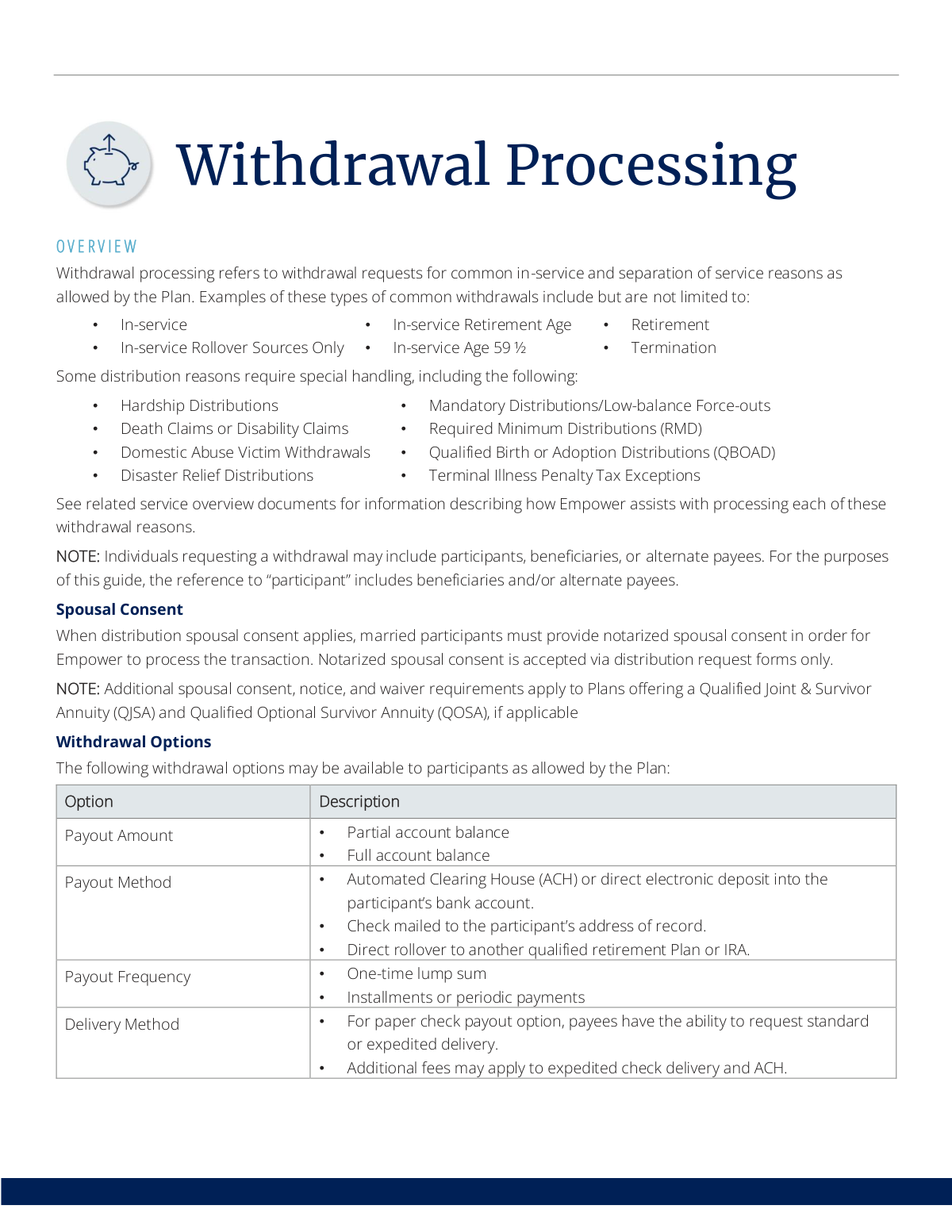
You can typically choose a partial or full payout as a lump sum or installments. Delivery methods include direct deposit (ACH), a mailed check, or a direct rollover to another qualified retirement plan or IRA.
If you are married and your plan requires it, you must provide notarized spousal consent for your withdrawal request to be processed. This consent must be submitted on the official distribution request form.
Yes, withdrawals are generally subject to a mandatory 20% federal tax withholding and may incur a 10% early withdrawal penalty. Empower automatically withholds applicable taxes, but you can submit a W-4 form to elect a different withholding amount.
Withdrawals for special reasons like hardship, disability, or death claims require special handling. You should refer to the specific service overview documents from Empower that describe the process for these unique situations.
Empower reviews your request to ensure it is complete and in 'good order.' Depending on your plan's rules, Empower may then process it directly or forward it to your Plan Administrator for final approval.
If your request is not in 'good order' due to missing or incorrect information, Empower will instruct you on how to provide the necessary corrections before your withdrawal can be processed.
Yes, you can choose a direct rollover to another qualified retirement plan or an IRA. This option can help you defer immediate taxes and avoid potential penalties associated with a cash distribution.
Additional fees may apply for certain services, such as requesting an expedited check delivery or for an ACH (direct deposit) transfer. Check your plan documents for specific fee information.
Yes, distributions to foreign persons are subject to different tax withholding rates. You will be required to submit a Form W-8BEN to certify your foreign status and ensure correct tax handling.
Yes, services like Instafill.ai use AI to accurately auto-fill form fields, which can save you time and help reduce errors on your withdrawal paperwork.
Simply upload your withdrawal form to the Instafill.ai platform. The AI will identify the fields and help you fill them out with your information, making the process faster and more convenient.
You can use a service like Instafill.ai, which can convert flat, non-fillable PDFs into interactive, fillable forms. This allows you to easily type your information directly onto the document before printing it for submission.
Compliance Empower Withdrawal Request
Validation Checks by Instafill.ai
1
Withdrawal Reason Completeness
Ensures that the participant has selected a valid reason for the withdrawal from the provided list (e.g., Termination, Retirement, In-service Age 59 ½). This field is mandatory as it determines eligibility, tax implications, and potential penalties. If no reason is selected, the form submission will be rejected with a message prompting the user to choose a withdrawal reason.
2
Payout Amount Specification
Validates that the participant has clearly specified the payout amount by selecting either 'Full account balance' or 'Partial account balance'. If 'Partial' is chosen, this check also ensures that a specific, valid positive dollar amount or percentage has been entered. A failure occurs if neither option is selected or if 'Partial' is chosen without a corresponding amount, preventing ambiguity in the withdrawal instruction.
3
Partial Withdrawal Amount Limit
Checks if the requested partial withdrawal amount is less than or equal to the participant's available vested account balance. This is a crucial logical check to prevent overdrafts and processing errors. If the requested amount exceeds the available balance, the transaction will be flagged for correction, and the user will be notified to enter a lower amount.
4
ACH Routing Number Format
Verifies that if the Automated Clearing House (ACH) payout method is selected, the provided bank routing number is exactly nine digits long and consists only of numbers. This check helps prevent transaction failures due to incorrect bank information. An invalid format will trigger an error message asking the user to re-enter a valid nine-digit routing number.
5
Direct Rollover Destination Details
Ensures that if the 'Direct rollover' payout method is selected, all required information for the receiving institution is provided. This includes the name of the new plan or IRA, the account number, and the financial institution's address. Missing information would make the rollover impossible to process, so the form will not be accepted until these fields are complete.
6
Spousal Consent Requirement for Married Participants
Checks the participant's marital status. If the participant indicates they are married and the plan requires spousal consent, this validation ensures the spousal consent section of the form is completed. This is a critical legal requirement to protect spousal rights under the retirement plan. If consent is required but not provided, the submission is considered 'not in good order' and will be rejected until the consent is obtained.
7
Notarization Presence for Spousal Consent
For paper form submissions where spousal consent is provided, this check flags the form for manual review to confirm that the spouse's signature has been properly notarized. While an automated system cannot verify the authenticity of a notary seal, it can ensure that the notary section is not blank. A missing notary signature or seal will cause the request to be rejected pending proper notarization.
8
Custom Tax Withholding Documentation (W-4)
Validates if the participant has elected to change the default mandatory tax withholding. If they elect a different federal or state withholding percentage, the system requires that a corresponding, completed tax form (e.g., W-4P for periodic payments or W-4R for non-periodic) is attached or submitted. Failure to provide the required form will result in the rejection of the custom withholding election and processing with the default rates.
9
Foreign Person Tax Documentation (W-8BEN)
This check is triggered if the participant certifies they are a non-US person for tax purposes. It validates that a completed Form W-8BEN has been attached to the withdrawal request. This form is necessary to apply the correct tax withholding rates for foreign persons. If the form is missing, the withdrawal cannot be processed and will be held until the required documentation is received.
10
Citizenship Status Certification
Ensures the participant has affirmatively certified their U.S. citizenship or resident alien status. This is a mandatory declaration for tax withholding and reporting purposes. The form submission will be blocked until the participant checks the appropriate box, confirming their status and acknowledging the tax implications.
11
Logical Consistency: Rollover vs. Tax Withholding
Performs a logical check to ensure that tax withholding fields are disabled or ignored when 'Direct rollover' is selected as the payout method. A direct rollover to another qualified plan or IRA is not a taxable event, so withholding is not applicable. This validation prevents user confusion and incorrect data entry by enforcing the correct workflow based on the payout method.
12
Plan-Specific Withdrawal Eligibility
Verifies that the withdrawal reason selected by the participant (e.g., 'In-service Rollover Sources Only') is actually a permissible option under their specific retirement plan's rules. This is a backend validation that cross-references the request against the plan's provisions stored in the recordkeeping system. If the withdrawal type is not allowed, the request is rejected with an explanation that it is not permitted by their plan.
13
Payout Method Dependent Fields
Validates that once a payout method is selected (ACH, Check, or Rollover), all fields that are dependent on that method are properly filled out. For 'Check', it verifies a valid mailing address is present; for 'ACH', it verifies bank account and routing numbers. This check ensures that a chosen payout method is actionable and has all the necessary data for successful execution.
14
Payout Frequency Selection
Ensures a payout frequency ('One-time lump sum' or 'Installments') has been selected. This choice dictates how the funds will be disbursed over time and affects tax withholding calculations. If no frequency is selected, the system cannot determine how to process the payment and will return an error prompting the user to make a selection.
Common Mistakes in Completing Empower Withdrawal Request
Many retirement plans legally require a spouse's notarized signature to authorize a withdrawal. Participants often overlook this step, fail to get the signature properly notarized, or assume a simple signature is sufficient. This critical error will cause the form to be rejected as 'not in good order,' leading to significant processing delays until a correctly completed and notarized form is resubmitted.
The form offers many specific withdrawal reasons, such as 'Retirement,' 'Termination,' or 'In-service Age 59 ½.' People may choose the wrong one due to a misunderstanding of their eligibility or the plan's rules. This can lead to the request being denied or processed under incorrect tax implications and penalties, so it's vital to carefully read the definitions and select the one that accurately reflects your situation.
When requesting an ACH direct deposit, it is very common to accidentally transpose digits in the bank routing or account number. This simple data entry error will cause the electronic transfer to fail, resulting in substantial delays in receiving funds while the transaction is corrected. To avoid this, double-check your account and routing numbers against a check; AI-powered form fillers like Instafill.ai can also help by validating number formats and saving correct information.
For a direct rollover to another IRA or qualified plan, the form requires complete details for the receiving financial institution, including its name, address, and your new account number. Participants frequently omit the account number or provide a general corporate address instead of the specific processing center. This incomplete information makes it impossible for Empower to transfer the funds, halting the rollover process until the correct details are provided.
If you opt to receive your funds via a paper check, it will be sent to the 'address of record' on file. People who have recently moved often forget to update their address before submitting the withdrawal request. This results in the check being mailed to the wrong location, leading to long delays, the risk of loss or theft, and the need to request a stop payment and reissue.
Specific tax situations require additional forms beyond the main withdrawal request. For instance, to change the standard tax withholding, a W-4R form is required, and non-U.S. residents must submit a W-8BEN form. People often check a box on the main form but forget to attach the separate, required IRS form, causing the request to be considered incomplete and pausing the process.
When requesting a partial withdrawal, participants must specify a clear, exact dollar amount or percentage. Vague requests like 'half of my account' or leaving the amount blank are common mistakes that make the form 'not in good order.' This ambiguity forces the processor to contact the participant for clarification, delaying the entire transaction.
In a rush to complete the process, people frequently miss required fields, checkboxes, or, most critically, the signature and date. An unsigned form is legally invalid and will be immediately rejected, forcing the process to start over. If the form is a non-fillable PDF, tools like Instafill.ai can convert it into an interactive version that highlights required fields to prevent such omissions.
By default, most withdrawals are subject to a mandatory 20% federal tax withholding, and potentially a 10% early withdrawal penalty. Many people are unaware of this and are surprised when the net amount they receive is much lower than the gross amount requested. To avoid surprises, understand the tax implications and actively elect your desired withholding by submitting the appropriate W-4 form if you wish to change it from the default.
Depending on the plan's rules, a withdrawal request may need to be reviewed and approved by the Plan Administrator before it can be processed. Participants sometimes send their form directly to Empower, bypassing this crucial approval step. This causes the request to be rerouted back to the administrator, significantly delaying the withdrawal timeline.
Saved over 80 hours a year
“I was never sure if my IRS forms like W-9 were filled correctly. Now, I can complete the forms accurately without any external help.”
Kevin Martin Green
Your data stays secure with advanced protection from Instafill and our subprocessors




Robust compliance program
Transparent business model
You’re not the product. You always know where your data is and what it is processed for.
ISO 27001, HIPAA, and GDPR
Our subprocesses adhere to multiple compliance standards, including but not limited to ISO 27001, HIPAA, and GDPR.
Security & privacy by design
We consider security and privacy from the initial design phase of any new service or functionality. It’s not an afterthought, it’s built-in, including support for two-factor authentication (2FA) to further protect your account.
Fill out Empower Withdrawal Request with Instafill.ai
Worried about filling PDFs wrong? Instafill securely fills empower-retirement-plan-withdrawal-request-form forms, ensuring each field is accurate.
