Yes! You can use AI to fill out NextGen 529 Client Direct Series Withdrawal Request Form
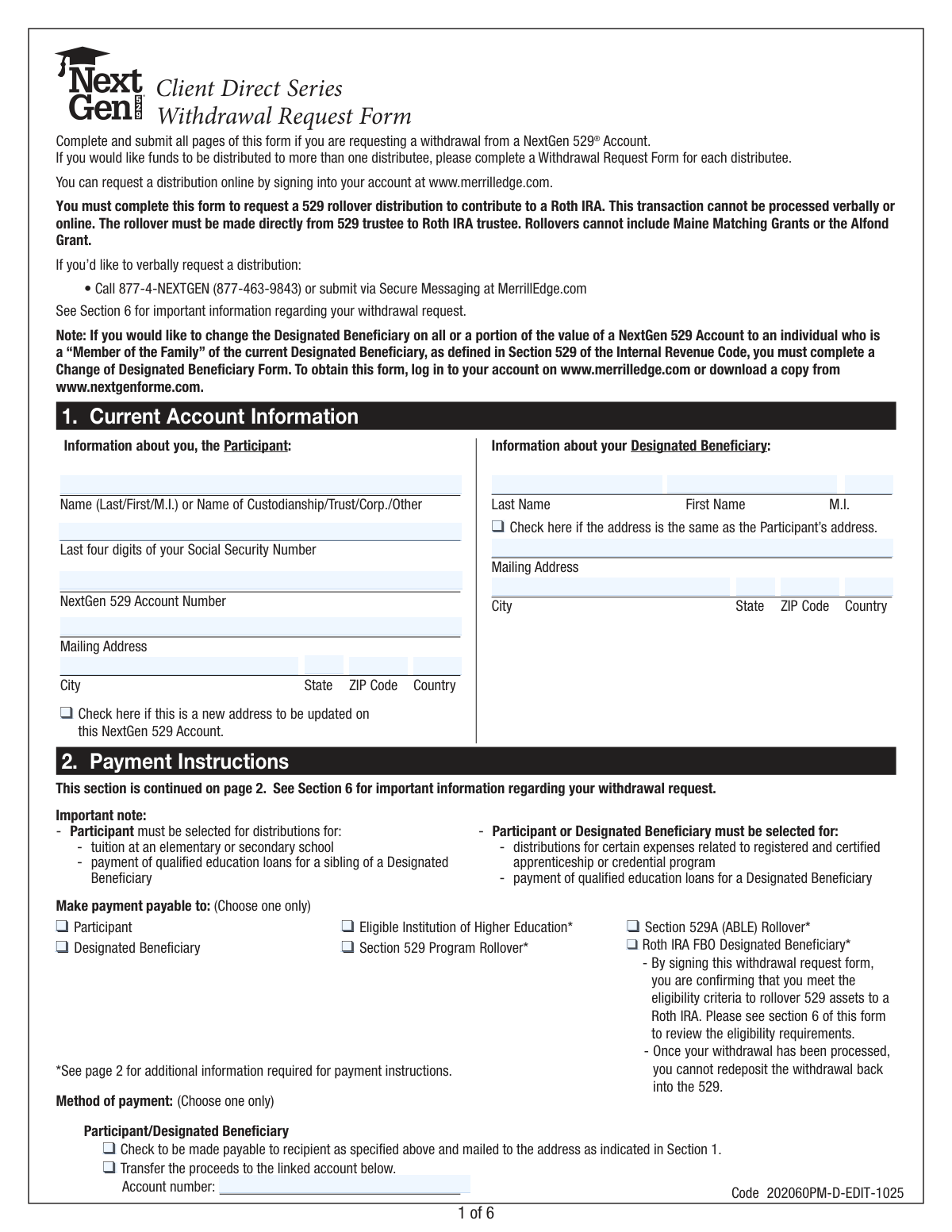
This form is used by participants in the NextGen 529 Client Direct Series program to request a withdrawal of funds from their college savings account. It allows account holders to specify the amount, recipient, and reason for the distribution, such as paying for qualified higher education expenses, rolling over to another 529 plan or a Roth IRA, or taking a non-qualified withdrawal. Today, this form can be filled out quickly and accurately using AI-powered services like Instafill.ai, which can also convert non-fillable PDF versions into interactive fillable forms.
Our AI automatically handles information lookup, data retrieval, formatting, and form filling.
It takes less than a minute to fill out NextGen 529 Withdrawal Request Form using our AI form filling.
Securely upload your data. Information is encrypted in transit and deleted immediately after the form is filled out.
Form specifications
| Form name: | NextGen 529 Client Direct Series Withdrawal Request Form |
| Number of pages: | 1 |
| Language: | English |
| Categories: | withdrawal forms |
Instafill Demo: How to fill out PDF forms in seconds with AI
How to Fill Out NextGen 529 Withdrawal Request Form Online for Free in 2026
Are you looking to fill out a NEXTGEN 529 WITHDRAWAL REQUEST FORM form online quickly and accurately? Instafill.ai offers the #1 AI-powered PDF filling software of 2026, allowing you to complete your NEXTGEN 529 WITHDRAWAL REQUEST FORM form in just 37 seconds or less.
Follow these steps to fill out your NEXTGEN 529 WITHDRAWAL REQUEST FORM form online using Instafill.ai:
- 1 Navigate to Instafill.ai and upload or select the NextGen 529 Withdrawal Request Form.
- 2 Use the AI assistant to accurately fill in your current account information, including details for the Participant and the Designated Beneficiary.
- 3 Select the payment instructions, specifying who will receive the funds (e.g., participant, educational institution, Roth IRA) and the method of payment (e.g., check, wire transfer).
- 4 Indicate the source and amount of the withdrawal, choosing between a full or partial withdrawal and specifying the portfolios to liquidate.
- 5 If applicable, complete Section 4 to certify the withdrawal of Maine Matching Grants or the Alfond Grant for qualified expenses.
- 6 Review all the information populated by the AI for accuracy, then provide your digital signature and the date to certify the request.
- 7 Download the completed form to mail to the appropriate Merrill Document Processing address as listed on the form.
Our AI-powered system ensures each field is filled out correctly, reducing errors and saving you time.
Why Choose Instafill.ai for Your Fillable NextGen 529 Withdrawal Request Form Form?
Speed
Complete your NextGen 529 Withdrawal Request Form in as little as 37 seconds.
Up-to-Date
Always use the latest 2026 NextGen 529 Withdrawal Request Form form version.
Cost-effective
No need to hire expensive lawyers.
Accuracy
Our AI performs 10 compliance checks to ensure your form is error-free.
Security
Your personal information is protected with bank-level encryption.
Frequently Asked Questions About Form NextGen 529 Withdrawal Request Form
This form is used to request a withdrawal from a NextGen 529 Client Direct Series Account for qualified education expenses, rollovers, or other distributions.
Yes, most distributions can be requested online at www.merrilledge.com, but you must use this form to request a 529 rollover to a Roth IRA.
The Account Participant (the account owner) must complete and sign the form to authorize any withdrawal from the NextGen 529 account.
You should allow approximately two weeks for mailing and processing. Once received, the request itself may take up to five business days to process.
You must meet several eligibility criteria, such as the 529 account being open for at least 15 years. You will need to provide the Roth IRA custodian's name and address, and the transaction must be made directly between trustees.
Yes, you can withdraw up to $10,000 per year per beneficiary for tuition at an elementary or secondary school. For this type of withdrawal, the payment must be made to you, the Participant.
No, you do not need to submit receipts with the form. However, you must retain all receipts and supporting documentation for your tax records in case of an audit.
Maine Matching Grants can only be used for qualified higher education expenses and must be paid directly to an eligible institution. These grants are forfeited if you close the account or roll it over to another state's 529 plan.
In Section 3, you must indicate the exact dollar amount to be withdrawn from each specific portfolio held in your account. List the amount next to the corresponding portfolio name.
Yes, you can withdraw a lifetime maximum of $10,000 to pay for qualified education loans for the designated beneficiary or their sibling. This payment can be made to either the Participant or the Designated Beneficiary.
You can choose to receive a check, have funds transferred to a linked bank account, or request a wire transfer for a $30 fee. Payments can also be sent directly to an eligible educational institution.
Yes, services like Instafill.ai use AI to accurately auto-fill form fields with your information, which can save you time and help prevent errors.
Simply upload the NextGen 529 Withdrawal Request Form to the Instafill.ai platform. The AI will make the form fillable, and you can provide your information to have it filled in automatically before you download, print, and sign.
If you have a non-fillable PDF, you can use a service like Instafill.ai. It can convert flat, non-interactive PDFs into fillable forms, allowing you to easily type your information directly into the fields.
Compliance NextGen 529 Withdrawal Request Form
Validation Checks by Instafill.ai
1
Account and Participant Verification
This check verifies that the combination of the NextGen 529 Account Number, Participant's Name, and the last four digits of the Social Security Number match an existing account in the system. This is a critical security and accuracy measure to prevent unauthorized access or processing withdrawals against the wrong account. If the information does not match, the form submission is rejected to protect the account holder's assets.
2
Exclusive Payee Selection
In Section 2, the form requires the user to select exactly one payee from the list of options (e.g., Participant, Designated Beneficiary, Eligible Institution). This validation ensures that one and only one checkbox is selected. Ambiguous instructions could lead to payment errors, delays, or incorrect tax consequences, so enforcing a single choice is essential for clear processing.
3
Conditional Requirement for Institution Details
If 'Eligible Institution of Higher Education' is selected as the payee in Section 2, this validation ensures that all related fields (Name of Institution, Mailing Address, Student's Name, and Student ID/SSN) are completely filled out. This information is mandatory for processing a direct payment to a school. Failure to provide these details will halt the withdrawal process until the required information is supplied.
4
Prohibits Wire Transfer for Rollovers
The form explicitly states that a wire transfer cannot be used for a rollover contribution. This check enforces that business rule by preventing a user from selecting 'Wire Transfer' as the payment method if any of the rollover options ('Section 529 Program Rollover', 'Section 529A (ABLE) Rollover', or 'Roth IRA') are chosen as the payee. This prevents invalid transaction combinations that would be rejected by the processing system.
5
Full vs. Partial Withdrawal Logic
This validation ensures the user selects either 'Full Withdrawal' or 'Partial Withdrawal' in Section 3, but not both. If 'Partial Withdrawal' is chosen, it further validates that a withdrawal amount is specified for at least one portfolio. This prevents ambiguous or incomplete withdrawal instructions, ensuring the system knows exactly how much money to liquidate and from which funds.
6
Partial Withdrawal Amount Summation
When a 'Partial Withdrawal' is requested, this check calculates the sum of all individual portfolio withdrawal amounts listed and verifies that it matches the value entered in the 'Partial Withdrawal Total' field. This serves as a cross-check to catch data entry errors and ensures the user's intended total withdrawal amount is accurate. A mismatch would cause the form to be flagged for manual review or rejected.
7
Sufficient Funds Validation
This check confirms that the requested withdrawal amount (whether full or partial) does not exceed the available balance within the specified portfolios or the total account value. This is a fundamental control to prevent overdrafts and ensure the transaction is financially viable. If funds are insufficient, the request will be rejected, and the participant will be notified.
8
Maine Grant Payee Restriction
According to the form's rules, withdrawals of Maine Matching Grants or the Alfond Grant can only be paid to an 'Eligible Institution of Higher Education'. This validation enforces that rule by checking that if a grant withdrawal is specified in Section 4, the payee selected in Section 2 must be the institution. This ensures compliance with the grant program's terms and prevents improper distribution of state-sponsored funds.
9
Prohibits Maine Grant Rollover to Roth IRA
The form states that Maine Matching Grants and the Alfond Grant cannot be rolled over to a Roth IRA. This logical check prevents a submission where a user requests a grant withdrawal in Section 4 and also selects 'Rollover to a Roth IRA' in Section 2. This is a critical compliance check to prevent an illegal transaction that would have negative financial and tax consequences.
10
Signature and Date Presence
This validation confirms that the form has been signed by the Participant and that a valid date has been entered in Section 5. The signature legally authorizes the withdrawal, and the date establishes a record of when the authorization was given. A missing signature or date renders the request invalid and legally non-binding, so the form would be rejected until properly completed.
11
ABA Routing Number Format
If 'Wire Transfer' is selected as the payment method, this check validates that the 'ABA/Routing Number' field contains a valid 9-digit number. An incorrect or improperly formatted routing number is a common cause of failed electronic fund transfers. This validation helps ensure the money is sent to the correct financial institution, preventing payment delays and potential loss of funds.
12
Conditional Requirement for Wire Transfer Details
When 'Wire Transfer' is selected in Section 2, this validation ensures that all required banking details, including the Financial Institution Account Number, Name on Account, and ABA/Routing Number, are provided. Without this complete information, a wire transfer cannot be initiated. This check prevents incomplete requests from entering the processing queue, reducing manual follow-up and delays.
Common Mistakes in Completing NextGen 529 Withdrawal Request Form
Users often provide an incomplete NextGen 529 Account Number or enter the last four digits of their Social Security Number incorrectly. This typically happens when filling out the form from memory instead of referencing an account statement. A mismatch in this core data will cause the entire request to be rejected for security reasons, leading to significant processing delays. Always double-check these numbers against an official document before submitting.
The form has strict rules about who can receive the funds for certain withdrawal types. For example, K-12 tuition withdrawals must be paid to the 'Participant,' while withdrawals of Maine Matching Grants must go to the 'Eligible Institution.' Selecting the wrong recipient can lead to processing rejection or create unintended tax consequences. Carefully read the notes in Section 2 to ensure your selection aligns with the purpose of your withdrawal.
When directing a payment to a school, rollover account, or via wire, specific details are required, such as a Student ID number, the receiving institution's full address, or an ABA routing number. People often leave these fields blank, assuming the administrator will look them up. This is incorrect; an incomplete form will be returned, delaying the payment. Gather all necessary third-party information before you begin filling out the form.
When requesting a wire transfer, a $30 fee applies. The form instructs users to add this fee to their total withdrawal request in Section 3. Many people forget this step and request only the net amount they need, resulting in receiving $30 less than intended. To avoid this, if you need $5,000 and choose a wire, you must request a partial withdrawal of $5,030.
A user wanting to empty their account might mistakenly check 'Partial Withdrawal' and list all their funds, potentially leaving a tiny balance and keeping the account open. Conversely, someone taking a large sum might accidentally check 'Full Withdrawal,' unintentionally closing their account. This mistake happens due to a misunderstanding of the options' finality. Decide definitively whether you are closing the account permanently or just taking funds out before making a selection in Section 3.
The form explicitly states that Maine Matching Grants and the Alfond Grant cannot be included in a rollover to another 529 plan or a Roth IRA. Users who are not aware of this restriction may request a full account rollover, which includes these grants. This will cause the rollover request to be rejected or processed incorrectly, and could lead to the forfeiture of the grant money. Always review the specific rules for any grant funds in your account before initiating a rollover.
The option to roll over 529 funds to a Roth IRA is new and has strict requirements, detailed in Section 6. Common mistakes include attempting a rollover before the 529 account has been open for 15 years or not realizing there is a $35,000 lifetime limit per beneficiary. Initiating an ineligible rollover will result in a rejected transaction. Participants must verify they meet all criteria, including account age and contribution timing, before completing this section of the form.
Submitting an unsigned or undated form is one of the most common and easily avoidable errors. In the rush to complete and mail the multi-page document, the signature line in Section 5 is often overlooked. An unsigned form is legally invalid and will be immediately returned without being processed, causing a delay of weeks. Always perform a final review of the entire document, with a specific focus on the signature and date fields, before mailing.
The form's instructions on page 1 clearly state that a 529 rollover to a Roth IRA cannot be processed online or verbally and must be requested using this specific paper form. Many users, accustomed to online transactions, may waste time trying to find this option on the website or calling customer service. This mistake stems from not reading the introductory instructions carefully. To avoid delays, use the physical form for any Roth IRA rollover request as required.
When a participant moves, they may correctly write their new address in the 'Mailing Address' fields in Section 1 but forget to check the small box that says 'Check here if this is a new address'. This oversight means the withdrawal check may be sent to the new address for this one transaction, but the official account address is not permanently updated. This can cause future correspondence, including tax forms, to be sent to the old, incorrect address. AI-powered form-fillers like Instafill.ai can help by prompting users to confirm if an address change is intended.
Saved over 80 hours a year
“I was never sure if my IRS forms like W-9 were filled correctly. Now, I can complete the forms accurately without any external help.”
Kevin Martin Green
Your data stays secure with advanced protection from Instafill and our subprocessors

Robust compliance program
Transparent business model
You’re not the product. You always know where your data is and what it is processed for.
ISO 27001, HIPAA, and GDPR
Our subprocesses adhere to multiple compliance standards, including but not limited to ISO 27001, HIPAA, and GDPR.
Security & privacy by design
We consider security and privacy from the initial design phase of any new service or functionality. It’s not an afterthought, it’s built-in, including support for two-factor authentication (2FA) to further protect your account.
Fill out NextGen 529 Withdrawal Request Form with Instafill.ai
Worried about filling PDFs wrong? Instafill securely fills nextgen-529-client-direct-series-withdrawal-request-form forms, ensuring each field is accurate.