Yes! You can use AI to fill out 403(b) Distribution Form - Davis Funds

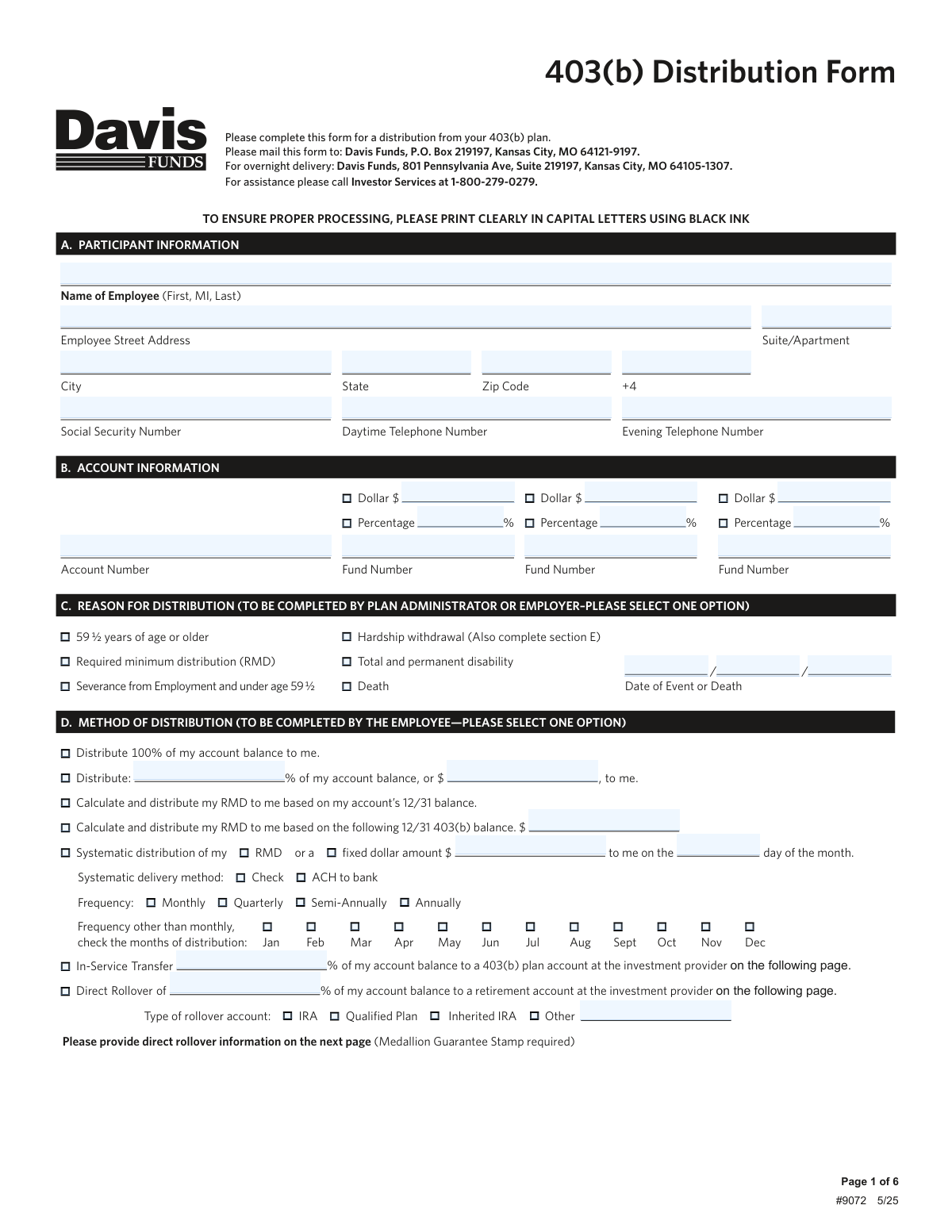
The Davis Funds 403(b) Distribution Form is a legal document used by a plan participant to request a withdrawal of funds from their 403(b) retirement account. It is essential for accessing retirement savings, processing rollovers to other accounts, or taking distributions due to specific events like reaching age 59 ½, severance from employment, disability, or financial hardship. Today, this form can be filled out quickly and accurately using AI-powered services like Instafill.ai, which can also convert non-fillable PDF versions into interactive fillable forms.
Our AI automatically handles information lookup, data retrieval, formatting, and form filling.
It takes less than a minute to fill out Davis Funds Form #9072 using our AI form filling.
Securely upload your data. Information is encrypted in transit and deleted immediately after the form is filled out.

Form specifications

Form name: 403(b) Distribution Form - Davis Funds
Number of pages: 1
Language: English
Categories: distribution forms
main-image

Instafill Demo: How to fill out PDF forms in seconds with AI

How to Fill Out Davis Funds Form #9072 Online for Free in 2026

Are you looking to fill out a DAVIS FUNDS FORM #9072 form online quickly and accurately? Instafill.ai offers the #1 AI-powered PDF filling software of 2026, allowing you to complete your DAVIS FUNDS FORM #9072 form in just 37 seconds or less.
Follow these steps to fill out your DAVIS FUNDS FORM #9072 form online using Instafill.ai:
  1. 1 Navigate to Instafill.ai and upload or select the Davis Funds 403(b) Distribution Form.
  2. 2 Use the AI assistant to accurately fill in your personal details in Section A (Participant Information) and Section B (Account Information).
  3. 3 Work with your Plan Administrator or Employer to complete Section C, indicating the reason for the distribution (e.g., age 59 ½, RMD, hardship).
  4. 4 Complete Section D (Method of Distribution) to specify how you want to receive your funds, such as a full or partial payout, a direct rollover, or a systematic withdrawal.
  5. 5 Provide your delivery instructions in Section F and banking details in Section G if requesting an ACH or wire transfer.
  6. 6 Make your federal and state tax withholding elections in Section H, using the provided W-4R information as a guide.
  7. 7 Review all entered information for accuracy, then sign and date the form in Section I. Obtain a Medallion Signature Guarantee if required for your transaction type, and have your Plan Administrator complete Section J before mailing the form.

Our AI-powered system ensures each field is filled out correctly, reducing errors and saving you time.

Why Choose Instafill.ai for Your Fillable Davis Funds Form #9072 Form?

Speed

Complete your Davis Funds Form #9072 in as little as 37 seconds.

Up-to-Date

Always use the latest 2026 Davis Funds Form #9072 form version.

Cost-effective

No need to hire expensive lawyers.

Accuracy

Our AI performs 10 compliance checks to ensure your form is error-free.

Security

Your personal information is protected with bank-level encryption.

Frequently Asked Questions About Form Davis Funds Form #9072

This form is used to request a distribution from your 403(b) retirement plan account with Davis Funds. You can use it for cash withdrawals, required minimum distributions (RMDs), direct rollovers to another retirement account, or hardship withdrawals.

The employee (plan participant) must complete most of the form, but your Plan Administrator or Employer must complete Section C and sign Section J. Both signatures are required to process the request.

You will need your personal details including your Social Security Number, your Davis Funds account number, and details for any rollover account. If requesting an electronic payment for the first time, you will also need your banking information and a voided check.

You can mail the form to Davis Funds, P.O. Box 219197, Kansas City, MO 64121-9197. For overnight delivery, use the address: Davis Funds, 801 Pennsylvania Ave, Suite 219197, Kansas City, MO 64105-1307.

A Medallion Signature Guarantee is a special signature certification from a financial institution that guarantees your identity. It is required for distributions over $100,000, direct rollovers, changing banking instructions, or sending funds to an address not on record.

To request a hardship withdrawal, your employer must select that reason in Section C, and you must complete Section E. You will need to certify the reason for your financial need and that you have no other resources available.

The default federal tax withholding is 20% for eligible rollover distributions and 10% for other payments like RMDs or hardship withdrawals. You can elect a different withholding percentage in Section H, but you cannot choose less than 20% for a rollover.

A direct rollover moves money to another retirement account and is generally not a taxable event. A cash distribution is paid directly to you, is considered taxable income, and is subject to mandatory tax withholding.

Your Plan Administrator or Employer must sign Section J to certify that you are eligible for the distribution you are requesting and that you are 100% vested. Your request cannot be processed without this authorization.

In Section D, you can choose to have Davis Funds calculate and distribute your RMD based on your account's prior year-end balance. You can also set up systematic distributions to satisfy your RMD on a recurring basis.

Section F provides several delivery options, including a check mailed to your address, an ACH direct deposit to your bank, or a wire transfer. Note that wire transfers incur a $5.00 fee and are only available for one-time distributions.

For assistance with the form, you can contact Davis Funds Investor Services directly at 1-800-279-0279. They can help clarify requirements and guide you through the process.

Yes, services like Instafill.ai use AI to accurately auto-fill form fields with your information, which can save you time and help prevent errors. This is especially useful for forms that require entering the same data in multiple places.

Simply upload the 403(b) Distribution Form PDF to the Instafill.ai platform. The AI will identify the fields, allowing you to provide your information once to have it automatically and accurately populated throughout the document.

If you have a non-fillable or 'flat' PDF, you can upload it to a service like Instafill.ai. The platform can convert it into an interactive, fillable form, allowing you to easily type your information into the correct fields online.

Compliance Davis Funds Form #9072
Validation Checks by Instafill.ai

1
Social Security Number Validation
This check ensures the Social Security Number field in Section A is not empty and conforms to the standard 9-digit format (XXXXXXXXX or XXX-XX-XXXX). The SSN is critical for tax reporting purposes (Form 1099-R) and for uniquely identifying the participant's account. A missing or malformed SSN will result in immediate rejection of the form, as processing cannot proceed without correct taxpayer identification.
2
Exclusive Distribution Method Selection
Validates that the employee has selected only one primary distribution method in Section D. The form presents several mutually exclusive choices, such as a 100% distribution, a partial distribution, an RMD calculation, a systematic distribution, or a rollover. If more than one of these primary options is checked, the request is ambiguous and cannot be processed, leading to rejection of the form for clarification.
3
Hardship Withdrawal Section Dependency
This check confirms that if 'Hardship withdrawal' is selected as the reason for distribution in Section C, then Section E ('Hardship Withdrawal Distribution') is also completed. Section E requires specifying a dollar amount and selecting a specific reason for the hardship. This is essential for IRS compliance, as hardship withdrawals are subject to strict regulations and require explicit justification to be approved.
4
Medallion Signature Guarantee Requirement
Verifies the presence of a valid Medallion Signature Guarantee stamp in Section I if any of the triggering conditions listed on the form are met. These conditions include distributions over $100,000, direct rollovers, adding new banking instructions, or mailing a check to an address other than the address of record. This guarantee is a crucial anti-fraud measure, and its absence when required will cause the entire transaction to be rejected.
5
Federal Withholding Rate Consistency
This validation checks the federal withholding rate entered in Section H against the rules for the distribution type. For an 'eligible rollover distribution,' the rate must be 20% or greater, whereas for non-eligible distributions like RMDs or hardships, the rate can be between 0% and 100%. Enforcing this logic ensures compliance with IRS mandatory withholding rules and prevents potential tax penalties for the participant.
6
Plan Administrator Authorization Completeness
Confirms that Section J, the Plan Administrator's or Employer's Authorization, is fully completed with a printed name, signature, title, and date. This authorization is a mandatory step that certifies the employee's eligibility for the requested distribution and their vesting status. A form submitted without this complete authorization is considered unapproved and cannot be processed.
7
Rollover Information Completeness
Ensures that if 'In-Service Transfer' or 'Direct Rollover' is selected in Section D, the receiving institution's details are fully provided on the form. This includes the investment provider's name, account number, and address. Without this complete information, it is impossible to execute the fund transfer correctly, and the form will be returned for completion.
8
Systematic Distribution Parameter Completeness
Validates that if 'Systematic distribution' is selected in Section D, all required sub-options are also filled out. This includes specifying the basis (RMD or a fixed dollar amount), the delivery method (Check or ACH), and the frequency (e.g., Monthly, Quarterly). If any of these parameters are missing, the payment schedule is undefined and the request cannot be set up.
9
Date of Event Requirement
Verifies that the 'Date of Event or Death' field in Section C is filled with a valid date if the reason for distribution is 'Severance from Employment,' 'Total and permanent disability,' or 'Death.' This date is critical for determining eligibility, applying correct tax rules, and establishing a legal record of the qualifying event. A missing date for these specific reasons will halt processing until the information is provided.
10
Partial Distribution Amount Exclusivity
This check validates that for the partial distribution option in Section D ('Distribute: % of my account balance, or $'), the participant has filled in either the percentage field or the dollar amount field, but not both. Providing both values creates a conflicting instruction. The form must be rejected to force the participant to clarify the exact amount they wish to withdraw.
11
New Banking Instructions Validation
Checks that if 'ACH transfer' or 'Wire' is selected in Section F and no banking information is on file, then Section G is fully completed with all bank details. It also cross-references that a Medallion Signature Guarantee is provided in Section I, as required for establishing new banking instructions. This dual check is vital to prevent misdirection of funds and protect against fraudulent activity.
12
State Withholding Election Validity
Verifies that if a participant elects a specific state tax withholding rate in Section H, their state of residence (from Section A) is one of the states for which Davis Funds offers this service. It also enforces state-specific rules, such as mandatory withholding on eligible rollover distributions for residents of certain states (e.g., Maryland, Kansas). This prevents processing errors and ensures compliance with diverse state tax laws.
13
RMD Calculation Basis Specificity
Ensures that if a participant selects an RMD distribution method in Section D, they have clearly specified the basis for the calculation. The form offers two options: calculation based on the account's 12/31 balance on record, or calculation based on a specific 12/31 balance provided by the user. If the second option is chosen, a dollar amount must be entered in the corresponding field, otherwise the RMD cannot be accurately calculated.
14
Third-Party Payee Address Completeness
Validates that if the delivery instruction 'Mail the check to a 3rd party' is selected in Section F, the payee's name and full address details are provided in the designated fields. This check is crucial to ensure the payment is sent to the correct recipient and location. A missing or incomplete address would make delivery impossible and require the form to be rejected.

Common Mistakes in Completing Davis Funds Form #9072

Missing Plan Administrator Authorization

Participants often submit the form after only completing their own sections, forgetting that Section J requires a signature from their Plan Administrator or Employer. This signature is mandatory as it certifies the participant's eligibility for the requested distribution. Without this authorization, the form is considered incomplete and will be immediately rejected, causing significant processing delays until a properly signed form is resubmitted.

Forgetting the Medallion Signature Guarantee

Many users overlook the requirement for a Medallion Signature Guarantee, which is a special stamp that verifies the authenticity of a signature. It is required for high-value distributions (over $100,000), rollovers, or when changing payment instructions. Failing to obtain this guarantee from a bank or financial institution will result in the rejection of the request, forcing the participant to restart the process and causing major delays.

Conflicting Distribution Instructions

In Section D, individuals sometimes select multiple, contradictory options, such as checking both 'Distribute 100% of my account balance' and also filling in a partial dollar or percentage amount. This ambiguity makes it impossible for the processor to know the user's true intent. As a result, the form will be returned for clarification, delaying access to the funds.

Incorrect Tax Withholding Election

Section H is complex and often misunderstood, leading to incorrect withholding elections. A common error is attempting to elect a withholding rate below the mandatory 20% for an eligible rollover distribution, or not specifying a rate and being defaulted into 10% or 20% withholding unexpectedly. These mistakes can lead to a significant and unforeseen tax liability at the end of the year or a smaller-than-expected net distribution amount.

Ignoring State-Specific Tax Rules

The form details different tax withholding rules for various states, which are easy to miss. A participant might check 'Do NOT withhold state taxes' while residing in a state like California or North Carolina where withholding is mandatory for certain distributions. In these cases, the financial institution is legally required to override the participant's election, resulting in a smaller payment than anticipated.

Incomplete Rollover or Transfer Information

When selecting a 'Direct Rollover' or 'In-Service Transfer' in Section D, it is common for people to neglect filling out the required details of the receiving institution on the subsequent page. Missing information such as the new investment provider's name, address, or account number makes it impossible to execute the transfer. This results in the request being put on hold until the complete information is provided.

Invalid Banking Information for Electronic Payments

For distributions via ACH or wire, users may enter an incorrect bank routing or account number in Section G, or fail to attach a voided check as required. The form explicitly states that deposit slips or starter checks are not acceptable. Such errors will cause the electronic transfer to fail, requiring the funds to be reissued, which significantly delays the receipt of money.

Illegible or Incorrectly Formatted Entries

The form explicitly instructs users to 'PRINT CLEARLY IN CAPITAL LETTERS USING BLACK INK,' but many people use cursive, lowercase letters, or blue ink. This can lead to automated scanning errors or manual data entry mistakes by the processing agent, potentially sending funds to the wrong account or address. Since this is a non-fillable PDF, tools like Instafill.ai can convert it into a fillable version, ensuring all entries are typed, legible, and correctly formatted to prevent such errors.

Misunderstanding Hardship Withdrawal Rules

In Section E, applicants may not fully grasp the strict IRS definition of a financial hardship or the requirement to certify that all other financial resources have been exhausted. Furthermore, many are unaware that taking a hardship distribution mandates a six-month suspension of their salary deferral contributions. Misunderstanding these rules can lead to a denied application or unintended future financial consequences.

Participant Completing Administrator-Only Section

A frequent mistake is the participant filling out Section C, 'Reason for Distribution,' which is clearly marked 'TO BE COMPLETED BY PLAN ADMINISTRATOR OR EMPLOYER'. The employer must be the one to certify the reason for the distribution (e.g., severance, age 59 ½). When a participant fills this out themselves, the form is considered improperly authorized and will be returned, halting the entire process.
Saved over 80 hours a year

“I was never sure if my IRS forms like W-9 were filled correctly. Now, I can complete the forms accurately without any external help.”

Kevin Martin Green

Your data stays secure with advanced protection from Instafill and our subprocessors

Robust compliance program

Transparent business model

You’re not the product. You always know where your data is and what it is processed for.

ISO 27001, HIPAA, and GDPR

Our subprocesses adhere to multiple compliance standards, including but not limited to ISO 27001, HIPAA, and GDPR.

Security & privacy by design

We consider security and privacy from the initial design phase of any new service or functionality. It’s not an afterthought, it’s built-in, including support for two-factor authentication (2FA) to further protect your account.

Fill out Davis Funds Form #9072 with Instafill.ai

Worried about filling PDFs wrong? Instafill securely fills 403b-distribution-form-davis-funds forms, ensuring each field is accurate.