Yes! You can use AI to fill out Separation from Employment Withdrawal Form for East Bay Regional Park District 457(b) Deferred Compensation Plan
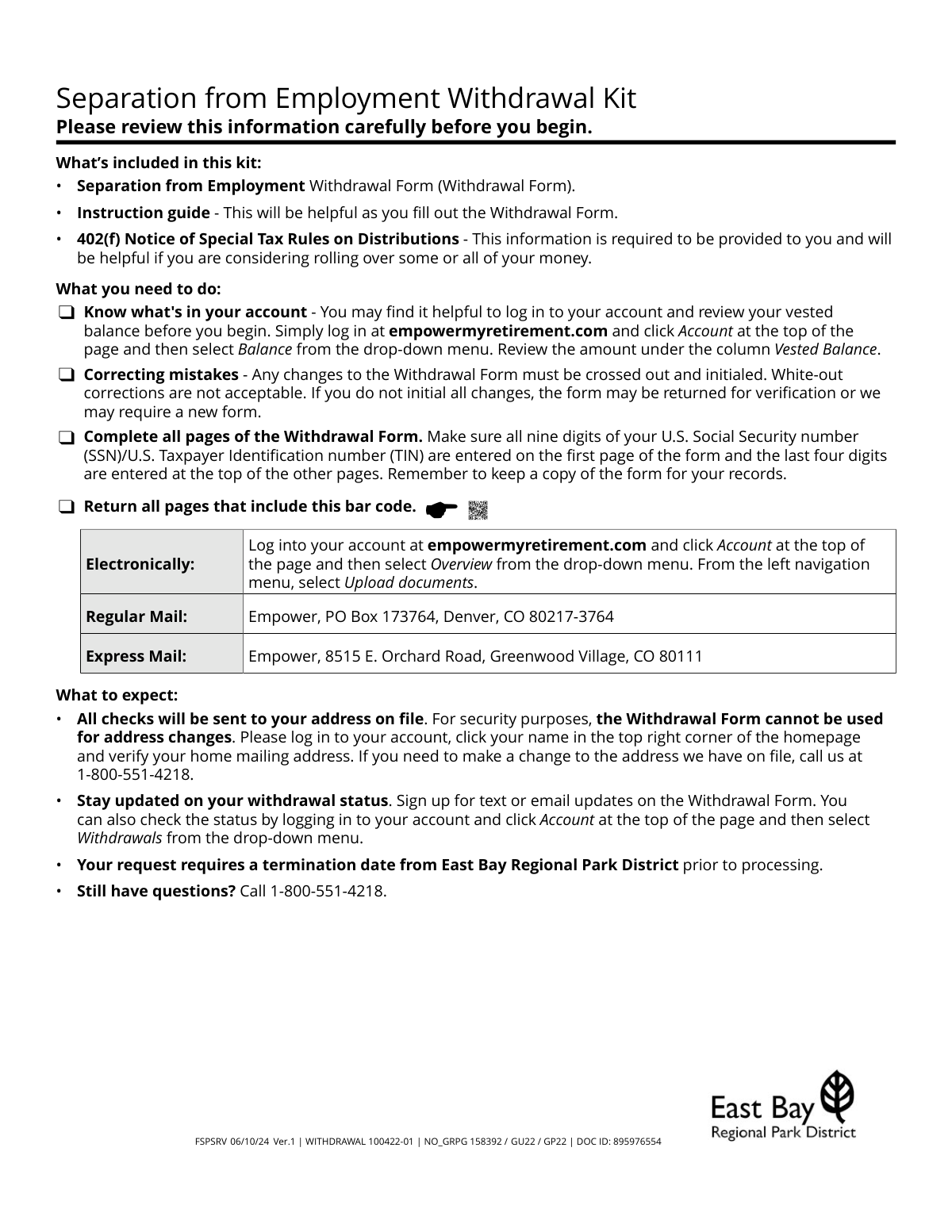
The Separation from Employment Withdrawal Form allows former employees of the East Bay Regional Park District to access funds from their 457(b) Deferred Compensation Plan. It is used to request a full or partial withdrawal, either as a direct payment or as a rollover to an IRA or another eligible retirement plan. This form is crucial for managing retirement savings after leaving employment. Today, this form can be filled out quickly and accurately using AI-powered services like Instafill.ai, which can also convert non-fillable PDF versions into interactive fillable forms.
WITHDRAWAL 100422-01 is part of the
employment forms, withdrawal forms, deferred compensation forms, 457 plan forms and East Bay forms categories on Instafill.
Rather not fill this in by hand? Instafill is an online form filler that completes PDF forms automatically — upload the blank form, answer a few questions, and the AI fills every field.
Form specifications
| Form name: | Separation from Employment Withdrawal Form for East Bay Regional Park District 457(b) Deferred Compensation Plan |
| Number of pages: | 1 |
| Language: | English |
Our AI automatically handles information lookup, data retrieval, formatting, and form filling.
It takes less than a minute to fill out WITHDRAWAL 100422-01 using our AI form filling.
Securely upload your data. Information is encrypted in transit and deleted immediately after the form is filled out.
Instafill Demo: How to fill out PDF forms in seconds with AI
How to Fill Out WITHDRAWAL 100422-01 Online for Free in 2026
Are you looking to fill out a WITHDRAWAL 100422-01 form online quickly and accurately? Instafill.ai offers the #1 AI-powered PDF filling software of 2026, allowing you to complete your WITHDRAWAL 100422-01 form in just 37 seconds or less.
Follow these steps to fill out your WITHDRAWAL 100422-01 form online using Instafill.ai:
- 1 Navigate to Instafill.ai and upload or select the Separation from Employment Withdrawal Form.
- 2 Provide your personal details in Step 1, including your full name, Social Security number, date of birth, and citizenship status.
- 3 In Step 2, specify your reason for withdrawal (e.g., retirement, separation from employment) and provide information about any outstanding loans or brokerage accounts.
- 4 Complete Step 3 by providing detailed instructions for your pretax, after-tax, and Roth money, indicating amounts for direct payment and/or rollover to new accounts.
- 5 Indicate your federal and state tax withholding preferences in Step 4, referencing the provided tax tables if needed.
- 6 Select your preferred delivery options for payments and rollover checks in Step 5, noting any associated fees.
- 7 Carefully review the entire form, provide your handwritten signature and the date in Step 6, and submit all required pages as instructed.
Our AI-powered system ensures each field is filled out correctly, reducing errors and saving you time.
Why Choose Instafill.ai for Your Fillable WITHDRAWAL 100422-01 Form?
Speed
Complete your WITHDRAWAL 100422-01 in as little as 37 seconds.
Up-to-Date
Always use the latest 2026 WITHDRAWAL 100422-01 form version.
Cost-effective
No need to hire expensive lawyers.
Accuracy
Our AI performs 10 compliance checks to ensure your form is error-free.
Security
Your personal information is protected with bank-level encryption.
Frequently Asked Questions About WITHDRAWAL 100422-01
This form is for former employees of the East Bay Regional Park District who want to withdraw funds from their 457(b) Deferred Compensation Plan. You can use it to request a cash payment to yourself or to roll over your funds to another retirement account, such as an IRA.
You will need your Social Security Number, your vested account balance, and the account details for your new IRA or employer plan if you are rolling over funds. It is important to open your new rollover account before you complete this form.
You can submit all pages containing a barcode either electronically by logging into your account at empowermyretirement.com and using the 'Upload documents' feature, or by mailing it to the Empower address provided on the form.
You can choose to pay off the loan before your withdrawal, have the outstanding balance treated as a taxable distribution, or select the option on the form to leave the loan active and continue making payments.
No, you cannot change your address on this withdrawal form for security reasons. You must call Empower at 1-800-551-4218 to update your address before submitting the form, as all checks are sent to the address on file.
Payments to you can be sent via regular mail, express mail for a $40 fee, or direct deposit (ACH) for a $15 fee if your bank info is on file. Rollover checks are always mailed to your address, and you are responsible for forwarding them to your new financial institution.
If you take a cash payment, it is generally considered taxable income, and a mandatory 20% federal tax is withheld from rollover-eligible payments. The form includes a detailed '402(f) Notice of Special Tax Rules' that you should review carefully.
Any corrections must be made by crossing out the incorrect information and writing your initials next to the change. Using white-out is not allowed and may cause your form to be rejected.
Processing begins after Empower receives your completed form and a termination date from East Bay Regional Park District. You can track the status by signing up for text or email updates on the form or by logging into your account online.
Pretax money has not been taxed, and both contributions and earnings are taxed upon withdrawal. After-tax contributions can be withdrawn tax-free, but their earnings are taxable. Roth contributions and their qualified earnings are typically tax-free.
Yes, the form states that a $50 withdrawal fee will be deducted from your withdrawal amount. Additional fees apply for express delivery ($40 per check type) or electronic deposit ($15 per deposit type).
Yes, services like Instafill.ai use AI to accurately auto-fill form fields, which can save you time and help prevent common errors. This ensures your information is entered correctly before you print and sign.
You can use a service like Instafill.ai to fill out the form electronically. Simply upload the PDF, and the AI will help you complete the fields before you print the form for your required handwritten signature.
If you have a non-fillable or 'flat' PDF, you can use a tool like Instafill.ai to convert it into an interactive, fillable form. This allows you to type your information directly into the fields for a clean and legible submission.
Compliance WITHDRAWAL 100422-01
Validation Checks by Instafill.ai
1
SSN/TIN Format and Completeness
Verifies that the U.S. Social Security number/U.S. Taxpayer Identification number in Step 1 is complete with all nine digits and follows a valid format (e.g., XXXXXXXXX or XXX-XX-XXXX). This is critical for accurate tax reporting and identity verification. If the SSN/TIN is missing, incomplete, or malformed, the form processing will be halted until corrected.
2
Name Matches Account Record
Validates that the First Name and Last Name entered in Step 1 exactly match the legal name associated with the account on file. A mismatch could indicate an error or a potential fraudulent attempt. If the names do not match, the request will be rejected or delayed pending identity verification to protect the account holder's assets.
3
Citizenship and W-8BEN Requirement
Checks the response to the citizenship question in Step 1. If the user indicates they are not a U.S. citizen or resident alien, this validation ensures the 'Country of legal residence' field is completed and flags that a completed IRS Form W-8BEN must be attached. Failure to provide this information results in processing delays and default 30% tax withholding.
4
Mutually Exclusive Withdrawal Amounts
For each partial withdrawal section (Pretax, After-tax, Roth), this check ensures the user has entered either a percentage OR a dollar amount, but not both. Providing both creates ambiguity in the withdrawal instruction. If both fields are filled, the form will be considered invalid and returned to the user for clarification.
5
Logical Sum of Partial Withdrawals
In Step 3, if the user selects 'Both: Pay some to me and roll over the rest' and provides specific amounts for both, this check verifies that the sum does not exceed 100% or the total available balance for that money type. This prevents contradictory instructions. An illogical sum would cause the request to be rejected for correction.
6
Rollover Destination Completeness
If any rollover option is selected in Step 3, this check ensures that all required destination details, specifically the 'Name of the IRA company or employer-sponsored retirement plan' and the 'Account number', are provided. Missing information makes the rollover impossible to process. The request will be deemed incomplete and returned.
7
Withdrawal Reason Singularity
Verifies that in Step 2, the user has selected only one reason for the withdrawal ('Retirement' or 'Separation from employment'). The form explicitly states to 'Choose only one'. Selecting multiple options or none at all will cause the form to be rejected for being incomplete or ambiguous.
8
Future-Dated Withdrawal Window
If a user enters an 'effective date for your withdrawal' in Step 3, this validation confirms the date is in the correct MM/DD/YYYY format, is not in the past, and is within the allowed 180-day future window. An invalid date or a date outside this window would be rejected, and the form would either be returned or processed as soon as possible if the field is cleared.
9
Address Confirmation Match
Compares the 'Account address' line entered in Step 1 against the first line of the address on file for the account. The form states this is for confirmation and that a different address will not be used for updates. A mismatch should trigger a warning or flag for manual review, as it could delay the mailing of checks or indicate a security concern.
10
Federal Tax Withholding Rate Rules
In Step 4, if a federal withholding percentage is entered, this check validates it against the payment type. For a rollover-eligible withdrawal, the rate must be 20% or greater. For other payments, the rate must be a whole number between 0% and 100%. An invalid rate will cause the form to be rejected, as it violates IRS rules.
11
ACH Delivery Information Requirement
In Step 5, if 'Electronic deposit (ACH)' is selected for payment delivery, this check ensures the 'Bank account nickname' and 'Last four digits of the bank account number' fields are completed. It also must verify that this banking information is already on file and has been for the required 15-day period. If the information is missing or not pre-verified, the delivery method will default to a mailed check, potentially delaying receipt of funds.
12
Signature and Date Presence
Confirms that the form has a legally valid, original handwritten signature in Step 6 and that the 'Signature date' field is completed with a valid date in MM/DD/YYYY format. A missing signature or date invalidates the entire request, as it signifies a lack of consent. The form will be returned unprocessed.
13
State Tax Withholding Exclusivity
In Step 4, for State Tax withholding, this check ensures the user has not simultaneously checked the 'Do not withhold state taxes' box and also entered a percentage or dollar amount to add. These options are mutually exclusive. If both are selected, the form is considered ambiguous and will be returned for correction.
14
Total Withdrawal Amount vs. Vested Balance
Performs a final logical check across all sections of Step 3 to ensure the total dollar amount requested for withdrawal across Pretax, After-tax, and Roth sources does not exceed the available vested balance in each respective category. Requesting more funds than are available is a critical error. The request will be rejected or adjusted to distribute 100% of the available balance if the requested amount is higher.
Common Mistakes in Completing WITHDRAWAL 100422-01
This happens when a user has moved or changed their name but hasn't updated their account information prior to submitting the form. Because the form explicitly prohibits address changes and requires the name to match what's on file for security, this discrepancy will halt the process. To avoid this, log in to your account or call the provided number to verify and update your personal information at least 15 days before submitting the withdrawal form.
In Step 2, the form defaults to treating any outstanding loan as a taxable distribution unless the user explicitly checks the 'Leave my loan active' box. Many people overlook this checkbox, leading to an unintended and often costly taxable event, including potential early withdrawal penalties. To prevent this, carefully review the loan section and make a conscious choice; if you plan to continue payments, you must check the box.
Users often believe their entire account balance, including brokerage holdings, will be part of the withdrawal by default. However, the form requires a separate, proactive step: you must first contact your brokerage provider to sell securities and transfer the cash proceeds back into the core plan. Failing to do this results in the withdrawal being processed for a much smaller amount than expected, leaving the brokerage funds behind in the plan.
Step 3 requires the new institution's name and the new account number for a rollover, which are often missing because the user hasn't opened the account yet. Furthermore, users may select 'Roll over 100%' but also enter a dollar amount, creating ambiguity. These errors make the request impossible to process, causing major delays. Always open your new rollover account before starting the form and enter either a percentage or a dollar amount, but never both.
Step 3 is divided into three complex money types, and users often don't know which types they have or the different rules for each, especially the after-tax section which splits contributions and earnings. This confusion leads to incomplete sections or incorrect elections, such as trying to roll after-tax funds to an ineligible plan. Before filling out this section, log in to your account to review your balance breakdown by money source to ensure you complete each part correctly.
In Step 4, users may try to enter a federal withholding rate below the mandatory 20% for a cash distribution, which is not allowed and invalidates the request. For state taxes, they might check 'Do not withhold' without realizing their state requires a separate, official state tax form to be attached. These mistakes lead to rejection or incorrect tax withholding, so it's crucial to read the instructions carefully and understand the default rates and requirements for making changes.
The requirement for an 'original, handwritten signature' in Step 6 is a very common point of failure in the digital age. Submitting the form without a signature, with a typed name, or a digital signature will cause it to be immediately rejected as invalid. To prevent this simple but critical error, always print the completed form and physically sign and date it with a pen before sending. Since this form is a non-fillable PDF, tools like Instafill.ai can convert it into a fillable version, but you must still print the final page to sign it by hand.
The withdrawal kit mentions several situations that require additional paperwork, such as the IRS Form W-8BEN for non-U.S. citizens or a state-specific tax form for custom withholding. Users often focus only on the main withdrawal form and forget to attach these necessary documents. This omission results in significant processing delays or, in the case of the W-8BEN, a default 30% tax withholding. Always double-check if your specific situation requires any extra forms.
In the partial withdrawal sections for Pre-tax, After-tax, and Roth funds, the form explicitly asks the user to choose either a percentage or a dollar amount, not both. However, people frequently fill in both fields, creating a contradiction that the processing department cannot resolve without contacting the applicant. This simple data entry error is a leading cause of delays. To avoid it, decide on one format for your withdrawal amount and leave the other field completely blank.
The instructions require the full SSN/TIN on the first page and the last four digits on every subsequent page that contains a barcode, a detail that is very easy to miss. Forgetting to add these numbers on all 16 required pages can cause the form to be flagged as incomplete during the verification process, leading to delays. Using an AI-powered form filling tool like Instafill.ai can help prevent this by automatically populating repetitive information across all necessary pages, ensuring consistency and completeness.
Saved over 80 hours a year
“I was never sure if my IRS forms like W-9 were filled correctly. Now, I can complete the forms accurately without any external help.”
Kevin Martin Green
Your data stays secure with advanced protection from Instafill and our subprocessors




Robust compliance program
Transparent business model
You’re not the product. You always know where your data is and what it is processed for.
ISO 27001, HIPAA, and GDPR
Our subprocesses adhere to multiple compliance standards, including but not limited to ISO 27001, HIPAA, and GDPR.
Security & privacy by design
We consider security and privacy from the initial design phase of any new service or functionality. It’s not an afterthought, it’s built-in, including support for two-factor authentication (2FA) to further protect your account.
Fill out WITHDRAWAL 100422-01 with Instafill.ai
Worried about filling PDFs wrong? Instafill securely fills separation-from-employment-withdrawal-form-for-east-bay-regional-park-district-457b-deferred-compensation-plan forms, ensuring each field is accurate.
