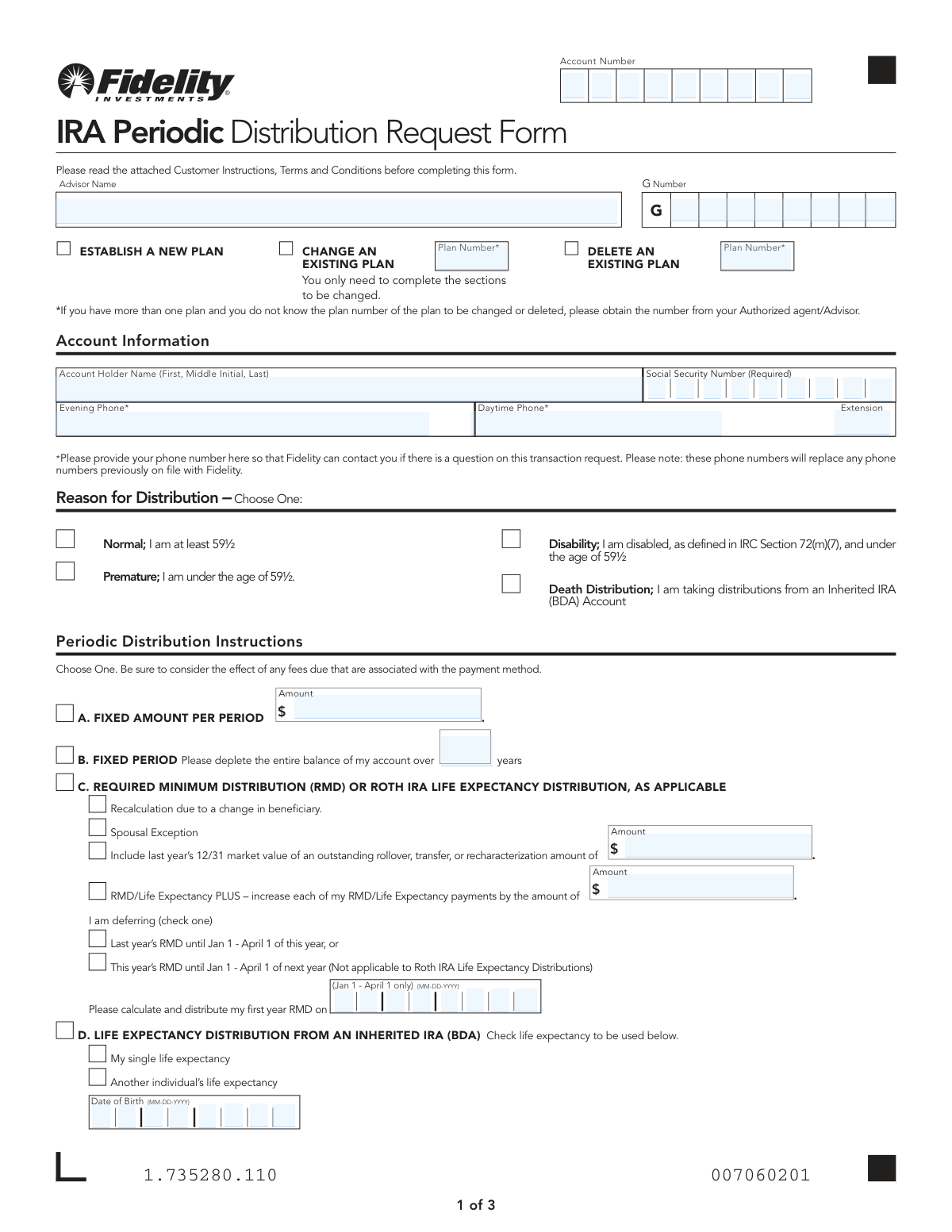
Yes! You can use AI to fill out IRA Periodic Distribution Request Form

This form allows Fidelity IRA holders to request, modify, or cancel a plan for periodic distributions from their retirement accounts, including Traditional, Roth, SEP, and SIMPLE IRAs. It is crucial for managing retirement income, satisfying Required Minimum Distributions (RMDs), or setting up Substantially Equal Periodic Payments (SEPPs). Today, this form can be filled out quickly and accurately using AI-powered services like Instafill.ai, which can also convert non-fillable PDF versions into interactive fillable forms.
Our AI automatically handles information lookup, data retrieval, formatting, and form filling.
It takes less than a minute to fill out 1.735280.110 using our AI form filling.
Securely upload your data. Information is encrypted in transit and deleted immediately after the form is filled out.

Form specifications

Form name: IRA Periodic Distribution Request Form
Number of pages: 1
Language: English
Categories: IRA forms, distribution forms
main-image

Instafill Demo: How to fill out PDF forms in seconds with AI

How to Fill Out 1.735280.110 Online for Free in 2026

Are you looking to fill out a 1.735280.110 form online quickly and accurately? Instafill.ai offers the #1 AI-powered PDF filling software of 2026, allowing you to complete your 1.735280.110 form in just 37 seconds or less.
Follow these steps to fill out your 1.735280.110 form online using Instafill.ai:
  1. 1 Navigate to Instafill.ai and upload or select the IRA Periodic Distribution Request Form.
  2. 2 Provide your personal and account information, including your name, account number, and Social Security Number.
  3. 3 Indicate the reason for your distribution, such as 'Normal' for those over 59½ or 'Death Distribution' for an inherited IRA.
  4. 4 Complete the 'Periodic Distribution Instructions' section by choosing an option like a fixed amount, RMD, or SEPPs, and providing the necessary details.
  5. 5 Specify the frequency, start date, and day of the month for your distribution payments.
  6. 6 Select your funding source, payment method (e.g., direct deposit, check), and complete the tax withholding elections for federal and state taxes.
  7. 7 Carefully review all entered information, digitally sign and date the form, and submit it according to the instructions.

Our AI-powered system ensures each field is filled out correctly, reducing errors and saving you time.

Why Choose Instafill.ai for Your Fillable 1.735280.110 Form?

Speed

Complete your 1.735280.110 in as little as 37 seconds.

Up-to-Date

Always use the latest 2026 1.735280.110 form version.

Cost-effective

No need to hire expensive lawyers.

Accuracy

Our AI performs 10 compliance checks to ensure your form is error-free.

Security

Your personal information is protected with bank-level encryption.

Frequently Asked Questions About Form 1.735280.110

This form is used to establish, change, or cancel a plan for taking regular, periodic payments from your Fidelity IRA, such as a Traditional, Roth, SEP, SIMPLE, or Inherited IRA.

Yes, if you wish to request a distribution from more than one IRA, you must complete a separate form for each individual account.

Select 'Normal' if you are age 59½ or older. Select 'Premature' if you are under age 59½; you may be subject to tax penalties unless you qualify for an exception.

Complete Section C under 'Periodic Distribution Instructions' to have Fidelity calculate and distribute your RMDs based on IRS life expectancy tables.

SEPPs, found in Section E, are for IRA owners under age 59½ who want to take distributions without incurring an early withdrawal penalty, using specific IRS-approved calculation methods.

Your periodic distribution plan will be activated approximately seven business days after Fidelity receives the completed form in good order.

Fidelity will first use funds from your core account, then from any contingent funding options you selected. If funds are still insufficient, a partial payment may be made, with attempts to process the remainder over the next three business days.

No, you can elect not to have federal tax withheld. However, if you make no election, 10% will be automatically withheld from your distributions (excluding Roth IRAs).

You can choose to receive payments via check to your address, a direct deposit (EFT) to your bank account, or as a cash distribution to a Fidelity non-retirement brokerage account.

You must first establish and transfer the assets into an Inherited IRA (BDA). After that, you can use this form to request death distributions from the newly established Inherited IRA.

If you do not specify the frequency, payments will be made annually in December. If you don't provide a specific day, payments will be made on the 5th of the month.

Yes, services like Instafill.ai use AI to accurately auto-fill form fields with your information, which saves time and helps reduce errors.

You can use a service like Instafill.ai to upload the PDF. The platform allows you to fill out and sign the form electronically from your computer or mobile device.

You can use a tool like Instafill.ai, which can convert flat, non-fillable PDFs into interactive forms that you can easily complete online.

Compliance 1.735280.110
Validation Checks by Instafill.ai

1
Verifies Social Security Number Format and Account Match
Ensures the Social Security Number (SSN) is provided in a valid 9-digit format and matches the SSN associated with the specified IRA account number. This is a critical identity verification step to prevent fraud and ensure compliance with tax reporting regulations. A mismatch or invalid format will halt the request pending identity confirmation.
2
Enforces Plan Number for Plan Changes or Deletions
This check validates that the 'Plan Number' field is filled out if the user selects the option to 'Change' or 'Delete' an existing distribution plan. This is necessary to identify which specific plan to modify or remove, especially if multiple plans exist on one account. Failure to provide the plan number will result in an error, as the system cannot determine which plan to act upon.
3
Ensures Single Selection for Reason for Distribution
Validates that the user has selected exactly one option from the 'Reason for Distribution' section (Normal, Premature, Disability, or Death Distribution). This choice is fundamental for correct tax reporting and determining potential penalties. Selecting none or multiple options would create ambiguity and lead to processing rejection.
4
Validates Distribution Reason Against Account Holder's Age
This check cross-references the selected 'Reason for Distribution' with the account holder's age on file. If 'Normal' is chosen, the owner must be 59½ or older; if 'Premature' is chosen, the owner must be younger than 59½. This logic is vital for applying the correct IRS rules and preventing incorrect tax reporting or penalties.
5
Confirms Exclusive Selection of a Distribution Instruction Method
This validation ensures that only one distribution instruction method (A: Fixed Amount, B: Fixed Period, C: RMD, D: Inherited IRA, or E: SEPPs) is selected. These options are mutually exclusive as they represent different calculation methodologies. Selecting more than one or none at all makes the request ambiguous and impossible to execute.
6
Verifies Eligibility for Substantially Equal Periodic Payments (SEPPs)
This check confirms that if Distribution Instruction Option E (SEPPs) is selected, the account holder is under age 59½, as this is an explicit IRS requirement for eligibility. Attempting to set up a SEPP plan for an individual aged 59½ or older would be non-compliant. A validation failure would prevent the creation of an invalid plan.
7
Validates Distribution Instructions for Inherited IRA Accounts
This check ensures that Distribution Instruction Option D is only used for accounts correctly identified as an 'Inherited IRA (BDA)' and that the 'Reason for Distribution' is 'Death Distribution'. This prevents incorrect distribution methods from being applied to inherited assets, which have specific IRS rules. A mismatch would require correction to ensure compliance.
8
Validates Funding Allocation Percentages Sum to 100%
When the user opts to fund distributions by liquidating specific mutual funds by percentage (Funding Option C), this validation ensures the sum of all entered percentages is exactly 100%. This is critical for ensuring the full distribution amount can be sourced correctly without ambiguity. A sum not equal to 100% will cause the form to be rejected, as the funding instructions are incomplete or erroneous.
9
Enforces Minimum Federal Tax Withholding Percentage
This check verifies that if the user elects to have a specific percentage of federal income tax withheld, the entered value is 10% or greater. The form states that 10% is the minimum rate that will be applied if withholding is chosen. This validation prevents users from entering a non-compliant lower rate and ensures the system adheres to its stated policy.
10
Validates the 'First Withdrawal' Date is Within the Allowed Timeframe
This validation ensures the 'Month and Year of First Withdrawal' is not in the past and is no more than one year in the future from the form's processing date. This rule, stated in the instructions, prevents stale-dated requests and ensures plans are initiated in a timely manner. An invalid date would require the user to provide a new, compliant start date.
11
Checks State Withholding Election Against Resident State Availability
This validation cross-references the account holder's state of residence with the list of states where state tax withholding is not available (e.g., AK, FL, TX). If the user is a resident of a non-withholding state but attempts to elect state withholding, the form should be flagged for correction. This prevents invalid requests and ensures compliance with state-specific tax processing rules.
12
Prevents Incompatible SEPP Calculation and Life Expectancy Selections
This check enforces a rule within the SEPPs section, validating that if the 'Amortization Calculation Method' is selected, the 'Uniform Distribution Table' is not chosen as the life expectancy option. The form explicitly states this combination is not available. This prevents the setup of a non-compliant SEPP plan that would fail IRS regulations.
13
Validates Completeness of Bank Information for New EFT Setups
This check is triggered when a user selects an EFT payment method but does not have pre-existing bank instructions on their account. It ensures all required fields in the 'Bank Information' section—including bank name, routing number, and account number—are completed. Missing information would make it impossible to set up the electronic transfer, causing payment delays or failure.
14
Validates RMD Deferral Date is within the IRS-allowed window
This validation applies when a user is deferring their first Required Minimum Distribution (RMD). It ensures the date entered for the distribution is between January 1 and April 1 of the specified year, which is the window allowed by the IRS. An invalid date would be non-compliant and could subject the IRA owner to significant tax penalties.

Common Mistakes in Completing 1.735280.110

Incorrect or Unintended Tax Withholding Elections

Applicants often misunderstand the withholding section, leading to unexpected tax consequences. Forgetting to check any box defaults to 10% federal withholding, which may be unwanted. Conversely, those who want withholding might fail to specify a percentage, and residents of certain states may not realize state withholding is mandatory if federal is withheld. These errors can result in a smaller-than-expected distribution or a large tax bill at year-end. To avoid this, carefully read the 'Notice of Withholding' and make explicit elections for both federal and state taxes.

Incomplete or Conflicting Distribution Instructions

The form requires selecting only one of five distribution options (A-E), but the complexity leads many to either leave it blank or check multiple boxes. This ambiguity makes the form 'not in good order' and causes immediate rejection and processing delays. The applicant must then be contacted to clarify their intent, delaying the start of their payments. To prevent this, carefully review the five options and select only the single one that matches your financial goal, whether it's a fixed amount, RMD, or SEPP.

Misunderstanding Substantially Equal Periodic Payments (SEPP) Rules

Option E for SEPPs is highly complex and a common source of errors. Applicants frequently select incompatible calculation methods and life expectancy options (e.g., choosing the Amortization Method with the Uniform Distribution Table, which is explicitly disallowed). Such mistakes will cause the form to be rejected, as the financial institution cannot proceed with an invalid calculation. This can jeopardize the applicant's ability to take penalty-free distributions under age 59½. AI-powered tools like Instafill.ai can help by flagging incompatible selections and ensuring all required fields for a chosen method are completed.

Failing to Specify Payment Frequency and Start Date

Many people overlook the 'Frequency of Periodic Distribution Payments' section, assuming payments will start monthly by default. However, the form's default is an annual payment in December, which is rarely the desired outcome. Furthermore, applicants often select a start date less than seven business days away, not accounting for the required processing time, which causes the first payment to be delayed until the next cycle. Always explicitly state the frequency, month, and start date to ensure payments are made as you expect.

Using a Single Form for Multiple IRA Accounts

The instructions clearly state, 'If you wish to request a distribution from more than one IRA, you must complete a separate form for each IRA.' Despite this, individuals often attempt to list multiple accounts or assume one form covers all their IRAs with the institution. This results in the request being processed for only the single account number listed on the form, while the others are ignored, potentially causing the person to miss required minimum distributions (RMDs) from their other accounts.

Requesting EFT Payments Without an Active EFT Setup

Selecting Direct Deposit (EFT) is convenient, but many applicants choose this option without having pre-existing EFT instructions on their account. The form notes that establishing a new EFT link can take up to 14 days, which will significantly delay the first distribution payment. If the form is submitted with a near-term start date, the payment may default to a paper check mailed to the address of record while the EFT is being set up. To avoid delays, ensure EFT is established well before submitting this form or attach a voided check and allow for the extra processing time.

Incorrectly Specifying Funding Sources

When choosing to fund distributions from specific mutual funds (Funding Option C), a common error is providing percentages that do not add up to exactly 100%. Any mathematical error here will cause the form to be rejected. Additionally, people may fail to select a 'Contingent Funding Option,' which can lead to failed or partial payments if a primary fund has insufficient assets, jeopardizing their income stream. Using a tool like Instafill.ai can help prevent this by automatically calculating totals and ensuring all required funding instructions are logical and complete.

Forgetting to Sign or Date the Form

It is a simple but surprisingly frequent mistake to submit the form without a signature or date. An unsigned form is legally invalid and cannot be processed under any circumstances. This oversight halts the entire process until a properly signed form is received, which can cause a delay of weeks and may result in missing a critical first payment or RMD deadline. Always double-check the signature block on the final page before mailing or submitting the form.

Choosing the Wrong 'Reason for Distribution'

Applicants often incorrectly select their distribution reason, particularly concerning the age 59½ threshold. An individual who is 58 might mistakenly check 'Normal,' or someone over 60 might check 'Premature.' This error has significant tax-reporting consequences, as it dictates how the distribution is coded on IRS Form 1099-R. An incorrect code can trigger an automatic penalty assessment from the IRS or require the filer to complete extra paperwork to prove an exception. Since this form is a non-fillable PDF, a tool like Instafill.ai can convert it into a fillable version, making it easier to review and correctly select from clear options.

Missing or Incomplete Account and Contact Information

Failing to write the full IRA account number in the designated boxes or omitting a daytime phone number is a common oversight. Without the correct account number, the request cannot be processed at all. Without a contact number, any small error or ambiguity on the form (which is common) requires communication by mail, turning a one-day delay into a one-week delay. Ensuring the account number is correct and providing a reliable phone number is critical for smooth and timely processing.
Saved over 80 hours a year

“I was never sure if my IRS forms like W-9 were filled correctly. Now, I can complete the forms accurately without any external help.”

Kevin Martin Green

Your data stays secure with advanced protection from Instafill and our subprocessors

Robust compliance program

Transparent business model

You’re not the product. You always know where your data is and what it is processed for.

ISO 27001, HIPAA, and GDPR

Our subprocesses adhere to multiple compliance standards, including but not limited to ISO 27001, HIPAA, and GDPR.

Security & privacy by design

We consider security and privacy from the initial design phase of any new service or functionality. It’s not an afterthought, it’s built-in, including support for two-factor authentication (2FA) to further protect your account.

Fill out 1.735280.110 with Instafill.ai

Worried about filling PDFs wrong? Instafill securely fills ira-periodic-distribution-request-form forms, ensuring each field is accurate.