Yes! You can use AI to fill out Fidelity Investments® Beneficiary Distribution Form
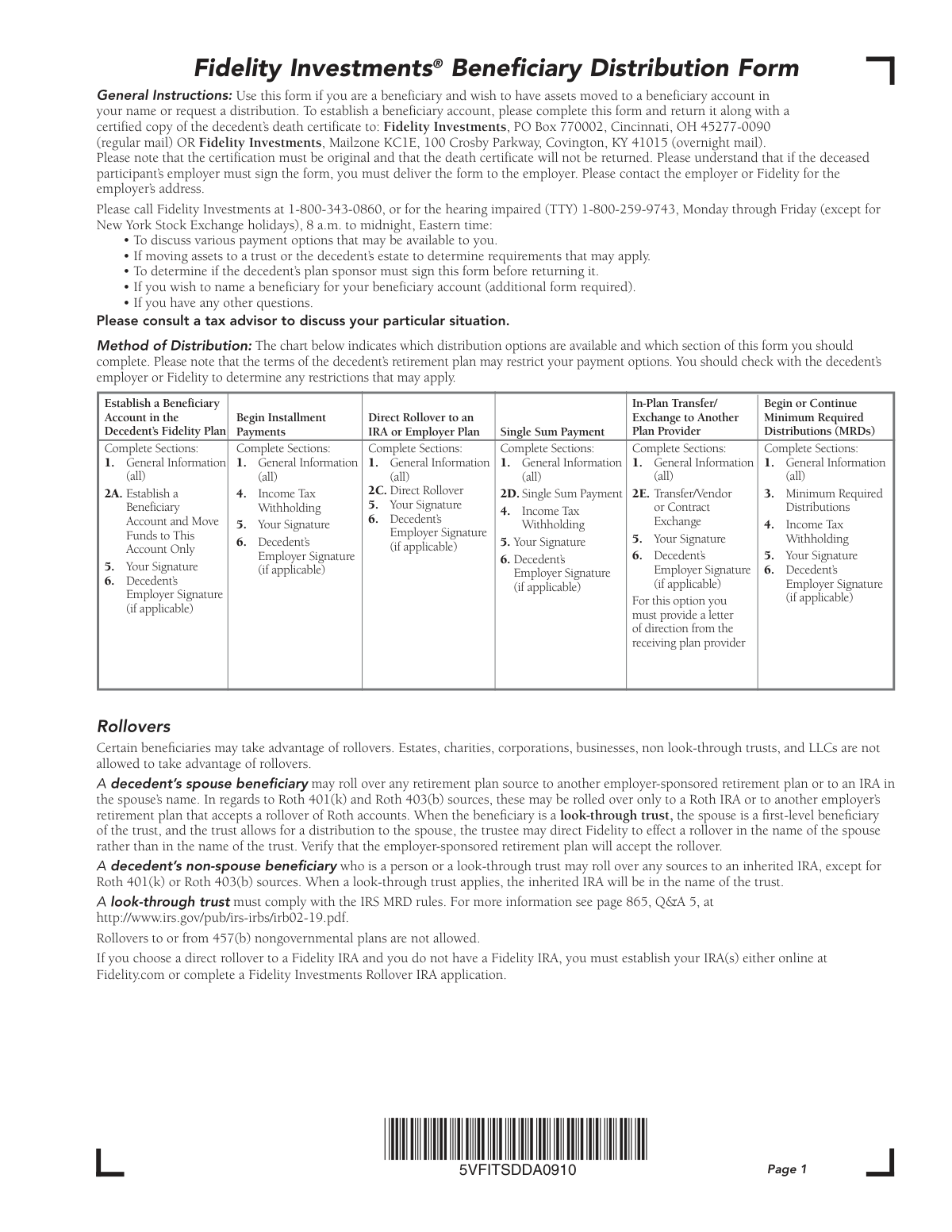
This form is used by the beneficiary of a deceased person's Fidelity retirement plan to manage the inherited assets. It allows the beneficiary to choose from several options, such as moving the funds to a new beneficiary account, beginning installment payments, executing a direct rollover to an IRA, or taking a single lump-sum payment. Today, this form can be filled out quickly and accurately using AI-powered services like Instafill.ai, which can also convert non-fillable PDF versions into interactive fillable forms.
5VFITSDDA0910 is part of the
beneficiary forms, investment forms, Fidelity forms, distribution forms, beneficiary distribution forms and UK investment forms categories on Instafill.
Rather not fill this in by hand? Instafill is an online form filler that completes PDF forms automatically — upload the blank form, answer a few questions, and the AI fills every field.
Form specifications
| Form name: | Fidelity Investments® Beneficiary Distribution Form |
| Number of pages: | 1 |
| Field instructions: | 5VFITSDDA0910 Instructions |
| Filled form examples: | 5VFITSDDA0910 Examples |
| Language: | English |
Our AI automatically handles information lookup, data retrieval, formatting, and form filling.
It takes less than a minute to fill out 5VFITSDDA0910 using our AI form filling.
Securely upload your data. Information is encrypted in transit and deleted immediately after the form is filled out.
Instafill Demo: How to fill out PDF forms in seconds with AI
How to Fill Out 5VFITSDDA0910 Online for Free in 2026
Are you looking to fill out a 5VFITSDDA0910 form online quickly and accurately? Instafill.ai offers the #1 AI-powered PDF filling software of 2026, allowing you to complete your 5VFITSDDA0910 form in just 37 seconds or less.
Follow these steps to fill out your 5VFITSDDA0910 form online using Instafill.ai:
- 1 Navigate to Instafill.ai and upload or select the Fidelity Beneficiary Distribution Form.
- 2 Use the AI assistant to automatically fill in your personal information as the beneficiary and the decedent's details in Section 1.
- 3 Select your desired distribution method in Section 2, such as establishing a new account, requesting a rollover, or taking a lump-sum payment.
- 4 Complete the relevant sections for Minimum Required Distributions (Section 3) and Income Tax Withholding preferences (Section 4), if applicable.
- 5 Review all the information populated by the AI for accuracy and make any necessary corrections.
- 6 Digitally sign the form in Section 5. The service will help identify if a signature guarantee or an employer signature (Section 6) is required based on your selections.
- 7 Download the completed form and submit it to Fidelity via mail, along with a certified copy of the death certificate as instructed.
Our AI-powered system ensures each field is filled out correctly, reducing errors and saving you time.
Why Choose Instafill.ai for Your Fillable 5VFITSDDA0910 Form?
Speed
Complete your 5VFITSDDA0910 in as little as 37 seconds.
Up-to-Date
Always use the latest 2026 5VFITSDDA0910 form version.
Cost-effective
No need to hire expensive lawyers.
Accuracy
Our AI performs 10 compliance checks to ensure your form is error-free.
Security
Your personal information is protected with bank-level encryption.
Frequently Asked Questions About 5VFITSDDA0910
This form is used by a beneficiary of a deceased person's Fidelity retirement plan to either move the assets into a new beneficiary account or to request a distribution of the funds.
You should complete this form if you are a named beneficiary, such as a spouse, non-spouse individual, trust, or estate, and you wish to claim assets from a decedent's Fidelity retirement plan.
You must submit the completed form along with a certified copy of the decedent's death certificate. Fidelity will not return the death certificate, so ensure you have other copies if needed.
For a single sum payment, you need to complete Section 1 (General Information), Section 2D (Single Sum Payment), Section 4 (Income Tax Withholding), and Section 5 (Your Signature). You may also need an employer signature in Section 6.
Send the form and required documents to Fidelity Investments via regular mail at PO Box 770002, Cincinnati, OH 45277-0090, or by overnight mail to Mailzone KC1E, 100 Crosby Parkway, Covington, KY 41015.
Possibly. You must contact Fidelity or the decedent's employer (the plan sponsor) to determine if their signature is required in Section 6 for your specific request.
A signature guarantee is a special stamp from a financial institution that verifies your signature to prevent fraud. It may be required for distributions over $100,000 or when establishing an account without an employer signature, as detailed in Section 5.
Yes, tax withholding rules apply. Eligible rollover amounts paid directly to you are subject to mandatory 20% federal withholding, while other payments have a default withholding rate you can change or waive in Section 4.
Yes, a non-spouse beneficiary can typically roll over funds to an inherited IRA. However, there may be restrictions, especially for Roth sources, so you should review the rollover rules on the form or consult a tax advisor.
If you request a check, it should arrive in 7-10 business days after the distribution is processed. An Electronic Funds Transfer (EFT) requires a 10-day setup period before the first payment can be sent.
An outstanding loan at the time of death is typically treated as a taxable distribution. You should contact Fidelity directly for more information on how this impacts the account.
Yes, services like Instafill.ai use AI to auto-fill form fields accurately and save time, which can be very helpful for complex forms like this one.
You can upload the PDF to a service like Instafill.ai, which makes the form interactive and fillable online. This allows you to type your information, sign electronically, and download the completed document for submission.
If your PDF is a flat, non-fillable image, you can use a tool like Instafill.ai to convert it into an interactive form. This makes it easy to complete on your computer without needing to print it.
Compliance 5VFITSDDA0910
Validation Checks by Instafill.ai
1
Distribution Type Section Completeness
Verifies that all required sections of the form are completed based on the distribution method chosen at the beginning of the form. For example, if 'Single Sum Payment' is selected, the system checks that Sections 1, 2D, 4, and 5 are all filled out. This ensures that all necessary information for a specific transaction type is provided, preventing processing delays or rejections due to incomplete data.
2
Mutually Exclusive Distribution Selection
Ensures that only one primary distribution option (e.g., 2A, 2B, 2C, 2D, or 2E) is selected in Section 2. The form is designed for a single type of distribution request per submission. If multiple options are checked, the request is ambiguous and must be rejected to force the user to clarify their intent on separate forms if necessary.
3
Beneficiary SSN or TIN Format
Validates that the Social Security Number (SSN) or Taxpayer Identification Number (TIN) provided in Section 1A for the beneficiary is in the correct 9-digit format (XXX-XX-XXXX or XXXXXXXXX). This is critical for accurate tax reporting to the IRS and for correctly identifying the beneficiary in the system. An invalid number will cause tax reporting failures and potential penalties.
4
Conditional Employment Termination Date
Checks if the decedent's date of birth in Section 1B indicates they died after age 69. If so, this validation ensures that the 'date the decedent terminated employment' field in Section 1C is completed. This date is crucial for determining Minimum Required Distribution (MRD) calculations, and its absence can lead to incorrect payment schedules.
5
Rollover Eligibility by Beneficiary Type
Verifies that the beneficiary is eligible to perform a rollover as requested in Section 2C. Based on the 'Type of Beneficiary' selected in Section 1A, the system cross-references IRS rules mentioned in the instructions, which prohibit rollovers for entities like estates, charities, and corporations. This check prevents illegal or non-compliant transactions that would be rejected by the receiving institution.
6
Prohibition of Rollover from 457(b) Nongovernmental Plan
This validation cross-references the plan type in Section 1D with the distribution request in Section 2. If the '457(b) nongovernmental plan' is checked and a 'Direct Rollover' (Section 2C) is requested, the form is flagged as invalid. This is a hard rule stated on the form, and enforcing it prevents attempts to perform a prohibited transaction.
7
Mandatory 20% Withholding on Eligible Rollover Amounts
If a distribution is an 'eligible rollover amount' but is not being directly rolled over (e.g., a check for a single sum payment), this check confirms that 20% federal tax withholding is applied. It overrides any user selection in Section 4 to 'elect not to have federal income taxes withheld' for that specific payment. This is a mandatory IRS rule, and failure to comply can result in penalties for both the beneficiary and the administrator.
8
Conditional Signature Guarantee Requirement
Implements the complex logic from Section 5 to determine if a Medallion signature guarantee is required. The check is triggered if the employer signature in Section 6 is absent AND the distribution is over $100,000, or if the beneficiary's address has changed within the last 15 days. This is a critical fraud prevention measure to protect high-value accounts from unauthorized distributions.
9
Non-Resident Alien Withholding and Documentation
If the beneficiary's mailing address in Section 1A is outside the United States, this validation confirms that a completed IRS Form W-8BEN is attached. It also ensures the user has not selected 'elect not to have... taxes withheld' in Section 4, as this is not permitted for foreign addresses. This is essential for complying with international tax treaties and U.S. tax law, preventing incorrect withholding and potential legal issues.
10
Required Attachment for In-Plan Transfer
Checks that if Section 2E, 'Transfer/Vendor or Contract Exchange', is completed, a 'letter-of-acceptance from the receiving plan provider' is included with the submission. This documentation is required to confirm the receiving institution is aware of and will accept the incoming funds. Without it, the transfer could fail, leaving the assets in limbo and causing significant delays.
11
Entity vs. Individual Beneficiary Field Validation
Validates that the correct identification fields in Section 1A are completed based on the beneficiary type. If the beneficiary is an entity like a trust or estate, the 'Name of Entity' and 'Tax ID #' fields must be filled. If the beneficiary is a person, the 'SSN' and 'Date of Birth' fields must be filled. This ensures the correct legal party is identified and the correct tax identifier is used for reporting.
12
Employer Signature for 457(b) Nongovernmental Plans
Verifies that Section 6, 'Decedent’s Employer Signature', is completed if the beneficiary is taking a distribution from a '457(b) nongovernmental plan' (as indicated in Section 1D). The form explicitly states this is a requirement for this plan type. This check ensures plan-specific rules are followed and that the employer has authorized the distribution, preventing non-compliant transactions.
13
Installment Payment Parameter Completeness
If Section 2B 'Begin Installment Payments' is chosen, this check ensures all necessary parameters are provided. It validates that the user has selected either a period in years or a specific dollar amount, chosen a payment frequency (monthly, quarterly, annually), and selected a valid payment method. Incomplete information would make it impossible to set up the payment schedule correctly.
14
MRD Calculation Method Consistency
In Section 3B, this validation ensures the selected MRD calculation method ('Five Year' or 'Life Expectancy') is permissible for the beneficiary type and circumstances. For instance, an 'Other trust' that is not a look-through trust may be restricted to the Five Year Method. This check prevents the selection of a non-compliant MRD schedule which could result in tax penalties for the beneficiary.
Common Mistakes in Completing 5VFITSDDA0910
The form's first page maps distribution types to specific sections that must be completed. Beneficiaries, often overwhelmed, may fill out unnecessary sections or, more critically, skip required ones, such as forgetting the tax withholding section for a lump-sum payment. This results in an incomplete application and significant processing delays. To prevent this, carefully follow the instructional chart on page one for your chosen distribution option.
The form requires a Medallion Signature Guarantee for certain transactions, like distributions over $100,000 or when an employer signature is not provided. A frequent error is obtaining a notary stamp, which is not a valid substitute and will lead to the form's rejection. You must visit a qualified financial institution that participates in the Medallion program to obtain the correct guarantee. AI-powered form fillers like Instafill.ai can highlight this critical requirement to prevent such errors.
Submitting the form without all required documentation is a primary cause for rejection. Beneficiaries often forget to include a certified copy of the decedent's death certificate or, for in-plan transfers (Section 2E), the required letter of acceptance from the receiving institution. This oversight forces a complete resubmission of the paperwork. A smart form-filling tool can generate a final checklist to ensure all necessary documents are gathered before mailing.
Section 6 requires an authorized signature from the decedent's employer (plan sponsor) in many cases, but beneficiaries are asked to verify if it's needed. Many will skip this step, assuming it's optional, which can halt the entire process. Plan sponsor approval is often a non-negotiable requirement to authorize a distribution, and its absence will cause the form to be returned. It is crucial to contact Fidelity or the employer to confirm if this signature is necessary.
When the beneficiary is a trust or an estate, the form requires the entity's legal name and Tax ID Number (TIN). Trustees or executors commonly enter their own personal name and Social Security Number in the primary beneficiary fields instead. This creates an identity mismatch that must be corrected, delaying the process. Always enter the entity's information first as requested in Section 1A.
For distributions that are eligible for a rollover but are paid directly to the beneficiary, a 20% federal tax withholding is mandatory. Beneficiaries often check the box in Section 4 to 'elect not to have federal income taxes withheld,' not realizing it doesn't apply in this scenario. While the mandatory rule will be enforced anyway, this incorrect election causes confusion and indicates a misunderstanding of the distribution's tax consequences.
When completing a direct rollover to another institution (Section 2C), beneficiaries must provide the full, correct name of the receiving custodian/trustee and the specific account number. Common mistakes include writing a generic name like 'My IRA' or omitting the account number entirely. This ambiguity forces Fidelity to contact the beneficiary for clarification, delaying the transfer of funds. Using a tool like Instafill.ai can help validate that these fields are completed correctly.
The Minimum Required Distribution (MRD) rules in Section 3 are highly complex and a major source of errors. Beneficiaries may select a calculation method they are not eligible for or provide conflicting instructions, such as specifying a payment amount while also asking Fidelity to calculate it. These mistakes require manual intervention and correction, delaying payments. Since this form is often a non-fillable PDF, a tool like Instafill.ai can convert it to an interactive version that guides users through the complex MRD logic to prevent errors.
The form provides two distinct addresses: a P.O. Box for regular mail and a street address for overnight mail. A common mistake is sending an overnight package (via UPS or FedEx) to the P.O. Box, which will result in it being returned as undeliverable. This simple but critical error can add weeks to the processing time while the beneficiary waits for the returned package and resends it to the correct address.
After navigating the form's complexities, it is surprisingly common for a beneficiary to forget to sign and date it in Section 5. An unsigned form is legally invalid and cannot be processed under any circumstances. This simple oversight immediately halts the request and requires the form to be sent back for a signature, causing unnecessary and frustrating delays in accessing the funds.
Saved over 80 hours a year
“I was never sure if my IRS forms like W-9 were filled correctly. Now, I can complete the forms accurately without any external help.”
Kevin Martin Green
Your data stays secure with advanced protection from Instafill and our subprocessors




Robust compliance program
Transparent business model
You’re not the product. You always know where your data is and what it is processed for.
ISO 27001, HIPAA, and GDPR
Our subprocesses adhere to multiple compliance standards, including but not limited to ISO 27001, HIPAA, and GDPR.
Security & privacy by design
We consider security and privacy from the initial design phase of any new service or functionality. It’s not an afterthought, it’s built-in, including support for two-factor authentication (2FA) to further protect your account.
Fill out 5VFITSDDA0910 with Instafill.ai
Worried about filling PDFs wrong? Instafill securely fills fidelity-investments-beneficiary-distribution-form forms, ensuring each field is accurate.
