
Yes! You can use AI to fill out Fidelity IRA Beneficiary Distribution — Charity, Foundation, or a University
Don't type 103 fields by hand. Tell our AI about yourself, or upload a document you already have, and it fills every field in seconds. You check it, then download, print or sign.
The AI does the filling. You just check it.
No typing into boxes, nothing to install.
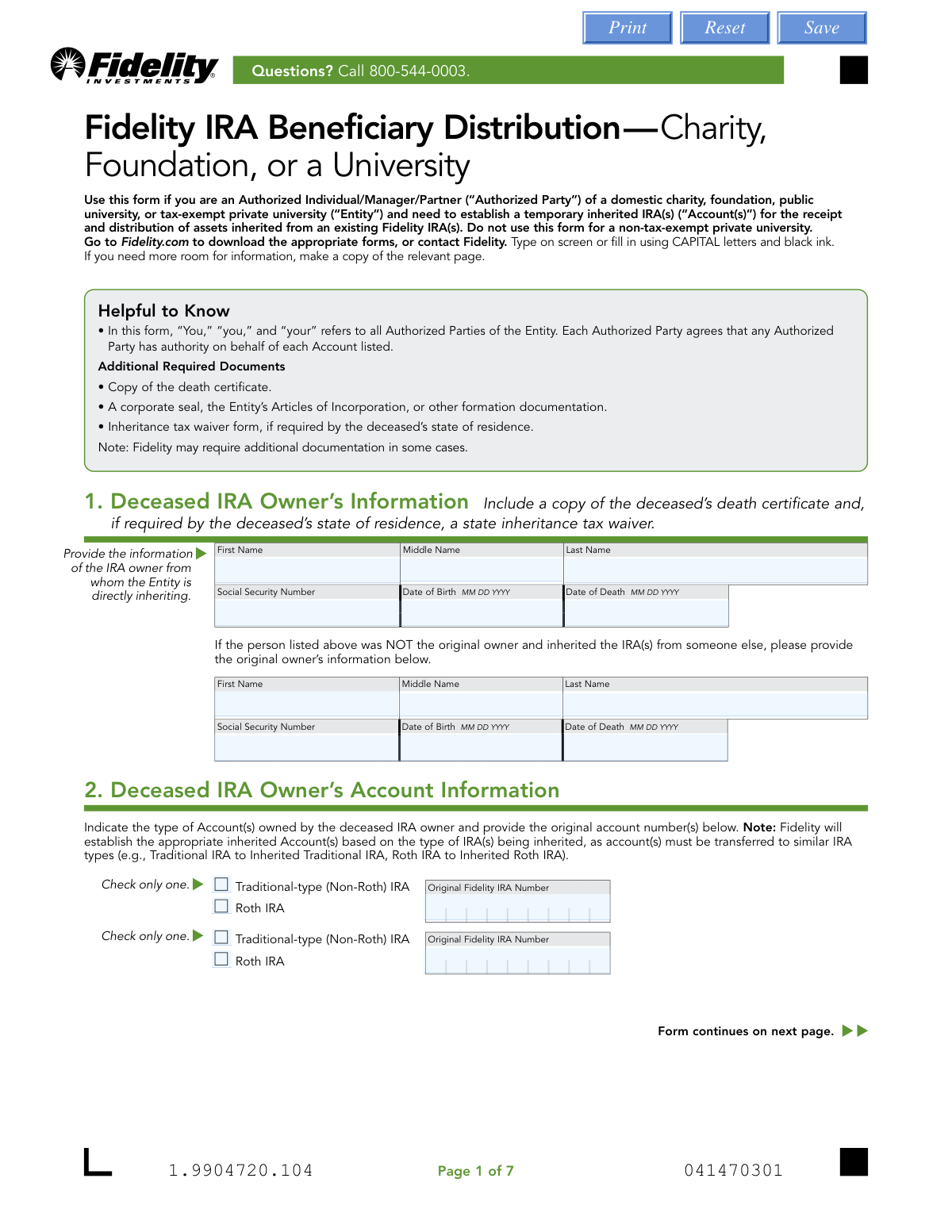
What this form asks for
The AI fills all of it, from your answers or your documents.
The AI checks your answers before you download
14 checks built for this form, so a wrong date or a missing answer is caught before anyone else sees it.
This check ensures the 'Date of Death' entered for the deceased IRA owner in Section 1 is chronologically after their 'Date of Birth'. It is a fundamental logical check to prevent significant data entry errors. If the date of death is not after the date of birth, the form submission will be rejected as it indicates impossible or incorrect data.
This check confirms that the Social Security Number provided for the deceased IRA owner in Section 1 is a 9-digit number, typically in the format XXX-XX-XXXX. This validation is critical for correctly identifying the deceased's account in Fidelity's system and for accurate tax reporting. A failure will prevent the system from finding the correct records and halt processing.
This is a backend validation that cross-references the 'Original Fidelity IRA Number' from Section 2 with Fidelity's internal systems. It verifies that the account number is valid, exists, and was owned by the deceased individual specified in Section 1. This check is crucial to prevent fraud and ensure assets are being distributed from the correct source account.
This validation confirms that the 'Taxpayer ID Number' (TIN/EIN) in Section 3 is provided and adheres to the correct 9-digit format (XX-XXXXXXX). The TIN is mandatory for tax reporting purposes (Form 1099-R) and for verifying the identity of the beneficiary entity. Submissions with a missing or malformed TIN will be rejected.
This check ensures that all components of the 'Permanent Address' in Section 3 (Street, City, State/Province, ZIP/Postal Code, Country) are filled out. This address is the entity's legal address used for tax reporting and official correspondence. An incomplete address will cause the form to be rejected to avoid compliance and mailing issues.
This check verifies that the values entered for federal and state tax withholding in Section 4 are whole numbers only, with no decimals, dollar signs, or other characters. The form explicitly requires whole number percentages. An invalid format would cause a calculation error and requires correction before the distribution can be processed.
And 8 more checks
- Enforces Mandatory Control Person Information
- Validates Control Person's SSN/ITIN Format
- Requires Foreign Citizen Identification Details
- Verifies Government ID is Not Expired
- Confirms Signature and Date are Present
- Flags Requirement for Medallion Signature Guarantee
- Checks for At Least One Account to Distribute
- Validates State-Specific Tax Withholding Rules
Let AI fill out your Fidelity IRA Beneficiary Distribution
No typing. Every field filled in seconds, checked, ready to sign.
How to Fill Out Fidelity IRA Beneficiary Distribution Online for Free in 2026
What the AI walks you through.
- Navigate to Instafill.ai, upload the 'Fidelity IRA Beneficiary Distribution' form, and let the AI prepare it for filling.
- Provide the deceased IRA owner's personal information, including their name, Social Security Number, and date of death, as requested in Section 1.
- Enter the complete details of the beneficiary entity (charity, foundation, or university) in Section 3, including its name, Taxpayer ID Number, and address.
- Specify distribution instructions and tax withholding preferences in Section 4. The AI can help clarify federal and state tax withholding options.
- Input the information for the entity's Control Person or Authorized Party in Section 5, including personal details, address, and citizenship status.
- Carefully review all entered information for accuracy. Electronically sign the form and submit it along with required documents like the death certificate and corporate formation documents, following the digital upload instructions provided by Fidelity.
Common Mistakes in Completing Fidelity IRA Beneficiary Distribution
The ones the AI is built to catch.
Forgetting Required Supporting Documents
Using an Incorrect or Abbreviated Entity Name
Entering an Incomplete or Incorrect IRA Account Number
Failing to Provide a Medallion Signature Guarantee
Improperly Formatting Tax Withholding Percentages
Providing Incomplete Control Person Information
Confusing the Deceased Owner with the Original Owner
Missing Signatures from All Authorized Parties
Submitting Illegible or Incomplete Form Pages
Frequently Asked Questions About Fidelity IRA Beneficiary Distribution
Is it really free for 7 days?
Can I fill other forms too?
How do I cancel?
How does the AI fill out Fidelity IRA Beneficiary Distribution?
What happens to my information?
How complex is Fidelity IRA Beneficiary Distribution to fill out?
What is the 'Fidelity IRA Beneficiary Distribution — Charity' form used for?
Who is authorized to complete this form on behalf of an organization?
What documents do I need to submit with this form?
How will my organization receive the inherited assets?
How long does it take to process this distribution request?
How do I submit the completed form and documents to Fidelity?
Do I need to have taxes withheld from the distribution?
When is a Medallion signature guarantee required?
What is a 'Control Person' and why is their information needed in Section 5?
Can my non-tax-exempt private university use this form?
The deceased had both a Traditional and a Roth IRA. Can I use one form for both?
Can I use an AI tool to help me fill out this form?
How can I fill out this form online using Instafill.ai?
What should I do if the PDF version of this form I have is not fillable?
Get your Fidelity IRA Beneficiary Distribution filled out by AI
$0 today. Cancel before Nov 2 and you pay nothing.
Other forms like this one
beneficiary forms: Form I-130A, Supplemental Info for Spouse Beneficiary, Affidavit and Representations Regarding Next of Kin (Preference Beneficiary Affidavit) (The Hartford) – Form LC-7086-17, VA Form 21-0788, Information Regarding Apportionment of Beneficiary's Award, California Schedule K-1 (541) (2025), Beneficiary’s Share of Income, Deductions, Credits, etc., Form I-130A, Supplemental Information for Spouse Beneficiary, Fidelity Investments® Beneficiary Distribution Form, Fidelity Investments 403(b) Beneficiary Designation, Fidelity Advisor IRA Beneficiary Designation, Fidelity Investments Qualified Plan Beneficiary Designation, Fidelity Investments 403(b)/401(a) Beneficiary Designation, The Church of the Nazarene 403(b) Retirement Savings Plan Beneficiary Designation Form, Fidelity Investments Qualified Plan Beneficiary Designation, IRA/HSA Beneficiary Designation, Designated Beneficiary Plan Agreement, Designated Beneficiary Plan Agreement, Beneficiary Designation Form For IRA and 403(b)(7) Accounts, Designated Beneficiary Plan Agreement, IRA Beneficiary Designation Form, Stock Power Form For transferring shares, changing names, or adding a beneficiary, Distribution Due to Death for Spouse Beneficiary - Elevator Constructors Union Local No. 1 Annuity and 401(k) Fund
IRA forms: Form 5498, IRA Contribution Information, SIRA Allied health treatment request (Catalogue no. SIRA09191), Transfer Due to Divorce — IRA/HSA/529, One-Time Withdrawal – IRA, Fidelity Investments, Fidelity Advisor IRA Distribution Request for Automatic Rollover Accounts, Fidelity Beneficiaries — IRA /HSA, Fidelity Advisor IRA Beneficiary Designation, IRA/HSA Beneficiary Designation, Form 8606, Nondeductible IRAs, Fidelity Investments Earnings Automatic Withdrawal Plan — IRA, Inherited IRA Application for Individual Beneficiaries, SIMPLE IRA Contribution Transmittal Form, IRA Distribution Form, Open a Schwab IRA, New York State Deferred Compensation Plan Direct Rollover to a Roth IRA, Charles Schwab IRA Distribution Form, Sample IRA Distribution Letter for a Qualified Charitable Distribution (QCD), Beneficiary Designation Form For IRA and 403(b)(7) Accounts, IRA Beneficiary Designation Form, Schwab IRA Account Application
charity forms: Form 1-S, Full Requirement Initial Charity Registration Application
distribution forms: Fischer Homes Request for In-Service Distribution, Form 1099-DIV, Dividends and Distributions, Form 1099-R, Distributions From Pensions etc., Form 1099-PATR, Taxable Distributions from Cooperatives, Form 1099-SA, Distributions from HSA/MSA, Nationwide Retirement Solutions Participant Distribution Request Form (PNF-0875M9, TRAC Version, 01/2025), Nationwide Retirement Solutions Participant Distribution Request Form (PNF-0875M9, TRAC Version, 01/2025), Fidelity Advisor 403(b) Distribution Request Form, Fidelity Advisor IRA Distribution Request for Automatic Rollover Accounts, Fidelity NetBenefits Distribution - Recurring Payments, Fidelity Investments® Beneficiary Distribution Form, Fidelity Investments Distribution Form, IRA Distribution Form, New York State Deferred Compensation Plan Benefit Distribution Request, Individual 401(k) Distribution Request Form, Fidelity Distribution—Rollover, Charles Schwab IRA Distribution Form, Sample IRA Distribution Letter for a Qualified Charitable Distribution (QCD), Vanguard IRA Distribution Kit (including IRA Distribution Form RRDFT and Form W-4R), Vanguard Required Minimum Distribution Service Form
university forms: University of Colorado 403(b) Plan – DSW Scudder Enrollment and Beneficiary Designation Form, Northwestern University Office of Undergraduate Financial Aid International Applicant Document Upload Cover Sheet, Vanguard Asset Transfer Authorization Form for the Emory University Retirement Plan, Vanguard University Leave of Absence Form, Form ORP-RMD-1, State University System Optional Retirement Program (SUSORP) Application for a Required Minimum Distribution, Application for Sabbatical Leave
beneficiary distribution forms: Fidelity Advisor 403(b) Beneficiary Distribution Request, Fidelity Investments® Beneficiary Distribution Form, Distribution Due to Death for Spouse Beneficiary - Elevator Constructors Union Local No. 1 Annuity and 401(k) Fund, IRA Distribution to Charitable Beneficiary, IRA Distribution to Charitable Beneficiary, IRA/IRRA®/ROTH IRA/SEP/SRA Beneficiary Distribution Form, Beneficiary Distribution Request
IRA distribution forms: Fidelity Automatic Withdrawals — RMD/Life Expectancy, Fidelity Advisor IRA Distribution Request for Automatic Rollover Accounts, IRA Distribution Form, Charles Schwab IRA Distribution Form, Sample IRA Distribution Letter for a Qualified Charitable Distribution (QCD), Vanguard IRA Distribution Kit (including IRA Distribution Form RRDFT and Form W-4R), IRA Distribution to Charitable Beneficiary, IRA Distribution to Charitable Beneficiary, IRA Distribution Form, Transamerica Distribution Request (Distribution of Traditional 401(k) to Roth IRA), TIAA Brokerage IRA Distribution Request (Form F11025), TIAA-CREF Funds IRA Distribution Form (Retail Class Only), Request for a Qualified Charitable Distribution (QCD) from a Brokerage Individual Retirement Account (IRA), Request for a Charitable Distribution from an Individual Retirement Account (IRA), Individual Retirement Account (IRA) Distribution Request Form, SIMPLE Individual Retirement Account (IRA) Distribution Request Form, Merrill IRA/IRRA®/Roth IRA/SEP/SRA One Time Distribution Form, IRA/IRRA®/Roth IRA/SEP/SRA Distribution Form For Standing Letters, IRA/IRRA®/ROTH IRA/SEP/SRA Beneficiary Distribution Form, Merrill IRA/IRRA®/SEP/SRA Substantially Equal Periodic Payment (72(t)) Distribution Form
IRA beneficiary forms: IRA/IRRA®/ROTH IRA/SEP/SRA Beneficiary Distribution Form, Fidelity Advisor IRA Beneficiary Designation, IRA/HSA Beneficiary Designation, Beneficiary Designation Form For IRA and 403(b)(7) Accounts, IRA Beneficiary Designation Form, IRA Distribution to Charitable Beneficiary, IRA Distribution to Charitable Beneficiary, TIAA Trust, N.A. IRA Beneficiary Designation, Pershing LLC IRA Designation of Beneficiary
Let AI fill out your Fidelity IRA Beneficiary Distribution
Your trial starts once a card is added. You pay nothing before Nov 2.
Our AI already knows this form, all 103 fields of it. Skip the typing: tell it about yourself, or upload what you have, and it fills the whole form in seconds.
- AI fills every field on all 7 pages, checkboxes included
- No typing into boxes: answer a few questions, or upload a document you already have, an old copy of this form, a photo of a document
- The AI checks the answers; you review and change anything before you download
- Download the finished PDF, print it, or sign it online
- Encrypted, and never used to train AI
Cancel before Nov 2 and you pay nothing.
A card is needed to start the trial. Cancel in two clicks from your account.
Terms · Privacy