Yes! You can use AI to fill out Hardship Withdrawal Request 401(a) Plan
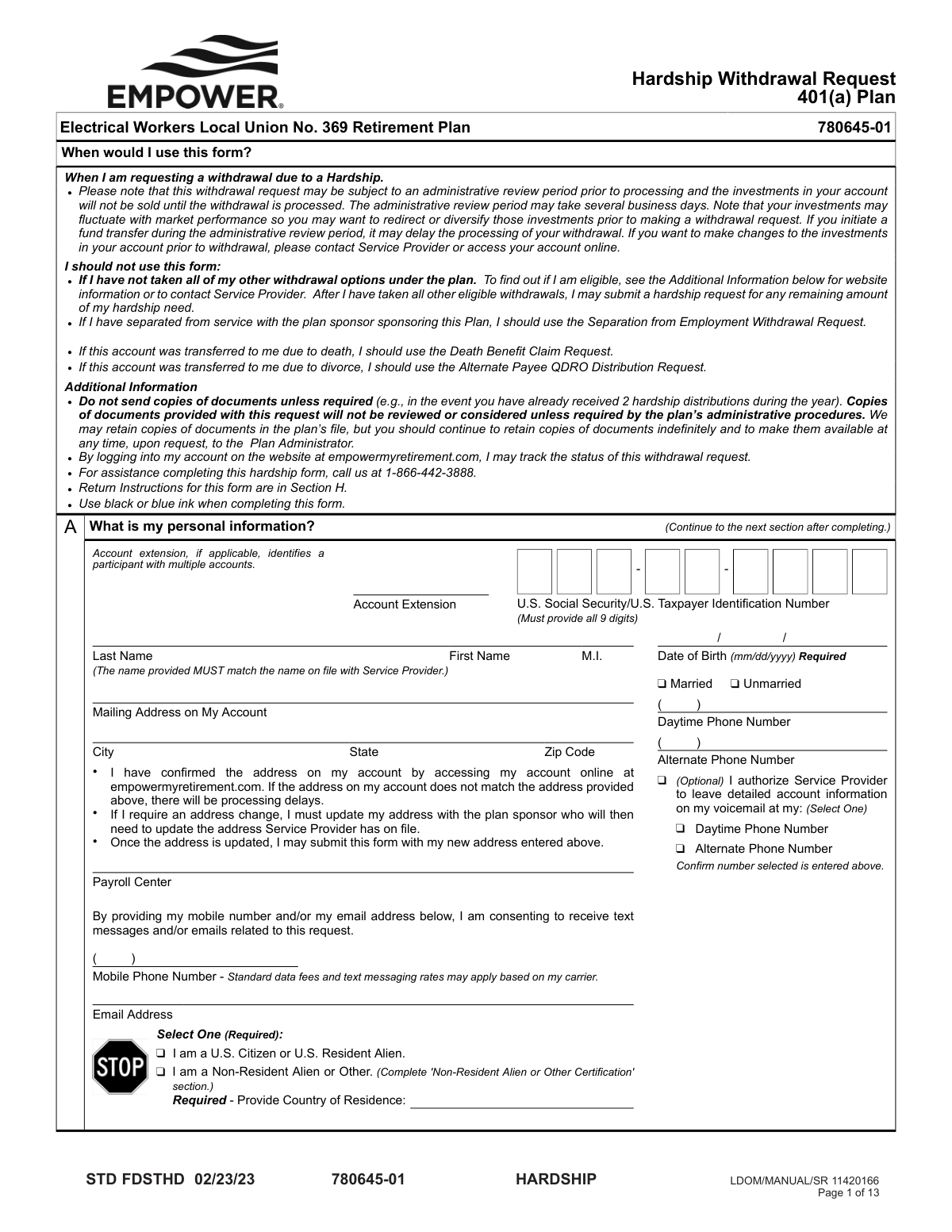
This is a formal application for participants of a 401(a) retirement plan to request funds due to an immediate and heavy financial need, such as medical expenses, preventing eviction, or tuition payments. It is important because it allows access to retirement savings for specific emergencies, but requires the applicant to certify the nature of the hardship and retain supporting documents. Today, this form can be filled out quickly and accurately using AI-powered services like Instafill.ai, which can also convert non-fillable PDF versions into interactive fillable forms.
STD FDSTHD is part of the
withdrawal forms, hardship withdrawal forms, hardship forms and withdrawal request forms categories on Instafill.
Rather not fill this in by hand? Instafill is an online form filler that completes PDF forms automatically — upload the blank form, answer a few questions, and the AI fills every field.
Form specifications
| Form name: | Hardship Withdrawal Request 401(a) Plan |
| Number of pages: | 1 |
| Language: | English |
Our AI automatically handles information lookup, data retrieval, formatting, and form filling.
It takes less than a minute to fill out STD FDSTHD using our AI form filling.
Securely upload your data. Information is encrypted in transit and deleted immediately after the form is filled out.
Instafill Demo: How to fill out PDF forms in seconds with AI
How to Fill Out STD FDSTHD Online for Free in 2026
Are you looking to fill out a STD FDSTHD form online quickly and accurately? Instafill.ai offers the #1 AI-powered PDF filling software of 2026, allowing you to complete your STD FDSTHD form in just 37 seconds or less.
Follow these steps to fill out your STD FDSTHD form online using Instafill.ai:
- 1 Navigate to Instafill.ai and upload or select the Hardship Withdrawal Request 401(a) Plan form.
- 2 Use the AI to automatically fill in your personal information in Section A, such as your name, Social Security Number, and address.
- 3 In Section B, specify the reason for your hardship withdrawal, providing the required details and total expense amount for the qualifying event.
- 4 Enter the total amount you are requesting in Section C and choose your preferred payment delivery method in Section D.
- 5 Complete the federal and state income tax withholding elections in Section F, attaching an IRS Form W-4R if you wish to elect a custom withholding amount.
- 6 Carefully review all information, then provide a handwritten signature in Section G. If you are married, your spouse's notarized consent may also be required.
- 7 Submit the completed and signed form as instructed in Section H, either by uploading it electronically or sending it via mail.
Our AI-powered system ensures each field is filled out correctly, reducing errors and saving you time.
Why Choose Instafill.ai for Your Fillable STD FDSTHD Form?
Speed
Complete your STD FDSTHD in as little as 37 seconds.
Up-to-Date
Always use the latest 2026 STD FDSTHD form version.
Cost-effective
No need to hire expensive lawyers.
Accuracy
Our AI performs 10 compliance checks to ensure your form is error-free.
Security
Your personal information is protected with bank-level encryption.
Frequently Asked Questions About STD FDSTHD
This form is used to request a hardship withdrawal from your 401(a) plan with the Electrical Workers Local Union No. 369 Retirement Plan. It is for active participants who have an immediate and heavy financial need and have already used all other available withdrawal options.
Yes, do not use this form if you have separated from service, are a beneficiary claiming a death benefit, or an alternate payee from a divorce. Specific forms exist for those situations.
Approved reasons include certain medical expenses, costs to purchase a principal residence, prevention of eviction or foreclosure, tuition payments, funeral expenses, and repairs for damage to your principal residence. You must select a qualifying reason in Section B.
Generally, you do not need to send copies of supporting documents unless specifically required. However, you must keep all original documents and be prepared to provide them to the Plan Administrator at any time upon request.
Checking the 'Net Amount' box means the amount you write is the exact amount you will receive after taxes are withheld. If you don't check the box, the amount you write is the total withdrawn from your account, and your payment will be that amount minus taxes.
Yes, if you are married, your spouse must sign the consent form in Section G. Their signature must be notarized by a Notary Public or witnessed by your authorized Plan Administrator for the request to be valid.
You can upload the form electronically by logging into your account at empowermyretirement.com, or you can mail it via regular or express mail to the addresses listed in Section H. Hand-delivered forms are not accepted.
First, there is an administrative review period of several business days. Once approved, electronic deposit (ACH) takes 2-3 business days, express delivery takes 1-2 business days, and regular mail can take up to 5 business days.
You can track the status of your request by logging into your account on the website at empowermyretirement.com.
No, a handwritten signature is required for both you and your spouse (if applicable). The form states that electronic signatures will not be accepted and will cause significant delays.
For assistance with completing the hardship form, you can call the service provider at 1-866-442-3888.
Yes, services like Instafill.ai use AI to accurately auto-fill form fields with your personal information, which can save you time and help avoid errors.
You can use a service like Instafill.ai to fill out the form online. Simply upload the PDF, and the tool will help you complete the fields before you print it for the required handwritten signatures.
If you have a non-fillable PDF, you can use a service like Instafill.ai to convert it into an interactive, fillable form. This allows you to type your information directly into the fields before printing.
Compliance STD FDSTHD
Validation Checks by Instafill.ai
1
SSN/TIN Format and Completeness
Verifies that the U.S. Social Security Number or Taxpayer Identification Number in Section A consists of exactly 9 digits and contains no other characters. This number is the primary key for identifying the participant and is mandatory for tax reporting. If the number is missing, incomplete, or improperly formatted, the request cannot be processed and must be rejected.
2
Participant Name Verification
Confirms that the First Name and Last Name provided in Section A match the name on file for the specified account or SSN. This is a critical fraud prevention measure to ensure the request is legitimate. A name mismatch will cause the request to be flagged for manual review or rejected, requiring the participant to resolve the discrepancy before proceeding.
3
Date of Birth Validity
Checks that the Date of Birth in Section A is a required field, is in a valid MM/DD/YYYY format, and represents a plausible date (e.g., the person is over 18 and the date is not in the future). This data is used for identity verification and determining eligibility for certain withdrawal rules. An invalid or missing date will halt processing.
4
Citizenship Status and Conditional Section E Completion
Ensures that a citizenship status is selected in Section A. If the 'Non-Resident Alien or Other' option is checked, this validation confirms that Section E ('Non-Resident Alien or Other Certification') has been fully completed. This is crucial for applying the correct tax withholding rules, and failure to complete the required conditional section will make the form incomplete and delay processing.
5
Marital Status and Conditional Spousal Consent Requirement
Validates that a marital status is selected in Section A. If the participant selects 'Married', the system flags that the 'My Spouse's Consent' portion of Section G is mandatory. This is a legal requirement to waive the Qualified Joint and Survivor Annuity (QJSA), and a missing spousal signature on a married participant's form will render the request invalid.
6
Hardship Reason and Detail Completeness
Verifies that the user has selected at least one hardship reason in Section B and that all corresponding required fields for that reason are filled out. For example, if 'Purchase of your Principal Residence' is selected, the purchase price and address must be provided. This ensures the hardship claim is substantiated as required by plan rules; incomplete details will result in rejection.
7
Withdrawal Amount Does Not Exceed Hardship Cost
Compares the 'Total cost of the event(s) causing hardship' from Section C against the sum of the 'Total expense amount(s)' listed in Section B. The requested withdrawal amount cannot be greater than the documented financial need. This is a key compliance check to adhere to IRS regulations, and a discrepancy will cause the request to be rejected for correction.
8
Withdrawal Request Does Not Exceed Available Funds
Checks that the requested withdrawal amount in Section C (grossed up for taxes if 'Net Amount' is checked) does not exceed the participant's available vested account balance. Attempting to withdraw more funds than are available is impossible. This check prevents a failed transaction and provides immediate feedback to the user to adjust their request.
9
ACH Delivery Eligibility
If 'Electronic Deposit (ACH)' is selected in Section D, this validation confirms that a verified bank account has been on file for the participant for at least 15 days. This is a security measure to prevent fraudulent redirection of funds to a newly added account. If the condition is not met, the validation fails and the payment method must be defaulted to a physical check, as stated on the form.
10
Mutually Exclusive Tax Withholding Input
For the State Income Tax withholding election in Section F, the form provides fields for both a percentage (%) and a flat dollar amount ($). This validation ensures that the user has entered a value in only one of these fields, not both. Ambiguous instructions cannot be processed, so if both are filled, the form must be rejected and sent back for clarification.
11
Participant Signature and Date Presence
Verifies that the participant's signature and a signature date are present in Section G. The signature is a legal attestation that the information provided is true and accurate. A missing signature or date invalidates the entire request, as it lacks the required legal consent and certification from the participant.
12
Spousal and Notary Signature Date Synchronization
If spousal consent is notarized, this check ensures the date written next to the spouse's signature in Section G matches the date of notarization on the notary's certificate. A mismatch invalidates the notarization, as it fails to prove the signature was witnessed on the specified date. This is a strict legal requirement that, if failed, will cause the spousal consent to be rejected.
13
Spousal Consent Timeliness
Validates that the spouse's signature date in Section G is no more than 180 days prior to the date the withdrawal request is submitted. Plan and regulatory rules require consent to be recent to be considered valid. An older signature is considered stale and legally insufficient, requiring the participant to obtain a new signature before the withdrawal can be processed.
14
Hardship Event Date Plausibility
Checks that dates entered within a specific hardship reason in Section B are logical. For example, in the 'Prevention of Eviction/Foreclosure' section, the 'Due date to avoid foreclosure or eviction' must be in the future or very recent past relative to the submission date. This helps catch data entry errors and ensures the hardship represents an 'immediate and heavy' financial need.
Common Mistakes in Completing STD FDSTHD
Applicants often request the specific amount they need (e.g., $10,000) but fail to check the 'Net Amount' box in Section C. This results in them receiving a smaller payment after mandatory taxes are withheld, which may be insufficient for their hardship. To avoid this, carefully read the examples provided and check the 'Net Amount' box to ensure the withdrawn funds cover both the hardship and the associated taxes. AI-powered tools like Instafill.ai can highlight such critical choices to prevent costly financial errors.
Married participants frequently submit the form without their spouse's signature in Section G, or the signature is not properly witnessed by a Plan Administrator or notarized. Since spousal consent is a legal requirement to waive the annuity benefit, its absence or improper validation leads to immediate rejection of the request. Before submitting, a married applicant must ensure their spouse signs, dates, and has their signature validated exactly as instructed on the form.
The notary requirements in Section G are complex, state-specific, and often lead to errors, such as the notary using the on-form section when a separate state-required certificate is needed. An invalid notarization, or a mismatch between the signature date and notary date, voids the spousal consent and causes the form to be rejected. Carefully review the notary instructions with the notary public to ensure full compliance before they apply their seal.
In an increasingly digital world, it is a common mistake to use an electronic or stamped signature, but this form explicitly requires a handwritten 'wet' signature in multiple places. Submitting a form with a non-handwritten signature will cause it to be rejected, forcing you to reprint, re-sign, and resubmit the entire package. Always print the completed form and sign it by hand with blue or black ink as specified.
Applicants often enter a name or mailing address in Section A that does not exactly match what the service provider has on file, such as using a nickname or a recently changed address not yet updated with the plan sponsor. This data mismatch halts processing until the discrepancy is resolved, causing significant delays. Before filling out the form, log into your account at empowermyretirement.com to verify your exact name and address on record.
In Section B, applicants may enter the total expense amount for their hardship but neglect to fill in the associated required details, like the patient's name for medical expenses or the property address for a home purchase. The form states that incomplete information will not be processed, leading to rejection and delays. Since this is a non-fillable PDF, using a tool like Instafill.ai can convert it into a smart, fillable form that helps ensure no required fields are missed.
Applicants select the fast ACH delivery option in Section D without realizing it is only available for bank accounts that have been on file for at least 15 days. This error results in the request defaulting to a slower mailed check, delaying access to urgently needed funds. To use this option, ensure your bank account is set up and validated online well in advance of submitting the form.
Believing it will strengthen their case, applicants often send copies of bills, invoices, or contracts when the form explicitly instructs them not to. This does not speed up the process and can create confusion, as the extra documents will not be reviewed and may be discarded. You must retain all substantiating documents for your records but only submit them if the plan administrator requests them at a later time.
When wanting to specify a federal tax withholding amount different from the 10% default, applicants often forget to attach the necessary IRS Form W-4R as mentioned in Section F. This results in the service provider applying default withholding rules, which may not align with the applicant's tax situation and could lead to an unexpected tax bill. To customize your withholding, you must download, complete, and attach the appropriate tax forms with your submission.
The spousal consent portion of Section G contains a specific line where the spouse must acknowledge the vested account balance and date, which is easily missed within the dense legal text. Leaving these fields blank renders the consent incomplete and will cause the entire form to be rejected. The participant should find this information on their statement or online and ensure their spouse fills it in before the form is notarized.
Saved over 80 hours a year
“I was never sure if my IRS forms like W-9 were filled correctly. Now, I can complete the forms accurately without any external help.”
Kevin Martin Green
Your data stays secure with advanced protection from Instafill and our subprocessors




Robust compliance program
Transparent business model
You’re not the product. You always know where your data is and what it is processed for.
ISO 27001, HIPAA, and GDPR
Our subprocesses adhere to multiple compliance standards, including but not limited to ISO 27001, HIPAA, and GDPR.
Security & privacy by design
We consider security and privacy from the initial design phase of any new service or functionality. It’s not an afterthought, it’s built-in, including support for two-factor authentication (2FA) to further protect your account.
Fill out STD FDSTHD with Instafill.ai
Worried about filling PDFs wrong? Instafill securely fills hardship-withdrawal-request-401a-plan forms, ensuring each field is accurate.
