Yes! You can use AI to fill out New York State Deferred Compensation Plan Direct Rollover to a Roth IRA
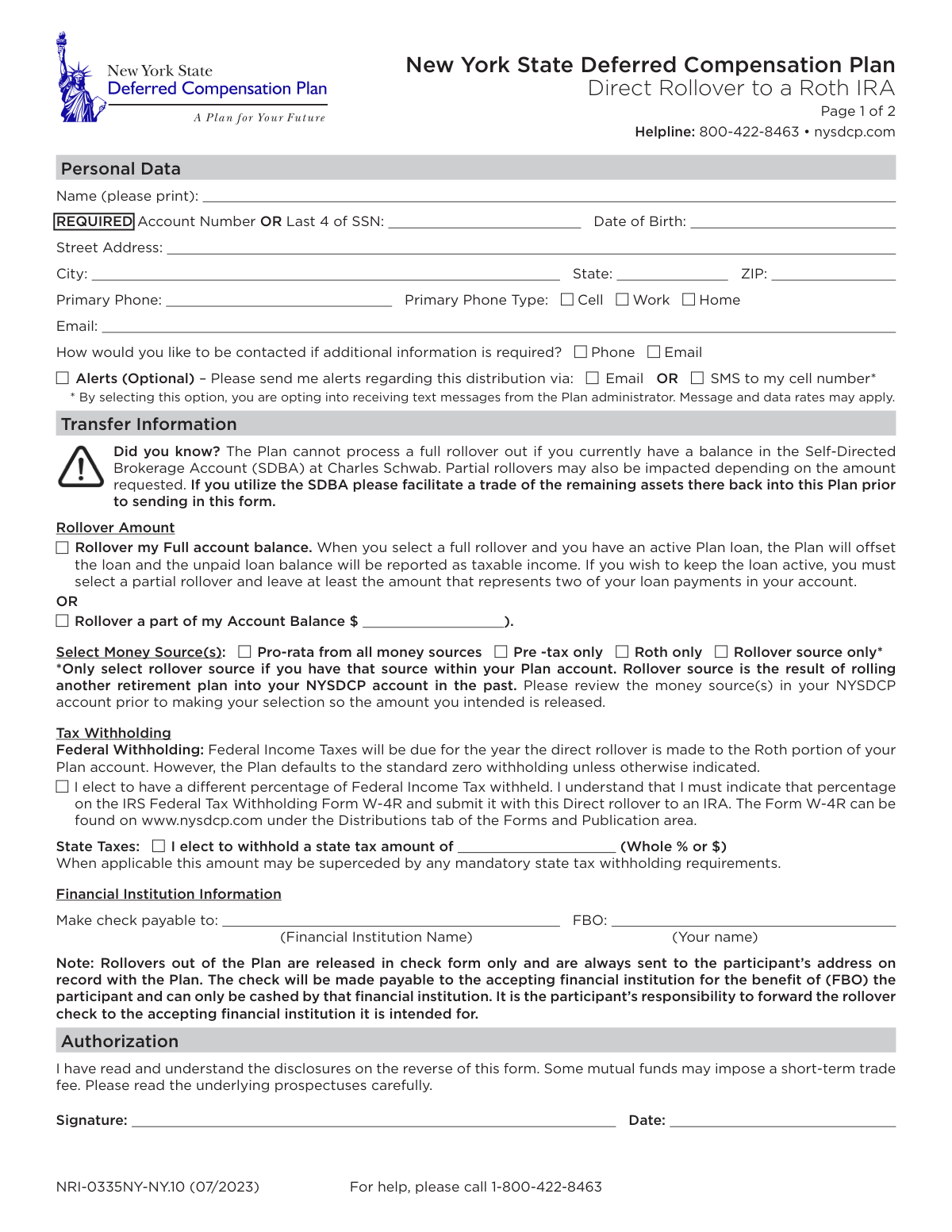
This form facilitates the direct rollover of funds from a participant's New York State Deferred Compensation Plan account into a Roth Individual Retirement Arrangement (IRA). It is important for individuals who wish to convert their pre-tax retirement savings into post-tax Roth funds, which involves paying income tax on the rolled-over amount in the current year for future tax-free growth and withdrawals. Today, this form can be filled out quickly and accurately using AI-powered services like Instafill.ai, which can also convert non-fillable PDF versions into interactive fillable forms.
NRI-0335NY-NY.10 is part of the
New York forms, New York State forms, rollover forms, IRA forms, deferred compensation forms, IRA rollover forms and Roth IRA forms categories on Instafill.
Rather not fill this in by hand? Instafill is an online form filler that completes PDF forms automatically — upload the blank form, answer a few questions, and the AI fills every field.
Form specifications
| Form name: | New York State Deferred Compensation Plan Direct Rollover to a Roth IRA |
| Number of pages: | 1 |
| Language: | English |
Our AI automatically handles information lookup, data retrieval, formatting, and form filling.
It takes less than a minute to fill out NRI-0335NY-NY.10 using our AI form filling.
Securely upload your data. Information is encrypted in transit and deleted immediately after the form is filled out.
Instafill Demo: How to fill out PDF forms in seconds with AI
How to Fill Out NRI-0335NY-NY.10 Online for Free in 2026
Are you looking to fill out a NRI-0335NY-NY.10 form online quickly and accurately? Instafill.ai offers the #1 AI-powered PDF filling software of 2026, allowing you to complete your NRI-0335NY-NY.10 form in just 37 seconds or less.
Follow these steps to fill out your NRI-0335NY-NY.10 form online using Instafill.ai:
- 1 Navigate to Instafill.ai and upload or select the 'Direct Rollover to a Roth IRA' form for the New York State Deferred Compensation Plan.
- 2 Use the AI assistant to provide your personal data, including your name, account number or the last 4 digits of your SSN, date of birth, and contact details.
- 3 Specify the transfer information by indicating whether you are rolling over your full or a partial account balance and selecting the money sources for the transfer.
- 4 Complete the tax withholding section, deciding whether to have federal or state income taxes withheld from the rollover amount and specifying the percentage or dollar amount.
- 5 Enter the receiving financial institution's information, making the check payable to the institution for your benefit (FBO).
- 6 Review all the information auto-filled by the AI for accuracy, then electronically sign and date the authorization section.
- 7 Download the completed form and submit it to the New York State Deferred Compensation Plan's Administrative Service Agency via mail or fax as per the instructions.
Our AI-powered system ensures each field is filled out correctly, reducing errors and saving you time.
Why Choose Instafill.ai for Your Fillable NRI-0335NY-NY.10 Form?
Speed
Complete your NRI-0335NY-NY.10 in as little as 37 seconds.
Up-to-Date
Always use the latest 2026 NRI-0335NY-NY.10 form version.
Cost-effective
No need to hire expensive lawyers.
Accuracy
Our AI performs 10 compliance checks to ensure your form is error-free.
Security
Your personal information is protected with bank-level encryption.
Frequently Asked Questions About NRI-0335NY-NY.10
This form is used to request a direct rollover of your funds from the New York State Deferred Compensation Plan (NYSDCP) into a Roth IRA at a different financial institution.
Any participant in the NYSDCP who wants to move their retirement savings into a Roth IRA must complete and submit this form.
If you request a full rollover with an active loan, the Plan will offset the loan, and the unpaid balance will be reported as taxable income for the year. To avoid this, you must select a partial rollover and leave sufficient funds in your account.
You cannot process a full rollover if you have a balance in an SDBA. You must first facilitate a trade of those assets back into the main Plan before submitting this form.
No, the Plan's default is zero federal tax withholding for a Roth IRA rollover, although taxes will be due. If you want federal taxes withheld, you must submit an IRS Form W-4R with this request.
You can choose to roll over your full account balance or a specific partial dollar amount. Be aware that a full rollover will offset any active loans you may have.
The funds are issued as a check made payable to your new financial institution 'for the benefit of' (FBO) you. The check is mailed to your address on record, and you are responsible for forwarding it to your new institution.
You must provide the name of the financial institution where your Roth IRA is held. The rollover check will be made payable to this institution.
You can send the form via standard mail, overnight mail, or fax. The specific addresses and fax number are listed on the second page of the form.
This option should only be selected if you have previously rolled money from another retirement plan into your NYSDCP account. It directs the Plan to only use those specific funds for this new rollover.
Yes, federal income taxes will be due for the year you make the direct rollover to a Roth IRA. You should consult with a tax advisor to understand the impact on your personal tax situation.
Yes, services like Instafill.ai use AI to accurately auto-fill form fields with your information, which can save you time and help prevent errors.
You can upload the PDF to Instafill.ai, and its AI will help you fill in the required fields like your personal data and transfer information before you print and sign it.
You can use a tool like Instafill.ai, which can convert flat, non-fillable PDFs into interactive forms that you can easily complete on your computer.
Compliance NRI-0335NY-NY.10
Validation Checks by Instafill.ai
1
Account Identifier Requirement
This check ensures that either the 'Account Number' or the 'Last 4 of SSN' field is completed. This information is critical for uniquely identifying the participant's account for processing. If neither is provided, the form submission will be rejected as the system cannot locate the correct account.
2
SSN Format Validation
Validates that if the 'Last 4 of SSN' is provided, it consists of exactly four numeric digits. This maintains data integrity and ensures the identifier is in the correct format for matching against system records. Submissions with incorrectly formatted SSN data will fail validation and require correction.
3
Date of Birth Plausibility
Verifies that the 'Date of Birth' is a valid, properly formatted date and falls within a reasonable range (e.g., not in the future, and the person is over 18 and under 120 years old). This acts as a secondary identity verification and prevents data entry errors. An invalid or implausible date will halt processing until corrected.
4
Exclusive Rollover Amount Selection
This validation ensures that the user has selected either 'Rollover my Full account balance' or 'Rollover a part of my Account Balance', but not both. Selecting one is mandatory to define the transaction, while selecting both creates ambiguity. The form will be considered incomplete if zero or two options are selected.
5
Partial Rollover Amount Specification
If the user selects 'Rollover a part of my Account Balance', this check confirms that a valid, positive numeric value is entered in the corresponding dollar amount field. A missing or non-numeric amount makes the request impossible to execute. The submission will be rejected pending entry of a valid dollar amount.
6
Partial Rollover Amount vs. Account Balance
This check compares the requested partial rollover amount against the participant's total available account balance. The requested amount cannot exceed the available funds. This prevents overdraft situations and transaction failures, ensuring the request is financially viable.
7
SDBA Balance Check for Full Rollover
For requests to 'Rollover my Full account balance', this validation queries the account to ensure there is no outstanding balance in the Self-Directed Brokerage Account (SDBA). As stated on the form, a full rollover cannot be processed with an SDBA balance. A failed check will require the participant to move SDBA assets before the rollover can proceed.
8
Money Source Selection Completeness
Ensures that at least one option under 'Select Money Source(s)' has been checked. This information is required to determine which funds within the account should be liquidated for the rollover. Without this selection, the system cannot proceed and the form will be returned for completion.
9
Rollover Source Availability Check
If the user selects 'Rollover source only', this validation cross-references the participant's account details to confirm a 'Rollover source' actually exists. This prevents transaction errors that would occur if the selected source is not present in the account. If the source is not found, the user will be notified to make a different selection.
10
SMS Alert and Phone Type Consistency
This check verifies that if the user opts into 'SMS to my cell number' for alerts, the 'Primary Phone Type' selected is 'Cell'. Sending an SMS to a landline (Work or Home) is not possible and would result in a communication failure. The system will flag this inconsistency for correction before processing.
11
Financial Institution Name Requirement
Validates that the 'Make check payable to' field, which specifies the receiving financial institution, is not blank. This name is legally required to be printed on the rollover check to ensure it can only be deposited by the correct institution. A missing name will prevent the check from being issued.
12
FBO Name Consistency
This check ensures the name entered in the 'FBO' (For Benefit Of) field matches the participant's name in the 'Personal Data' section. This is crucial for the receiving institution to correctly credit the funds to the participant's new IRA account. A mismatch can cause significant delays or rejection of the deposit.
13
State Tax Withholding Amount Format
If the user elects to withhold state tax by checking the box, this validation ensures the provided value is a valid whole percentage or a dollar amount. An empty or improperly formatted field would make it impossible to calculate the withholding. The form would be flagged as incomplete if the election is made without a valid amount.
14
Authorization Signature and Date Presence
Confirms that the 'Signature' and 'Date' fields in the Authorization section are completed. The signature provides legal authorization for the transaction, and the date establishes when the authorization was given. A missing signature or date invalidates the request, and the form will be rejected.
15
Federal Tax Form W-4R Cross-Reference
If the participant checks the box to elect a different federal withholding percentage, this validation flags the submission to verify that the required IRS Form W-4R is also attached. The form explicitly states the W-4R is required for non-standard withholding. If the W-4R is missing, the entire submission will be put on hold.
Common Mistakes in Completing NRI-0335NY-NY.10
The form requires either the Account Number or the last 4 digits of your SSN for processing. Applicants often overlook this field, leading to the form's immediate rejection and significant delays. To avoid this, double-check that one of these two identifiers is clearly and accurately entered in the 'Personal Data' section before submission.
The form clearly warns that a full rollover cannot be processed if you have funds in a Self-Directed Brokerage Account (SDBA). This error occurs when participants miss the 'Did you know?' notice and fail to move SDBA assets back into the plan first. This results in a rejected request, forcing the participant to liquidate SDBA holdings and restart the entire process.
Participants with an active loan often select a 'Full account balance' rollover without realizing this action will offset the loan. The outstanding loan balance is then reported as taxable income, potentially creating a large, unexpected tax bill. To keep a loan active, you must select a 'Partial' rollover and leave sufficient funds in your account as instructed.
A direct rollover to a Roth IRA is a taxable event, but this form defaults to 0% federal tax withholding. Many people assume taxes are withheld automatically and are later surprised by a large tax liability. You must proactively elect to withhold taxes and submit the separate Form W-4R to avoid this; otherwise, no federal taxes will be withheld.
If you elect to have federal taxes withheld, you must check the box AND submit the separate IRS Form W-4R with your application. A common mistake is checking the box but forgetting to include the W-4R form. This omission results in the plan defaulting to 0% withholding, negating your intent and potentially causing issues with the IRS.
The rollover check must be made payable to the receiving financial institution 'For the Benefit Of' (FBO) you. People often write only the institution's name or their own name, omitting the required 'FBO' designation. This causes the receiving bank to reject the check, forcing a lengthy process to have a new one issued.
Applicants sometimes assume the funds will be transferred electronically or that the check is sent directly to the new institution. The form states the check is mailed to the participant's address on record, and it is your responsibility to forward it. Misunderstanding this can lead to long delays as you wait for a transfer that will not happen, while the physical check may be lost or misplaced.
The form requires you to select which money source to roll over (e.g., Pre-tax, Roth, Rollover source). A frequent error is selecting 'Rollover source only' without actually having such a source in the account. This happens when participants don't review their account details first, leading to processing errors or rejection of the form. Always verify your available money sources on the plan website before filling out this section.
Forgetting to sign and date the authorization section is a simple but very common mistake that invalidates the entire request. An unsigned form has no legal standing and cannot be processed, halting the rollover until a properly completed form is submitted. Always do a final review to ensure the signature and date fields are complete. AI-powered tools like Instafill.ai can help by highlighting required signature fields before you finalize a document.
Since this is a non-fillable PDF, it must be printed and completed by hand, where poor handwriting can cause significant issues. Illegible names, numbers, or addresses can be misinterpreted, leading to data entry errors, misdirected mail, or form rejection. To prevent this, print clearly in block letters. Alternatively, services like Instafill.ai can convert flat PDFs into fillable forms, allowing you to type your information for perfect clarity.
Saved over 80 hours a year
“I was never sure if my IRS forms like W-9 were filled correctly. Now, I can complete the forms accurately without any external help.”
Kevin Martin Green
Your data stays secure with advanced protection from Instafill and our subprocessors




Robust compliance program
Transparent business model
You’re not the product. You always know where your data is and what it is processed for.
ISO 27001, HIPAA, and GDPR
Our subprocesses adhere to multiple compliance standards, including but not limited to ISO 27001, HIPAA, and GDPR.
Security & privacy by design
We consider security and privacy from the initial design phase of any new service or functionality. It’s not an afterthought, it’s built-in, including support for two-factor authentication (2FA) to further protect your account.
Fill out NRI-0335NY-NY.10 with Instafill.ai
Worried about filling PDFs wrong? Instafill securely fills new-york-state-deferred-compensation-plan-direct-rollover-to-a-roth-ira forms, ensuring each field is accurate.
