Yes! You can use AI to fill out Separation from Employment Withdrawal Form
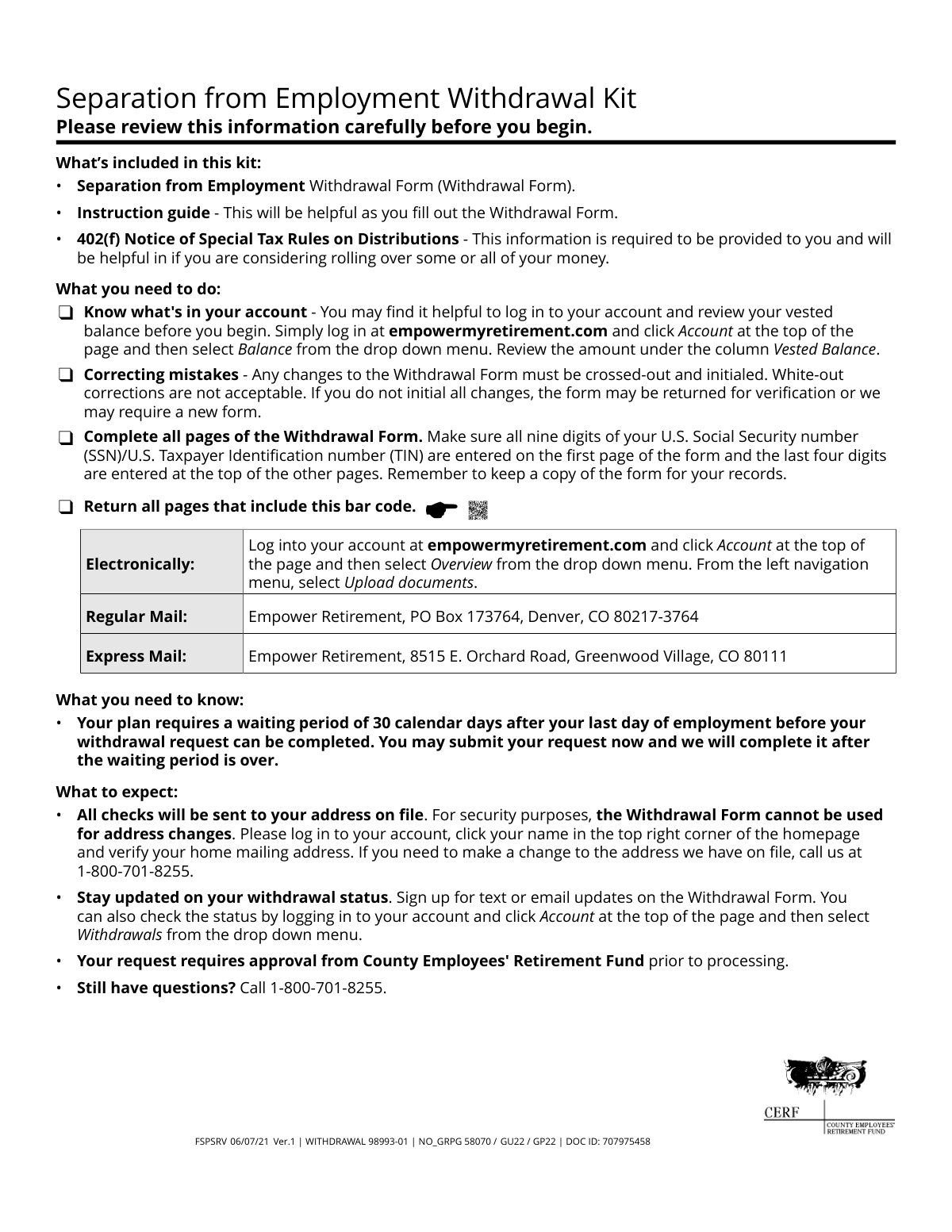
The Separation from Employment Withdrawal Form allows individuals who are no longer employed with the County Employees' Retirement Fund to request a distribution of their vested balance from the CERF Savings Plan - 457 Plan. This form is crucial for accessing retirement funds, either as a direct payment or as a rollover into another eligible retirement account, such as an IRA. Today, this form can be filled out quickly and accurately using AI-powered services like Instafill.ai, which can also convert non-fillable PDF versions into interactive fillable forms.
WITHDRAWAL 98993-01 is part of the
VA forms, employment forms, HR forms and withdrawal forms categories on Instafill.
Rather not fill this in by hand? Instafill is an online form filler that completes PDF forms automatically — upload the blank form, answer a few questions, and the AI fills every field.
Form specifications
| Form name: | Separation from Employment Withdrawal Form |
| Number of pages: | 1 |
| Language: | English |
Our AI automatically handles information lookup, data retrieval, formatting, and form filling.
It takes less than a minute to fill out WITHDRAWAL 98993-01 using our AI form filling.
Securely upload your data. Information is encrypted in transit and deleted immediately after the form is filled out.
Instafill Demo: How to fill out PDF forms in seconds with AI
How to Fill Out WITHDRAWAL 98993-01 Online for Free in 2026
Are you looking to fill out a WITHDRAWAL 98993-01 form online quickly and accurately? Instafill.ai offers the #1 AI-powered PDF filling software of 2026, allowing you to complete your WITHDRAWAL 98993-01 form in just 37 seconds or less.
Follow these steps to fill out your WITHDRAWAL 98993-01 form online using Instafill.ai:
- 1 Navigate to Instafill.ai and upload or select the Separation from Employment Withdrawal Form.
- 2 Use the AI assistant to fill in your personal information in Step 1, including your name, Social Security Number, date of birth, and citizenship status.
- 3 In Step 2, select your reason for the withdrawal, either 'Retirement' or 'Separation from employment'.
- 4 Complete Step 3 by detailing your withdrawal instructions. Specify whether you want a direct payment, a rollover, or a combination, and enter the corresponding amounts or percentages.
- 5 Proceed to Step 4 to make your federal and state tax withholding elections, choosing either the default rate or an additional amount.
- 6 Select your delivery options in Step 5 for any funds paid directly to you and for any rollover checks.
- 7 Review all entered information for accuracy, provide your handwritten signature and date in Step 6, and submit the completed form as instructed.
Our AI-powered system ensures each field is filled out correctly, reducing errors and saving you time.
Why Choose Instafill.ai for Your Fillable WITHDRAWAL 98993-01 Form?
Speed
Complete your WITHDRAWAL 98993-01 in as little as 37 seconds.
Up-to-Date
Always use the latest 2026 WITHDRAWAL 98993-01 form version.
Cost-effective
No need to hire expensive lawyers.
Accuracy
Our AI performs 10 compliance checks to ensure your form is error-free.
Security
Your personal information is protected with bank-level encryption.
Frequently Asked Questions About WITHDRAWAL 98993-01
This form is for former employees of the County Employees' Retirement Fund who wish to withdraw funds from their CERF Savings Plan - 457 Plan. You can use it to request a payment to yourself, a rollover to another retirement account, or a combination of both.
There is a required 30-day waiting period after your last day of employment. After that, your request requires approval, which can take several business days, followed by up to five business days for processing plus delivery time.
You can submit all pages with the barcode electronically by uploading them to your account at empowermyretirement.com. Alternatively, you can send the form via regular or express mail to the Empower Retirement addresses provided.
No, you cannot use this form to change your address for security reasons. You must call Empower Retirement at 1-800-701-8255 to update your address before submitting the form, as all checks are sent to the address on file.
The rollover check will be made payable to your new IRA company or employer's plan, but it will be mailed to your home address on file. You are responsible for forwarding the check to the new institution.
If you request a payment directly to yourself, a mandatory 20% will be withheld for federal taxes. State tax withholding is based on your state of residence, and you may choose to have extra amounts withheld for both.
To correct a mistake, you must cross out the incorrect information and write your initials next to the change. Using white-out is not acceptable and may cause your form to be returned.
Yes, if you are not a U.S. citizen or U.S. resident alien, you must complete and submit IRS Form W-8BEN with your withdrawal request. If this form is missing or incorrect, 30% of your withdrawal will be withheld for federal taxes.
Yes, the form allows you to do both. In Step 3, you can complete Option A to specify an amount to be paid to you and Option B to specify an amount to be rolled over.
There are no fees for standard delivery by regular mail. However, there is a $30 fee for express delivery and a $15 fee for an electronic deposit (ACH) to your bank account.
Yes, an original, handwritten signature is required in Step 6. You must print the completed form to sign it, as digital or typed signatures are not accepted.
Yes, services like Instafill.ai use AI to accurately auto-fill form fields, which can help you complete the form faster and with fewer errors. This is especially useful for repetitive information like your name and SSN.
You can use a service like Instafill.ai to fill out the form online. Simply upload the PDF, and the tool will help you complete the fields interactively before you print it for your required handwritten signature.
If you have a non-fillable or 'flat' PDF, you can use a tool like Instafill.ai to convert it into an interactive, fillable form. This allows you to type your information directly into the fields before printing.
Compliance WITHDRAWAL 98993-01
Validation Checks by Instafill.ai
1
SSN/TIN Format and Completeness
This check verifies that the U.S. Social Security Number or Taxpayer Identification Number in Step 1 is present and contains exactly nine digits. It is critical for identity verification and mandatory for IRS tax reporting. If the number is missing, incomplete, or in an invalid format, the form will be rejected and returned to the applicant for correction, causing significant processing delays.
2
SSN/TIN Consistency Across Pages
This validation ensures the last four digits of the SSN/TIN entered at the top of pages 2 through 8 match the last four digits of the full SSN/TIN provided on page 1. This cross-page check confirms document integrity and ensures all pages belong to the same request. A mismatch will flag the form for manual review or rejection to prevent processing errors.
3
Name Matches Account Record
Validates that the full first and last name provided in Step 1 exactly matches the name registered to the account on file. This is a primary security measure to prevent unauthorized access and fraudulent withdrawals. If the names do not match, the request will be halted and may require the user to submit legal name-change documentation or a new form.
4
Citizenship and W-8BEN Dependency
This check enforces a conditional requirement based on the citizenship question in Step 1. If the applicant answers 'No' to being a U.S. citizen or resident alien, the system verifies that the required IRS Form W-8BEN has been submitted with the packet. Failure to provide the W-8BEN form will result in processing delays and default to a 30% federal tax withholding.
5
Mutually Exclusive Withdrawal Reason
In Step 2, this validation ensures that the applicant has selected one, and only one, reason for the withdrawal ('Retirement' or 'Separation from employment'). Selecting both or neither reason creates ambiguity in processing and determining eligibility. If this rule is violated, the form will be considered incomplete and returned for clarification.
6
Withdrawal Amount Exclusivity (Pay to Me)
For a partial withdrawal under 'Option A: Pay it to me', this check confirms that the user has specified either a percentage or a dollar amount, but not both. Entering values in both fields creates a conflicting instruction. If both are filled, the form will be flagged as invalid and require correction before the withdrawal can be processed.
7
Withdrawal Amount Exclusivity (Rollover)
For a partial rollover under 'Option B: Roll over funds', this check confirms that the user has specified either a percentage or a dollar amount, but not both. This prevents ambiguity in how much of the account balance should be rolled over. A form with both fields completed will be rejected for correction.
8
Logical Withdrawal Sum
This is a crucial logic check across Step 3 that ensures the total withdrawal elections do not conflict or exceed 100% of the account balance. It prevents invalid combinations, such as selecting 'Full withdrawal' in Option A and any amount in Option B, or selecting partial amounts that sum to more than 100%. An illogical request will be rejected as it cannot be processed.
9
Rollover Destination Details
If the applicant chooses to roll over any funds (Option B), this validation ensures all required destination details are provided. It checks for the selection of an IRA type or employer plan, and confirms that the corresponding 'Account number' field is filled. If 'To an account elsewhere' is chosen, the 'Name of the IRA company' must also be present. Missing information will delay the rollover as the check cannot be issued correctly.
10
Effective Date Validity
This check validates the optional 'Effective date for your withdrawal' in Step 3. If a date is entered, it must be a valid calendar date in mm/dd/yyyy format, must not be in the past, and must be within the next 180 days as specified. An invalid or out-of-range date will be rejected, and the user will be asked to correct it or leave it blank for immediate processing.
11
ACH Delivery Information Verification
If 'Electronic deposit (ACH)' is selected in Step 5, this check verifies that the 'Bank account nickname' and 'Last four digits of the bank account number' are provided. More importantly, it confirms that this information matches a pre-verified bank account already on file for the user. If no matching account is found, the request will default to a paper check sent via mail to prevent fraud, and the ACH fee will not be charged.
12
Signature and Date Presence
This validation confirms that an original, handwritten signature is present in Step 6 and that the 'Signature date' field is completed. The date must be a valid, non-future date. A missing signature or date invalidates the applicant's consent and authorization, making the form legally unenforceable and causing an automatic rejection of the request.
13
Address Confirmation Match
This check compares the 'Account address (first line only)' entered in Step 1 against the first line of the mailing address currently on file for the account. This serves as a security verification step. A mismatch indicates a potential issue and will cause the withdrawal to be delayed while the user is contacted to verify their address over the phone, as per the form's instructions.
14
Extra Tax Withholding Exclusivity
In Step 4, for both Federal and State tax withholding, this check ensures that if an 'EXTRA' amount is requested, it is entered as either a percentage OR a dollar amount, but not both. Providing both creates a conflicting instruction for calculating tax withholding. The form will be considered 'not in good order' and returned for correction if this rule is violated.
Common Mistakes in Completing WITHDRAWAL 98993-01
The instructions explicitly state that corrections must be made by crossing out the error and initialing the change. Many people instinctively reach for correction fluid or tape (white-out), which is not acceptable and will lead to the form being rejected. This happens because it's a common habit, but financial forms require a clear audit trail of any changes. To avoid this, carefully review your entries before writing, and if a mistake is made, use a single line to cross it out and write your initials next to the correction.
Users often try to write their new address on the withdrawal form, assuming it will update their account. However, the form clearly states it cannot be used for address changes and that checks will be sent to the address already on file. This security measure prevents fraud but can result in payments being sent to an old address, causing significant delays and potential loss of funds. Before submitting, you must verify your address online or call the provided number to make any necessary changes.
In Step 3, when selecting a rollover, individuals often forget to provide the complete name of the new institution and, most critically, the new account number. This frequently occurs because the user has not yet opened the destination IRA or employer plan account before filling out the form. A missing account number will halt the process, as the rollover check cannot be properly issued. Always establish your new rollover account first and have the details ready before completing this section.
In Step 4, the form defaults to a 20% federal tax withholding and asks if you want to add an 'EXTRA' amount. A common error is entering the total desired withholding (e.g., 30%) instead of just the additional amount (e.g., 10%). This results in a much larger tax withholding than intended (e.g., 20% + 30% = 50%), significantly reducing the net payment received. To avoid this, calculate only the amount you want withheld *in addition* to the mandatory 20% and enter that figure.
In our increasingly digital world, it's easy to overlook the requirement for a physical, handwritten signature. The form explicitly states 'An original, handwritten signature is required,' but users may forget to sign, use a typed font, or apply a digital signature image. Any signature other than a wet ink signature will cause the form to be rejected, delaying the entire withdrawal process. Always print the form and sign it by hand in the designated box before submission.
Choosing the electronic deposit (ACH) option in Step 5 is convenient, but it only works if your bank account information has been on file and verified for at least 15 days. People often select this option assuming they can add their bank details with the form, which is not allowed for security reasons. If the account isn't pre-verified, the request will default to a check sent via regular mail, delaying access to funds and negating the speed of an electronic transfer. Verify your banking information is on file well before submitting the form.
The form requires the full nine-digit SSN on the first page but only the last four digits on all subsequent pages. Applicants sometimes forget to enter the last four digits on later pages or mistakenly enter the full SSN on every page. This inconsistency can cause processing delays as the pages are verified. AI-powered tools like Instafill.ai can help prevent this by automatically populating the correct format on each page after the initial entry.
Certain situations require additional documents, which are often overlooked. For example, non-U.S. citizens must submit a completed IRS Form W-8BEN to avoid a default 30% tax withholding. Similarly, individuals wanting a specific state tax withholding amount may need to attach their state's official tax form. Forgetting these attachments will delay the request until the missing documents are received, potentially causing tax and payment complications.
In Step 3, when requesting a partial withdrawal or rollover, the form instructs users to choose either a percentage or a specific dollar amount, but not both. A common mistake is to fill in both fields, creating ambiguity for the processor. This forces the processing agent to either return the form for clarification or follow a default rule you may not have intended, delaying your request. To avoid this, decide on one format—percentage or dollar amount—and leave the other field blank.
The instructions specify to 'Return all pages that include this bar code.' Many people mistakenly believe they only need to send back the pages they filled out, such as the signature page. However, the barcode on each page is crucial for automated document scanning and processing. Submitting an incomplete set of pages can cause the entire package to be flagged as incomplete, requiring you to resubmit the entire form and starting the process over. Since this form is a non-fillable PDF, a tool like Instafill.ai can convert it into a fillable version, making it easier to manage and ensure all necessary pages are saved and submitted together.
Saved over 80 hours a year
“I was never sure if my IRS forms like W-9 were filled correctly. Now, I can complete the forms accurately without any external help.”
Kevin Martin Green
Your data stays secure with advanced protection from Instafill and our subprocessors




Robust compliance program
Transparent business model
You’re not the product. You always know where your data is and what it is processed for.
ISO 27001, HIPAA, and GDPR
Our subprocesses adhere to multiple compliance standards, including but not limited to ISO 27001, HIPAA, and GDPR.
Security & privacy by design
We consider security and privacy from the initial design phase of any new service or functionality. It’s not an afterthought, it’s built-in, including support for two-factor authentication (2FA) to further protect your account.
Fill out WITHDRAWAL 98993-01 with Instafill.ai
Worried about filling PDFs wrong? Instafill securely fills separation-from-employment-withdrawal-form forms, ensuring each field is accurate.
