Yes! You can use AI to fill out SIRA Allied health treatment request (Catalogue no. SIRA09191)
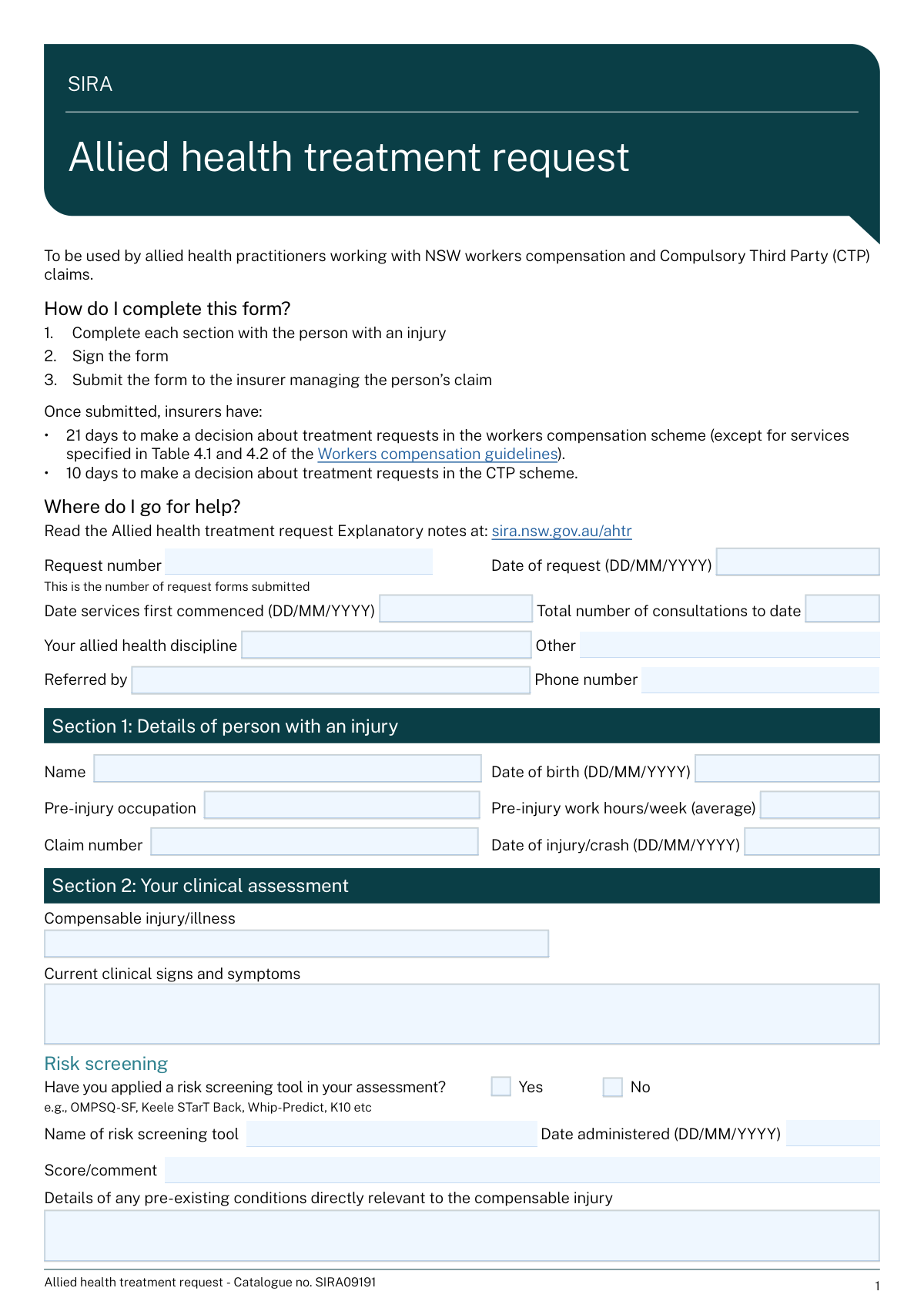
The SIRA Allied health treatment request (SIRA09191) is an official request form completed by an allied health practitioner to document clinical assessment findings, barriers to recovery, a treatment plan, and the specific services/costs being requested for an injured person under NSW workers compensation or CTP schemes. It supports insurer decision-making within required timeframes (generally 21 days for workers compensation and 10 days for CTP, with some exceptions) and provides a structured record of goals, outcome measures, and rationale for treatment. Accurate completion is important to avoid delays, ensure the request is clinically justified, and enable timely approval or follow-up for additional information. Today, this form can be filled out quickly and accurately using AI-powered services like Instafill.ai, which can also convert non-fillable PDF versions into interactive fillable forms.
Our AI automatically handles information lookup, data retrieval, formatting, and form filling.
It takes less than a minute to fill out SIRA09191 (Allied health treatment request) using our AI form filling.
Securely upload your data. Information is encrypted in transit and deleted immediately after the form is filled out.
Form specifications
| Form name: | SIRA Allied health treatment request (Catalogue no. SIRA09191) |
| Number of pages: | 4 |
| Language: | English |
| Categories: | workers compensation forms, SIRA forms, health treatment forms, allied health forms |
Instafill Demo: filling out a legal form in seconds
How to Fill Out SIRA09191 (Allied health treatment request) Online for Free in 2026
Are you looking to fill out a SIRA09191 (ALLIED HEALTH TREATMENT REQUEST) form online quickly and accurately? Instafill.ai offers the #1 AI-powered PDF filling software of 2026, allowing you to complete your SIRA09191 (ALLIED HEALTH TREATMENT REQUEST) form in just 37 seconds or less.
Follow these steps to fill out your SIRA09191 (ALLIED HEALTH TREATMENT REQUEST) form online using Instafill.ai:
- 1 Go to Instafill.ai and upload the SIRA Allied health treatment request (SIRA09191) PDF (or select it from the form library).
- 2 Enter the request details (request number, dates, discipline, referrer details, service commencement date, and consultations to date).
- 3 Fill Section 1 with the injured person’s details (name, DOB, occupation, work hours, claim number, and date of injury/crash).
- 4 Complete Section 2 clinical assessment information (compensable injury/illness, signs/symptoms, risk screening tool/date/score if used, pre-existing conditions, capacity, and at least one Standardised Outcome Measure with interpretation).
- 5 Complete Sections 3 and 4 (barriers to recovery and strategies, assistance requests, goals/SMART treatment plan, self-management, intervention, rationale, anticipated sessions and discharge date, and collaboration confirmation).
- 6 Complete Section 5 by listing each requested service line (service type, number of sessions/hours, frequency/timeframe, service code, costs, and overall total) and then add Section 6 practitioner/practice details and signature.
- 7 Use Instafill.ai to validate required fields and conditional items, export the completed form, and submit it to the insurer managing the claim (keeping a copy for your records).
Our AI-powered system ensures each field is filled out correctly, reducing errors and saving you time.
Why Choose Instafill.ai for Your Fillable SIRA09191 (Allied health treatment request) Form?
Speed
Complete your SIRA09191 (Allied health treatment request) in as little as 37 seconds.
Up-to-Date
Always use the latest 2026 SIRA09191 (Allied health treatment request) form version.
Cost-effective
No need to hire expensive lawyers.
Accuracy
Our AI performs 10 compliance checks to ensure your form is error-free.
Security
Your personal information is protected with bank-level encryption.
Frequently Asked Questions About Form SIRA09191 (Allied health treatment request)
This form is used by allied health practitioners to request approval for treatment/services for people with NSW workers compensation or Compulsory Third Party (CTP) claims. It documents the clinical assessment, treatment plan, and the specific services and costs being requested.
The treating allied health practitioner completes the form together with the person with an injury and signs it. The insurer completes Section 7 (Insurer decision) after reviewing the request.
Submit the completed and signed form to the insurer managing the personâs claim (using the insurerâs preferred method such as email, portal upload, or fax if applicable). Keep a copy for your records in case the insurer requests clarification.
In the workers compensation scheme, insurers generally have 21 days to decide (except for services specified in Table 4.1 and 4.2 of the Workers compensation guidelines). In the CTP scheme, insurers have 10 days to make a decision.
Youâll typically need the claim number, date of injury/crash, the personâs details (name, DOB, occupation, pre-injury hours), your clinical findings, and the services/costs you are requesting. It also helps to have any relevant referral details and outcome measure results available.
Enter the reference or sequential number for this request (i.e., the count/identifier of AHTR forms youâve submitted for this claim). If your practice uses internal numbering, use that consistently so requests can be tracked.
Select âNoâ in the Capacity section. The form notes that if you donât have it, the insurer should provide the position description/work duties (workers compensation and where relevant CTP).
You must indicate whether you applied a risk screening tool (Yes/No). If you select âYes,â you should provide the tool name, date administered, and score/comment (e.g., OMPSQ-SF, Keele STarT Back, Whip-Predict, K10).
At least one Standardised Outcome Measure must be reported. You can include up to three measures and provide initial, previous (if applicable), and current dates and scores, plus a brief interpretation of what the scores mean for function/progress.
For pre-injury capacity, describe the personâs usual work tasks/days/hours and usual activities (ADLs, driving, transport, leisure) before the injury. For current capacity, describe what they can do now in those same areas, including any restrictions or limitations.
Goals should be SMART: Specific, Measurable, Achievable, Realistic, and Timed. Include what the person will do and by when (e.g., return to usual job by a specific date, drive for an hour by a specific date).
Briefly explain why the requested services are clinically necessary and how they will address the personâs impairments, barriers to recovery, and stated goals. Link the rationale to assessment findings and outcome measures where possible.
List each service type (including consultation type and any aids/equipment), the number of sessions/hours, frequency/timeframe, service code (if applicable), and cost per session/item. Calculate each lineâs total cost and ensure the âOverall totalâ equals the sum of all line totals.
YesâAI form-filling tools (such as Instafill.ai) can help auto-fill form fields from your provided information, reducing manual typing and saving time. You should still review all clinical content, costs, and dates for accuracy before signing and submitting.
You can upload the PDF to Instafill.ai, map or paste your case details (patient info, assessment findings, goals, services/costs), and let the AI populate the fields for review and export. If the PDF is flat/non-fillable, Instafill.ai can convert it into an interactive fillable form so you can complete it digitally and generate a clean final PDF for submission.
Compliance SIRA09191 (Allied health treatment request)
Validation Checks by Instafill.ai
1
Validates all date fields use DD/MM/YYYY and represent real calendar dates
Checks that every date field (e.g., Date of request, Date services first commenced, Date of birth, Date of injury/crash, risk screening date, SOM dates, anticipated discharge date, insurer signature date) matches the DD/MM/YYYY format and is a valid date (e.g., not 31/02/2026). This prevents downstream parsing errors and ensures consistent interpretation across systems and jurisdictions. If validation fails, the submission should be blocked and the user prompted to correct the specific date field(s).
2
Ensures required request and claimant identifiers are present (Request number, Claim number, Person name)
Verifies that Request number, Claim number, and the injured personâs full name are not blank and contain meaningful values (not placeholders like 'N/A' or 'unknown'). These identifiers are essential to link the request to the correct claim and avoid misallocation of approvals/declines. If any are missing, the form should be rejected as incomplete and routed back for completion.
3
Checks chronological consistency of key dates (injury, service commencement, request date, discharge date)
Validates that Date of injury/crash is not after Date services first commenced, and that Date services first commenced is not after Date of request. Also checks that Anticipated discharge date is not before Date services first commenced and is not unreasonably far in the past relative to Date of request. This ensures the treatment timeline is plausible and supports insurer decision timeframes. If inconsistent, flag the conflicting fields and require correction or an explanatory note where applicable.
4
Validates injured person age plausibility based on Date of birth and Date of injury/crash
Computes the personâs age at the Date of injury/crash and ensures it is within a plausible range (e.g., 0â120) and that Date of birth is not in the future. This reduces data entry errors that can affect eligibility, reporting, and clinical interpretation. If the age is implausible, the system should block submission and request confirmation/correction of DOB and injury date.
5
Validates phone number formats for referrer, practice, and insurer contact
Checks that phone numbers contain only permitted characters (digits, spaces, parentheses, plus sign) and meet minimum length requirements appropriate for AU numbers (e.g., 8â15 digits after stripping formatting). This ensures stakeholders can be contacted promptly for approvals, case conferences, or clarifications. If invalid, the system should prompt for a corrected number and prevent submission if the field is required in that context.
6
Validates email address format for practice, treating practitioner, and insurer contact
Ensures email fields contain a syntactically valid email address (e.g., [email protected]) and do not include spaces or obvious invalid patterns. Correct emails are critical for sending decisions, requests for more information, and documentation. If validation fails, the user must correct the email before submission (or the field should be cleared if optional and not provided).
7
Conditional discipline validation: 'Other discipline/details' required only when discipline is 'Other'
If 'Your allied health discipline' is set to 'Other', the 'Other discipline/details' field must be completed with a clear discipline name; otherwise it must be empty or ignored. This prevents ambiguous provider type classification and supports correct guideline and billing rule application. If the condition is not met, the system should require either selecting a standard discipline or completing the 'Other' details.
8
Risk screening conditional completeness when 'Yes' is selected
When 'Have you applied a risk screening tool?' is 'Yes', validates that tool name, date administered, and score/comment are all provided and the date administered is a valid date. This ensures the screening result can be interpreted and used to justify barriers/strategies and treatment planning. If any component is missing, the submission should be blocked and the missing fields highlighted.
9
Mutual exclusivity for Yes/No checkbox pairs (risk screening, position description copy, collaborative plan)
Ensures that for each Yes/No pair (e.g., risk screening Yes vs No; position description copy Yes vs No; collaboratively developed plan Yes vs No) exactly one option is selected. This prevents contradictory states that break conditional logic and reporting. If both or neither are selected, the system should require a single selection before allowing submission.
10
Standardised Outcome Measures (SOM) minimum requirement and row completeness
Validates that at least one SOM measure row is completed (measure name plus at least an initial date and initial score). For any SOM row where a measure name is entered, checks that all provided date fields are valid and that score fields are not blank when their corresponding date is present. If the minimum SOM requirement is not met or a row is partially completed, the system should block submission and prompt the user to complete or remove the incomplete row.
11
SOM date progression validation within each measure row
For each SOM row, checks that Initial date †Previous date †Current date when those fields are present, and that none of these dates occur after the Date of request (unless explicitly allowed by business rules). This ensures outcome tracking reflects a logical sequence and supports evidence of progress. If dates are out of order, the system should flag the specific row and require correction.
12
Interpretation of score(s) required when any SOM measure is provided
If any SOM measure row is populated, requires 'Interpretation of score(s)' to be completed with a concise clinical interpretation (not just repeating numbers). This is important for insurer decision-making and demonstrates how outcomes relate to function and progress. If missing, the system should prevent submission and request an interpretation entry.
13
Treatment goals completeness and SMART deadline validation
Validates that Goal 1 (work/activity goal) includes both the goal statement ('ToâŠ') and a target date ('byâŠ') and that the target date is a valid DD/MM/YYYY date. Also checks Goal 2 fields are not partially filled (either both statement and date are present or both blank). If a goal is missing a deadline or has an invalid date, the system should block submission because goals are required to justify treatment and measure progress.
14
Collaborative plan 'No' requires a reason
If 'Did you collaboratively develop this treatment plan with the person with an injury?' is 'No', requires the 'Reason plan was not collaboratively developed' field to be completed with a specific explanation. This supports compliance expectations and clarifies consent/engagement issues that may affect outcomes. If missing, the system should not allow submission until a reason is provided.
15
Service requested line-item arithmetic and overall total reconciliation
For each populated service row, validates that Number of sessions/hours and Cost per session/item are numeric and non-negative, and that Total cost equals (number Ă cost) within a defined rounding tolerance (e.g., 2 decimal places). Also checks that 'Overall total' equals the sum of all line-item total costs. If any mismatch occurs, the system should flag the row(s) and prevent submission to avoid billing/approval errors.
16
Insurer decision logic: explanation and contact details required for non-full approvals
If the insurer decision is 'Approval of some services only', 'Declined', or 'More information required', requires the Explanation field to be completed and also requires insurer contact name, phone, email, signature, and signature date. This ensures decisions are auditable, actionable, and compliant with the formâs stated requirements. If the decision is non-full approval and required fields are missing, the system should block finalization of the decision section and request completion.
Common Mistakes in Completing SIRA09191 (Allied health treatment request)
This form repeatedly requires dates in DD/MM/YYYY, but people often enter MM/DD/YYYY, write text dates (e.g., â1 Feb 23â), or leave out the year. Inconsistent timelines (date of injury, date services commenced, date of request, SOM dates) can trigger insurer queries, delays, or a âmore information requiredâ decision. Always use DD/MM/YYYY and sanity-check that the sequence makes sense (injury/crash date â services commenced â request date; SOM dates should align with treatment history). AI-powered tools like Instafill.ai can automatically format dates correctly and flag timeline inconsistencies before submission.
Request number is the sequential count/reference for treatment request forms submitted, not the insurer claim number. People often duplicate the claim number here or omit it entirely, which makes it harder for insurers to track whether this is an initial request or a subsequent one. Use a clear internal sequence (e.g., AHTR-01, AHTR-02) and keep it consistent across submissions for the same claim. Instafill.ai can help by reusing the correct identifiers across forms and preventing field mix-ups.
A common error is entering âTotal number of consultations to dateâ that doesnât match clinical notes, or forgetting it should include the current visit. In Section 5, people also request a number of sessions that conflicts with the stated frequency/timeframe or the anticipated discharge plan, which can lead to partial approvals or requests for clarification. Recalculate totals carefully and ensure the requested sessions logically fit the timeframe and discharge date. Instafill.ai can validate numeric consistency (e.g., sessions Ă cost, frequency vs timeframe) to reduce rework.
When âYour allied health disciplineâ is set to âOther,â the form expects a specific discipline description, but itâs often left blank or filled with a clinic name instead of a profession. This creates ambiguity about applicable service codes, guidelines, and approval pathways, which can delay decisions. If you choose âOther,â clearly state the profession (e.g., âExercise physiology,â âDietitianâ) and any relevant credentialing. Instafill.ai can enforce conditional fields so âOther detailsâ is completed when required.
People frequently tick âYesâ for risk screening but forget to enter the tool name, date administered, or score/comment, or they tick âNoâ but still write a tool score. Insurers use this information to understand complexity and barriers to recovery; missing or contradictory entries often result in follow-up questions. If âYes,â provide the exact tool (e.g., OMPSQ-SF), the administration date, and the score with a brief interpretation; if âNo,â leave the tool fields blank. Instafill.ai can prevent contradictory entries by validating the Yes/No logic.
The form requires at least one Standardised Outcome Measure, but submissions often include none, omit dates, or provide scores without units/scale (e.g., â14â instead of â14/50â). Another frequent issue is leaving âInterpretation of score(s)â blank, which makes it hard for insurers to judge progress and necessity of further treatment. Always include at least one SOM with initial and current dates/scores (and previous if applicable), and add a short interpretation describing functional change. Instafill.ai can prompt for required SOM components and standardize score formatting.
In the pre-injury/current capacity tables, people often write generic statements like âlimited liftingâ without specifying tasks, hours, or functional tolerances, or they leave the âposition description/work dutiesâ Yes/No unticked. Vague capacity information can lead to delays because insurers need clear work impact and recovery planning details. Describe concrete duties (e.g., âstanding 6 hrs/shift, lifting 10â15 kg boxesâ) and current tolerances/restrictions (e.g., âstanding 2 hrs, lifting â€5 kg, 4-hr shiftsâ). Instafill.ai can help structure capacity statements and ensure the Yes/No fields are completed.
The goals section is designed for SMART goals, but people often enter broad aims (âreduce pain,â âimprove mobilityâ) and forget to complete the âbyâ date. Non-specific goals make it difficult for insurers to assess whether the requested services are reasonable, necessary, and outcome-driven, increasing the chance of partial approval or requests for more detail. Write goals that specify the activity, measurable target, and a clear date (e.g., âReturn to 6-hour retail shifts with â€3/10 pain by 04/08/2026â). Instafill.ai can prompt for missing âbyâ dates and guide goal formatting.
A frequent reason for insurer pushback is a rationale that lists treatments (e.g., âmanual therapy, exerciseâ) without explaining why theyâre needed now, how they address identified barriers, and how progress will be measured. This can result in âmore information requiredâ or reduced session approvals. Tie the rationale to the compensable injury, risk/barriers, SOM changes, functional capacity, and the planned endpoint (anticipated sessions and discharge date). Instafill.ai can help ensure the narrative includes the key elements insurers typically look for.
People often miscalculate âTotal costâ (not multiplying correctly), forget to sum the âOverall total,â or enter costs without clarifying whether theyâre per session vs per item. Missing or incorrect service codes (where applicable) can also slow processing because insurers may need to verify billing alignment. Double-check each row: number of sessions/hours Ă cost per session/item = total cost, then ensure the overall total equals the sum of all rows; include service codes when relevant. Instafill.ai can automatically compute totals and validate that the overall total matches the line items.
Submissions are commonly delayed because the treating practitionerâs AHPRA registration/membership number is missing/incorrect, the SIRA approval number (workers compensation only) is omitted when required, or the form is not signed. Insurers may treat unsigned or unidentifiable requests as incomplete and request resubmission. Verify AHPRA number formatting, include SIRA approval number when applicable, provide both practice and practitioner emails, and ensure the signature field is completed before sending. Instafill.ai can prefill practitioner details consistently and flag missing signature/required identifiers prior to submission.
Saved over 80 hours a year
âI was never sure if my IRS forms like W-9 were filled correctly. Now, I can complete the forms accurately without any external help.â
Kevin Martin Green
Your data stays secure with advanced protection from Instafill and our subprocessors

Robust compliance program
Transparent business model
Youâre not the product. You always know where your data is and what it is processed for.
ISO 27001, HIPAA, and GDPR
Our subprocesses adhere to multiple compliance standards, including but not limited to ISO 27001, HIPAA, and GDPR.
Security & privacy by design
We consider security and privacy from the initial design phase of any new service or functionality. Itâs not an afterthought, itâs built-in, including support for two-factor authentication (2FA) to further protect your account.
Fill out SIRA09191 (Allied health treatment request) with Instafill.ai
Worried about filling PDFs wrong? Instafill securely fills sira-allied-health-treatment-request-catalogue-no-sira09191 forms, ensuring each field is accurate.