Yes! You can use AI to fill out Fidelity Investments Distribution Form
The Fidelity Investments Distribution Form is a document used by account holders to request a withdrawal of funds from their retirement plan. It is important because it formalizes the distribution process, allowing the participant to specify the reason, amount, and method of payment, while also addressing critical tax withholding and spousal consent requirements. Today, this form can be filled out quickly and accurately using AI-powered services like Instafill.ai, which can also convert non-fillable PDF versions into interactive fillable forms.
Fidelity Investments Distribution Form is part of the
investment forms, Fidelity forms, distribution forms and UK investment forms categories on Instafill.
Rather not fill this in by hand? Instafill is an online form filler that completes PDF forms automatically — upload the blank form, answer a few questions, and the AI fills every field.
Form specifications
| Form name: | Fidelity Investments Distribution Form |
| Number of pages: | 1 |
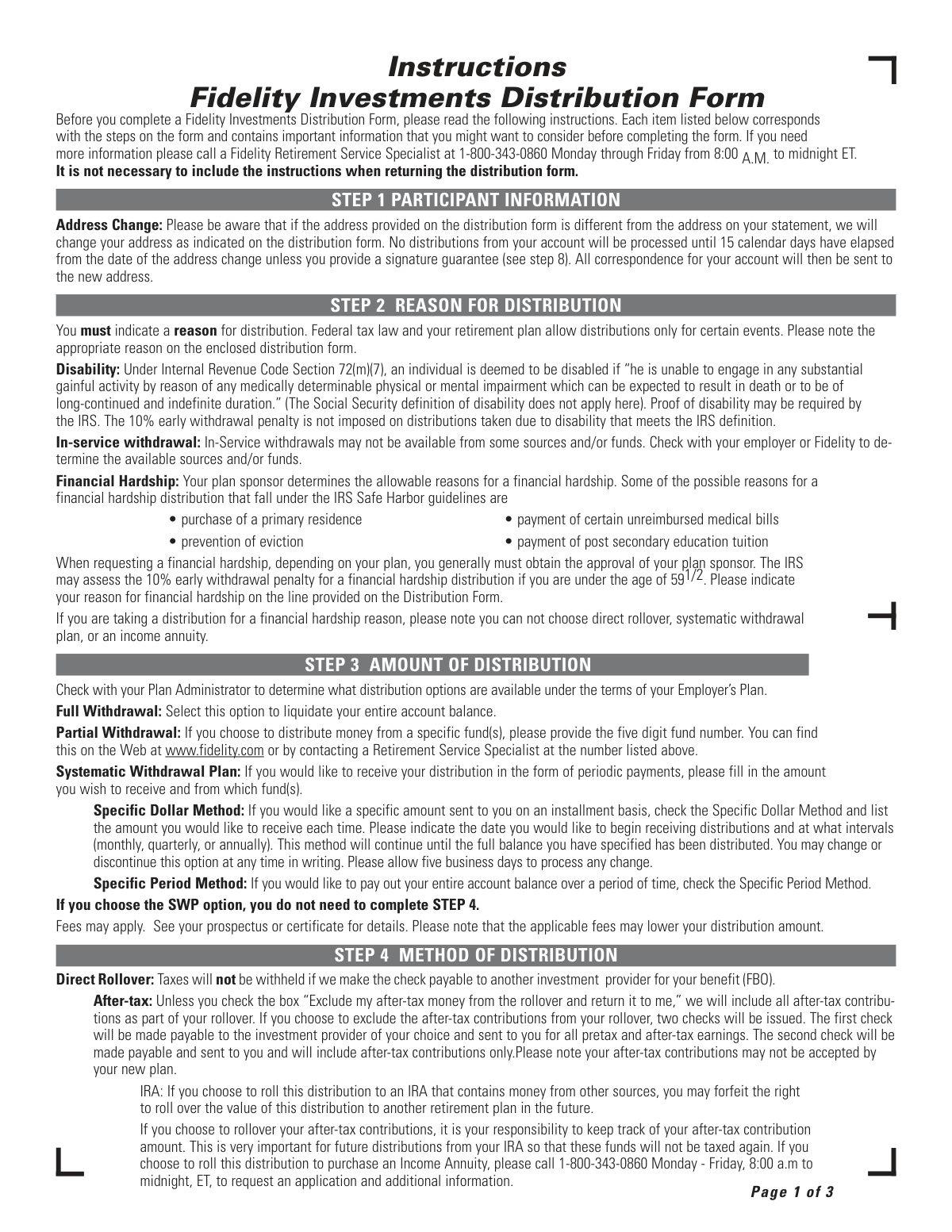
| Field instructions: | Fidelity Investments Distribution Form Instructions |
| Filled form examples: | Fidelity Investments Distribution Form Examples |
| Language: | English |
Our AI automatically handles information lookup, data retrieval, formatting, and form filling.
It takes less than a minute to fill out Fidelity Investments Distribution Form using our AI form filling.
Securely upload your data. Information is encrypted in transit and deleted immediately after the form is filled out.
Instafill Demo: How to fill out PDF forms in seconds with AI
How to Fill Out Fidelity Investments Distribution Form Online for Free in 2026
Are you looking to fill out a FIDELITY INVESTMENTS DISTRIBUTION FORM form online quickly and accurately? Instafill.ai offers the #1 AI-powered PDF filling software of 2026, allowing you to complete your FIDELITY INVESTMENTS DISTRIBUTION FORM form in just 37 seconds or less.
Follow these steps to fill out your FIDELITY INVESTMENTS DISTRIBUTION FORM form online using Instafill.ai:
- 1 Navigate to Instafill.ai and upload or select the Fidelity Investments Distribution Form to begin the process.
- 2 Provide your personal details in the 'Participant Information' section, ensuring your address is current.
- 3 Indicate the 'Reason for Distribution' (e.g., disability, financial hardship) and the 'Amount of Distribution' you are requesting.
- 4 Choose your 'Method of Distribution' in Step 4, such as a direct rollover or cash payment, and how you would like to receive the funds in Step 5.
- 5 Complete the 'Spousal Consent' section if you are married, which may require a notarized signature.
- 6 Specify your 'Income Tax Withholding' preferences for federal and state taxes.
- 7 Sign the form in Step 8, obtaining a Medallion signature guarantee if required, secure plan sponsor approval, and submit the completed document to Fidelity.
Our AI-powered system ensures each field is filled out correctly, reducing errors and saving you time.
Why Choose Instafill.ai for Your Fillable Fidelity Investments Distribution Form Form?
Speed
Complete your Fidelity Investments Distribution Form in as little as 37 seconds.
Up-to-Date
Always use the latest 2026 Fidelity Investments Distribution Form form version.
Cost-effective
No need to hire expensive lawyers.
Accuracy
Our AI performs 10 compliance checks to ensure your form is error-free.
Security
Your personal information is protected with bank-level encryption.
Frequently Asked Questions About Fidelity Investments Distribution Form
This form is used to request a withdrawal of funds from your Fidelity-managed retirement account. You must complete it to receive money from your account for qualifying events like separation from service, disability, or financial hardship.
Any participant in a Fidelity-managed retirement plan who is eligible and wishes to withdraw funds from their account must complete this form.
You must indicate a reason because federal tax law and your specific retirement plan only permit distributions for certain events. The reason you provide determines your eligibility and how the distribution is processed.
Allowable reasons are determined by your plan sponsor but often include purchasing a primary residence, paying certain unreimbursed medical bills, or preventing eviction. Note that hardship distributions cannot be rolled over.
Yes, a mandatory 20% federal income tax is withheld from most distributions unless you directly roll the funds over to another retirement account. For financial hardships, 10% is withheld by default, but you can elect to change this.
To defer taxes, you can select the 'Direct Rollover' option to have Fidelity send the funds directly to another eligible retirement plan or an IRA. This avoids the mandatory 20% tax withholding.
If you are married and your distribution is not in the form of a qualified joint and survivor annuity, your spouse's notarized consent is required. This rule may not apply to all plans, so check with a Fidelity specialist.
A signature guarantee is a special verification from a financial institution, required if your distribution is $100,000 or more, sent to an address not on record, or if your address changed in the last 15 days. A notary's signature is not an acceptable substitute.
Fidelity will update your address on file, but for security, your distribution will be delayed for 15 calendar days. This delay can be avoided if you provide a valid signature guarantee with your form.
Yes, even if you are no longer with the company, your plan may require the plan sponsor's (your former employer's) approval for a distribution. You should verify if this is necessary for your plan.
Yes, services like Instafill.ai use AI to accurately auto-fill form fields with your information. This can save you time and help reduce errors when completing the form.
You can use a service like Instafill.ai to upload the PDF document. The platform allows you to fill out all the required fields on your computer, tablet, or phone and then download the completed form.
If you have a non-fillable or 'flat' PDF, you can upload it to a tool like Instafill.ai. It will convert the document into an interactive, fillable form that you can complete and sign electronically.
Compliance Fidelity Investments Distribution Form
Validation Checks by Instafill.ai
1
Required Reason for Distribution
This check ensures that the participant has selected a reason for the distribution in Step 2. Federal tax law and retirement plan rules require a valid reason for any distribution. If no reason is selected, the form submission will be rejected and the user will be prompted to choose one of the available options like 'Separation from service', 'Disability', or 'Financial Hardship'.
2
Financial Hardship Distribution Method Restriction
This validation verifies that if 'Financial Hardship' is selected as the reason for distribution, the participant has not chosen an invalid distribution method. As per the instructions, direct rollovers, systematic withdrawal plans, and income annuities are not permitted for hardship withdrawals. A failure of this check would prevent submission and inform the user to select a different payment method, such as a direct payment.
3
Partial Withdrawal Fund Number Requirement
This check is triggered if the participant selects 'Partial Withdrawal' in Step 3. It validates that the corresponding field for the five-digit fund number is not empty and contains a properly formatted 5-digit number. This is crucial for ensuring the correct funds are liquidated for the distribution, and failure to provide a valid number would result in an error message requesting the user to enter the correct fund number.
4
Systematic Withdrawal Plan (SWP) Method Completeness
If the participant chooses the 'Systematic Withdrawal Plan' option, this check ensures all required sub-fields are completed. For the 'Specific Dollar Method', it validates that the dollar amount, start date, and payment frequency (monthly, quarterly, or annually) are all specified. This prevents ambiguity and ensures the payment plan can be set up correctly, and an incomplete submission would be flagged for correction.
5
Mutually Exclusive Distribution Amount Selection
This validation ensures that the participant has selected only one option for the amount of distribution in Step 3 ('Full Withdrawal', 'Partial Withdrawal', or 'Systematic Withdrawal Plan'). Selecting more than one option would create a conflicting instruction for processing the account. The system should use radio buttons to enforce this, but a backend check is still necessary to reject any submission where multiple options are somehow selected.
6
Single Payment Reception Method Selection
This check validates that in Step 5, the participant has chosen exactly one method for receiving their payment. The instructions state to 'Choose only one option', implying a set of mutually exclusive choices. This check prevents processing delays caused by ambiguous instructions, and if more than one or zero options are selected, the form would be considered invalid.
7
Spousal Consent Requirement for Married Participants
This check enforces the spousal consent rule from Step 6. If the participant checks the 'Married' box and the distribution is not in the form of a qualified joint and survivor annuity, the system verifies that the spousal consent section is fully completed with a signature. This is a legal requirement to protect spousal rights under the plan, and a missing consent would halt the distribution process until it is properly obtained and notarized.
8
Notary Commission Expiration Date Validity
When spousal consent is required and notarized, this validation confirms that the notary's commission expiration date is present and is a valid future date. An expired or missing commission date invalidates the notarization, which can have legal consequences and render the spousal consent void. The form would be returned to the participant for proper notarization if this check fails.
9
Participant Signature Presence
This is a fundamental completeness check to ensure the participant has signed the form in Step 8. The signature legally authorizes Fidelity to process the distribution request from the participant's account. A missing signature is a critical error, and the form will be immediately rejected and returned for completion.
10
Signature Guarantee Requirement Logic
This complex validation determines if a signature guarantee is required based on the rules in Step 8. It checks if the distribution is $100,000 or more, if the payment is being sent to an address different from the address of record, or if the address of record was changed in the last 15 days. This is a crucial security measure to prevent fraudulent distributions, and if a guarantee is required but not provided, the request will be denied.
11
Medallion Prefix and Distribution Amount Consistency
If a Medallion signature guarantee is provided, this check validates that the letter prefix (e.g., A, B, C) corresponds to a liability limit sufficient for the distribution amount. For example, a $600,000 distribution would require a prefix of 'B', 'A', or 'X', but not 'C'. An incorrect prefix means the guarantor is not covering the transaction value, so the request would be returned for a proper signature guarantee.
12
Federal Tax Withholding Minimum for Eligible Rollovers
This check applies to 'Eligible Rollover Distributions' that are not being directly rolled over. It ensures that the federal income tax withholding is at least the mandatory 20%. While a user can elect to withhold more, they cannot withhold less. This validation ensures compliance with IRS regulations, and an attempt to specify less than 20% would be rejected.
Common Mistakes in Completing Fidelity Investments Distribution Form
Applicants often mistakenly provide a notarized signature when a Medallion signature guarantee is required for large distributions (over $100,000) or address changes. A notary only verifies identity, while a signature guarantee protects against fraud by having a financial institution accept liability. This error leads to immediate rejection of the form and significant delays. To avoid this, verify if a signature guarantee is needed in Step 8 and obtain it from a qualified bank or brokerage firm, not a standard notary public.
Married participants often forget to obtain their spouse's signature, or the signature is not properly notarized. The form requires the spouse's signature in the presence of a notary (or plan representative) for most distribution types, and the notary must include their seal and commission expiration date. An incomplete spousal consent section makes the form legally invalid and will cause it to be returned, halting the distribution process until corrected.
If a participant provides a new address on the form, Fidelity imposes a 15-calendar-day hold on processing the distribution as a security measure. People often overlook this detail and are surprised by the delay in receiving their funds. To avoid this, either use the existing address of record or, if an address change is necessary and funds are needed quickly, provide a Medallion signature guarantee as specified in Step 8 to waive the holding period.
Many people do not realize that if they receive an eligible rollover distribution as a check made out to them (instead of a direct rollover to another retirement account), Fidelity is legally required to withhold 20% for federal taxes. They may incorrectly try to elect no withholding, not realizing it's mandatory. This results in receiving a smaller check than anticipated. To avoid surprises, plan for this 20% reduction or choose a direct rollover to defer taxes.
Participants, especially former employees, frequently assume they no longer need their old employer's approval for a distribution and skip Step 9. However, many plans require the plan sponsor's signature regardless of employment status. Submitting the form without a required signature will cause it to be rejected. Before submitting, always call a Fidelity specialist or your former employer to confirm if this approval is necessary.
When requesting a partial withdrawal from specific funds, people often forget to include the required five-digit fund numbers. Without this information, Fidelity does not know which assets to liquidate, making the request impossible to process. This data entry error will cause the form to be returned for completion. To prevent this, locate the fund numbers on your statement or the Fidelity website before filling out the form. AI-powered tools like Instafill.ai can help flag missing required fields like this.
The instructions clearly state that financial hardship distributions cannot be directly rolled over to another retirement account. However, participants in distress may overlook this rule and incorrectly select the direct rollover option in Step 4. This conflict in instructions will cause the form to be rejected. It's crucial to read the limitations for your distribution reason; for hardships, you must take a cash distribution subject to potential taxes and penalties.
For very large distributions, the Medallion signature guarantee must have a letter prefix that corresponds to the transaction value (e.g., prefix 'D' for up to $250,000). A common error is obtaining a guarantee with a prefix that is too low for the distribution amount. This will result in the form being rejected for insufficient liability coverage. To avoid this, inform the guaranteeing institution of the estimated distribution amount so they can apply the correct prefix.
During a rollover, the form defaults to including after-tax money unless the participant explicitly checks a box to exclude it. People often miss this choice, which can have tax implications. If after-tax money is rolled over, the participant must track that basis to avoid being taxed on it again in the future. To avoid this, make a conscious decision in Step 4 and keep detailed records if you choose to roll over the after-tax portion.
A simple but frequent mistake is failing to check a box in Step 2 to indicate the reason for the distribution, such as separation from service or disability. Federal law and plan rules require a valid reason for any distribution. An omission in this section renders the form incomplete and guarantees it will be sent back for correction, delaying the entire process. Since this form is a non-fillable PDF, a tool like Instafill.ai can convert it to a fillable version and use AI to help ensure all required fields are completed before submission.
Saved over 80 hours a year
“I was never sure if my IRS forms like W-9 were filled correctly. Now, I can complete the forms accurately without any external help.”
Kevin Martin Green
Your data stays secure with advanced protection from Instafill and our subprocessors




Robust compliance program
Transparent business model
You’re not the product. You always know where your data is and what it is processed for.
ISO 27001, HIPAA, and GDPR
Our subprocesses adhere to multiple compliance standards, including but not limited to ISO 27001, HIPAA, and GDPR.
Security & privacy by design
We consider security and privacy from the initial design phase of any new service or functionality. It’s not an afterthought, it’s built-in, including support for two-factor authentication (2FA) to further protect your account.
Fill out Fidelity Investments Distribution Form with Instafill.ai
Worried about filling PDFs wrong? Instafill securely fills fidelity-investments-distribution-form forms, ensuring each field is accurate.
