Yes! You can use AI to fill out Distribution — RMD Annual One-Time Payment

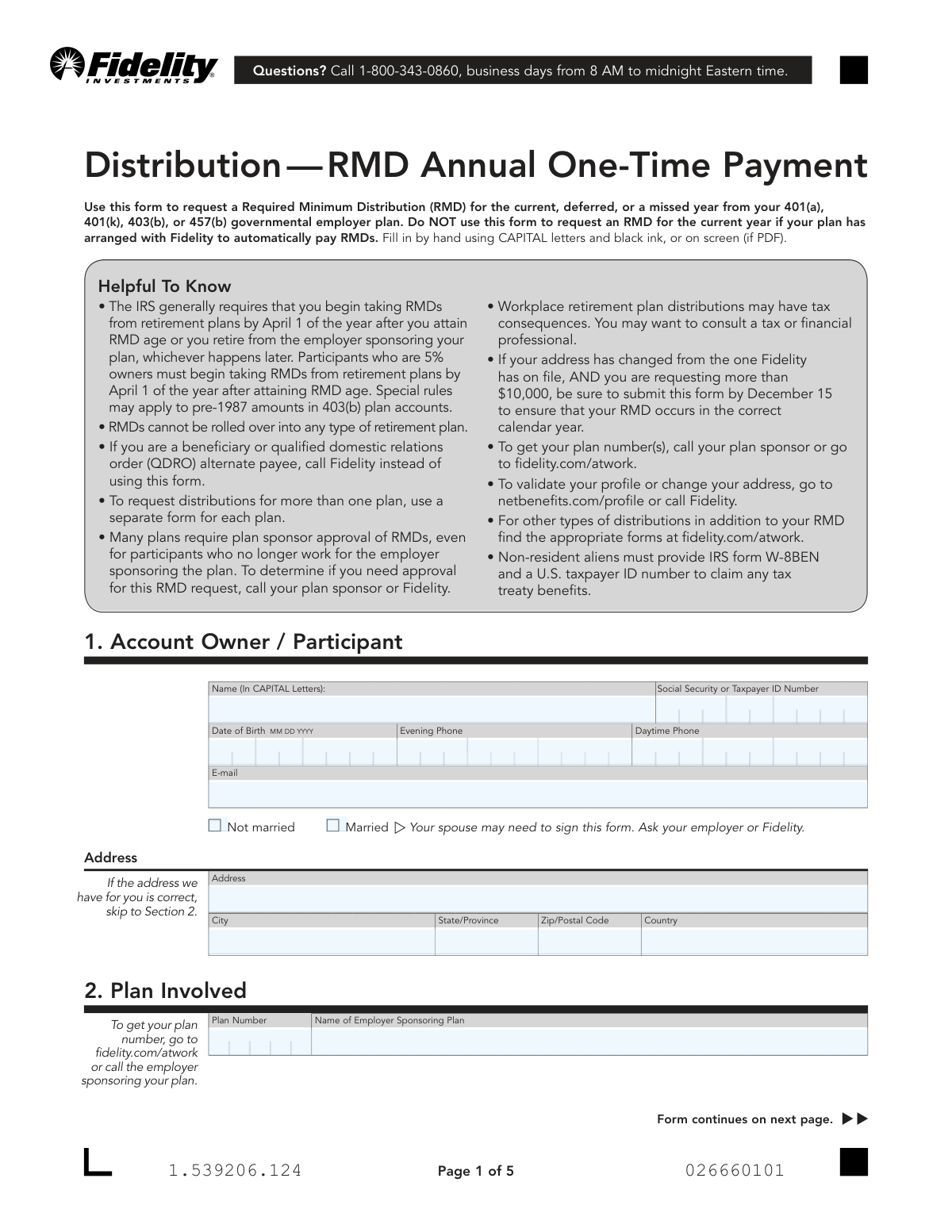
This form is used by a retirement plan account owner to request a Required Minimum Distribution (RMD) for the current, a deferred, or a missed year from their Fidelity-administered employer plan. It is crucial for ensuring compliance with IRS regulations regarding retirement account withdrawals to avoid significant tax penalties. Today, this form can be filled out quickly and accurately using AI-powered services like Instafill.ai, which can also convert non-fillable PDF versions into interactive fillable forms.
Our AI automatically handles information lookup, data retrieval, formatting, and form filling.
It takes less than a minute to fill out Fidelity RMD Annual One-Time Payment Form using our AI form filling.
Securely upload your data. Information is encrypted in transit and deleted immediately after the form is filled out.

Form specifications

Form name: Distribution — RMD Annual One-Time Payment
Number of pages: 1
Language: English
Categories: payment forms, distribution forms
main-image

Instafill Demo: How to fill out PDF forms in seconds with AI

How to Fill Out Fidelity RMD Annual One-Time Payment Form Online for Free in 2026

Are you looking to fill out a FIDELITY RMD ANNUAL ONE-TIME PAYMENT FORM form online quickly and accurately? Instafill.ai offers the #1 AI-powered PDF filling software of 2026, allowing you to complete your FIDELITY RMD ANNUAL ONE-TIME PAYMENT FORM form in just 37 seconds or less.
Follow these steps to fill out your FIDELITY RMD ANNUAL ONE-TIME PAYMENT FORM form online using Instafill.ai:
  1. 1 Navigate to Instafill.ai and upload or select the Fidelity 'Distribution — RMD Annual One-Time Payment' form.
  2. 2 Provide your personal account owner information in Section 1, including your name, Social Security Number, date of birth, and contact details.
  3. 3 Enter your retirement plan information in Section 2, such as the plan number and the name of the sponsoring employer.
  4. 4 In Sections 3 and 4, specify the year for the RMD request and select the desired calculation method.
  5. 5 Complete Sections 5 and 6 to indicate your tax withholding preferences and choose how you want to receive the funds (e.g., electronic transfer or check).
  6. 6 If applicable, have your spouse provide consent in Section 7, and obtain a signature guarantee or notarization as required in Section 8.
  7. 7 Review all the information for accuracy, then sign and date the form before submitting it to Fidelity as instructed.

Our AI-powered system ensures each field is filled out correctly, reducing errors and saving you time.

Why Choose Instafill.ai for Your Fillable Fidelity RMD Annual One-Time Payment Form Form?

Speed

Complete your Fidelity RMD Annual One-Time Payment Form in as little as 37 seconds.

Up-to-Date

Always use the latest 2026 Fidelity RMD Annual One-Time Payment Form form version.

Cost-effective

No need to hire expensive lawyers.

Accuracy

Our AI performs 10 compliance checks to ensure your form is error-free.

Security

Your personal information is protected with bank-level encryption.

Frequently Asked Questions About Form Fidelity RMD Annual One-Time Payment Form

This form is used to request a one-time Required Minimum Distribution (RMD) payment for the current, a deferred, or a missed year from your Fidelity-held workplace retirement plan, such as a 401(k) or 403(b).

This form is for account owners or participants in a 401(a), 401(k), 403(b), or 457(b) governmental plan. If you are a beneficiary or a QDRO alternate payee, you should call Fidelity directly instead of using this form.

No, you should not use this form if your plan has arranged with Fidelity to automatically pay your RMD for the current year. This form is for manual, one-time RMD payment requests.

You can find your plan number by logging into your account at fidelity.com/atwork or by contacting the employer who sponsors your plan.

No, you must use a separate form for each plan from which you are requesting a distribution.

Your spouse may need to sign Section 7 if your plan requires spousal consent for distributions. To find out if this is required for your plan, contact your employer or call Fidelity.

A signature guarantee is required if your distribution is over $100,000, or if it's over $10,000, you've recently changed your address, and you are not using an existing EFT setup. You can get a signature guarantee from most banks or credit unions.

Processing times vary by delivery method: Electronic Funds Transfer (EFT) takes about 3 business days, a check by mail takes about 7 business days, and a check via UPS delivery takes about 2 business days.

Fidelity will automatically withhold federal income tax, but you can adjust this by submitting an IRS Form W-4P. State tax withholding rules vary, and you can make an election in Section 5, but some states have specific requirements.

Yes, in Section 3 you can specify that you are requesting an RMD for a missed year. Be aware that the IRS may impose a penalty on RMD amounts you fail to take on time.

You can submit the form digitally using the NetBenefits mobile app, or you can mail the entire completed form to the Fidelity address listed on the last page.

Yes, services like Instafill.ai use AI to accurately auto-fill form fields with your information, which can save you time and help prevent errors.

You can use a service like Instafill.ai to fill out the form online. Simply upload the PDF, and the tool will help you complete the fields before you print it for signing and submission.

If you have a non-fillable or 'flat' PDF, you can upload it to a service like Instafill.ai. The platform can convert it into an interactive, fillable form that you can complete on your screen.

Compliance Fidelity RMD Annual One-Time Payment Form
Validation Checks by Instafill.ai

1
Validates Social Security Number Format and Presence
This check ensures that the Social Security or Taxpayer ID Number field in Section 1 is not empty and follows the standard 9-digit format (XXXXXXXXX or XXX-XX-XXXX). This number is critical for identity verification and for the IRS tax reporting associated with the distribution. A missing or malformed number will prevent the processing of the request and lead to rejection of the form.
2
Verifies Participant Date of Birth and RMD Age Eligibility
This validation confirms that the Date of Birth in Section 1 is a valid date and that the participant has reached the required age to take a Required Minimum Distribution (RMD). The IRS has specific age requirements for RMDs, and this check prevents distributions for individuals who are not yet eligible. If the participant is not of RMD age, the form submission will be invalid for this purpose.
3
Ensures RMD Year Selection is Complete and Logical
This check verifies that the participant has selected at least one option in Section 3 for the RMD year (This year, Deferred, or Missed). It also enforces the rule that a 'Deferred RMD' and a 'Missed RMD' cannot be requested on the same form. This ensures clear instructions are provided for which year's RMD is being processed and prevents contradictory requests.
4
Validates 'Deferred RMD' Eligibility
This check confirms that if the 'Deferred RMD from last calendar year' option is selected in Section 3, it is the participant's very first RMD. This option is only available for a participant's initial RMD, which can be deferred until April 1 of the following year. The system must cross-reference the participant's history to ensure they have not taken a prior RMD, otherwise the request is invalid.
5
Confirms 'Missed RMD' Year is Provided
This validation ensures that if the 'Missed RMD from more than one year ago' box is checked in Section 3, at least one of the 'Missed Year' fields is filled with a valid four-digit year. The year provided must be a past year. This check is crucial because the system cannot process a request for a missed RMD without knowing which specific year(s) to calculate for.
6
Enforces Single RMD Calculation Method Selection
This check verifies that exactly one calculation method has been selected in Section 4 ('Uniform Lifetime Table', 'Joint Life... Table', or 'Use the following amount'). The form explicitly states to choose only one option. Selecting multiple or no options creates ambiguity and makes it impossible to determine the correct distribution amount, leading to processing delays or rejection.
7
Validates Spouse Information for Joint Life Table
If the 'Joint Life and Last Survivor Expectancy Table' is selected in Section 4, this check ensures the 'Spouse’s Date of Birth' is provided. It also performs a logical check to confirm the spouse is more than ten years younger than the participant, as this is a specific IRS requirement for using this table. An invalid or missing spouse DOB will cause this calculation method to fail.
8
Verifies Self-Calculated Amount is Provided
This validation confirms that if the 'Use the following amount' option is selected in Section 4, the corresponding 'Amount' field contains a valid, positive numeric dollar value. A blank or non-numeric entry makes the request incomplete and un-processable. This ensures that when a participant opts out of Fidelity's calculation, they provide a clear, actionable amount for the distribution.
9
Checks for Exclusive Delivery Method Selection
This check ensures that only one payment delivery method is chosen in Section 6. The participant must select either EFT, Check, UPS Delivery, or Deposit into a Fidelity account. Selecting multiple or no options would create confusion about where to send the funds, halting the distribution process until clarification is received.
10
Validates Fidelity Account Number for Direct Deposit
If 'Deposit into Fidelity non-retirement account' is selected in Section 6, this validation ensures that the 'Fidelity Non-Retirement Account Number' field is filled out. The provided number should also be checked against a valid format for Fidelity account numbers. Without a valid account number, the electronic transfer cannot be initiated, and the payment would likely default to a check sent by mail, delaying receipt of funds.
11
Validates State Tax Withholding Minimum Amount
This check verifies that if a participant enters a specific dollar amount for state tax withholding in Section 5, the value is numeric and meets the specified '$10 minimum'. This prevents invalid data entry and ensures compliance with the form's stated rules. An amount below the minimum would be rejected, potentially resulting in default withholding rules being applied.
12
Confirms Spousal Consent for Married Participants
This validation checks if the participant selected 'Married' in Section 1 and, if the plan rules require it, confirms that the 'Spouse’s Consent' in Section 7 is fully completed, signed, and notarized/witnessed. Spousal consent is a legal requirement for many retirement plans to protect the spouse's rights to survivor benefits. A missing or incomplete consent section will prevent the distribution from being processed.
13
Ensures Participant Signature and Date are Present
This is a critical check to confirm that the account owner has signed and dated the form in Section 8. The signature legally authorizes Fidelity to act on the instructions and certifies the information is correct. A missing signature or date renders the entire form invalid and unauthorized, and it will be immediately rejected.
14
Validates Plan Sponsor Approval When Required
This check determines if the participant's plan requires sponsor approval for distributions and, if so, verifies that Section 9 is completed and signed by an authorized plan representative. Many employer plans require this oversight to ensure distributions comply with plan documents. If required approval is missing, Fidelity cannot process the request.
15
Restricts UPS Delivery for PO Box and Foreign Addresses
If 'Check sent by UPS delivery' is chosen in Section 6, this validation cross-references the participant's address in Section 1. It ensures the address is not a P.O. Box or a foreign address, as the form explicitly states UPS delivery is unavailable for these address types. This prevents a failed delivery attempt and ensures the participant chooses a viable delivery method from the start.

Common Mistakes in Completing Fidelity RMD Annual One-Time Payment Form

Incomplete or Incorrect Plan Information

Users often leave the Plan Number blank or enter an incorrect/abbreviated employer name because they don't have the information readily available. Since this information is critical for Fidelity to identify the correct account, its absence or inaccuracy will lead to processing delays or outright rejection of the form. To avoid this, locate your plan number on a previous statement, by logging into fidelity.com/atwork, or by calling your plan sponsor before you begin filling out the form.

Confusing 'Deferred' vs. 'Missed' RMD Years

The form distinguishes between a 'Deferred RMD' (for your very first RMD, deferred from last year) and a 'Missed RMD' (for any other prior year). People frequently select the wrong option, which can lead to incorrect calculations and processing issues by Fidelity's system. Carefully read the definitions in Section 3 to ensure you select the correct option for your situation, as combining these incorrectly on one form is prohibited.

Selecting an Inappropriate RMD Calculation Method

In Section 4, a user might select the 'Joint Life and Last Survivor Expectancy Table' without meeting the strict criteria that their spouse must be their sole beneficiary AND more than ten years younger. This error will cause the form to be rejected or, if processed, result in an incorrect RMD calculation. Unless you are certain you qualify, you should use the default 'Uniform Lifetime Table' to ensure accuracy and avoid delays.

Miscalculating a Self-Directed RMD Amount

Choosing the 'Self-Calculated' option in Section 4 places the full responsibility for accuracy on the participant. A common and costly mistake is miscalculating this amount and withdrawing less than required, which can trigger a substantial 25% IRS penalty on the shortfall. To prevent this, use one of the Fidelity-calculated options unless you are an expert or are intentionally taking a partial RMD to be aggregated with other plans.

Incorrect State Tax Withholding Election

The state tax withholding rules in Section 5 are complex and state-specific. For example, residents of states like NY, NJ, and PA must enter a specific dollar amount for withholding, as selecting the 'applicable rate' will result in zero tax being withheld. This mistake can lead to a large, unexpected state tax bill and potential underpayment penalties. Carefully read the instructions for your state of residence to ensure you make a valid election.

Providing Invalid Payment Delivery Information

A simple typographical error when entering a bank account number for an Electronic Funds Transfer (EFT) in Section 6 is a frequent mistake. An invalid account number will cause the transaction to fail and default to a paper check sent via mail, significantly delaying your receipt of funds. Double-check all account and routing numbers for accuracy before submitting the form. AI-powered form filling tools like Instafill.ai can help validate such data formats to prevent errors.

Missing Required Spousal Consent

If a participant is married and their plan requires spousal consent, failing to have Section 7 completed and notarized will render the entire form invalid. Participants are often unaware if their plan requires this, so they skip the section. To avoid rejection, confirm with your plan sponsor or Fidelity if spousal consent is necessary for your distribution before you submit the form.

Failing to Obtain a Required Signature Guarantee

The form requires a signature guarantee (not a simple notary) for distributions over $100,000, or for those over $10,000 involving a recent address change. People often misunderstand this requirement or confuse it with notarization, leading to form rejection and critical delays, especially near the year-end RMD deadline. Review the conditions in Section 8 carefully and visit a qualified financial institution for a Medallion signature guarantee if one is required.

Bypassing Mandatory Plan Sponsor Approval

Many plans, especially for former employees, require an authorized plan representative to sign off on the distribution in Section 9. Participants often overlook this and send the form directly to Fidelity, only to have it returned for the missing signature. This back-and-forth process can jeopardize your ability to take the RMD before the calendar year deadline. Always verify with your former employer or Fidelity if plan sponsor approval is needed.

Forgetting to Attach Required IRS Tax Forms

The form references several supplemental IRS forms like the W-4P, W-9, or W-8BEN for specific tax situations, such as for non-resident aliens or those living abroad. It is a common oversight to forget to download, complete, and attach these separate documents. This omission will halt the processing of your request and can result in incorrect, often higher, mandatory tax withholding. Since this form is a non-fillable PDF, a tool like Instafill.ai can convert it to a fillable version and help manage the attachment of these necessary supplemental documents.
Saved over 80 hours a year

“I was never sure if my IRS forms like W-9 were filled correctly. Now, I can complete the forms accurately without any external help.”

Kevin Martin Green

Your data stays secure with advanced protection from Instafill and our subprocessors

Robust compliance program

Transparent business model

You’re not the product. You always know where your data is and what it is processed for.

ISO 27001, HIPAA, and GDPR

Our subprocesses adhere to multiple compliance standards, including but not limited to ISO 27001, HIPAA, and GDPR.

Security & privacy by design

We consider security and privacy from the initial design phase of any new service or functionality. It’s not an afterthought, it’s built-in, including support for two-factor authentication (2FA) to further protect your account.

Fill out Fidelity RMD Annual One-Time Payment Form with Instafill.ai

Worried about filling PDFs wrong? Instafill securely fills distribution-rmd-annual-one-time-payment forms, ensuring each field is accurate.