Yes! You can use AI to fill out Open a Schwab IRA
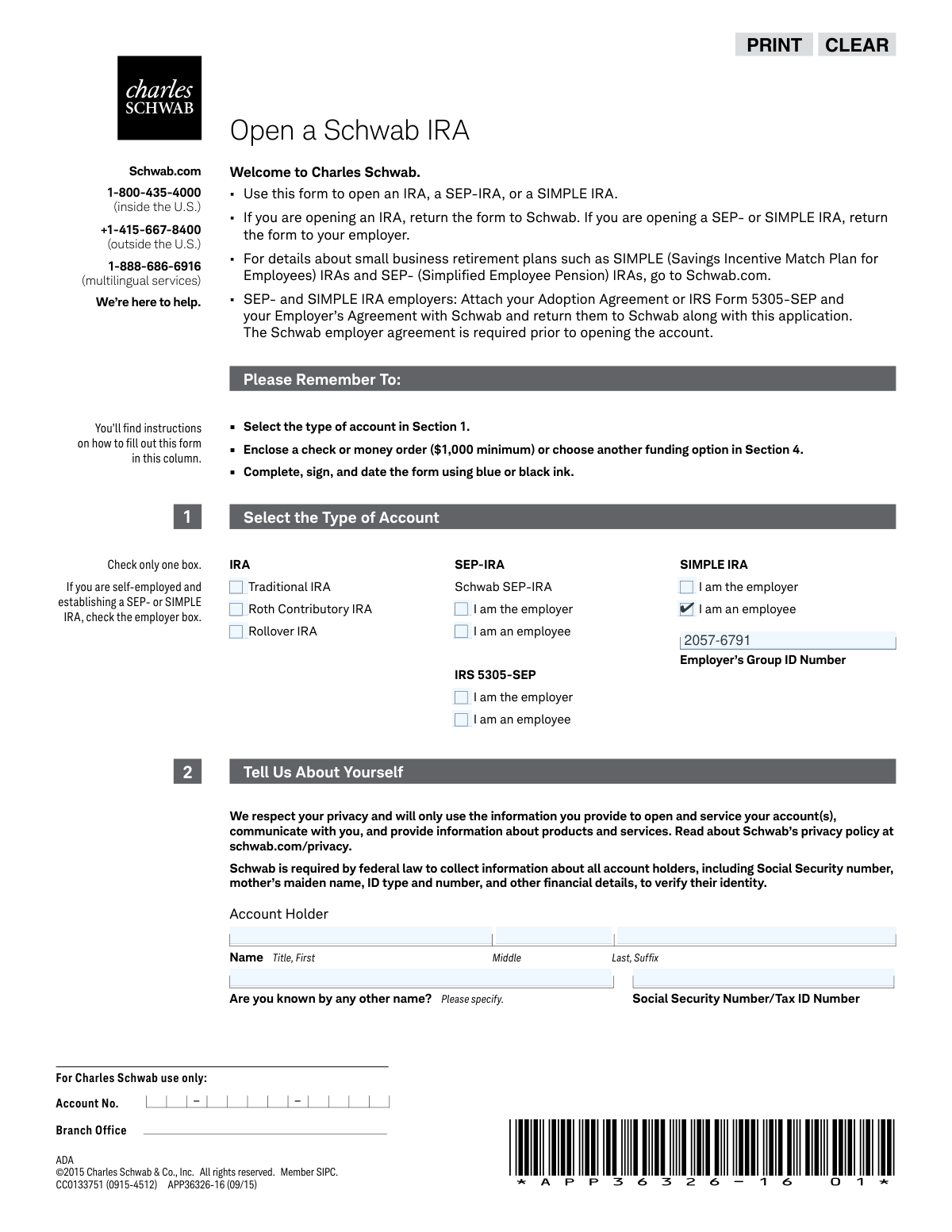
This form is an application to open a retirement account, such as a Traditional IRA, Roth IRA, SEP-IRA, or SIMPLE IRA, with Charles Schwab & Co., Inc. It gathers essential personal, financial, and employment information required by federal law to establish and service the account, and allows you to designate beneficiaries. Today, this form can be filled out quickly and accurately using AI-powered services like Instafill.ai, which can also convert non-fillable PDF versions into interactive fillable forms.
Rather not fill this in by hand? Instafill is an online form filler that completes PDF forms automatically — upload the blank form, answer a few questions, and the AI fills every field.
Form specifications
| Form name: | Open a Schwab IRA |
| Number of pages: | 1 |
| Language: | English |
Our AI automatically handles information lookup, data retrieval, formatting, and form filling.
It takes less than a minute to fill out APP36326-16 using our AI form filling.
Securely upload your data. Information is encrypted in transit and deleted immediately after the form is filled out.
Instafill Demo: How to fill out PDF forms in seconds with AI
How to Fill Out APP36326-16 Online for Free in 2026
Are you looking to fill out a APP36326-16 form online quickly and accurately? Instafill.ai offers the #1 AI-powered PDF filling software of 2026, allowing you to complete your APP36326-16 form in just 37 seconds or less.
Follow these steps to fill out your APP36326-16 form online using Instafill.ai:
- 1 Navigate to Instafill.ai and upload or select the 'Open a Schwab IRA' application form.
- 2 In Section 1, select the type of retirement account you wish to open, such as a Traditional IRA, Roth IRA, SEP-IRA, or SIMPLE IRA.
- 3 Use the AI assistant to accurately fill in your personal details in Section 2, including your name, address, Social Security Number, date of birth, and employment information.
- 4 Complete Section 3 by providing your investment experience, financial details, and overall investment objective for the account.
- 5 In Section 4, choose how you will fund your new account, whether by check, direct deposit, or transferring an existing account.
- 6 Designate your primary and contingent beneficiaries in Section 5, specifying their information and share percentages.
- 7 Carefully review all the information populated by the AI, then proceed to Section 7 to electronically sign and date the application before submitting it to Charles Schwab.
Our AI-powered system ensures each field is filled out correctly, reducing errors and saving you time.
Why Choose Instafill.ai for Your Fillable APP36326-16 Form?
Speed
Complete your APP36326-16 in as little as 37 seconds.
Up-to-Date
Always use the latest 2026 APP36326-16 form version.
Cost-effective
No need to hire expensive lawyers.
Accuracy
Our AI performs 10 compliance checks to ensure your form is error-free.
Security
Your personal information is protected with bank-level encryption.
Frequently Asked Questions About APP36326-16
This form is used to open a new Individual Retirement Account (IRA), including Traditional, Roth, and Rollover IRAs, as well as small business retirement plans like SEP-IRAs and SIMPLE IRAs with Charles Schwab.
Individuals looking to open a personal IRA, and both employers and employees setting up a SEP-IRA or SIMPLE IRA plan, should use this form to establish their account.
If you are opening a personal IRA (Traditional, Roth, or Rollover), you should return the completed and signed form directly to Charles Schwab using one of the mailing addresses provided in Section 8.
For SEP-IRAs and SIMPLE IRAs, employees should return the completed form to their employer, not directly to Schwab. Your employer is responsible for submitting the paperwork.
Yes, if you are funding the account with a check or money order, there is a $1,000 minimum initial contribution. If you set up a monthly direct deposit, the minimum is $100 per month.
You will need your Social Security Number, driver's license or other government-issued ID details, employment information, and financial details like your annual income and liquid net worth.
You can name primary and contingent beneficiaries and specify the percentage of assets each should receive. The total percentage for all primary beneficiaries must equal 100%, and the same applies to contingent beneficiaries.
This form does not support per stirpes designations directly. You must skip Section 5 and instead complete and attach a separate Schwab Beneficiary Designation Form to make a per stirpes election.
You are automatically enrolled for paperless documents if you provide your email address in Section 2 and do not check the box to opt out in Section 3. You will receive an email to confirm your consent after the account is opened.
Securities industry regulations require brokerage firms to collect this information to monitor for potential conflicts of interest. If you answer 'yes,' you must attach a letter of approval from your employer.
No, the form instructions state that if you are opening a SEP- or SIMPLE IRA, you should skip Section 4, 'Choose How to Fund Your Account.' Your employer will handle the contribution process.
Yes, services like Instafill.ai use AI to accurately auto-fill form fields, which can save you time and help prevent errors. These tools can read the form and intelligently populate your information.
You can use a service like Instafill.ai to upload the PDF and fill it out online. Instafill.ai creates an interactive version of the form, allowing you to type your information directly into the fields before printing for signature.
If you have a non-fillable or 'flat' PDF, tools like Instafill.ai can convert it into an interactive, fillable form. This allows you to easily type in your answers instead of having to print and fill it out by hand.
Compliance APP36326-16
Validation Checks by Instafill.ai
1
Ensures a Single Account Type Is Selected
This check verifies that the applicant has selected exactly one account type in Section 1 (e.g., Traditional IRA, Roth IRA, SEP-IRA). The form explicitly states to 'Check only one box'. This is critical for establishing the correct type of retirement account and applying the appropriate legal and tax rules. If more than one or no box is checked, the application cannot be processed.
2
Validates Social Security Number (SSN) Format and Presence
This validation ensures the Social Security Number/Tax ID Number field in Section 2 is not empty and conforms to the standard 9-digit format (XXX-XX-XXXX). The SSN is a mandatory piece of information required by federal law for identity verification (USA PATRIOT Act) and for tax reporting purposes by the IRS. An invalid or missing SSN will result in immediate application rejection.
3
Verifies Home/Legal Address Is a Physical Address
This check confirms that the 'Home/Legal Street Address' provided in Section 2 is a physical street address and not a P.O. Box, as explicitly instructed on the form. Financial institutions are required by regulations to obtain a physical address for the account holder to verify their identity and residence. An entry identified as a P.O. Box will cause a validation failure, requiring the applicant to provide a valid residential address.
4
Validates Date of Birth for Legality and Format
This check verifies that the 'Date of Birth' in Section 2 is in a valid 'mm/dd/yyyy' format and that the date indicates the applicant is of legal age to open a financial account. This is essential for legal contract validity and compliance with regulations governing financial accounts for minors. A date that is invalid, in the future, or indicates the applicant is underage will halt the application process.
5
Checks for Unexpired Government-Issued ID
This validation confirms that the 'Expiration Date' of the government-issued ID (Driver's License, Passport, etc.) in Section 2 is a valid date that has not passed. A current, unexpired ID is required for identity verification as part of Customer Identification Programs (CIP). Submitting an expired ID will result in a failure to verify identity and the application will be rejected pending submission of valid ID information.
6
Conditional Validation of Employment Details
This check ensures that if the applicant selects 'Employed' or 'Self-Employed' in the 'Employment Information' section, the corresponding fields for 'Employer Name', 'Industry', 'Occupation/Position', and 'Business Street Address' are completed. Securities industry regulations require this information for compliance and suitability assessments. Failure to provide these details when required will render the application incomplete.
7
Conditional Validation of Public Company Affiliation
This check verifies that if an applicant answers 'Yes' to being a 'director, 10% shareholder, or policy-making officer of a publicly held company', the 'Company Name' and 'Trading Symbol' fields are filled out. This information is critical for regulatory compliance to monitor for potential insider trading activities. If the question is answered 'Yes' but the details are missing, the application will be flagged for correction.
8
Ensures Funding Method Is Selected for Standard IRAs
This validation checks that if the account type selected in Section 1 is a Traditional, Roth, or Rollover IRA, then a funding option (A, B, C, D, or E) has been selected in Section 4. The form instructs SEP/SIMPLE IRA applicants to skip this section. This ensures the account opening process includes a clear instruction on how the initial deposit will be made, which is a prerequisite for activating the account.
9
Validates Primary Beneficiary Share Percentages Sum to 100%
This check calculates the sum of the 'Share %' for all beneficiaries designated as 'Primary' in Section 5 and ensures the total equals exactly 100%. This is a critical instruction on the form to prevent ambiguity in asset distribution upon the account holder's death. If the percentages do not sum to 100%, the beneficiary designation is considered invalid and must be corrected to ensure the holder's wishes are legally enforceable.
10
Validates Contingent Beneficiary Share Percentages Sum to 100%
This check calculates the sum of the 'Share %' for all beneficiaries designated as 'Contingent' in Section 5 and ensures the total equals exactly 100%. Similar to the primary beneficiary check, this validation enforces the form's rule for clear and unambiguous asset distribution. An incorrect sum would create legal and processing complications if all primary beneficiaries predecease the account holder, so the designation must be corrected.
11
Verifies Presence of Signature and Signature Date
This validation confirms that the 'Account Holder Signature' field in Section 7 is signed and that 'Today’s Date' is filled out with a valid date. The signature legally binds the applicant to the terms and agreements of the account, including the arbitration clause and perjury statement. An unsigned or undated application is legally non-binding and cannot be processed.
12
Validates Email Address Format
This check ensures the 'Email Address' provided in Section 2 follows a standard format (e.g., [email protected]). A valid email is crucial because the form states that providing it constitutes consent for electronic communication and enrollment in paperless document delivery. An invalid format would prevent the applicant from receiving important account documents, notifications, and disclosures, leading to a communication breakdown.
13
Ensures Role Selection for SEP/SIMPLE IRAs
This validation confirms that if 'SEP-IRA' or 'SIMPLE IRA' is selected in Section 1, the applicant has also checked either the 'I am the employer' or 'I am an employee' box. This distinction is fundamental as it determines the submission process (return to Schwab vs. return to employer) and the required accompanying documents (e.g., Adoption Agreement). Failure to specify the role makes the application's context unclear and incomplete.
14
Verifies Completeness of Financial Profile
This check ensures that the applicant has made a selection for 'Annual Income', 'Liquid Net Worth', and 'Investment Experience' in Section 2. This financial information is required by regulators to determine the suitability of investment products and strategies for the client. An incomplete financial profile prevents the firm from meeting its compliance obligations and the account cannot be properly serviced.
Common Mistakes in Completing APP36326-16
Applicants often get confused between Traditional, Roth, and Rollover IRAs, or mistake their role as 'employee' vs. 'employer' for SEP/SIMPLE IRAs. This can lead to opening an account with incorrect tax implications or contribution limits, requiring complex corrections later. To avoid this, carefully read the definitions for each account type before making a selection.
The form explicitly states 'No P.O. boxes, please' for the Home/Legal Street Address, a requirement under federal law for identity verification. Applicants often miss this instruction and enter a P.O. Box, causing the application to be rejected or delayed. Always provide a physical street address in this section and use the separate 'Mailing Address' section for your P.O. Box if needed.
Typographical errors in the Social Security Number (SSN) or Tax ID Number field are extremely common and have serious consequences. An incorrect number will cause identity verification to fail, leading to immediate processing delays and potential tax reporting problems with the IRS. Since this form is a non-fillable PDF, using a tool like Instafill.ai can convert it into an interactive, fillable version and use data validation to ensure the number is in the correct format, reducing the chance of manual errors.
If an applicant answers 'Yes' to being affiliated with a stock exchange or FINRA member firm, they must attach a letter from their employer approving the account. This is a common oversight that leads to significant processing delays, as the application is considered incomplete without this compliance document. Always review the instructions next to checkboxes to see if additional documentation is required.
In the financial information section, the form requires applicants to write in a specific dollar amount if their Annual Income is over $100,000 or Liquid Net Worth is over $250,000. Many people only check the box and neglect to write the amount. This leaves the financial profile incomplete and can delay the application or affect suitability assessments for certain investments.
When funding the IRA with a check for a new contribution, it's crucial to write the contribution year (e.g., '2023 Contribution') on the check's memo line. If this is omitted, Schwab will apply it to the current year by default, which can cause tax issues if the contribution was intended for the prior tax year. This is especially common for contributions made between January 1 and the tax filing deadline.
A frequent and critical error is failing to ensure that the 'Share %' for all primary beneficiaries adds up to exactly 100%, and the same for all contingent beneficiaries. Any other total will render the designation invalid, potentially causing the account assets to go to the estate instead of the intended individuals. An advanced form-filling tool like Instafill.ai can automatically calculate and validate these percentages as you enter them, preventing this costly mistake.
Applicants often fail to provide complete information for their beneficiaries, such as their Social Security Number, date of birth, or full address. While the account can still be opened, this missing data can create significant delays and legal hurdles for the beneficiaries when they need to claim the assets. To ensure a smooth transition, fill out every field for each designated beneficiary as completely as possible.
The form provides different submission instructions based on the account type: standard IRAs are returned to Schwab, while SEP and SIMPLE IRAs are returned to the employer. Applicants often miss this distinction and send the form to the wrong entity, causing significant delays and lost paperwork. Always double-check the instructions on pages 1 and 8 to confirm the correct recipient based on your chosen account type.
Forgetting to sign and date the application in Section 7 is one of the most common reasons for immediate rejection. An unsigned application is not legally binding and cannot be processed, forcing the firm to return it and delaying the account opening by days or weeks. Always perform a final review of the form, paying special attention to the signature line before submitting.
Saved over 80 hours a year
“I was never sure if my IRS forms like W-9 were filled correctly. Now, I can complete the forms accurately without any external help.”
Kevin Martin Green
Your data stays secure with advanced protection from Instafill and our subprocessors




Robust compliance program
Transparent business model
You’re not the product. You always know where your data is and what it is processed for.
ISO 27001, HIPAA, and GDPR
Our subprocesses adhere to multiple compliance standards, including but not limited to ISO 27001, HIPAA, and GDPR.
Security & privacy by design
We consider security and privacy from the initial design phase of any new service or functionality. It’s not an afterthought, it’s built-in, including support for two-factor authentication (2FA) to further protect your account.
Fill out APP36326-16 with Instafill.ai
Worried about filling PDFs wrong? Instafill securely fills open-a-schwab-ira forms, ensuring each field is accurate.
