
Yes! You can use AI to fill out Transfer Due to Divorce — IRA/HSA/529
Don't type 23 fields by hand. Tell our AI about yourself, or upload a document you already have, and it fills every field in seconds. You check it, then download, print or sign.
The AI does the filling. You just check it.
No typing into boxes, nothing to install.
What this form asks for
The AI fills all of it, from your answers or your documents.
The AI checks your answers before you download
16 checks built for this form, so a wrong date or a missing answer is caught before anyone else sees it.
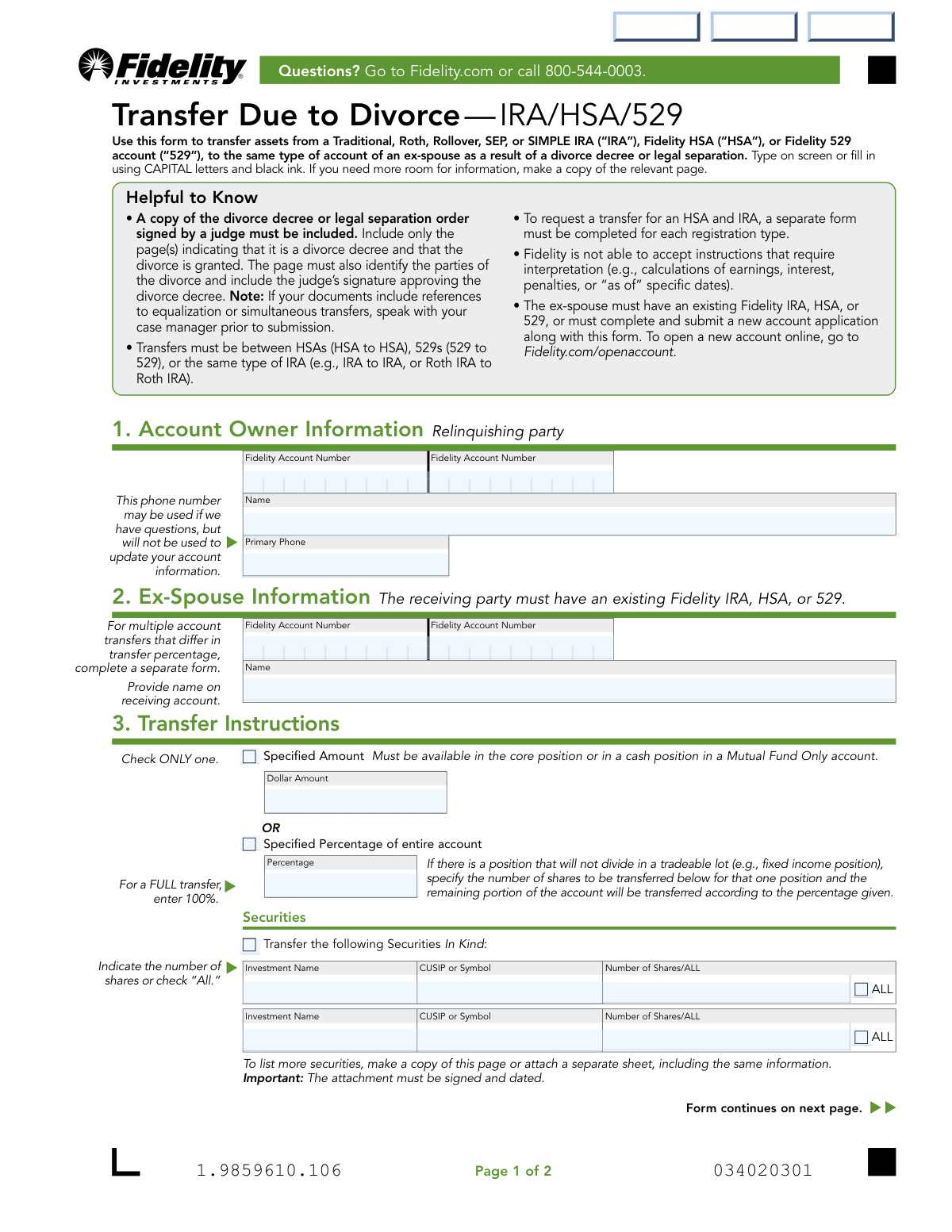
Validates that the account owner's (relinquishing party's) Fidelity account number is present and conforms to Fidelity's standard account number format. Account numbers must not be left blank, contain invalid characters, or be truncated. If this field is missing or malformed, Fidelity cannot identify the source account from which assets are to be transferred, causing the form to be rejected outright.
Validates that the ex-spouse's (receiving party's) Fidelity account number is present and correctly formatted. Since the form explicitly states the receiving party must have an existing Fidelity IRA, HSA, or 529, a missing or invalid account number indicates either the account does not exist or the form is incomplete. Failure to provide a valid receiving account number will prevent the transfer from being processed and may require the ex-spouse to first open a new account.
Validates that the account owner's name is provided in the designated field and matches the name associated with the Fidelity account number supplied. The name should be the full legal name as it appears on the account, not a nickname or abbreviation. A mismatch between the name and account number could indicate an error in account identification and may result in the transfer being applied to the wrong account.
Validates that the receiving party's name is provided and corresponds to the name on the Fidelity account number listed for the ex-spouse. The form instructs users to 'Provide name on receiving account,' meaning the name must exactly match the account registration. If the name does not match the account on record, Fidelity cannot confirm the correct receiving party and will reject or delay the transfer.
Validates that exactly one of the three transfer instruction options is selected: Specified Dollar Amount, Specified Percentage, or Securities In Kind. The form explicitly states 'Check ONLY one,' meaning selecting multiple options or leaving all options blank renders the instructions ambiguous or incomplete. If more than one option is selected or none is selected, Fidelity cannot determine the intended transfer scope and will be unable to process the request.
Validates that when the 'Specified Amount' option is chosen, the Dollar Amount field contains a positive numeric value greater than zero. The form notes that the amount must be available in the core position or a cash position in a Mutual Fund Only account, so the value must be a valid currency amount. A blank, zero, or non-numeric entry in this field when the dollar amount option is selected will result in an incomplete or unprocessable transfer instruction.
And 10 more checks
- Percentage Field Validity and Range When Specified Percentage Is Selected
- Securities In Kind Fields Completeness When Securities Option Is Selected
- CUSIP or Symbol Format Validation for Securities Entries
- Number of Shares vs. 'ALL' Checkbox Mutual Exclusivity
- Account Owner Signature Presence
- Ex-Spouse Signature Presence
- Date Fields Format and Logical Validity
- Medallion Signature Guarantee Requirement for High-Value Transfers
- Same Account Type Consistency Between Relinquishing and Receiving Accounts
- Primary Phone Number Format Validity
Let AI fill out your Fidelity Transfer Due to Divorce
No typing. Every field filled in seconds, checked, ready to sign.
How to Fill Out Fidelity Transfer Due to Divorce Online for Free in 2026
What the AI walks you through.
- Navigate to Instafill.ai and upload the Fidelity Transfer Due to Divorce — IRA/HSA/529 form or select it from the available form library.
- Enter the Account Owner (relinquishing party) information, including the Fidelity account number, full name, and primary phone number in Section 1.
- Enter the Ex-Spouse (receiving party) information in Section 2, including their Fidelity IRA, HSA, or 529 account number and full name; if the ex-spouse does not have an existing account, note that a new account application must be submitted.
- Complete the Transfer Instructions in Section 3 by selecting either a specified dollar amount, a specified percentage of the entire account, or specific securities to be transferred in kind, providing all required details such as investment names, CUSIP/symbols, and number of shares.
- Gather and attach a copy of the divorce decree or legal separation order signed by a judge, ensuring it identifies both parties and includes the judge's signature.
- Have both the account owner and the ex-spouse print their names, sign, and date the form in Section 4; obtain a Medallion Signature Guarantee for the account owner if the transfer value exceeds $100,000.
- Submit the completed and signed form along with all required documents by scanning and uploading via Fidelity.com/upload-Transfer-Divorce, or mail to the appropriate Fidelity address if digital submission is not possible.
Common Mistakes in Completing Fidelity Transfer Due to Divorce
The ones the AI is built to catch.
Failing to include the required divorce decree documentation
Attempting to transfer between mismatched account types
Using a single form for both an HSA and an IRA transfer
Entering an incorrect or incomplete Fidelity account number
Checking more than one transfer instruction option
Entering a dollar amount that is not available in the core or cash position
Omitting the Medallion Signature Guarantee when required
Leaving the ex-spouse's Fidelity account number blank or submitting without an existing account
Providing incomplete securities information for in-kind transfers
Using lowercase letters or non-black ink when filling out the form manually
Submitting instructions that require Fidelity to perform calculations
Both parties failing to sign and date the form, or using incorrect date format
Frequently Asked Questions About Fidelity Transfer Due to Divorce
Is it really free for 7 days?
Can I fill other forms too?
How do I cancel?
How does the AI fill out Fidelity Transfer Due to Divorce?
What happens to my information?
How complex is Fidelity Transfer Due to Divorce to fill out?
What is the purpose of the Transfer Due to Divorce — IRA/HSA/529 form?
What documents do I need to include with this form?
Does the ex-spouse need an existing Fidelity account to receive the transfer?
Can I transfer assets between different account types, such as an IRA to an HSA?
What are my options for specifying how much to transfer?
Is a Medallion signature guarantee required?
Who needs to sign this form?
How do I submit this form to Fidelity?
What happens if the transfer is not done correctly under IRS rules?
Can Fidelity process transfers that require calculations, such as earnings or interest as of a specific date?
What should I do if my divorce decree references equalization or simultaneous transfers?
Can I use AI tools like Instafill.ai to fill out this form?
How can I fill out this form online using Instafill.ai?
What if I need to transfer assets from multiple accounts with different transfer percentages?
What if I need to list more securities than the form has space for?
Get your Fidelity Transfer Due to Divorce filled out by AI
$0 today. Cancel before Oct 31 and you pay nothing.
Other forms like this one
divorce forms: Fidelity Advisor Transfer Due to Divorce—IRA, IRA/IRRA®/Roth IRA/SEP/SRA Divorce Transfer Instruction Form, Form 12.995(c), Safety-Focused Parenting Plan
IRA forms: Form 5498, IRA Contribution Information, SIRA Allied health treatment request (Catalogue no. SIRA09191), One-Time Withdrawal – IRA, Fidelity Investments, Fidelity Advisor IRA Distribution Request for Automatic Rollover Accounts, Fidelity Beneficiaries — IRA /HSA, Fidelity Advisor IRA Beneficiary Designation, IRA/HSA Beneficiary Designation, Fidelity IRA Beneficiary Distribution — Charity, Foundation, or a University, Form 8606, Nondeductible IRAs, Fidelity Investments Earnings Automatic Withdrawal Plan — IRA, Inherited IRA Application for Individual Beneficiaries, SIMPLE IRA Contribution Transmittal Form, IRA Distribution Form, Open a Schwab IRA, New York State Deferred Compensation Plan Direct Rollover to a Roth IRA, Charles Schwab IRA Distribution Form, Sample IRA Distribution Letter for a Qualified Charitable Distribution (QCD), Beneficiary Designation Form For IRA and 403(b)(7) Accounts, IRA Beneficiary Designation Form, Schwab IRA Account Application
HSA forms: Form 1099-SA, Distributions from HSA/MSA, Group Transfer Form Fidelity Health Savings Account (HSA), Fidelity Beneficiaries — IRA /HSA, IRA/HSA Beneficiary Designation, HSA Bank Investment Account Transfer Form, Schwab Health Savings Brokerage Account (HSBA) to HSA Invest Choice Account Transfer Form, Health Savings Account (HSA) Transfer Request, Form 8889, Health Savings Accounts (HSAs), Form 1099-SA, Distributions From an HSA, Archer MSA, or Medicare Advantage MSA, Form 8889, Health Savings Accounts
transfer forms: Form REG 227, Application for Replacement or Transfer of Title, City of Harvey Real Estate Transfer Declaration & Application (with Certificate for Exemption), DBPR ABT-6002 – Application for Transfer of Ownership of an Alcoholic Beverage License, DBPR ABT-6002, Division of Alcoholic Beverages and Tobacco Application for Transfer of Ownership of an Alcoholic Beverage License, Request for Transfer of Records (Adelaide Health Care) – AHC-0013-05-PS (Version 2), DBPR Form ABT-6002, Division of Alcoholic Beverages and Tobacco Application for Transfer of Ownership of an Alcoholic Beverage License, Pfändungs- und Überweisungsbeschluss (Garnishment and Transfer Order) – German Civil Enforcement Court Form, Fidelity Funds Account Transfer of Assets Form, Fidelity Stock Plan Services (SPS) Transfer Request Form, How to Transfer Assets from Morgan Stanley to Fidelity Investments (Fidelity Stock Plan Services Guide), Fidelity Investments Transfer/Rollover/Exchange Form, Fidelity Investments Standing Transfer Instructions Form, Fidelity Investments Transfer/Rollover Form, Group Transfer Form Fidelity Health Savings Account (HSA), Plan–to-Plan Transfer, Plan Exchange, or Service Credit Authorization Form, Beneficiaries — Nonretirement Transfer on Death, Transfer Shares as a Gift — Nonretirement, Form APP13017-29, Transfer Your Account to Schwab, Transfer of Assets Out - Partial Account or Charitable Gift Transfers, Charles Schwab & Co., Inc. Account Transfer Form
529 forms: Bright Directions 529 Beneficiary Change Form, Rollover Request — 529 College Savings Plan, Fidelity Investments Withdrawals—529 College Savings Plan, The Vanguard 529 College Savings Plan: Power of Attorney, The Vanguard 529 College Savings Plan Agent Authorization/Limited Power of Attorney, The Vanguard 529 College Savings Plan Direct Rollover Out to Roth IRA Form, The Vanguard 529 College Savings Plan Transfer Due to Death of Account Owner Form, The Vanguard 529 College Savings Plan Incoming Direct Rollover Form, The Vanguard 529 College Savings Plan: Withdrawal Request Form, IAdvisor 529 Plan Certification of Authorized Individual(s), NextGen 529 Series Change Form, NextGen 529 Client Direct Series Incoming Rollover Form, Merrill Lynch 529 College Savings Plan Withdrawal Request Form, 529 Plan Account Transfer Form, Fidelity Institutional CHET Advisor 529 Plan New Account Application, Form 529TCF, The Vanguard 529 College Savings Plan, Trustee Certification, Account Application for Merrill West Virginia Residents - The Hartford SMART529, 529 Plan Account Application, Fidelity Institutional 529 College Savings Plan Beneficiary Change, 529 College Savings Plan Beneficiary Change Form
IRA transfer forms: IRA/IRRA®/Roth IRA/SEP/SRA Divorce Transfer Instruction Form, Fidelity Advisor Transfer Due to Divorce—IRA, Frequently Asked Questions: Transferring to an Empower Premier IRA, TIAA IRA Transfer or Rollover Authorization, TIAA Trust, N.A. Private Asset Management, Request for a Direct Transfer From IRA Contracts, Inherited IRA Transfer of Assets/ Direct Rollover Form, Merrill Inherited IRA Transfer Instruction Form, Inherited IRA Transfer of Assets/Direct Rollover
Let AI fill out your Fidelity Transfer Due to Divorce
Your trial starts once a card is added. You pay nothing before Oct 31.
Our AI already knows this form, all 23 fields of it. Skip the typing: tell it about yourself, or upload what you have, and it fills the whole form in seconds.
- AI fills every field on both pages, checkboxes included
- No typing into boxes: answer a few questions, or upload a document you already have, an old copy of this form, a photo of a document
- The AI checks the answers; you review and change anything before you download
- Download the finished PDF, print it, or sign it online
- Encrypted, and never used to train AI
Cancel before Oct 31 and you pay nothing.
A card is needed to start the trial. Cancel in two clicks from your account.
Terms · Privacy