Yes! You can use AI to fill out Fidelity Investments Request for Transaction Letter of Instruction (LOI) for Alternative Investments
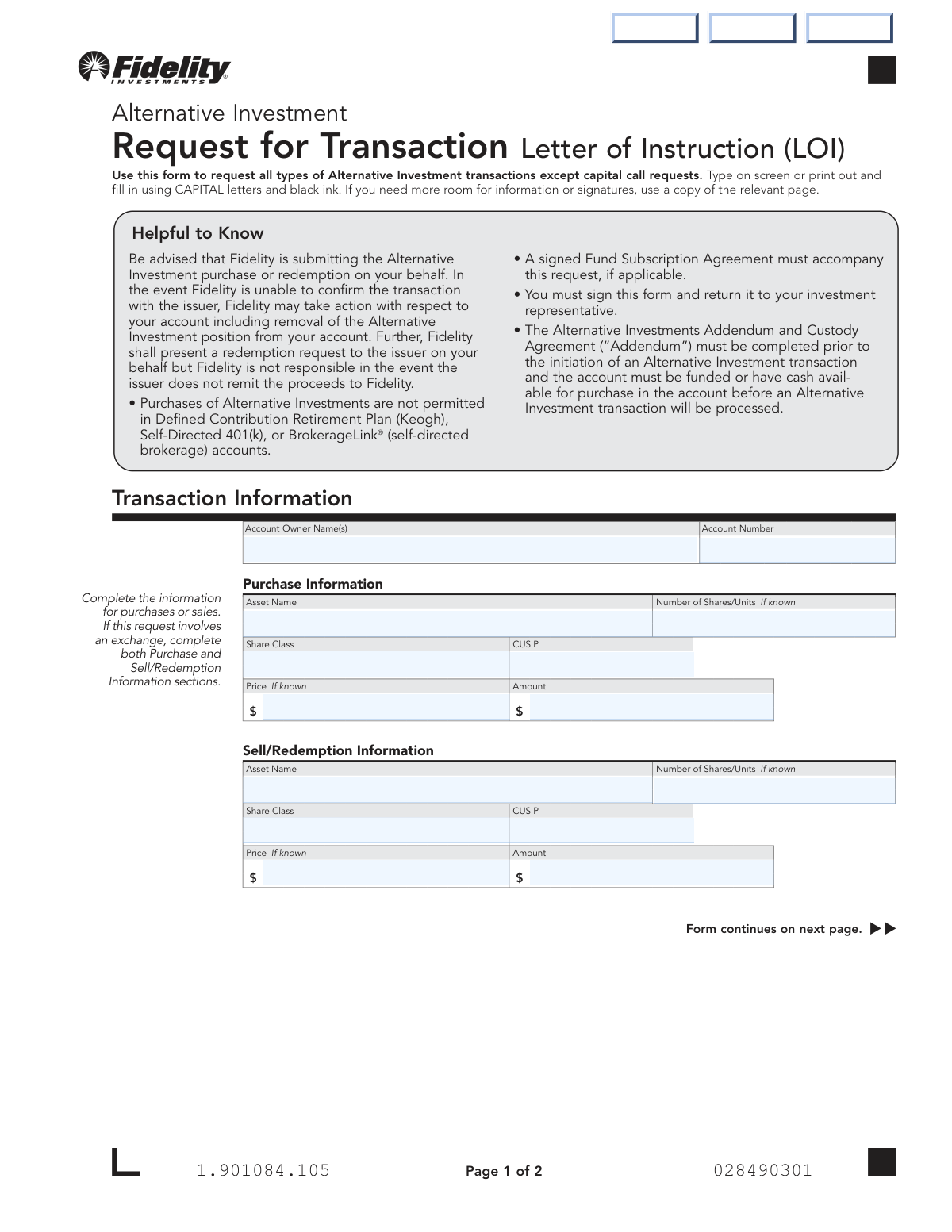
The Fidelity Investments Request for Transaction Letter of Instruction (LOI) is an official form that authorizes Fidelity Brokerage Services LLC and National Financial Services LLC to submit Alternative Investment transactions—including purchases, redemptions, and exchanges—on behalf of the account owner. It is a critical document that establishes the account owner's sole responsibility for investment suitability and indemnifies Fidelity from any resulting claims or losses. The form must be accompanied by a signed Fund Subscription Agreement (if applicable) and requires completion of the Alternative Investments Addendum and Custody Agreement prior to processing. Today, this form can be filled out quickly and accurately using AI-powered services like Instafill.ai, which can also convert non-fillable PDF versions into interactive fillable forms.
Our AI automatically handles information lookup, data retrieval, formatting, and form filling.
It takes less than a minute to fill out Fidelity Alternative Investment LOI using our AI form filling.
Securely upload your data. Information is encrypted in transit and deleted immediately after the form is filled out.
Form specifications
| Form name: | Fidelity Investments Request for Transaction Letter of Instruction (LOI) for Alternative Investments |
| Number of pages: | 1 |
| Filled form examples: | Form Fidelity Alternative Investment LOI Examples |
| Language: | English |
Instafill Demo: filling out a legal form in seconds
How to Fill Out Fidelity Alternative Investment LOI Online for Free in 2026
Are you looking to fill out a FIDELITY ALTERNATIVE INVESTMENT LOI form online quickly and accurately? Instafill.ai offers the #1 AI-powered PDF filling software of 2026, allowing you to complete your FIDELITY ALTERNATIVE INVESTMENT LOI form in just 37 seconds or less.
Follow these steps to fill out your FIDELITY ALTERNATIVE INVESTMENT LOI form online using Instafill.ai:
- 1 Navigate to Instafill.ai and upload the Fidelity Alternative Investment Transaction LOI PDF or select it from the available form library to begin filling it out online.
- 2 Enter the Account Owner Name(s) and Fidelity Non-Retirement Account Number in the Transaction Information section to identify the account associated with the request.
- 3 Complete the Purchase Information section by providing the Asset Name, Number of Shares/Units, Share Class, CUSIP, Price (if known), and the dollar Amount for any Alternative Investment purchase.
- 4 Complete the Sell/Redemption Information section with the Asset Name, Number of Shares/Units, Share Class, CUSIP, Price (if known), and Amount for any sale or redemption; if requesting an exchange, fill out both the Purchase and Sell/Redemption sections.
- 5 Review all entered information for accuracy, ensuring that the account is funded or has sufficient cash available and that any required Fund Subscription Agreement is prepared to accompany the form.
- 6 Print the completed form, obtain the required signatures and dates from the Primary Account Owner and Joint Account Holder (if applicable) in the Signatures and Dates section.
- 7 Submit the signed form along with any necessary supporting documents to Fidelity via regular mail (PO Box 770001, Cincinnati, OH 45277-0058) or overnight mail (100 Crosby Parkway, Covington, KY 41015), or deliver it to your Fidelity investment representative.
Our AI-powered system ensures each field is filled out correctly, reducing errors and saving you time.
Why Choose Instafill.ai for Your Fillable Fidelity Alternative Investment LOI Form?
Speed
Complete your Fidelity Alternative Investment LOI in as little as 37 seconds.
Up-to-Date
Always use the latest 2026 Fidelity Alternative Investment LOI form version.
Cost-effective
No need to hire expensive lawyers.
Accuracy
Our AI performs 10 compliance checks to ensure your form is error-free.
Security
Your personal information is protected with bank-level encryption.
Frequently Asked Questions About Form Fidelity Alternative Investment LOI
This form is used to request all types of Alternative Investment transactions — including purchases, sales/redemptions, and exchanges — through Fidelity. It is not used for capital call requests, which require a separate process.
Any Fidelity account owner who wants to buy, sell, redeem, or exchange an Alternative Investment must complete this form. For joint accounts or trust accounts, all account owners must sign the form.
No. This form explicitly excludes capital call requests. You will need to use a different form or process for capital call transactions — contact your Fidelity Representative for guidance.
Yes. Purchases of Alternative Investments are not permitted in Defined Contribution Retirement Plan (Keogh), Self-Directed 401(k), or BrokerageLink® (self-directed brokerage) accounts. They are permitted in Fidelity IRAs, Fidelity Self-Employed 401(k), and other eligible account types.
You may need to include a signed Fund Subscription Agreement if applicable. Additionally, the Alternative Investments Addendum and Custody Agreement must be completed before any transaction is initiated, and your account must have sufficient cash available.
If your request involves an exchange, you must complete both the Purchase Information section and the Sell/Redemption Information section on the form. Each section requires the asset name, number of shares/units, share class, CUSIP, price, and amount.
No, margin cannot be used to purchase Alternative Investments. However, if you have a margin agreement with NFS, non-margin eligible buying power may be applied to an Alternative Investment transaction or used to pay applicable taxes if your account has insufficient available cash.
Send the completed form and any required documents to Fidelity via regular mail at PO Box 770001, Cincinnati, OH 45277-0058, or via overnight mail to 100 Crosby Parkway, Mail Zone: KC1K, Covington, KY 41015.
Yes, signatures and dates are mandatory — the form cannot be processed without them. Both the primary account owner and any joint account holder must sign and date the form before submission.
No. While Fidelity submits the transaction on your behalf, it is not responsible if the issuer fails to confirm the transaction or remit proceeds. If Fidelity cannot confirm the transaction, it may take action including removing the Alternative Investment position from your account.
No. By signing, you acknowledge that this form and any resulting transaction do not constitute a recommendation by Fidelity to buy, sell, or hold an Alternative Investment. You take full responsibility for determining the appropriateness and suitability of the investment.
Yes! Services like Instafill.ai use AI to auto-fill form fields accurately, saving you time and reducing errors. You can visit Instafill.ai to fill out this form online without needing to print it manually.
If you have a flat, non-fillable PDF version of this form, Instafill.ai can convert it into an interactive fillable form so you can complete it digitally. This eliminates the need to print, handwrite, and scan the document.
You will need to provide the account owner name(s), account number, and details about the investment including the asset name, number of shares/units, share class, CUSIP, price, and dollar amount for either the purchase or sell/redemption (or both, if it's an exchange).
You should contact your Fidelity Representative directly for any questions about completing or submitting this form. They can guide you through the process and ensure all required documents are included.
Compliance Fidelity Alternative Investment LOI
Validation Checks by Instafill.ai
1
Account Owner Name Presence and Format Validation
Validates that the CustomerName field is populated and contains a full legal name rather than a nickname, abbreviation, or partial name. The account owner name must match the name on record with Fidelity to ensure the transaction is attributed to the correct account holder. If this field is blank or contains an unrecognizable name format, the form cannot be processed and will be returned to the submitter.
2
Fidelity Account Number Format Validation
Checks that the Fidelity NonRetirement Account Number field is populated and conforms to Fidelity's standard account number format (typically a numeric string of a specific length). An invalid or missing account number makes it impossible to associate the transaction with the correct brokerage account. Failure to provide a valid account number will result in the form being rejected and the transaction not being processed.
3
Transaction Section Completeness Check
Ensures that at least one of the two transaction sections — Purchase Information or Sell/Redemption Information — is fully completed, and that for an exchange transaction, both sections are filled out. Submitting a form with neither section completed provides no actionable instruction for Fidelity to process. If neither section contains sufficient data, the form must be returned as incomplete.
4
Purchase Asset Name Presence Validation
Verifies that the AltInvestName field is populated whenever any other Purchase Information fields (such as Number of Shares, CUSIP, Price, or Amount) are filled in. The asset name is essential for identifying the specific Alternative Investment being purchased and must not be left blank if a purchase transaction is intended. An incomplete purchase section without an asset name will prevent Fidelity from submitting the transaction to the correct issuer.
5
Sell/Redemption Asset Name Presence Validation
Verifies that the AltInvestName2 field is populated whenever any other Sell/Redemption Information fields (such as NumberShares2, CUSIP2, Price2, or Amount2) are filled in. Just as with purchases, the asset name is critical for identifying which Alternative Investment position is being redeemed. Leaving this field blank while other redemption fields are populated creates an ambiguous instruction that cannot be processed.
6
CUSIP Format Validation for Purchase
Checks that the CUSIP field, when provided for a purchase transaction, conforms to the standard 9-character alphanumeric CUSIP format (e.g., six alphanumeric characters followed by two digits and one check digit). An incorrectly formatted CUSIP could result in the transaction being applied to the wrong security. While the field is marked 'if known,' any value entered must be validated to prevent misidentification of the Alternative Investment.
7
CUSIP Format Validation for Sell/Redemption
Checks that the CUSIP2 field, when provided for a sell or redemption transaction, conforms to the standard 9-character alphanumeric CUSIP format. An incorrectly formatted CUSIP in the redemption section could cause Fidelity to submit a redemption request for the wrong investment position. Any value entered in this field must be validated even though it is optional, to ensure accuracy of the redemption instruction.
8
Purchase Amount Numeric and Positive Value Validation
Ensures that the Amount field in the Purchase Information section, when populated, contains a valid positive numeric dollar value with no non-numeric characters other than a decimal point. A zero, negative, or non-numeric amount would represent an invalid purchase instruction that cannot be executed. This check prevents data entry errors from resulting in erroneous or unprocessable transaction submissions.
9
Sell/Redemption Amount Numeric and Positive Value Validation
Ensures that the Amount2 field in the Sell/Redemption Information section, when populated, contains a valid positive numeric dollar value with no non-numeric characters other than a decimal point. An invalid amount in the redemption section could cause Fidelity to submit an incorrect or unprocessable redemption request to the issuer. This validation protects both the account holder and Fidelity from processing errors.
10
Number of Shares/Units Numeric and Positive Value Validation
Validates that the NumberShares and NumberShares2 fields, when populated, contain positive numeric values and are not zero or negative. The number of shares or units directly determines the scope of the transaction, and an invalid value would make the instruction unexecutable. This check applies to both the purchase and sell/redemption sections and ensures that any entered quantity is a meaningful, processable figure.
11
Primary Account Owner Signature Presence Validation
Confirms that the Primary Account Owner Signature field (PrintPrimaryName) is completed, as the form explicitly states it cannot be processed without signatures and dates. The primary account owner's signature is a legal authorization for Fidelity to act on the transaction instruction, and its absence renders the entire form invalid. Without this signature, no transaction of any type — purchase, redemption, or exchange — can be submitted.
12
Signature Date Format and Completeness Validation
Verifies that the date accompanying the Primary Account Owner Signature is present and follows the required MM/DD/YYYY format with valid calendar values (e.g., month between 01–12, day appropriate for the given month, and a reasonable four-digit year). An improperly formatted or missing date invalidates the signature block and prevents the form from being processed. The date is also important for establishing the timeline of the transaction instruction relative to market conditions.
13
Joint Account Holder Signature Consistency Check
Checks that if a Joint Account Holder Name (PrintJointName) is provided, a corresponding Joint Account Holder Signature and date are also present, and vice versa. For joint or trust accounts, all account owners are required to authorize the transaction, and a missing co-signature on a joint account would make the authorization incomplete. Conversely, a joint signature without a printed name creates an unidentifiable authorization that may be rejected.
14
Exchange Transaction Dual-Section Completeness Check
When the form is being used for an exchange transaction, validates that both the Purchase Information section and the Sell/Redemption Information section are fully completed with at minimum an asset name and either a share quantity or dollar amount. The form instructions explicitly state that both sections must be completed for an exchange, and submitting only one section would result in an incomplete exchange instruction. Failure to complete both sections will cause the form to be returned without processing.
15
Prohibited Account Type Check for Purchase Transactions
Validates that the account number provided does not correspond to a Defined Contribution Retirement Plan (Keogh), Self-Directed 401(k), or BrokerageLink self-directed brokerage account when a purchase transaction is being requested. The form explicitly states that purchases of Alternative Investments are not permitted in these account types, and processing such a request would violate Fidelity's stated policy. If the account is identified as a prohibited type for purchases, the transaction must be flagged and rejected before submission.
16
Price Field Numeric Format Validation
Ensures that the Price and Price2 fields, when populated, contain valid positive numeric values representing a per-share or per-unit price, with no non-numeric characters other than a decimal point. Although these fields are marked 'if known' and are optional, any value entered must be a valid numeric figure to avoid confusion or errors in transaction processing. An invalid price entry could cause discrepancies between the submitted instruction and the issuer's records, potentially delaying or invalidating the transaction.
Common Mistakes in Completing Fidelity Alternative Investment LOI
Many people attempt to use this form to purchase Alternative Investments in Defined Contribution Retirement Plan (Keogh), Self-Directed 401(k), or BrokerageLink accounts, which is explicitly prohibited. This mistake often happens because investors are unaware of account-type restrictions and assume all Fidelity accounts support the same investment options. Submitting the form for an ineligible account will result in rejection and processing delays. Always verify your account type is eligible before completing the form — eligible accounts include standard brokerage accounts, Fidelity IRAs, Fidelity Self-Employed 401(k)s, and Fidelity Investment-Only Retirement Plan Accounts.
A common oversight is submitting this LOI form without having first completed the required Alternative Investments Addendum and Custody Agreement ('Addendum'). The form clearly states the Addendum must be completed prior to initiating any Alternative Investment transaction, yet many investors skip this prerequisite step. Without the Addendum on file, Fidelity cannot process the transaction regardless of how correctly the LOI is filled out. Ensure the Addendum is fully completed and on file with Fidelity before submitting this form.
Many investors forget to attach a signed Fund Subscription Agreement when it is applicable to their transaction. This is a required accompanying document for certain Alternative Investment purchases, and its absence will cause the request to be delayed or rejected. People often overlook this requirement because it is listed in the 'Helpful to Know' section rather than in the main form body. Before submitting, confirm whether your specific investment requires a Fund Subscription Agreement and include a signed copy if so.
Investors frequently enter an incorrect, partial, or misformatted Fidelity Non-Retirement Account Number, which can cause the transaction to be applied to the wrong account or rejected entirely. This mistake is common because account numbers can be long and are easy to transpose or truncate when entered manually. The consequences can include significant delays or unauthorized transactions on the wrong account. Double-check your account number against your official Fidelity statement before submitting, or use an AI-powered form filling tool like Instafill.ai to auto-populate and validate account numbers accurately.
Investors often leave the CUSIP field blank or enter an incorrect CUSIP number for the Alternative Investment, assuming the asset name alone is sufficient for identification. CUSIP numbers are critical unique identifiers that ensure Fidelity processes the correct security, and errors here can result in the wrong investment being purchased or redeemed. Alternative Investment CUSIPs can be difficult to locate and are sometimes confused with similar-sounding funds. Verify the exact CUSIP with your investment representative or fund documentation before completing the form, and tools like Instafill.ai can help validate these identifiers automatically.
When requesting an exchange (simultaneous sale and purchase), many investors only fill out either the Purchase Information or the Sell/Redemption Information section, not both. The form explicitly instructs that both sections must be completed for exchange transactions, but this instruction is easy to miss. Submitting an incomplete exchange request will result in only one leg of the transaction being processed, potentially leaving the investor in an unintended position. Carefully read the instruction that states 'If this request involves an exchange, complete both Purchase and Sell/Redemption Information sections' before submitting.
Investors frequently enter a Share Class that does not match the CUSIP or asset name provided, or they leave the Share Class field blank entirely. Different share classes of the same fund have different fee structures, liquidity terms, and eligibility requirements, so a mismatch can result in the wrong class being transacted. This error often occurs because investors are unfamiliar with the specific share class they hold or are purchasing. Always cross-reference the Share Class with your fund documentation or investment representative to ensure consistency across all fields.
One of the most common reasons this form is rejected is missing signatures or dates, or entering the date in the wrong format. The form requires the date in MM/DD/YYYY format, but many people write it in other formats (e.g., DD/MM/YYYY or abbreviated year) or forget to date the form altogether. The form explicitly warns that it 'cannot be processed without signatures and dates.' For joint accounts, both the primary account owner and the joint account holder must sign and date the form — missing either signature will cause rejection. AI-powered tools like Instafill.ai can flag missing signatures and enforce correct date formatting before submission.
Investors often print their name in the 'Print Primary Account Owner Name' field using a nickname, abbreviation, or variation that does not exactly match the name on their Fidelity account registration. This discrepancy can cause identity verification failures and transaction delays. For joint accounts, the joint account holder's printed name must also match the account registration exactly. Always use your full legal name as it appears on your Fidelity account, and ensure the joint account holder does the same.
Many investors submit the LOI form before ensuring their account is funded or has sufficient cash available for the purchase, which is a stated prerequisite for processing. The form notes that 'the account must be funded or have cash available for purchase in the account before an Alternative Investment transaction will be processed.' Submitting without adequate funds causes processing delays and may result in the transaction being voided. Verify your available cash balance before submitting, keeping in mind that margin cannot be used to purchase Alternative Investments.
Investors sometimes send the completed form to a general Fidelity address rather than the specific addresses listed on the form, causing significant delays in processing. The form provides two distinct addresses: a regular mail address (PO Box 770001, Cincinnati, OH 45277-0058) and an overnight mail address (100 Crosby Parkway, Mail Zone: KC1K, Covington, KY 41015). Using the wrong address — for example, sending overnight mail to the PO Box — can result in the form being lost or delayed. Always use the correct address based on your chosen delivery method, and confirm with your Fidelity Representative if unsure.
Investors frequently leave the Price and Amount fields blank even when the information is known, or they enter amounts without the correct dollar formatting (e.g., omitting cents, using commas incorrectly, or entering non-numeric characters). While these fields are marked 'If known,' providing accurate price and amount information when available helps Fidelity process the transaction more efficiently and reduces the risk of errors. Additionally, entering an amount that does not align with the number of shares/units and price can create inconsistencies that flag the form for manual review. Use Instafill.ai to auto-format currency fields and cross-validate amounts against shares and price to avoid these errors.
Saved over 80 hours a year
“I was never sure if my IRS forms like W-9 were filled correctly. Now, I can complete the forms accurately without any external help.”
Kevin Martin Green
Your data stays secure with advanced protection from Instafill and our subprocessors
Robust compliance program
Transparent business model
You’re not the product. You always know where your data is and what it is processed for.
ISO 27001, HIPAA, and GDPR
Our subprocesses adhere to multiple compliance standards, including but not limited to ISO 27001, HIPAA, and GDPR.
Security & privacy by design
We consider security and privacy from the initial design phase of any new service or functionality. It’s not an afterthought, it’s built-in, including support for two-factor authentication (2FA) to further protect your account.
Fill out Fidelity Alternative Investment LOI with Instafill.ai
Worried about filling PDFs wrong? Instafill securely fills fidelity-investments-request-for-transaction-letter-of-instruction-loi-for-alternative-investments forms, ensuring each field is accurate.