
Yes! You can use AI to fill out Fidelity Growth and Guaranteed Income Partial Withdrawal/Full Surrender Form
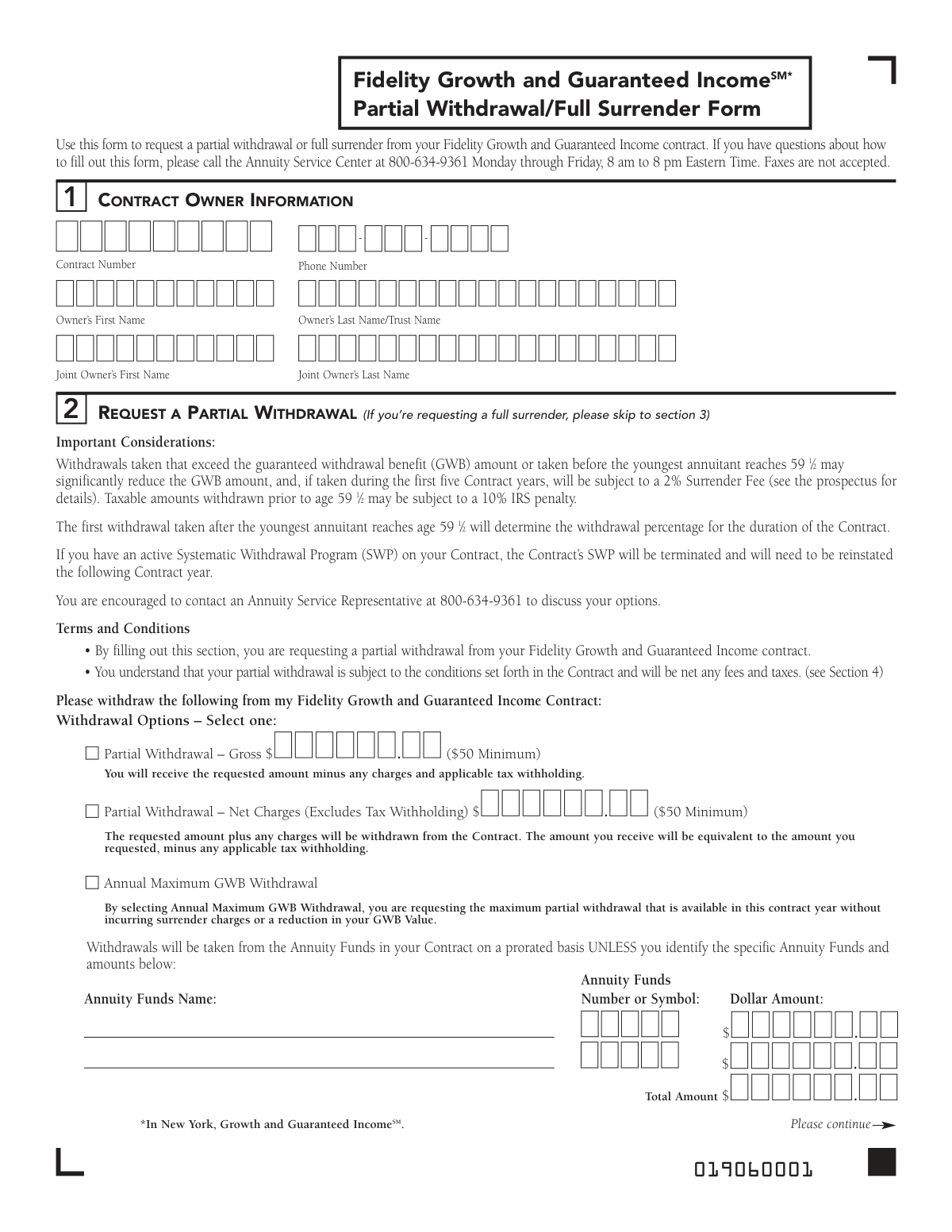
Don't type 55 fields by hand. Tell our AI about yourself, or upload a document you already have, and it fills every field in seconds. You check it, then download, print or sign.
The AI does the filling. You just check it.
No typing into boxes, nothing to install.
What this form asks for
The AI fills all of it, from your answers or your documents.
The AI checks your answers before you download
14 checks built for this form, so a wrong date or a missing answer is caught before anyone else sees it.
Validates that the user has completed either Section 2 for a partial withdrawal or Section 3 for a full surrender, but not both. This is crucial for preventing ambiguous or conflicting instructions that would require manual intervention to resolve. If both sections are filled, the form submission should be rejected with an error message prompting the user to choose only one action.
Ensures the provided Contract Number exists, is active, and that the Owner's Name in Section 1 matches the primary owner on record for that contract. This is a fundamental security check to prevent unauthorized access to or transactions on an annuity. A mismatch would block the request and may trigger a fraud alert.
Checks that if a 'Partial Withdrawal - Gross' or 'Partial Withdrawal - Net Charges' is requested, the specified dollar amount is a numeric value greater than or equal to the stated $50 minimum. This rule enforces the contract's terms and prevents the processing of insignificant or invalid transaction amounts. Requests below the minimum will be rejected, requiring the user to correct the amount.
Verifies that in Section 2, exactly one withdrawal option ('Gross', 'Net', or 'Annual Maximum GWB') has been selected. If a gross or net amount is chosen, this check also ensures a corresponding dollar value has been entered. This prevents incomplete requests and ensures the withdrawal calculation method is clearly defined.
If a full surrender is requested in Section 3, this check ensures one of the two certification boxes regarding the original contract's status (enclosed or lost/destroyed) is checked. This certification is a required part of the legal process for closing the contract. An incomplete certification would prevent the surrender from being processed.
Verifies that a mandatory choice has been made in Section 4 regarding federal tax withholding. The user must explicitly select either to withhold a specific percentage or not to withhold taxes at all. This ensures compliance and clarity on tax handling, preventing the system from using a default that the client may not want.
And 8 more checks
- Valid Tax Withholding Percentage
- Singular Payment Method Selection
- Conditional Third-Party Payee Information
- Conditional Fidelity Account Number
- Required Owner Signature and Date
- Conditional Joint Owner Signature
- Signature Guarantee Requirement Logic
- Valid Phone Number Format
Let AI fill out your Fidelity Partial Withdrawal/Full Surrender Form
No typing. Every field filled in seconds, checked, ready to sign.
How to Fill Out Fidelity Partial Withdrawal/Full Surrender Form Online for Free in 2026
What the AI walks you through.
- Navigate to Instafill.ai and upload or select the Fidelity Partial Withdrawal/Full Surrender Form.
- Use the AI assistant to accurately fill in your contract owner information, including name, contract number, and phone number in Section 1.
- Choose your request type: either a partial withdrawal in Section 2, specifying the amount and source, or a full surrender in Section 3.
- Complete Section 4 to provide your federal income tax withholding instructions for the distribution.
- Indicate your preferred payment method in Section 5, such as a check to your address of record or an electronic funds transfer (EFT).
- Carefully review all the information you've entered for accuracy before proceeding.
- Electronically sign the form in Section 6. The system will alert you if a signature guarantee is required based on your request, which must be obtained separately before mailing the form.
Common Mistakes in Completing Fidelity Partial Withdrawal/Full Surrender Form
The ones the AI is built to catch.
Failing to Obtain a Signature Guarantee When Required
Missing Joint Owner's Signature
Confusing 'Gross' and 'Net' Partial Withdrawals
Incomplete Tax Withholding Instructions
Submitting Contradictory Requests
Incorrect or Incomplete Contract Number
Mailing the Form to the Wrong Address
Attempting to Fax the Form
Invalid Payment Instructions
Mismatch Between Total and Itemized Withdrawal Amounts
Frequently Asked Questions About Fidelity Partial Withdrawal/Full Surrender Form
Is it really free for 7 days?
Can I fill other forms too?
How do I cancel?
How does the AI fill out Fidelity Partial Withdrawal/Full Surrender Form?
What happens to my information?
How complex is Fidelity Partial Withdrawal/Full Surrender Form to fill out?
What is the purpose of this form?
Who needs to fill out this form?
What is the difference between a partial withdrawal and a full surrender?
What happens if I don't specify my tax withholding preference in Section 4?
How do I submit the completed form?
Are there penalties for taking a withdrawal before age 59 ½?
What are my options for receiving the payment?
What is a Signature Guarantee and when is it required?
What happens to my Systematic Withdrawal Program (SWP) if I request a partial withdrawal?
For a full surrender, do I need to send my original contract document?
Can I use an AI tool to help me fill out this form?
How can I fill out this form online?
What should I do if my PDF of this form is not fillable?
Who can I call if I have questions about filling out this form?
Get your Fidelity Partial Withdrawal/Full Surrender Form filled out by AI
$0 today. Cancel before Nov 1 and you pay nothing.
Other forms like this one
income forms: Form SSA-44, Medicare Income-Related Monthly Adjustment Amount - Life-Changing Event, Form 1040-X, Amended U.S. Individual Income Tax Return, Form 1040-C, U.S. Departing Alien Income Tax Return, Form 4137, Social Security and Medicare Tax on Unreported Tip Income, Form 8960, Net Investment Income Tax, Form 1042-S, Foreign Person’s U.S. Income, Form 990-T, Exempt Org Business Income Tax Return, Form 945, Annual Return of Withheld Federal Income Tax, Form 568, LLC Income Return, Form FTB 3514, California Earned Income Tax Credit, Form 1099-INT, Interest Income, Form 1120-S, U.S. Income Tax Return for an S Corporation, Form 1065, U.S. Return of Partnership Income, Form 1040, U.S. Individual Income Tax Return, Form FL-150, Income and Expense Declaration, Form 122A-1, Chapter 7 Statement of Current Monthly Income, Arizona Form 285-I, Individual Income Tax Disclosure/Representation Authorization Form, Form SSA-8000-BK, Application for Supplemental Security Income (SSI), Judicial Council of California Form FL-150, Income and Expense Declaration, Form 1120-S (2025), U.S. Income Tax Return for an S Corporation
withdrawal forms: Empower Disability Withdrawal Request Form, One-Time Withdrawal – IRA, Fidelity Investments, One-Time Withdrawal — Defined Contribution Retirement Plan, Fidelity One-Time Withdrawal Form — Nonretirement, One-Time Withdrawal – Investment-Only (Non-Prototype) Retirement Account, Fidelity Investments Withdrawal — One-Time, Automatic Withdrawals—Defined Contribution Retirement Plan, Fidelity Investments Withdrawals—529 College Savings Plan, Fidelity Automatic Withdrawals — Nonretirement, Fidelity Investments Earnings Automatic Withdrawal Plan — IRA, The Vanguard 529 College Savings Plan: Withdrawal Request Form, Vanguard Personal Investor Withdrawal form, Empower Retirement Plan Withdrawal Request Form, Hardship Withdrawal Request - Empower, Hardship Withdrawal Request 401(a) Plan, Separation from Employment Withdrawal Form, MassMutual Application for Hardship Withdrawal, Beneficiary Account Withdrawal Request Governmental 457(b) Plan, Separation from Employment Withdrawal Form for East Bay Regional Park District 457(b) Deferred Compensation Plan, Separation from Employment Withdrawal Kit
Fidelity forms: Fidelity Funds Account Transfer of Assets Form, Fidelity Stock Plan Services (SPS) Transfer Request Form, How to Transfer Assets from Morgan Stanley to Fidelity Investments (Fidelity Stock Plan Services Guide), Fidelity Investments Transfer/Rollover/Exchange Form, Fidelity Investments Standing Transfer Instructions Form, Fidelity Charitable 144/145 Contribution Form, One-Time Withdrawal – IRA, Fidelity Investments, Fidelity Investments Transfer/Rollover Form, Fidelity Advisor 403(b) Distribution Request Form, Fidelity Advisor IRA Distribution Request for Automatic Rollover Accounts, Special Tax Notice: Your Rollover Options - Fidelity Investments, Fidelity Charitable Letter of Authorization, Fidelity Advisor Trading Authorization and Indemnification, Fidelity Investment-Only (Non-Prototype) Retirement Account Application, Fidelity NetBenefits Send a Document Form, Fidelity NetBenefits Auditor's Guide: An Overview of Fidelity's 2024 Plan Year Reporting Package, Fidelity NetBenefits Distribution - Recurring Payments, Fidelity Investments® Beneficiary Distribution Form, Fidelity Investments Distribution Form, Fidelity One-Time Withdrawal Form — Nonretirement
Let AI fill out your Fidelity Partial Withdrawal/Full Surrender Form
Your trial starts once a card is added. You pay nothing before Nov 1.
Our AI already knows this form, all 55 fields of it. Skip the typing: tell it about yourself, or upload what you have, and it fills the whole form in seconds.
- AI fills every field on all 3 pages, checkboxes included
- No typing into boxes: answer a few questions, or upload a document you already have, an old copy of this form, a photo of a document
- The AI checks the answers; you review and change anything before you download
- Download the finished PDF, print it, or sign it online
- Encrypted, and never used to train AI
Cancel before Nov 1 and you pay nothing.
A card is needed to start the trial. Cancel in two clicks from your account.
Terms · Privacy