Yes! You can use AI to fill out Fidelity Investments Transfer/Rollover Form
The Fidelity Transfer/Rollover Form is an official document used by individuals to transfer or roll over retirement plan assets—such as 401(a), 401(k), 403(b), 457(b), or IRA accounts—from a previous investment provider into a Fidelity employer-sponsored retirement account. It supports both direct rollovers and indirect (60-day) rollovers, and can also be used to consolidate multiple employer-sponsored retirement accounts already held at Fidelity. Completing this form accurately is essential to ensure timely processing and to avoid tax penalties associated with improper rollovers. Today, this form can be filled out quickly and accurately using AI-powered services like Instafill.ai, which can also convert non-fillable PDF versions into interactive fillable forms.
Fidelity Transfer/Rollover Form is part of the
investment forms, rollover forms, investment transfer forms, Fidelity forms, transfer forms and UK investment forms categories on Instafill.
Rather not fill this in by hand? Instafill is an online form filler that completes PDF forms automatically — upload the blank form, answer a few questions, and the AI fills every field.
Form specifications
| Form name: | Fidelity Investments Transfer/Rollover Form |
| Number of pages: | 1 |
| Field instructions: | Fidelity Transfer/Rollover Form Instructions |
| Filled form examples: | Fidelity Transfer/Rollover Form Examples |
| Language: | English |
Our AI automatically handles information lookup, data retrieval, formatting, and form filling.
It takes less than a minute to fill out Fidelity Transfer/Rollover Form using our AI form filling.
Securely upload your data. Information is encrypted in transit and deleted immediately after the form is filled out.
Instafill Demo: How to fill out PDF forms in seconds with AI
How to Fill Out Fidelity Transfer/Rollover Form Online for Free in 2026
Are you looking to fill out a FIDELITY TRANSFER/ROLLOVER FORM form online quickly and accurately? Instafill.ai offers the #1 AI-powered PDF filling software of 2026, allowing you to complete your FIDELITY TRANSFER/ROLLOVER FORM form in just 37 seconds or less.
Follow these steps to fill out your FIDELITY TRANSFER/ROLLOVER FORM form online using Instafill.ai:
- 1 Navigate to Instafill.ai and upload the Fidelity Transfer/Rollover Form PDF or select it from the available form library to begin filling it out online.
- 2 Complete Section 1 (Your Information) by entering your personal details, including your Social Security number, date of birth, full name, address, and contact information.
- 3 Fill in Section 2 (Investment Provider You Are Moving Money From) with the name, address, and phone number of your previous investment provider, and attach a copy of your most recent account statement.
- 4 Complete Section 3 (Account(s) or Contract(s) to Move) by providing the account or contract numbers, account types (403(b), 401(a)/(k), 457(b), or IRA), and the liquidation amount (full or partial) for each account you wish to transfer.
- 5 Enter your Fidelity account information in Section 4, including the name of the employer sponsoring your Fidelity retirement account, the plan number if known, and the type of account.
- 6 Specify your investment instructions in Section 5, indicating how you want the transferred assets allocated among available fund options, or confirm your current investment elections.
- 7 Obtain any required employer authorized signature in Section 6, then sign and date Section 7 (Your Signature), and submit the completed form to Fidelity via the postage-paid envelope or overnight delivery address provided.
Our AI-powered system ensures each field is filled out correctly, reducing errors and saving you time.
Why Choose Instafill.ai for Your Fillable Fidelity Transfer/Rollover Form Form?
Speed
Complete your Fidelity Transfer/Rollover Form in as little as 37 seconds.
Up-to-Date
Always use the latest 2026 Fidelity Transfer/Rollover Form form version.
Cost-effective
No need to hire expensive lawyers.
Accuracy
Our AI performs 10 compliance checks to ensure your form is error-free.
Security
Your personal information is protected with bank-level encryption.
Frequently Asked Questions About Fidelity Transfer/Rollover Form
This form is used to move retirement assets to your Fidelity employer-sponsored retirement account from a previous investment provider. You can also use it to consolidate multiple employer-sponsored retirement accounts currently held at Fidelity.
Yes, you must already have a retirement account with Fidelity to use this form. If you do not have one, you must also complete an Account Application/Enrollment Form before or alongside this transfer/rollover form.
You will need to provide your Social Security number, date of birth, full name, street address, city, state, zip code, email address, and daytime and evening phone numbers. Per the USA PATRIOT Act, this information is required to verify your identity when opening or updating an account.
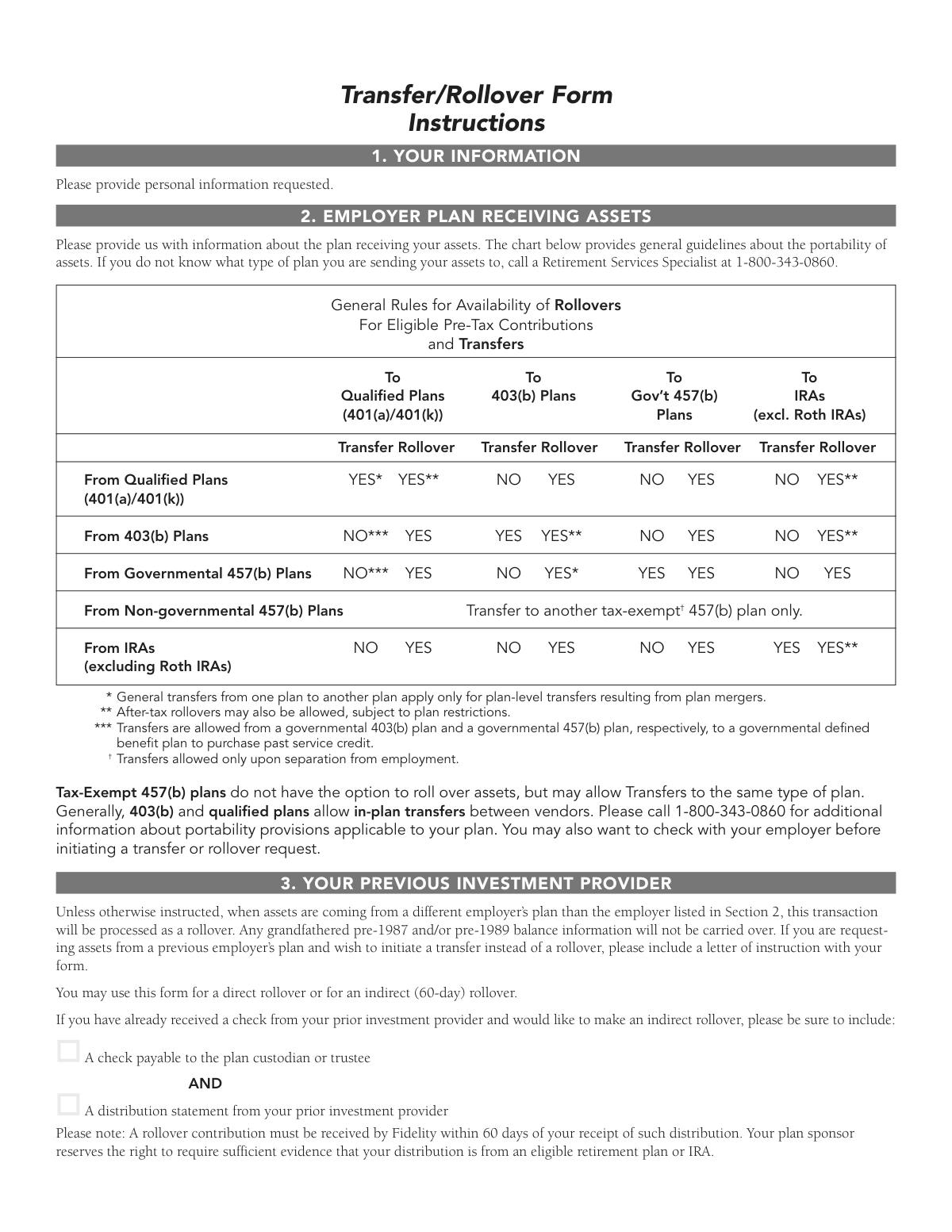
A transfer is a direct movement of assets between plans of the same type, while a rollover moves assets between different types of retirement plans. Unless you specifically request a transfer in writing, assets coming from a different employer's plan will be processed as a rollover by default.
An indirect rollover occurs when you have already received a distribution check from your prior investment provider and want to roll it into your Fidelity account. You must submit the check payable to the plan custodian or trustee along with a distribution statement from your prior provider, and Fidelity must receive it within 60 days of your receipt of the distribution.
You can choose either a full liquidation (100%) or a partial liquidation by specifying a percentage or dollar amount. If you do not specify an amount, Fidelity will move 100% of the account balance by default.
You should include your most recent account statement from the previous investment provider. If you are doing an indirect rollover, you must also include the distribution check and a distribution statement. Additionally, contact your previous investment provider to check if any additional paperwork is required on their end.
An authorized employer signature in Section 6 may be required depending on your plan. You should contact your Human Resources office or call Fidelity at 1-800-343-0860 to verify whether employer authorization is needed before submitting the form.
In Section 5, you can choose to invest in your current investment selection by selecting 'Yes,' or you can specify fund names, fund codes, and percentages. If no investment instructions are provided, assets will be allocated to your current investment election on file, or to the plan's default fund if instructions are incomplete.
You can return the form using the postage-paid envelope provided to Fidelity Investments, P.O. Box 770002, Cincinnati, OH 45277-0090. For overnight delivery, send it to Fidelity Investments, 100 Crosby Parkway, Mailzone KC1E, Covington, KY 41015.
The form provides space for two accounts or contracts in Sections 3A and 3B. If you need to move more than two accounts, you should make additional copies of page 2 of the form and include them with your submission.
Yes, rollovers from Traditional or SEP IRAs (excluding Roth IRAs) into qualified plans (401(a)/401(k)), 403(b) plans, and governmental 457(b) plans are generally allowed. However, direct transfers from IRAs to employer plans are not permitted; only rollovers are allowed in those cases.
Yes, AI-powered services like Instafill.ai can help you accurately auto-fill the Transfer/Rollover Form, saving you time and reducing the risk of errors. If you have a flat, non-fillable PDF version of the form, Instafill.ai can also convert it into an interactive fillable form so you can complete it digitally.
Simply upload the Transfer/Rollover Form PDF to Instafill.ai, and the AI will guide you through each section, auto-filling fields like your personal information, account details, and investment instructions based on the information you provide. Once complete, you can download the filled form and submit it to Fidelity using the mailing instructions provided.
You can call Fidelity Investments at 1-800-343-0860, Monday through Friday, 8 A.M. to midnight ET. For hearing-impaired assistance, call TTY 1-800-259-9743. A Retirement Services Specialist can help you determine the type of plan, portability rules, and whether employer authorization is needed.
Compliance Fidelity Transfer/Rollover Form
Validation Checks by Instafill.ai
1
Social Security Number Format and Completeness Validation
Validates that the Social Security Number (SSN) is provided and follows the standard 9-digit format (XXX-XX-XXXX). The SSN is a critical identifier used to locate and request assets from the previous investment provider if no account number is supplied. If the SSN is missing, malformed, or contains non-numeric characters, the form cannot be processed and asset transfer may be delayed or misdirected.
2
Date of Birth Format and Logical Range Validation
Ensures the Date of Birth is provided in a valid date format (MM/DD/YYYY) and falls within a plausible range for a retirement account holder (e.g., applicant must be at least 18 years old and no older than 120 years). The Date of Birth is required for identity verification under the USA PATRIOT Act. An invalid or missing date of birth may prevent account opening or identity verification, causing processing delays.
3
Required Personal Information Completeness Check
Verifies that all mandatory personal information fields in Section 1 are populated, including First Name, Last Name, Street Address, City, State, and Zip Code. These fields are required by the USA PATRIOT Act to verify the identity of the account holder and ensure proper delivery of correspondence. Missing any of these fields will result in an incomplete form that cannot be processed.
4
Phone Number Format Validation
Checks that at least one phone number (Daytime or Evening) is provided and that any entered phone numbers conform to a standard 10-digit U.S. format (e.g., XXX-XXX-XXXX or (XXX) XXX-XXXX). A valid phone number is necessary for Fidelity representatives to contact the applicant if there are questions or issues with the transfer request. Phone numbers containing letters, incorrect digit counts, or invalid area codes should be flagged.
5
Email Address Format Validation
Validates that if an email address is provided, it conforms to a standard email format containing a local part, an '@' symbol, a domain name, and a valid top-level domain (e.g., [email protected]). While not explicitly marked as required, a valid email address ensures Fidelity can communicate electronically with the account holder. An improperly formatted email address should be flagged to prevent failed communications.
6
Previous Investment Provider Name and Address Completeness
Ensures that the name of the investment provider being moved from (Section 2) is provided along with a complete address including Street, City, State, and Zip Code. This information is essential for Fidelity to contact the transferring institution and initiate the asset movement. If the provider name or address is missing or incomplete, the transfer request cannot be directed to the correct institution, causing significant delays.
7
Account or Contract Number Presence and Format Check
Verifies that at least one account or contract number is provided in Section 3A, and that any entered numbers do not contain invalid special characters. While the form notes that the SSN will be used if no account number is provided, a valid account number significantly reduces the risk of assets being requested from the wrong account. If both the account number and SSN are absent, the form must be flagged as incomplete.
8
Account Type Selection Validation
Confirms that a Type of Account or Contract (403(b), 401(a)/(k), 457(b), or IRA) is selected for each account listed in Sections 3A and 3B, and that the source account type is also identified (same employer, previous employer, Traditional/SEP IRA, or Rollover IRA). The account type determines the rollover/transfer eligibility rules per the portability chart and IRS regulations. Failure to select an account type may result in incorrect processing or an ineligible transfer being initiated.
9
Liquidation Amount Completeness and Logical Consistency
Validates that a liquidation amount is specified for each account listed — either Full Liquidation/100%, a partial percentage, or a partial dollar amount — and that only one option is selected per account. If a partial percentage is entered, it must be a numeric value between 1 and 99; if a dollar amount is entered, it must be a positive numeric value. Selecting both a percentage and a dollar amount simultaneously, or leaving the field blank, creates an ambiguous instruction that could result in incorrect asset liquidation.
10
Fidelity Receiving Account Employer Information Completeness
Ensures that the employer sponsoring the Fidelity retirement account (Section 4) is identified either by employer name with plan number, or by employer name with City and State. This information is required to correctly route the incoming assets to the appropriate Fidelity employer-sponsored plan. If neither the plan number nor the city and state are provided alongside the employer name, the assets may be deposited into the wrong plan or held pending clarification.
11
Receiving Account Type Selection Validation
Confirms that the type of Fidelity account receiving the assets (403(b), 401(a)/(k), or 457(b)) is selected in Section 4. The receiving account type must be cross-referenced against the source account type to ensure the transfer or rollover is permissible under the portability rules outlined in the form's eligibility chart. If no account type is selected, or if the combination of source and destination account types is not permitted, the form should be flagged for review.
12
Rollover Eligibility and 60-Day Rule Compliance Check
For indirect (60-day) rollovers, validates that the form submission includes both a check payable to the plan custodian/trustee and a distribution statement from the prior investment provider, and that the rollover contribution is being received within 60 days of the distribution date as indicated on the distribution statement. The IRS strictly enforces the 60-day rollover window, and failure to comply results in the distribution being treated as taxable income with potential early withdrawal penalties. If the distribution date on the statement indicates the 60-day window has expired, the form should be flagged immediately.
13
Investment Instructions Percentage Total Validation
Validates that if custom investment instructions are provided in Section 5, the sum of all specified fund allocation percentages equals exactly 100%. Partial or over-allocated investment instructions are considered incomplete and will result in the assets being defaulted to the plan's default fund, which may not align with the account holder's investment intentions. Each individual percentage entry must also be a positive numeric value greater than zero.
14
Applicant Signature and Date Presence Validation
Confirms that the applicant's signature field and corresponding date are both completed in Section 7 before the form is submitted. The signature certifies the applicant's agreement to the terms, their SSN accuracy under penalty of perjury, and their authorization to liquidate and transfer the designated assets. A form submitted without a signature or date is legally invalid and cannot be processed, resulting in a return of the form to the applicant.
15
Employer Authorized Signature Consistency Check
Verifies that if the Employer Plan Acceptance section (Section 6) is completed, both the Employer Authorized Signature and the Employer Authorized Printed Name fields are filled in, and that the authorization date is present and valid. Some plans require employer authorization before a transfer or rollover can be processed, and an incomplete authorization section may cause the entire request to be rejected or delayed. If only one of the two name fields is completed, the form should be flagged for follow-up.
16
Source and Destination Plan Rollover/Transfer Compatibility Validation
Cross-validates the source account type selected in Section 3 against the destination account type selected in Section 4 to ensure the requested transaction (transfer or rollover) is permitted under the IRS portability rules outlined in the form's eligibility chart. For example, a transfer from a non-governmental 457(b) plan to a 401(k) plan is not permitted, and a transfer from an IRA to a 403(b) plan is also not allowed. If an incompatible combination is detected, the form should be flagged with a specific explanation of the restriction to prevent an ineligible transaction from being initiated.
Common Mistakes in Completing Fidelity Transfer/Rollover Form
Many people overlook the requirement to attach their most recent account statement from the previous investment provider, either because they don't read the instructions carefully or assume it's optional. Without this document, Fidelity cannot verify account details, which will delay or halt processing of the transfer. The checklist on page 4 explicitly reminds submitters to include this statement. Always gather your most recent statement before completing the form, and attach it as a required document. Tools like Instafill.ai can flag missing required attachments to help prevent this oversight.
People sometimes transpose digits, leave the field blank, or enter an ITIN instead of a valid SSN when completing Section 1. This is critical because the SSN is used to identify your account and, if no account or contract number is provided in Section 3, it is used to locate and request the assets to be moved. An incorrect SSN can cause the transfer to be applied to the wrong account or rejected entirely. Double-check your SSN carefully before submitting, and note that you certify its accuracy under penalty of perjury by signing the form.
In Section 3, filers frequently check the wrong account type (e.g., selecting 403(b) when the account is actually a 401(k) or IRA), often because they are unsure of their plan type or confuse similar plan names. Selecting the wrong type can result in the transfer being processed incorrectly, potential tax consequences, or the request being rejected because the rollover is not permitted between those plan types. Refer to your account statement or contact your previous investment provider to confirm the exact plan type before completing this section. AI-powered tools like Instafill.ai can help validate plan type selections against provided account information.
Many people leave the liquidation amount blank, enter both a percentage and a dollar amount simultaneously, or enter a partial amount without realizing the default is 100% liquidation. If the field is left blank, Fidelity will move 100% of the account, which may not be the submitter's intention. Conversely, entering conflicting values (both a percentage and a dollar figure) can cause processing errors or delays. Clearly select either 'Full Liquidation/100%' or specify either a percentage or a dollar amount — not both — in the partial liquidation fields.
When indicating that the account or contract belongs to a previous employer in Section 3, many filers check the box but forget to write in the employer plan name in the space provided. This omission makes it impossible for Fidelity to correctly identify the source plan, which can delay or prevent the transfer from being processed. Always write the full, official name of the previous employer's plan in the designated field. If you are unsure of the exact plan name, check your old account statements or contact your former employer's HR department.
Many submitters skip Section 6 (Employer Plan Acceptance) without first verifying whether their employer requires an authorized signature, assuming it is optional. If your plan requires this authorization and it is missing, the form will be considered incomplete and the transfer will be delayed or rejected. The form instructs you to contact your Human Resources office or a Fidelity representative to determine if this signature is needed. Always verify this requirement before submitting the form, and allow adequate time to obtain the signature if required.
It is surprisingly common for people to complete all other sections of the form but forget to sign and date it in Section 7, especially when they are in a hurry or submit the form digitally. Without the participant's signature, the form is legally invalid and cannot be processed. The form even includes a 'Please sign here!' reminder, yet this step is still frequently missed. Before mailing or submitting the form, always review the checklist on page 4 and confirm that your signature and the current date are present. Instafill.ai can prompt users to complete required signature fields before submission.
In Section 5, when specifying how transferred assets should be invested across multiple funds, people often enter percentages that add up to less than or more than 100%. The form explicitly states that the total must equal 100%, and incomplete or incorrect investment instructions will result in assets being defaulted to the plan's default fund, which may not align with the submitter's investment goals. Carefully add up all fund percentages before submitting, and if you want assets invested in your current election, simply check 'Yes' rather than completing the fund table. AI-powered tools like Instafill.ai can automatically validate that fund allocations sum to exactly 100%.
When performing an indirect rollover — where the participant has already received a distribution check — many people are unaware of or underestimate the strict 60-day deadline to deposit the funds into the new plan. Missing this deadline can result in the distribution being treated as taxable income and potentially subject to a 10% early withdrawal penalty. The form clearly states that the rollover contribution must be received by Fidelity within 60 days of receipt of the distribution. Act promptly upon receiving a distribution check, and include both the check payable to the plan custodian and a distribution statement from your prior provider.
The form provides two different mailing addresses: a P.O. Box for regular mail and a physical street address for overnight delivery services. Many people use the P.O. Box address when sending via overnight courier, which can result in the package being undeliverable and causing significant delays. If using an overnight delivery service, always use the Covington, KY street address (100 Crosby Parkway, Mailzone KC1E, Covington, KY 41015) rather than the Cincinnati P.O. Box. Review the mailing instructions carefully before sending.
Filers frequently assume that submitting the Fidelity Transfer/Rollover Form is all that is required, not realizing that their previous investment provider may have its own separate paperwork, signature guarantee requirements, or authorization forms. Failing to complete the previous provider's requirements can stall the transfer indefinitely, as Fidelity cannot compel the other institution to release funds without proper authorization. The form explicitly advises contacting your previous investment provider before submitting. Make this call early in the process to identify and complete any additional requirements in parallel with this form.
In Section 4, people often enter a shortened, informal, or incorrect version of their employer's name rather than the exact name as it appears on their Fidelity statement or enrollment paperwork. This can cause Fidelity to be unable to match the submission to the correct employer-sponsored plan, resulting in delays or misapplication of funds. The form specifically instructs that the employer name should match what appears on your Fidelity statement or enrollment paperwork. If you are unsure, log into your Fidelity account or call 1-800-343-0860 to confirm the exact plan name before completing this section.
Saved over 80 hours a year
“I was never sure if my IRS forms like W-9 were filled correctly. Now, I can complete the forms accurately without any external help.”
Kevin Martin Green
Your data stays secure with advanced protection from Instafill and our subprocessors




Robust compliance program
Transparent business model
You’re not the product. You always know where your data is and what it is processed for.
ISO 27001, HIPAA, and GDPR
Our subprocesses adhere to multiple compliance standards, including but not limited to ISO 27001, HIPAA, and GDPR.
Security & privacy by design
We consider security and privacy from the initial design phase of any new service or functionality. It’s not an afterthought, it’s built-in, including support for two-factor authentication (2FA) to further protect your account.
Fill out Fidelity Transfer/Rollover Form with Instafill.ai
Worried about filling PDFs wrong? Instafill securely fills fidelity-investments-transferrollover-form forms, ensuring each field is accurate.
