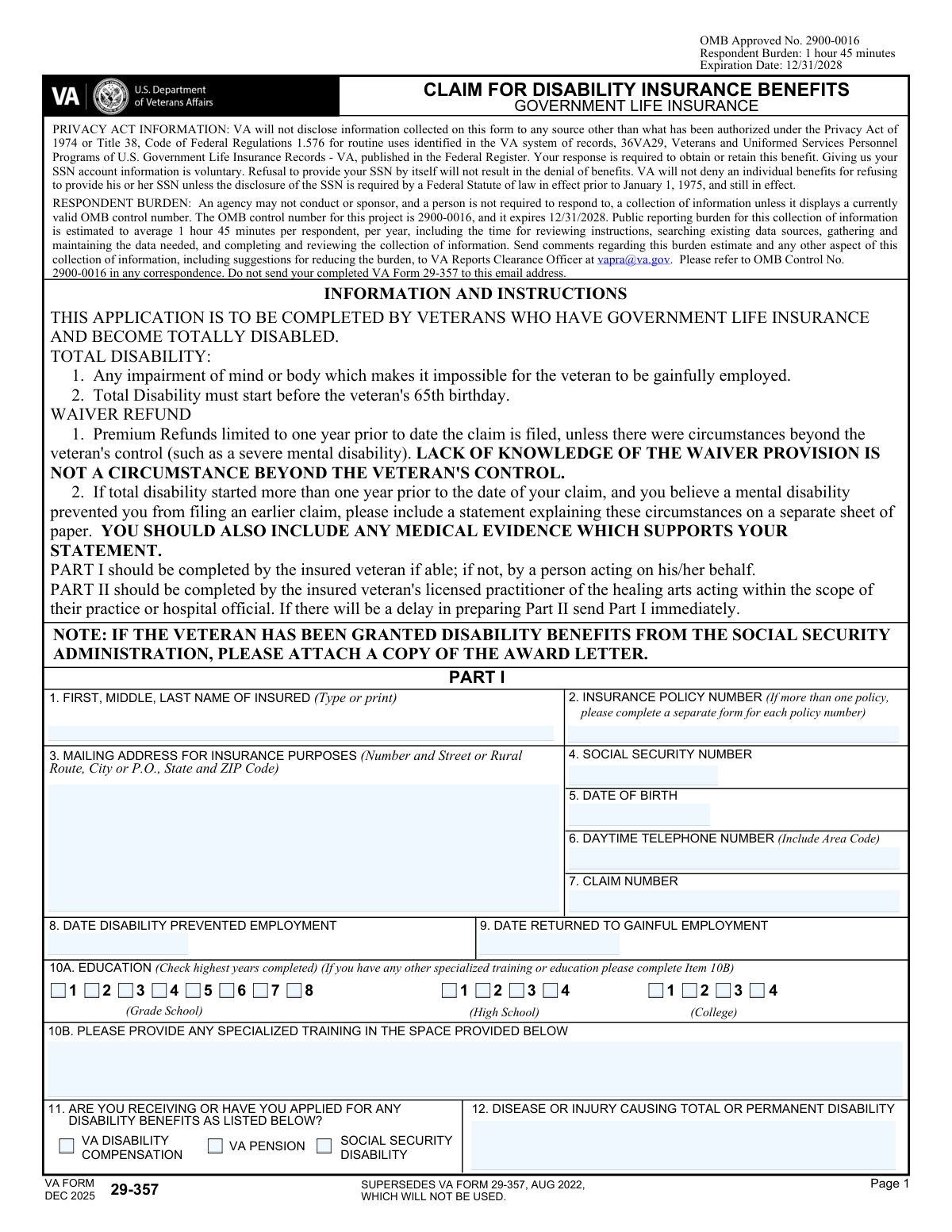
Yes! You can use AI to fill out VA Form 29-357, Claim for Disability Insurance Benefits (Government Life Insurance)

VA Form 29-357 is an application for veterans who hold Government Life Insurance and become totally disabled, allowing them to claim disability insurance benefits and potentially obtain a waiver of premiums (and limited premium refunds). The form includes Part I (completed by the insured veteran or a representative) and Part II (completed by an attending licensed practitioner of the healing arts or a hospital official) to document the medical basis and work impact of the disability. It is important because VA uses the information to determine eligibility, establish disability onset, and evaluate waiver/refund provisions, and it may require supporting evidence such as a Social Security disability award letter. Today, this form can be filled out quickly and accurately using AI-powered services like Instafill.ai, which can also convert non-fillable PDF versions into interactive fillable forms.
Our AI automatically handles information lookup, data retrieval, formatting, and form filling.
It takes less than a minute to fill out VA Form 29-357 using our AI form filling.
Securely upload your data. Information is encrypted in transit and deleted immediately after the form is filled out.

Form specifications

Form name: VA Form 29-357, Claim for Disability Insurance Benefits (Government Life Insurance)
Number of pages: 3
Language: English
main-image

Instafill Demo: filling out a legal form in seconds

How to Fill Out VA Form 29-357 Online for Free in 2026

Are you looking to fill out a VA FORM 29-357 form online quickly and accurately? Instafill.ai offers the #1 AI-powered PDF filling software of 2026, allowing you to complete your VA FORM 29-357 form in just 37 seconds or less.
Follow these steps to fill out your VA FORM 29-357 form online using Instafill.ai:
  1. 1 Go to Instafill.ai and upload VA Form 29-357 (or select it from the form library).
  2. 2 Let the AI detect and map the form fields, then import your personal details (name, SSN, date of birth, contact information, and mailing address) into Part I.
  3. 3 Enter insurance and claim details (policy number, claim number if available) and provide disability onset and employment-impact dates (date disability prevented employment, any return-to-work date).
  4. 4 Complete the remaining Part I sections: education and specialized training, benefits applied for/received (VA compensation/pension/SSA), condition causing disability, treatment providers/hospitals, and employment history for the year prior to disability to present.
  5. 5 Upload supporting documents (e.g., Social Security disability award letter, medical evidence, and any explanatory statement regarding delayed filing due to mental disability) and attach them to the submission packet.
  6. 6 Send Part II to your attending practitioner or hospital official through Instafill.ai for completion (treatment history, diagnosis, objective findings, prognosis, work capability, and signatures), then review for completeness and consistency.
  7. 7 Run Instafill.ai validation checks, e-sign where allowed (or prepare for wet signature if required), generate the final PDF, and submit it to the VA Insurance Center via the VA document upload service or the mailing address listed on the form.

Our AI-powered system ensures each field is filled out correctly, reducing errors and saving you time.

Why Choose Instafill.ai for Your Fillable VA Form 29-357 Form?

Speed

Complete your VA Form 29-357 in as little as 37 seconds.

Up-to-Date

Always use the latest 2026 VA Form 29-357 form version.

Cost-effective

No need to hire expensive lawyers.

Accuracy

Our AI performs 10 compliance checks to ensure your form is error-free.

Security

Your personal information is protected with bank-level encryption.

Frequently Asked Questions About Form VA Form 29-357

VA Form 29-357 is a claim for Disability Insurance Benefits under Government Life Insurance. Veterans use it to request a waiver of premiums (and possibly a refund) when they become totally disabled.

This application is for veterans who have Government Life Insurance and become totally disabled. Part I is completed by the insured veteran (or someone acting on the veteran’s behalf), and Part II must be completed by the veteran’s attending licensed practitioner or a hospital official.

Total disability means an impairment of mind or body that makes it impossible for the veteran to be gainfully employed. The total disability must begin before the veteran’s 65th birthday.

Yes. The form instructs you to complete a separate VA Form 29-357 for each insurance policy number.

You’ll need identifying and contact details (name, address, SSN, date of birth, phone), your policy number and claim number (if you have one), the date your disability prevented employment, education/training, the condition causing disability, treatment providers/hospitals, and your employment history for the year prior to disability to the present.

Attach a copy of your Social Security Administration disability award letter. The form specifically requests this if SSA disability benefits have been granted.

Send Part I immediately if there will be a delay in preparing Part II. Part II can follow once your practitioner or hospital official completes it.

Premium refunds are generally limited to one year prior to the date the claim is filed. If you believe circumstances beyond your control (such as severe mental disability) prevented earlier filing, include a separate statement and supporting medical evidence.

No. The form states that lack of knowledge of the waiver provision is not considered a circumstance beyond the veteran’s control.

Enter the date your condition first prevented you from working in gainful employment, and if you later returned to work, enter the date you returned. If you have not returned to gainful employment, leave that return-to-work date blank or mark it as not applicable based on your completion method.

You must list your employment (including self-employment) for one year prior to the date of total disability to the present. Include dates of employment, last day worked, hours and earnings, occupation, employer name/address, and reason for termination.

Mail it to: Department of Veterans Affairs, Insurance Center, P.O. Box 5209, Janesville, WI 53547-5209. The form also notes the fastest and most secure option is the VA Insurance document upload service at https://insurance.va.gov/home/IDU.

Call the VA Insurance toll-free number listed on the form: 1-800-669-8477. They can help with insurance-related questions and submission guidance.

Yes. Services like Instafill.ai can use AI to auto-fill form fields accurately from the information you provide, helping reduce errors and saving time while you still review and approve everything before submission.

Upload the PDF to Instafill.ai, provide your details (and any supporting info like policy number, dates, and provider information), and the AI will map your answers into the correct fields for review. If the PDF is flat/non-fillable, Instafill.ai can convert it into an interactive fillable form so you can complete and export it cleanly.

Compliance VA Form 29-357
Validation Checks by Instafill.ai

1
Insured Full Name completeness and character validation
Validates that the insured’s first and last name are provided (middle optional) and contain only expected characters (letters, spaces, hyphens, apostrophes) with reasonable length limits. This prevents identity mismatches and downstream indexing/search issues. If validation fails, block submission and prompt for a complete legal name as shown on insurance/VA records.
2
Insurance Policy Number format and single-policy-per-form rule
Checks that the insurance policy number is present and matches an allowed pattern, including any required letter prefix (as indicated in Part II). Also enforces the instruction that only one policy number is submitted per form instance (no multiple policy numbers in one field). If validation fails, require correction or creation of separate submissions per policy.
3
Claim Number presence and format consistency across sections
Ensures a claim number is provided when required and conforms to the expected alphanumeric/length rules used by the VA Insurance Center. If both Part I and Part II claim number fields are present, they must match exactly to avoid misrouting medical evidence to the wrong claim. If validation fails, flag for correction and prevent submission until the claim number is consistent.
4
Social Security Number (SSN) format and plausibility checks
Validates SSN is either blank (since disclosure is described as voluntary) or, if provided, is exactly 9 digits (optionally formatted as XXX-XX-XXXX) and not an obvious invalid value (e.g., all zeros, 123456789). This reduces identity errors and prevents ingestion of placeholder data. If validation fails, reject the SSN value and request a corrected SSN or allow the user to leave it blank.
5
Date of Birth format and age-based eligibility (disability onset before 65th birthday)
Checks that Date of Birth is a valid date (not in the future) and that the reported disability start date (Date Disability Prevented Employment / stopped working due to disability) occurs before the insured’s 65th birthday, per form instructions. This is critical for eligibility determination and prevents processing of ineligible claims. If validation fails, show an eligibility warning and require correction or additional review routing.
6
Daytime Telephone Number format validation
Validates the daytime phone number is present and matches a valid phone format (e.g., 10 digits for US numbers, allowing parentheses/dashes/spaces) and is not an extension-only entry. A valid contact number is needed for follow-up and reduces delays in evidence development. If validation fails, prompt for a corrected phone number including area code.
7
Mailing/Home Address completeness and ZIP/state validation
Ensures the address includes street/rural route, city, state, and ZIP code, and validates state as a valid US state/territory abbreviation and ZIP as 5 digits (or ZIP+4). This is important for correspondence delivery and record matching. If validation fails, require completion of missing components and correction of invalid state/ZIP values.
8
Disability and employment date logic (prevented employment vs returned to work)
Validates that 'Date Disability Prevented Employment' is a valid date and, if 'Date Returned to Gainful Employment' is provided, it must be on/after the prevented-employment date. It also flags cases where a return-to-work date is provided but the claim still asserts total disability without explanation, as this may require adjudicative clarification. If validation fails, require date correction or an explanatory note/attachment indicator.
9
Education level selection exclusivity and completeness
Checks that exactly one education checkbox is selected as the highest year completed across grade school, high school, and college options (no multiple 'highest year' selections). This prevents ambiguous education history and supports vocational assessment. If validation fails, require the user to select only one highest completed year.
10
Specialized training details required when indicated
If the applicant provides any indication of specialized training (e.g., non-empty training field or a business rule toggle in the UI), validate that the training description is sufficiently detailed (e.g., minimum character count, includes type of training and approximate dates/certification if available). This supports employability evaluation and reduces follow-up requests. If validation fails, prompt for more complete training information or allow the user to clear the field if none applies.
11
Disability benefits status selection and SSA award letter attachment prompt
Validates that the disability benefits question (VA Disability Compensation, VA Pension, Social Security Disability) is answered explicitly (at least one selected or an explicit 'none' option in the UI). If Social Security Disability is selected, require an attachment indicator for the SSA award letter or capture a reason it is unavailable. If validation fails, prompt the user to complete the benefits status and add the required attachment indicator.
12
Disease/Injury causing disability required and non-placeholder content
Ensures the 'Disease or Injury causing total or permanent disability' field is completed with meaningful content (not 'N/A', 'unknown', or a single word like 'pain' without context). This is essential for medical development and for the practitioner to align Part II diagnosis with Part I. If validation fails, require a more specific condition description (e.g., diagnosis name, body system, or injury details).
13
Hospital treatment records: paired fields and admission/release date order
For each hospital entry, validates that if a hospital name is provided then address, admission date, and release date are also provided (or an explicit 'still admitted' indicator if supported). Admission date must be on/before release date, and dates must be valid and not in the future. If validation fails, require completion of missing fields and correction of date sequencing.
14
Licensed practitioner records: required pairing and treatment date sequencing
For each practitioner entry, validates that name and address are provided together and that treatment began date is on/before last treatment date (or allow last treatment to be blank if ongoing with an 'ongoing' indicator). This ensures VA can request records and that timelines support the disability onset narrative. If validation fails, prompt for missing provider details and correct invalid date ranges.
15
Employment history coverage and internal consistency (one year prior to disability to present)
Validates that at least one employment record is provided covering the period from one year prior to the disability start date through the present (or indicates unemployment/self-employment explicitly). For each employment row, checks From/To dates are valid and ordered, last day worked falls within the From–To range, and weekly hours/earnings are numeric and non-negative. If validation fails, require corrected dates/numbers and prompt for additional employment rows or an unemployment explanation.
16
Signature and signature date presence and chronology
Ensures the insured/fiduciary signature is present and the signature date is provided and is not earlier than key claim events in a way that indicates data entry error (e.g., signature date before date of birth or far before disability onset). This is required for consent/attestation and legal sufficiency of the claim. If validation fails, block submission until a valid signature and date are provided.

Common Mistakes in Completing VA Form 29-357

Using the wrong form version or submitting to the wrong destination

Applicants sometimes download an older VA Form 29-357 (the form notes DEC 2025 supersedes AUG 2022) or mail/upload it to an incorrect office/email (the burden email explicitly says not to send completed forms there). This can delay processing or cause the claim to be rejected/returned for resubmission. Always confirm you’re using VA Form 29-357 (DEC 2025) and submit via the VA Insurance document upload service or the Janesville, WI address listed on the form. If you’re working from a flat, non-fillable PDF, Instafill.ai can convert it into a fillable version and help ensure you’re using the current form and correct submission method.

Leaving Part II (medical provider report) incomplete or not coordinating with the provider

A very common issue is the veteran completes Part I but never gets Part II completed by an attending licensed practitioner/hospital official, or the provider omits key sections (history, objective findings, diagnosis, prognosis). Without Part II, VA often cannot substantiate total disability, leading to follow-up requests and long delays. If Part II will be delayed, the form instructs you to send Part I immediately—but you still must follow through to obtain Part II and any hospital summaries. Instafill.ai can help track missing sections and prompt you (and your provider) for the exact fields that are commonly skipped.

Incorrect or inconsistent policy number (missing letter prefix or mixing multiple policies)

People frequently enter an incomplete insurance policy number, forget the letter prefix (explicitly required in Part II), or try to list multiple policies on one form even though the instructions say to complete a separate form for each policy number. This can cause VA to match the claim to the wrong policy or request clarification, slowing adjudication. Copy the policy number exactly as shown on your insurance documents and submit separate forms for each policy. AI-powered tools like Instafill.ai can validate expected policy-number formats and flag missing prefixes before submission.

Mismatched identity details across pages (name/SSN/DOB/claim number)

Because the insured’s identifying information appears in multiple places (Part I and Part II), applicants often have small mismatches—nickname vs. legal name, transposed SSN digits, or a missing claim number on one page. Even minor inconsistencies can trigger manual review or requests for correction. Use the insured’s legal name exactly, double-check SSN and DOB, and ensure the claim number (if applicable) is consistent everywhere it appears. Instafill.ai can auto-populate repeated fields and reduce copy-over errors.

Wrong or unclear disability onset/work-stoppage dates

Applicants often confuse “Date disability prevented employment” (Part I) with “Date insured stopped working because of disability” (Part II), or they provide approximate dates without explanation. These dates are critical for eligibility (e.g., total disability must start before age 65) and for waiver/refund timing, so unclear dates can lead to denials or additional evidence requests. Use exact dates when possible and ensure the veteran’s and provider’s dates align; if uncertain, attach a brief explanation and supporting records. Instafill.ai can help format dates consistently and flag conflicts between Part I and Part II.

Filling 'Date returned to gainful employment' when the veteran never returned (or leaving it blank without clarification)

Many people either enter a date even though the veteran did not return to work (guessing or using a non-relevant date), or leave it blank without indicating “N/A.” This creates confusion about whether the disability is total/continuous and can prompt VA to request clarification. If the veteran has not returned to gainful employment, write “N/A” (or follow the form’s conventions) and ensure the employment record supports that timeline. Instafill.ai can suggest appropriate “N/A” usage and prevent accidental entry of contradictory dates.

Incomplete education section (checking multiple boxes or skipping specialized training details)

The education item asks for the highest year completed, but applicants sometimes check multiple years or forget to complete Item 10B when they have specialized training. Education/training can be relevant to employability determinations, and inconsistent entries can weaken the narrative of inability to work. Check only one box for the highest year completed and list any specialized training clearly in 10B (licenses, certifications, vocational programs, dates if known). Instafill.ai can enforce “single selection” logic and prompt for 10B when training is mentioned elsewhere.

Not attaching the Social Security Disability award letter when applicable

The form specifically requests a copy of the SSA award letter if the veteran has been granted Social Security disability benefits, but many applicants forget to include it or attach unrelated SSA documents. Missing the award letter can lead to follow-up requests and delays, even if the veteran is otherwise eligible. Attach the SSA award/benefit determination letter (not just payment history) and label it clearly. Instafill.ai can remind you to attach required supporting documents based on your checkbox selections.

Underreporting treatment sources (missing hospitals/practitioners, incomplete addresses, or missing treatment dates)

Applicants often list only one provider, omit VA facilities, provide partial addresses, or leave admission/release and treatment-began/last-treatment dates blank. VA may need these details to obtain records; incomplete provider information can stall evidence gathering and slow the claim. List every hospital/clinic and practitioner who treated the disabling condition, include full mailing addresses, and provide date ranges as accurately as possible. Instafill.ai can standardize addresses, validate ZIP codes, and prompt for missing date ranges.

Employment history errors (missing one-year lookback, inconsistent hours/earnings, or forgetting self-employment)

The form requests a record of employment for one year prior to the date of total disability to the present, including self-employment, but people frequently provide only their last job or omit side work. Others enter monthly earnings in a weekly field, leave “last day worked” blank, or provide date ranges that don’t match the disability onset date. These issues can undermine the “gainful employment” analysis and trigger clarification requests. Provide a complete timeline, use weekly hours/weekly earnings as requested, and include self-employment with the same level of detail; Instafill.ai can help normalize pay-period formats and flag timeline gaps.

Missing signatures/dates or wrong signer (insured vs. fiduciary/official)

A frequent rejection reason is a missing signature/date in Part I, or Part II lacking the preparer’s signature/title/report date. Another common mistake is someone signs for the insured without indicating they are an authorized official/fiduciary, which can raise validity questions. Ensure Part I is signed and dated by the insured if able; if not, the person acting on the insured’s behalf should sign in the correct capacity and be consistent with any supporting authority documentation. Instafill.ai can highlight signature/date fields before finalizing and reduce the chance of submitting an incomplete packet.
Saved over 80 hours a year

“I was never sure if my IRS forms like W-9 were filled correctly. Now, I can complete the forms accurately without any external help.”

Kevin Martin Green

Your data stays secure with advanced protection from Instafill and our subprocessors

Robust compliance program

Transparent business model

You’re not the product. You always know where your data is and what it is processed for.

ISO 27001, HIPAA, and GDPR

Our subprocesses adhere to multiple compliance standards, including but not limited to ISO 27001, HIPAA, and GDPR.

Security & privacy by design

We consider security and privacy from the initial design phase of any new service or functionality. It’s not an afterthought, it’s built-in, including support for two-factor authentication (2FA) to further protect your account.

Fill out VA Form 29-357 with Instafill.ai

Worried about filling PDFs wrong? Instafill securely fills va-form-29-357-claim-for-disability-insurance-benefits-government-life-insurance-1 forms, ensuring each field is accurate.