Yes! You can use AI to fill out VA Form 21-686c, Declaration of Status of Dependents

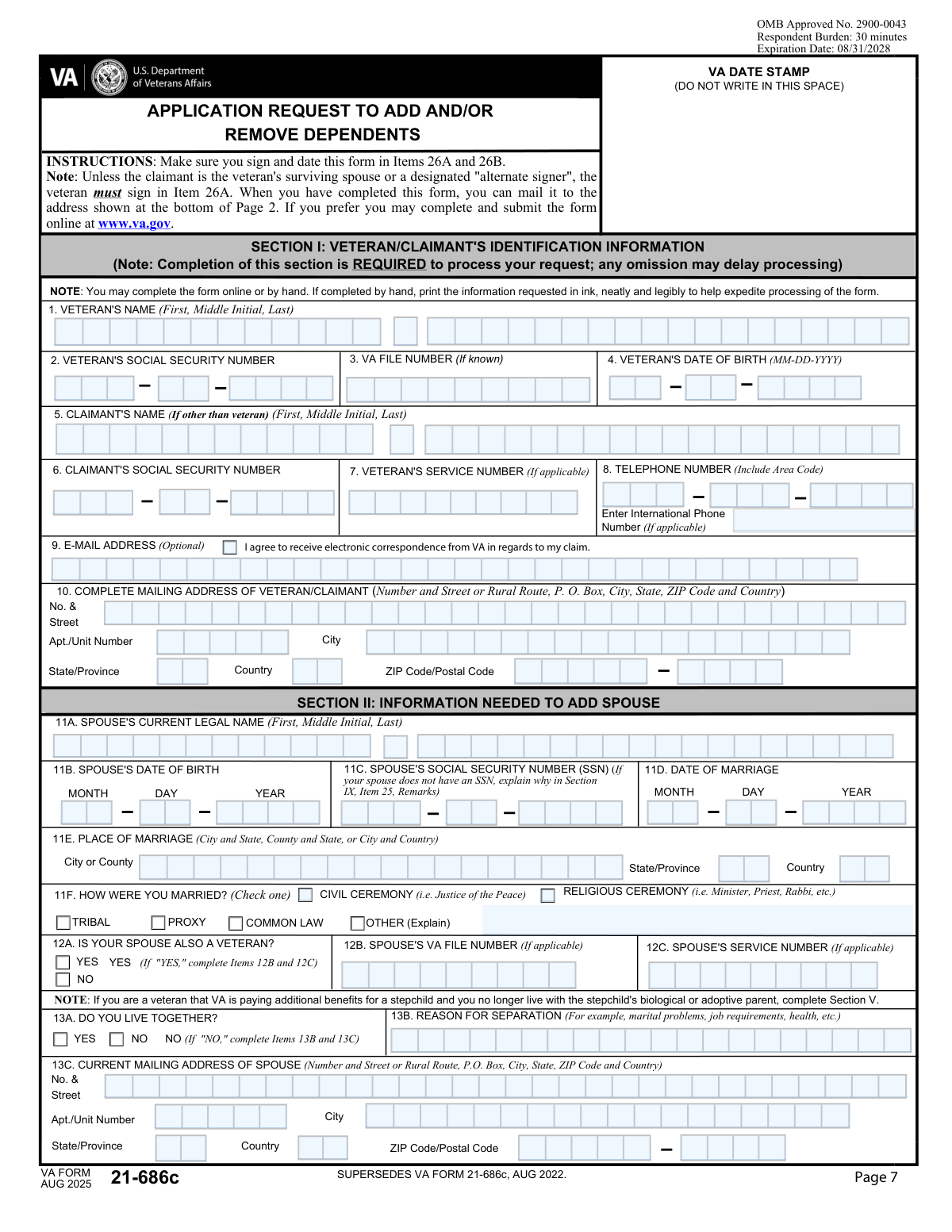
VA Form 21-686c, Declaration of Status of Dependents, is an official U.S. Department of Veterans Affairs form used by veterans or claimants to report changes in dependent status, including adding a spouse or children, reporting a divorce, reporting the death of a dependent, or removing a dependent from VA benefits. Accurate completion of this form is critical because it directly affects the amount of VA compensation or pension benefits a veteran receives. The form requires detailed personal, marital, and family information for both the veteran and any dependents being added or removed. Today, this form can be filled out quickly and accurately using AI-powered services like Instafill.ai, which can also convert non-fillable PDF versions into interactive fillable forms.
Our AI automatically handles information lookup, data retrieval, formatting, and form filling.
It takes less than a minute to fill out VA Form 21-686c using our AI form filling.
Securely upload your data. Information is encrypted in transit and deleted immediately after the form is filled out.

Form specifications

Form name: VA Form 21-686c, Declaration of Status of Dependents
Number of pages: 15
Language: English
main-image

Instafill Demo: filling out a legal form in seconds

How to Fill Out VA Form 21-686c Online for Free in 2026

Are you looking to fill out a VA FORM 21-686C form online quickly and accurately? Instafill.ai offers the #1 AI-powered PDF filling software of 2026, allowing you to complete your VA FORM 21-686C form in just 37 seconds or less.
Follow these steps to fill out your VA FORM 21-686C form online using Instafill.ai:
  1. 1 Navigate to Instafill.ai and search for or upload VA Form 21-686c (Declaration of Status of Dependents) to begin the guided filling process.
  2. 2 Enter the veteran's and claimant's identifying information, including full name, Social Security Number, VA file number, date of birth, service number, and current mailing address.
  3. 3 Complete the spouse information section by providing the spouse's name, date of birth, Social Security Number, date and place of marriage, marriage type, and whether the spouse is also a veteran.
  4. 4 Provide information about any prior marriages for both the veteran and the current spouse, including dates, places, and how each marriage was terminated (death, divorce, annulment, or other).
  5. 5 Fill in the dependent children sections, including each child's name, date of birth, place of birth, Social Security Number, child status (biological, adopted, stepchild, etc.), and current residence information if the child does not live with the veteran.
  6. 6 Complete any applicable sections for reporting a divorce from a former spouse, the death of a dependent, a child's marriage, or a schoolchild stopping school attendance.
  7. 7 Review all entered information for accuracy, provide your electronic signature and date, and submit the completed form through Instafill.ai or download it for submission to the VA.

Our AI-powered system ensures each field is filled out correctly, reducing errors and saving you time.

Why Choose Instafill.ai for Your Fillable VA Form 21-686c Form?

Speed

Complete your VA Form 21-686c in as little as 37 seconds.

Up-to-Date

Always use the latest 2026 VA Form 21-686c form version.

Cost-effective

No need to hire expensive lawyers.

Accuracy

Our AI performs 10 compliance checks to ensure your form is error-free.

Security

Your personal information is protected with bank-level encryption.

Frequently Asked Questions About Form VA Form 21-686c

This form is used by veterans or claimants to report changes in dependents to the VA, including adding or removing a spouse, reporting a marriage, divorce, or death of a dependent, and adding or removing dependent children. Veterans, surviving spouses, or other claimants who need to update their VA dependency records to potentially receive additional benefits should complete this form.

You will need the veteran's full name, Social Security Number, VA file number (if known), date of birth, and mailing address. You will also need your spouse's full name, SSN, date of birth, and marriage details, as well as information about any dependent children including their names, SSNs, dates and places of birth, and current addresses.

Yes, the form requires the veteran's and claimant's Social Security Numbers, entered in three separate parts: the first 3 digits, the middle 2 digits, and the last 4 digits. The spouse's and each dependent child's SSN are also required in the same format.

The form recognizes several types of marriages: religious ceremony, civil ceremony, common law, tribal, and proxy. If your marriage type does not fit any of these categories, you can select 'Other' and provide a brief explanation in the space provided.

If you and your spouse do not live together, check the 'NO' box in Item 13A and then provide your spouse's current mailing address (street, city, state, country, and ZIP code) and a brief reason for the separation, such as marital problems, job requirements, or health reasons.

Sections 14A through 14D allow you to list up to four prior marriages for the veteran/claimant, including the name of the former spouse, date and place of marriage, and how and when the marriage ended (death, divorce, annulment, or other). Section 15 covers the current spouse's prior marriages in the same format.

Sections 16 through 19 allow you to add up to four dependent children, and an addendum (Section 11) is available if you have more than four children to add. For each child, you must provide their name, SSN, date and place of birth, child status (biological, adopted, stepchild, etc.), and address if they do not live with you.

For each dependent child, you can check all applicable statuses: biological, adopted, stepchild, 18–23 years old and in school (requires VA Form 21-674), child incapable of self-support, and child previously married. If the child is a stepchild, you may also need to provide the date the child entered the veteran's household.

Section 6 (Item 22) is used to report the death of a dependent. You will need to indicate the dependent type (spouse, child, parent, etc.), provide the dependent's full name, and enter the date and place of death including city, state/province, and country.

In Item 12A, check 'Yes' to indicate your spouse is also a veteran, then complete Items 12B and 12C by providing your spouse's VA file number and military service number as they appear on official records.

Yes, AI-powered services like Instafill.ai can help you accurately auto-fill this complex form by guiding you through each field and reducing errors. This is especially helpful given the large number of fields covering marriage history, dependent children, and personal identification information.

Visit Instafill.ai, upload your VA form, and the AI will walk you through each section, auto-filling fields based on the information you provide. This saves significant time compared to manually completing the many detailed sections covering veteran information, spouse details, prior marriages, and dependent children.

If you have a flat, non-fillable PDF version of this form, Instafill.ai can convert it into an interactive fillable form so you can complete it digitally. This eliminates the need to print and handwrite your responses across the form's many sections.

Providing your email address is optional, but if you do, you can also check the consent box to agree to receive electronic correspondence from the VA about your claim. This can speed up communication regarding your dependency claim.

For more than four prior marriages, use the Remarks section (Item 25) to provide additional information. For more than four dependent children, complete the addendum page (Section 11) and submit it along with your main application; you can make additional copies of the addendum page if needed.

Compliance VA Form 21-686c
Validation Checks by Instafill.ai

1
Veteran and Claimant Social Security Number Format Validation
Validates that all three segments of the Veteran's and Claimant's Social Security Number are numeric only and match the required digit counts: exactly 3 digits for the area number, exactly 2 digits for the group number, and exactly 4 digits for the serial number. SSN segments must not contain letters, spaces, or dashes, and none of the segments should be all zeros (e.g., '000' for the area number is invalid per SSA rules). If any segment fails this check, the form cannot be processed and the claimant's identity cannot be verified, potentially delaying or denying benefits.
2
Veteran Date of Birth Logical Validity Check
Validates that the Veteran's Date of Birth fields (MM, DD, YYYY) together form a real, logically valid calendar date — for example, month must be between 01 and 12, day must be appropriate for the given month and year (e.g., no February 30), and the year must be a four-digit value representing a plausible birth year (e.g., not in the future and not before 1900). The combined date must also be in the past and result in an age consistent with military service eligibility. An invalid or impossible date of birth will prevent accurate identity matching against VA records.
3
Current Marriage Date Must Precede Form Submission Date
Validates that the Date of Marriage (Item 11D: MM, DD, YYYY) represents a date that is in the past relative to the form submission date, and that the combined month, day, and year form a valid calendar date. The marriage date must also be after both the Veteran's and Spouse's dates of birth, ensuring the marriage could not have occurred before either party was born. If the marriage date is in the future or is logically impossible, the claim for spousal benefits cannot be substantiated.
4
Spouse's Date of Birth Validity and Age Consistency Check
Validates that the Spouse's Date of Birth (Item 11B: MM, DD, YYYY) forms a valid calendar date with month between 1–12, day appropriate for the month, and a four-digit year that is in the past. The spouse's date of birth must also precede the Date of Marriage (Item 11D), confirming the spouse was alive at the time of marriage. An invalid or future-dated spouse birth date will cause processing errors and may result in rejection of the spousal dependency claim.
5
Marriage Type Selection Completeness and Mutual Exclusivity Check
Validates that at least one Marriage Type checkbox (Religious, Civil, Common Law, Proxy, Tribal, or Other) is selected in Item 11F, as this field is required to establish the legal basis of the marriage for VA purposes. If 'Other (Explain)' is selected, the corresponding explanation text field must also be populated with a non-empty description. Selecting no marriage type or selecting 'Other' without an explanation will result in an incomplete submission that cannot be adjudicated.
6
Spouse Veteran Status Mutual Exclusivity and Conditional Field Requirement
Validates that exactly one of the two checkboxes for Item 12A ('Is your spouse also a veteran? — Yes' or 'No') is selected, as both being checked or neither being checked is an invalid state. If 'Yes' is selected, the conditional fields for Spouse's VA File Number (Item 12B) and Spouse's Service Number (Item 12C) become required and must be populated with non-empty values. Failure to answer this question or to complete the conditional fields when applicable will prevent the VA from cross-referencing the spouse's service record.
7
Separation Address and Reason Required When Not Living Together
Validates that when Item 13A 'NO (Do you live together)' is checked, all required spouse mailing address fields (Street Address, City, State/Province, Country, ZIP/Postal Code) and the Reason for Separation field are populated with non-empty values. The spouse's address is necessary for VA correspondence and benefit coordination when the couple does not share a residence. If these fields are left blank while the 'NO' option is selected, the form is incomplete and the separation claim cannot be properly evaluated.
8
Prior Marriage Termination Date Must Follow Marriage Date (Items 14A–14D and 15A–15D)
Validates that for each prior marriage entry (14A, 14B, 14C, 14D, 15A, 15B, 15C, 15D), if a termination date is provided, it must be a valid calendar date that is chronologically after the corresponding marriage date. A termination date that precedes or equals the marriage date is logically impossible and indicates a data entry error. Additionally, if any termination reason checkbox (Death, Divorce, Annulment, or Other) is checked, the full termination date and place fields must be completed; failure to do so will result in an incomplete prior marriage history that could affect benefit eligibility.
9
Prior Marriage Termination Reason Selection and Explanation Completeness
Validates that for each prior marriage entry where a termination is indicated (14A through 14D and 15A through 15D), exactly one termination reason checkbox (Death, Divorce, Annulment, or Other) is selected. If 'Other (Explain)' is selected for any entry, the corresponding explanation text field must contain a non-empty description of the termination circumstances. Leaving the reason unchecked or selecting 'Other' without an explanation creates an ambiguous record that the VA cannot use to confirm the claimant's current marital status.
10
Dependent Child Date of Birth Validity and Age-Status Consistency
Validates that for each dependent child listed (Items 16–19, 24, and addendum Items 1–2), the Date of Birth fields (MM, DD, YYYY) form a valid calendar date and represent a date in the past. The child's age derived from the birth date must be consistent with the selected child status checkboxes — for example, if '18–23 years old and in school' is checked, the birth year must correspond to an age between 18 and 23; if 'Minor Child (Under 18)' is checked, the child must be under 18 based on the birth date. Inconsistencies between age and status will cause the dependency claim to be flagged for manual review.
11
Child SSN Segment Format and Completeness Validation
Validates that for each dependent child whose SSN is provided (Items 16B, 17B, 18B, 19B, 24C, and addendum 1B and 2B), all three segments are numeric only and conform to the required digit lengths: 3 digits for the area number, 2 digits for the group number, and 4 digits for the serial number. If an SSN is partially entered (e.g., only some segments filled), the entire SSN is considered incomplete and must be corrected. An invalid or incomplete child SSN will prevent the VA from verifying the child's identity and may delay processing of the dependency claim.
12
Stepchild Household Entry Date Required When Stepchild Status Selected
Validates that when a child's status is marked as 'Stepchild' (Items 16G, 17G, 18G, 19G, or addendum 1G/2G), the corresponding 'Date Child Entered Veteran's Household' fields (Items 16I, 17I, 18I, 19I, 1I, 2I) must be completed with a valid month, day, and year. This date must be in the past and must be after the child's date of birth. The household entry date is required to establish when the stepchild became a dependent for VA benefit purposes; omitting it will result in the stepchild dependency claim being rejected.
13
Mailing Address Completeness and ZIP Code Format Validation
Validates that the Veteran/Claimant's mailing address includes at minimum a Street Address, City, State/Province, Country, and primary ZIP/Postal Code. For U.S. addresses, the primary ZIP code must be exactly 5 numeric digits, and if the ZIP+4 extension is provided, it must be exactly 4 numeric digits. The same format rules apply to all other address ZIP fields throughout the form (spouse address, child address, stepchild address). An incomplete or incorrectly formatted mailing address will prevent VA correspondence from reaching the claimant and may delay benefit payments.
14
Telephone Number Format and International Number Mutual Exclusivity
Validates that if a domestic telephone number is provided, the Area Code must be exactly 3 digits, the Prefix must be exactly 3 digits, and the Line Number must be exactly 4 digits, all numeric. If an International Phone Number is provided instead, it must include a country code and be non-empty, and the domestic phone fields should not also be fully populated to avoid conflicting contact information. An improperly formatted phone number will prevent VA staff from contacting the claimant for follow-up on the claim.
15
Email Address Format and Consent Checkbox Consistency
Validates that if an email address is entered in the optional Email Address field, it conforms to a standard email format containing exactly one '@' symbol, a valid domain with at least one period, and no disallowed characters or spaces. Additionally, if an email address is provided, the consent checkbox ('I agree to receive electronic correspondence from VA') should be checked; conversely, if the consent checkbox is checked, an email address must be present. Providing an email without consent or consent without an email creates an inconsistent record that the VA cannot act upon for electronic correspondence.
16
Divorce Reporting Section Completeness and Date Validity (Section 4 — Item 20)
Validates that when the Veteran is reporting a divorce from a former spouse (Section 4, Item 20), the former spouse's full name (First and Last at minimum), the Date of Divorce (MM, DD, YYYY forming a valid past date), and the Place of Divorce (City/County and State/Province or Country) are all populated. The divorce date must be after the corresponding marriage date if that marriage is also recorded on the form, and must be in the past relative to the submission date. An incomplete divorce report will prevent the VA from updating the claimant's marital status and may result in continued payment of spousal benefits to an ineligible recipient.

Common Mistakes in Completing VA Form 21-686c

Entering Social Security Numbers with dashes or incorrect digit groupings

Many people habitually write their SSN in the standard formatted style (e.g., 123-45-6789), but this form requires the number to be entered in separate segmented fields: first 3 digits, middle 2 digits, and last 4 digits — with no dashes. This applies to the veteran's, claimant's, spouse's, and each child's SSN. Entering dashes or placing digits in the wrong segment will cause processing errors or rejection. Always separate the SSN into its three parts and enter only numeric digits in each corresponding field. Tools like Instafill.ai can automatically parse and correctly distribute SSN digits into the right fields, preventing this common error.

Using incorrect date formats or single-digit entries without leading zeros

The form requires dates to be entered in separate Year (YYYY), Month (MM), and Day (DD) fields throughout — for marriages, births, terminations, and more. A very common mistake is entering a single-digit month or day without a leading zero (e.g., '3' instead of '03' for March), or entering a two-digit year instead of four digits (e.g., '85' instead of '1985'). This can cause data mismatches and delays in VA processing. Always use two digits for month and day, and four digits for year, as specified in each field's instructions. Instafill.ai can automatically format dates correctly across all date fields in the form.

Omitting prior marriage history or leaving Sections 14 and 15 incomplete

Sections 14 (veteran's prior marriages) and 15 (current spouse's prior marriages) are frequently left blank or only partially completed because applicants assume only the current marriage matters. However, VA requires a complete marital history for both the veteran and the current spouse to verify eligibility for spousal benefits. Failing to disclose all prior marriages — including dates, places, and how each marriage ended — can result in claim delays, requests for additional evidence, or denial. Review all prior marriages carefully and complete every applicable sub-section (14A through 14D and 15A through 15D), including termination details and reasons.

Failing to check the correct marriage termination reason or leaving it blank

For each prior marriage listed in Sections 14 and 15, claimants must indicate how the marriage ended by checking one of the boxes: Death, Divorce, Annulment, or Other (Explain). A common mistake is leaving all termination reason boxes unchecked, or checking 'Other' without providing an explanation in the corresponding text field. Without a termination reason, VA cannot verify that the prior marriage legally ended, which can block approval of the current spousal claim. Always check the appropriate box and, if 'Other' is selected, provide a clear written explanation in the designated field.

Confusing the veteran's information with the claimant's information

When the claimant is someone other than the veteran (e.g., a surviving spouse), people often enter the veteran's name, SSN, or date of birth in the claimant fields, or vice versa. This form has distinct sections for the veteran and the claimant, and mixing up these entries can cause the claim to be associated with the wrong person or rejected entirely. Carefully read each section header to determine whether it asks for the veteran's or the claimant's information, and ensure each field is populated with the correct individual's data.

Not completing conditional fields when required (e.g., spouse's address when not living together)

Several fields are only required under specific conditions — for example, the spouse's current mailing address (Item 13) must be completed only if the veteran and spouse do not live together, and the spouse's VA file number and service number are only needed if the spouse is also a veteran. Many applicants either skip these conditional fields when they should complete them, or fill them in when they don't apply. Failing to complete required conditional fields leads to incomplete submissions and processing delays. Always read the conditional instructions carefully and complete all fields that apply to your specific situation.

Entering names inconsistently or using nicknames instead of legal names

The form requires that all names — for the veteran, claimant, spouse, children, and prior spouses — be entered exactly as they appear on official legal documents such as birth certificates, marriage certificates, or military records. A common mistake is using a nickname (e.g., 'Bob' instead of 'Robert'), a maiden name instead of a current legal name, or inconsistent spelling across different sections of the form. These discrepancies can cause VA records to not match, leading to requests for additional documentation or delays. Always use full legal names as they appear on official records throughout the entire form.

Omitting or incorrectly entering dependent children's information in Sections 16–19 and 24–25

The dependent children sections (16 through 19 for adding children, and 24–25 for existing dependents not living with the veteran) require detailed information including full name, SSN, date and place of birth, child status checkboxes, and address if the child does not live with the claimant. A frequent mistake is skipping the child status checkboxes (Biological, Adopted, Stepchild, etc.) or failing to provide the caregiver's name and address when the child does not live with the veteran. Incomplete child information can delay or reduce benefit payments. Complete all applicable fields for each child and check all relevant status boxes.

Not providing the place of marriage in full (city/county, state, and country)

The place of marriage must be entered across three separate fields: city or county, state or province, and country. Many applicants only fill in the city or state and leave the country field blank, assuming it defaults to the United States. For marriages that occurred outside the U.S., this omission is especially problematic and can cause the VA to question the validity of the marriage. Always complete all three location fields for every marriage entry — current and prior — using the full country name and standard state abbreviation where applicable.

Failing to indicate the correct marriage type or leaving the marriage type section blank

Item 11F requires claimants to specify how they were married by checking one of the boxes: Religious ceremony, Civil ceremony, Common law, Tribal, Proxy, or Other (Explain). Many people skip this section entirely or check 'Other' without providing an explanation, which can raise questions about the legal validity of the marriage for VA purposes. Some marriage types (such as common law or proxy) may require additional documentation. Always select the most accurate marriage type and, if 'Other' is chosen, provide a clear and specific explanation in the text field provided.

Leaving the VA File Number blank or entering it in the wrong format

The VA File Number is a unique identifier used by the VA to locate a veteran's records, and it may differ from the veteran's SSN. Many claimants leave this field blank because they don't know their VA file number, or they mistakenly enter their SSN in this field. While leaving it blank is acceptable if unknown, entering an incorrect number can cause the claim to be linked to the wrong file. Check any previous VA correspondence, award letters, or rating decisions to find the correct VA file number, and enter it exactly as it appears, including any letters or special characters.

Omitting the reason for separation when the veteran and spouse do not live together

When the veteran and spouse do not currently live together (Item 13A — NO), the form requires both the spouse's current mailing address and a written explanation for the separation (e.g., job requirements, health reasons, marital problems). Many applicants provide the address but forget to fill in the reason for separation, or provide a vague answer that doesn't satisfy VA requirements. An incomplete or missing reason for separation can trigger a request for additional information and delay benefit processing. Provide a clear, specific, and honest explanation for why the couple is living apart in the designated field.
Saved over 80 hours a year

“I was never sure if my IRS forms like W-9 were filled correctly. Now, I can complete the forms accurately without any external help.”

Kevin Martin Green

Your data stays secure with advanced protection from Instafill and our subprocessors

Robust compliance program

Transparent business model

You’re not the product. You always know where your data is and what it is processed for.

ISO 27001, HIPAA, and GDPR

Our subprocesses adhere to multiple compliance standards, including but not limited to ISO 27001, HIPAA, and GDPR.

Security & privacy by design

We consider security and privacy from the initial design phase of any new service or functionality. It’s not an afterthought, it’s built-in, including support for two-factor authentication (2FA) to further protect your account.

Fill out VA Form 21-686c with Instafill.ai

Worried about filling PDFs wrong? Instafill securely fills va-form-21-686c-declaration-of-status-of-dependents forms, ensuring each field is accurate.