Yes! You can use AI to fill out EzB – Erklärung zum Beschäftigungsverhältnis (02/2024)

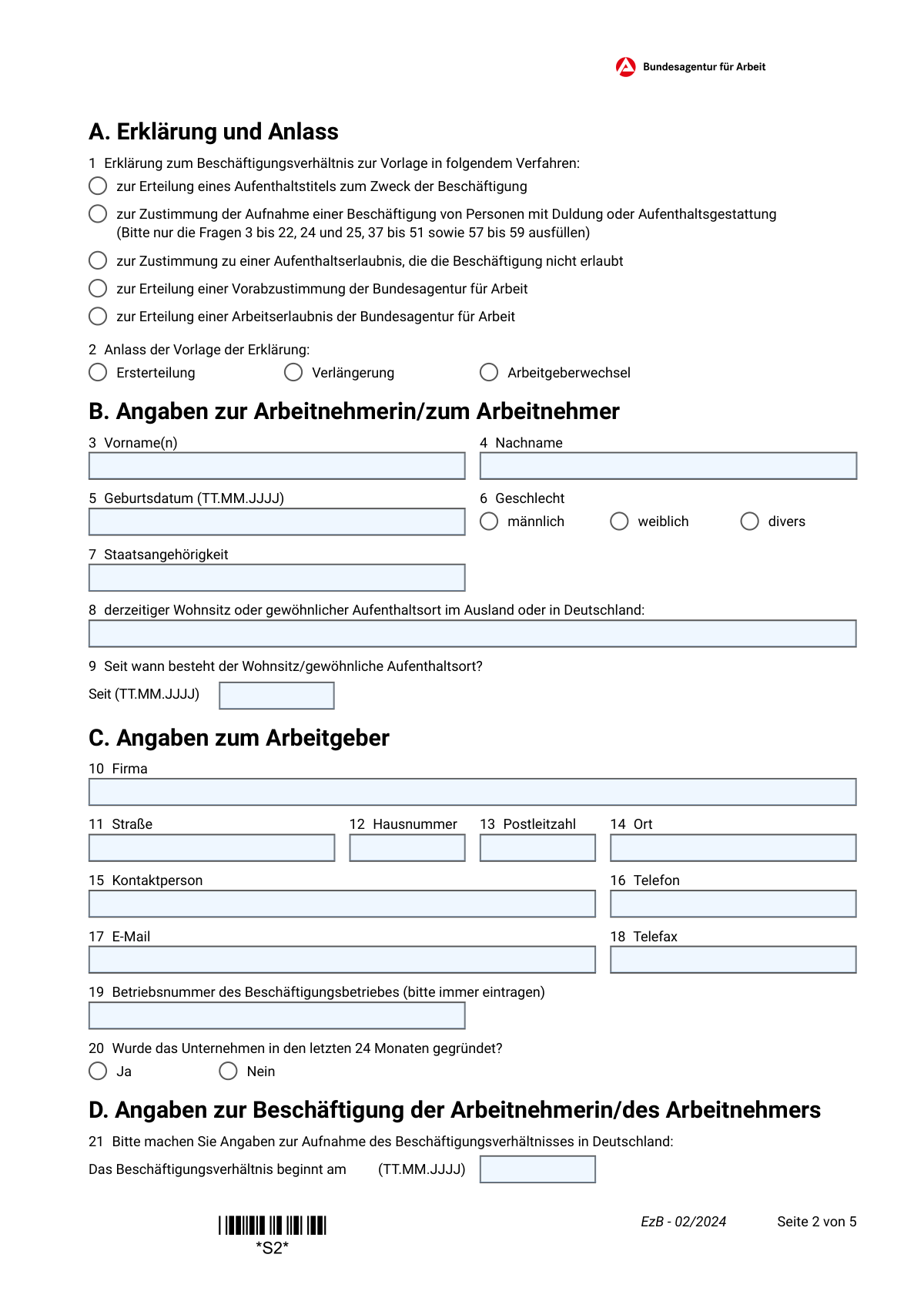
Die EzB („ErklĂ€rung zum BeschĂ€ftigungsverhĂ€ltnis“) ist ein offizielles Formular, mit dem ein Arbeitgeber verbindlich bestĂ€tigt, dass einer auslĂ€ndischen Arbeitnehmerin bzw. einem auslĂ€ndischen Arbeitnehmer ein konkreter Arbeitsplatz in Deutschland angeboten wird und die BeschĂ€ftigung tatsĂ€chlich ausgeĂŒbt werden soll. Es wird typischerweise zur Beantragung eines Aufenthaltstitels zum Zweck der BeschĂ€ftigung oder einer BeschĂ€ftigungserlaubnis (z. B. bei Duldung/Gestattung) genutzt und enthĂ€lt zugleich die Angaben, die fĂŒr die Zustimmung bzw. PrĂŒfung durch die Bundesagentur fĂŒr Arbeit erforderlich sind. Das Formular ist wichtig, weil es zentrale BeschĂ€ftigungsdaten (Arbeitsort, TĂ€tigkeit, Qualifikation, Arbeitszeit, Entgelt, Sozialversicherung) standardisiert dokumentiert und falsche/fehlende Angaben rechtliche Folgen haben können. Heute kann dieses Formular schnell und prĂ€zise mit KI-Services wie Instafill.ai ausgefĂŒllt werden, die auch nicht-ausfĂŒllbare PDF-Versionen in interaktive, ausfĂŒllbare Formulare umwandeln können.
Our AI automatically handles information lookup, data retrieval, formatting, and form filling.
It takes less than a minute to fill out EzB (02/2024) using our AI form filling.
Securely upload your data. Information is encrypted in transit and deleted immediately after the form is filled out.

Form specifications

Form name: EzB – Erklärung zum Beschäftigungsverhältnis (02/2024)
Number of pages: 5
Language: English
main-image

Instafill Demo: filling out a legal form in seconds

How to Fill Out EzB (02/2024) Online for Free in 2026

Are you looking to fill out a EZB (02/2024) form online quickly and accurately? Instafill.ai offers the #1 AI-powered PDF filling software of 2026, allowing you to complete your EZB (02/2024) form in just 37 seconds or less.
Follow these steps to fill out your EZB (02/2024) form online using Instafill.ai:
  1. 1 Instafill.ai öffnen und die Vorlage „EzB – Erklärung zum Beschäftigungsverhältnis (02/2024)“ auswählen oder das PDF hochladen.
  2. 2 Das passende Verfahren und den Anlass auswählen (z. B. Aufenthaltstitel zur Beschäftigung, Vorabzustimmung/Arbeitserlaubnis; Ersterteilung/Verlängerung/Arbeitgeberwechsel).
  3. 3 Arbeitnehmerdaten eingeben bzw. per KI aus Pass/Unterlagen übernehmen (Name, Geburtsdatum, Geschlecht, Staatsangehörigkeit, Wohnsitz und Datum seit wann).
  4. 4 Arbeitgeberangaben ausfüllen (Firma, Anschrift, Kontaktperson, Telefon/E-Mail/Fax, Betriebsnummer, Gründungsdatum/„letzte 24 Monate“).
  5. 5 Beschäftigungsdetails eintragen (Beginn, Befristung, Überlassung an Dritte, Arbeitsort, Berufsbezeichnung und Tätigkeitsbeschreibung).
  6. 6 Qualifikation und ggf. Berufsausübungserlaubnis sowie Arbeitsbedingungen ergänzen (Abschlüsse/Anerkennung, Arbeitszeit, Überstunden, Urlaub, Tarifbindung, Entgelt/variable Vergütung, Sozialversicherung/DVKA-Ausnahme).
  7. 7 Angaben prüfen, erforderliche Nachweise als Anlagen hochladen, anschließend Ort/Datum eintragen und das Formular zur Unterschrift (Arbeitgeber/Bevollmächtigte/r) finalisieren und als PDF für die Einreichung exportieren.

Our AI-powered system ensures each field is filled out correctly, reducing errors and saving you time.

Why Choose Instafill.ai for Your Fillable EzB (02/2024) Form?

Speed

Complete your EzB (02/2024) in as little as 37 seconds.

Up-to-Date

Always use the latest 2026 EzB (02/2024) form version.

Cost-effective

No need to hire expensive lawyers.

Accuracy

Our AI performs 10 compliance checks to ensure your form is error-free.

Security

Your personal information is protected with bank-level encryption.

Frequently Asked Questions About Form EzB (02/2024)

Das Formular dient als ArbeitgebererklĂ€rung fĂŒr Behördenverfahren rund um die BeschĂ€ftigung von ArbeitskrĂ€ften aus Drittstaaten. Es wird bei der Auslandsvertretung/AuslĂ€nderbehörde fĂŒr einen Aufenthaltstitel zur BeschĂ€ftigung und/oder bei der Bundesagentur fĂŒr Arbeit (BA) fĂŒr Zustimmung/Vorabzustimmung/Arbeitserlaubnis verwendet.

In der Regel fĂŒllt der Arbeitgeber (oder eine bevollmĂ€chtigte Person des Arbeitgebers) das Formular aus und unterschreibt in Abschnitt L. Die Angaben mĂŒssen dem Inhalt des Arbeitsvertrags entsprechen.

Sie kreuzen das Verfahren an, fĂŒr das die ErklĂ€rung eingereicht wird (z. B. Aufenthaltstitel zur BeschĂ€ftigung, Vorabzustimmung/Arbeitserlaubnis der BA oder Zustimmung bei Duldung/Aufenthaltsgestattung). WĂ€hlen Sie die Option, die zur Situation der beschĂ€ftigten Person und zum Antrag passt.

„Ersterteilung“ ist der erstmalige Antrag, „VerlĂ€ngerung“ die FortfĂŒhrung eines bestehenden Titels/Erlaubnis und „Arbeitgeberwechsel“ wenn die Person zu einem neuen Arbeitgeber wechselt. Kreuzen Sie genau den Anlass an, der aktuell zutrifft.

Nein, laut Hinweis ist der Arbeitsvertrag grundsÀtzlich nur vorzulegen, wenn die Auslandsvertretung oder AuslÀnderbehörde ihn gesondert anfordert. Das Formular bestÀtigt bereits verbindlich, dass ein konkreter Arbeitsplatz angeboten wird.

FĂŒgen Sie Qualifikationsnachweise (z. B. Hochschulabschluss/Berufsausbildung) und ggf. Anerkennungs- oder Gleichwertigkeitsnachweise bei, jeweils mit deutscher Übersetzung. Wenn der Abschluss im Ausland erworben wurde, ist bei „Ja (bitte Nachweis vorlegen)“ ein entsprechender Nachweis erforderlich.

Bei VerlÀngerungen ist die erneute Vorlage der Qualifikationsnachweise laut Formular in der Regel nicht erforderlich. HÀufig werden stattdessen Lohn-/Gehaltsabrechnungen verlangt (siehe Hinweis).

Bei VerlĂ€ngerungen oder Arbeitgeberwechsel sollen Lohn-/Gehaltsabrechnungen der ersten zwei und der letzten zwei Monate in Kopie vorgelegt werden. Halten Sie diese Unterlagen bereit, um RĂŒckfragen zu vermeiden.

Kreuzen Sie „wechselnde Arbeits-/Einsatzorte“ an, wenn es keinen festen Arbeitsort gibt. Wenn es eine konkrete abweichende Adresse gibt, wĂ€hlen Sie „Der Arbeitsort befindet sich unter folgender Adresse“ und tragen die vollstĂ€ndige Adresse ein.

Damit ist gemeint, ob die Arbeitnehmerin/der Arbeitnehmer an ein anderes Unternehmen ĂŒberlassen/entsendet wird (z. B. ArbeitnehmerĂŒberlassung). Kreuzen Sie „Ja“ nur an, wenn tatsĂ€chlich eine Überlassung an Dritte geplant ist.

Geben Sie an, ob Vollzeit/Teilzeit/geringfĂŒgig und die Wochenstunden (Punkt 37) gelten. Falls Überstunden verpflichtend sind, tragen Sie Umfang und Ausgleich (Punkte 38–40) ein und nennen Sie den Urlaubsanspruch in Arbeitstagen pro Jahr (Punkt 41).

WĂ€hlen Sie, ob das Entgelt pro Stunde oder pro Monat gezahlt wird, und tragen Sie den Bruttobetrag ein (Punkt 46). ZusĂ€tzliche geldwerte Leistungen oder variable VergĂŒtung mĂŒssen mit Art und Höhe ebenfalls angegeben werden (Punkte 47–51).

Sie geben an, ob in Deutschland Sozialversicherungspflicht besteht (Punkt 52) und begrĂŒnden ggf. Ausnahmen (Punkt 53). Wenn eine Ausnahmevereinbarung ĂŒber die DVKA vorliegt, kreuzen Sie dies an und fĂŒgen den Nachweis bei (Punkte 54–55).

Das Formular wird bei der zustĂ€ndigen Auslandsvertretung oder AuslĂ€nderbehörde eingereicht und kann zur PrĂŒfung an die Bundesagentur fĂŒr Arbeit weitergeleitet werden. Die Behörden können zusĂ€tzlich weitere Angaben und Nachweise anfordern.

Ja—Tools wie Instafill.ai können Formfelder mit KI automatisch und prĂ€zise ausfĂŒllen und so Zeit sparen. Wenn das PDF „flach“/nicht ausfĂŒllbar ist, kann Instafill.ai es in ein interaktives, ausfĂŒllbares Formular umwandeln und anschließend online ausfĂŒllen lassen.

Compliance EzB (02/2024)
Validation Checks by Instafill.ai

1
Exactly one procedure type selected (Section A.1)
Validate that exactly one checkbox is selected for the procedure the declaration is submitted for (e.g., residence title for employment, BA pre-approval, work permit, etc.). This is important because downstream routing, required fields, and legal processing differ by procedure type. If none or multiple are selected, the submission must be rejected or returned for clarification because the competent authority cannot determine the correct processing path.
2
Exactly one reason for submission selected (Section A.2)
Ensure that exactly one of 'Ersterteilung', 'VerlÀngerung', or 'Arbeitgeberwechsel' is checked. The reason affects which supporting documents are expected (e.g., pay slips for extensions/employer change) and how authorities interpret the declaration. If missing or multiple reasons are selected, flag the record as invalid and require correction before acceptance.
3
Employee name completeness and character validity (Fields 3–4)
Check that first name(s) and last name are both present, non-empty, and do not contain invalid characters (e.g., only digits or only punctuation). Names should allow common diacritics and hyphens, and multiple first names should be separated by spaces as instructed. If validation fails, the submission should be blocked because identity matching and official correspondence depend on correct names.
4
Employee birthdate format and plausibility (Field 5)
Validate that the birthdate is provided in TT.MM.JJJJ format and represents a real calendar date. Also apply plausibility rules (e.g., not in the future; age within a reasonable working range such as 15–80 unless explicitly allowed). If invalid, reject or request correction because eligibility checks and identity verification rely on accurate birthdate data.
5
Gender selection is single-choice (Field 6)
Ensure exactly one gender option is selected (mÀnnlich/weiblich/divers). This prevents contradictory data and supports consistent recordkeeping across systems that expect a single value. If none or multiple are selected, mark the submission incomplete and require resubmission.
6
Nationality field is present and standardized (Field 7)
Require a non-empty nationality and validate it against an allowed list (e.g., ISO country names or a controlled vocabulary used by the system). This is important because the form is specifically for third-country nationals and because nationality drives legal requirements and authority workflows. If the value is missing or not recognized, the submission should be flagged for manual review or correction.
7
Current residence address completeness and 'since' date consistency (Fields 8–9)
Validate that the current residence/ordinary stay is provided as a usable address string (at minimum: locality and country; ideally street/PLZ/city when in Germany) and that the 'Seit' date is in TT.MM.JJJJ format. The 'Seit' date must not be in the future and should be logically consistent with the employee birthdate (not before birth). If incomplete or inconsistent, require correction because residence history is relevant for jurisdiction and processing.
8
Employer address and contact details completeness (Fields 10–18)
Check that employer legal name, street, house number, postal code, and city are all present, and that a contact person is provided. Validate phone and fax numbers for acceptable formats (e.g., +49..., digits, spaces) and validate email with standard email syntax. If any required employer identification/contact fields are missing or malformed, reject because authorities must be able to identify and contact the employer.
9
German postal code and house number format validation (Fields 12–14)
Validate that the employer postal code is a 5-digit German PLZ when the employer is in Germany, and that the house number is not empty and matches common patterns (e.g., '12', '12a', '12-14'). This reduces undeliverable mail and mismatched employer records. If invalid, prompt correction; if the employer is outside Germany (rare for this form), require an alternate postal format and country indicator.
10
Betriebsnummer required and format-checked (Field 19)
Ensure the Betriebsnummer is always provided (the form explicitly says 'bitte immer eintragen') and validate it against the expected numeric length/structure used in Germany (commonly 8 digits). This is critical for linking the employer to official BA records and for automated checks. If missing or not in the correct format, the submission should be rejected or routed to manual verification.
11
Employment start date format and plausibility (Field 21)
Validate that the employment start date is present and in TT.MM.JJJJ format, and that it is not unreasonably far in the past/future relative to the submission context. This date is essential for permit timing and employment authorization decisions. If invalid or missing, block submission because the employment offer cannot be assessed without a start date.
12
Fixed-term vs. permanent contract logic (Field 22)
Ensure exactly one of 'unbefristet' or 'befristet bis' is selected. If 'befristet bis' is selected, require an end date in TT.MM.JJJJ and validate that it is after the start date (Field 21). If the logic fails (e.g., end date missing or before start), reject because contract duration is a core legal parameter for the permit decision.
13
Work location selection and conditional address requirement (Field 24)
Validate that exactly one work location option is selected: employer seat, changing locations, or specific address. If 'specific address' is selected, require a complete worksite address (street/house number/PLZ/city) and ensure it is not identical to an empty placeholder. If inconsistent, flag for correction because the competent authority and labor checks depend on the actual worksite.
14
Job title and task description minimum content (Field 25)
Require that the job title and description are not empty and meet a minimum length/content threshold (e.g., includes role plus at least one duty, and ideally mentions function/industry as requested). This prevents vague entries like 'Mitarbeiter' without duties, which are insufficient for labor market and qualification assessment. If too short or generic, return for completion or route to manual review.
15
Qualification section consistency (Fields 26–34)
Validate internal consistency between qualification checkboxes and dependent fields: if 'Hochschulabschluss' is selected, require fields 26–27 and require the recognition question (28) when the degree is foreign; if recognition is 'Ja', require the proof form (29). If 'Berufsausbildung' is selected, require fields 30–31 and the recognition outcome (32) for foreign training; if 'Ja' or 'Teilweise', require proof form (33). If 'kein Abschluss' is selected, ensure no contradictory degree/training fields are filled unless explicitly allowed, otherwise flag for correction.
16
Regulated profession permit dependency (Fields 35–36)
If the regulated-profession question is answered 'Ja', require a clear description of the required qualification/permit in field 36 and (where supported) an attachment indicator or reference. This is important because certain occupations cannot legally be performed without authorization, and missing permit details can lead to incorrect approvals. If 'Ja' is selected but field 36 is empty, reject or request additional information before processing.
17
Working time type and hours-per-week validation (Field 37)
Ensure exactly one working time type is selected (Vollzeit/Teilzeit/geringfĂŒgig) and that 'Arbeitsstunden pro Woche' is provided as a numeric value within a reasonable range (e.g., >0 and <=60). Optionally enforce typical constraints (e.g., Vollzeit usually around 35–40 hours; geringfĂŒgig often low hours) and flag outliers for review. If missing or non-numeric, block submission because pay and compliance checks depend on weekly hours.

Common Mistakes in Completing EzB (02/2024)

Wrong procedure/reason boxes checked (Section A)

People often tick the wrong procedure (e.g., “Vorabzustimmung” vs. “Aufenthaltstitel zum Zweck der BeschĂ€ftigung”) or forget to select the correct Anlass (Ersterteilung/VerlĂ€ngerung/Arbeitgeberwechsel). This happens because the options sound similar and applicants assume multiple boxes should be checked “just in case.” The consequence is that the authority may request a corrected form or assess the case under the wrong legal pathway, causing delays. Avoid this by confirming the exact process with the AuslĂ€nderbehörde/consulate or your immigration counsel and ticking only what applies; AI-powered tools like Instafill.ai can flag inconsistent selections and guide you to the correct combination of checkboxes.

Not following the “fill only certain questions” instruction for Duldung/Gestattung cases

For “Zustimmung der Aufnahme einer BeschĂ€ftigung von Personen mit Duldung oder Aufenthaltsgestattung,” the form explicitly says to fill only questions 3–22, 24–25, 37–51, and 57–59, but many people still complete everything or skip required parts. This usually happens because the instruction is easy to overlook in a long text block. The result can be missing required data for that pathway or unnecessary entries that trigger follow-up questions. Avoid this by using the instruction as a checklist and completing exactly the referenced question ranges; Instafill.ai can enforce conditional logic so only the relevant fields are presented and validated.

Date format errors (TT.MM.JJJJ) and inconsistent timelines

A frequent issue is entering dates in the wrong format (e.g., YYYY-MM-DD), leaving out leading zeros, or mixing up start date of employment (21) with residence start date (9). This happens especially with international employers or HR teams used to other date standards. Incorrect dates can lead to plausibility issues (e.g., employment start before residence start) and requests for correction. Always use TT.MM.JJJJ and cross-check that residence dates, contract start, and any fixed-term end date align; Instafill.ai can auto-format dates and run timeline consistency checks.

Missing or incorrect Betriebsnummer (Field 19)

Many submissions omit the Betriebsnummer or enter a different identifier (e.g., Handelsregister number, Steuernummer, VAT ID). This happens because companies have multiple numbers and the form’s wording is brief. Without the correct Betriebsnummer, the Bundesagentur fĂŒr Arbeit may not be able to assign the case properly, delaying approval. Avoid this by retrieving the official Betriebsnummer for the employing establishment (not the parent company) and entering it exactly; Instafill.ai can validate expected formats and prompt for the correct identifier.

Employer address split incorrectly across street/house number/PLZ/city (Fields 11–14)

People often put the full address into the street field, forget the house number, or swap PLZ and city—especially when copying from letterheads. This leads to mismatched or non-standard addresses that can cause correspondence issues or additional verification requests. Enter street name only in “Straße,” the building number (including suffix like 12a) in “Hausnummer,” and a 5-digit German PLZ where applicable. Instafill.ai can standardize and validate address components and formatting automatically.

Workplace (Arbeitsort) option selected but required address not provided (Field 24)

A common mistake is ticking “Der Arbeitsort befindet sich unter folgender Adresse” but leaving the address blank, or selecting “Arbeitgeber-Sitz” even though the employee works at a different site/client location. This happens because HR assumes the employer’s registered address is sufficient. The consequence is unclear worksite information, which can affect labor market checks, compliance, and the authority’s assessment. Avoid this by selecting the option that matches reality and providing the full worksite address when required; Instafill.ai can enforce the dependency so the address field becomes mandatory when that option is chosen.

Vague job title and insufficient task description (Field 25)

Applicants often enter only a generic title (e.g., “Mitarbeiter,” “Engineer,” “IT”) without describing duties, function, and industry as requested. This happens because people copy a short internal job title rather than the role profile. The consequence is that the Bundesagentur fĂŒr Arbeit or AuslĂ€nderbehörde may not be able to assess qualification match, salary comparability, or whether the role fits the intended permit category, leading to follow-up questions. Avoid this by providing a concrete title plus 4–8 bullet-like responsibilities, including department/function and sector; Instafill.ai can help structure the description and ensure required elements are included.

Qualification section contradictions and missing recognition evidence (Section E, Fields 26–33)

A frequent error is checking “Hochschulabschluss” or “Berufsausbildung” but leaving the related fields blank, or selecting “Ja (bitte Nachweis vorlegen)” without attaching/identifying the recognition or equivalency proof. This happens because employers assume the employee will provide documents later or misunderstand what “Anerkennung/Gleichwertigkeit” means. Missing or inconsistent qualification data can block processing or trigger requests for translations and recognition decisions. Avoid this by completing all dependent fields (study program/training name, place, recognition status) and attaching German translations where required; Instafill.ai can prompt for the correct supporting documents and keep the logic consistent.

Regulated profession question answered incorrectly (Section F, Fields 35–36)

Many people answer “Nein” to the question about BerufsausĂŒbungserlaubnis even for regulated roles (e.g., doctors, nurses, certain protected professional titles), or answer “Ja” but fail to specify the required permit and provide proof. This often happens because HR is unfamiliar with German professional licensing rules or confuses academic recognition with professional authorization. The consequence can be immediate rejection or a request to submit licensing evidence, significantly delaying start dates. Avoid this by verifying whether the role/title is regulated in Germany and listing the exact required authorization and issuing body; Instafill.ai can help by prompting for the permit details and ensuring attachments are not forgotten.

Working time and overtime details incomplete or implausible (Sections G–H, Fields 37–40)

Common issues include selecting Vollzeit/Teilzeit but not entering weekly hours, or stating overtime is required without specifying scope and compensation method. This happens because companies assume “standard” hours apply or because overtime rules are described only in the contract. Missing details can raise compliance concerns and lead to clarification requests from authorities. Avoid this by entering the exact weekly hours, overtime extent (if applicable), and whether overtime is compensated by pay or time off; Instafill.ai can validate that required fields are completed based on your selections.

Salary entered in the wrong unit or missing variable/benefit details (Section J, Fields 46–51)

People often fill both hourly and monthly pay, enter net instead of gross, use commas/periods inconsistently, or forget to describe/quantify benefits and variable pay after ticking those options. This happens because payroll conventions differ and benefits are sometimes handled outside the contract. Incorrect salary data can cause the authority to question whether conditions meet legal or market standards, delaying approval. Avoid this by entering one correct gross amount (hourly or monthly as applicable), using consistent Euro formatting, and fully describing/quantifying any benefits or variable components; Instafill.ai can format currency correctly and ensure the selected compensation type matches the provided numbers.

Social insurance (Sozialversicherungspflicht) answered incorrectly or DVKA exception not documented (Section K, Fields 52–55)

A typical mistake is selecting “Nein” for German social insurance without providing a clear legal reason, or selecting a DVKA exception but not attaching/identifying the proof. This happens especially with cross-border postings where HR assumes home-country coverage automatically applies. The consequence is that authorities may treat the employment conditions as unclear or non-compliant and request additional documentation. Avoid this by confirming whether German social insurance applies and, if exempt, stating the exact basis and providing DVKA/A1 or relevant documentation; Instafill.ai can prompt for the required justification and ensure the evidence fields are completed.
Saved over 80 hours a year

“I was never sure if my IRS forms like W-9 were filled correctly. Now, I can complete the forms accurately without any external help.”

Kevin Martin Green

Your data stays secure with advanced protection from Instafill and our subprocessors

Robust compliance program

Transparent business model

You’re not the product. You always know where your data is and what it is processed for.

ISO 27001, HIPAA, and GDPR

Our subprocesses adhere to multiple compliance standards, including but not limited to ISO 27001, HIPAA, and GDPR.

Security & privacy by design

We consider security and privacy from the initial design phase of any new service or functionality. It’s not an afterthought, it’s built-in, including support for two-factor authentication (2FA) to further protect your account.

Fill out EzB (02/2024) with Instafill.ai

Worried about filling PDFs wrong? Instafill securely fills ezb-erklrung-zum-beschftigungsverhltnis-022024 forms, ensuring each field is accurate.