
Yes! You can use AI to fill out Employee Direct Deposit Banking Authorization Form (RUN Powered by ADP®)
Don't type 33 fields by hand. Tell our AI about yourself, or upload a document you already have, and it fills every field in seconds. You check it, then download, print or sign.
The AI does the filling. You just check it.
No typing into boxes, nothing to install.
What this form asks for
The AI fills all of it, from your answers or your documents.
The AI checks your answers before you download
14 checks built for this form, so a wrong date or a missing answer is caught before anyone else sees it.
This check verifies that the 'Legal Name' field is not empty. The employee's full legal name is required for identity verification and to ensure the correct payroll record is updated. A failure to provide this information would prevent the system from associating the bank accounts with the correct employee.
This validation confirms that the 'Signature' field has been completed, indicating the employee has read and agreed to the authorization terms. A missing signature invalidates the authorization, making the form legally non-binding for the employer to act upon. The submission must be rejected if the signature is absent.
This check ensures that any entered 'Routing #' is exactly nine digits long. This is the standard format for an American Bankers Association (ABA) routing number. Incorrectly formatted routing numbers will cause the automated clearing house (ACH) transfer to fail, resulting in a delayed or missed payment for the employee.
This check performs a mathematical calculation (the ABA checksum algorithm) on the nine-digit routing number to verify its authenticity. This helps catch typographical errors that a simple digit count would miss, significantly reducing the risk of sending funds to a non-existent or incorrect financial institution. A failed checksum indicates the routing number is invalid and must be corrected.
For every deposit section where a routing number is entered, this check verifies that the corresponding 'Account #' field is also filled. A routing number only identifies the bank, while the account number is required to identify the specific employee account for the deposit. Missing account numbers make the entry unusable and will cause the deposit to fail.
This validation ensures that the employee has filled out all the necessary information for at least the first deposit account section. The purpose of the form is to authorize direct deposit, so submitting it without any account details is a pointless action. The form should be rejected if no bank name, routing number, account number, and deposit amount are specified.
And 8 more checks
- Enforces Exclusive Account Type Selection
- Enforces Exclusive Deposit Amount Method
- Permits Only One 'Full Net Amount' Designation
- Validates Deposit Amount is a Positive Number
- Ensures Completeness of Partially Filled Account Sections
- Verifies Company Name is Present
- Validates Signature Date Format and Presence
- Logical Check for Deposit Allocation
Let AI fill out your ADP Direct Deposit Form
No typing. Every field filled in seconds, checked, ready to sign.
How to Fill Out ADP Direct Deposit Form Online for Free in 2026
What the AI walks you through.
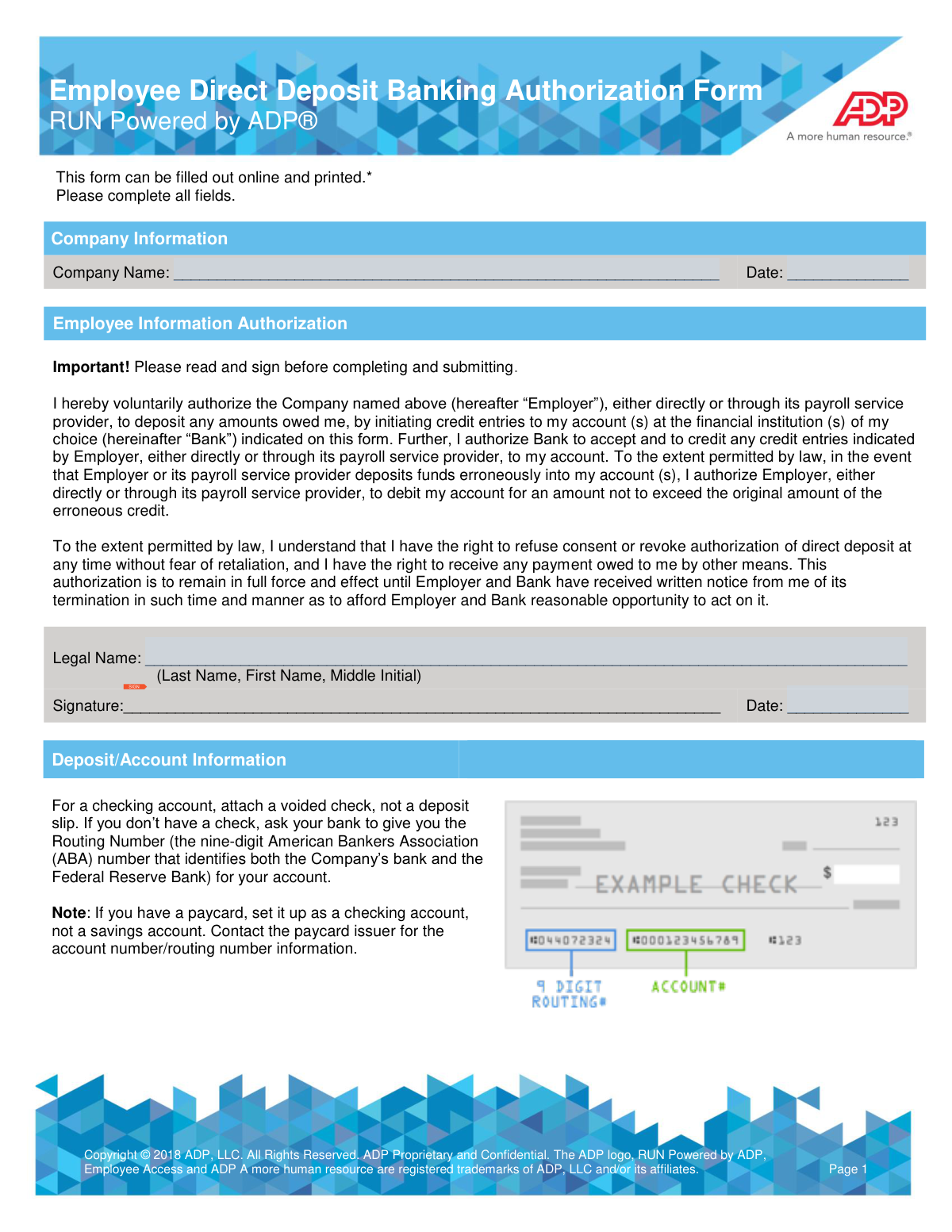
- Navigate to Instafill.ai and upload the Employee Direct Deposit Banking Authorization Form or select it from their template library.
- Provide the employer's company name and the current date in the 'Company Information' section.
- Enter your full legal name in the 'Employee Information' section, then carefully read the authorization agreement.
- Provide your digital signature and date to authorize the direct deposit agreement.
- In the 'Deposit/Account Information' section, enter the details for each bank account, including the bank name, routing number, and account number. You can add up to four accounts.
- For each account, select the account type (checking or savings) and specify the amount to be deposited, either a fixed dollar amount or the 'Full Net Amount'.
- Review all the information you've entered for accuracy, then download the completed form to submit to your employer's payroll department.
Common Mistakes in Completing ADP Direct Deposit Form
The ones the AI is built to catch.
Entering an Incorrect or Incomplete Routing Number
Forgetting to Sign or Date the Authorization Section
Incorrectly Configuring Split Deposit Amounts
Transposing Digits in the Account or Routing Number
Using a Nickname Instead of the Required Legal Name Format
Attaching a Deposit Slip Instead of a Voided Check
Providing Ambiguous Deposit Instructions for a Single Account
Submitting an Illegible, Hand-Written Form
Forgetting to Select an Account Type
Incorrectly Classifying a Paycard Account
Frequently Asked Questions About ADP Direct Deposit Form
Is it really free for 7 days?
Can I fill other forms too?
How do I cancel?
How does the AI fill out ADP Direct Deposit Form?
What happens to my information?
How complex is ADP Direct Deposit Form to fill out?
What is the purpose of this Employee Direct Deposit form?
Who needs to fill out this form?
What documents do I need to provide with this form?
Where can I find my bank's routing number and my account number?
Can I split my paycheck between multiple bank accounts?
How do I specify how much money goes into each account?
I have a paycard. How do I set it up for direct deposit?
What happens if my employer makes a mistake and overpays me?
Can I cancel my direct deposit authorization later?
Where do I submit this form after completing it?
Can AI tools help me fill out this form?
How can I use Instafill.ai to complete this form online?
What should I do if the PDF version of this form I received is not fillable?
Get your ADP Direct Deposit Form filled out by AI
$0 today. Cancel before Nov 3 and you pay nothing.
Other forms like this one
HR forms: U.S. Equal Employment Opportunity Commission (EEOC) Form 453, Recommendation for Recognition, U.S. Equal Employment Opportunity Commission (EEOC) Form 453, Recommendation for Recognition, EzB – Erklärung zum Beschäftigungsverhältnis (02/2024), New York State Employment Application Form, A Place for Mom 401(k) Plan Request for Rollover Contribution Form, ADP Compensation and Fee Disclosure Statement, ADP Leave Management Application for Leave of Absence, ADP Retirement Services Beneficiary Designation Form, ADP Year-End Seminar Handout Manual, AeroVironment Profit Sharing and Salary Deferral 401(k) Plan In-Service Withdrawal Form, Albany Medical Center 2024 Benefits Guide, Authorization Agreement for Direct Deposit, Beneficiary Designation 401(k) Plan, ENVIRONMENTAL MONITORING LABORATORY, LLC Employment Application, Earnings and Deductions Quick Reference, Employee’s Frequently Asked Questions: Leave of Absence, Form 2938, Hardship Withdrawal Request, Form I-9, Employment Eligibility Verification, Group Life Conversion FAQ Sheet, Health & Welfare and Retirement Benefits 2018 Benefits Overview
employee forms: Form 1099-NEC, Nonemployee Compensation, Form W-4, Employee's Withholding Certificate, Form CA-1, Federal Employee's Notice of Traumatic Injury, Form 5884-A, Employee Retention Credit, Form 1099-NEC, Nonemployee Compensation, Form 1099-NEC, Nonemployee Compensation, Form 1099-NEC, Nonemployee Compensation, HR-Pol-Rec&Res-04 Employment Application Form (Recruitment of Permanent Employees), Commonwealth of Massachusetts Department of Industrial Accidents Form 110, Employee’s Claim, Commonwealth of Massachusetts Department of Industrial Accidents (DIA) Form 110, Employee’s Claim, Form 1099-NEC, Nonemployee Compensation, WTIA 401(k) Plan Rollover Contribution Employee Certification, BNSF Investment and Retirement Plan [401(k) Plan for Salaried Employees], Form 5500, Annual Return/Report of Employee Benefit Plan, Form 5500, Annual Return/Report of Employee Benefit Plan, The Principal Pension Plan Summary Plan Description: Cash Balance Formula for Employees and Individual Field, The Principal Pension Plan Summary Plan Description: Traditional and Cash Balance Formulas for Employees and Individual Field, Sensus USA Inc. 401(k) Plan Summary Plan Description (For Non-Union Employees), Paychex Retirement Services Employee Rollover Form, Employee’s Frequently Asked Questions: Leave of Absence
banking forms: HomePlus Loan Application (Individuals) – China Banking Corporation (CBC), ACH Authorization Agreement, ACH and Electronic Funds Transfer Instructions and Agreement, Account Opening Form for Professional Clients (Institutions, Companies, Intermediaries and Eligible Counterparties), Application form for Trust investment, Corestone® Electronic Only Account Application, Electronic Funds Transfer (EFT) Form, Form F1C, Account Application Supplemental, Funds Transfer Service Enrollment Form, Navy Federal Voluntary Removal of Joint Owner Request, New Account Agreement, Standing Letter of Authorization / Instruction Enrollment Form, TIAA Trust, N.A. Authorization to receive client account information
ADP forms: ADP 401(k) Plan Beneficiary Designation Form, ADP Compensation and Fee Disclosure Statement, ADP Retirement Services: Your retirement account and the C.A.R.E.S. Act, ADP IMPORTANT INFORMATION: Your retirement account and the C.A.R.E.S. Act, ADP Leave Management Application for Leave of Absence, ADP Year-End Seminar Handout Manual, ADP Retirement Services Beneficiary Designation Form, ADP Retirement Services Beneficiary Designation Form, International Driving Permit – IDP / Inter-American Driving Permit - IADP Application
direct deposit forms: Form SF 1199A, Direct Deposit Sign-Up, Authorization Agreement for Direct Deposit, Form F11182, Direct Deposit Authorization, ACH Authorization Agreement, ACH Authorization Agreement (FRM-ACH-02-20), Direct Deposit Authorization Form
bank authorization forms: ACH Authorization Agreement, Fidelity Bank Wire Authorization, Fidelity Bank Wire Authorization, Authorization to transfer funds from a bank retirement account
banking authorization forms: Form F11182, Direct Deposit Authorization
Let AI fill out your ADP Direct Deposit Form
Your trial starts once a card is added. You pay nothing before Nov 3.
Our AI already knows this form, all 33 fields of it. Skip the typing: tell it about yourself, or upload what you have, and it fills the whole form in seconds.
- AI fills every field on both pages, checkboxes included
- No typing into boxes: answer a few questions, or upload a document you already have, an old copy of this form, a photo of a document
- The AI checks the answers; you review and change anything before you download
- Download the finished PDF, print it, or sign it online
- Encrypted, and never used to train AI
Cancel before Nov 3 and you pay nothing.
A card is needed to start the trial. Cancel in two clicks from your account.
Terms · Privacy