Yes! You can use AI to fill out ADP Compensation and Fee Disclosure Statement
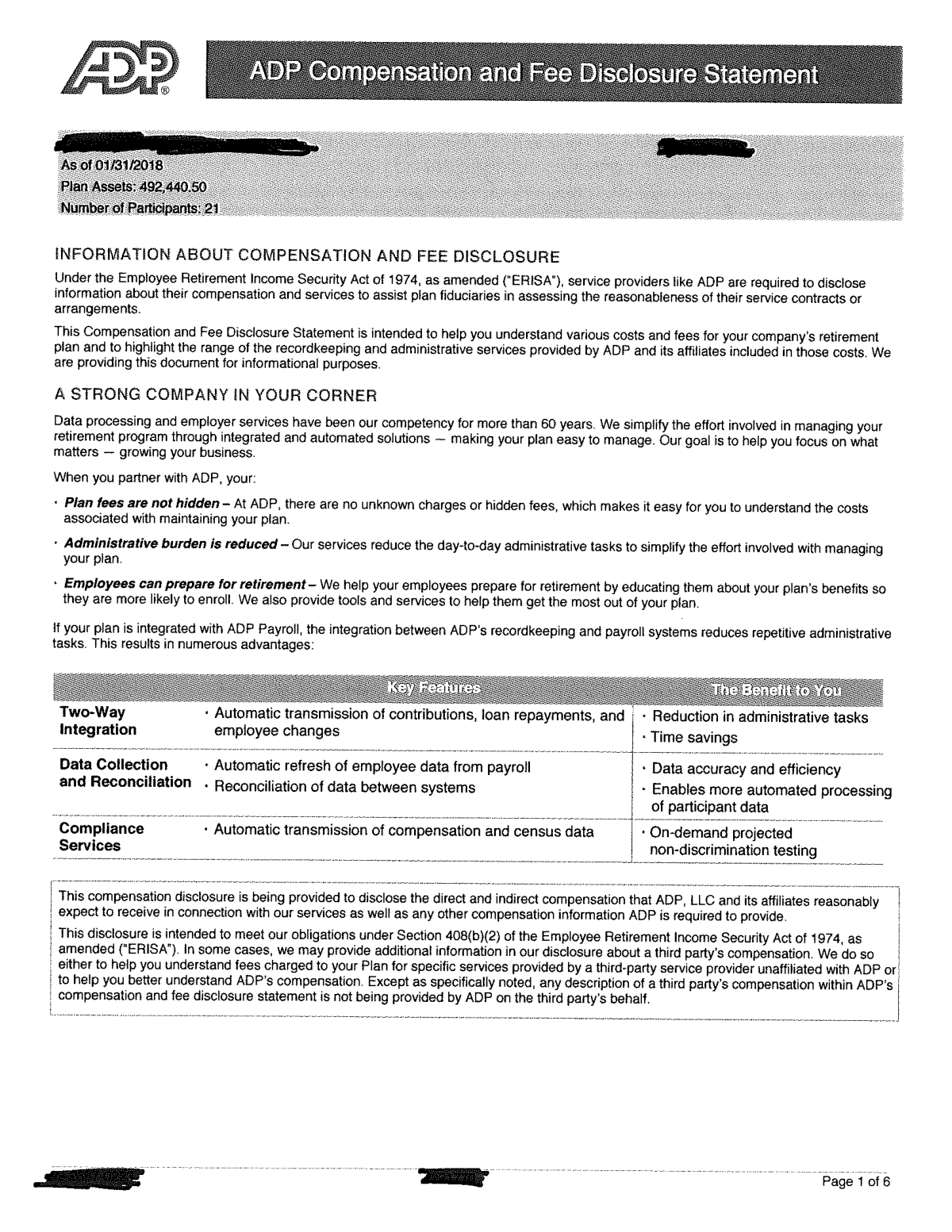
The ADP Compensation and Fee Disclosure Statement is a document provided to employers (plan sponsors) to outline the various costs, fees, and compensation related to their retirement plan services. It is essential for plan fiduciaries to understand these expenses to ensure they are reasonable and to meet their legal obligations for financial transparency. Today, this form can be filled out quickly and accurately using AI-powered services like Instafill.ai, which can also convert non-fillable PDF versions into interactive fillable forms.
ADP Fee Disclosure Statement is part of the
disclosure forms, HR forms and ADP forms categories on Instafill.
Rather not fill this in by hand? Instafill is an online form filler that completes PDF forms automatically — upload the blank form, answer a few questions, and the AI fills every field.
Form specifications
| Form name: | ADP Compensation and Fee Disclosure Statement |
| Number of pages: | 1 |
| Language: | English |
Our AI automatically handles information lookup, data retrieval, formatting, and form filling.
It takes less than a minute to fill out ADP Fee Disclosure Statement using our AI form filling.
Securely upload your data. Information is encrypted in transit and deleted immediately after the form is filled out.
Instafill Demo: How to fill out PDF forms in seconds with AI
How to Fill Out ADP Fee Disclosure Statement Online for Free in 2026
Are you looking to fill out a ADP FEE DISCLOSURE STATEMENT form online quickly and accurately? Instafill.ai offers the #1 AI-powered PDF filling software of 2026, allowing you to complete your ADP FEE DISCLOSURE STATEMENT form in just 37 seconds or less.
Follow these steps to fill out your ADP FEE DISCLOSURE STATEMENT form online using Instafill.ai:
- 1 Navigate to Instafill.ai and upload your ADP Compensation and Fee Disclosure Statement PDF or select it from the available templates.
- 2 Use the AI assistant to automatically identify and pre-fill key details such as your company name, plan ID, and contact information.
- 3 Review the sections detailing service provider compensation, plan-level fees, and investment-related expenses, using AI prompts to clarify complex financial terms.
- 4 Input any required acknowledgements, dates, or fiduciary information into the designated interactive fields.
- 5 Electronically sign the document where required. Instafill.ai provides a secure and legally binding e-signature solution.
- 6 Review the entire completed statement for accuracy, ensuring all fee structures are correctly documented.
- 7 Download, print, or securely share the finalized disclosure statement for your company's compliance records.
Our AI-powered system ensures each field is filled out correctly, reducing errors and saving you time.
Why Choose Instafill.ai for Your Fillable ADP Fee Disclosure Statement Form?
Speed
Complete your ADP Fee Disclosure Statement in as little as 37 seconds.
Up-to-Date
Always use the latest 2026 ADP Fee Disclosure Statement form version.
Cost-effective
No need to hire expensive lawyers.
Accuracy
Our AI performs 10 compliance checks to ensure your form is error-free.
Security
Your personal information is protected with bank-level encryption.
Frequently Asked Questions About ADP Fee Disclosure Statement
This statement is designed to provide a clear breakdown of the compensation, costs, and fees associated with administering your company's retirement plan. It helps you, as the plan sponsor, understand all the costs involved for both the company and your employees.
This document is intended for the plan sponsor or fiduciary, which is typically the business owner, HR manager, or person responsible for overseeing the company's retirement plan. It is not meant for individual employee distribution.
No, this is a disclosure statement provided for your information and records. You are not required to fill out, sign, or return this document, but you should review it carefully and keep it in your fiduciary files.
Plan-level fees are costs charged to the company (the plan sponsor) for overall plan administration and recordkeeping. Participant-level fees are costs deducted directly from the individual retirement accounts of your employees for services like investment management.
Indirect compensation refers to payments ADP may receive from third parties, such as revenue sharing from mutual fund companies, related to your plan's investments. These are not fees you pay directly but are disclosed for full transparency.
After reviewing the statement, you should have a clear understanding of your plan's costs. Keep this document for your records to demonstrate you are monitoring plan fees, which is a key fiduciary responsibility.
You will typically receive this disclosure statement on an annual basis. You may also receive an updated statement if there are any material changes to the fees or services during the year.
To understand the total cost, you must review all sections, including plan-level fees, participant-level fees, and any indirect compensation. The document should contain summaries that help you calculate the overall cost.
If you have questions about any fees or services detailed in this statement, you should contact your dedicated ADP retirement plan representative. Their contact information is usually included within the document.
Yes, services like Instafill.ai use AI to help you accurately auto-fill related administrative forms for your plan, such as enrollment or distribution paperwork. This can save significant time and reduce errors.
Simply upload the form to the Instafill.ai platform. The AI will make the document interactive, allowing you to click and type directly into the fields, save your progress, and complete your paperwork efficiently online.
You can use a service like Instafill.ai to solve this problem. It can convert flat, non-fillable PDFs into interactive, fillable forms that you can complete and save digitally.
Compliance ADP Fee Disclosure Statement
Validation Checks by Instafill.ai
1
Verifies Employer Identification Number (EIN) Format
This check ensures the Employer Identification Number (EIN) is entered in the standard IRS format of XX-XXXXXXX. The EIN is a unique identifier for the business entity, critical for tax reporting and regulatory filings related to the retirement plan. An incorrectly formatted EIN will cause submission rejections and compliance delays.
2
Validates Company Legal Name Completeness
Ensures the company name provided is the full legal name and not an abbreviation or 'Doing Business As' (DBA) name. Using the correct legal name is essential for the enforceability of the agreement and for accurate filings with government agencies like the IRS and DOL. An incorrect name can lead to legal and administrative complications.
3
Ensures Plan Effective Date is a Valid Future or Recent Past Date
This validation confirms that the Plan Effective Date is a valid date and is logically sound in relation to the signature date (e.g., not decades in the past). This is important because the effective date dictates when plan services, contributions, and fees begin. An illogical date can cause significant payroll, compliance, and billing problems.
4
Validates Contact Phone Number Format
This check verifies that the primary contact's phone number is in a recognizable format (e.g., (XXX) XXX-XXXX). A valid phone number is crucial for timely communication regarding plan administration, compliance alerts, or service issues. Failure to capture a valid number can delay important notifications.
5
Validates Contact Email Address Format
Ensures the provided email address follows the standard '[email protected]' format. This is a critical check as most plan communications, statements, and legal notices are sent electronically. An invalid email address will result in communication failures and could lead to the client missing critical information.
6
Requires Authorized Signatory Name and Title
This check confirms that the printed name and official title of the person signing the agreement are both provided. This information is necessary to verify the individual's identity and their authority to bind the company to the agreement. A missing name or title can call the validity of the entire disclosure statement into question.
7
Validates Signature Date Presence and Format
This validation ensures the signature date field is not empty and contains a date in a standard format (e.g., MM/DD/YYYY). The signature date establishes the execution date of the agreement, which is a critical legal data point. A missing or malformed date creates ambiguity about when the terms became effective.
8
Verifies Fee Percentage Values are Numeric and within Range
This check ensures that any fields for percentage-based fees contain only numeric values and fall within a logical range (e.g., 0 to 100). This prevents data entry errors that could lead to drastic miscalculations of plan costs. Incorrect percentages would result in major billing disputes and financial reporting errors.
9
Ensures Fixed Fee Amounts are in a Valid Currency Format
This validation checks that all fixed-fee fields are entered in a proper currency format (e.g., 1,234.56). It prevents the entry of non-numeric text and ensures data integrity for billing systems. Inaccurate fee data leads to incorrect invoices and undermines trust in the financial reporting.
10
Validates Company Address for Completeness
This check ensures that all components of the company address (street, city, state, ZIP code) are filled in. A complete and accurate address is required for mailing official documents, tax forms, and other critical correspondence. An incomplete address will lead to returned mail and communication breakdowns.
11
Verifies ZIP Code Format
Ensures the ZIP code is in a valid 5-digit (XXXXX) or 9-digit ZIP+4 (XXXXX-XXXX) format. This is essential for the accurate mailing of physical documents and for internal territory or tax jurisdiction assignments. An invalid ZIP code will cause delivery failures.
12
Cross-references Plan Name and Plan Number
For existing plans, this check verifies that the provided Plan Name and Plan Number correspond to the same plan within the system. This logical check prevents a user from mistakenly applying fees or changes to the wrong retirement plan. A mismatch could cause significant administrative errors and financial impact on an unrelated plan.
Common Mistakes in Completing ADP Fee Disclosure Statement
Plan sponsors often enter an outdated plan name or an incorrect Plan Number, especially if they manage multiple retirement plans. This error can cause significant administrative delays, misapplication of funds, and compliance issues with regulatory bodies like the DOL. To avoid this, always cross-reference the Plan Name and Number with the official Plan Document or the most recent Form 5500 filing before entry.
Business owners, particularly of smaller companies, sometimes mistakenly enter their Social Security Number (SSN) in the Employer Identification Number (EIN) field. The plan sponsor is the business entity, so the company's EIN is required for proper tax reporting and identification. Using an SSN will cause the form to be rejected and lead to tax reporting complications for the plan.
Fiduciaries often focus on direct, billed fees but fail to scrutinize the 'indirect compensation' section, which includes revenue sharing and 12b-1 fees. These fees are paid from investment fund assets to the service provider and represent a real cost that reduces participant returns. Ignoring these costs means you don't have a complete picture of the plan's total expenses, which is a failure of fiduciary responsibility.
The form outlines all services being provided for the stated fees, such as recordkeeping, compliance testing, and loan administration. A common mistake is to skim this section and sign without confirming it matches the company's actual needs and service agreement. This can result in paying for services you don't use or discovering a needed service isn't covered when a problem arises.
The document must be signed by a person legally authorized as a plan fiduciary or trustee as defined in the plan documents. An office manager or HR generalist without this specific authority might sign, rendering the disclosure invalid and creating a serious compliance risk. Always ensure the signer holds the appropriate title (e.g., Trustee, Plan Administrator) and is formally designated to act on behalf of the plan.
Plan sponsors may need to use their current participant count and total plan assets to calculate estimated fees based on the provided formulas. Simple arithmetic errors or typos during this manual calculation can lead to a significant misunderstanding of the plan's true cost. To prevent this, double-check all calculations or use AI-powered form fillers like Instafill.ai that can perform these calculations automatically and reduce human error.
It's a surprisingly frequent error to submit this critical legal document without a signature or date, which are required to make it a binding acknowledgement. An incomplete form will be immediately rejected, delaying services and creating a gap in compliance documentation. If the form is a non-fillable PDF, a tool like Instafill.ai can convert it to a fillable version, making it easier to add a digital signature and date before submission.
The disclosure statement includes detailed information on the fees for each investment option offered in the plan, such as expense ratios. A plan fiduciary has a legal duty to ensure these investment fees are reasonable, but many sponsors overlook this section, focusing only on the plan-level administrative fees. Failing to review and monitor these fund-level costs can be considered a breach of fiduciary duty.
The 'Plan Sponsor' is the company or employer entity that established the retirement plan, not the individual filling out the form. People sometimes enter their own name instead of the legal business name. This causes identification mismatches in the system, leading to processing rejections and problems linking the disclosure to the correct corporate account.
After signing and submitting the disclosure, plan sponsors often forget to save a fully executed copy for their own records. This document is a critical piece of evidence demonstrating fiduciary oversight and compliance with ERISA disclosure requirements. Not having it available can cause major problems during a plan audit by the Department of Labor or IRS.
Saved over 80 hours a year
“I was never sure if my IRS forms like W-9 were filled correctly. Now, I can complete the forms accurately without any external help.”
Kevin Martin Green
Your data stays secure with advanced protection from Instafill and our subprocessors




Robust compliance program
Transparent business model
You’re not the product. You always know where your data is and what it is processed for.
ISO 27001, HIPAA, and GDPR
Our subprocesses adhere to multiple compliance standards, including but not limited to ISO 27001, HIPAA, and GDPR.
Security & privacy by design
We consider security and privacy from the initial design phase of any new service or functionality. It’s not an afterthought, it’s built-in, including support for two-factor authentication (2FA) to further protect your account.
Fill out ADP Fee Disclosure Statement with Instafill.ai
Worried about filling PDFs wrong? Instafill securely fills adp-compensation-and-fee-disclosure-statement forms, ensuring each field is accurate.
