Yes! You can use AI to fill out Beneficiary Designation 401(k) Plan
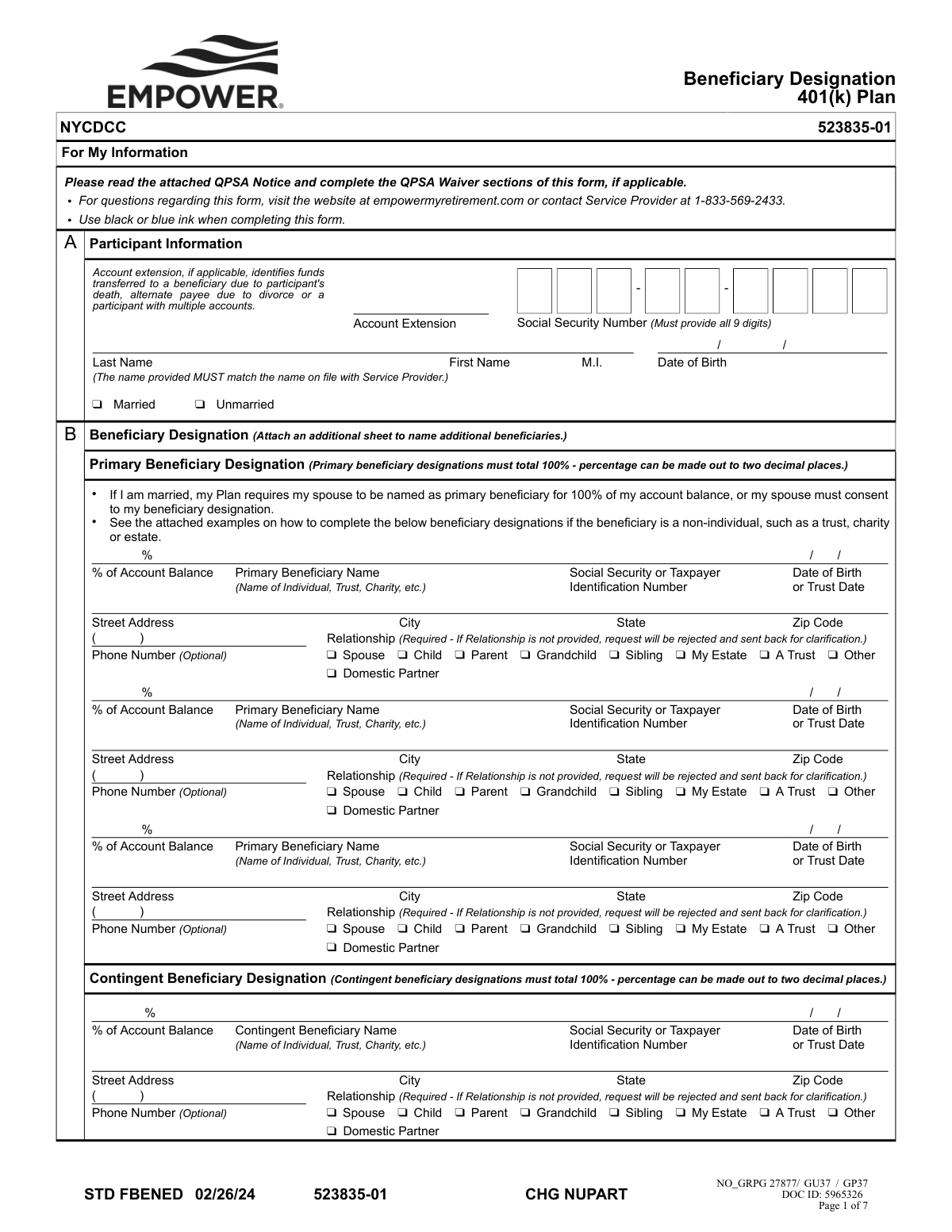
The Beneficiary Designation 401(k) Plan form is a legal document used by retirement plan participants to officially name their primary and contingent beneficiaries. It ensures that your 401(k) assets are distributed according to your wishes after your passing, and includes critical sections for spousal consent and waiving the Qualified Preretirement Survivor Annuity (QPSA) if applicable. Today, this form can be filled out quickly and accurately using AI-powered services like Instafill.ai, which can also convert non-fillable PDF versions into interactive fillable forms.
STD FBENED (523835-01) is part of the
beneficiary forms, HR forms and beneficiary designation forms categories on Instafill.
Rather not fill this in by hand? Instafill is an online form filler that completes PDF forms automatically — upload the blank form, answer a few questions, and the AI fills every field.
Form specifications
| Form name: | Beneficiary Designation 401(k) Plan |
| Number of pages: | 1 |
| Language: | English |
Our AI automatically handles information lookup, data retrieval, formatting, and form filling.
It takes less than a minute to fill out STD FBENED (523835-01) using our AI form filling.
Securely upload your data. Information is encrypted in transit and deleted immediately after the form is filled out.
Instafill Demo: How to fill out PDF forms in seconds with AI
How to Fill Out STD FBENED (523835-01) Online for Free in 2026
Are you looking to fill out a STD FBENED (523835-01) form online quickly and accurately? Instafill.ai offers the #1 AI-powered PDF filling software of 2026, allowing you to complete your STD FBENED (523835-01) form in just 37 seconds or less.
Follow these steps to fill out your STD FBENED (523835-01) form online using Instafill.ai:
- 1 Navigate to Instafill.ai and upload or select the Beneficiary Designation 401(k) Plan form.
- 2 Enter your personal participant information, such as your full name, Social Security Number, and date of birth.
- 3 Designate your primary beneficiaries by providing their names, relationship, and the percentage of the account balance for each, ensuring the total equals 100%.
- 4 Optionally, list contingent beneficiaries who will inherit your assets if the primary beneficiaries are unable to.
- 5 If you are married and not designating your spouse as the 100% primary beneficiary, complete the spousal consent and Qualified Preretirement Survivor Annuity (QPSA) waiver sections.
- 6 Carefully review all entered information, then sign and date the form. If required, have your spouse sign in the presence of a Notary Public.
- 7 Download the completed, signed, and notarized form and submit it to the plan administrator as per the delivery instructions.
Our AI-powered system ensures each field is filled out correctly, reducing errors and saving you time.
Why Choose Instafill.ai for Your Fillable STD FBENED (523835-01) Form?
Speed
Complete your STD FBENED (523835-01) in as little as 37 seconds.
Up-to-Date
Always use the latest 2026 STD FBENED (523835-01) form version.
Cost-effective
No need to hire expensive lawyers.
Accuracy
Our AI performs 10 compliance checks to ensure your form is error-free.
Security
Your personal information is protected with bank-level encryption.
Frequently Asked Questions About STD FBENED (523835-01)
This form allows you, as a 401(k) plan participant, to officially name the person(s) or entity that will receive your account balance upon your death. This designation ensures your assets are distributed according to your wishes and supersedes all prior designations.
Any participant in the 401(k) Plan who wants to designate or update their beneficiaries should complete this form. It is your responsibility to keep your beneficiary information current, especially after life events like marriage, divorce, or the death of a beneficiary.
A primary beneficiary is the first person or entity in line to receive your 401(k) assets after your death. Contingent beneficiaries will only receive the assets if all of your primary beneficiaries have passed away before you.
Yes, if you are married, the plan requires you to name your spouse as the 100% primary beneficiary. If you wish to name someone else, your spouse must provide written, notarized consent by signing the 'Spousal Consent for Beneficiary Designation' section.
A QPSA, or Qualified Preretirement Survivor Annuity, is a default death benefit that provides your surviving spouse with lifetime monthly payments. You would waive the QPSA if you and your spouse agree on a different beneficiary or a different form of payment, but your spouse must provide notarized consent to do so.
Yes, if your spouse is consenting to you naming a primary beneficiary other than themself, or if they are consenting to waive the QPSA benefit, their signature must be witnessed and signed by a Notary Public.
You can list multiple beneficiaries in Section B and must assign a percentage to each one. The total percentages for all primary beneficiaries must equal 100%, and the total for all contingent beneficiaries must also equal 100%.
Yes, you can name a non-individual entity like a trust, charity, or your estate as a beneficiary. You will need to provide the entity's name and Taxpayer Identification Number (TIN) in the beneficiary section.
If you list multiple beneficiaries but do not provide percentages, the benefit will be divided equally among them. To avoid ambiguity, it is best to specify the exact percentage each beneficiary should receive.
You can upload the signed form electronically at empowermyretirement.com or mail it to the regular or express mail addresses provided in Section D of the form. Hand-delivered forms are not accepted at the express mail address.
No, the form explicitly states that electronic signatures are not accepted and will cause significant delays. You must provide a handwritten signature using blue or black ink.
Yes, services like Instafill.ai use AI to accurately auto-fill your personal information and beneficiary details onto the form. This saves time and helps reduce errors before you print the document for the required handwritten signatures.
Simply upload the Beneficiary Designation PDF to the Instafill.ai platform. The AI will identify the fields, allowing you to enter your information once and have it automatically placed throughout the document, which you can then download and print for signing.
If you have a non-fillable or 'flat' PDF, you can use a service like Instafill.ai to make it interactive. Upload the file, and the platform will convert it into a fillable form that you can complete on your computer before printing.
Compliance STD FBENED (523835-01)
Validation Checks by Instafill.ai
1
Primary Beneficiary Percentage Summation
This check verifies that the sum of the percentages assigned to all primary beneficiaries equals exactly 100%. This is critical for ensuring the participant's entire account balance is allocated correctly upon their death. If the total is not 100%, the form will be rejected for correction, as it would leave funds unassigned or over-assigned.
2
Spousal Consent for Non-Spouse Primary Beneficiary
This validation confirms that if the participant's marital status is 'Married' and a primary beneficiary other than the spouse is named (or the spouse receives less than 100%), the 'Spousal Consent for Beneficiary Designation' section is completed. This includes the spouse's signature, date, and proper notarization. Failure to obtain this consent makes the non-spouse designation legally invalid under ERISA and Plan rules, requiring the form to be returned.
3
Participant Social Security Number Format
This check ensures the Social Security Number in the Participant Information section is present and contains exactly nine digits. The SSN is a unique identifier crucial for matching the form to the correct 401(k) account. An incomplete or incorrectly formatted SSN will cause processing failure and rejection of the form.
4
Beneficiary Relationship Field Completeness
This validation ensures that for every primary and contingent beneficiary listed, a 'Relationship' has been selected. The form explicitly states this field is required and that the request will be rejected if it is missing. This information is necessary for administrative and legal purposes, and its absence will halt the processing of the designation.
5
Participant Signature and Date Presence
This check verifies that the participant has provided a handwritten signature and a corresponding date in the 'Participant Consent' section. The signature and date legally execute the designation, making it a binding instruction. A missing signature or date renders the entire form invalid and will cause a significant delay as the form must be returned to the participant for completion.
6
Contingent Beneficiary Percentage Summation
This check verifies that if any contingent beneficiaries are listed, the sum of their assigned percentages equals exactly 100%. This ensures the account is fully allocated in the event that no primary beneficiaries survive the participant. A total other than 100% will result in rejection of the form to prevent ambiguity in asset distribution.
7
Spousal Signature and Notary Date Consistency
This validation confirms that when spousal consent is provided, the date written next to the spouse's signature is identical to the date of notarization. This is a legal requirement to prove the consent was witnessed on the specified date. A mismatch in dates invalidates the notarization and the consent, leading to the rejection of the form.
8
Beneficiary Identification Number and Date Type Consistency
This check validates that the type of identification and date provided corresponds to the beneficiary type. For an individual (e.g., Child, Spouse), a Social Security Number and Date of Birth are expected. For a non-individual like a Trust, a Taxpayer Identification Number (TIN) and Trust Date are expected. Inconsistencies can cause legal and tax reporting issues, requiring clarification and resubmission.
9
Completeness of Participant Information
This check ensures all fields in Section A, 'Participant Information,' are filled out, including full name, SSN, date of birth, and marital status. This data is fundamental for identifying the participant and applying the correct plan rules (e.g., spousal consent). Missing information will prevent the service provider from processing the designation, causing the form to be returned.
10
Completeness of Beneficiary Details
For each beneficiary entry where a percentage is assigned, this check verifies that all associated required fields are complete, including the beneficiary's full name, SSN or TIN, Date of Birth or Trust Date, and full address. Incomplete beneficiary information can make it impossible to locate or properly pay the beneficiary in the future. The form will be rejected to ensure all necessary data is captured.
11
QPSA Waiver Signature Logic for Married Participants
This check applies if the participant is married and signs the 'Participant Waiver of QPSA'. It verifies that the spouse has also signed and dated the corresponding 'Spousal Consent to Waiver of QPSA' section. The spouse's consent is legally required to waive their right to the QPSA, and its absence renders the waiver ineffective.
12
Notary Section Completion for Spousal Consent
When spousal consent is required and provided, this validation ensures the 'Statement of Notary' section is fully completed. This includes the notary's signature, commission expiration date, state/county information, and a visible notary seal. An incomplete or illegible notary section invalidates the spousal consent, leading to the rejection of the entire form.
13
Date Field Format and Plausibility
This check scans all date fields on the form (e.g., Date of Birth, Signature Dates, Notary Expiration) to ensure they are in a valid format (MM/DD/YYYY) and represent a logical date. For example, a Date of Birth cannot be in the future, and a signature date cannot be before the participant's birth date. Invalid dates will cause processing errors and require correction.
14
Percentage Field Format
This validation ensures that all percentage values for primary and contingent beneficiaries are formatted correctly, with no more than two decimal places as specified on the form. This prevents data entry errors and ensures the allocation logic can be processed accurately. Values with more than two decimal places would be flagged for correction.
Common Mistakes in Completing STD FBENED (523835-01)
Participants often make simple math errors, causing the percentages for primary or contingent beneficiaries not to total exactly 100%. This frequently happens when dividing assets among multiple people with decimals, as shown in the form's example. An incorrect total will cause the form to be immediately rejected, delaying the update and leaving your old beneficiary designation in place.
A married participant naming a non-spouse (like a child) as a primary beneficiary often forgets the mandatory spousal consent section. This section requires the spouse's handwritten signature to be witnessed and sealed by a Notary Public. Failure to obtain this notarized consent makes the beneficiary designation legally invalid and is one of the most common reasons for rejection.
In the digital age, many people attempt to use an electronic or typed signature, but this form explicitly requires a physical, handwritten 'wet' signature. Forgetting to sign in all required spots (participant consent, QPSA waiver) is also a frequent oversight on a multi-page document. The absence of a valid, handwritten signature will result in significant processing delays as the form is not legally binding without it.
The form strictly requires that the date the spouse signs the consent form must be the exact same date the Notary Public signs and seals the document. People often make the mistake of having their spouse sign on one day and then visiting the notary on another. This date discrepancy invalidates the notarization and will cause the form to be rejected, forcing you to repeat the entire process.
Participants frequently leave critical information for their beneficiaries blank, such as their Social Security Number, Date of Birth, or full address. The form also explicitly states that failing to check the 'Relationship' box will result in rejection. These omissions delay processing and can create major difficulties in locating and verifying the beneficiary when the time comes to distribute the assets.
The form warns that the participant's name 'MUST match the name on file with Service Provider,' yet people often use a nickname, a recently changed married name, or a slightly different version of their legal name. This discrepancy creates an identity verification issue, causing the form to be flagged or rejected until the name is corrected to match official plan records. This simple error can halt the entire process.
The Qualified Preretirement Survivor Annuity (QPSA) rules are complex, and participants often misunderstand them. This leads to either failing to complete the waiver when they intend to, or incorrectly signing the waiver and accidentally forfeiting their spouse's right to an annuity benefit. Both the participant and the spouse have separate signature sections related to the waiver (pages 3 & 4) that are easily confused or missed.
When naming a trust, estate, or charity, people mistakenly provide an individual's Social Security Number instead of the entity's Taxpayer Identification Number (TIN/EIN). They also often forget to include the 'Trust Date' as shown in the examples. This incorrect information will cause the designation to fail, as the plan administrator cannot validate the non-individual beneficiary.
After carefully detailing their primary beneficiaries, many people leave the contingent beneficiary section completely blank or incomplete. They may assume the assets will automatically pass to their primary beneficiary's heirs, which is not the case. If all primary beneficiaries are deceased, the assets will go to the participant's estate and enter probate, a lengthy and costly legal process that this form is designed to avoid.
This form is a non-fillable PDF, requiring it to be printed and completed by hand, which often results in illegible handwriting. Unclear names, addresses, or Social Security Numbers can be misinterpreted by data entry staff, leading to incorrect information on your account or outright rejection of the form. To prevent this, AI-powered tools like Instafill.ai can convert the document into a fillable version, allowing you to type all information clearly before printing for the required handwritten signatures.
Saved over 80 hours a year
“I was never sure if my IRS forms like W-9 were filled correctly. Now, I can complete the forms accurately without any external help.”
Kevin Martin Green
Your data stays secure with advanced protection from Instafill and our subprocessors




Robust compliance program
Transparent business model
You’re not the product. You always know where your data is and what it is processed for.
ISO 27001, HIPAA, and GDPR
Our subprocesses adhere to multiple compliance standards, including but not limited to ISO 27001, HIPAA, and GDPR.
Security & privacy by design
We consider security and privacy from the initial design phase of any new service or functionality. It’s not an afterthought, it’s built-in, including support for two-factor authentication (2FA) to further protect your account.
Fill out STD FBENED (523835-01) with Instafill.ai
Worried about filling PDFs wrong? Instafill securely fills beneficiary-designation-401k-plan forms, ensuring each field is accurate.
