Yes! You can use AI to fill out New York State Employment Application Form

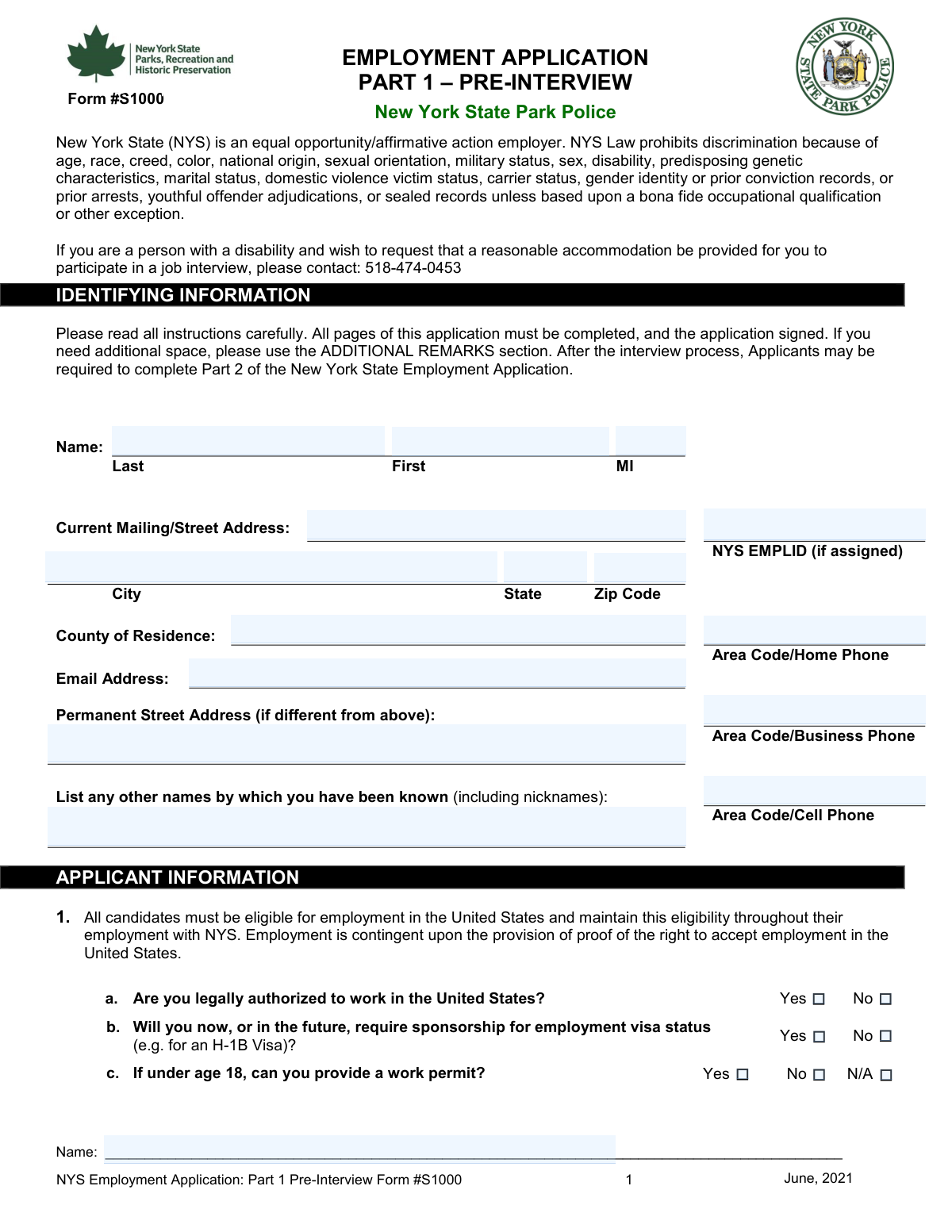
The New York State Employment Application is a comprehensive official form required by New York State government agencies for prospective employees to provide personal contact information, employment eligibility, work history, educational background, professional licenses, references, and other relevant qualifications. It serves as the standardized gateway for individuals applying for state government positions, ensuring agencies collect consistent and complete applicant data. The form also includes sections for veterans' credits, driver license details, and professional certifications, making it one of the most thorough public-sector employment applications in the state. Today, this form can be filled out quickly and accurately using AI-powered services like Instafill.ai, which can also convert non-fillable PDF versions into interactive fillable forms.
Our AI automatically handles information lookup, data retrieval, formatting, and form filling.
It takes less than a minute to fill out NYS Employment Application using our AI form filling.
Securely upload your data. Information is encrypted in transit and deleted immediately after the form is filled out.

Form specifications

Form name: New York State Employment Application Form
Number of pages: 7
Language: English
main-image

Instafill Demo: filling out a legal form in seconds

How to Fill Out NYS Employment Application Online for Free in 2026

Are you looking to fill out a NYS EMPLOYMENT APPLICATION form online quickly and accurately? Instafill.ai offers the #1 AI-powered PDF filling software of 2026, allowing you to complete your NYS EMPLOYMENT APPLICATION form in just 37 seconds or less.
Follow these steps to fill out your NYS EMPLOYMENT APPLICATION form online using Instafill.ai:
  1. 1 Navigate to Instafill.ai and upload the NYS Employment Application PDF or select it from the available form library to begin filling it out online.
  2. 2 Enter your personal information, including your full legal name, current mailing address, county of residence, NYS Employee ID (if assigned), and any other names or nicknames you have been known by.
  3. 3 Provide your contact information such as your email address, home phone, business phone, and cell phone number, and answer the employment eligibility questions regarding work authorization, visa sponsorship, and work permit if under 18.
  4. 4 Complete the driver license section by indicating whether you hold a valid NYS driver license, selecting your license class (A through E or Other), and entering your license expiration date, licensing state, and any CDL endorsements or restrictions.
  5. 5 Fill in your professional license or certificate details, including the license name, type/specialty, issuing authority, license number, issue and expiration dates, and answer questions about any conditional limitations or suspensions/revocations.
  6. 6 Enter your educational background (high school, vocational/technical school, college/university, and military/training school), work history for up to three employers including supervisor details and reasons for leaving, and list at least three professional references with their contact information.
  7. 7 Review all sections for accuracy, indicate your work preferences (full-time, part-time, shifts, geographic locations, etc.), add any additional remarks, sign and date the form, and submit or download the completed application through Instafill.ai.

Our AI-powered system ensures each field is filled out correctly, reducing errors and saving you time.

Why Choose Instafill.ai for Your Fillable NYS Employment Application Form?

Speed

Complete your NYS Employment Application in as little as 37 seconds.

Up-to-Date

Always use the latest 2026 NYS Employment Application form version.

Cost-effective

No need to hire expensive lawyers.

Accuracy

Our AI performs 10 compliance checks to ensure your form is error-free.

Security

Your personal information is protected with bank-level encryption.

Frequently Asked Questions About Form NYS Employment Application

This is a New York State employment application form used by individuals seeking positions with NYS agencies. Anyone applying for a job with a New York State government agency must complete this form, providing personal information, employment history, education, licenses, and references.

You will need to provide your full legal name (last, first, middle initial), current mailing address, county of residence, contact information (email, home, business, and cell phone numbers), and any other names or nicknames you have been known by. If your permanent address differs from your mailing address, you must provide that as well.

An NYS EMPLID (Employee Identification Number) is a unique number assigned by New York State to its employees. If you have previously worked for NYS and were assigned one, enter it on the form; if you have never worked for NYS or were never assigned one, simply leave that field blank.

The form asks three eligibility questions: (a) whether you are legally authorized to work in the United States, (b) whether you currently or will in the future require employer sponsorship such as an H-1B visa, and (c) if you are under 18 years old, whether you can provide a valid work permit. You must check the appropriate Yes, No, or N/A box for each question.

Yes, the form requires you to list the name and relationship of any relatives currently employed by the agency you are applying to. If you have no relatives employed by that agency, you should check the box indicating that no relatives are employed there.

You must indicate whether you currently hold a valid New York State driver's license. If yes, you must specify the license class (A, B, C, D, E, or Other), the issuing state, the expiration date, and any CDL endorsements or restrictions if you hold a Commercial Driver License.

In the Professional License/Certificate section, enter the full name of the license or certificate, its type or specialty, the issuing authority, the license number, issue date, expiration date, and registration dates. You must also indicate whether you have any conditional limitations (3b) or whether your license has ever been suspended or revoked (3c), providing details if either answer is Yes.

The form provides space for at least three previous or current employers, and you must include the employer's name and address, dates of employment, supervisor's name and title, phone number, your job title and duties, and your reason for leaving. If you have additional employment history, you can attach extra sheets and indicate that on the form.

You must provide details about your high school (name, location, credits, diploma/degree, and courses of study), any vocational or technical school, colleges or universities attended, and any training or military school. For each, include the number of credits, type of diploma or degree received, and your major or minor.

The form requires up to three professional references, and for each you must provide the reference's full name, address, relationship to you, phone number, and email address. Make sure your references are aware they may be contacted by the hiring agency.

The form allows you to specify your preferred geographic work locations, desired type of work or position, and your availability for various work arrangements including full-time, part-time, per diem, permanent, temporary, seasonal (summer or winter only), shift work, overtime, and Saturday or Sunday hours.

Yes, AI-powered services like Instafill.ai can help you accurately auto-fill this form's many fields, saving you significant time and reducing errors. Simply upload the form to Instafill.ai, and the AI will guide you through completing each section correctly.

To fill out this form online, visit Instafill.ai and upload the PDF of the NYS employment application. The AI will automatically identify all form fields and help you enter your information accurately, after which you can download, print, and sign the completed form for submission.

If you have a flat, non-fillable PDF version of this form, Instafill.ai can convert it into an interactive fillable form. Simply upload the non-fillable PDF to Instafill.ai, and the platform will make all fields editable so you can complete and save the form digitally.

Yes, the form requires your signature on the designated signature line, along with today's date and your printed name. You will also need to print your name on multiple pages (Pages 3, 4, 5, and 6) as indicated throughout the form to confirm the accuracy of the information provided.

Compliance NYS Employment Application
Validation Checks by Instafill.ai

1
Ensures Primary Name Fields Are Fully Completed and Properly Formatted
Validates that both Last Name and First Name fields are populated with non-empty values, and that the Middle Initial field, if provided, contains exactly one alphabetic character. Names should not contain numeric digits or special characters beyond hyphens or apostrophes (e.g., O'Brien, Smith-Jones). If Last Name or First Name is blank, the application cannot be properly identified or processed, and if Middle Initial exceeds one character, it violates the field specification.
2
Validates Current Mailing Address Completeness and ZIP Code Format
Checks that the Current Mailing Street Address, City, State, and ZIP Code fields are all populated, as these are required for correspondence and official record-keeping. The ZIP Code must conform to either a 5-digit format (e.g., 12345) or ZIP+4 format (e.g., 12345-6789), and the State field must be a valid two-letter U.S. state abbreviation or recognized full state name. Failure to provide a complete and correctly formatted mailing address may result in the applicant missing critical communications regarding their application status.
3
Validates Email Address Format
Ensures the Email Address field contains a properly structured email address following the standard format of [email protected] (e.g., [email protected]), with no spaces and at least one dot in the domain portion. This field is critical because application correspondence, interview notifications, and status updates are sent electronically. An improperly formatted or missing email address will prevent the applicant from receiving timely communications.
4
Validates Phone Number Format for All Phone Fields
Checks that any provided phone number — Home Phone, Business Phone, and Cell Phone — follows a consistent format including an area code, such as 555-555-1234 or (555) 555-1234, and contains exactly 10 digits excluding formatting characters. At least one phone number (Home or Cell) should be present to ensure the applicant can be reached. Phone numbers containing letters, fewer than 10 digits, or invalid area codes (e.g., starting with 0 or 1) should be flagged as invalid.
5
Ensures Employment Eligibility Questions Are Each Answered with Exactly One Selection
Validates that for each of the three employment eligibility questions (a, b, and c), exactly one checkbox option is selected — no question should have both Yes and No checked simultaneously, and no required question should be left entirely unanswered. Question (a) regarding legal authorization to work in the U.S. is particularly critical, as an unanswered or contradictory response may disqualify the application from further processing. Question (c) regarding work permit must have either Yes, No, or N/A selected, and N/A should only be selected if the applicant is 18 or older.
6
Ensures Driver License Class Is Selected When Current License Is Indicated
Validates that if the applicant checks 'Yes' for currently holding a valid driver license, at least one license class (A, B, C, D, E, or Other) is also selected or specified, and the License Expiration Date and Licensing State fields are populated. Conversely, if 'No' is selected for current driver license possession, all license class fields, expiration date, and CDL endorsement fields should remain blank. Inconsistencies between the license possession answer and the class/expiration fields indicate incomplete or contradictory data that could affect eligibility for positions requiring driving.
7
Validates Driver License Expiration Date Is a Valid Future or Recent Date
Checks that the License Expiration Date, when provided, is a valid calendar date in an accepted format (e.g., MM/DD/YYYY) and is not a date in the distant past, which would indicate an expired license. If the expiration date has already passed, the system should flag the license as potentially expired and prompt the applicant to confirm or update the information. This validation is important for positions that require a valid, current driver license as a condition of employment.
8
Ensures Professional License Details Are Internally Consistent and Complete
Validates that if any Professional License/Certificate field is populated (e.g., Name of Trade or Professional License, License Number, or Issued By), then all core fields in that section — including Issue Date, Expiration Date, and Issuing Authority — are also completed. Issue Date must precede Expiration Date, and Registration Date must precede Registration Expiration Date; any date inversion should be flagged as a logical error. Incomplete or inconsistent professional license information may result in the applicant's credentials being unverifiable during the hiring process.
9
Ensures Suspension/Revocation Details Are Provided When 'Yes' Is Selected for Question 3c
Validates that if the applicant selects 'Yes' for the License Suspension/Revocation question (3c) or 'Yes' for Conditional Limitations (3b), the corresponding detail text field is populated with a substantive explanation. A blank or whitespace-only detail field when 'Yes' is selected is insufficient and should trigger a validation error requiring the applicant to provide specifics such as dates, jurisdiction, and reasons. Omitting this information prevents reviewers from properly evaluating the applicant's professional history and compliance standing.
10
Validates Employment History Date Ranges Are Logical and Non-Overlapping
Checks that for each employment history entry, the 'Date Employed From' precedes the 'Date Employed To' date, and that neither date is in the future beyond today's date unless 'present' is indicated for the end date. Additionally, the system should flag significant overlaps between multiple employment entries that would suggest the applicant was working full-time at two employers simultaneously without explanation. Invalid or illogical date ranges undermine the credibility of the employment history and may require follow-up clarification.
11
Ensures at Least One Employment History Entry Is Provided
Validates that the applicant has completed at minimum the first employment history block, including the Name of Present or Last Employer, Employer Address, employment dates, and a description of title and duties. An application submitted with no employment history whatsoever may be incomplete unless the applicant is a first-time job seeker, in which case an explicit indication should be present. Missing employment history prevents hiring managers from evaluating the applicant's relevant experience and professional background.
12
Validates Professional Reference Information Is Sufficiently Complete
Checks that each professional reference entry that is partially filled is also fully completed, meaning if a Reference Name is provided, the corresponding Address, Relationship, and at least one contact method (Phone or Email) must also be present. Reference phone numbers should follow the standard 10-digit format, and reference email addresses should conform to valid email syntax. Incomplete reference entries make it impossible for the hiring agency to contact the reference, which could delay or jeopardize the applicant's consideration.
13
Ensures Relative Employment Disclosure Is Completed or Explicitly Waived
Validates that the applicant has either entered a relative's name and relationship in the relative employment fields, or has checked the box confirming they have no relatives employed by the agency. Leaving all three fields (relative name, relationship, and the 'no relatives' checkbox) blank constitutes an incomplete disclosure that may violate the agency's conflict-of-interest policy. This check ensures transparency and compliance with nepotism disclosure requirements standard in government employment applications.
14
Ensures Work Availability and Preference Fields Have at Least One Selection
Validates that the applicant has made at least one selection among the work type preference fields (Full-Time, Part-Time, Per Diem, Permanent, Temporary, Seasonal) and has indicated availability for at least one shift or schedule type (Shift Work, Overtime, Saturday Hours, Sunday Hours). For each paired Yes/No field, exactly one option should be selected to avoid ambiguity. Unanswered work preference fields prevent the agency from matching the applicant to appropriate available positions.
15
Validates Today's Date Field Is Present and Matches a Valid Current Date
Checks that the 'Today's Date' field on the signature page is populated with a valid calendar date in the expected format (e.g., MM/DD/YYYY) and that the date is not in the future or unreasonably far in the past (e.g., more than 90 days prior). The date on the signature page serves as the official submission date of the application and is legally significant for determining application timeliness and eligibility windows. A missing or invalid date may render the application legally incomplete or unacceptable for processing.
16
Ensures Signature and Print Name Fields on All Signature Pages Are Populated
Validates that the Signature field and all 'Print Name' fields (Pages 3, 4, 5, and 6) are not left blank, as these fields collectively certify the accuracy of the information provided throughout the application. A missing signature or printed name on any page may invalidate that section of the application and could be grounds for rejection under agency submission requirements. This check ensures the applicant has acknowledged and attested to the truthfulness of all information submitted across the entire form.

Common Mistakes in Completing NYS Employment Application

Entering name inconsistently across multiple name fields

This form requires your name in several places (Primary Name, Applicant Name on pages 3, 5, and 6), and applicants often use different formats or spellings across these fields — for example, using a nickname on one page and a legal name on another. Inconsistencies can raise red flags with reviewers and delay processing. Always use your exact legal name as it appears on official government documents, and ensure it is identical in every name field throughout the form. AI-powered tools like Instafill.ai can automatically populate repeated name fields consistently to prevent this error.

Leaving the NYS EMPLID field blank or entering an incorrect number

Applicants who have previously worked for New York State often forget they were assigned an Employee Identification Number (EMPLID), or they confuse it with other ID numbers such as a Social Security Number or employee badge number. Entering the wrong number or leaving it blank when one exists can cause duplicate records or delays in processing. Check prior NYS employment paperwork, pay stubs, or contact your previous NYS agency's HR department to confirm your EMPLID before submitting.

Omitting county of residence or confusing it with city/municipality

Many applicants skip the County of Residence field or mistakenly enter their city or town name instead of the county. This is especially common in New York where city and county names can overlap (e.g., entering 'Albany' as a city but forgetting to separately enter 'Albany County'). The county field is required for administrative and jurisdictional purposes, and omitting it can result in an incomplete application. Double-check your county by referencing your voter registration card, tax documents, or a reliable online lookup tool.

Incorrectly answering employment eligibility questions or leaving them blank

Applicants sometimes skip questions about work authorization (question a), visa sponsorship (question b), or work permit status for minors (question c), or they misunderstand what 'sponsorship' means and answer incorrectly. Leaving these checkboxes blank or selecting conflicting answers (e.g., checking both Yes and No) can result in automatic disqualification or a request for clarification. Read each question carefully: if you are 18 or older, mark N/A for the work permit question; if you are a U.S. citizen or permanent resident, you do not require sponsorship. Instafill.ai can help guide you through these conditional logic fields to ensure correct responses.

Failing to disclose or incorrectly describing license suspensions or conditional limitations

Applicants with professional licenses sometimes check 'No' for suspension/revocation (question 3c) or conditional limitations (question 3b) out of embarrassment or misunderstanding of what qualifies, even when a past issue exists. Omitting this information is considered falsification of the application and can result in termination if discovered after hiring. If you answered 'Yes' to either question, you must provide full details in the explanation field, including dates, jurisdiction, license numbers, and outcomes. Be thorough and honest, as background checks will likely uncover any discrepancies.

Using incorrect date formats or entering expired license information

Fields such as License Expiration Date, Issue Date, Registration Date, and employment dates are frequently filled in with inconsistent formats (e.g., mixing MM/DD/YYYY with DD/MM/YYYY or using only two-digit years), or applicants inadvertently list an already-expired license. Submitting an expired license date can disqualify you from positions requiring a valid credential. Always use the date format specified or most commonly accepted (MM/DD/YYYY), and verify all dates against your actual physical license or certificate before entering them. Instafill.ai can automatically format dates correctly to prevent these errors.

Leaving employment history dates incomplete or using vague 'To' dates for current employment

A very common mistake is leaving the 'Date Employed To' field blank for a current position, or writing 'present' in a format the form does not accept, rather than entering today's date as instructed. Additionally, applicants often omit exact start or end months, entering only a year. Incomplete employment dates make it impossible to verify work history and can cause your application to be returned or rejected. For current employment, enter today's actual date in the 'To' field, and always include both month and year for all positions listed.

Providing personal references instead of professional references

The form specifically requests professional references, yet many applicants list family members, friends, or personal acquaintances who cannot speak to their professional qualifications and work performance. This undermines the credibility of your application and may signal a lack of professional network. Ensure all three references are current or former supervisors, colleagues, professors, or professional mentors who can speak directly to your work skills and character. Always notify your references in advance and confirm their contact information is current and accurate.

Omitting or incorrectly completing the relative disclosure section

Applicants frequently forget to either list relatives employed by the agency they are applying to or fail to check the box confirming they have no such relatives. Leaving this section entirely blank is not acceptable — you must do one or the other. Failing to disclose a relative who works at the agency can be considered a conflict of interest or an act of dishonesty, which may result in disqualification. Review the agency's roster or ask HR if you are unsure whether a family member works there, and always complete this section definitively.

Skipping work preference fields or selecting contradictory options

Fields such as Shift Work, Overtime, Saturday/Sunday Hours, Full-Time, Part-Time, Permanent, Temporary, and Seasonal are often left blank or filled out with contradictory selections (e.g., checking both 'Full-Time' and 'Part-Time' without explanation). These fields help the agency match you to appropriate openings, and incomplete or contradictory answers can result in missed opportunities or misplacement. Carefully consider your actual availability and preferences, and select only the options that genuinely apply to your situation. If you are open to multiple arrangements, check all that apply but ensure they are logically consistent.

Entering incomplete or inaccurate education information

Applicants often leave education fields partially filled — for example, listing a school name but omitting the number of credits, degree type, or major/minor — or they confuse different education sections (high school, vocational/technical, college, military/training school). Missing education details can prevent verification of your qualifications and may result in your application being ranked lower or returned. Gather your transcripts, diplomas, and certificates before completing this section, and fill in every applicable sub-field for each institution attended. Instafill.ai can help ensure all education sub-fields are consistently and completely populated.

Failing to sign, date, or print name on all required pages

This form requires a printed name on multiple pages (Pages 3, 4, 5, and 6) as well as a signature and today's date on the final certification page, yet applicants routinely miss one or more of these fields — especially on interior pages. An unsigned or undated application is legally incomplete and will typically be rejected outright without review. Before submitting, flip through every page of the form and confirm that every 'Print Name' field is filled in and that the signature and date fields on the final page are completed. If submitting digitally, ensure your electronic signature is properly applied to all required locations.
Saved over 80 hours a year

“I was never sure if my IRS forms like W-9 were filled correctly. Now, I can complete the forms accurately without any external help.”

Kevin Martin Green

Your data stays secure with advanced protection from Instafill and our subprocessors

Robust compliance program

Transparent business model

You’re not the product. You always know where your data is and what it is processed for.

ISO 27001, HIPAA, and GDPR

Our subprocesses adhere to multiple compliance standards, including but not limited to ISO 27001, HIPAA, and GDPR.

Security & privacy by design

We consider security and privacy from the initial design phase of any new service or functionality. It’s not an afterthought, it’s built-in, including support for two-factor authentication (2FA) to further protect your account.

Fill out NYS Employment Application with Instafill.ai

Worried about filling PDFs wrong? Instafill securely fills new-york-state-employment-application-form forms, ensuring each field is accurate.