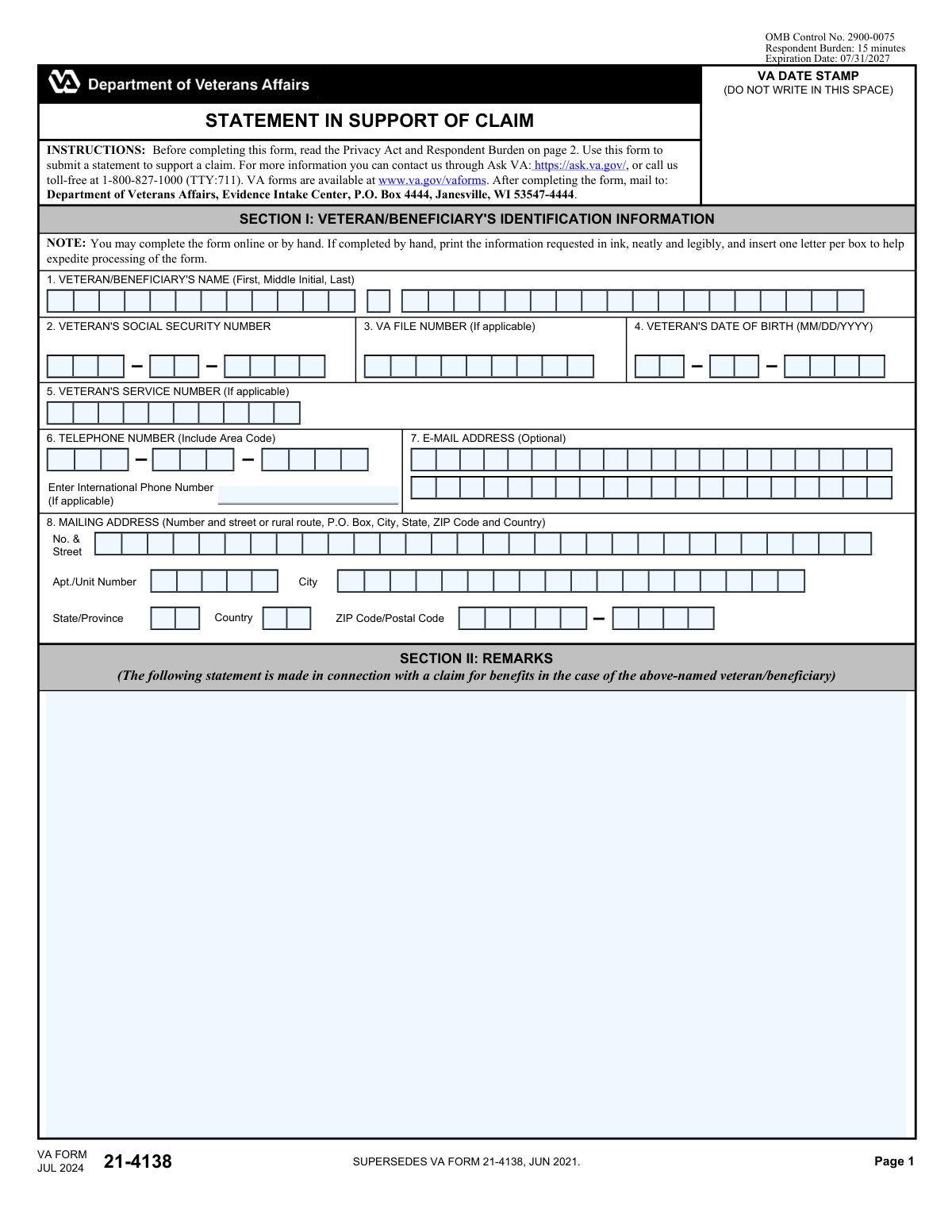
Yes! You can use AI to fill out VA Form 21-4138, Statement in Support of Claim
VA Form 21-4138, Statement in Support of Claim, is an official VA form that lets a veteran or beneficiary provide a personal statement or other narrative information in connection with a VA benefits claim. It is commonly used to explain circumstances, clarify evidence, describe symptoms or events, or add context that may not be captured in other forms. Submitting a clear, accurate statement can help the VA understand the claim and may support faster or more accurate adjudication. The form must be signed and dated to certify the statement is true and correct.
Our AI automatically handles information lookup, data retrieval, formatting, and form filling.
It takes less than a minute to fill out VA 21-4138 using our AI form filling.
Securely upload your data. Information is encrypted in transit and deleted immediately after the form is filled out.
Form specifications
| Form name: | VA Form 21-4138, Statement in Support of Claim |
| Number of pages: | 2 |
| Language: | English |
| Categories: | beneficiary forms |
Instafill Demo: filling out a legal form in seconds
How to Fill Out VA 21-4138 Online for Free in 2026
Are you looking to fill out a VA 21-4138 form online quickly and accurately? Instafill.ai offers the #1 AI-powered PDF filling software of 2026, allowing you to complete your VA 21-4138 form in just 37 seconds or less.
Follow these steps to fill out your VA 21-4138 form online using Instafill.ai:
- 1 Enter the veteran/beneficiary identification details, including full name, Social Security number, date of birth, and VA file number/service number (if applicable).
- 2 Provide current contact information, including mailing address, phone number (including international number if applicable), and optional email address.
- 3 In the Remarks section, write the statement supporting the claim, clearly describing the issue, relevant dates, events, symptoms, and any supporting context.
- 4 If more space is needed, continue the remarks in the continued section and ensure the narrative remains organized and specific.
- 5 Review the completed form for accuracy and consistency with the claim and any supporting evidence being submitted.
- 6 Sign and date the declaration/certification section to attest the statements are true and correct.
- 7 Download/print the finalized form for submission and send it to the VA Evidence Intake Center (or upload through the appropriate VA submission channel if available).
Our AI-powered system ensures each field is filled out correctly, reducing errors and saving you time.
Why Choose Instafill.ai for Your Fillable VA 21-4138 Form?
Speed
Complete your VA 21-4138 in as little as 37 seconds.
Up-to-Date
Always use the latest 2026 VA 21-4138 form version.
Cost-effective
No need to hire expensive lawyers.
Accuracy
Our AI performs 10 compliance checks to ensure your form is error-free.
Security
Your personal information is protected with bank-level encryption.
Frequently Asked Questions About Form VA 21-4138
VA Form 21-4138 (Statement in Support of Claim) is used to submit a written statement to support a VA benefits claim. It lets you explain facts, timelines, symptoms, or other details the VA should consider.
The veteran or beneficiary named on the claim typically completes and signs this form. Itās used when you want to add your own statement in connection with a claim for benefits.
This form is designed specifically for submitting a statement to support a claim and helps ensure VA receives the key identifying information. If you submit a letter, include the same identifying details so it can be matched to your claim.
Section I asks for the veteran/beneficiaryās name, Social Security number, date of birth, VA file number (if applicable), service number (if applicable), mailing address, and telephone number. Email is optional.
Use Section II to clearly explain the statement you are making in support of your claim, including relevant dates, events, and how the issue affects you. Be specific and organized so the VA can understand what youāre requesting and why.
The form includes a continuation area for Section II (Remarks Continued). If you still need more room, you can attach additional pages and make sure your name and identifying information appear on each page.
You may complete the form online or by hand. If completing by hand, print neatly in ink and follow the instruction to use one letter per box to help speed processing.
Mail the completed form to: Department of Veterans Affairs, Evidence Intake Center, P.O. Box 4444, Janesville, WI 53547-4444. Do not write in the āVA Date Stampā area.
Yes. Section III requires the veteran/beneficiaryās signature and the date signed to certify the statements are true and correct to the best of your knowledge and belief.
Providing your SSN helps VA identify your claim file, but the form states it is voluntary and refusal by itself will not result in denial of benefits. However, VA notes an SSN may be required if a federal statute requires it.
The estimated respondent burden is 15 minutes. Actual time may vary depending on how much detail you include and whether you need to gather dates or supporting information.
The form warns that severe penalties may apply, including fines or imprisonment, for willfully submitting a statement or evidence of a material fact knowing it to be false. Sign only after reviewing your statement for accuracy.
The VA states it will not disclose information except as authorized under the Privacy Act of 1974 and applicable routine uses under Title 38 regulations. Information is considered confidential (38 U.S.C. 5701) and may be verified through computer matching with other agencies.
You can contact VA through Ask VA at https://ask.va.gov/ or call 1-800-827-1000 (TTY: 711). VA forms are also available at www.va.gov/vaforms.
No. The email address [email protected] is only for comments about the paperwork burden estimate, not for submitting completed forms.
Compliance VA 21-4138
Validation Checks by Instafill.ai
1
Ensures Veteran/Beneficiary Name is present and structurally valid
Validates that the Veteran/Beneficiary's name is provided and includes at least a first and last name, with middle initial optional. The check should reject entries that are clearly placeholders (e.g., "N/A", "Unknown") or contain invalid characters (e.g., excessive punctuation or numbers). This is important because the name is a primary identifier used to associate the statement with the correct claimant record. If validation fails, the submission should be flagged for correction before intake to prevent misfiling.
2
Validates Social Security Number (SSN) format and disallowed values
Checks that the SSN is exactly 9 digits (allowing common formatting like XXX-XX-XXXX) and contains only numeric characters after normalization. It should also reject known invalid patterns (e.g., all zeros, 123456789, 000-xx-xxxx) and ensure the value is not partially entered. SSN is used to match the statement to the correct VA claim file and reduce identity mismatches. If validation fails, the system should prompt for correction or route to manual review if SSN is intentionally omitted.
3
Validates Date of Birth (DOB) format and plausibility
Ensures the Veteran's date of birth is provided in MM/DD/YYYY format and represents a real calendar date. The check should enforce plausibility rules (e.g., not in the future, and within a reasonable human age range such as 0ā120 years). DOB is a key identity attribute used for record matching and fraud prevention. If validation fails, the form should be rejected or held for clarification to avoid associating the statement with the wrong person.
4
Validates VA File Number format when provided
If a VA File Number is entered, validates it matches expected formatting rules (e.g., numeric-only or VA-defined alphanumeric pattern, length constraints) and is not a placeholder value. This helps ensure the statement is linked to the correct claim folder when SSN is missing or when multiple records exist. If validation fails, the system should not use the file number for matching and should request correction or fall back to other identifiers.
5
Validates Service Number format when provided
If the Veteran's service number is provided, checks for acceptable character set (typically alphanumeric), length limits, and rejects obvious placeholders. Service numbers can be used as supplemental identifiers for older service eras and can improve matching accuracy. If validation fails, the value should be ignored for automated matching and the submission flagged if other identifiers are also weak or missing.
6
Ensures Mailing Address completeness and minimum deliverability
Validates that the mailing address includes required components: street (or P.O. Box/rural route), city, state/province, ZIP/postal code, and country. It should also ensure the address fields are not empty or filled with non-address text and that the state/country combination is consistent (e.g., U.S. state requires country = USA). A complete address is necessary for correspondence and for resolving claim development actions. If validation fails, the system should require correction because incomplete addresses can cause missed deadlines and returned mail.
7
Validates ZIP/Postal Code format based on Country
Checks that the ZIP/postal code matches the expected pattern for the selected country (e.g., U.S. ZIP 5 digits or ZIP+4). For non-U.S. addresses, it should allow international postal formats but still enforce reasonable length and character constraints. Correct postal codes improve deliverability and reduce returned mail. If validation fails, the user should be prompted to correct the postal code or confirm an international format.
8
Validates Telephone Number format and international handling
Ensures the telephone number includes an area code for U.S. numbers and contains only valid digits after normalization, with optional symbols like parentheses, spaces, or hyphens. If an international phone number is provided, the system should validate E.164-style structure (e.g., leading + and country code) or require the country selection to support the format. A valid phone number is important for time-sensitive claim development and identity verification. If validation fails, the system should request correction or allow submission with a warning if phone is not strictly required by the workflow.
9
Validates Email Address format when provided (optional field)
If an email address is entered, validates it conforms to standard email syntax (local-part@domain) and rejects clearly invalid entries (e.g., missing '@', invalid domain). Because the field is optional, the check should not block submission when blank, but should block or warn when a malformed email is provided. Accurate email supports faster communication and reduces delays. If validation fails, the system should prompt the user to correct the email or clear the field.
10
Ensures Remarks/Statement content is present and meaningful
Validates that the remarks section contains text and meets a minimum content threshold (e.g., not empty, not only whitespace, not only "see attached" unless an attachment is actually included). This is critical because the formās purpose is to submit a statement in support of a claim, and an empty statement provides no actionable evidence. If validation fails, the submission should be blocked or routed to a queue requiring follow-up to obtain the missing statement.
11
Attachment consistency check for references in Remarks
Scans the remarks for references to attachments (e.g., "attached", "enclosed", "see document") and verifies that at least one attachment is included in the submission package when such references exist. This prevents situations where the VA expects supporting evidence that was never transmitted. If validation fails, the system should prompt the user to upload the referenced documents or revise the remarks to remove the attachment reference.
12
Signature presence and type validation
Ensures the Veteran/Beneficiary signature field is completed (e.g., captured as a valid e-signature, typed signature per policy, or an image/ink signature depending on channel). The check should also reject placeholder text like "/s/" without a name if not permitted by the submission method. A signature is required to certify the truth and correctness of the statement and is legally significant. If validation fails, the form should be rejected as incomplete because it lacks required certification.
13
Validates Date Signed format and logical constraints
Checks that the date signed is in MM/DD/YYYY format, is a real date, and is not in the future. It should also enforce reasonable recency rules if required by the intake process (e.g., not excessively old relative to submission date) and ensure it is present when a signature is present. The date signed establishes when the certification was made and supports auditability. If validation fails, the system should require correction before acceptance.
14
Cross-field identity consistency between Page 1 and Page 2 SSN
Validates that the SSN shown/entered on Page 2 ("VETERAN'S SOCIAL SECURITY NO.") matches the SSN provided in Section I on Page 1 when both are present. This prevents mismatched pages or mixed claimant information in a single submission. Consistency is essential for correct indexing and to avoid privacy breaches. If validation fails, the submission should be flagged for manual review and not automatically associated with a claim file.
15
Required-field completeness check for Section I core identifiers
Ensures that the minimum set of identifiers required for intake are present: name plus at least one strong identifier (SSN or VA File Number) and date of birth, according to the organizationās intake rules. This check is important because incomplete identifiers can prevent the statement from being matched to the correct veteran/beneficiary record. If validation fails, the system should block submission or route it to an exception workflow requiring additional identifying information.
Common Mistakes in Completing VA 21-4138
People sometimes enter the claimantās information (e.g., spouse/child) instead of the veteran/beneficiary listed in Section I, especially when someone else is helping complete the form. This can cause the statement to be misfiled under the wrong record or not associated with the correct claim at all, delaying processing. Always confirm whose claim the statement supports and ensure the name, SSN, and VA file number (if applicable) match the veteran/beneficiary on the claim.
A frequent error is writing dates in a non-VA format (e.g., DD/MM/YYYY, YYYY-MM-DD, or āJuly 3, 24ā) instead of MM/DD/YYYY as required. Incorrect formats can lead to data entry errors, mismatched records, or requests for clarification. Use two-digit month/day and four-digit year (e.g., 07/03/2024) for both the veteranās date of birth and the date signed.
Many applicants donāt know they have a VA file number, confuse it with a claim number, or enter an unrelated number. Missing or incorrect file numbers can slow down matching the statement to the correct claims folder, especially when names are common. If you have a VA file number, enter it exactly as shown on VA correspondence; if you donāt, leave it blank rather than guessing.
Because SSNs are long and sensitive, people sometimes omit digits, transpose numbers, or use an ITIN/other identifier. This can prevent the VA from properly associating the statement with the correct claim file and may trigger follow-up requests. Double-check each digit against an official document and enter the full SSN in the field provided.
When completed by hand, applicants often write cursive, squeeze multiple letters into a box, or use pencil/light ink, making scanning and data entry difficult. Illegible entries can result in incorrect contact information, misidentification, or processing delays. Print neatly in dark ink and follow the āone letter per boxā instruction to improve readability and reduce errors.
People frequently omit apartment/unit numbers, use an old address, or forget the country for overseas addresses. An incomplete or outdated address can cause missed VA letters, deadlines, and requests for evidence, which can negatively affect the claim timeline. Provide the full mailing address exactly as used by the postal service, including unit number, correct ZIP/Postal Code, and country when applicable.
Applicants often forget the area code, enter separators inconsistently, or provide a local international number without country code even though the form prompts for an international phone number if applicable. This can prevent the VA from reaching you quickly to resolve issues, leading to mailed correspondence and delays. Include area code for U.S. numbers and include country code and full dialing format for international numbers.
Many statements are written as general narratives (āI disagreeā or āplease approveā) without the specific details the VA needs, such as dates, locations, condition names, event descriptions, and how the evidence supports the claim. Vague remarks can reduce the statementās usefulness and may lead to additional development requests. In Section II, clearly state what benefit/issue the statement supports, include relevant timelines, and reference attached evidence (e.g., āSee attached buddy statement datedā¦ā).
People sometimes cram text into the margins, write over other fields, or forget to use the āRemarks (Continued)ā area, which can make the statement hard to read or incomplete when scanned. Missing pages or unreadable overflow can weaken the submission and prompt follow-up. Use the continuation area (and additional pages if needed), label each page with the veteranās name/SSN or VA file number, and indicate āSee attached page X of Y.ā
A common mistake is forgetting to sign, typing a name without an acceptable signature (when submitting by mail), or having someone else sign without proper authority. Unsigned forms may be considered incomplete and can delay acceptance of the statement as evidence. Ensure the veteran/beneficiary signs in the signature block and dates it; if a representative must sign, confirm VA rules for representation and include appropriate documentation.
Applicants sometimes add notes, dates, or tracking information in the VA date stamp box because it looks like an empty field. Marking this area can interfere with VA intake processing and document control, potentially causing scanning or routing issues. Leave the date stamp area completely blank and place any notes in the remarks section instead.
Because the form lists multiple contacts, people sometimes email the completed form to the paperwork reduction/burden estimate email address or send it to an incorrect VA office. This can result in the statement not being received for claim processing and may cause missed deadlines. Submit through the approved channels (online submission if available or mail to the Evidence Intake Center address provided) and do not send completed forms to the [email protected] email.
Saved over 80 hours a year
āI was never sure if my IRS forms like W-9 were filled correctly. Now, I can complete the forms accurately without any external help.ā
Kevin Martin Green
Your data stays secure with advanced protection from Instafill and our subprocessors

Robust compliance program
Transparent business model
Youāre not the product. You always know where your data is and what it is processed for.
ISO 27001, HIPAA, and GDPR
Our subprocesses adhere to multiple compliance standards, including but not limited to ISO 27001, HIPAA, and GDPR.
Security & privacy by design
We consider security and privacy from the initial design phase of any new service or functionality. Itās not an afterthought, itās built-in, including support for two-factor authentication (2FA) to further protect your account.
Fill out VA 21-4138 with Instafill.ai
Worried about filling PDFs wrong? Instafill securely fills va-form-21-4138-statement-in-support-of-claim forms, ensuring each field is accurate.