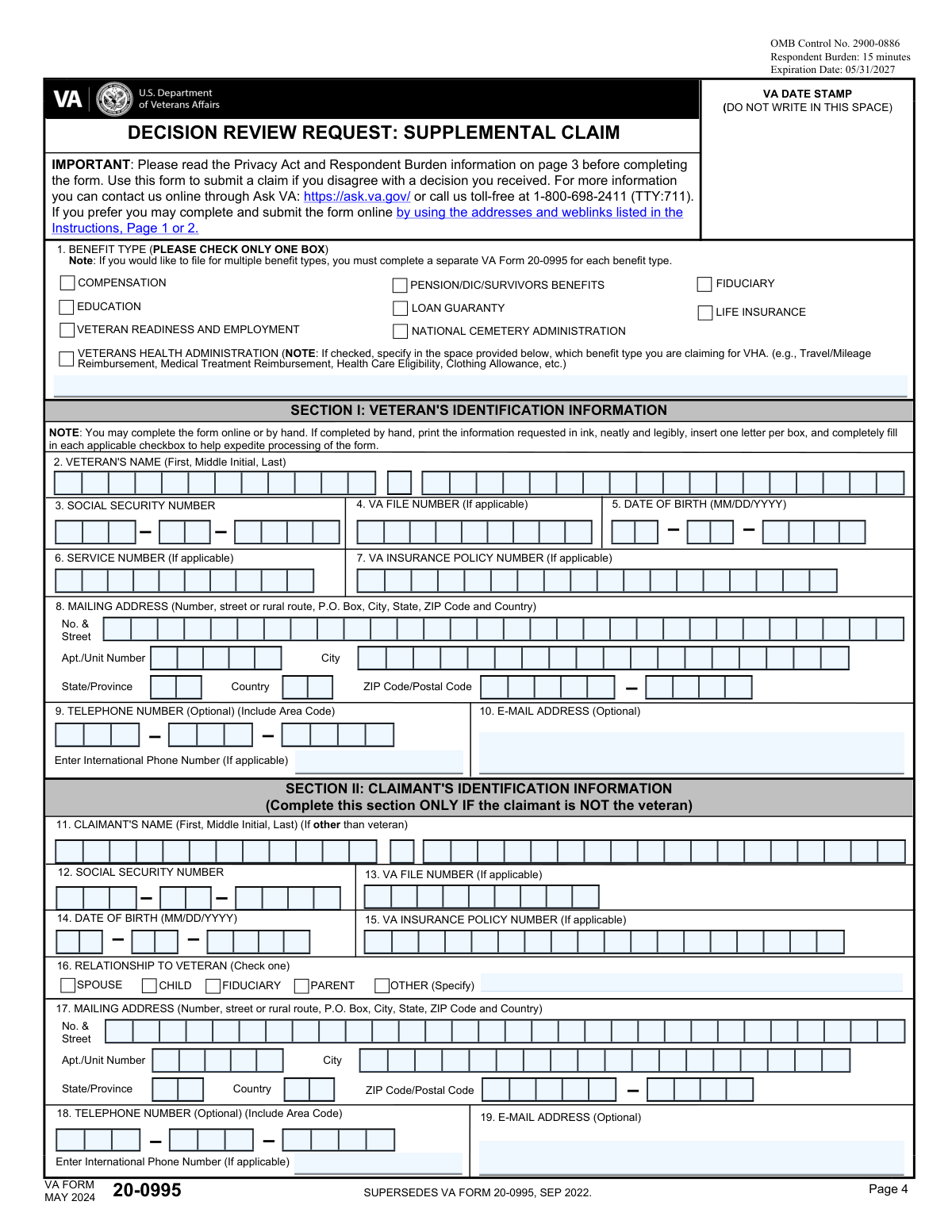
Fill out Form 20-0995, Decision Review Request: Supplemental Claim with Instafill.ai
Worried about filling PDFs wrong? Instafill securely fills VBA-20-0995-ARE forms, ensuring each field is accurate.
Form 20-0995 is part of the
VA forms, VA claim forms and supplemental forms categories on Instafill.
#1 AI PDF Filling Software of 2026
3 out of 4 customers say they prepare their Form 20-0995 forms in 37 seconds or less
Secure platform for your PDF forms and personal information
| Form name: | Form 20-0995, Decision Review Request: Supplemental Claim |
| Number of fields: | 161 |
| FCI: | Complex (70/100) |
Form Complexity Index
Complex
70 / 100
| Fillable fields | 161 |
| Pages | 7 |
| Fields per page | 23 |
| Sections | 46 |
| Conditional rules | 18 |
| Tables & lists | 2 |
| Instruction pages | — |
| OMB Control No. | 2900-0886 |
| Instafill Form ID | IF-VBA-20-0995-ARE |
Form 20-0995 has a complex Form Complexity Index of 70/100. Instafill’s AI completes it accurately in under a minute.
Instafill Demo: How to fill out PDF forms in seconds with AI
Compliance Form 20-0995
Validation Checks by Instafill.ai
1
Verifies that the form is being used for a supplemental claim based on new and relevant evidence
This validation check ensures that the form is specifically designated for a supplemental claim, confirming that the user has selected the correct form for their intended purpose. It verifies that the evidence provided is indeed new and relevant, which is crucial for the claim's success. By checking this, the software helps prevent the submission of incorrect forms that could delay the review process. This step is essential for maintaining the integrity of the claims process and ensuring that claimants receive the appropriate consideration.
2
Confirms that only one benefit type is selected in Item 1
This validation check confirms that the claimant has selected only one benefit type in Item 1, ensuring compliance with the requirement to file separate forms for multiple claims. It verifies that the form is filled out correctly to avoid any confusion or processing delays. By enforcing this rule, the software helps streamline the review process and ensures that each claim is evaluated on its own merits. This check is vital for maintaining an organized and efficient claims system.
3
Ensures that all requested personal information is provided in Section I or II
This validation check ensures that all necessary personal information is provided in Section I or II, including the claimant's name, Social Security Number, VA file number, and contact details. It verifies that the information is complete to facilitate proper identification and processing of the claim. By checking for this completeness, the software helps prevent delays that could arise from missing or incorrect information. This step is crucial for ensuring that the claim is associated with the correct individual and processed efficiently.
4
Checks that Section III is completed if the claimant is homeless or at risk of homelessness
This validation check ensures that Section III is completed if the claimant indicates that they are homeless or at risk of homelessness, prioritizing the claim appropriately. It verifies that the necessary information is provided to address the urgent needs of vulnerable claimants. By enforcing this requirement, the software helps to expedite the review process for those in critical situations, ensuring they receive timely assistance. This check is essential for safeguarding the welfare of claimants facing housing instability.
5
Verifies that all issues for review are listed in Section IV
This validation check verifies that all issues for review are clearly listed in Section IV, including references to the decision notification letter and the date of the VA's decision notice. It ensures clarity in the claim by confirming that all relevant issues are documented for the review process. By checking this, the software helps to prevent misunderstandings or omissions that could hinder the evaluation of the claim. This step is important for maintaining transparency and thoroughness in the claims review process.
6
Confirms that new and relevant evidence is submitted in Section V
This validation check ensures that new and relevant evidence is submitted in Section V of the form. It verifies that the evidence provided is not only new but also directly pertinent to the issues being claimed. By confirming the relevance of the evidence, the check helps to strengthen the claimant's case. This process is crucial for the successful review of the supplemental claim.
7
Ensures that the claimant acknowledges the evidence notice in Section VI
This validation check ensures that the claimant acknowledges the evidence notice in Section VI of the form. It confirms that the claimant understands the evidence requirements necessary for their claim. By verifying this acknowledgment, the check helps to prevent misunderstandings regarding what is needed for a successful claim. This step is essential for maintaining clarity and transparency in the claims process.
8
Checks for consent in Section VII regarding notifications to the VHA
This validation check verifies that consent is provided in Section VII regarding notifications to the Veterans Health Administration (VHA). It ensures that the claimant is aware of and agrees to the communication process related to their claim. By confirming this consent, the check helps to facilitate effective communication between the claimant and the VHA. This is an important aspect of ensuring that the claimant remains informed throughout the review process.
9
Verifies that Sections VIII and IX are signed and dated
This validation check verifies that Sections VIII and IX of the form are properly signed and dated. It ensures that the form is certified by the claimant or an authorized alternate signer, which is a critical requirement for the validity of the submission. By confirming the signatures and dates, the check helps to authenticate the claim and prevent any potential disputes regarding its legitimacy. This step is vital for ensuring that the claim is processed without unnecessary delays.
10
Confirms that the completed form is submitted to the correct VA address based on the selected benefit type
This validation check confirms that the completed form is submitted to the correct VA address based on the selected benefit type. It ensures that the claim is directed to the appropriate processing center, which is essential for timely and accurate handling of the claim. By verifying the submission address, the check helps to minimize the risk of misdirection and delays in processing. This step is crucial for ensuring that the claimant receives a prompt response to their supplemental claim.
11
Ensures that a copy of the completed form and supporting documents is retained for the claimant's records
This validation check ensures that a copy of the completed form and any supporting documents is retained for the claimant's records. This promotes accountability and tracking of the claim process. By keeping a record, the claimant can reference their submission in future communications. It also aids in maintaining a clear history of the claim for both the claimant and the reviewing authorities.
12
Verifies that the claimant is aware of the option to seek assistance from an accredited representative or the VA
This check verifies that the claimant is informed about their option to seek assistance from an accredited representative or the VA. It ensures that claimants have access to necessary support throughout the claims process. By confirming this awareness, the validation process promotes informed decision-making. This is crucial for claimants who may need guidance in navigating the complexities of their claims.
13
Checks that the form is submitted by the appropriate method (mail, in person, or electronically)
This validation check ensures that the form is submitted by the appropriate method as specified in the instructions. It verifies compliance with submission guidelines, which is essential for the timely processing of the claim. By confirming the submission method, the process helps prevent delays that could arise from incorrect submission practices. This check is vital for maintaining the integrity of the claims process.
14
Confirms that the claimant has reviewed the instructions thoroughly
This validation check confirms that the claimant has thoroughly reviewed the instructions provided for completing the form. It ensures that they are aware of all requirements to avoid any omissions or errors in the form completion process. By emphasizing the importance of understanding the instructions, this check helps to minimize mistakes that could lead to delays or rejections. It promotes a smoother and more efficient claims process.
15
Ensures that any additional documentation required for alternate signers is included if applicable
This validation check ensures that any additional documentation required for alternate signers is included if applicable. It maintains compliance with signature requirements, which is crucial for the validity of the claim. By verifying the inclusion of necessary documents, this check helps to prevent issues related to authorization. This is particularly important for claims involving representatives or guardians.
Common Mistakes in Completing Form 20-0995
Failing to assess eligibility prior to submitting Form 20-0995 can lead to unnecessary delays and complications in the review process. It is crucial to ensure that you meet the eligibility criteria for a supplemental claim before proceeding. To avoid this mistake, carefully review the eligibility requirements outlined by the Department of Veterans Affairs and confirm your status before filling out the form.
Selecting more than one benefit type in Item 1 can create confusion and may result in processing delays. Each benefit type has specific criteria and processes, and checking multiple options can complicate your claim. To prevent this issue, take the time to read the instructions carefully and select only the benefit type that applies to your situation.
Incomplete identifying information can hinder the processing of your claim and may lead to requests for additional information. It is essential to provide all required personal details, including your full name, Social Security number, and contact information. To avoid this mistake, double-check that all fields are filled out accurately and completely before submitting the form.
Neglecting to include information about homelessness when it applies to your situation can affect the consideration of your claim. The Department of Veterans Affairs may have specific provisions for homeless veterans, and failing to disclose this information could limit your access to benefits. To ensure your claim is fully considered, always include relevant details about your living situation if you are experiencing homelessness.
Omitting issues that you wish to have reviewed in Section IV can result in an incomplete claim and may prevent you from receiving the benefits you deserve. It is important to list all relevant issues clearly and concisely to ensure they are addressed during the review process. To avoid this mistake, take the time to reflect on all the issues you want to contest and ensure they are documented in the appropriate section of the form.
Submitting evidence that has already been provided in previous claims can lead to delays in processing your request. It is essential to review your prior submissions and ensure that any new evidence is distinct and relevant to your current claim. To avoid this mistake, maintain a clear record of all evidence submitted in past claims and only include new or additional information that supports your case. This will help streamline the review process and improve the chances of a favorable outcome.
Insufficient details in your evidence requests can hinder the review process and may result in a denial of your claim. It is crucial to provide clear and comprehensive information about the evidence you are submitting, including how it relates to your claim. To prevent this issue, take the time to thoroughly explain the significance of each piece of evidence and how it supports your case. This clarity will assist the reviewer in understanding your position and expedite the decision-making process.
Failing to acknowledge the evidence notice in Section VI can lead to misunderstandings regarding the evidence you are submitting. This section is designed to confirm your awareness of the evidence requirements, and neglecting it may result in your claim being processed incorrectly. To avoid this mistake, carefully read and acknowledge the notice as instructed, ensuring that you understand what is required for your claim. This will help ensure that all necessary evidence is considered during the review.
Not consenting to notifications in Section VII can prevent you from receiving important updates regarding your claim. This consent is vital for ensuring that you are informed about the status of your request and any additional information needed. To avoid this oversight, make sure to read the consent section thoroughly and provide your agreement where required. This proactive step will keep you informed and engaged throughout the review process.
Omitting your signature and date on the form can result in delays or outright rejection of your claim. A signature is a critical component that verifies your identity and agreement to the information provided. To prevent this mistake, double-check the form before submission to ensure that you have signed and dated it appropriately. This simple step can save you time and ensure that your claim is processed without unnecessary complications.
Submitting the form with an alternate signer can lead to delays or rejection if the necessary documentation is not included. It is crucial to ensure that any alternate signer has the proper authority to act on behalf of the claimant. To avoid this mistake, always check the requirements for alternate signers and include any required documentation, such as power of attorney forms, with your submission.
Sending the form to the wrong address can result in significant delays in processing your claim. Each type of claim may have a specific submission address, and using an incorrect one can lead to your form being misplaced or returned. To prevent this issue, always verify the correct submission address on the official VA website or the instructions provided with the form before sending your application.
Not retaining a copy of the completed form can create challenges in tracking the status of your claim or addressing any issues that arise during processing. Keeping a copy serves as a reference for your records and can be invaluable if you need to follow up with the VA. To avoid this mistake, always make a photocopy or digital scan of your completed form before submission and store it in a safe place.
Many individuals may hesitate to seek help when filling out the form, which can lead to errors or incomplete submissions. The VA provides resources and support for claimants, and utilizing these can enhance the accuracy of your application. To mitigate this risk, do not hesitate to reach out to VA representatives, veteran service organizations, or legal advisors if you have questions or need clarification on any part of the form.
Saved over 80 hours a year
“I was never sure if my IRS forms like W-9 were filled correctly. Now, I can complete the forms accurately without any external help.”
Kevin Martin Green
Your data stays secure with advanced protection from Instafill and our subprocessors




Robust compliance program
Transparent business model
You’re not the product. You always know where your data is and what it is processed for.
ISO 27001, HIPAA, and GDPR
Our subprocesses adhere to multiple compliance standards, including but not limited to ISO 27001, HIPAA, and GDPR.
Security & privacy by design
We consider security and privacy from the initial design phase of any new service or functionality. It’s not an afterthought, it’s built-in, including support for two-factor authentication (2FA) to further protect your account.
Fill out Form 20-0995 with Instafill.ai
Worried about filling PDFs wrong? Instafill securely fills vba-20-0995-are forms, ensuring each field is accurate.
