
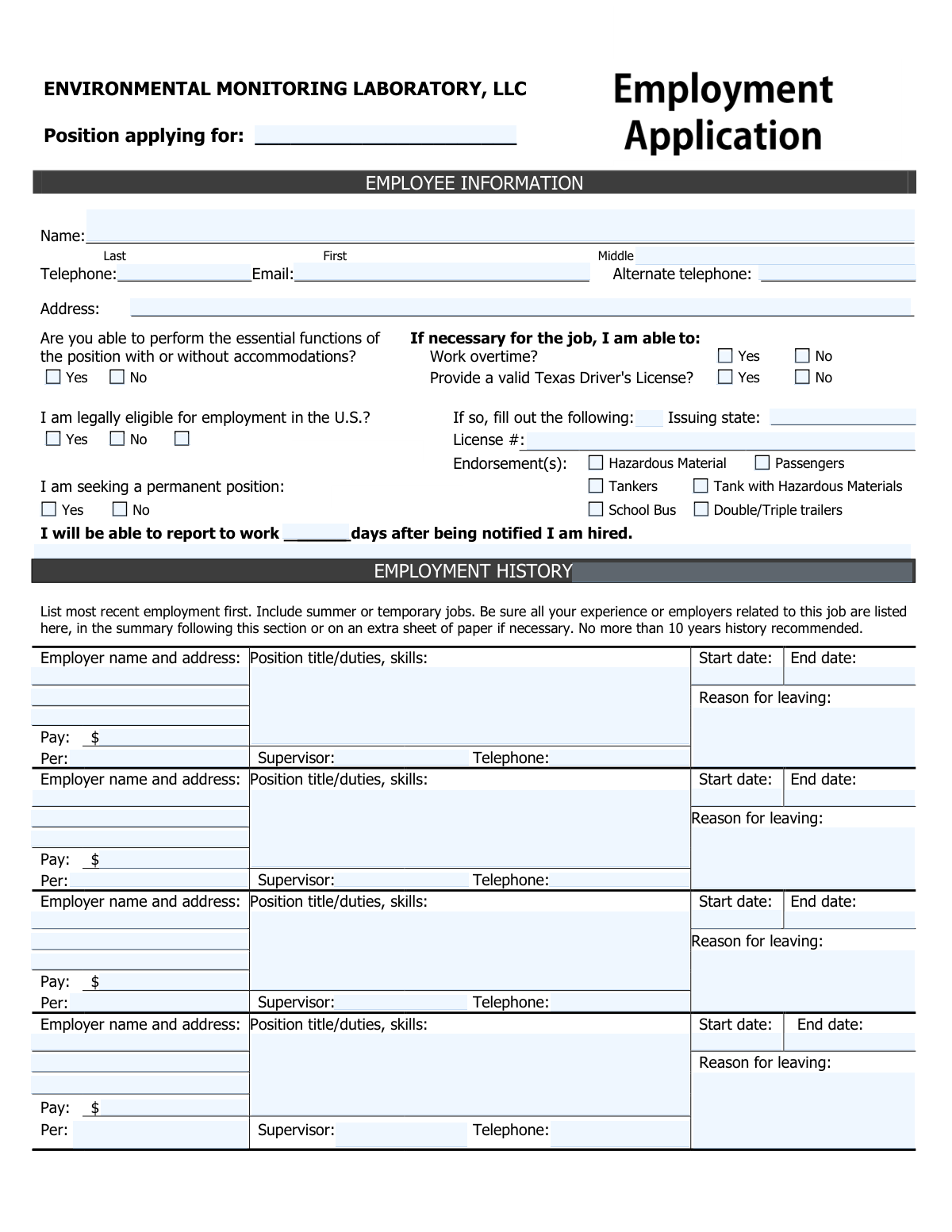
Yes! You can use AI to fill out ENVIRONMENTAL MONITORING LABORATORY, LLC Employment Application
Don't type 127 fields by hand. Tell our AI about yourself, or upload your resume, and it fills every field in seconds. You check it, then download, print or sign.
The AI does the filling. You just check it.
No typing into boxes, nothing to install.
What this form asks for
The AI fills all of it, from your answers or your documents.
The AI checks your answers before you download
14 checks built for this form, so a wrong date or a missing answer is caught before anyone else sees it.
This check ensures the email address entered in the 'Email Address' field follows the standard format, containing an '@' symbol and a domain (e.g., [email protected]). This is critical for ensuring the employer can reliably contact the applicant for interviews and updates. If the format is invalid, the system should prompt the user to correct the email address before submission.
This check validates that for each entry in the 'Employment History' section, the 'End date' is on or after the 'Start date'. This prevents logical impossibilities in the applicant's work history and ensures data accuracy for background verification. If an end date precedes a start date, the system should flag the entry and require the applicant to correct the dates.
This check enforces a conditional requirement where if the applicant selects 'Yes' for 'Provide a valid Texas Driver's License?', then the 'License #' and 'Issuing state' fields must be completed. This ensures that all necessary information is collected when an applicant claims to have a license, which may be a job requirement. If these dependent fields are empty after selecting 'Yes', an error message should appear.
This check ensures that the applicant has selected either 'Yes' or 'No' for the question 'I am legally eligible for employment in the U.S.?'. This is a critical screening question for legal compliance in hiring and is a fundamental requirement for employment. The form submission should be blocked until a response is provided for this mandatory question.
This validation confirms that the 'Last' and 'First' name fields are not left blank. The applicant's name is a fundamental piece of identifying information required for processing the application and for any subsequent communication or background checks. Failure to provide a name would prevent the form from being submitted.
This validation verifies that the 'Primary Telephone' and 'Alternate Telephone' fields contain a valid 10-digit phone number format. This is crucial for ensuring the hiring manager can contact the applicant for interviews or follow-up questions. An invalid format would trigger an error message asking the user to enter a valid phone number like (555) 555-5555.
And 8 more checks
- Checks for Completeness of Employment History Entries
- Ensures 'Days to Report' is a Valid Number
- Verifies Issuing State for Texas Driver's License
- Validates Numeric Format for Pay Amount
- Ensures Pay Period is Specified with Pay Amount
- Validates Completeness of Reference Contact Information
- Validates Format of Application Signature Date
- Requires Selection for Essential Job Functions
Let AI fill out your Employment Application
No typing. Every field filled in seconds, checked, ready to sign.
How to Fill Out Employment Application Online for Free in 2026
What the AI walks you through.
- Navigate to Instafill.ai and upload or select the Employment Application form.
- Use the AI assistant to automatically populate your personal information, including name, address, and contact details.
- Enter the position you are applying for and answer the eligibility and availability questions.
- Detail your employment history, starting with your most recent job, including employer details, dates, and reason for leaving.
- Provide your educational background, military service (if applicable), and list any relevant skills, qualifications, or certifications.
- List the names and contact information for your personal references.
- Carefully review all the information you've entered for accuracy, then sign and date the application to certify its contents.
Common Mistakes in Completing Employment Application
The ones the AI is built to catch.
Reversing First and Last Name
Entering a Vague Position Title
Providing Vague or Passive Job Duties
Using Negative Language for 'Reason for Leaving'
Omitting the Pay Period for Salary
Incomplete Driver's License Information
Listing Inappropriate Personal References
Forgetting to Sign and Date the Application
Using an Unprofessional Email Address
Leaving Unexplained Gaps in Employment History
Frequently Asked Questions About Employment Application
Is it really free for 7 days?
Can I fill other forms too?
How do I cancel?
How does the AI fill out Employment Application?
What happens to my information?
How complex is Employment Application to fill out?
What is the purpose of this form?
Who should I list as a personal reference?
How should I fill out the 'End date' and 'Reason for leaving' for my current job?
The form recommends a 10-year employment history. Do I have to follow that exactly?
Is a valid Texas Driver's License required to apply?
What does it mean to be able to perform essential functions 'with or without accommodations'?
What information do I need to complete the Education section?
How do I submit this application once it's filled out?
Can I use an AI tool to help me fill out this application?
How can I use Instafill.ai to fill this form out online?
The PDF I have of this form is not fillable. What can I do?
What should I enter for 'Pay' and 'Per' in the employment history section?
What happens after I sign and submit the application?
Get your Employment Application filled out by AI
$0 today. Cancel before Nov 2 and you pay nothing.
Other forms like this one
employment forms: Form I-765, Application for Employment Authorization, Form CMS L564, Request for Employment Info, Form OF-306, Declaration for Federal Employment, Form NYS DHR, Employment Complaint Form, Form AO 78, Application for Employment, Illinois State Board of Education (ISBE) Application for Employment (ISBE 61-08), Prudential Group Disability Insurance – Education and Employment History Form (GL.2009.009, Ed. 06/2017), HR-Pol-Rec&Res-04 Employment Application Form (Recruitment of Permanent Employees), City of Carlinville Application for Employment (An Equal Opportunity Employer), U.S. Equal Employment Opportunity Commission (EEOC) Form 453, Recommendation for Recognition, The Prudential Insurance Company of America Group Disability Insurance – Education and Employment History Form (GL.2009.009, Ed. 06/2017), St. Paul’s Hospital Application for Employment (職位申請表) – SPHF-HRD-035, U.S. Equal Employment Opportunity Commission (EEOC) Form 453, Recommendation for Recognition, Prudential Group Disability Insurance – Education and Employment History Form (GL.2009.009, Ed. 06/2017), Claim for Special Employment Advance (SU514), New York State Employment Application: Part 1 – Pre-Interview (Form #S1000), New York State Employment Application Form, Sidney Sussex College Cambridge, Application for Employment, Z83, Application for Employment in the Republic of South Africa Government Department, Vanguard 403(b)(7) ERISA Retirement Plan Distribution Request (Retirement / Severance from Employment / Disability)
HR forms: U.S. Equal Employment Opportunity Commission (EEOC) Form 453, Recommendation for Recognition, U.S. Equal Employment Opportunity Commission (EEOC) Form 453, Recommendation for Recognition, EzB – Erklärung zum Beschäftigungsverhältnis (02/2024), New York State Employment Application Form, A Place for Mom 401(k) Plan Request for Rollover Contribution Form, ADP Compensation and Fee Disclosure Statement, ADP Leave Management Application for Leave of Absence, ADP Retirement Services Beneficiary Designation Form, ADP Year-End Seminar Handout Manual, AeroVironment Profit Sharing and Salary Deferral 401(k) Plan In-Service Withdrawal Form, Albany Medical Center 2024 Benefits Guide, Authorization Agreement for Direct Deposit, Beneficiary Designation 401(k) Plan, Earnings and Deductions Quick Reference, Employee Direct Deposit Banking Authorization Form (RUN Powered by ADP®), Employee’s Frequently Asked Questions: Leave of Absence, Form 2938, Hardship Withdrawal Request, Form I-9, Employment Eligibility Verification, Group Life Conversion FAQ Sheet, Health & Welfare and Retirement Benefits 2018 Benefits Overview
labor forms: NJ Department of Labor & Workforce Development Form MW-562, Payroll Certification for Public Works Projects (Contractor and Subcontractor’s Weekly and Final Certification), New York State Department of Labor (NYSDOL) Division of Labor Standards Complaint Form (LS 223), New York State Department of Labor, Division of Labor Standards Complaint Form (LS 223), Alberta Precision Laboratories General Laboratory Requisition (Form 21302), Massachusetts Collaborative — CT/CTA/MRI/MRA Prior Authorization Form, Standard Form 1187, Request for Payroll Deductions for Labor Organization Dues, Form CMS-209, CLIA Laboratory Survey Report Form, Notice to Employee (Labor Code section 2810.5), Form CA-17, Duty Status Report
LLC forms: Form 568, LLC Income Return, Inland Residential Real Estate Services LLC Application for Lease (Form 4301, Rev. 11/14), Form LLC1050, Articles of Cancellation of a Virginia Limited Liability Company, Empower Financial Services, Inc. (EFSI) and Empower Advisory Group, LLC (EAG) Form CRS Customer Relationship Summary, Mid America Pet Food Settlement Claim Form, Filardi v. Mid-America Pet Food, LLC, Case No. 23-cv-11170-NSR, Pershing LLC Account Transfer Form, Pershing Advisor Solutions LLC ACH Authorization Agreement, Pershing LLC IRA Designation of Beneficiary, J.P. Morgan Securities LLC Account Transfer Request, First Republic Securities Company, LLC Entity Account Application (FRSC 778 E 7/19), New York Life Investments Funds Individual Retirement Account Application and NYLIFE Securities LLC Investor Profile, Form S-320, Supplemental Application: LLC Ownership
employment application forms: Form I-765, Application for Employment Authorization, Form AO 78, Application for Employment, Illinois State Board of Education (ISBE) Application for Employment (ISBE 61-08), HR-Pol-Rec&Res-04 Employment Application Form (Recruitment of Permanent Employees), City of Carlinville Application for Employment (An Equal Opportunity Employer), St. Paul’s Hospital Application for Employment (職位申請表) – SPHF-HRD-035, New York State Employment Application: Part 1 – Pre-Interview (Form #S1000), New York State Employment Application Form, Sidney Sussex College Cambridge, Application for Employment, Z83, Application for Employment in the Republic of South Africa Government Department, Brighton Police Department Police Officer Employment Application, Form OF-612, Optional Application for Federal Employment, King Faisal Specialist Hospital and Research Centre (General Organization) Employment Application Form, Form I-765, Application For Employment Authorization, State of New Jersey Application for Employment (Form DPF-663), Standard Application for Employment, NYS Employment Application: Part 1 Pre-Interview Form #S1000, Application for a Residency and Employment Rights Certificate, Application to Suspend Employment/Occupational Disabilities Related to Criminal Convictions (CN: 12535), Form ETA-9089 – Appendix A: Foreign Worker Information, Application for Permanent Employment Certification
ATO forms: Form 501A, Fantasy Contest Operator Personal Information Form (Commonwealth of Virginia, VDACS Office of Charitable & Regulatory Programs), Régie du logement Mandatory Form – LEASE of a Dwelling, Formato Solicitud de Afiliación (Persona Natural) – Cooperativa de Ahorro y Crédito Universidad Santo Tomás (USTACOOP), FDA Form 1572, Statement of Investigator, Form DE-160/GC-040, Inventory and Appraisal (Declaration of Representative/Guardian/Conservator or Small Estate Claimant and Declaration of Probate Referee), Tesorería General de la Seguridad Social (TGSS) — Mandato / Orden de domiciliación de adeudos directos SEPA para el pago de cuotas de la Seguridad Social (TC 1/15-3, 06-2022), California Department of Social Services Form RFA 07 (2/18), Resource Family Approval (RFA) Health Questionnaire (Mandatory), Dallas Area Rapid Transit Police Department Personal History Statement (Peace Officer / Telecommunicator), Fidelity Change of Account Ownership — Mutual Fund Only Accounts (Changing to a Trust, Estate, Guardian, or Conservator Account), Fidelity Change of Account Registration — Changing to a Trust, Estate, Guardian, or Conservator Brokerage Account, Distribution Due to Death for Spouse Beneficiary - Elevator Constructors Union Local No. 1 Annuity and 401(k) Fund, Elevator Constructors Union Local No.1 Annuity and 401(k) Fund Distribution Request Due to Qualified Domestic Relations Order, Incoming Rollover Election for Elevator Constructors Annuity and 401(k) Retirement Plan, Mandatory Distribution Processing Authorization, Alberta Precision Laboratories General Laboratory Requisition (Form 21302), Contrato de Trabajo Indefinido, Contrato de Trabajo en Prácticas (Código 420), Professional Practice Employment Contract, Anthem Blue Cross Respiratory Syncytial Virus Enrollment Form, Formato de Inscripción al Registro Federal De Contribuyentes a Través de Oficina Virtual, Form CMS-209, CLIA Laboratory Survey Report Form
Let AI fill out your Employment Application
Your trial starts once a card is added. You pay nothing before Nov 2.
Our AI already knows this form, all 127 fields of it. Skip the typing: tell it about yourself, or upload what you have, and it fills the whole form in seconds.
- AI fills every field on both pages, tables and checkboxes included
- No typing into boxes: answer a few questions, or upload your resume, an old copy of this form, a photo of a document
- The AI checks the answers; you review and change anything before you download
- Download the finished PDF, print it, or sign it online
- Encrypted, and never used to train AI
Cancel before Nov 2 and you pay nothing.
A card is needed to start the trial. Cancel in two clicks from your account.
Terms · Privacy