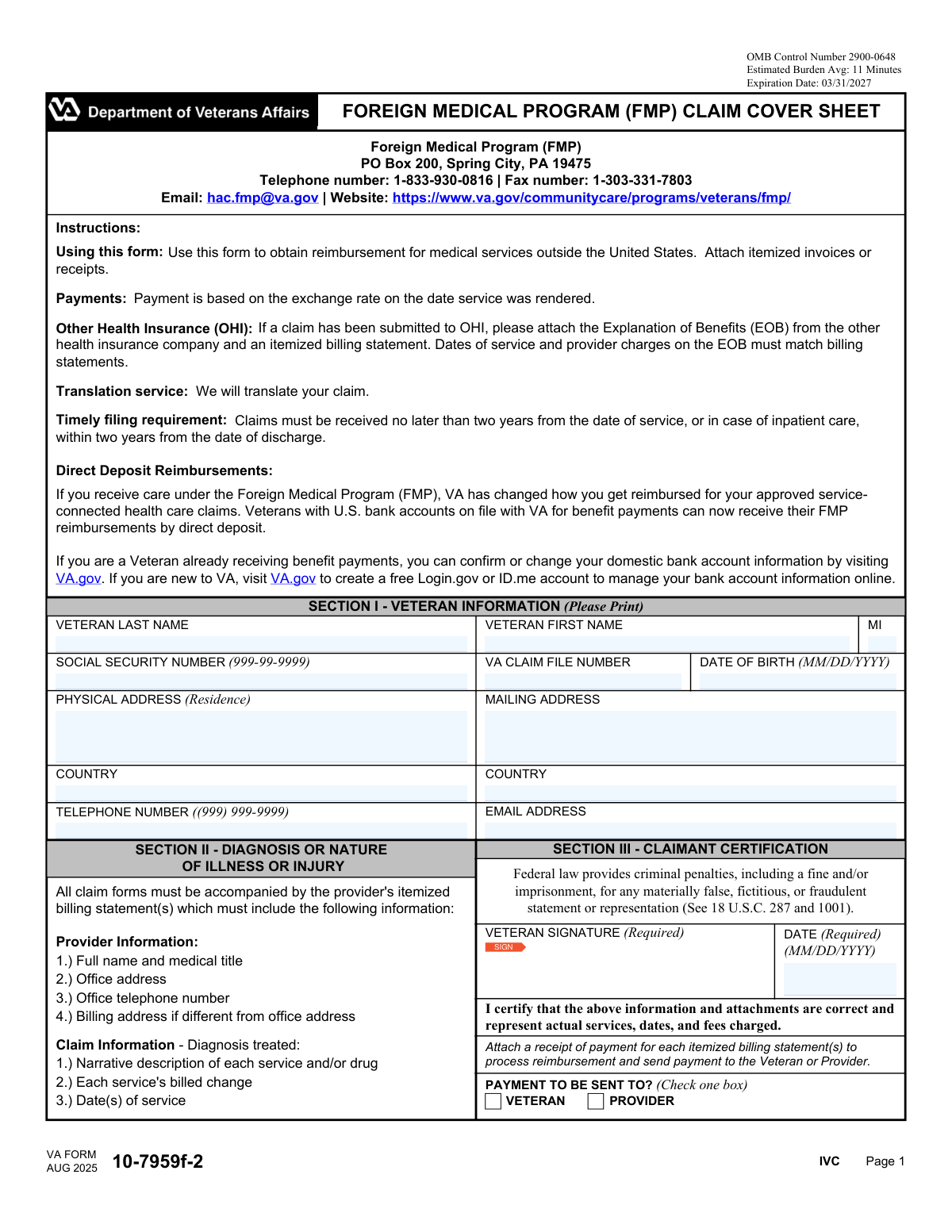
Yes! You can use AI to fill out VA Form 10-7959f-2, Foreign Medical Program (FMP) Claim Cover Sheet
VA Form 10-7959f-2 (Foreign Medical Program Claim Cover Sheet) is a Department of Veterans Affairs form used by Veterans to submit an FMP reimbursement claim for medical care received outside the U.S. It captures the Veteranâs identifying and contact information, summarizes the diagnosis/nature of illness or injury, and includes a required certification and payment destination selection (Veteran or provider). It is important because FMP claims must include itemized provider billing statements and proof of payment (and an EOB if other health insurance was billed) and must be filed within the VAâs timely filing window (generally within two years of service/discharge). Today, this form can be completed quickly and accurately using AI-powered services like Instafill.ai, which can also convert non-fillable PDF versions into interactive fillable forms.
Our AI automatically handles information lookup, data retrieval, formatting, and form filling.
It takes less than a minute to fill out VA 10-7959f-2 using our AI form filling.
Securely upload your data. Information is encrypted in transit and deleted immediately after the form is filled out.
Form specifications
| Form name: | VA Form 10-7959f-2, Foreign Medical Program (FMP) Claim Cover Sheet |
| Number of pages: | 1 |
| Language: | English |
| Categories: | VA forms, medical claim forms, veterans benefit forms, VA medical forms, VA claim forms, Medi-Cal forms |
Instafill Demo: filling out a legal form in seconds
How to Fill Out VA 10-7959f-2 Online for Free in 2026
Are you looking to fill out a VA 10-7959F-2 form online quickly and accurately? Instafill.ai offers the #1 AI-powered PDF filling software of 2026, allowing you to complete your VA 10-7959F-2 form in just 37 seconds or less.
Follow these steps to fill out your VA 10-7959F-2 form online using Instafill.ai:
- 1 Go to Instafill.ai and upload VA Form 10-7959f-2 (or select it from the form library).
- 2 Let the AI detect and create fillable fields (or convert the PDF to an interactive form if needed), then confirm the form version and basic claim context (FMP reimbursement for care outside the U.S.).
- 3 Enter Veteran information: name, SSN, VA claim file number, date of birth, physical residence address/country, mailing address/country, phone number, and email.
- 4 Complete the diagnosis/nature of illness or injury section by summarizing what was treated and ensuring your provider’s itemized billing statement(s) include required details (provider name/title, addresses, phone, narrative of services/drugs, charges, and dates of service).
- 5 Upload supporting documents: itemized invoices/billing statements, receipts/proof of payment for each statement, and (if applicable) other health insurance EOBs that match the billing statement dates and charges.
- 6 Choose where payment should be sent (Veteran or Provider), review for accuracy (including timely filing requirements), and apply the required digital signature and date.
- 7 Download the completed packet and submit it to the FMP office using the listed submission method (e.g., fax/mail), keeping a copy of everything for your records.
Our AI-powered system ensures each field is filled out correctly, reducing errors and saving you time.
Why Choose Instafill.ai for Your Fillable VA 10-7959f-2 Form?
Speed
Complete your VA 10-7959f-2 in as little as 37 seconds.
Up-to-Date
Always use the latest 2026 VA 10-7959f-2 form version.
Cost-effective
No need to hire expensive lawyers.
Accuracy
Our AI performs 10 compliance checks to ensure your form is error-free.
Security
Your personal information is protected with bank-level encryption.
Frequently Asked Questions About Form VA 10-7959f-2
This form is used to request reimbursement for approved medical services you received outside the United States under the VA Foreign Medical Program (FMP). You submit it with itemized invoices/receipts to support your claim.
Veterans (or their representatives) who received medical care outside the U.S. and are seeking reimbursement through FMP should complete it. Youâll also use it when requesting payment be sent to the provider instead of the Veteran.
Attach the providerâs itemized billing statement(s) and a receipt/proof of payment for each statement. If you also billed other health insurance, include the Explanation of Benefits (EOB) and ensure the dates of service and charges match the itemized bill.
It must include the providerâs full name and medical title, office address, office phone number, and billing address (if different). It must also list a narrative description of each service/drug, the charge for each item, and the date(s) of service.
VA must receive your claim within two years of the date of service. For inpatient care, it must be received within two years of the date of discharge.
Payment is based on the exchange rate on the date the service was rendered. Make sure your documentation clearly shows the service date(s) and amounts charged.
If you submitted the claim to OHI, attach the OHI Explanation of Benefits (EOB) and an itemized billing statement. The EOBâs dates of service and provider charges must match the billing statement for VA to process the claim.
NoâVA states it will translate your claim. You should still submit clear copies of the original itemized bills and receipts.
Enter your name exactly as it appears on official records and provide your SSN, VA claim/file number, and date of birth. Include both your physical residence address and your mailing address (with country) plus a phone number and email for contact.
Provide a brief description of the illness/injury and what was treated, consistent with the itemized billing statement. The detailed service descriptions, dates, and charges should be supported by the attached provider documentation.
Yes, the Veteran signature and date are required in Section III. The form includes a digital signature field, so you can sign electronically if you are using a compatible PDF viewer.
In Section III, check one box to indicate whether payment should be sent to the Veteran or directly to the provider. Choose the option that matches how you want reimbursement issued for the attached claim.
You can submit your claim to the Foreign Medical Program using the contact details on the form: mail to FMP, PO Box 200, Spring City, PA 19475; fax to 1-303-331-7803; or contact FMP at 1-833-930-0816 or [email protected] for guidance.
Yesâif you have a U.S. bank account on file with VA for benefit payments, FMP reimbursements can be paid by direct deposit. You can confirm or update your bank information on VA.gov (you may need a Login.gov or ID.me account).
YesâAI tools can help you extract your personal details and billing information and place them into the correct fields to reduce errors and save time. For example, Instafill.ai can auto-fill form fields accurately based on your documents and inputs.
Upload the PDF to Instafill.ai, then provide or upload the supporting details (Veteran identifiers, contact info, and billing documents). Instafill.ai maps your information to the correct fields (including signature/date and payment destination), lets you review, and then you can download the completed form for submission.
If you have a flat/non-fillable PDF, Instafill.ai can convert it into an interactive fillable form so you can type into fields and complete it cleanly. After conversion, you can auto-fill and export a completed version for printing or submission.
Compliance VA 10-7959f-2
Validation Checks by Instafill.ai
1
Ensures Veteran Last Name is present and contains only valid name characters
Validates that the Veteran Last Name field is not blank and contains only reasonable name characters (letters, spaces, hyphens, apostrophes) and not numbers or symbols. This is important for identity matching against VA records and to prevent downstream payment/eligibility mismatches. If validation fails, the submission should be rejected or routed for manual review with a prompt to correct the name formatting.
2
Ensures Veteran First Name is present and contains only valid name characters
Checks that the Veteran First Name is provided and follows the same character rules as last name (no digits, no unsupported punctuation). Accurate first name entry is critical for record retrieval and reducing duplicate/incorrect claimant profiles. If it fails, the form should not proceed until corrected or should be flagged for manual verification.
3
Validates Middle Initial is a single alphabetic character or blank
Confirms the Middle Initial field is either empty or exactly one letter (AâZ), optionally allowing a trailing period depending on system rules. This prevents data quality issues where full middle names or multiple characters are entered into a single-initial field. If invalid, the system should prompt the user to enter one letter or leave it blank.
4
Validates Social Security Number format and disallows known invalid SSNs
Verifies SSN matches the required pattern (999-99-9999) or a normalized 9-digit value and rejects clearly invalid values (e.g., 000-00-0000, 123-45-6789 if treated as test, all same digits). SSN is used to locate records and incomplete/invalid SSNs can delay or prevent claim processing. If validation fails, block submission and request correction, or allow submission only with an explicit warning and manual review workflow if SSN is optional in your implementation.
5
Validates VA Claim File Number presence/format when provided and checks it is not identical to SSN unless allowed
Checks that the VA Claim File Number, if entered, meets expected length/character constraints (commonly numeric or alphanumeric depending on VA assignment) and is not obviously malformed (e.g., too short, contains unsupported symbols). Also checks for logical issues such as the claim file number being an exact copy of the SSN when the system expects a distinct identifier (unless policy allows SSN-based file numbers). If it fails, prompt for correction and/or flag for manual review to avoid misrouting the claim.
6
Validates Date of Birth format and ensures it is a plausible past date
Ensures DOB is in MM/DD/YYYY format and represents a real calendar date that is not in the future. Optionally enforces plausibility rules (e.g., claimant age between 0 and 120) to catch typos like transposed digits. If invalid, prevent submission and request a corrected DOB to support accurate identity matching.
7
Validates Residence Address completeness (street) and requires Residence Country
Checks that the Residence Street Address is not blank and includes sufficient detail (e.g., not just a country name or a single character) and that Residence Country is selected/entered. This is important for claimant contact, eligibility context, and to reduce returned mail or inability to verify residency details. If validation fails, require completion before submission or route to manual review if partial address is permitted.
8
Validates Mailing Address completeness and requires Mailing Country
Ensures the Mailing Address field is populated with a deliverable address (not empty, not only whitespace) and that the Mailing Address Country is provided. Mailing details are essential for correspondence and any paper-based notifications related to the claim. If invalid, block submission and prompt for a complete mailing address and country.
9
Checks logical consistency between Residence Country and Mailing Country when addresses are identical
If the user indicates or the system detects that the mailing address text matches the residence address text, validates that the countries also match (or prompts the user to confirm a difference). This prevents subtle inconsistencies that can cause delivery failures or confusion in claimant records. If the check fails, require confirmation/correction before finalizing the submission.
10
Validates Telephone Number format and minimum digits, allowing international numbers
Validates the telephone number matches an accepted format such as (999) 999-9999 for U.S. numbers or an international format with country code (e.g., +CC ...), and enforces a minimum digit count after normalization. Reliable phone contact is important for resolving missing documentation (e.g., invoices/EOB) and preventing claim delays. If invalid, prompt for correction and optionally allow submission only if email is valid and present.
11
Validates Email Address format and rejects clearly non-deliverable values
Checks that the email address conforms to standard email syntax (local@domain) and rejects common invalid entries (missing '@', missing TLD, spaces). Email is a primary channel for correspondence and missing/invalid email can slow claim resolution. If validation fails, prompt for correction or require an alternate contact method to be valid.
12
Ensures Veteran Signature (digital signature) is present and captured correctly
Verifies the digital signature field is completed (not empty) and that the signature capture meets system requirements (e.g., signed state, certificate/intent recorded, not a placeholder). The signature is required to certify the claim and supports fraud prevention and legal attestation. If missing or invalid, the claim must not be accepted as complete and should be returned for signature.
13
Validates Claimant Certification Date format and ensures it is not in the future
Ensures the certification date is in MM/DD/YYYY format, is a real date, and is not later than the submission date (or current date). This helps establish when the claimant attested to the information and supports auditability. If invalid, block submission and request a corrected date.
14
Checks signature-date consistency (certification date must be present when signed and within a reasonable window)
If a signature is present, validates that the certification date is also present and that the date is reasonably close to the signature event timestamp (if available), such as within the same day or a configurable window. This prevents mismatched or stale attestations that can create compliance and audit issues. If the check fails, require the user to re-sign or correct the date, or route to manual review.
15
Validates Payment Destination selection is exactly one option (Veteran or Provider)
Ensures the user selects oneâand only oneâpayment destination checkbox: VETERAN or PROVIDER. This is critical to route reimbursement correctly and avoid payment delays or duplicate payments. If neither or both are selected, the system should block submission and require a single selection.
Common Mistakes in Completing VA 10-7959f-2
People often attach only a credit-card slip or a non-itemized receipt instead of the providerâs itemized billing statement that lists each service/drug, charges, and dates of service. Without itemization, FMP canât verify what was provided or whether itâs reimbursable, which commonly leads to delays or denial. Always include an itemized invoice for every visit/pharmacy purchase and ensure it contains the required provider and claim details. AI-powered tools like Instafill.ai can help by prompting for missing required invoice elements and organizing attachments so nothing is overlooked.
Claimants frequently submit invoices but forget to include a receipt or proof of payment for each itemized billing statement, especially when multiple providers are involved. This can prevent reimbursement because VA needs evidence the expense was actually paid (unless payment is being directed to the provider). Attach a payment receipt, bank/credit statement line item, or provider âpaidâ receipt corresponding to each invoice. Instafill.ai can flag when an invoice is present without a matching proof-of-payment attachment.
When other health insurance (OHI) was billed, people often omit the Explanation of Benefits (EOB) or submit an EOB whose dates of service and charges donât match the itemized billing statement. VA specifically requires the EOB and that the EOB dates/charges match the billing statement; mismatches trigger development requests and slow processing. Submit the EOB plus the itemized bill, and verify the provider name, dates, and amounts align exactly (including currency). Instafill.ai can help cross-check dates and amounts to reduce EOB/bill mismatch errors.
A common error is entering dates in non-U.S. format (DD/MM/YYYY) or using the invoice date instead of the actual date(s) services were rendered. This matters because timely filing is based on the date of service (or discharge date for inpatient care) and payment is based on the exchange rate on the service date. Always use MM/DD/YYYY on the cover sheet and ensure the itemized bill clearly lists the actual service dates. Instafill.ai can automatically format dates correctly and prompt you to confirm service dates versus billing dates.
Claimants sometimes leave the SSN blank due to privacy concerns, transpose digits, or enter an incomplete number. The form states the SSN is used to locate records, and missing/incorrect SSNs commonly cause processing delays or inability to match the claim to the veteran. Enter the full SSN exactly as on official records (including dashes if used) and double-check for typos. Instafill.ai can validate SSN length/format and reduce transcription errors.
People often skip the VA claim file number or mistakenly enter a different identifier (e.g., member ID, policy number, or a provider account number). This can slow routing and verification, especially when multiple veterans share similar names or when SSN is unclear. Use the VA-assigned claim/file number exactly as shown on VA correspondence, and donât substitute other IDs. Instafill.ai can help map the correct identifier to the correct field and prevent misplacement.
A frequent issue is entering nicknames, missing middle initial, or using a different last name than what VA has on file (e.g., after marriage) without consistency across documents. Mismatches can cause record-locating problems and lead to requests for clarification, delaying reimbursement. Enter the veteranâs name exactly as it appears on official VA records and keep it consistent across invoices, EOBs, and the cover sheet. Instafill.ai can standardize names across fields and warn when entries differ from prior saved profiles.
Because this is a foreign program, claimants often forget to include the country, omit postal codes, or provide only a partial address (missing unit/apartment or city). Incomplete addresses can cause correspondence issues and payment delays, particularly if VA needs to request additional information. Provide a complete residence address and a complete mailing address (if different), including country and postal/ZIP code. Instafill.ai can validate address completeness and formatting for international addresses.
Many claimants enter a local number only, use nonstandard separators, or omit the country code when living outside the U.S. If VA canât reach you quickly to resolve a documentation issue, the claim may be delayed. Enter a reachable number including country code and area/city code, and ensure voicemail is set up if applicable. Instafill.ai can format phone numbers consistently and prompt for missing country codes.
People sometimes forget to sign, forget to date the certification, or type a name where a digital signature is required. An unsigned/undated certification can make the submission incomplete and trigger a return for correction. Use the formâs digital signature field (or proper signature method if printing) and enter the certification date in MM/DD/YYYY. If the form is a flat non-fillable PDF, Instafill.ai can convert it into a fillable version and ensure signature/date fields are completed correctly.
Claimants sometimes check both âVETERANâ and âPROVIDER,â or leave the selection blank, especially when they are unsure who should be reimbursed. This creates ambiguity about where payment should be sent and can delay processing while VA seeks clarification. Check exactly one box based on who should receive payment, and ensure your attachments support that choice (e.g., proof of payment if paying the veteran). Instafill.ai can enforce single-choice selection and prompt you to confirm the intended payee.
Saved over 80 hours a year
âI was never sure if my IRS forms like W-9 were filled correctly. Now, I can complete the forms accurately without any external help.â
Kevin Martin Green
Your data stays secure with advanced protection from Instafill and our subprocessors

Robust compliance program
Transparent business model
Youâre not the product. You always know where your data is and what it is processed for.
ISO 27001, HIPAA, and GDPR
Our subprocesses adhere to multiple compliance standards, including but not limited to ISO 27001, HIPAA, and GDPR.
Security & privacy by design
We consider security and privacy from the initial design phase of any new service or functionality. Itâs not an afterthought, itâs built-in, including support for two-factor authentication (2FA) to further protect your account.
Fill out VA 10-7959f-2 with Instafill.ai
Worried about filling PDFs wrong? Instafill securely fills va-form-10-7959f-2-foreign-medical-program-fmp-claim-cover-sheet forms, ensuring each field is accurate.