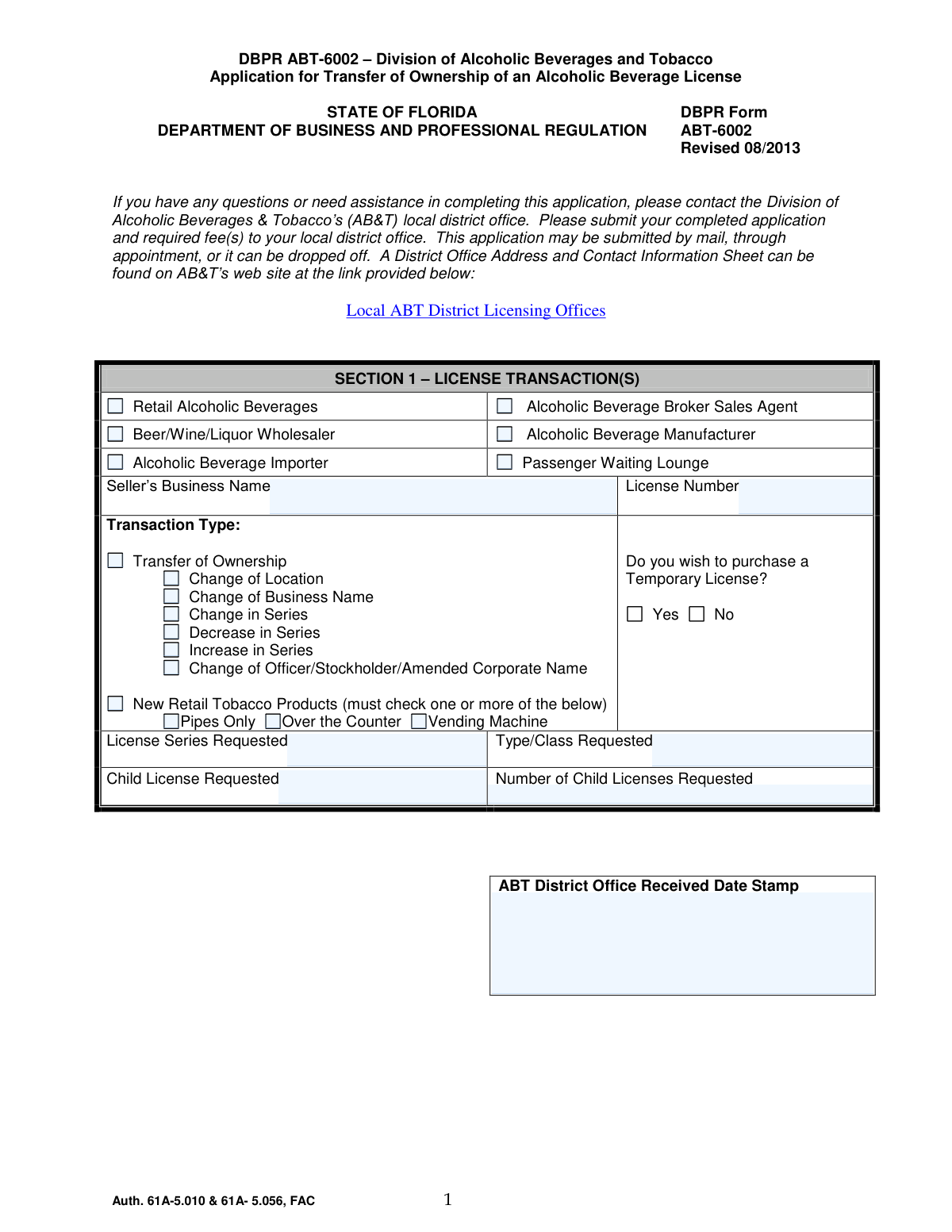
Yes! You can use AI to fill out DBPR ABT-6002, Division of Alcoholic Beverages and Tobacco Application for Transfer of Ownership of an Alcoholic Beverage License

DBPR ABT-6002 is an official Florida Department of Business and Professional Regulation (DBPR) Division of Alcoholic Beverages and Tobacco (ABT) form used to process a transfer of ownership of an alcoholic beverage license. The application captures the license transaction type(s), applicant and premises details, required governmental approvals (zoning, sales tax/DOR, and health where applicable), and disclosures about owners and other interested parties. It is important because ABT uses it to determine eligibility, ensure regulatory compliance (including background and moral character standards), and properly update the license record before a transfer can be approved or a temporary license issued.
Our AI automatically handles information lookup, data retrieval, formatting, and form filling.
It takes less than a minute to fill out DBPR ABT-6002 using our AI form filling.
Securely upload your data. Information is encrypted in transit and deleted immediately after the form is filled out.

Form specifications

Form name: DBPR ABT-6002, Division of Alcoholic Beverages and Tobacco Application for Transfer of Ownership of an Alcoholic Beverage License
Number of pages: 18
Filled form examples: Form DBPR ABT-6002 Examples
Language: English
Categories: DBPR forms, alcohol license forms, business license forms
main-image

Instafill Demo: filling out a legal form in seconds

How to Fill Out DBPR ABT-6002 Online for Free in 2026

Are you looking to fill out a DBPR ABT-6002 form online quickly and accurately? Instafill.ai offers the #1 AI-powered PDF filling software of 2026, allowing you to complete your DBPR ABT-6002 form in just 37 seconds or less.
Follow these steps to fill out your DBPR ABT-6002 form online using Instafill.ai:
  1. 1 Select the transaction type(s) in Section 1 (transfer of ownership and any additional changes such as location, business name, series change, or tobacco permit) and enter the seller’s business name, license number, and requested license series/type/class; indicate whether a temporary license is requested.
  2. 2 Complete Section 2 with the applicant’s legal entity information (legal name, Florida Department of State document number if applicable, FEIN, contact details), business D/B/A, premises location and mailing address, and (optional) designate a contact person authorized to communicate with ABT.
  3. 3 For each required individual, complete Section 3 (Related Party Personal Information), including identity details, citizenship/immigration information if applicable, ownership interests, and full criminal history disclosures; prepare copies of arrest dispositions and any required moral character mitigation if any answers trigger them.
  4. 4 Complete Sections 4 and 5 by describing the premises and preparing the required sketch/floor plan, then obtain the necessary third-party approvals: zoning authority sign-off, Department of Revenue sales tax clearance, and health approval for on-premises consumption (or the appropriate agency based on the business type).
  5. 5 Complete Sections 6–8 as applicable: disclose any applicant-entity felony convictions, complete special license requirements (quota/club/special acts if applicable), and fully list the entire ownership structure and all direct/indirect interested parties; attach copies of leases, deeds/right of occupancy, management/franchise/concession agreements, and any percentage-payment agreements when required.
  6. 6 Arrange fingerprint submission for all required persons using an FDLE-approved Livescan vendor (use ORI FL920150Z), retain the fingerprint receipt, and include it in the packet when applicable; follow out-of-state hard-card procedures if needed.
  7. 7 Sign and notarize the required affidavits (Section 9 Affidavit of Applicant and Section 10 Affidavit of Transferor), complete the quota transfer fee computation (Section 12) if transferring a quota license, and submit the original signed application with required attachments and fees to the local ABT district office (mail, appointment, or drop-off).

Our AI-powered system ensures each field is filled out correctly, reducing errors and saving you time.

Why Choose Instafill.ai for Your Fillable DBPR ABT-6002 Form?

Speed

Complete your DBPR ABT-6002 in as little as 37 seconds.

Up-to-Date

Always use the latest 2026 DBPR ABT-6002 form version.

Cost-effective

No need to hire expensive lawyers.

Accuracy

Our AI performs 10 compliance checks to ensure your form is error-free.

Security

Your personal information is protected with bank-level encryption.

Frequently Asked Questions About Form DBPR ABT-6002

DBPR ABT-6002 is the Division of Alcoholic Beverages and Tobacco (ABT) application used to request a transfer of ownership of a Florida alcoholic beverage license. It may also be used in the same packet to request related changes such as change of location, business name, or license series when applicable.

Submit the completed application and required fee(s) to your local ABT district office. You can submit by mail, by appointment, or by drop-off; district office addresses are listed on the ABT website under Local ABT District Licensing Offices.

You must submit an original application with original signatures. Copies are acceptable for supporting documents (for example, leases, deeds, contracts), but the application itself must be original.

When applicable, you must submit executed copies of documents such as a right of occupancy/lease/deed (in the applicant entity’s name), franchise/management/concession agreements, percentage-payment agreements, and certain court or estate documents (e.g., death certificate, letters of administration, court orders). ABT may request additional items depending on your situation.

If eligible, you may purchase a temporary license. The checklist notes a $100 fee for a temporary license, and if you are increasing the license series and requesting a temporary license, you must pay $100 or 1/4 of the annual license fee (whichever is greater) in addition to the transfer fee.

List the full legal name the license will be issued in (individual or legal entity). If the applicant is a corporation/LLC/partnership, use the name and document number exactly as registered with the Florida Department of State, Division of Corporations (Sunbiz).

If you list a contact person, ABT will communicate directly with them about application issues and they may make changes to the application paperwork on your behalf (except the Related Party Personal Information Sheet). You will not be copied on ABT’s correspondence to that contact person during processing.

Department of Revenue (sales tax) clearance is required for transfers of ownership. Zoning and health approvals are generally required for new and certain other application types (and health approval is required for consumption-on-premises), so ABT may require them depending on the transactions you check (e.g., change of location or on-premises consumption).

Section 13 authorizes the Department of Revenue to release the seller/transferor’s tax account status to the purchaser and ABT, which is needed for DOR clearance on a transfer. The form instructs you not to return Section 13 to ABT with your application because it must be used with your sales tax registration/clearance process with DOR.

Section 3 must be completed by each person directly connected with the business unless they are a current licensee. This can include sole proprietors, partners, officers/directors, certain shareholders (over 0.5% in non-public corporations), managing members/managers, and anyone directly interested and receiving financial proceeds.

Fingerprints are required for many owners and controlling persons (e.g., sole proprietor; officers/directors; certain shareholders; general partners; managing members/managers; and persons directly interested and receiving financial proceeds). If you are a current ABT licensee, you generally do not need new fingerprints unless you have been arrested since your last submission; similar exceptions may apply if you were fingerprinted within the past 3 years and meet the conditions listed in the instructions.

Provide the ABT ORI number FL920150Z to the Livescan vendor. If you provide the wrong ORI (or none), DBPR may not receive your fingerprint results and your application could be delayed.

Out-of-state applicants may use an FDLE-approved Livescan vendor that is “hard card scanning capable,” or request the alternative hard-card procedure from DBPR. If using a fingerprint card, you must register and prepay through the Pearson site listed in the instructions, then mail the completed card to the Florida Fingerprinting Program address provided (do not send money to Prints Inc.).

Social Security numbers are mandatory for this application under federal and Florida law for child support compliance screening and licensee identification/tax administration purposes. The division states it will redact Social Security numbers from public records requests.

Section 8 requires you to list the entire ownership structure and disclose direct and indirect interested parties, including certain lenders, guarantors, co-signers, and parties to management/franchise/concession or percentage-payment agreements. Failure to disclose an interest can result in denial, suspension, and/or revocation of the license, and you may need to submit copies of the related agreements.

Provide a complete sketch (ink or computer-generated on letter-size paper) showing permanent walls, doors, windows, counters, and labeled rooms/areas, including any outside areas where alcohol will be sold/served/consumed. Blueprints are not accepted due to scanning issues, and multi-story premises must show each floor if the entire building is to be licensed.

For quota liquor licenses, the transfer fee is based on the average annual gross sales of alcoholic beverages for the three years immediately before the transfer application, assessed at four mils (.004) and capped at $5,000. You may choose to pay $5,000 instead of providing records, and only certain record types are acceptable (e.g., DOR sales tax records, CPA-audited accounting records, income tax records, or ABT sales records).

Compliance DBPR ABT-6002
Validation Checks by Instafill.ai

1
Validates Section 1 License Transaction Selection and Transaction Type Completeness
Ensures the applicant selects at least one license transaction category (e.g., Retail Alcoholic Beverages, Manufacturer) and at least one Transaction Type (e.g., Transfer of Ownership, Change of Location). This is required to route the application to the correct workflow, fee rules, and required approvals. If no selection is made or conflicting selections are detected, the submission should be rejected as incomplete and the applicant prompted to correct Section 1.
2
Validates License Number and License Series/Type/Class Format and Presence
Checks that the License Number is provided and matches the expected ABT license numbering format (system-configured pattern), and that License Series Requested and Type/Class Requested are present when required by the selected transaction(s). These fields drive eligibility, required attachments (e.g., quota computation), and fee calculations. If the license identifiers are missing or malformed, the application should fail validation and be returned for correction.
3
Validates Temporary License Request Fee and Eligibility Logic
If the applicant selects 'Temporary License: Yes', verifies that the required temporary license fee is included (e.g., $100 for a temporary license, and for increase in series: $100 or 1/4 of annual fee, whichever is greater, in addition to the $100 transfer fee). This prevents underpayment and delays in issuing temporary authority. If the fee amount is missing or inconsistent with the selected transaction type(s), the system should flag the application as deficient and generate an invoice or rejection notice.
4
Validates Applicant Entity Identification (Legal Name, DBPR Issuance Name, and Sunbiz Document Number)
Ensures the 'Full Name of Applicant(s)' (license issuance name) is present and, when the applicant is a corporation/LLC/partnership, that the Department of State Document # is provided and matches an acceptable format (and ideally is verified as active via Sunbiz integration). This is critical because the form states the application is incomplete without active registration for legal entities. If the entity name/document number is missing or inactive, the submission should be marked incomplete and held until corrected.
5
Validates FEIN Format and Conditional Requirement Based on Payroll
Checks that FEIN, if provided, matches IRS FEIN format (9 digits, typically XX-XXXXXXX) and is required when the applicant indicates they pay wages to one or more employees (if that indicator exists in the digital intake). FEIN is used for tax administration and business identification. If FEIN is required but missing or incorrectly formatted, the application should fail validation and request a corrected FEIN.
6
Validates Business Contact Information (Phone, Email) Formatting and Completeness
Validates Business Telephone Number is present and conforms to a standard US phone format (10 digits with optional extension) and that any provided email fields (business and contact person) match a valid email syntax. Reliable contact information is necessary for deficiency notices, invoices, and communications described in the instructions. If phone is missing/invalid or email is malformed, the system should block submission or require correction depending on whether the field is mandatory.
7
Validates Address Completeness and Florida Location Consistency
Ensures Location Address includes street number, city, county, and ZIP, and enforces State = FL for the licensed premises as shown on the form. Also validates Mailing Address fields are complete (street/PO box, city, state, ZIP) and that ZIP codes are 5-digit (or ZIP+4 if allowed). If required address components are missing or the premises state is not Florida, the application should be rejected as invalid.
8
Validates Contact Person Authorization Data When Provided
If a Contact Person is entered, verifies that their name, phone, and mailing address are complete and properly formatted, since the instructions state the division may communicate only with that person and allow them to make changes. This prevents misdirected communications and unauthorized updates. If partial contact person data is provided (e.g., name without phone/address), the system should require completion or removal of the contact person section.
9
Validates Revocation Proceedings and Relationship Explanation Dependency
If 'transfer due to revocation proceedings' is answered Yes, ensures the follow-up question about personal relationship is answered, and if that is Yes, an explanation is provided. This dependency is important for regulatory review and potential conflict/eligibility concerns. If the explanation is missing when required, the application should be flagged as incomplete and returned for clarification.
10
Validates Related Party Personal Information Required for Each Disclosed Person (Non-Current Licensees)
Ensures a Related Party Personal Information section is completed for each person directly connected with the business unless they are a current licensee (in which case Section 11 update data may apply). This includes required identity fields (full name, SSN, DOB, home address) and is necessary for background screening and qualification determinations. If any required related party record is missing for a disclosed owner/officer/partner, the system should fail validation and list the missing individuals.
11
Validates Social Security Number (SSN) Format and Presence Where Mandatory
Checks SSN fields are present where required (Related Party Personal Information and Current Licensee Update Data Sheet) and match a valid SSN pattern (9 digits; optionally formatted as XXX-XX-XXXX) and are not obviously invalid (e.g., all zeros). The form states SSN disclosure is mandatory under cited statutes for screening and identification. If SSN is missing or invalid, the application should be rejected or held as incomplete until corrected.
12
Validates Date Fields (DOB, Conviction/Arrest Dates, Seller Obtained License Date) and Logical Ranges
Validates all dates are in an accepted format (e.g., MM/DD/YYYY) and represent real calendar dates, and applies logical checks such as DOB not in the future and applicant age meeting minimum legal thresholds if applicable. For arrest/conviction questions, ensures provided dates fall within the stated lookback windows (15 years or 5 years) when the applicant answers Yes, or otherwise flags inconsistencies for review. If date formats are invalid or logic checks fail, the system should require correction and/or route to manual review.
13
Validates Criminal History and Arrest Disposition Attachment Requirements
If the applicant answers Yes to felony conviction, alcohol/tobacco offense, or arrest/notice-to-appear questions, verifies that the required detail fields (date, location, type of offense) are completed and that a Copy of the Arrest Disposition is attached as required by the checklist. This is essential for statutory qualification review and moral character evaluation. If details or attachments are missing, the application should be marked deficient and not proceed until documentation is provided.
14
Validates Moral Character Mitigation Requirement When Standards Not Met
If the applicant answers 'No' to meeting moral character standards, verifies that mitigation documentation is included (as referenced in the checklist and moral character rule). This ensures the division can evaluate qualification rather than automatically denying for lack of information. If mitigation is not attached when required, the system should flag the application as incomplete and request the missing mitigation package.
15
Validates Disclosure of Interested Parties Completeness and Ownership Structure Consistency
Ensures the applicant completes the correct ownership table (corporation/LLC/partnership, etc.) and lists all required roles (e.g., officers, directors, stockholders with stock %, managers/members) with non-negative percentages where applicable. Also checks that the persons listed here align with the Related Party Personal Information sheets and fingerprint requirements (e.g., non-public corporation shareholders > 0.5% must be captured). If ownership structure is incomplete, percentages are missing, or individuals are not consistently disclosed across sections, the application should be rejected for non-disclosure risk.
16
Validates Agreement/Other Interests Yes-Answers Require Supporting Documents
For the 'Other Interests' questions (loans, revenue rights, percentage lease payments, guarantors/co-signers, management/franchise/concession agreements, items of value from industry members), if any answer is Yes, verifies that a copy of the relevant agreement is attached. The form explicitly states agreements must be submitted and may trigger additional fingerprinting/related party requirements. If a Yes answer is provided without an attachment, the system should flag a deficiency and prevent final submission until documents are uploaded.

Common Mistakes in Completing DBPR ABT-6002

Selecting the wrong transaction type(s) in Section 1

Applicants often check only “Transfer of Ownership” and forget to also check related changes (change of location, business name, series increase/decrease, officer/stockholder changes, or new retail tobacco products). This causes the packet to be processed under the wrong workflow and can trigger missing-approval letters, incorrect fees, or the need to refile. Avoid this by reviewing the checklist and marking every transaction that applies to the deal terms, then ensuring the rest of the form sections and attachments match those selections.

Mismatch between legal entity name and Florida Department of State (Sunbiz) registration

A very common error is entering a D/B/A or informal business name as the “Full Name of Applicant(s)” instead of the exact legal entity name and document number registered with the Florida Department of State. The division treats this as an incomplete or incorrect applicant identity, which can delay approval until corrected and may require amended documents. To avoid it, copy the entity name and document number exactly as shown on Sunbiz and use the D/B/A only in the “Business Name (D/B/A)” field.

Leaving out required original signatures and notarizations (or using copies)

This application requires original signatures and multiple notarized affidavits (Related Party Personal Information notarization statement, Affidavit of Applicant, Affidavit of Transferor, and DOR clearance authorization). People frequently submit scanned signatures, forget to have the notary complete the venue/date/ID method, or fail to check whether it was “sworn/subscribed” vs “acknowledged.” The result is an automatic deficiency and resubmission request. Prevent this by signing in ink, in front of a notary, and verifying every notary block is fully completed before submission.

Submitting the Department of Revenue clearance form to AB&T (Section 13) despite the warning

Section 13 explicitly states “DO NOT RETURN THIS FORM TO AB&T WITH YOUR APPLICATION,” but applicants often include it in the packet anyway or assume AB&T will forward it. This can lead to confusion, delays, and a false sense that DOR clearance has been handled when it has not. Avoid the mistake by following the instruction literally: complete Section 13 for DOR purposes and submit it with sales tax registration/clearance steps as directed, not as part of the AB&T packet.

Incorrect fingerprint submission (wrong ORI, wrong vendor, or missing receipt)

Applicants frequently use a non-approved Livescan vendor, fail to provide the AB&T ORI number (FL920150Z), or submit fingerprints under the wrong ORI so DBPR never receives the results. Others forget to include the fingerprint receipt when it is applicable, or assume prior fingerprints always carry over without checking the arrest/3-year/withdrawn-application rules. These errors can stall the application until prints are correctly received. To avoid it, use an FDLE-approved Livescan vendor, confirm the ORI is FL920150Z at the appointment, and include the receipt (and reprint if prior prints are not eligible).

Not completing Related Party Personal Information for every required person

People often complete Section 3 for only one owner and overlook that it must be completed by each person directly connected with the business (e.g., officers, directors, partners, managing members/managers, and certain shareholders), unless they are a current licensee. Missing a single required individual’s sheet or original signature triggers a deficiency and can also create compliance issues if the ownership structure is incomplete. Avoid this by building a list from Section 8 (entire ownership structure) and ensuring each required person completes Section 3 with an original signature and notarization.

Under-disclosing ownership and “interested parties” in Section 8

Applicants commonly list only the obvious owners and omit lenders, guarantors, co-signers, percentage-rent landlords, management/franchise/concession agreements, or parties receiving proceeds—especially when the relationship is indirect. The form warns that failure to disclose can result in denial, suspension, or revocation, and it often leads to follow-up requests for agreements and additional fingerprints. To avoid it, answer the “OTHER INTERESTS” questions carefully and attach copies of any relevant agreements; when in doubt, disclose and explain rather than omit.

Answering criminal history questions incorrectly or failing to attach arrest dispositions

A frequent mistake is answering “No” because the person believes a charge was sealed, adjudication was withheld, it was “just a notice to appear,” or it happened long ago—despite the form requiring disclosure of arrests/notices to appear within 15 years and certain convictions within 5/15 years. Another common omission is failing to attach the arrest disposition when any answer is “Yes.” This can lead to delays, moral character review, or denial if the omission appears intentional. Avoid it by disclosing fully, attaching dispositions for every “Yes,” and adding an explanatory sheet if needed.

Incomplete or non-compliant premises sketch (Section 4)

Applicants often submit a blueprint (not accepted), a sketch that is not legible, not letter-size, missing labels (rooms, bars/counters, storage, restrooms), or failing to include outside contiguous areas where alcohol will be sold/served/consumed. This causes zoning/inspection issues and can require a revised sketch, delaying approval. To avoid it, provide a clear ink or computer-generated letter-size floor plan showing all permanent walls/doors/windows/counters, each room labeled, and any outside contiguous service areas.

Missing or misrouted approvals (zoning, health, and sales tax) in Section 5

Applicants frequently assume approvals are optional or will be obtained by AB&T, or they get the wrong agency to sign the health section (Hotels & Restaurants vs County Health vs Agriculture) based on whether food is served and the type of establishment. Others forget to have the zoning authority indicate whether the location is within city limits vs unincorporated county, which affects fee sharing. These omissions trigger deficiency notices and can restart validity windows for approvals. Avoid it by contacting the correct local authorities early, ensuring each section is completed by the proper agency, and confirming all checkboxes and validity-day fields are filled in.

Incorrect fees or quota transfer fee computation (Section 12)

People often pay the wrong amount when requesting a temporary license (e.g., forgetting the additional rule for series increases: $100 or 1/4 of the annual fee, whichever is greater) or miscalculate the quota transfer fee by using unacceptable records or the wrong three-year period. This results in invoices, processing delays, or having to re-submit supporting documentation. To avoid it, use only the four acceptable record types listed, compute the three-year average correctly (or elect the $5,000 option), and double-check temporary/permanent fee requirements against the current fee charts.
Saved over 80 hours a year

“I was never sure if my IRS forms like W-9 were filled correctly. Now, I can complete the forms accurately without any external help.”

Kevin Martin Green

Your data stays secure with advanced protection from Instafill and our subprocessors

Robust compliance program

Transparent business model

You’re not the product. You always know where your data is and what it is processed for.

ISO 27001, HIPAA, and GDPR

Our subprocesses adhere to multiple compliance standards, including but not limited to ISO 27001, HIPAA, and GDPR.

Security & privacy by design

We consider security and privacy from the initial design phase of any new service or functionality. It’s not an afterthought, it’s built-in, including support for two-factor authentication (2FA) to further protect your account.

Fill out DBPR ABT-6002 with Instafill.ai

Worried about filling PDFs wrong? Instafill securely fills dbpr-abt-6002-division-of-alcoholic-beverages-and forms, ensuring each field is accurate.