Yes! You can use AI to fill out Transfer Due to Divorce — IRA/HSA/529

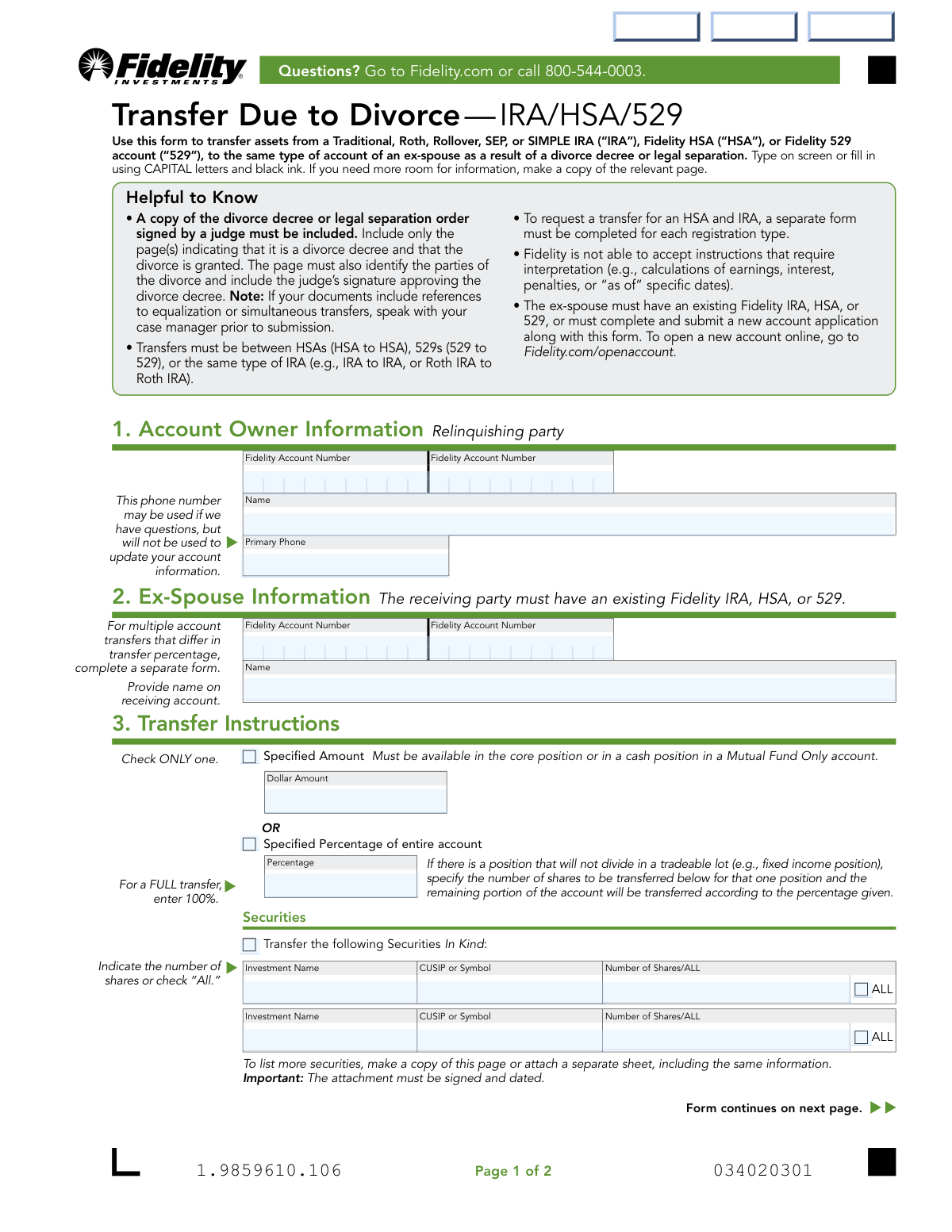
This form facilitates the transfer of assets from a Traditional, Roth, Rollover, SEP, or SIMPLE IRA, a Fidelity HSA, or a Fidelity 529 account to an ex-spouse's account of the same type, as stipulated in a divorce decree or legal separation agreement. It is a crucial document for ensuring the division of assets is handled correctly and without unintended tax consequences. Today, this form can be filled out quickly and accurately using AI-powered services like Instafill.ai, which can also convert non-fillable PDF versions into interactive fillable forms.
Our AI automatically handles information lookup, data retrieval, formatting, and form filling.
It takes less than a minute to fill out Fidelity Transfer Due to Divorce Form using our AI form filling.
Securely upload your data. Information is encrypted in transit and deleted immediately after the form is filled out.

Form specifications

Form name: Transfer Due to Divorce — IRA/HSA/529
Number of pages: 1
Language: English
main-image

Instafill Demo: How to fill out PDF forms in seconds with AI

How to Fill Out Fidelity Transfer Due to Divorce Form Online for Free in 2026

Are you looking to fill out a FIDELITY TRANSFER DUE TO DIVORCE FORM form online quickly and accurately? Instafill.ai offers the #1 AI-powered PDF filling software of 2026, allowing you to complete your FIDELITY TRANSFER DUE TO DIVORCE FORM form in just 37 seconds or less.
Follow these steps to fill out your FIDELITY TRANSFER DUE TO DIVORCE FORM form online using Instafill.ai:
  1. 1 Navigate to Instafill.ai and upload or select the Fidelity 'Transfer Due to Divorce — IRA/HSA/529' form.
  2. 2 Use the AI assistant to accurately fill in the Account Owner (Relinquishing Party) information, including name and Fidelity account numbers.
  3. 3 Provide the Ex-Spouse (Receiving Party) details, ensuring their name and Fidelity account number are correct.
  4. 4 Clearly specify the transfer instructions by indicating a specific dollar amount, a percentage of the entire account, or listing the exact securities to be transferred.
  5. 5 Review all entered information for accuracy before both the account owner and the ex-spouse provide their digital signatures.
  6. 6 Upload a clear copy of the required pages from the signed divorce decree or legal separation order as an attachment.
  7. 7 Submit the completed form and all necessary documents securely through the platform for processing by Fidelity.

Our AI-powered system ensures each field is filled out correctly, reducing errors and saving you time.

Why Choose Instafill.ai for Your Fillable Fidelity Transfer Due to Divorce Form Form?

Speed

Complete your Fidelity Transfer Due to Divorce Form in as little as 37 seconds.

Up-to-Date

Always use the latest 2026 Fidelity Transfer Due to Divorce Form form version.

Cost-effective

No need to hire expensive lawyers.

Accuracy

Our AI performs 10 compliance checks to ensure your form is error-free.

Security

Your personal information is protected with bank-level encryption.

Frequently Asked Questions About Form Fidelity Transfer Due to Divorce Form

This form is used to transfer assets from a Fidelity IRA, HSA, or 529 account to an ex-spouse's account of the same type, as mandated by a divorce decree or legal separation.

Both the original account owner (the relinquishing party) and the ex-spouse receiving the assets (the receiving party) must provide their information and sign the form.

You must include a copy of the court-certified divorce decree or legal separation order signed by a judge. Only include the pages that grant the divorce, identify both parties, and contain the judge's signature.

The ex-spouse must have an existing Fidelity account of the same type or open a new one. A new account application can be completed online and submitted along with this transfer form.

The fastest method is to scan or photograph the entire signed form and required documents, then upload them at Fidelity.com/upload-Transfer-Divorce. You can also find mailing instructions on Fidelity's website.

A Medallion signature guarantee is required for the account owner's signature if the transfer value is over $100,000. This is not required if the form is signed at a Fidelity Investor Center with both parties present.

No, transfers must be between the same type of account. For example, assets must be transferred from an IRA to an IRA, or from an HSA to an HSA.

No, you must complete a separate form for each account registration type. You will need one form for the IRA transfer and another for the HSA transfer.

To transfer the entire account, check the box for 'Specified Percentage of entire account' in Section 3 and enter '100%' in the percentage field.

Yes, services like Instafill.ai use AI to accurately auto-fill form fields, which can save you time and help prevent errors.

Upload the PDF to the Instafill.ai platform, and its AI will make the form fillable. You can then type in your information to auto-fill the fields before downloading the completed form for signature.

You can use a service like Instafill.ai to convert the flat PDF into an interactive, fillable form. This allows you to easily type your information directly into the fields on your computer.

In Section 3, use the 'Transfer the following Securities In Kind' area. List the investment name, CUSIP or symbol, and the exact number of shares to transfer, or check 'ALL' for that specific security.

No, Fidelity cannot act on instructions that require interpretation, such as calculating earnings or using 'as of' dates. The transfer must be for a specific dollar amount, a current percentage, or a specific number of shares.

Compliance Fidelity Transfer Due to Divorce Form
Validation Checks by Instafill.ai

1
Validates Relinquishing Account Ownership
Checks that the Account Owner Name and Fidelity Account Number in Section 1 correspond to a valid, existing account. This is crucial to ensure the request is initiated by the correct individual and from the correct source account. A mismatch would halt the process to prevent unauthorized transfers or errors.
2
Validates Receiving Account Ownership
Verifies that the Ex-Spouse Name and Fidelity Account Number in Section 2 match an existing Fidelity account. This confirmation is essential to direct the assets to the correct recipient and account as stipulated by the divorce decree. Failure to validate could result in assets being sent to the wrong person or a non-existent account.
3
Ensures Account Type Consistency
Confirms that the account type of the relinquishing account (e.g., Traditional IRA, HSA) is the same as the receiving account. The form specifies that transfers must be like-to-like (e.g., Roth IRA to Roth IRA). This validation prevents invalid, and potentially taxable, cross-type transfers that would violate IRS rules.
4
Exclusive Transfer Instruction Selection
Ensures that only one transfer method is selected in Section 3: either 'Specified Amount,' 'Specified Percentage,' or 'Securities In Kind.' The form logic requires a single, unambiguous instruction to avoid confusion and processing errors. If multiple options are selected, the form is considered invalid and must be rejected for clarification.
5
Completeness of Transfer Instructions
Verifies that at least one transfer instruction method in Section 3 has been fully completed with all required details. A form submitted without any instructions on what to transfer is incomplete and cannot be acted upon. This check ensures the core purpose of the form—the asset transfer—is clearly defined.
6
Validates Specified Dollar Amount and Availability
If 'Specified Amount' is chosen, this check validates that the entry is a positive numerical value. It also cross-references the relinquishing account to confirm the specified dollar amount is available in the core or cash position, as required by the form. This prevents overdraft situations or transaction failures due to insufficient funds.
7
Validates Specified Percentage Range
If 'Specified Percentage' is selected, this check ensures the value entered is a number between 0.01 and 100, inclusive. A percentage outside this range is illogical and would cause processing errors. This validation guarantees the instruction is mathematically sound and executable.
8
Verifies Security Ownership and Share Quantity
For 'Securities In Kind' transfers, this validates that the specified CUSIP or Symbol exists within the relinquishing party's account. It also checks that the 'Number of Shares' indicated is a positive number or 'ALL' and does not exceed the total shares held. This prevents attempts to transfer assets that the account owner does not possess.
9
Mandatory Dual Signature Presence
Confirms that both the Account Owner (relinquishing party) and the Ex-Spouse (receiving party) have signed the form in Section 4. These signatures provide legal authorization for Fidelity to act on the instructions. A missing signature from either party renders the request invalid and legally unenforceable.
10
Valid and Chronological Signature Dates
Checks that the signature dates in Section 4 are in a valid MM/DD/YYYY format and are not in the future. The dates should be on or before the submission date. This validation helps establish a clear timeline for the authorization and ensures the request is current.
11
Conditional Medallion Guarantee for High-Value Transfers
This check is triggered if the total transfer value exceeds $100,000. It verifies that a valid Medallion signature guarantee has been provided for the account owner's signature. This is a critical security measure to protect against large-scale fraud and requires strict enforcement.
12
Required Divorce Decree Attachment
Verifies that the submission package includes a copy of the required divorce decree or legal separation order signed by a judge. The form is a legal instrument based on this court order, making the document's presence non-negotiable for processing. Without it, Fidelity has no legal basis to perform the transfer.
13
Valid Primary Phone Number Format
Ensures the primary phone number provided in Section 1 follows a standard format (e.g., 10 digits, optional parentheses, dashes). While not used for account updates, a valid number is necessary for the case manager to contact the account owner if questions arise during processing. An invalid number could cause significant delays if clarification is needed.
14
Account Holder Name and Signature Name Match
This check compares the printed name of the account owner in Section 4a with the name on the account provided in Section 1. It ensures the person signing the form is the actual account holder. This is a basic identity verification step to prevent unauthorized individuals from initiating transfers.

Common Mistakes in Completing Fidelity Transfer Due to Divorce Form

Forgetting the Medallion Signature Guarantee

Users often overlook the requirement for a Medallion signature guarantee on the account owner's signature for transfers valued over $100,000. This is different from a notary stamp and serves as a higher level of authentication. Submitting the form without the required guarantee will lead to immediate rejection and significant processing delays. To avoid this, verify the transfer value and visit a qualified financial institution like a bank or credit union to obtain the guarantee before submission.

Submitting Incomplete or Incorrect Divorce Decree Pages

A common error is failing to include a copy of the divorce decree or providing the wrong pages. The form explicitly requires the pages that identify the parties, state the divorce is granted, and include the judge's signature. Submitting the entire document or incorrect excerpts can cause delays as the processing team must search for the required information. To prevent this, carefully select and copy only the specific pages mandated by the instructions.

Missing Signatures from Both Parties

This form requires signatures from both the relinquishing account owner and the receiving ex-spouse. People often assume only the person giving up the assets needs to sign, leading to an incomplete submission. An unsigned form is invalid and will be returned, halting the transfer process. Always ensure both parties have printed their names, signed, and dated the form in Section 4 before submission.

Attempting to Transfer Between Mismatched Account Types

Users may misunderstand that transfers must be between identical account types (e.g., Roth IRA to Roth IRA, HSA to HSA). Attempting to transfer assets from a Traditional IRA to a Roth IRA, or from an IRA to an HSA, is not permitted with this form and will be rejected. Before filling out the form, confirm that both the source and destination accounts are of the exact same type to ensure a valid transfer.

Providing Conflicting Transfer Instructions

In Section 3, individuals sometimes select both 'Specified Amount' and 'Specified Percentage,' or fill in details for both options. This creates ambiguity and forces Fidelity to reject the form for clarification, delaying the transfer. You must choose only one method: either a specific dollar amount or a percentage of the entire account. Using an AI-powered tool like Instafill.ai can help prevent this by enforcing rules that only allow one of the two mutually exclusive options to be selected.

Requesting a Dollar Transfer from Invested Assets

When specifying a dollar amount for transfer, the funds must be available in the account's core (cash) position. A frequent mistake is requesting an amount that is currently invested in stocks or mutual funds, which Fidelity cannot liquidate on your behalf based on this form. This results in a failed transfer. To avoid this, ensure the desired dollar amount is settled as cash in the core position before submitting the form.

Submitting Before the Ex-Spouse's Account is Open

The form requires the receiving ex-spouse to have an existing Fidelity account of the correct type. Submitting this transfer request without a valid, open receiving account number will cause the entire package to be rejected. The ex-spouse must first open the necessary account online or via an application, and only then should this transfer form be submitted with the new account number included.

Using One Form for Multiple Account Registrations

The instructions state that a separate form is required for each registration type (e.g., one for an IRA transfer and another for an HSA transfer). A common mistake is to list assets from both an IRA and an HSA on a single form, which will be rejected. To ensure proper processing, you must complete and submit a distinct form for each account type being transferred.

Failing to Sign and Date Attached Pages

If more space is needed to list securities for an in-kind transfer, the form allows for an attached sheet. However, users often forget the critical step of signing and dating this attachment. An unsigned attachment is not considered a valid instruction, and the securities listed on it will not be transferred, leading to an incomplete execution of your request. Always sign and date any separate sheets that contain transfer instructions.

Entering Ambiguous 'In-Kind' Security Instructions

When transferring specific securities, the instructions must be precise. A common error is failing to clearly indicate either the exact 'Number of Shares' or checking the 'ALL' box for each security listed. Leaving this part blank or providing unclear directions forces a rejection of the form. Double-check that for every security listed in Section 3, you have provided a clear, unambiguous instruction. Since this form is a non-fillable PDF, a tool like Instafill.ai can convert it to a smart, fillable version that can help validate these fields are completed correctly.
Saved over 80 hours a year

“I was never sure if my IRS forms like W-9 were filled correctly. Now, I can complete the forms accurately without any external help.”

Kevin Martin Green

Your data stays secure with advanced protection from Instafill and our subprocessors

Robust compliance program

Transparent business model

You’re not the product. You always know where your data is and what it is processed for.

ISO 27001, HIPAA, and GDPR

Our subprocesses adhere to multiple compliance standards, including but not limited to ISO 27001, HIPAA, and GDPR.

Security & privacy by design

We consider security and privacy from the initial design phase of any new service or functionality. It’s not an afterthought, it’s built-in, including support for two-factor authentication (2FA) to further protect your account.

Fill out Fidelity Transfer Due to Divorce Form with Instafill.ai

Worried about filling PDFs wrong? Instafill securely fills transfer-due-to-divorce-irahsa529-1 forms, ensuring each field is accurate.