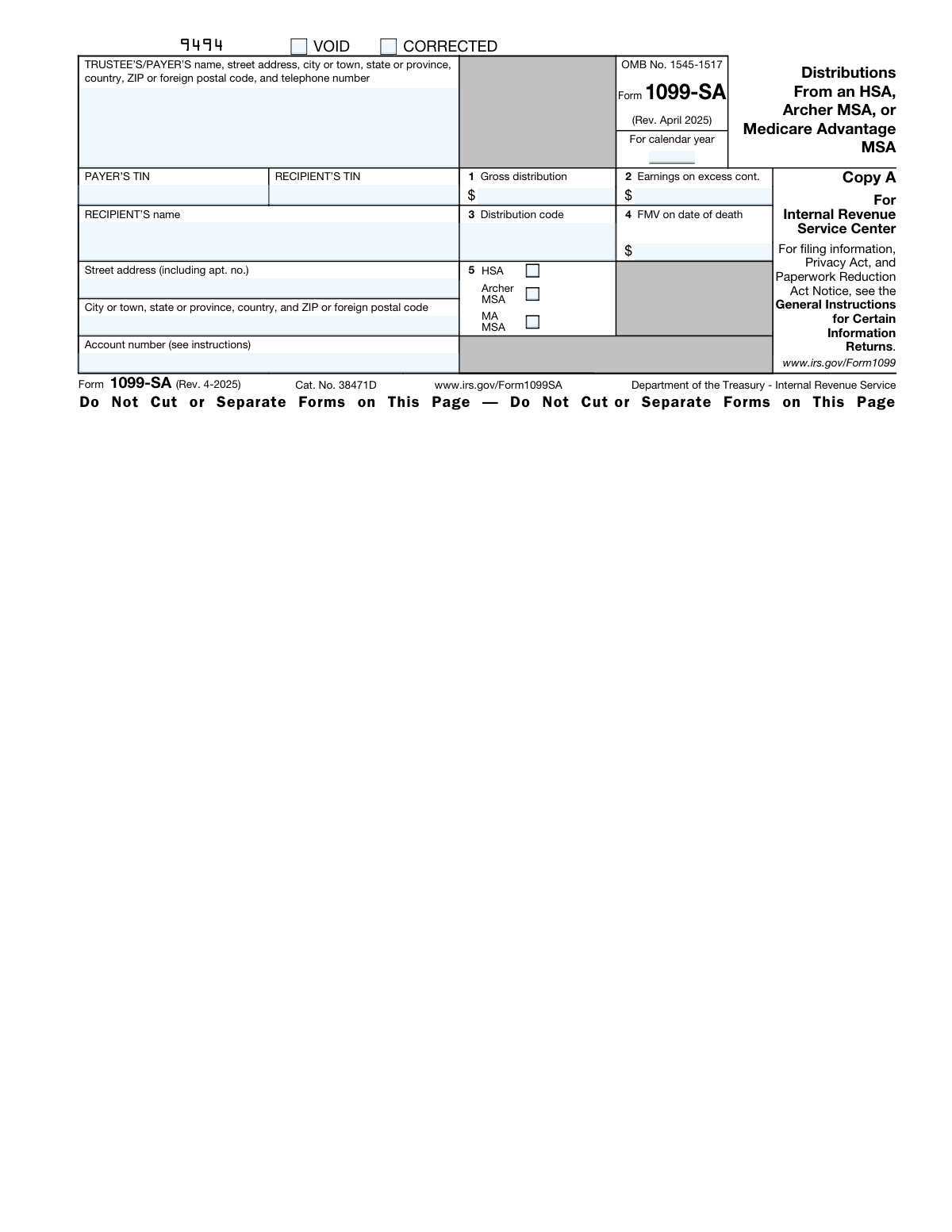
Yes! You can use AI to fill out Form 1099-SA, Distributions From an HSA, Archer MSA, or Medicare Advantage MSA

Form 1099-SA, Distributions From an HSA, Archer MSA, or Medicare Advantage MSA, is an information return used by trustees and payers to report distributions made from these tax-favored health accounts to the recipient and the IRS. This form is crucial for recipients to correctly report income and file their tax returns, particularly Forms 8889 or 8853. Today, this form can be filled out quickly and accurately using AI-powered services like Instafill.ai, which can also convert non-fillable PDF versions into interactive fillable forms.
1099-SA is part of the CAR forms, distribution forms, HSA forms, Medicare forms, 1099 forms and L.A. Care forms categories on Instafill.
Our AI automatically handles information lookup, data retrieval, formatting, and form filling.
It takes less than a minute to fill out 1099-SA using our AI form filling.
Securely upload your data. Information is encrypted in transit and deleted immediately after the form is filled out.

Form specifications

Form name: Form 1099-SA, Distributions From an HSA, Archer MSA, or Medicare Advantage MSA
Number of fields: 33
Number of pages: 2
Filled form examples: Form 1099-SA Examples
Language: English
main-image

Instafill Demo: How to fill out PDF forms in seconds with AI

How to Fill Out 1099-SA Online for Free in 2026

Are you looking to fill out a 1099-SA form online quickly and accurately? Instafill.ai offers the #1 AI-powered PDF filling software of 2026, allowing you to complete your 1099-SA form in just 37 seconds or less.
Follow these steps to fill out your 1099-SA form online using Instafill.ai:
  1. 1 Navigate to Instafill.ai and upload your Form 1099-SA document or select it from the template library.
  2. 2 Provide the Payer's information, including their name, address, and Taxpayer Identification Number (TIN).
  3. 3 Enter the Recipient's details, such as their full name, address, and TIN.
  4. 4 Fill in the distribution amounts in the appropriate boxes, including Gross distribution (Box 1), Earnings on excess contributions (Box 2), and FMV on date of death (Box 4).
  5. 5 Enter the correct distribution code in Box 3 and check the box in Box 5 to indicate the type of account (HSA, Archer MSA, or MA MSA).
  6. 6 Review all the information entered by the AI-powered tool for accuracy and make any necessary corrections.
  7. 7 Download, print, or e-file your completed Form 1099-SA directly from the platform.

Our AI-powered system ensures each field is filled out correctly, reducing errors and saving you time.

Why Choose Instafill.ai for Your Fillable 1099-SA Form?

Speed

Complete your 1099-SA in as little as 37 seconds.

Up-to-Date

Always use the latest 2026 1099-SA form version.

Cost-effective

No need to hire expensive lawyers.

Accuracy

Our AI performs 10 compliance checks to ensure your form is error-free.

Security

Your personal information is protected with bank-level encryption.

Frequently Asked Questions About Form 1099-SA

Form 1099-SA reports distributions you have received from a Health Savings Account (HSA), Archer MSA, or Medicare Advantage (MA) MSA. You receive this form from your account's trustee or payer if you took money out during the year.

The trustee or payer of your health savings account is responsible for completing Form 1099-SA and sending one copy to you (Copy B) and another to the IRS (Copy A). As the recipient, you use this form for your tax filing but do not fill it out yourself.

You must use the information on Form 1099-SA to complete either Form 8889 (for HSAs) or Form 8853 (for Archer MSAs and MA MSAs). These forms are then filed with your annual income tax return, such as Form 1040.

A distribution is generally not taxable if you used it to pay for qualified medical expenses. If you did not use the funds for qualified medical expenses, the distribution must be included in your income and may also be subject to a penalty.

Box 1 shows the total amount distributed from your account during the calendar year. This includes any payments made directly to you or to a medical service provider on your behalf.

The code in Box 3 identifies the type of distribution you received. For example, code '1' indicates a normal distribution, '2' is for excess contributions, and '4' is for a death distribution.

If the account holder dies, Box 4 will show the fair market value (FMV) of the account on the date of death. The tax treatment of the funds depends on whether the beneficiary is a spouse, a non-spouse, or the estate.

For your security and protection, your copy of the form may only show the last four digits of your Taxpayer Identification Number (TIN). The payer has reported your complete identification number to the IRS.

Yes, services like Instafill.ai use AI to help payers and trustees accurately auto-fill form fields. This can save significant time and reduce the risk of errors, especially when preparing a large number of forms.

As a payer, you can use a service like Instafill.ai to easily complete Form 1099-SA online. Simply upload the form, and the AI-powered platform will make it fillable, allowing you to enter all required information digitally.

If you have a non-fillable or 'flat' PDF, you can use a tool like Instafill.ai to convert it into an interactive, fillable form. This allows you to type information directly into the fields instead of printing and filling by hand.

Box 2 shows the earnings on any excess contributions that were withdrawn from your HSA or Archer MSA. You must include these earnings in your income on the 'Other income' line of your tax return for the year you received them.

Compliance 1099-SA
Validation Checks by Instafill.ai

1
Validates Payer's TIN Format
This check ensures that the Payer's Taxpayer Identification Number (TIN) is a valid 9-digit number, formatted as XX-XXXXXXX or XXXXXXXXX. This is critical for the IRS to correctly identify the financial institution or payer that issued the distribution. A failure in this validation would lead to rejection of the filing and potential penalties for the payer.
2
Validates Recipient's TIN Format
This check verifies that the Recipient's Taxpayer Identification Number (TIN) is a valid 9-digit Social Security Number (SSN), Individual Taxpayer Identification Number (ITIN), or other valid TIN. The recipient's TIN is the primary key used by the IRS to associate the reported distribution with the correct individual's tax return. An incorrect TIN will cause processing delays and mismatches for the recipient's tax filing.
3
Ensures Calendar Year is Valid
This validation confirms that the 'For calendar year' field contains a valid 4-digit year. The year should be the year the distribution occurred and typically cannot be a future year. This is fundamental for attributing the income or distribution to the correct tax period, and an invalid year would make the entire form's data contextually incorrect.
4
Requires Gross Distribution Amount
This check ensures that Box 1, 'Gross distribution', contains a non-negative numeric value. As the primary purpose of Form 1099-SA is to report a distribution, this field is mandatory unless the form is marked as VOID. A missing or invalid value in this box makes the form meaningless and will result in a processing failure.
5
Validates Distribution Code in Box 3
This check verifies that the 'Distribution code' in Box 3 is one of the single-digit codes specified by the IRS (1, 2, 3, 4, 5, or 6). Each code represents a specific reason for the distribution, which has significant tax implications for the recipient. An invalid code prevents the IRS and the recipient from correctly determining the tax treatment of the distribution.
6
Requires Account Type Selection in Box 5
This validation ensures that exactly one of the checkboxes in Box 5 (HSA, Archer MSA, or MA MSA) is selected. The form covers three different types of savings accounts, and the specific type must be identified for correct tax reporting. Failure to select an account type, or selecting multiple types, creates ambiguity and will cause the form to be rejected.
7
Verifies Earnings on Excess Contributions Logic
This check confirms that the value in Box 2, 'Earnings on excess cont.', is less than or equal to the value in Box 1, 'Gross distribution'. The instructions state that the earnings reported in Box 2 are included in the total gross distribution in Box 1. A value in Box 2 greater than Box 1 is a logical impossibility and indicates a data entry error.
8
Ensures Consistency for FMV on Date of Death
This validation checks that Box 4, 'FMV on date of death', is populated only if the distribution code in Box 3 is '4' (Death distribution) or '6' (Death distribution after year of death to a nonspouse beneficiary). This amount is only relevant in the context of a beneficiary distribution following the account holder's death. Populating this field for other distribution types is a logical error that would confuse tax calculations.
9
Checks for Payer Information Completeness
This check verifies that the Payer's name, full address (street, city, state, ZIP), and telephone number are all present. Complete and accurate payer information is required by the IRS to identify the source of the distribution and to contact the payer if there are issues with the filing. Incomplete information can lead to form rejection.
10
Checks for Recipient Information Completeness
This validation ensures the recipient's full name and complete address (street, city, state, ZIP) are provided. This information is necessary for the form to be mailed to the correct person and for the IRS to maintain accurate records. Missing address information can prevent the recipient from receiving their copy, leading to issues with their tax filing.
11
Cross-Validates Excess Contributions Amount and Code
This check provides a warning if Box 2 ('Earnings on excess cont.') contains a value greater than zero, but the code in Box 3 is not '2' (Excess contributions). While not strictly disallowed, this situation is highly unlikely and suggests a potential data entry error. This logical check helps ensure the reason for the distribution aligns with the financial data provided.
12
Validates ZIP Code Format
This check ensures that the ZIP codes for both the Payer and the Recipient are in a valid format (5-digit or 9-digit ZIP+4 for US addresses). Correctly formatted ZIP codes are essential for mailability and data integrity for both the IRS and postal services. An invalid format can lead to returned mail and processing delays.

Common Mistakes in Completing 1099-SA

Entering an Incorrect Distribution Code in Box 3

This mistake involves selecting the wrong code to identify the type of distribution. It often happens because the preparer is unfamiliar with the specific definitions for each code (e.g., normal, excess contribution, disability, death). The consequences are significant, as the IRS uses this code to determine the taxability of the distribution and whether penalties apply, potentially leading to an audit or tax notice for the recipient. To avoid this, carefully consult the IRS instructions for Form 1099-SA to match the distribution circumstances with the correct code.

Using an Incorrect or Transposed TIN

Entering the wrong Taxpayer Identification Number (TIN) for either the payer or the recipient is a frequent error. This is usually caused by a simple typo or by referencing outdated information. An incorrect TIN will cause the IRS to flag a mismatch, leading to filing rejection, processing delays, and potential penalties for the payer. To prevent this, always verify the recipient's TIN against a Form W-9 or other official source before filing.

Reporting the Wrong Gross Distribution Amount in Box 1

This error involves misstating the total amount distributed from the account during the calendar year. It can happen from calculation errors, excluding direct payments made to medical providers, or confusing net and gross amounts. An incorrect amount in Box 1 forces the recipient to report inaccurate information on their tax return (Form 8889 or 8853), which can result in an incorrect tax liability and IRS inquiries. Always sum all distributions for the year, including direct payments, to ensure the Box 1 amount is accurate.

Forgetting to Select the Account Type in Box 5

Preparers sometimes forget to check the box indicating whether the distribution is from an HSA, Archer MSA, or Medicare Advantage MSA. This oversight can occur during manual data entry, especially when processing a high volume of forms. This omission creates ambiguity and can cause the recipient to use the wrong tax form (Form 8889 for HSAs vs. Form 8853 for MSAs), leading to errors on their tax return. Ensure the correct account type is checked to provide clear information to the recipient and the IRS.

Mishandling Death Distribution Reporting

When an account holder dies, specific reporting rules apply which are often misunderstood. Common mistakes include failing to use the correct distribution code (4 or 6), or incorrectly calculating the Fair Market Value (FMV) in Box 4. These errors can cause significant tax problems for the beneficiary, who may be required to report the FMV as income. To avoid this, carefully follow the instructions for deceased account holders, use the correct codes, and accurately report the FMV as of the date of death.

Entering the Wrong Calendar Year

A simple but disruptive mistake is entering the year the form is being prepared (e.g., 2025) instead of the calendar year for which the distributions are being reported (e.g., 2024). This often happens when filing in early January. This error will cause the IRS to reject the filing or process it for the wrong tax period, requiring a corrected form and causing confusion for the recipient. Always double-check that the year on the form matches the year the financial transactions occurred.

Using an Outdated Recipient Name or Address

Payer records can easily become outdated, leading to the use of a recipient's old address, a misspelled name, or a name that doesn't match the TIN. This can prevent the recipient from receiving their copy of the Form 1099-SA in a timely manner, delaying their tax filing. It can also trigger a name/TIN mismatch notice from the IRS. It is crucial to have a process for regularly updating recipient information.

Improperly Using the 'CORRECTED' Checkbox

The 'CORRECTED' checkbox is often misused, either by checking it on an original submission or by forgetting to check it when fixing a previously filed form. This creates confusion at the IRS, which may treat a corrected form as a duplicate or an original form as an invalid correction. This can lead to unnecessary notices and correspondence for both the payer and recipient. Only check this box when you are submitting a new form to replace one that was already filed with an error.

Incorrectly Reporting Earnings on Excess Contributions in Box 2

Calculating and reporting the earnings on withdrawn excess contributions is a complex task that can lead to errors. Preparers may miscalculate the amount or forget that this value must also be included in the Box 1 total. An incorrect Box 2 value means the recipient cannot accurately report this amount as 'Other Income' on their tax return, potentially leading to underpayment of tax. Use the specific calculation method provided by the IRS to ensure this amount is correct.

Providing Incomplete Payer Information

The payer's information block is sometimes filled out with incomplete details, such as a missing phone number or an abbreviated company name that doesn't match IRS records. This can make it difficult for the recipient to contact the payer with questions and can cause the IRS to question the form's validity. Always provide the full, legally registered name, address, and phone number of the payer for clarity and compliance. AI-powered form-filling tools like Instafill.ai can help prevent many of these data entry errors by validating formats and auto-populating consistent information. Since this form is often a non-fillable PDF, Instafill.ai can also convert it into an interactive, fillable version to streamline the process.
Saved over 80 hours a year

“I was never sure if my IRS forms like W-9 were filled correctly. Now, I can complete the forms accurately without any external help.”

Kevin Martin Green

Your data stays secure with advanced protection from Instafill and our subprocessors

Robust compliance program

Transparent business model

You’re not the product. You always know where your data is and what it is processed for.

ISO 27001, HIPAA, and GDPR

Our subprocesses adhere to multiple compliance standards, including but not limited to ISO 27001, HIPAA, and GDPR.

Security & privacy by design

We consider security and privacy from the initial design phase of any new service or functionality. It’s not an afterthought, it’s built-in, including support for two-factor authentication (2FA) to further protect your account.

Fill out 1099-SA with Instafill.ai

Worried about filling PDFs wrong? Instafill securely fills form-1099-sa-distributions-from-an-hsa-archer-msa-or-medicare-advantage-msa forms, ensuring each field is accurate.