
Instafill.ai
7 days free
AI form filling · 100 fields · 6 pages · done in seconds

Yes! You can use AI to fill out Form 1099-G, Certain Government Payments

Don't type 100 fields by hand. Tell our AI about yourself, or upload your W-2 or last year's return, and it fills every field in seconds. You check it, then download, print or sign.
7 days free, then $19.99/month · Cancel anytime
AI fills it, no typingEncrypted, never used to train AICancel in two clicks
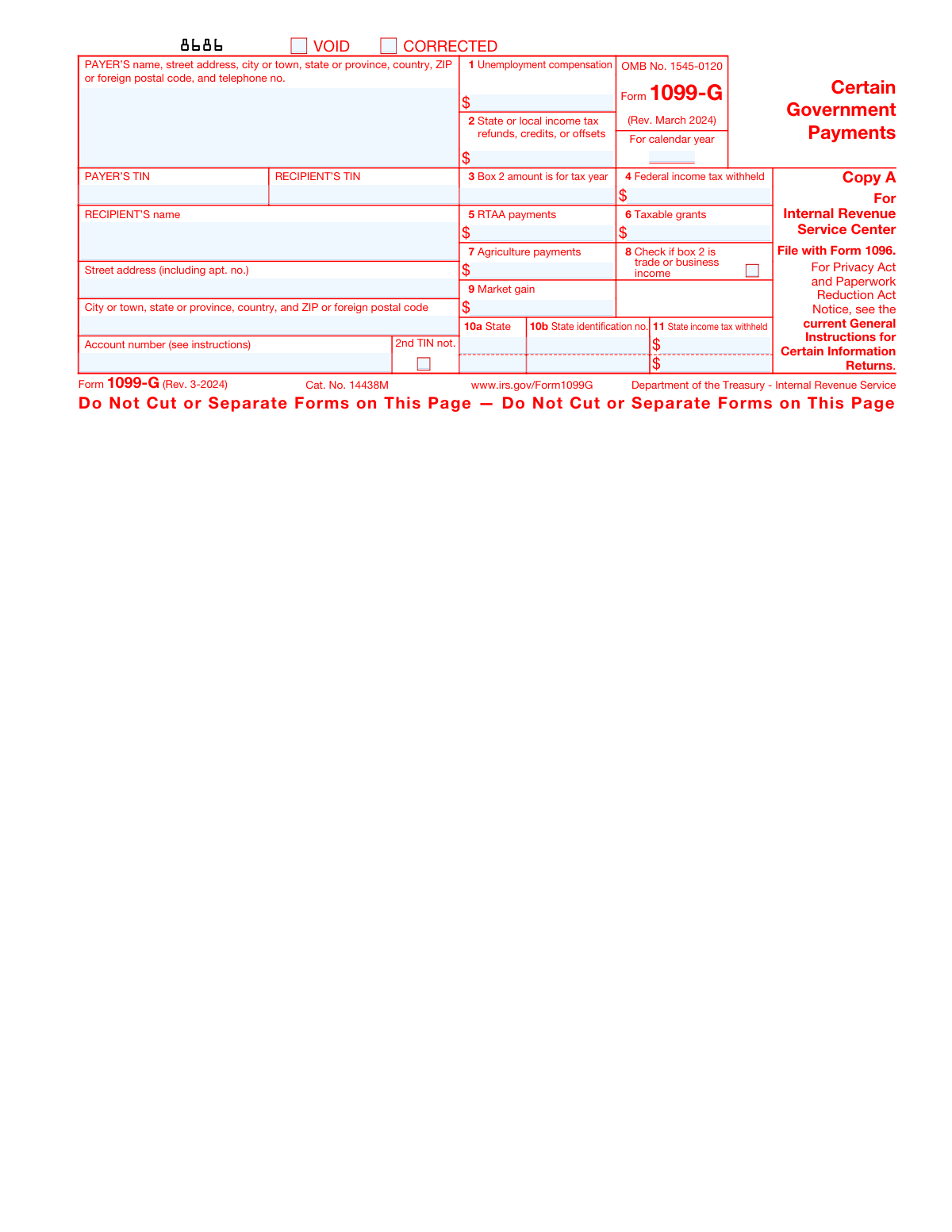
Form 1099-G, Certain Government Payments, page 1
Moderate · 56/100Form Complexity Index

The AI does the filling. You just check it.

No typing into boxes, nothing to install.

Tell the AI about youAnswer a few questions in plain words, or upload your W-2 or last year's return. That is all the typing there is.
AI fills every field in secondsIt puts each answer in the right box on every page, checkboxes included.
Check it and downloadReview every field, change anything, then download, print or sign the PDF.

What this form asks for

The AI fills all of it, from your answers or your documents.

Form 1099-G, also known as the 'Certain Government Payments' form, is used to report various government payments, including state tax refunds, unemployment compensation, and other government-provided taxable income. It is important for taxpayers to report this information on their tax returns.
Fillable fields100
Pages6
Sections17
Form Complexity IndexModerate, 56/100

The AI checks your answers before you download

20 checks built for this form, so a wrong date or a missing answer is caught before anyone else sees it.

Ensures that the correct calendar year is entered for which the Form 1099-G is being filed.

The software ensures that the calendar year entered on the Form 1099-G corresponds with the tax year for which the form is intended. It checks the year against the current processing date to prevent the filing of outdated or future forms. The validation includes confirming that the year format is correct and that it is a valid year in the Gregorian calendar. This is crucial as the tax information must align with the correct fiscal period for accurate reporting to the IRS.

Confirms that the VOID checkbox is marked only if the form is being voided.

The software confirms that the 'VOID' checkbox on Form 1099-G is marked exclusively when the form is intended to be nullified. It ensures that this checkbox is not marked in cases where the form is valid and being filed for the first time. If the 'VOID' checkbox is marked, the software will treat the form as invalid for submission purposes and may prompt the user to confirm the void action. This check is essential to prevent the accidental voiding of a legitimate form.

Verifies that the CORRECTED checkbox is marked only if the form is being corrected.

The software verifies that the 'CORRECTED' checkbox is marked solely when the Form 1099-G contains updates or corrections to previously submitted information. It ensures that this checkbox is left unmarked for initial submissions. If the 'CORRECTED' checkbox is marked, the software will process the form as an amendment to an earlier submission and may require additional information to reference the original document. This verification is important to distinguish between original filings and corrections.

Checks that the payer's name, address, telephone number, and TIN are accurately entered.

The software checks that the payer's information on Form 1099-G, including the name, address, telephone number, and Taxpayer Identification Number (TIN), is accurately entered and formatted correctly. It validates that the TIN is in the proper format and that the address adheres to postal standards. The software may cross-reference the payer's details with a database to ensure accuracy. Accurate payer information is critical for the IRS to identify the source of the government payment.

Validates that the recipient's name, address, TIN, and account number (if applicable) are correctly filled in.

The software validates that the recipient's details on Form 1099-G are correctly filled in, including the name, address, Taxpayer Identification Number (TIN), and account number if applicable. It checks that the TIN is valid and properly formatted, and that the address complies with postal formatting standards. The software may also verify the recipient's information against external records for accuracy. Correct recipient information is essential for the IRS to attribute the government payment to the right individual or entity.

Ensures that the total unemployment compensation in Box 1 is accurately reported.

The AI ensures that the total unemployment compensation reported in Box 1 of Form 1099-G matches the records provided by the government or the payer. It cross-references the amount with the recipient's documentation to confirm accuracy. The AI also checks for any discrepancies between the reported amount and the recipient's expected compensation, alerting the user to any potential errors. This validation is crucial as it affects the recipient's taxable income and must be reported correctly on their tax return.

And 14 more checks
  • Confirms the amount of state or local income tax refunds, credits, or offsets in Box 2 is correct.
  • Verifies the tax year in Box 3 for which the amount in Box 2 was made.
  • Checks for any federal income tax withheld and enters the amount in Box 4.
  • Validates the total RTAA payments entered in Box 5.
  • Ensures the amount of taxable grants in Box 6 is accurately reported.
  • Confirms the amount of agriculture payments entered in Box 7.
  • Verifies that Box 8 is checked if the amount in Box 2 is trade or business income.
  • Checks for any market gain associated with CCC loans and enters the amount in Box 9.
  • Validates the state and state identification number entered in Boxes 10a and 10b, respectively.
  • Ensures that the amount of state income tax withheld is correctly entered in Box 11.
  • Confirms that the correct copy of the form is used for its intended purpose (Copy A for the IRS, Copy B for the recipient, etc.).
  • Verifies that Copy A is not downloaded from the website and filed with the IRS, to avoid penalties.
  • Checks if e-filing is applicable based on the number of information returns to be filed (mandatory for 10 or more).
  • Validates that all necessary copies are filed with the IRS and state tax departments as required.

Let AI fill out your Form 1099-G

No typing. Every field filled in seconds, checked, ready to sign.

7 days free, then $19.99/month · Cancel anytime

How to Fill Out Form 1099-G Online for Free in 2026

What the AI walks you through.

  1. Visit instafill.ai site and select Form 1099-G
  2. Enter payer's information
  3. Input recipient's TIN and name
  4. Fill in recipient's address details
  5. Report unemployment compensation
  6. Include state tax refunds or offsets
  7. Add federal income tax withheld
  8. Enter other government payments
  9. Sign and date the form electronically
  10. Check for accuracy and submit form

Common Mistakes in Completing Form 1099-G

The ones the AI is built to catch.

Using non-scannable Copy A from the website for IRS filing
Copy A of Form 1099-G downloaded from the IRS website is not scannable and should not be used for filing with the IRS. This can lead to processing errors and delays. To avoid this mistake, filers should use the official, scannable forms provided by the IRS for paper submissions. These can be ordered directly from the IRS or through an authorized supplier. Always ensure that the forms used are compatible with IRS scanning technology.
Failing to order official IRS forms for paper filing
Paper filers sometimes neglect to order the official IRS forms, which can result in the rejection of their submissions. The IRS requires the use of official, scannable forms for paper filings to ensure accurate processing. To prevent this error, request the necessary forms well in advance of the filing deadline from the IRS or an authorized supplier. Keep in mind that photocopies are not acceptable, and always verify that you have the correct forms before beginning the filing process.
Not e-filing when required for 10 or more returns
The IRS mandates e-filing for entities submitting 10 or more Form 1099-G returns. Failure to comply with this requirement can lead to penalties. To avoid this mistake, ensure that you are familiar with the current IRS filing requirements. If you are required to e-file, register for the IRS Filing Information Returns Electronically (FIRE) system in advance, and make sure to submit your returns electronically to meet the IRS guidelines.
Incorrectly entering the calendar year for the form
Entering the wrong calendar year on Form 1099-G is a common error that can cause confusion and delays in processing. The year entered should reflect the year in which the payments were made, not the year the form is being filed. To avoid this mistake, double-check the calendar year before submitting the form. Ensure that all entries correspond to the correct tax year, and review the form thoroughly for accuracy.
Forgetting to check the VOID box when voiding the form
When a Form 1099-G needs to be voided, failing to check the 'VOID' box can result in the form being processed as if it were valid. To properly void a form, the 'VOID' box at the top of the form must be checked. If you discover an error after the form has been filled out, clearly mark the 'VOID' box before submitting any corrected forms. Keep a copy of the voided form for your records and ensure that any replacement forms are completed accurately to replace the voided document.
Omitting the CORRECTED checkbox on a corrected form
Failing to mark the 'CORRECTED' checkbox on a corrected Form 1099-G can lead to confusion and the incorrect processing of the form by the IRS. To avoid this mistake, double-check the form before submission to ensure that if the form is indeed a correction of a previously filed 1099-G, the 'CORRECTED' box at the top of the form is marked. This helps the IRS differentiate between the original and the corrected form, ensuring that the recipient's tax records are accurate.
Entering incorrect payer's TIN or omitting it
Entering an incorrect Taxpayer Identification Number (TIN) for the payer or omitting it altogether can result in processing delays and potential penalties. It is crucial to verify the payer's TIN before filling out the form. This information can typically be found on prior tax documents or by contacting the payer directly. Ensure that the TIN is entered accurately and in the correct format to facilitate proper reporting to the IRS.
Providing incomplete or incorrect payer's information
Submitting Form 1099-G with incomplete or incorrect payer information can lead to the form being rejected or the need for a corrected submission. To prevent this, thoroughly review all payer details, including the name, address, and TIN, before filing the form. It is advisable to cross-reference this information with official documents or directly with the payer to confirm its accuracy. Accurate payer information is essential for the IRS to attribute the reported payments correctly.
Entering recipient's TIN incorrectly or not at all
Incorrectly entering the recipient's TIN or failing to include it can cause significant issues, such as misattributed income or delays in processing. Recipients should ensure their TIN is readily available when completing the form. It is important to enter the TIN carefully and to double-check for accuracy. If the recipient's TIN is not known, reach out to the recipient to obtain the correct information before filing the form.
Failing to provide recipient's account number if applicable
Neglecting to include the recipient's account number when required can result in the misallocation of the reported information. If the recipient has multiple accounts with the payer, or if the payer has indicated that an account number is necessary, it must be included on the form. Always review the form instructions to determine if an account number is needed. Including the correct account number ensures that the payment is accurately reported and attributed to the right account.
Not entering the total unemployment compensation in Box 1
Failing to enter the total unemployment compensation in Box 1 can lead to incorrect reporting of income, which may result in penalties or an incorrect tax liability. It is crucial to accurately report all unemployment compensation received during the tax year in this box. Taxpayers should double-check their unemployment compensation statements and ensure that the total amount is correctly entered. If there is any confusion regarding the amount to be reported, consulting with the issuing agency or a tax professional is advisable.
Leaving Box 2 blank or entering incorrect refund amounts
Box 2 is designated for state or local income tax refunds, credits, or offsets. Leaving this box blank or entering incorrect amounts can lead to discrepancies in tax records and potential issues with the IRS. Taxpayers should carefully review their records, such as state tax refund documents, to determine the correct amount to report. If a refund was received in the tax year, the exact amount should be entered in Box 2. Accuracy in reporting is essential to maintain compliance with tax laws.
Forgetting to specify the tax year for Box 2 amounts in Box 3
It is important to specify the tax year for which the state or local income tax refunds, credits, or offsets reported in Box 2 were made. Neglecting to provide this information in Box 3 can cause confusion and may affect the taxpayer's current year tax return. To avoid this mistake, taxpayers should verify the tax year associated with the refund and clearly indicate it in Box 3. This ensures that the IRS can accurately match the refund to the correct tax year.
Omitting federal income tax withheld in Box 4
Box 4 is intended for reporting any federal income tax withheld from government payments. Omitting this information can result in an underreporting of tax payments, which may lead to an unexpected tax bill or a reduced refund. Taxpayers should carefully review their 1099-G forms or other withholding documents to confirm the amount of federal income tax withheld and report it accurately in Box 4. This step is crucial for receiving credit for all taxes paid throughout the year.
Failing to report RTAA payments in Box 5
Reemployment Trade Adjustment Assistance (RTAA) payments must be reported in Box 5. Failure to do so can lead to incomplete tax reporting and potential issues with the IRS. Individuals who have received RTAA payments should ensure that the total amount is included in Box 5 of Form 1099-G. Accurate and complete reporting of all government payments, including RTAA, is necessary for proper tax calculation and compliance with federal tax regulations.
Incorrectly reporting taxable grants in Box 6
Taxable grants should be accurately reported in Box 6 of Form 1099-G. To avoid this mistake, carefully review the type of grant received and determine if it is taxable. Consult with a tax professional or refer to IRS guidelines to understand the tax implications of the grant. Ensure that the amount entered in Box 6 reflects the correct taxable amount as per IRS regulations.
Not reporting agriculture payments in Box 7
Agricultural payments must be reported in Box 7 of Form 1099-G. To prevent errors, double-check all received agricultural payments against your records before filling out the form. Make sure to include all payments that qualify under the agricultural program as specified by the IRS. Accurate reporting is crucial to comply with tax laws and to avoid potential audits or penalties.
Failing to check Box 8 when Box 2 amount is trade/business income
If the amount in Box 2 is related to trade or business income, Box 8 must be checked. To avoid overlooking this, review the source of the income reported in Box 2 to determine if it pertains to trade or business activities. If it does, remember to check Box 8 to indicate this. This distinction is important for the IRS to classify the income correctly and for the recipient to report it accurately on their tax return.
Forgetting to enter market gain associated with CCC loans in Box 9
Market gains associated with Commodity Credit Corporation (CCC) loans must be entered in Box 9. To ensure this is done correctly, maintain thorough records of all CCC loan transactions, including any market gains. Before submitting Form 1099-G, verify that all market gains have been calculated and reported in Box 9. Accurate reporting of these gains is necessary for proper tax treatment and to avoid discrepancies.
Leaving state identification number blank in Box 10b
The state identification number is a critical piece of information and should not be left blank in Box 10b. To avoid this mistake, locate the correct state identification number prior to filling out the form. This number is often found on state-issued tax documents or by contacting the state tax department. Including the state identification number ensures that state tax agencies can properly process the form and attribute the information to the correct entity.
Not entering the amount of state income tax withheld in Box 11
Failing to enter the amount of state income tax withheld in Box 11 can lead to discrepancies in the taxpayer's filings and may result in incorrect tax liability calculations. To avoid this mistake, double-check the state income tax withheld figures before submitting the form. Ensure that all financial documents are on hand for accurate reporting. It is also advisable to cross-verify the amounts with the state tax department's records if possible.
Mixing up copies intended for different recipients or agencies
Distributing the incorrect copies of Form 1099-G to recipients or agencies can cause confusion and delay the processing of tax information. To prevent this, carefully review the form instructions to understand which copy is designated for the recipient, the IRS, and other agencies. Label each copy clearly after printing and before mailing, and maintain a methodical filing system that separates each copy to avoid mix-ups.
Recipient not retaining Copy B for their records
When recipients do not retain Copy B of Form 1099-G for their records, they may encounter difficulties when preparing their tax returns. It is crucial for recipients to understand the importance of keeping their tax documents for at least three years as recommended by the IRS. Recipients should create a dedicated file for tax documents and ensure that Copy B is securely stored immediately upon receipt. Additionally, consider making digital copies for backup.
Payer not following specific filing instructions for each copy
Payers who do not adhere to the specific filing instructions for each copy of Form 1099-G risk non-compliance with IRS regulations. To avoid this error, payers should familiarize themselves with the filing requirements detailed in the form's official instructions. It is important to note the different destinations and handling procedures for each copy. Utilizing a checklist can help ensure that each step of the filing process is completed correctly.
Ignoring IRS Publications 1141, 1167, and 1179 for detailed guidance
Overlooking the detailed guidance provided in IRS Publications 1141, 1167, and 1179 can lead to errors in form preparation and submission. These publications contain crucial information regarding the correct procedures for reporting, withholding, and filing. To avoid mistakes, payers and recipients should review these publications thoroughly before completing Form 1099-G. Attending IRS webinars or seeking advice from a tax professional can also be beneficial in understanding the requirements.

Frequently Asked Questions About Form 1099-G


Is it really free for 7 days?
Yes. You pay $0 today. Cancel before Nov 3 and you are never charged. Keep it, and it is $19.99 a month for 5 fills of your Form 1099-G.
Can I fill other forms too?
This plan is for your Form 1099-G: your own AI agent fills it as often as 5 times a month. To fill other forms and upload your own, choose a Professional plan from your account.
How do I cancel?
From your account, in two clicks, any time. No email, no call.
How does the AI fill out Form 1099-G?
You answer a few questions in plain words, or upload your W-2 or last year's return. The AI reads what you give it and puts each answer into the right field of Form 1099-G, on every page, in seconds. It checks the answers against the form's own rules, and you review and change anything before you download, print or sign.
What happens to my information?
It is encrypted in transit and at rest, and it is never used to train AI.
How complex is Form 1099-G to fill out?
Form 1099-G has a Form Complexity Index of 56 out of 100, in the moderate tier: 100 fillable fields across 6 pages. Instafill.ai's AI fills it in under a minute, with every field there for you to review before you download.
What is Form 1099-G used for?
Form 1099-G, Certain Government Payments, is used to report certain types of government payments made to individuals. It includes information on state or local income tax refunds, credits, or offsets, unemployment compensation, taxable grants, agricultural payments, and certain federal payments like U.S. Department of Commerce (DOC) and U.S. Department of Housing and Urban Development (HUD) program payments. Taxpayers receive this form from the government entity that made the payments, and it is used to complete their federal income tax returns.
What should I do if I receive a Form 1099-G?
If you receive a Form 1099-G, you should review it to ensure that the information reported is accurate. You will need to report the relevant amounts on your federal income tax return if they are taxable. For example, state or local tax refunds must be reported if you itemized deductions in the previous year, and unemployment compensation is generally taxable. Keep the form for your records and consult with a tax professional if you have any questions about how to report the information on your tax return.
Is unemployment compensation reported on Form 1099-G taxable?
Yes, unemployment compensation reported on Form 1099-G is generally considered taxable income. You must include it on your federal income tax return for the year you received the payments. The amount of unemployment compensation you received will be shown in box 1 of the form. However, there may be exceptions or changes due to specific tax laws or relief measures, so it's important to check the current tax year's rules or consult with a tax professional.
How do I report state or local income tax refunds from Form 1099-G on my tax return?
State or local income tax refunds from Form 1099-G are reported on your federal income tax return if you itemized deductions on your previous year's return and claimed a deduction for state and local taxes. If you received a refund because you overpaid those taxes, the refund may be considered taxable income. The amount of the refund will be shown in box 2 of the form. You would report this amount on the income tax return for the year in which you received the refund, typically on Schedule 1 (Form 1040), if it is taxable.
What does box 3 on Form 1099-G indicate?
Box 3 on Form 1099-G indicates the box number on the tax return where the reported amount should be entered if it is taxable. For example, if box 3 shows 'unemployment compensation,' it indicates that the amount in box 1 should be reported as unemployment compensation on your tax return. It's a reference to help taxpayers report the information correctly on their tax returns.
What should I include in my income tax return from box 4 of Form 1099-G?
Box 4 of Form 1099-G reports any federal income tax that was withheld from the government payments you received. You should include this amount on your income tax return as tax withheld, which could potentially reduce the amount of tax you owe or increase your refund. It is similar to withholding on a W-2 form, where the amount is credited against the total tax liability calculated on your income tax return.
What are RTAA payments reported in box 5 of Form 1099-G?
RTAA payments, reported in box 5 of Form 1099-G, refer to Reemployment Trade Adjustment Assistance payments. These are benefits paid to eligible workers who are adversely affected by foreign trade and have been approved for Trade Adjustment Assistance (TAA). These payments are part of a federal program designed to help workers who have lost their jobs as a result of increased imports or shifts in production outside the United States. RTAA payments are considered taxable income and must be reported on your tax return.
Are taxable grants reported in box 6 of Form 1099-G considered income?
Yes, taxable grants reported in box 6 of Form 1099-G are considered income and must be included in your taxable income on your tax return. These grants could be from government agencies and are typically for specific purposes, such as education or research. It's important to report these grants as income to avoid any discrepancies with the IRS, which could lead to penalties or an audit.
How do I report agriculture payments from box 7 of Form 1099-G?
Agriculture payments reported in box 7 of Form 1099-G should be reported on your tax return as income. If you are a farmer or involved in a farming business, these payments are usually reported on Schedule F (Form 1040), Profit or Loss From Farming. These payments can include subsidies, disaster relief payments, or other types of support provided by the government and are considered part of your gross income.
What does it mean if box 8 on Form 1099-G is checked?
If box 8 on Form 1099-G is checked, it indicates that you received a trade or business grant that is taxable. This could be a state or local government grant received in the course of your trade or business, not as an individual. The amount of the grant is reported in box 6, and the fact that box 8 is checked signifies that the grant is related to your trade or business activities. You should report this income on the tax form that corresponds to your business type, such as Schedule C for sole proprietors or the appropriate form for corporations or partnerships.
How do I report market gain from box 9 of Form 1099-G?
Market gain associated with repayments of Commodity Credit Corporation (CCC) loans reported in box 9 of Form 1099-G should be reported on your tax return as income. If you are a farmer or other producer, this market gain is usually reported on Schedule F (Form 1040) if you use the cash method of accounting. If you use the accrual method, report this gain on the appropriate line of your income tax return as it applies to your business. It's important to consult the IRS instructions for Form 1099-G or a tax professional for guidance specific to your situation.
What are the state income tax withheld reporting boxes on Form 1099-G?
On Form 1099-G, Certain Government Payments, state income tax withheld is reported in box 11. This box shows the total state income tax withheld from your payments. When you file your state income tax return, you should report this amount as tax withheld, which could potentially reduce your state income tax liability or increase your refund.
Can I file Form 1099-G electronically?
Yes, you can file Form 1099-G electronically. The IRS encourages the electronic filing of all information returns, including Form 1099-G, as it is faster and more accurate. Filers can use the IRS Filing Information Returns Electronically (FIRE) system. To file electronically, you must have software that generates a file according to the specifications in IRS Publication 1220 or you may choose to use a third-party service provider.
What are the penalties for filing a scannable Copy A of Form 1099-G downloaded from the website?
The IRS requires that a scannable Copy A of Form 1099-G be filed with the IRS. If you download and print a non-scannable copy of Form 1099-G from the website and submit it, you may be subject to a penalty because the IRS scanning equipment cannot process these forms. Penalties can vary based on the size of the business and the extent of the noncompliance. It's important to use the official IRS forms or file electronically to avoid these penalties.
Where can I find the official IRS information returns including a scannable Copy A for filing with the IRS?
The official IRS information returns, including a scannable Copy A for filing with the IRS, can be obtained in several ways. You can order the forms free of charge from the IRS by calling 1-800-TAX-FORM (1-800-829-3676) or by visiting the IRS website. Additionally, you can visit an IRS Taxpayer Assistance Center to pick up the forms in person. For electronic filing, you do not need a scannable form, but you must ensure that your software complies with IRS Publication 1220.
What should I do if I suspect identity theft from the information on Form 1099-G?
If you suspect identity theft regarding your Form 1099-G, you should immediately contact the issuing state agency that sent you the form. Inform them of the situation and ask for guidance on how to proceed. Additionally, you should report the identity theft to the IRS by filing a Form 14039, Identity Theft Affidavit, and contact the Federal Trade Commission (FTC) to file a report. It's also advisable to check your credit reports for any unusual activity and consider placing a fraud alert or credit freeze on your credit files.
What is the purpose of the account number on Form 1099-G?
The account number on Form 1099-G is a unique identifier that the issuing agency uses to distinguish your specific government payment information. It is helpful for tracking and managing payments, especially if you receive more than one type of government payment or have multiple accounts with the agency. The account number ensures that the payments are accurately reported and matched to the correct taxpayer's records.
Where can I find more information about developments related to Form 1099-G?
For the most current information about developments related to Form 1099-G, you can visit the official IRS website at www.irs.gov/Form1099G. The IRS regularly updates its forms and instructions with any changes in tax law or reporting requirements. Additionally, you can consult with a tax professional or contact the IRS directly for specific inquiries.
Does the IRS offer a Free File Program for filing taxes that include Form 1099-G?
Yes, the IRS offers a Free File Program that allows taxpayers to prepare and file their federal income tax online for free. If you have a Form 1099-G and meet the eligibility criteria for the Free File Program, you can use one of the available tax preparation software options provided by the IRS partners to file your taxes, including the information from your Form 1099-G. More information about the Free File Program can be found on the IRS website.
What should I do with Copy 2 of Form 1099-G?
Copy 2 of Form 1099-G is typically labeled 'For Recipient's State Tax Department.' If you are required to file a state income tax return, you should include the information from Copy 2 on your state tax return. Keep this copy for your records and refer to it when preparing your state tax return. If you have questions about how to report this information on your state taxes, you should contact your state tax department or consult with a tax professional.
Encrypted in transit and at restNever used to train AIDelete your forms any time

Get your Form 1099-G filled out by AI

$0 today. Cancel before Nov 3 and you pay nothing.

Other forms like this one

government forms: Town of Horizon City Public Information Request (Texas Government Code, Chapter 552), National Apartment Association (NAA) Rental Application for Residents and Occupants (Virginia) and Supplemental Rental Application for Units Under Government Regulated Affordable Housing Programs, VA Form 29-357, Claim for Disability Insurance Benefits (Government Life Insurance), Z83, Application for Employment in the Republic of South Africa Government Department, Incoming Transfer/Direct Rollover Governmental 457(b) Plan, Incoming Transfer/Direct Rollover Governmental 457(b) Plan, City of Torrance Deferred Compensation Plan, Oklahoma Pathfinder 457 Plan Incoming Transfer/Rollover Request Governmental 457(b) Plan, Beneficiary Account Withdrawal Request Governmental 457(b) Plan, Empower Beneficiary Designation Governmental 457(b) Plan, Request for Distribution from Your 457(b) Governmental Plan, DCMA Guidebook for Government Contract Property Administration, Application for Special Leave of Absence without Pay, Central Registry Reporting Form, Form SSA-3379-BK, Function Report - Child Age 12 to 18th Birthday, Form SSA-820-BK, Work Activity Report - Self-Employment, Alcoholic Beverages License Application, Unified Government of Athens-Clarke County, Georgia

1099 forms: Form 1099-NEC, Nonemployee Compensation, Form 4852, Substitute for Form W-2 or 1099-R, Form 1099-MISC, Miscellaneous Information, Form 1099-INT, Interest Income, Form 1099-DIV, Dividends and Distributions, Form 1099-R, Distributions From Pensions etc., Form 1099-S, Proceeds From Real Estate Transactions, Form 1099-C, Cancellation of Debt, Form 1099-K, Payment Card and Third Party Network Transactions, Form 1099-OID, Original Issue Discount, Form 1099-PATR, Taxable Distributions from Cooperatives, Form 1099-Q, Payments From Qualified Education Programs, Form 1099-SA, Distributions from HSA/MSA, Form 1099-B, Proceeds From Broker Transactions, Form 1099-NEC, Nonemployee Compensation, Form 1099-NEC, Nonemployee Compensation, Form 1099-NEC, Nonemployee Compensation, Form 1099-NEC, Nonemployee Compensation, Instructions for Forms 1099-R and 5498, Form 1099-MISC, Miscellaneous Information

payment forms: Form 5405, Repayment of First-Time Homebuyer Credit, Form 1127, Application for Extension of Time for Payment of Tax Due to Undue Hardship, Form 1099-K, Payment Card and Third Party Network Transactions, Form 1099-Q, Payments From Qualified Education Programs, Form SSA-8, Application for Lump-Sum Death Payment, Form 1845-0163, Borrower Defense to Repayment Application, application-and-contract-for-electric-facilities-w, Carer Payment and Carer Allowance – Medical Report (SA431) for a child under 16 years, Income-Driven Repayment (IDR) Plan Request (PAYE, IBR, and ICR) — William D. Ford Federal Direct Loan (Direct Loan) Program and Federal Family Education Loan (FFEL) Programs (OMB No. 1845-0102), Fidelity NetBenefits Distribution - Recurring Payments, Electronic Dividend and Interest Payment Authorization Form, Vanguard Super Apply for a financial hardship payment, Special Tax Notice Regarding Plan Payments, Empower Loan Payment Change Request Form, Empower Retirement Payment Request Form, Empower 401(k) Loan Prepayment Request Form, Special Tax Notice Regarding Plan Payments, Transamerica Automatic Payment Authorization, Excess Withdrawal Request and Form W-4R, Withholding Certificate for Nonperiodic Payments and Eligible Rollover Distributions, Form F6776, Authorization of Interest-Only Payments (ERISA)

government ID forms: Form 40-5122, Travel License / Identification Application, Town of Horizon City Public Information Request (Texas Government Code, Chapter 552), National Apartment Association (NAA) Rental Application for Residents and Occupants (Virginia) and Supplemental Rental Application for Units Under Government Regulated Affordable Housing Programs, VA Form 29-357, Claim for Disability Insurance Benefits (Government Life Insurance), Z83, Application for Employment in the Republic of South Africa Government Department, Incoming Transfer/Direct Rollover Governmental 457(b) Plan, Incoming Transfer/Direct Rollover Governmental 457(b) Plan, City of Torrance Deferred Compensation Plan, Oklahoma Pathfinder 457 Plan Incoming Transfer/Rollover Request Governmental 457(b) Plan, Beneficiary Account Withdrawal Request Governmental 457(b) Plan, Empower Beneficiary Designation Governmental 457(b) Plan, Request for Distribution from Your 457(b) Governmental Plan, DCMA Guidebook for Government Contract Property Administration, Alcoholic Beverages License Application, Unified Government of Athens-Clarke County, Georgia

government HR forms: OPM Form 71, Request for Leave or Approved Absence, Town of Horizon City Public Information Request (Texas Government Code, Chapter 552), National Apartment Association (NAA) Rental Application for Residents and Occupants (Virginia) and Supplemental Rental Application for Units Under Government Regulated Affordable Housing Programs, VA Form 29-357, Claim for Disability Insurance Benefits (Government Life Insurance), Z83, Application for Employment in the Republic of South Africa Government Department, Incoming Transfer/Direct Rollover Governmental 457(b) Plan, Incoming Transfer/Direct Rollover Governmental 457(b) Plan, City of Torrance Deferred Compensation Plan, Oklahoma Pathfinder 457 Plan Incoming Transfer/Rollover Request Governmental 457(b) Plan, Beneficiary Account Withdrawal Request Governmental 457(b) Plan, Empower Beneficiary Designation Governmental 457(b) Plan, Request for Distribution from Your 457(b) Governmental Plan, DCMA Guidebook for Government Contract Property Administration, Alcoholic Beverages License Application, Unified Government of Athens-Clarke County, Georgia

UK government forms: United Kingdom (UK) State Pension claim form, Town of Horizon City Public Information Request (Texas Government Code, Chapter 552), National Apartment Association (NAA) Rental Application for Residents and Occupants (Virginia) and Supplemental Rental Application for Units Under Government Regulated Affordable Housing Programs, VA Form 29-357, Claim for Disability Insurance Benefits (Government Life Insurance), Z83, Application for Employment in the Republic of South Africa Government Department, Incoming Transfer/Direct Rollover Governmental 457(b) Plan, Incoming Transfer/Direct Rollover Governmental 457(b) Plan, City of Torrance Deferred Compensation Plan, Oklahoma Pathfinder 457 Plan Incoming Transfer/Rollover Request Governmental 457(b) Plan, Beneficiary Account Withdrawal Request Governmental 457(b) Plan, Empower Beneficiary Designation Governmental 457(b) Plan, Request for Distribution from Your 457(b) Governmental Plan, DCMA Guidebook for Government Contract Property Administration, Alcoholic Beverages License Application, Unified Government of Athens-Clarke County, Georgia

7 days free, then $19.99/month · Cancel anytime