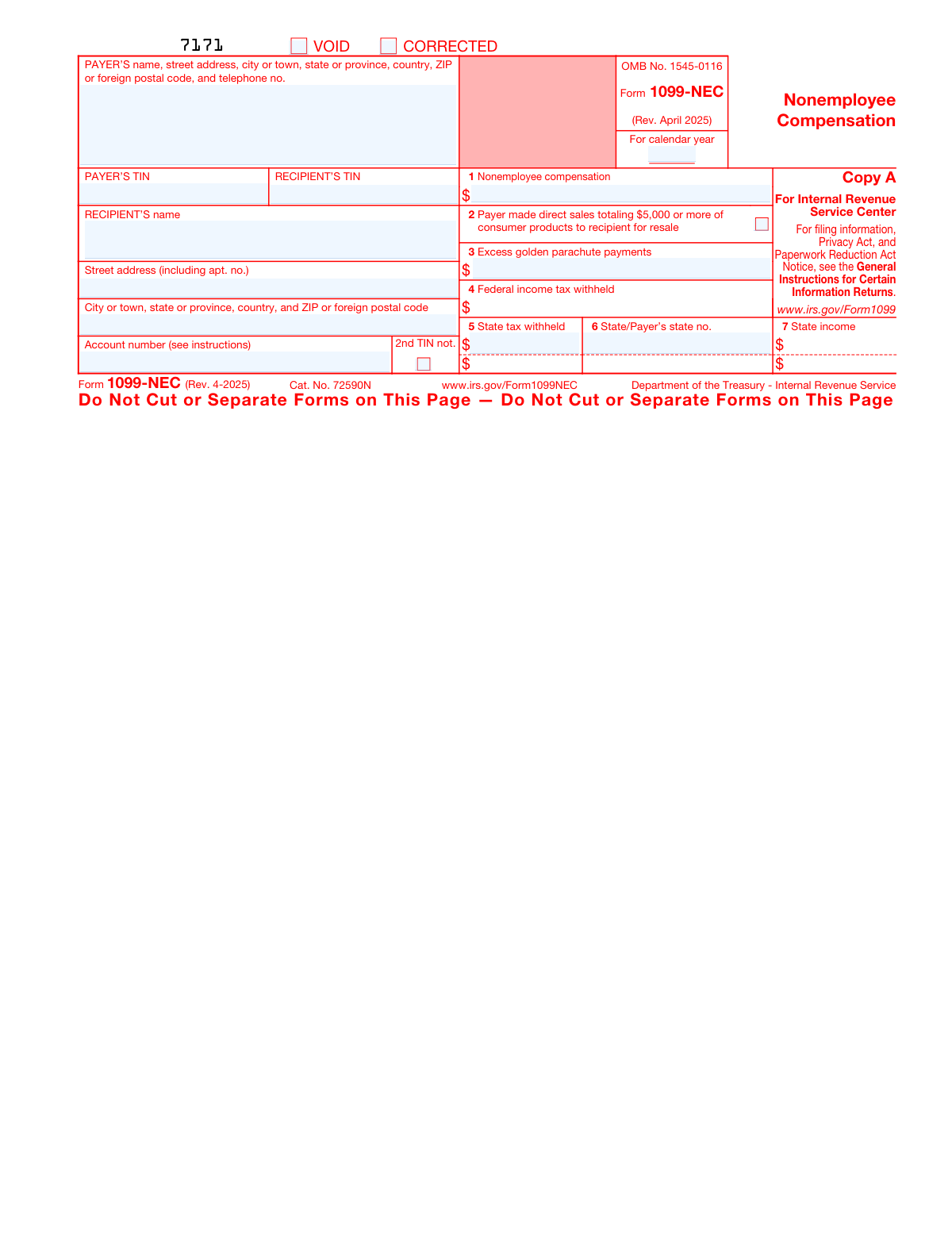
Yes! You can use AI to fill out Form 1099-NEC, Nonemployee Compensation

Form 1099-NEC (Nonemployee Compensation) is an IRS information return used by businesses and individuals to report payments of $600 or more made to non-employees, such as independent contractors, freelancers, and sole proprietors, during a calendar year. It replaced Box 7 of the former Form 1099-MISC for reporting nonemployee compensation starting in tax year 2020. The form is critical for both payers (who must file it with the IRS and provide a copy to recipients) and recipients (who use it to report self-employment or other income on their tax returns). Today, this form can be filled out quickly and accurately using AI-powered services like Instafill.ai, which can also convert non-fillable PDF versions into interactive fillable forms.
Our AI automatically handles information lookup, data retrieval, formatting, and form filling.
It takes less than a minute to fill out 1099-NEC using our AI form filling.
Securely upload your data. Information is encrypted in transit and deleted immediately after the form is filled out.

Form specifications

Form name: Form 1099-NEC, Nonemployee Compensation
Number of pages: 6
Language: English
main-image

Instafill Demo: filling out a legal form in seconds

How to Fill Out 1099-NEC Online for Free in 2026

Are you looking to fill out a 1099-NEC form online quickly and accurately? Instafill.ai offers the #1 AI-powered PDF filling software of 2026, allowing you to complete your 1099-NEC form in just 37 seconds or less.
Follow these steps to fill out your 1099-NEC form online using Instafill.ai:
  1. 1 Navigate to Instafill.ai and upload your Form 1099-NEC PDF or select it from the available form library to begin filling it out online.
  2. 2 Enter the payer's information, including full legal name, street address, city, state, ZIP code, telephone number, and Taxpayer Identification Number (TIN) in the designated payer fields.
  3. 3 Enter the recipient's information, including full legal name, street address, city, state, ZIP code, and Taxpayer Identification Number (SSN, EIN, or ITIN) in the recipient fields.
  4. 4 Fill in the compensation and withholding boxes, including Box 1 (nonemployee compensation), Box 3 (excess golden parachute payments), Box 4 (federal income tax withheld), and check Box 2 if applicable for direct sales of $5,000 or more.
  5. 5 Complete the state tax information fields (Boxes 5–7), entering state tax withheld, the payer's state identification number, and state income amounts for up to two states if required.
  6. 6 Indicate the applicable calendar tax year, and check the VOID or CORRECTED box if the form is being voided or correcting a previously filed return.
  7. 7 Review all entered information for accuracy using Instafill.ai's AI-powered validation, then download, print, or e-file the completed copies as required (Copy B for the recipient, Copy 1 for the state, and Copy 2 for the recipient's state return).

Our AI-powered system ensures each field is filled out correctly, reducing errors and saving you time.

Why Choose Instafill.ai for Your Fillable 1099-NEC Form?

Speed

Complete your 1099-NEC in as little as 37 seconds.

Up-to-Date

Always use the latest 2026 1099-NEC form version.

Cost-effective

No need to hire expensive lawyers.

Accuracy

Our AI performs 10 compliance checks to ensure your form is error-free.

Security

Your personal information is protected with bank-level encryption.

Frequently Asked Questions About Form 1099-NEC

Form 1099-NEC (Nonemployee Compensation) is used by businesses and individuals (payers) to report payments of $600 or more made to non-employees, such as freelancers, independent contractors, or self-employed individuals. The payer is responsible for completing and issuing this form to both the recipient and the IRS.

Copy A is filed with the IRS, Copy B is given to the recipient to keep for their records, Copy 1 is sent to the state tax department, and Copy 2 is given to the recipient to file with their state income tax return. Each copy serves a different purpose in the tax reporting process.

No. The online version of Copy A downloaded from the IRS website is not scannable and cannot be filed with the IRS — doing so may result in a penalty. You must either e-file or order the official scannable paper forms at IRS.gov/EmployerForms.

If you have 10 or more information returns to file, you are generally required to e-file. If you have fewer than 10, the IRS strongly encourages e-filing, but you may still file on paper using official IRS-ordered forms. Visit IRS.gov/InfoReturn for e-file options.

Box 1 should include the total amount of nonemployee compensation paid to the recipient during the tax year. If this amount represents self-employment income, the recipient must report it on Schedule C or F (Form 1040), and complete Schedule SE to calculate self-employment taxes.

Box 2 is checked if the payer made direct sales of consumer products totaling $5,000 or more to the recipient for resale, on a buy-sell, deposit-commission, or similar basis. The recipient should generally report any income from selling these products on Schedule C (Form 1040).

Box 3 shows the total excess golden parachute payments made to the recipient, which are subject to a 20% excise tax. Recipients should refer to their tax return instructions for where to report this amount.

Box 4 shows any backup withholding that was applied to the recipient's payments. A payer is required to backup withhold if the recipient did not provide a valid TIN. The recipient should include this amount as tax withheld on their income tax return.

Box 5 is for state income tax withheld, Box 6 is for the payer's state identification number, and Box 7 is for the amount of state income being reported. These boxes support state tax reporting and should only be filled in if state tax was withheld. The form allows reporting for up to two states.

Check VOID if the form was issued in error or no reportable payment was made, making the form null. Check CORRECTED if you are submitting the form to fix information that was previously reported incorrectly on an earlier filing.

If you believe you are an employee and cannot get the payer to correct the form, report the amount in Box 1 as wages on Form 1040 and complete Form 8919 (Uncollected Social Security and Medicare Tax on Wages) to attach to your return. See IRS Publication 1779 for more guidance.

The form requires both the payer's TIN and the recipient's TIN (which can be a Social Security Number, EIN, ITIN, or ATIN). For the recipient's protection, the form may display only the last four digits of their TIN, but the full TIN must be reported to the IRS.

Yes! Services like Instafill.ai use AI to automatically fill in form fields accurately, saving you time and reducing errors. You can use Instafill.ai to complete all required fields on Form 1099-NEC, including payer and recipient information, compensation amounts, and withholding details.

Simply upload your Form 1099-NEC PDF to Instafill.ai, and the AI will guide you through filling in each field — from payer and recipient details to compensation and withholding amounts. Once complete, you can download the filled form to distribute to recipients or file with the appropriate tax authorities.

If you have a flat, non-fillable PDF version of Form 1099-NEC, Instafill.ai can convert it into an interactive fillable form, allowing you to type directly into the fields. This is especially useful for Copy B and other recipient copies downloaded from the IRS website.

Compliance 1099-NEC
Validation Checks by Instafill.ai

1
Ensures Payer's TIN is in a Valid Format
The Payer's TIN must be entered in a recognized IRS format: either a 9-digit Employer Identification Number (EIN) formatted as XX-XXXXXXX or a Social Security Number (SSN) formatted as XXX-XX-XXXX. This field is required and cannot be left blank, as it uniquely identifies the payer to the IRS. If the TIN is missing, incorrectly formatted, or contains non-numeric characters, the form will be rejected and may result in penalties for the payer.
2
Ensures Recipient's TIN is in a Valid Format
The Recipient's TIN must conform to a valid IRS-recognized format, including SSN (XXX-XX-XXXX), EIN (XX-XXXXXXX), ITIN (9XX-XX-XXXX), or ATIN. This field is required for proper IRS matching and tax reporting. An invalid or missing Recipient TIN may trigger backup withholding requirements and could result in IRS penalties for the payer for failing to obtain and report a correct TIN.
3
Ensures Box 1 Nonemployee Compensation is a Non-Negative Numeric Value
Box 1 (Nonemployee Compensation) must contain a valid non-negative dollar amount with no more than two decimal places, and must not include alphabetic characters or special symbols other than a decimal point. This is the primary reportable amount on Form 1099-NEC and is required when total payments to the recipient meet or exceed $600 for the tax year. A missing, negative, or non-numeric value in this field will cause the form to fail IRS processing and may result in underreporting penalties.
4
Ensures Tax Year is a Valid Calendar Year
The calendar year field must contain a valid four-digit year (e.g., 2024 or 2025) that corresponds to the tax year for which compensation is being reported. The year must not be a future year beyond the current filing period, nor an implausibly historical year. An incorrect or missing tax year will cause the IRS to be unable to match the filing to the correct tax period, potentially resulting in misapplied credits or penalties for both the payer and recipient.
5
Ensures VOID and CORRECTED Checkboxes Are Not Both Selected Simultaneously
The VOID and CORRECTED checkboxes are mutually exclusive: a form cannot be both voided and corrected at the same time, as these statuses represent fundamentally different actions. VOID indicates the form should be disregarded entirely, while CORRECTED indicates it replaces a previously filed form with updated information. If both are checked simultaneously, the IRS cannot determine the intended status of the form, which may lead to processing errors or duplicate reporting issues.
6
Ensures State Tax Withheld Fields Require Corresponding State Identification Number
If a value is entered in Box 5 (State tax withheld) or State 1/State 2 tax withheld fields, the corresponding Box 6 (State/Payer's state no.) or State 1/State 2 state identification number must also be populated. The IRS and state tax authorities require the payer's state ID to properly route and credit state withholding amounts. Reporting state tax withheld without a corresponding state ID number will cause state tax reconciliation failures and may result in the recipient being unable to claim the withheld amount on their state return.
7
Ensures State Income Fields Are Only Populated When State Tax Withheld Is Present
The State 1 and State 2 income fields (Box 7) should only be filled when the corresponding state tax withheld (Box 5) fields contain a value, as state income reporting is contingent on there being a state withholding relationship. Populating state income without a corresponding state tax withheld amount or state ID creates an inconsistent record that may confuse state tax authorities. This check prevents orphaned state income entries that lack the required supporting withholding and identification data.
8
Ensures Payer's Name and Address Fields Are Fully Populated
The Payer's name, street address, city, state, ZIP code, and telephone number fields must all be present and non-empty, as this information is required for the IRS to identify and contact the filing entity. The address must include at minimum a street address, city, state or province, and ZIP or postal code. Missing or incomplete payer address information can result in the IRS being unable to process the form or contact the payer for corrections, potentially leading to penalties.
9
Ensures Recipient's Name is Populated and Not Abbreviated
The Recipient's name field must contain the full legal name of the individual or business entity as it appears on their tax records, and must not be left blank or contain only initials or abbreviations. The IRS uses the recipient's name in combination with their TIN to match the 1099-NEC to the correct tax return. An abbreviated, incomplete, or missing recipient name increases the risk of TIN/name mismatch errors, which can trigger IRS notices and backup withholding requirements.
10
Ensures Federal Income Tax Withheld is a Non-Negative Numeric Value
Box 4 (Federal income tax withheld) must contain a valid non-negative dollar amount if populated, representing backup withholding applied to the recipient's payments. This field should only contain a value if backup withholding was actually applied, and must not be negative or contain non-numeric characters. An erroneous or negative value in this field could cause the recipient to incorrectly claim a tax credit they are not entitled to, and may trigger IRS discrepancy notices.
11
Ensures Excess Golden Parachute Payments is a Non-Negative Numeric Value When Populated
Box 3 (Excess golden parachute payments) must contain a valid non-negative dollar amount if entered, as this represents compensation subject to a 20% excise tax under IRS rules. The field should be left blank rather than entered as zero if no such payments were made, to avoid confusion with intentional zero-dollar reporting. A negative or non-numeric value in this field will cause processing errors and may incorrectly trigger excise tax calculations for the recipient.
12
Ensures Recipient's Address Fields Are Sufficiently Complete
The recipient's street address and city/state/ZIP fields must both be populated with meaningful content to ensure the form can be delivered to the recipient and properly processed. A ZIP or postal code, where applicable, should conform to the standard 5-digit (or 5+4) U.S. format or an appropriate foreign postal code format. Missing or incomplete recipient address information prevents the payer from fulfilling their obligation to furnish a copy of the form to the recipient, which is required by IRS regulations.
13
Ensures the Direct Sales Checkbox (Box 2) Does Not Require a Dollar Amount Entry
Box 2 is a checkbox field only, indicating that direct sales of consumer products totaling $5,000 or more were made to the recipient for resale; it does not require or accept a specific dollar amount. Validation should confirm that no numeric dollar value is entered in association with Box 2, as the IRS form design intentionally uses a checkbox rather than a monetary field for this indicator. Entering a dollar amount where only a checkbox is expected may cause form parsing errors or misinterpretation of the reported data.
14
Ensures Second State Reporting Fields Are Only Populated When First State Fields Are Complete
The State 2 fields (State 2: Tax withheld, State 2: State/Payer's state no., and State 2: State income) should only be populated if the State 1 fields are already fully completed, as the form is designed to report a primary state first before a secondary state. Populating State 2 fields while leaving State 1 fields blank creates an illogical reporting sequence that may confuse state tax authorities and cause reconciliation errors. This check enforces the proper sequential completion of multi-state withholding information.
15
Ensures Payer's Telephone Number is in a Valid Format
The payer's telephone number must be entered in a recognizable format, such as (XXX) XXX-XXXX or XXX-XXX-XXXX for domestic numbers, and must contain the correct number of digits without letters or invalid special characters. A valid telephone number is required so that the IRS or state tax authorities can contact the payer if there are questions about the filing. An improperly formatted or missing telephone number may delay resolution of any discrepancies identified by the IRS during processing.
16
Ensures Nonemployee Compensation Meets the $600 Reporting Threshold When Box 1 Is Populated
When Box 1 (Nonemployee Compensation) is populated, the amount entered should generally be $600 or more, as the IRS requires Form 1099-NEC to be filed only when total payments to a nonemployee recipient meet or exceed this threshold during the tax year. Amounts below $600 in Box 1 may indicate a data entry error or an unnecessary filing, though certain exceptions (such as backup withholding) may apply. This check flags potentially below-threshold entries for review to ensure the form is being filed appropriately and to prevent unnecessary or erroneous submissions.

Common Mistakes in Completing 1099-NEC

Printing and filing Copy A downloaded from the IRS website

Many payers mistakenly print Copy A (the red form) from the IRS website and mail it to the IRS, not realizing that the online version is not scannable. The IRS requires a scannable Copy A, and filing a non-scannable version can result in significant penalties. To avoid this, either order the official pre-printed forms from IRS.gov/EmployerForms or file electronically via IRS.gov/InfoReturn. Tools like Instafill.ai can help guide you toward the correct filing method and convert flat PDFs into properly fillable versions.

Entering an incorrect or misformatted Taxpayer Identification Number (TIN)

Payers frequently enter the wrong TIN for either themselves or the recipient — including transposed digits, missing hyphens, or using an SSN where an EIN is required (or vice versa). An incorrect TIN can trigger IRS backup withholding notices (CP2100) and penalties for incorrect information returns. Always verify the recipient's TIN against their W-9 before filing, and ensure the format matches what the IRS expects (e.g., XX-XXXXXXX for EINs, XXX-XX-XXXX for SSNs). AI-powered tools like Instafill.ai can automatically validate TIN formats to catch these errors before submission.

Failing to check the CORRECTED box when reissuing a form

When a previously filed Form 1099-NEC contains an error and needs to be reissued, many payers forget to check the CORRECTED checkbox on the new form. Without this checkbox marked, the IRS may treat the corrected form as a duplicate filing, potentially doubling the reported income for the recipient. Always check the CORRECTED box whenever you are resubmitting a form to fix any previously reported information, and ensure the corrected form is sent to both the IRS and the recipient.

Incorrectly checking the VOID box instead of the CORRECTED box

Some filers confuse the VOID and CORRECTED checkboxes, checking VOID when they actually intend to correct a previously filed form. VOID is only used when a form was issued in error and no reportable payment was made, while CORRECTED is used to fix erroneous data on a previously submitted form. Using the wrong checkbox can cause the IRS to disregard valid payment information or create confusion in the recipient's tax records. Carefully review the purpose of each checkbox before marking it.

Omitting or incorrectly reporting nonemployee compensation in Box 1

Payers sometimes omit payments, report only partial amounts, or include amounts that do not qualify as nonemployee compensation (such as reimbursements or payments to corporations) in Box 1. Box 1 should reflect the total gross nonemployee compensation paid to the recipient during the tax year, and the $600 reporting threshold must be met. Misreporting this amount can lead to IRS notices, penalties, and discrepancies on the recipient's tax return. Always reconcile Box 1 against your accounting records and confirm the recipient's status before filing.

Leaving the calendar tax year blank or entering the wrong year

Filers occasionally leave the 'For calendar year' field blank or enter the current year instead of the tax year being reported, especially when filing late or correcting prior-year forms. An incorrect or missing tax year makes it impossible for the IRS to properly match the form to the correct tax period, potentially causing processing errors and penalties. Always double-check that the calendar year entered matches the year in which the payments were made, not the year in which the form is being filed.

Entering state tax information without completing all required state fields

When state income tax was withheld, payers often fill in Box 5 (State tax withheld) but forget to complete Box 6 (State/Payer's state no.) or Box 7 (State income), or vice versa. All three state fields are interdependent — if any state withholding is reported, the corresponding state identification number and state income amount must also be provided. Incomplete state information can cause state tax authority processing errors and may require amended filings. Ensure all three state boxes are completed consistently whenever state withholding applies.

Using the wrong form for employee compensation (W-2 vs. 1099-NEC confusion)

Some payers mistakenly issue a Form 1099-NEC to workers who should actually be classified as employees and receive a W-2. This misclassification can expose the payer to employment tax liabilities, penalties, and back taxes, and it forces the recipient to incorrectly report their income. If there is any question about worker classification, review IRS guidelines on independent contractors vs. employees (see Pub. 1779) before issuing the form. Recipients who believe they are employees should complete Form 8919 and report the income accordingly.

Providing an incomplete or incorrect payer name and address

Payers sometimes enter a trade name or abbreviation instead of their full legal business name, omit the telephone number, or provide an outdated address in the payer information section. The IRS uses the payer's name and TIN together to match filings, so inconsistencies can cause processing delays or mismatches. Always use the exact legal name associated with your TIN as registered with the IRS, and include a complete mailing address and a valid contact telephone number. Instafill.ai can help auto-populate and validate payer information to prevent these errors.

Incorrectly reporting or omitting federal income tax withheld in Box 4

Box 4 (Federal income tax withheld) is often left blank even when backup withholding was applied, or conversely, an amount is entered when no withholding actually occurred. Backup withholding at the current rate applies when a recipient fails to provide a valid TIN, and failing to report it accurately can create discrepancies between the payer's tax deposits and the recipient's tax return. Only enter an amount in Box 4 if backup withholding was actually withheld and remitted to the IRS, and ensure the amount matches your tax deposit records.

Failing to file electronically when required (10 or more returns)

Payers who have 10 or more information returns to file are generally required to file electronically, but many are unaware of this threshold and continue to file paper forms, risking penalties for non-compliance. The e-file threshold was lowered in recent years, catching many small businesses off guard. Check IRS.gov/InfoReturn to determine your filing obligation and use the IRS FIRE system or an approved e-file provider. Even if you have fewer than 10 returns, the IRS strongly encourages electronic filing to reduce errors and processing time.

Entering the recipient's name inconsistently with their TIN records

A common mistake is entering a recipient's nickname, business trade name, or a slightly misspelled version of their legal name that does not match what the IRS has on file for their TIN. This mismatch triggers TIN validation failures and can result in backup withholding notices and penalties for the payer. Always obtain a completed Form W-9 from the recipient before filing and use the exact name as it appears on their Social Security card, EIN confirmation letter, or other official IRS correspondence. AI-powered tools like Instafill.ai can cross-check name and TIN combinations to flag potential mismatches before submission.
Saved over 80 hours a year

“I was never sure if my IRS forms like W-9 were filled correctly. Now, I can complete the forms accurately without any external help.”

Kevin Martin Green

Your data stays secure with advanced protection from Instafill and our subprocessors

Robust compliance program

Transparent business model

You’re not the product. You always know where your data is and what it is processed for.

ISO 27001, HIPAA, and GDPR

Our subprocesses adhere to multiple compliance standards, including but not limited to ISO 27001, HIPAA, and GDPR.

Security & privacy by design

We consider security and privacy from the initial design phase of any new service or functionality. It’s not an afterthought, it’s built-in, including support for two-factor authentication (2FA) to further protect your account.

Fill out 1099-NEC with Instafill.ai

Worried about filling PDFs wrong? Instafill securely fills form-1099-nec-nonemployee-compensation forms, ensuring each field is accurate.