
Yes! You can use AI to fill out HSA Bank Investment Account Transfer Form
Don't type 46 fields by hand. Tell our AI about yourself, or upload a document you already have, and it fills every field in seconds. You check it, then download, print or sign.
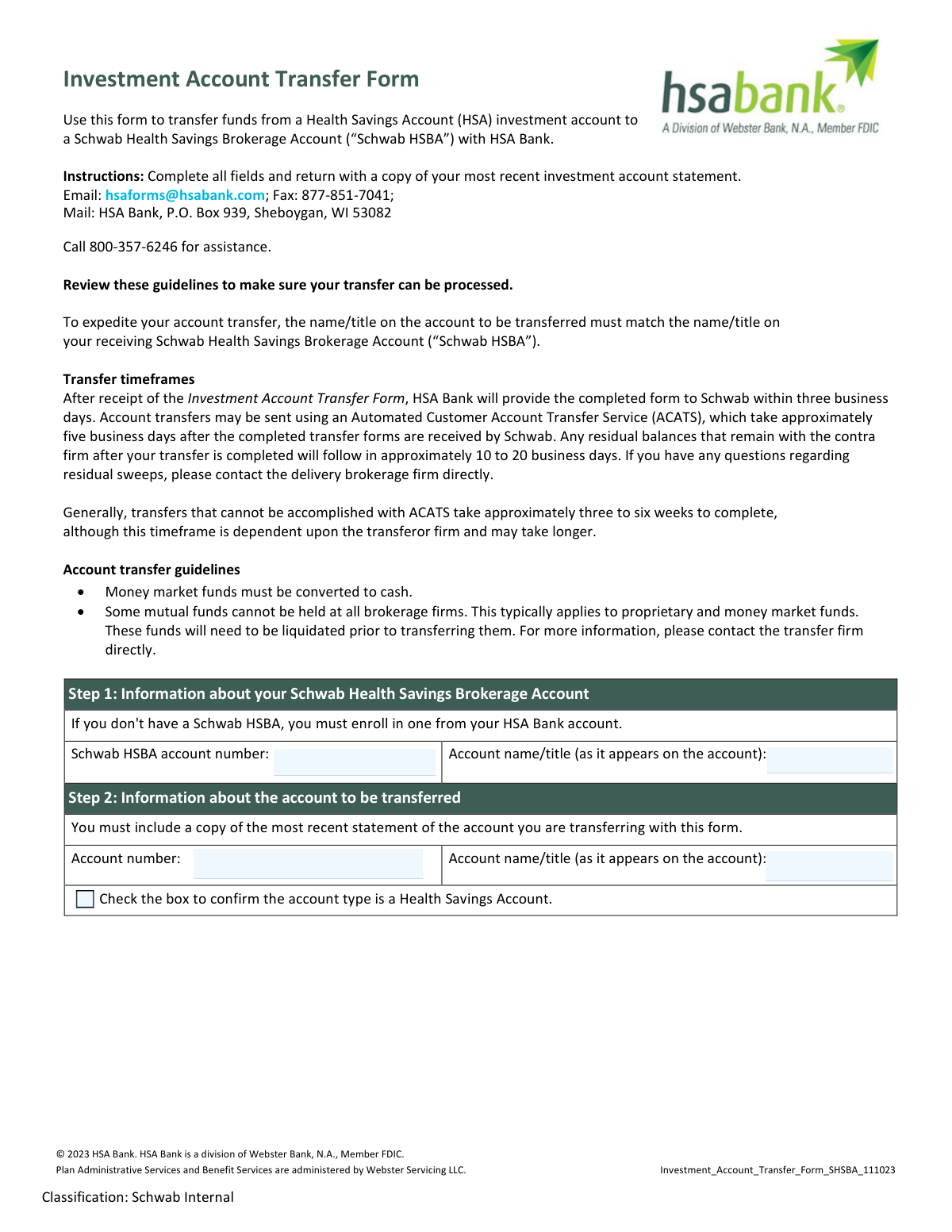
The AI does the filling. You just check it.
No typing into boxes, nothing to install.
What this form asks for
The AI fills all of it, from your answers or your documents.
The AI checks your answers before you download
12 checks built for this form, so a wrong date or a missing answer is caught before anyone else sees it.
This check verifies that a file has been uploaded corresponding to the 'most recent statement of the account you are transferring'. This statement is mandatory for processing the transfer as it is used to verify the assets and account details. If the statement is missing, the form submission will be rejected and the user will be prompted to attach the required document before proceeding.
This validation compares the 'Account name/title' from Step 1 (Schwab HSBA) with the 'Account name/title' from Step 2 (transferring account). The form explicitly states that matching names expedite the transfer. A mismatch could cause significant delays or rejection by the clearing firm, so this check flags any discrepancies to the user for correction.
In Step 3, the user must select either 'This is a total transfer' or 'This is a partial transfer'. This check ensures that exactly one of these options is selected, not both and not neither. This choice is fundamental as it dictates which other sections of the form are required and how the transfer is processed.
This check is dependent on the selection in Step 3. If 'This is a partial transfer' is selected, the system verifies that at least one section within Step 4 (Transfer cash, Transfer assets, Transfer from a mutual fund, or Transfer a CD) is completed. If 'Total transfer' is selected, this check ensures Step 4 is empty to avoid conflicting instructions.
Verifies that the 'Signature' and 'Date' fields in Step 5 are both completed. The signature is the legal authorization for the transfer, and the date establishes when the authorization was given. An unsigned or undated form is legally invalid and cannot be processed.
This validation ensures the checkbox in Step 2, confirming the account to be transferred is a Health Savings Account, is checked. Since this form is specifically for HSA transfers, this confirmation is mandatory. Failure to check this box will halt the submission, as the form is not applicable for other account types.
And 6 more checks
- Valid Partial Cash Transfer Amount
- Partial Asset Row Completeness
- Mutual Fund Action Specificity
- Conditional CD Maturity Date Requirement
- Account Number Presence and Format
- Valid Date Format
Let AI fill out your Investment Account Transfer Form (SHSBA)
No typing. Every field filled in seconds, checked, ready to sign.
How to Fill Out Investment Account Transfer Form (SHSBA) Online for Free in 2026
What the AI walks you through.
- Navigate to Instafill.ai and upload the Investment Account Transfer Form PDF.
- Provide your Schwab Health Savings Brokerage Account (HSBA) number and account name as requested in Step 1 of the form.
- Enter the details of the account you are transferring from, as specified in Step 2. Remember to have a copy of your most recent statement ready to submit with the form.
- Indicate whether you are making a total or partial transfer in Step 3. If it's a partial transfer, provide specific details about the cash amount or assets in Step 4.
- Carefully review the transfer agreement in Step 5 to understand the terms and conditions of the asset transfer.
- Electronically sign and date the form to authorize the transfer.
- Download the completed form from Instafill.ai and submit it, along with your investment account statement, to HSA Bank via email, fax, or mail as instructed.
Common Mistakes in Completing Investment Account Transfer Form (SHSBA)
The ones the AI is built to catch.
Forgetting to Attach the Required Account Statement
Mismatched Account Names Between Institutions
Incorrectly Specifying Fractional Shares
Attempting to Transfer Non-Transferable Assets
Incomplete or Contradictory Transfer Instructions
Missing Signature or Date in Step 5
Using One Form for Multiple Mutual Fund Companies
Submitting the Form Before Opening a Schwab HSBA
Ambiguous Partial Transfer Details for Mutual Funds
Illegible Handwriting on a Printed Form
Frequently Asked Questions About Investment Account Transfer Form (SHSBA)
Is it really free for 7 days?
Can I fill other forms too?
How do I cancel?
How does the AI fill out Investment Account Transfer Form (SHSBA)?
What happens to my information?
How complex is Investment Account Transfer Form (SHSBA) to fill out?
What is the purpose of this Investment Account Transfer Form?
Who needs to fill out this form?
What documents do I need to submit with this form?
How and where do I submit the completed form?
How long will it take for my account transfer to complete?
What is the difference between a 'total transfer' and a 'partial transfer'?
Why do the account names on both accounts need to match?
Can I transfer any type of mutual fund?
What happens to fractional shares of my stocks during the transfer?
How do I transfer a Certificate of Deposit (CD)?
Are there any fees for transferring my account?
Can I use an AI tool to help me fill out this form?
How can I use Instafill.ai to complete this form online?
The PDF version of this form I have isn't fillable. What can I do?
Get your Investment Account Transfer Form (SHSBA) filled out by AI
$0 today. Cancel before Nov 2 and you pay nothing.
Other forms like this one
investment forms: Form 3468, Investment Credit, Form 8960, Net Investment Income Tax, How to Transfer Assets from Morgan Stanley to Fidelity Investments (Fidelity Stock Plan Services Guide), Fidelity Investments Transfer/Rollover/Exchange Form, Fidelity Investments Standing Transfer Instructions Form, One-Time Withdrawal – IRA, Fidelity Investments, Fidelity Investments Transfer/Rollover Form, Special Tax Notice: Your Rollover Options - Fidelity Investments, Fidelity Investment-Only (Non-Prototype) Retirement Account Application, Fidelity Investments® Beneficiary Distribution Form, Fidelity Investments Distribution Form, One-Time Withdrawal – Investment-Only (Non-Prototype) Retirement Account, Fidelity Investments Withdrawal — One-Time, Fidelity Investments Withdrawals—529 College Savings Plan, Fidelity Investments Change of Account Ownership — Mutual Fund Only Accounts, Fidelity Investments 403(b) Beneficiary Designation, Fidelity Investments Qualified Plan Beneficiary Designation, Fidelity Investments 403(b)/401(a) Beneficiary Designation, Fidelity Investments Qualified Plan Beneficiary Designation, Fidelity Investments Earnings Automatic Withdrawal Plan — IRA
bank account forms: Authorization to transfer funds from a bank retirement account, Corestone® Electronic Only Account Application, Individual Transfer on Death Account Agreement (03-25)
investment account forms: Fidelity Investment-Only (Non-Prototype) Retirement Account Application, One-Time Withdrawal – Investment-Only (Non-Prototype) Retirement Account, Fidelity Investments Change of Account Ownership — Mutual Fund Only Accounts, Fidelity Investment-Only (Non-Prototype) Retirement Account Application, Voya Investment Management Traditional, Roth, Rollover, and SEP Individual Retirement Account (IRA) Application and Adoption Agreement, Voya Investment Management Account Maintenance Form (Includes Substitute Form W-9), U.S. Bancorp Investments Account Transfer Form, Fidelity Investments Account Application/Enrollment Form and Beneficiary Designation, Fidelity Investments 403(b) Custodial Account Application, New York Life Investments Funds Individual Retirement Account Application and NYLIFE Securities LLC Investor Profile, 529 Plan Account Application, 529 Plan Account Transfer Form, Account Application for Merrill West Virginia Residents - The Hartford SMART529, Account Opening Form for Professional Clients (Institutions, Companies, Intermediaries and Eligible Counterparties), Action Required Letter of Authorization - Merrill Lynch, AwardChoice Limited Individual Investor Account Form, Beneficiary Designation Form - Merrill Lynch, BlackRock IRA Rollover Certification Form, BlackRock New Account Application For Non-Retirement Accounts, Bolton Global Capital Journal Request (Form AS0020)
investment transfer forms: How to Transfer Assets from Morgan Stanley to Fidelity Investments (Fidelity Stock Plan Services Guide), Fidelity Investments Transfer/Rollover/Exchange Form, Fidelity Investments Standing Transfer Instructions Form, Fidelity Investments Transfer/Rollover Form, TIAA 1035 Exchange Authorization to Alternate Investment Company Transfer Payout Annuity for ATRA, U.S. Bancorp Investments Account Transfer Form, Computershare Alternative Investment Product Transfer Request, Pershing LLC Account Transfer Form, Thrivent Funds Transfer of Assets, Form MF11502, Electronic Funds Transfer (EFT) Authorization, Fidelity Transfer/Rollover/Exchange Form, Fidelity Transfer/Rollover/Exchange Form
HSA forms: Form 1099-SA, Distributions from HSA/MSA, Transfer Due to Divorce — IRA/HSA/529, Group Transfer Form Fidelity Health Savings Account (HSA), Fidelity Beneficiaries — IRA /HSA, IRA/HSA Beneficiary Designation, Schwab Health Savings Brokerage Account (HSBA) to HSA Invest Choice Account Transfer Form, Health Savings Account (HSA) Transfer Request, Form 8889, Health Savings Accounts (HSAs), Form 1099-SA, Distributions From an HSA, Archer MSA, or Medicare Advantage MSA, Form 8889, Health Savings Accounts
account transfer forms: Fidelity Funds Account Transfer of Assets Form, Group Transfer Form Fidelity Health Savings Account (HSA), Form APP13017-29, Transfer Your Account to Schwab, Transfer of Assets Out - Partial Account or Charitable Gift Transfers, Charles Schwab & Co., Inc. Account Transfer Form, Rollover/Transfer Request — ABLE Account, Schwab Health Savings Brokerage Account (HSBA) to HSA Invest Choice Account Transfer Form, Retirement Transfer Between Existing Vanguard Accounts, The Vanguard 529 College Savings Plan Transfer Due to Death of Account Owner Form, Vanguard Brokerage Account CREST Transfer Form, Account Transfer Authorization (ACATS) Form, AbbVie Savings Plan 401(k) Account Transfer Notice, Transfer Between Existing Fidelity Accounts, Rollover/Transfer Request — ABLE Account, TIAA Brokerage Incoming Account Transfer Form, TIAA Brokerage Joint Transfer on Death Account Agreement, TIAA Brokerage Incoming Managed Account Transfer Form (F11319), Health Savings Account (HSA) Transfer Request, Client Account Transfer Form to Merrill Lynch, Pierce, Fenner & Smith Incorporated, Authorization to transfer funds from a bank retirement account
transfer forms: Form REG 227, Application for Replacement or Transfer of Title, City of Harvey Real Estate Transfer Declaration & Application (with Certificate for Exemption), DBPR ABT-6002 – Application for Transfer of Ownership of an Alcoholic Beverage License, DBPR ABT-6002, Division of Alcoholic Beverages and Tobacco Application for Transfer of Ownership of an Alcoholic Beverage License, Request for Transfer of Records (Adelaide Health Care) – AHC-0013-05-PS (Version 2), DBPR Form ABT-6002, Division of Alcoholic Beverages and Tobacco Application for Transfer of Ownership of an Alcoholic Beverage License, Pfändungs- und Überweisungsbeschluss (Garnishment and Transfer Order) – German Civil Enforcement Court Form, Fidelity Funds Account Transfer of Assets Form, Fidelity Stock Plan Services (SPS) Transfer Request Form, How to Transfer Assets from Morgan Stanley to Fidelity Investments (Fidelity Stock Plan Services Guide), Transfer Due to Divorce — IRA/HSA/529, Fidelity Investments Transfer/Rollover/Exchange Form, Fidelity Investments Standing Transfer Instructions Form, Fidelity Investments Transfer/Rollover Form, Group Transfer Form Fidelity Health Savings Account (HSA), Plan–to-Plan Transfer, Plan Exchange, or Service Credit Authorization Form, Beneficiaries — Nonretirement Transfer on Death, Transfer Shares as a Gift — Nonretirement, Form APP13017-29, Transfer Your Account to Schwab, Transfer of Assets Out - Partial Account or Charitable Gift Transfers
bank transfer forms: Vanguard Electronic Bank Transfer Form, Institutional Bank Transfer Form - Vanguard Workplace Solutions, Authorization to transfer funds from a bank retirement account, Merrill Funds Transfer Service Enrollment Form
UK investment forms: Triple Point Venture VCT plc | Investor Application Form, Form 3468, Investment Credit, Form 8960, Net Investment Income Tax, How to Transfer Assets from Morgan Stanley to Fidelity Investments (Fidelity Stock Plan Services Guide), Fidelity Investments Transfer/Rollover/Exchange Form, Fidelity Investments Standing Transfer Instructions Form, One-Time Withdrawal – IRA, Fidelity Investments, Fidelity Investments Transfer/Rollover Form, Special Tax Notice: Your Rollover Options - Fidelity Investments, Fidelity Investment-Only (Non-Prototype) Retirement Account Application, Fidelity Investments® Beneficiary Distribution Form, Fidelity Investments Distribution Form, One-Time Withdrawal – Investment-Only (Non-Prototype) Retirement Account, Fidelity Investments Withdrawal — One-Time, Fidelity Investments Withdrawals—529 College Savings Plan, Fidelity Investments Change of Account Ownership — Mutual Fund Only Accounts, Fidelity Investments 403(b) Beneficiary Designation, Fidelity Investments Qualified Plan Beneficiary Designation, Fidelity Investments 403(b)/401(a) Beneficiary Designation, Fidelity Investments Qualified Plan Beneficiary Designation
Let AI fill out your Investment Account Transfer Form (SHSBA)
Your trial starts once a card is added. You pay nothing before Nov 2.
Our AI already knows this form, all 46 fields of it. Skip the typing: tell it about yourself, or upload what you have, and it fills the whole form in seconds.
- AI fills every field on all 3 pages, checkboxes included
- No typing into boxes: answer a few questions, or upload a document you already have, an old copy of this form, a photo of a document
- The AI checks the answers; you review and change anything before you download
- Download the finished PDF, print it, or sign it online
- Encrypted, and never used to train AI
Cancel before Nov 2 and you pay nothing.
A card is needed to start the trial. Cancel in two clicks from your account.
Terms · Privacy