
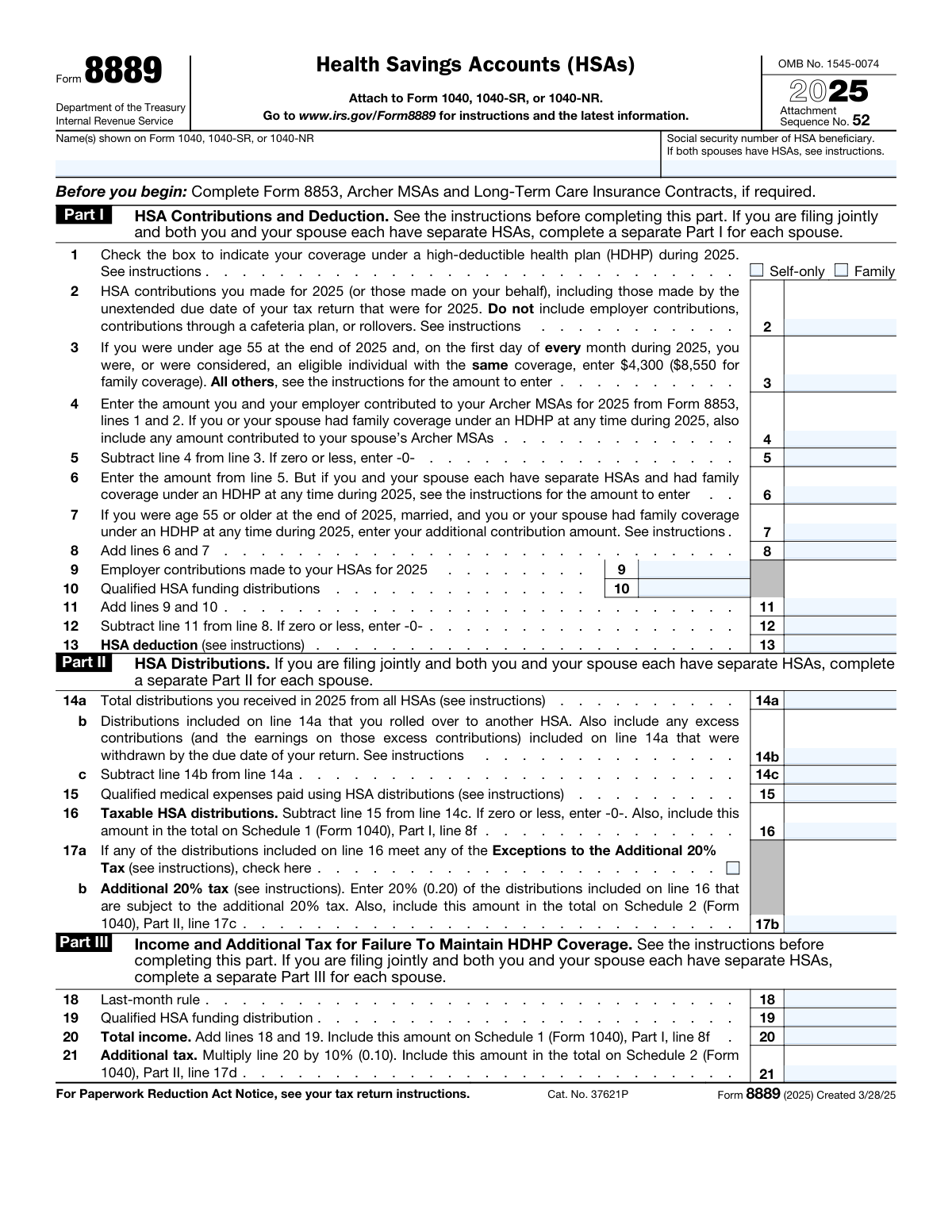
Yes! You can use AI to fill out Form 8889, Health Savings Accounts
Don't type 27 fields by hand. Tell our AI about yourself, or upload a document you already have, and it fills every field in seconds. You check it, then download, print or sign.
The AI does the filling. You just check it.
No typing into boxes, nothing to install.
What this form asks for
The AI fills all of it, from your answers or your documents.
The AI checks your answers before you download
15 checks built for this form, so a wrong date or a missing answer is caught before anyone else sees it.
The AI ensures that the personal information filled out on the Health Savings Accounts (HSAs) form aligns with the individual's official tax records and identification documents. This includes verifying the accuracy of the name, Social Security Number (SSN), and address. The AI cross-references this data with government databases to prevent discrepancies that could lead to processing delays or rejections. It also checks for any typographical errors that might have been made during the form completion process.
The AI confirms that the contribution details entered for the HSA are accurate and within the legal limits established by the Internal Revenue Service (IRS). It checks the reported amounts against the current year's contribution limits for both individual and family coverage. The AI also takes into account catch-up contributions for individuals aged 55 and older, ensuring that the total contributions do not surpass the maximum allowed. This validation is crucial to avoid excess contributions that could result in penalties.
The AI verifies that the distribution information provided for the HSA is complete and that it correctly specifies the types of medical expenses covered. It checks that the distributions are for qualified medical expenses as defined by the IRS and that all necessary details, such as dates and amounts, are accurately reported. The AI also ensures that the form includes proper documentation or references for the expenses, which is essential for tax purposes and for maintaining the tax-advantaged status of the HSA.
The AI checks the eligibility criteria to ensure that the individual is qualified to make contributions to an HSA. This includes verifying that the individual is covered under a High Deductible Health Plan (HDHP) as required by the IRS. The AI examines insurance coverage details to confirm that the plan meets the minimum deductible and out-of-pocket expense thresholds for HDHPs. Additionally, it ensures that the individual has no other health coverage that disqualifies them from contributing to an HSA, such as being enrolled in Medicare.
The AI calculates the maximum HSA contribution limit for the individual based on several factors, including age, coverage type (individual or family), and the number of months the individual was eligible for an HSA during the tax year. It prorates the contribution limit for individuals who were not eligible for the entire year and applies additional catch-up contributions for those aged 55 and older. This calculation ensures that the individual does not exceed the legal contribution limits, which could result in tax penalties.
The AI ensures that all employer contributions to the Health Savings Account (HSA) are accurately reported on the individual's tax forms. It verifies that these contributions are included in the individual's income if necessary, according to the Internal Revenue Service (IRS) guidelines. The AI cross-references the reported amounts with the employer's records to maintain accuracy. It also checks for adherence to the contribution limits set for the tax year in question.
And 9 more checks
- Determines if any additional taxes are applicable
- Identifies if the individual has maintained HDHP coverage
- Evaluates the necessity to file an amended return
- Confirms that Form 8889 is filed
- Checks for the accurate calculation of the deduction for HSA contributions on Part I of Form 8889.
- Verifies the correct reporting of distributions on Part II of Form 8889 and whether they are used for qualified medical expenses.
- Ensures that the form includes any required supporting documentation or explanations for distributions or contributions.
- Validates that the form is signed and dated, indicating that the information provided is accurate to the best of the individual's knowledge.
- Confirms compliance with IRS Publication 969 regarding HSAs and cross-references the form's instructions for specific line items.
Let AI fill out your Form 8889
No typing. Every field filled in seconds, checked, ready to sign.
How to Fill Out Form 8889 Online for Free in 2026
What the AI walks you through.
- Visit instafill.ai site and select Form 8889.
- Enter your name and social security number.
- Fill in HSA contributions and deductions.
- Complete HSA distributions section.
- Sign and date the form electronically.
- Check for accuracy and submit form.
Common Mistakes in Completing Form 8889
The ones the AI is built to catch.
Neglecting to Report Employer Contributions in Part I
Exceeding the Contribution Limit in Part I
Failing to Report Distributions in Part II
Reporting Incorrect Distribution Amounts in Part II
Failing to Calculate the Excess Contribution Penalty in Part III
Neglecting to Maintain HDHP Coverage and Reporting It in Part III
Filing Form 8889 Without Necessary Documentation
Lack of Understanding of HSA Rules and Eligibility Requirements
Frequently Asked Questions About Form 8889
Is it really free for 7 days?
Can I fill other forms too?
How do I cancel?
How does the AI fill out Form 8889?
What happens to my information?
How complex is Form 8889 to fill out?
What is a Health Savings Account (HSA) and who is eligible to have one?
What is the maximum contribution limit for an HSA in 2023?
What types of distributions can be made from an HSA?
What is the deadline for making contributions to an HSA for the current tax year?
What happens if you exceed the contribution limit for an HSA?
What is the last-month rule for HSAs?
What is the penalty for failing to maintain HDHP coverage?
What are the exceptions to the additional 20% tax on HSA distributions?
Can HSA funds be rolled over to another HSA?
Can HSA funds be used to pay for health insurance premiums?
Get your Form 8889 filled out by AI
$0 today. Cancel before Nov 1 and you pay nothing.
Other forms like this one
HSA forms: Form 1099-SA, Distributions from HSA/MSA, Transfer Due to Divorce — IRA/HSA/529, Group Transfer Form Fidelity Health Savings Account (HSA), Fidelity Beneficiaries — IRA /HSA, IRA/HSA Beneficiary Designation, HSA Bank Investment Account Transfer Form, Schwab Health Savings Brokerage Account (HSBA) to HSA Invest Choice Account Transfer Form, Health Savings Account (HSA) Transfer Request, Form 8889, Health Savings Accounts (HSAs), Form 1099-SA, Distributions From an HSA, Archer MSA, or Medicare Advantage MSA
health savings forms: Group Transfer Form Fidelity Health Savings Account (HSA), Schwab Health Savings Brokerage Account (HSBA) to HSA Invest Choice Account Transfer Form, Health Savings Account (HSA) Transfer Request, Form 8889, Health Savings Accounts (HSAs), New York State Department of Health Medicare Savings Program Application
health forms: Form 1095-A, Health Insurance Marketplace Statement, Form WH-380-E, Certification of Health Care Provider, Form 7206, Self-Employed Health Ins. Ded., Form 8885, Health Coverage Tax Credit, Form WH-380-F, Certification of Health Care Provider, Form 1095-C, Employer-Provided Health Insurance Offer and Coverage, Form 1095-B, Health Coverage, Form I-905, Application for Authorization to Issue Certification for Health Care Workers, Form BHVH, Outpatient Behavioral Health – ABA Treatment Request, Form SHA, Separation Health Assessment, DHS-6696-ENG, Minnesota Health Care Programs Application (MNsure/DHS), Geisinger Health Plan Behavioral Health Professional Services Questionnaire, Priority Health Small Group Renewal Decision Form, Form CH-006: PA-BH-Res-PCS, Oregon Behavioral Health Support Program Plan of Care Authorization (Plan of Care Request for Behavioral Health Residential or Personal Care Services), Form 7206 (2025), Self-Employed Health Insurance Deduction, HIPAA Authorization Form, Authorization for the Release of Protected Health Information, Prior Authorization (PA) Request Form – Adult Palliative Care (Alameda Alliance for Health), Medicare Enrolment Application (Australia) – Enrol in Medicare, Re-enrol/Extend Eligibility, Enrol a Newborn, and Register for My Health Record, Alameda Alliance for Health Prior Authorization (PA) Request Form – Adult Palliative Care, Health Assessment – Ontario Health atHome (Fixing Long-Term Care Act, 2021) (Form 4768-69E)
savings account forms: Group Transfer Form Fidelity Health Savings Account (HSA), Schwab Health Savings Brokerage Account (HSBA) to HSA Invest Choice Account Transfer Form, The Vanguard 529 College Savings Plan Transfer Due to Death of Account Owner Form, AbbVie Savings Plan 401(k) Account Transfer Notice, Health Savings Account (HSA) Transfer Request, Form 8889, Health Savings Accounts (HSAs)
health savings account forms: Health Savings Account (HSA) Transfer Request, Group Transfer Form Fidelity Health Savings Account (HSA), Schwab Health Savings Brokerage Account (HSBA) to HSA Invest Choice Account Transfer Form, Form 8889, Health Savings Accounts (HSAs)
Let AI fill out your Form 8889
Your trial starts once a card is added. You pay nothing before Nov 1.
Our AI already knows this form, all 27 fields of it. Skip the typing: tell it about yourself, or upload what you have, and it fills the whole form in seconds.
- AI fills every field on the form, checkboxes included
- No typing into boxes: answer a few questions, or upload a document you already have, an old copy of this form, a photo of a document
- The AI checks the answers; you review and change anything before you download
- Download the finished PDF, print it, or sign it online
- Encrypted, and never used to train AI
Cancel before Nov 1 and you pay nothing.
A card is needed to start the trial. Cancel in two clicks from your account.
Terms · Privacy