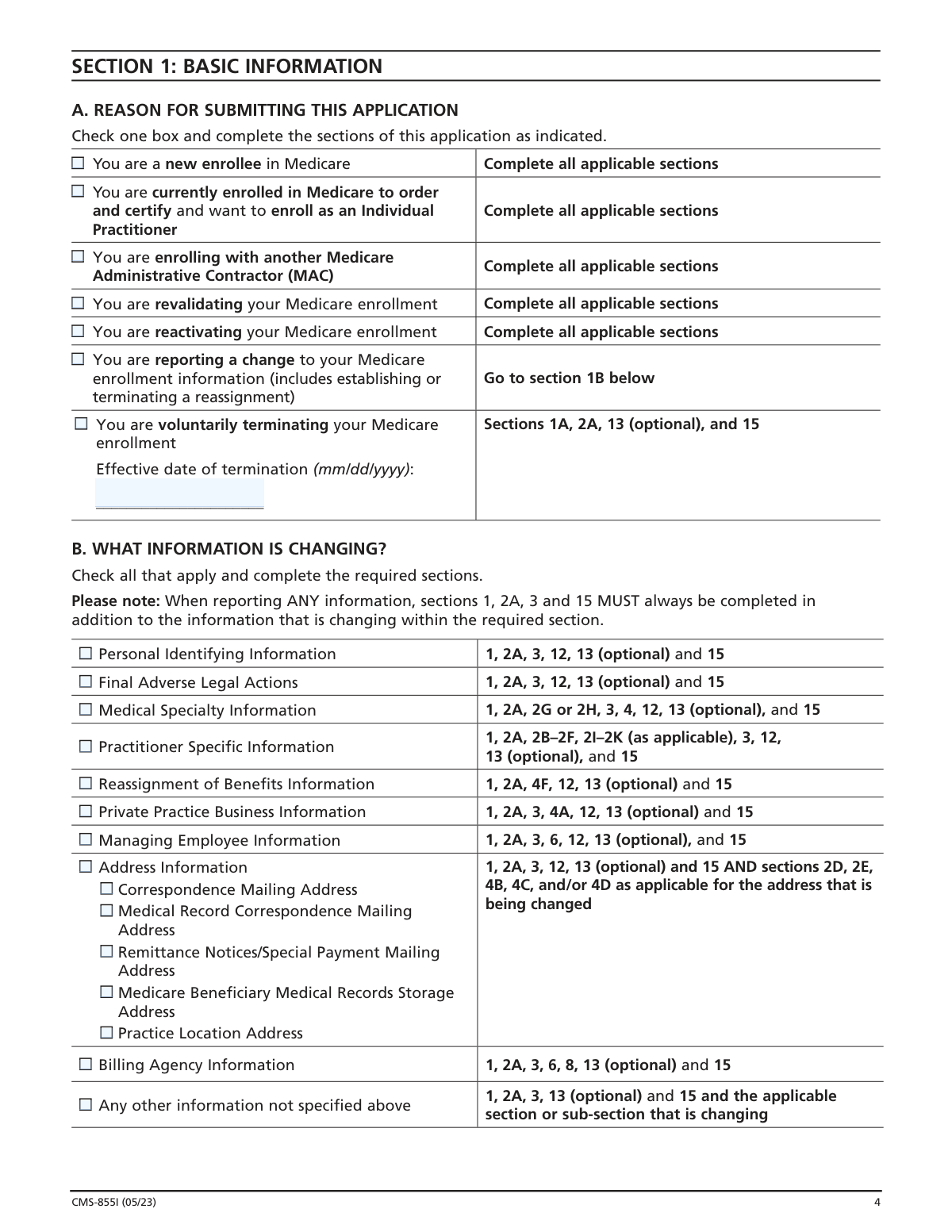
Yes! You can use AI to fill out Form CMS-855I, Medicare Enrollment Application for Physicians and Non-Physician Practitioners
Form CMS-855I is a Centers for Medicare & Medicaid Services (CMS) enrollment application used by physicians and non-physician practitioners—such as nurse practitioners, physician assistants, clinical social workers, and physical therapists—to enroll in the Medicare program, make changes to existing enrollment information, reactivate billing privileges, or voluntarily terminate enrollment. The form collects detailed information including personal identifying data, medical specialties, practice locations, adverse legal history, managing employee information, and billing agency details, and must be submitted with supporting documentation to the appropriate Medicare fee-for-service contractor. Accurate completion is critical, as falsifying information can result in criminal, civil, or administrative penalties including exclusion from the Medicare program. Today, this complex multi-section form can be filled out quickly and accurately using AI-powered services like Instafill.ai, which can also convert non-fillable PDF versions into interactive fillable forms.
Our AI automatically handles information lookup, data retrieval, formatting, and form filling.
It takes less than a minute to fill out CMS-855I using our AI form filling.
Securely upload your data. Information is encrypted in transit and deleted immediately after the form is filled out.
Form specifications
| Form name: | Form CMS-855I, Medicare Enrollment Application for Physicians and Non-Physician Practitioners |
| Number of pages: | 1 |
| Language: | English |
| Categories: | CAR forms, healthcare provider forms, practitioner forms, CMS forms, physician forms, enrollment forms, L.A. Care forms, enrollment application forms, Medicare forms |
Instafill Demo: How to fill out PDF forms in seconds with AI
How to Fill Out CMS-855I Online for Free in 2026
Are you looking to fill out a CMS-855I form online quickly and accurately? Instafill.ai offers the #1 AI-powered PDF filling software of 2026, allowing you to complete your CMS-855I form in just 37 seconds or less.
Follow these steps to fill out your CMS-855I form online using Instafill.ai:
- 1 Navigate to Instafill.ai and upload the CMS-855I PDF or select it from the available form library to begin filling it out online.
- 2 Complete Section 1 (Basic Information) by selecting your reason for submission—such as new enrollment, reactivation, change of information, or voluntary termination—and enter your Medicare Identification Number and NPI as applicable.
- 3 Fill in Section 2 (Identifying Information) with your personal details including name, date of birth, Social Security Number, gender, correspondence address, medical school, license and certification information, and your applicable physician or non-physician practitioner specialty.
- 4 Complete Section 3 (Adverse Legal Actions/Convictions) by honestly disclosing any convictions, exclusions, revocations, or suspensions under your current or former name or business identity, attaching relevant documentation as required.
- 5 Fill out Section 4 (Practice Location Information) with details about your practice locations, group affiliations, payment/remittance address, medical record storage locations, and any unique circumstances regarding how you render services.
- 6 Complete Sections 6 and 8 as applicable, providing information about managing employees and any billing agency you use to submit Medicare claims on your behalf.
- 7 Review Section 15 (Certification Statement), gather all required supporting documents listed in Section 17, sign and date the application with an original ink signature, and submit the completed package to your designated Medicare fee-for-service contractor.
Our AI-powered system ensures each field is filled out correctly, reducing errors and saving you time.
Why Choose Instafill.ai for Your Fillable CMS-855I Form?
Speed
Complete your CMS-855I in as little as 37 seconds.
Up-to-Date
Always use the latest 2026 CMS-855I form version.
Cost-effective
No need to hire expensive lawyers.
Accuracy
Our AI performs 10 compliance checks to ensure your form is error-free.
Security
Your personal information is protected with bank-level encryption.
Frequently Asked Questions About Form CMS-855I
Form CMS-855I is the Medicare Enrollment Application for Physicians and Non-Physician Practitioners. It must be completed by all physicians and eligible non-physician practitioners (such as nurse practitioners, physician assistants, clinical social workers, audiologists, and others) who want to bill Medicare for their services, whether in a private or group setting.
Non-physician practitioners who must complete this form include anesthesiology assistants, audiologists, certified nurse midwives, certified registered nurse anesthetists, clinical nurse specialists, clinical social workers, mass immunization roster billers, nurse practitioners, occupational therapists in private practice, physical therapists in private practice, physician assistants, clinical psychologists, psychologists billing independently, and registered dietitians or nutrition professionals.
Yes, you must obtain a National Provider Identifier (NPI) before enrolling in Medicare or submitting any changes to your existing Medicare enrollment information. The NPI is assigned by the National Plan and Provider Enumeration System (NPPES), and you can apply online at https://NPPES.cms.hhs.gov. Applying for an NPI is a separate process from Medicare enrollment.
You must mail your completed application to the Medicare fee-for-service contractor (also called a carrier or Medicare administrative contractor) that services your State. To find the correct mailing address, visit www.cms.hhs.gov/MedicareProviderSupEnroll. Do not mail your application to the CMS address listed in the Paperwork Reduction Act notice, as this will significantly delay processing.
All applicants must submit copies of professional school degrees or certificates, professional licenses, Federal/State/local business licenses or certifications, IRS confirmation of your Tax Identification Number (if applicable), and a completed Form CMS-588 (Electronic Funds Transfer Authorization). Additional documents may be required depending on your specialty, such as lease agreements for PT/OT services, CLIA certificates, adverse legal action documentation, Form CMS-460, and/or Form CMS-855R.
Physician assistants should only complete Sections 1, 2, 3, 13, 15, and 17, and must report all employers in Section 2E. Physician assistants do not complete Section 4 of the application. If terminating enrollment, physician assistants must complete Sections 1A, 2F, 13, and 15.
If you render services in a group or organization setting, you must complete a separate CMS-855R (Individual Reassignment of Medicare Benefits) for each organization to which you reassign your benefits. If you reassign all of your benefits to a group, you can complete Sections 1–4 and then skip to Sections 14 through 17 of the CMS-855I application.
Yes, all applicable adverse legal actions must be reported regardless of whether records were expunged or any appeals are pending. This includes felony and misdemeanor convictions, license revocations or suspensions, exclusions from Federal or State health care programs, and Medicare payment suspensions or revocations. You must attach copies of all adverse legal action documentation and any resolutions.
As an individual practitioner, you are the only person who can sign the application — the authority to sign cannot be delegated to anyone else. All signatures must be original and signed in ink; stamped, faxed, or copied signatures will not be accepted. Applications with non-original signatures will not be processed.
Deliberately falsifying information on this application can result in serious criminal, civil, and administrative penalties. These include fines up to $250,000 and imprisonment up to 5 years under 18 U.S.C. § 1001, civil penalties of $5,000–$10,000 per violation plus triple damages under the False Claims Act, and exclusion from the Medicare program. Providing false information may also result in denial or revocation of your Medicare billing privileges.
If you need to change your enrollment information (such as adding a practice location or updating personal details), check the 'Change of Information' option in Section 1 and complete only the sections relevant to the change. Changes must be reported to the fee-for-service contractor in accordance with 42 C.F.R. § 424.520(b). If you are not currently receiving payments via Electronic Funds Transfer (EFT), you will also need to submit a CMS-588 form.
Yes, AI-powered services like Instafill.ai can help you accurately auto-fill the CMS-855I form fields, saving you significant time and reducing errors. These tools guide you through each section and ensure all required information is entered correctly before you submit.
You can visit Instafill.ai, upload your CMS-855I PDF, and use the AI-powered tool to fill in all required fields interactively online. The service helps you complete each section accurately, including personal information, practice location details, specialty selection, and supporting document checklists, before you print and submit the form with your original signature.
If you have a flat, non-fillable version of the CMS-855I PDF, Instafill.ai can convert it into an interactive fillable form so you can complete it digitally. This eliminates the need to print and handwrite all information, making the process faster and more accurate.
CMS estimates the form takes approximately 4 hours to complete. To avoid delays, make sure all required sections are filled out, your NPI is entered in all applicable sections, all dates are included, the correspondence address in Section 2 is correct, and all required supporting documentation is attached before mailing to your designated fee-for-service contractor.
Compliance CMS-855I
Validation Checks by Instafill.ai
1
NPI Format and Presence Validation
Validates that the National Provider Identifier (NPI) is provided and conforms to the standard 10-digit numeric format assigned by NPPES. The NPI is a mandatory unique health identifier required before enrolling in Medicare or submitting any changes to existing enrollment information. If the NPI is missing or improperly formatted, the application cannot be processed, as Medicare requires this identifier to link billing privileges to the correct provider.
2
Social Security Number Format and Consistency Validation
Validates that the Social Security Number (SSN) in Section 2A is present, follows the standard 9-digit format (XXX-XX-XXXX), and is consistent with the applicant's name and date of birth as recorded on their Social Security record. The SSN is a required field used to verify the practitioner's identity and prevent fraudulent enrollment. If the SSN does not match Social Security records or is improperly formatted, the application will be rejected and enrollment delayed.
3
Date of Birth Format and Logical Range Validation
Validates that the Date of Birth field in Section 2A is entered in the required mm/dd/yyyy format and represents a plausible date for a practicing medical professional (e.g., the applicant must be at least 18 years old and the date cannot be in the future). This field must also align with Social Security records as stated in the form instructions. An invalid or implausible date of birth will cause identity verification to fail and delay or prevent enrollment.
4
License Effective and Expiration Date Logical Consistency Validation
Validates that the license Effective Date precedes the Expiration/Renewal Date in Section 2A, both dates are in the required mm/dd/yyyy format, and the license is not currently expired at the time of submission. A valid, non-expired professional license is a prerequisite for Medicare enrollment, as practitioners must meet all Federal and State licensing requirements for their specialty. If the expiration date has passed or the dates are logically inconsistent, the application should be flagged for review or rejection.
5
Reason for Application Selection Validation
Validates that exactly one reason for application has been selected in Section 1A (e.g., new enrollee, enrolling with another contractor, reactivating, voluntarily terminating, changing information, or revalidating). Selecting no reason or multiple conflicting reasons makes it impossible to determine which required sections must be completed and which billing number information applies. If this field is blank or contradictory, the application cannot be routed or processed correctly.
6
Required Sections Completion Based on Application Reason Validation
Validates that all sections required for the selected reason for application in Section 1A have been completed. For example, a new enrollee must complete all sections, while a voluntary termination requires only Sections 1A, 13, and 15 (with additional sections for physician assistants). Incomplete required sections will result in processing delays or outright rejection of the application by the fee-for-service contractor.
7
Voluntary Termination Effective Date Presence and Format Validation
Validates that when 'Voluntarily Terminating' is selected in Section 1A, an Effective Date of Termination is provided in mm/dd/yyyy format and is not a past date that would be unreasonably retroactive. The termination date is critical for stopping Medicare billing privileges on the correct date and preventing improper payments. If this date is missing or improperly formatted, the termination cannot be processed and the provider may continue to be billed incorrectly.
8
Specialty Selection Completeness and Exclusivity Validation
Validates that exactly one primary specialty (P) is designated in Section 2D for physician applicants, and that non-physician practitioners select only one specialty type from the non-physician list. The form explicitly states that only one primary specialty may be selected for physicians, and non-physician practitioners who wish to enroll under multiple specialty types must submit separate CMS-855I applications for each. Selecting no specialty, multiple primary specialties, or an invalid combination will result in the application being returned for correction.
9
Practice Location Address Format and P.O. Box Prohibition Validation
Validates that the Practice Location Street Address in Section 4C is a specific street address as recorded by the United States Postal Service and does not contain a P.O. Box. The form explicitly prohibits P.O. Boxes as practice location addresses, as Medicare requires a verifiable physical location where services are rendered. If a P.O. Box is entered or the address cannot be validated as a real street address, the application will be rejected or returned for correction.
10
Adverse Legal Action Disclosure Completeness Validation
Validates that if 'YES' is selected for any adverse legal action question in Section 3, all required detail fields are completed, including the specific adverse legal action, the date it occurred, the Federal or State agency or court that imposed it, and the resolution. The form requires that all adverse legal actions be reported regardless of expungement or pending appeals, and supporting documentation must be attached. Incomplete adverse legal action disclosures can result in denial of enrollment or, if intentionally omitted, criminal and civil penalties under 18 U.S.C. § 1001.
11
Certification Statement Signature and Date Validation
Validates that the Certification Statement in Section 15 contains an original ink signature and a date in mm/dd/yyyy format, and that the signature matches the practitioner's name as provided in Section 2A. The form explicitly states that stamped, faxed, or copied signatures will not be accepted, and that only the individual practitioner may sign — this authority cannot be delegated. An unsigned, undated, or non-original signature will result in the application not being processed.
12
EIN and SSN Mutual Exclusivity Validation for Sole Proprietors
Validates that a sole proprietor applicant has not entered both an Employer Identification Number (EIN) in Section 4F and indicated that payments should be made to their SSN, as the form explicitly states that only one identifier (either SSN or EIN) can be used to bill Medicare. Additionally, if an EIN is provided, the applicant must meet all three qualifying conditions: being a sole proprietor, not reassigning all Medicare payments, and wanting payments made to the EIN. Violating this mutual exclusivity rule will cause payment routing errors and require resubmission.
13
Physician Assistant Employer Information Completeness Validation
Validates that physician assistant applicants completing Section 2E have provided the employer's name, effective date of employment, and at minimum one of either the employer's Medicare Identification Number or NPI for each employment arrangement listed. Physician assistants have a unique enrollment pathway where their services are reimbursed through their employer, making complete employer information essential for proper claims processing. Missing or incomplete employer information will prevent the fee-for-service contractor from correctly linking the physician assistant's billing to the appropriate employer.
14
Telephone Number Format Validation
Validates that all telephone number fields throughout the application (Sections 2B, 4C, 8, and 13) are entered in a standard 10-digit U.S. phone number format (e.g., XXX-XXX-XXXX or (XXX) XXX-XXXX) and do not contain letters or special characters other than standard separators. Valid contact phone numbers are essential for the fee-for-service contractor to reach the applicant or contact person during the enrollment review process. An improperly formatted or missing required telephone number will impede communication and may delay processing.
15
Medical Record Storage Address Physical Location Validation
Validates that any medical record storage facility address provided in Section 4G is a physical street address and not a P.O. Box or drop box, as explicitly prohibited by the form. The storage location must be a real, verifiable physical address where both current and former patient records are maintained, and the records must belong to the applicant rather than another supplier. Providing a P.O. Box or an address that cannot be verified as a physical location will result in the application being returned for correction, as CMS requires access to patient records for audit and compliance purposes.
16
Professional Corporation Tax Identification Number and Legal Business Name Consistency Validation
Validates that when Section 4A is completed for a professional corporation, professional association, or LLC, the Legal Business Name and Tax Identification Number (TIN) match exactly as reported to the Internal Revenue Service, and that IRS confirmation documentation (e.g., CP575) is indicated as attached in Section 17. The TIN must be in the correct format (XX-XXXXXXX for an EIN) and cannot be a personal SSN unless the applicant is a sole proprietor using an EIN. A mismatch between the legal business name and TIN will cause payment routing failures and may trigger fraud review.
Common Mistakes in Completing CMS-855I
Many applicants fail to verify on page 1 whether the CMS-855I is the correct form for their supplier type before completing it. Non-physician practitioners whose specialty is not listed in the eligible types (e.g., certain therapists or suppliers) may submit this form incorrectly, causing significant processing delays or outright rejection. Always review the complete list of eligible provider types on page 1 and contact your designated fee-for-service contractor if your specialty is not listed. Tools like Instafill.ai can help guide you to the correct form based on your provider type before you begin filling it out.
A very common mistake is submitting the CMS-855I without first obtaining a National Provider Identifier (NPI) from NPPES. The NPI is required prior to enrolling in Medicare or making changes to existing enrollment information, and the application cannot be processed without it. Applicants often confuse the NPI application process with the Medicare enrollment process, not realizing they are entirely separate steps. Apply for your NPI at https://NPPES.cms.hhs.gov well in advance of submitting this form to avoid delays.
Section 2A requires that your name, date of birth, and Social Security Number exactly match the information on your Social Security record, yet applicants frequently enter nicknames, maiden names, or slightly different name spellings. Even minor discrepancies can cause the application to be rejected or flagged for additional verification. Always use your legal name exactly as it appears on your Social Security card, and double-check your date of birth format (mm/dd/yyyy). AI-powered tools like Instafill.ai can cross-validate name and SSN fields to flag potential mismatches before submission.
The form consistently requires dates in mm/dd/yyyy format across many fields, including date of birth, license effective/expiration dates, incorporation dates, and the date you first saw a Medicare patient. Applicants frequently enter dates in other formats (e.g., mm/yyyy, yyyy-mm-dd, or written out as 'January 5, 2020'), which can cause processing errors or rejection. Review every date field carefully and ensure all dates conform to the mm/dd/yyyy format. Instafill.ai automatically formats dates correctly, eliminating this common source of error.
Section 4C explicitly states that each practice location must be a specific street address as recorded by the United States Postal Service and that a P.O. Box is not acceptable. Many applicants, particularly those who use a P.O. Box for all their mail, mistakenly enter it as their practice location address. This will result in the application being returned or delayed. If you only render services in patients' homes and have no office, you may use your home address and explain the situation in Section 4H.
In Section 2D, physicians must designate exactly one primary specialty using 'P' and may designate multiple secondary specialties using 'S.' A frequent mistake is either marking more than one specialty as primary, leaving the primary designation blank, or failing to mark any specialty at all. This causes processing delays because Medicare requires a clear primary specialty for billing and reimbursement purposes. Carefully review the instructions and ensure only one specialty is marked 'P' before submitting.
Section 3 requires that ALL adverse legal actions be reported regardless of whether records were expunged or appeals are pending, yet many applicants omit actions they believe were resolved, sealed, or expunged. This is one of the most serious mistakes because deliberate omission can be treated as falsification of a federal application, potentially resulting in criminal penalties, fines, or permanent exclusion from Medicare. When in doubt, query the Healthcare Integrity and Protection Data Bank at 1-800-767-6732 and disclose everything.
The CMS-855I has complex conditional logic — for example, physician assistants must only complete Sections 1, 2, 3, 13, 15, and 17, while practitioners reassigning all benefits skip to Section 13 after completing Sections 1–4. Applicants frequently either skip required sections or complete sections that do not apply to them, both of which cause processing delays. Read the reason-for-submission instructions in Section 1 carefully and follow the specific section guidance for your situation. Instafill.ai can intelligently navigate these conditional paths and ensure only the correct sections are completed.
Medicare requires that all payments be made via Electronic Funds Transfer (EFT), and the CMS-588 form must be submitted with the application unless the applicant already receives EFT payments and is not changing banking information, or is reassigning all payments to another entity. Many applicants forget to include this form entirely, or submit it with incomplete banking information, causing payment setup delays after enrollment is approved. Check the supporting documents checklist in Section 17 and ensure the CMS-588 is completed and included where required.
Section 15 explicitly states that all signatures must be original and signed in ink, and that stamped, faxed, or copied signatures will not be accepted. A very common mistake is submitting a scanned or photocopied application with a reproduced signature, or having an office staff member sign on behalf of the practitioner. Only the individual practitioner may sign the certification statement — this authority cannot be delegated. Applications with non-original signatures will not be processed, causing significant delays in enrollment.
The application must be sent to the specific Medicare fee-for-service contractor (carrier or Medicare Administrative Contractor) that services the state where the practice is located, and many applicants send it to the wrong contractor or to the CMS address listed in the Paperwork Reduction Act notice. The form explicitly warns that mailing to the CMS address in Baltimore will significantly delay processing. Look up the correct mailing address for your jurisdiction at www.cms.hhs.gov/MedicareProviderSupEnroll before sending your completed application.
Section 17 lists mandatory supporting documents that must accompany the application, including copies of professional licenses, degrees, business licenses, IRS Tax ID confirmation (CP575), and applicable certifications such as CLIA or FDA Mammography certificates. Applicants frequently submit the application without all required attachments, either because they overlook the checklist or assume documents already on file with Medicare are sufficient. Review the Section 17 checklist thoroughly before mailing, and note that any Certificate of Good Standing submitted in lieu of licenses cannot be more than 30 days old. Instafill.ai can prompt you to gather all required documents based on your specific provider type.
Saved over 80 hours a year
“I was never sure if my IRS forms like W-9 were filled correctly. Now, I can complete the forms accurately without any external help.”
Kevin Martin Green
Your data stays secure with advanced protection from Instafill and our subprocessors

Robust compliance program
Transparent business model
You’re not the product. You always know where your data is and what it is processed for.
ISO 27001, HIPAA, and GDPR
Our subprocesses adhere to multiple compliance standards, including but not limited to ISO 27001, HIPAA, and GDPR.
Security & privacy by design
We consider security and privacy from the initial design phase of any new service or functionality. It’s not an afterthought, it’s built-in, including support for two-factor authentication (2FA) to further protect your account.
Fill out CMS-855I with Instafill.ai
Worried about filling PDFs wrong? Instafill securely fills form-cms-855i-medicare-enrollment-application-for-physicians-and-non-physician-practitioners forms, ensuring each field is accurate.