Yes! You can use AI to fill out Schwab Health Savings Brokerage Account (HSBA) to HSA Invest Choice Account Transfer Form
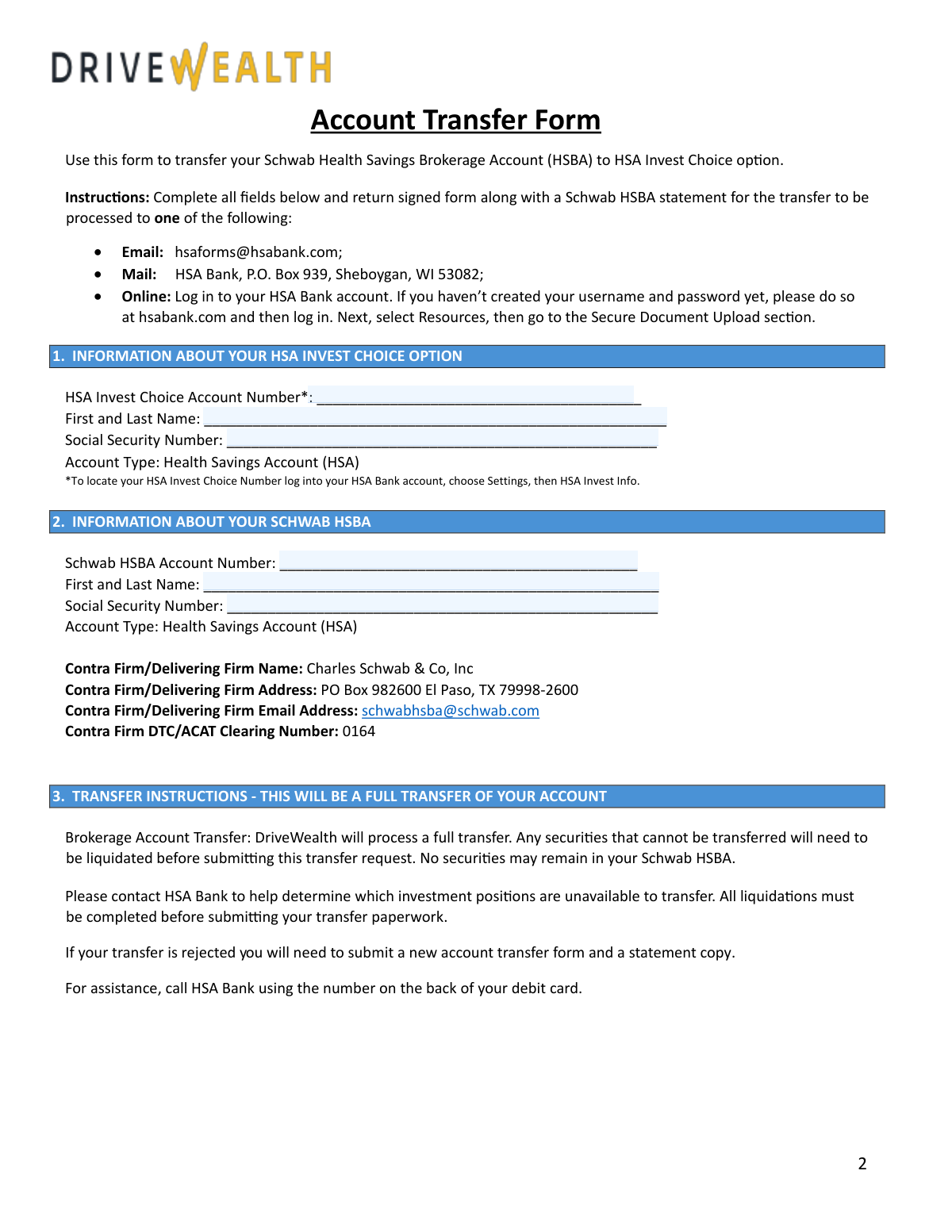
This form facilitates the full transfer of a Schwab Health Savings Brokerage Account (HSBA) to an HSA Invest Choice account with DriveWealth, LLC, managed through HSA Bank. It's crucial for consolidating your HSA investments and requires you to liquidate any non-transferable securities before submission. Today, this form can be filled out quickly and accurately using AI-powered services like Instafill.ai, which can also convert non-fillable PDF versions into interactive fillable forms.
Schwab HSBA to HSA Invest Choice Transfer Form is part of the
Schwab forms, brokerage forms, HSA forms, health savings forms, account transfer forms, health forms, transfer forms, broker forms, savings account forms, brokerage account forms, brokerage transfer forms and health savings account forms categories on Instafill.
Rather not fill this in by hand? Instafill is an online form filler that completes PDF forms automatically — upload the blank form, answer a few questions, and the AI fills every field.
Form specifications
| Form name: | Schwab Health Savings Brokerage Account (HSBA) to HSA Invest Choice Account Transfer Form |
| Number of pages: | 1 |
| Language: | English |
Our AI automatically handles information lookup, data retrieval, formatting, and form filling.
It takes less than a minute to fill out Schwab HSBA to HSA Invest Choice Transfer Form using our AI form filling.
Securely upload your data. Information is encrypted in transit and deleted immediately after the form is filled out.
Instafill Demo: How to fill out PDF forms in seconds with AI
How to Fill Out Schwab HSBA to HSA Invest Choice Transfer Form Online for Free in 2026
Are you looking to fill out a SCHWAB HSBA TO HSA INVEST CHOICE TRANSFER FORM form online quickly and accurately? Instafill.ai offers the #1 AI-powered PDF filling software of 2026, allowing you to complete your SCHWAB HSBA TO HSA INVEST CHOICE TRANSFER FORM form in just 37 seconds or less.
Follow these steps to fill out your SCHWAB HSBA TO HSA INVEST CHOICE TRANSFER FORM form online using Instafill.ai:
- 1 Navigate to Instafill.ai and upload or select the Schwab HSBA to HSA Invest Choice Transfer Form.
- 2 Provide your HSA Invest Choice account number, name, and Social Security Number in Section 1.
- 3 Enter the details for your Schwab HSBA, including the account number and your personal information, in Section 2.
- 4 Review the transfer instructions in Section 3, ensuring all non-transferable securities have been liquidated from your Schwab account.
- 5 If applicable, complete the 'One and the Same Letter' in Section 4 for any name discrepancies between accounts.
- 6 Carefully read the terms and conditions, then use the AI tool to securely e-sign and date the form in Section 6.
- 7 Download the completed form and submit it along with a recent Schwab HSBA statement to HSA Bank via email, mail, or their secure online portal.
Our AI-powered system ensures each field is filled out correctly, reducing errors and saving you time.
Why Choose Instafill.ai for Your Fillable Schwab HSBA to HSA Invest Choice Transfer Form Form?
Speed
Complete your Schwab HSBA to HSA Invest Choice Transfer Form in as little as 37 seconds.
Up-to-Date
Always use the latest 2026 Schwab HSBA to HSA Invest Choice Transfer Form form version.
Cost-effective
No need to hire expensive lawyers.
Accuracy
Our AI performs 10 compliance checks to ensure your form is error-free.
Security
Your personal information is protected with bank-level encryption.
Frequently Asked Questions About Schwab HSBA to HSA Invest Choice Transfer Form
This form is used to authorize the full transfer of your investments from a Schwab Health Savings Brokerage Account (HSBA) to the HSA Invest Choice option, which is managed by DriveWealth, LLC.
You should complete this form if you currently have a Schwab HSBA and wish to move all your investment assets to the HSA Invest Choice platform offered through HSA Bank.
You must submit a copy of a recent statement from your Schwab HSBA along with the completed and signed transfer form for the request to be processed.
You can submit the form and your Schwab statement via email to [email protected], by mail to HSA Bank, or by uploading it directly through the Secure Document Upload section of your online HSA Bank account.
To locate this number, log in to your HSA Bank account, navigate to the 'Settings' section, and then select 'HSA Invest Info'.
You must liquidate (sell) any ineligible securities, such as CDs, options, or certain mutual funds, before you submit the transfer request. The form lists many ineligible security types; contact HSA Bank if you are unsure about a specific investment.
No, this form is for a full account transfer only. All securities must be transferred or liquidated, as no assets can remain in your Schwab HSBA after the process is complete.
Yes, Schwab charges a $25 transfer-out fee. This fee will be taken from your Schwab HSBA or, if funds are insufficient, from your HSA cash balance at HSA Bank.
A transfer is typically rejected if non-transferable investments are still in the account. You will need to liquidate those assets and then submit a new, completed transfer form and statement copy.
You must complete Section 4, the 'One and the Same Letter,' to certify that both names belong to you. If your last name changed, you must also provide legal documentation like a driver's license or passport.
Fractional shares of stock are not transferable. They will be automatically liquidated (sold) during the transfer process, and the cash proceeds will be moved to your new account.
Yes, services like Instafill.ai use AI to accurately auto-fill form fields, which can save you time and help reduce errors.
Simply upload the form's PDF to the Instafill.ai platform. The AI will make the fields interactive, allowing you to type your information directly onto the form before downloading the completed document for submission.
If you have a non-fillable PDF, you can use a tool like Instafill.ai. It can convert flat PDFs into interactive, fillable forms that you can easily complete on your computer.
Compliance Schwab HSBA to HSA Invest Choice Transfer Form
Validation Checks by Instafill.ai
1
HSA Invest Choice Account Number Presence and Format
Checks that the 'HSA Invest Choice Account Number' in Section 1 is provided and conforms to the expected format (e.g., 17-digit alphanumeric). This number is critical for identifying the destination account at DriveWealth. If the number is missing or invalid, the transfer cannot be routed correctly and the submission will be rejected.
2
Schwab HSBA Account Number Presence and Format
Validates that the 'Schwab HSBA Account Number' in Section 2 is filled out and matches the format for Schwab accounts. This number is essential for the delivering firm (Schwab) to locate the correct source account for the transfer. An incorrect or missing number will result in an immediate rejection of the transfer request by Schwab.
3
Social Security Number Format and Consistency
This check ensures that the Social Security Number fields in both Section 1 and Section 2 are filled, follow the valid XXX-XX-XXXX format, and contain the exact same value. The SSN is a primary identifier for the account holder, and a mismatch indicates either a data entry error or that the accounts belong to different individuals, which would halt the transfer. If the numbers do not match, the form will be rejected pending correction.
4
Name Consistency and 'One and the Same' Trigger
Compares the 'First and Last Name' fields from Section 1 and Section 2 for an exact match. This is important because a name discrepancy requires legal clarification. If the names do not match, the system must flag that Section 4 ('ONE AND THE SAME LETTER') is now a mandatory part of the form to be completed by the user.
5
Conditional Completion of 'One and the Same' Section
If the names in Sections 1 and 2 do not match, this validation verifies that all fields within Section 4 are completed, including both printed names, both signatures, and both dates. This section legally attests that the different names refer to the same person. Failure to complete this section when required will result in the form being considered incomplete and rejected.
6
Mandatory Account Owner Signature
Verifies that the 'Account Owner Signature' field in Section 6 has been signed. This signature is the legal authorization for DriveWealth and Schwab to execute the full account transfer and agree to the terms and conditions. A missing signature invalidates the entire request, and the form will be returned to the user for completion.
7
Main Signature Date Validity
Checks that the 'Date' field next to the primary signature in Section 6 is filled, is a valid date, and is not set in the future. This date establishes when the authorization was given and is crucial for compliance and record-keeping. An invalid or future date can cause processing delays or rejection of the form.
8
Schwab Statement Attachment Verification
Confirms that a copy of the user's Schwab HSBA statement has been included with the form submission, as required by the instructions. This statement is used by the processing team to verify the assets in the account and ensure a smooth transfer. Submissions without the required statement will be placed on hold or rejected until the document is provided.
9
Conditional Name Change Documentation Attachment
If Section 4 is completed to explain a last name change (e.g., due to marriage or divorce), this check verifies that the required legal documentation (like a driver's license or passport) is also attached. This documentation provides legal proof of the name change, which is necessary for financial institutions to update records. Without this proof, the transfer cannot proceed under the new name.
10
Prohibition of User Input in 'Official Use Only' Sections
Ensures that all fields within Section 7 ('FOR OFFICIAL USE ONLY') are left blank on the user's submission. These fields are reserved for the receiving firm, DriveWealth, to complete during their internal processing. User-entered data in this section could indicate form tampering or misunderstanding, leading to the form being flagged for manual review or rejection.
11
Completeness of Account Holder Information
Performs a check to ensure all personal identifier fields in Section 1 and Section 2 (First and Last Name, SSN, Account Number) are filled out. Missing information in these core sections makes it impossible to identify either the source or destination accounts accurately. The form will be considered incomplete and rejected if any of these fields are empty.
12
Logical Distinction Between Source and Destination Accounts
This validation compares the 'Schwab HSBA Account Number' from Section 2 against the 'HSA Invest Choice Account Number' from Section 1 to ensure they are not identical. A transfer must occur between two distinct accounts. If the numbers are the same, it indicates a critical data entry error, and the form will be rejected as logically invalid.
Common Mistakes in Completing Schwab HSBA to HSA Invest Choice Transfer Form
The form's first page lists many security types that cannot be transferred. Users often overlook this and submit the form with ineligible assets, leading to an automatic rejection. This forces the user to liquidate the assets and restart the entire process with a new form. To avoid this, carefully review your Schwab HSBA portfolio against the list and sell any prohibited securities before submitting the form.
The instructions explicitly require submitting a copy of a Schwab HSBA statement with the form. People often focus on filling out the fields and forget to attach this crucial document. Without the statement, the receiving firm cannot verify the assets, causing the request to be rejected as incomplete. Always double-check that you have attached a recent account statement before sending the form.
This error occurs when the name on the Schwab account does not exactly match the name on the HSA Invest Choice account, and the user fails to properly complete Section 4. This is common after marriage or due to minor spelling variations. Failing to complete the 'One and the Same Letter' section, including both required signatures, will cause a rejection. If your name has changed, you must complete Section 4 and provide supporting legal documentation.
The form requires two different, long account numbers, and it's easy to transpose digits or enter the wrong number in the wrong field. This leads to an immediate failure to locate one of the accounts, causing the transfer to be rejected. To prevent this, carefully copy the full account numbers from your online portals and double-check each digit. AI-powered tools like Instafill.ai can help by auto-filling this information accurately from saved profiles.
The form notes a $25 transfer-out fee will be charged by Schwab. Users may not have sufficient cash in either their Schwab HSBA or their main HSA cash balance to cover this fee. This can stall the transfer process until the fee is paid. Before submitting, ensure you have at least $25 in cash available in one of these two locations to avoid delays.
When printing and filling by hand, users may have illegible handwriting or accidentally miss a required field like a Social Security Number or date. Any missing or unreadable information will result in the form being rejected for compliance reasons. Using a tool like Instafill.ai can convert the non-fillable PDF into a fillable version, ensuring all entries are typed, legible, and complete.
The form has a signature block for the account owner (Section 6) and a separate section for a DriveWealth Representative (Section 7). In a hurry, users sometimes mistakenly sign in the official use section. This can cause confusion and may lead to the form being returned for a proper signature, delaying the transfer. Always read section headers carefully and sign only in the designated customer signature block.
The form is exclusively for a 'full transfer,' meaning every asset in the Schwab HSBA must be moved to close the account. Some users mistakenly believe they can use this form to transfer only specific stocks while leaving others behind. This misunderstanding leads to a rejection, as the process is not designed for partial transfers. You must liquidate non-transferable assets and be prepared to move everything.
The form requires the full Social Security Number (SSN) in both Section 1 and Section 2 to verify identity. A common error is providing only the last four digits, which is insufficient for this type of financial transfer. This will cause an identity verification failure and an immediate rejection. Ensure you enter the complete nine-digit SSN in both fields.
When a name discrepancy requires filling out Section 4, users must sign their name as it appears on the Schwab account and as it appears on the HSA Invest account. Many people only sign once or use their current signature for both lines. This invalidates the declaration, leading to a rejection. To avoid this, carefully sign your name exactly as it is registered on each respective account in the designated signature boxes.
Saved over 80 hours a year
“I was never sure if my IRS forms like W-9 were filled correctly. Now, I can complete the forms accurately without any external help.”
Kevin Martin Green
Your data stays secure with advanced protection from Instafill and our subprocessors




Robust compliance program
Transparent business model
You’re not the product. You always know where your data is and what it is processed for.
ISO 27001, HIPAA, and GDPR
Our subprocesses adhere to multiple compliance standards, including but not limited to ISO 27001, HIPAA, and GDPR.
Security & privacy by design
We consider security and privacy from the initial design phase of any new service or functionality. It’s not an afterthought, it’s built-in, including support for two-factor authentication (2FA) to further protect your account.
Fill out Schwab HSBA to HSA Invest Choice Transfer Form with Instafill.ai
Worried about filling PDFs wrong? Instafill securely fills schwab-health-savings-brokerage-account-hsba-to-hsa-invest-choice-account-transfer-form forms, ensuring each field is accurate.
