
Yes! You can use AI to fill out Geisinger Health Plan Behavioral Health Professional Services Questionnaire
Don't type 140 fields by hand. Tell our AI about yourself, or upload your insurance card, and it fills every field in seconds. You check it, then download, print or sign.
The AI does the filling. You just check it.
No typing into boxes, nothing to install.
What this form asks for
The AI fills all of it, from your answers or your documents.
The AI checks your answers before you download
16 checks built for this form, so a wrong date or a missing answer is caught before anyone else sees it.
Validates that the Provider name field is completed and contains a plausible full legal name (e.g., first and last name, not only initials or a single word). This is important for directory accuracy, credentialing alignment, and avoiding duplicate or ambiguous listings. If validation fails, the submission should be rejected or routed for manual review with a request to provide the full legal provider name.
Checks that Credentials are provided and match an allowed set or pattern (e.g., MD, DO, PhD, PsyD, LCSW, LPC, LMFT, CRNP) and are not free-text placeholders like "N/A" when a credential is required. Standardizing credentials improves search/filtering and reduces misrepresentation risk. If invalid, the form should prompt the submitter to select/enter a recognized credential or be flagged for verification.
Ensures the Provider NPI is present and is exactly 10 digits, numeric-only, and passes the NPI Luhn check-digit algorithm. This prevents directory mismatches and downstream claim/referral routing errors. If validation fails, block submission and request correction because an invalid NPI can break provider identification.
Validates that Address includes required components (street, city, state, ZIP) and that ZIP is 5 digits (or ZIP+4 in a valid format). A complete address is necessary for member access, mapping, and network directory compliance. If incomplete or malformed, the submission should be rejected or returned for correction.
Checks that County is provided and, when possible, is consistent with the submitted ZIP/city/state (e.g., via a ZIP-to-county reference). This supports accurate regional directory listings and referral routing. If the county is missing or inconsistent, flag for correction or manual review to prevent incorrect geographic placement.
Validates that Group Name is completed when the submission indicates a group practice (or when multiple practitioners are implied) and that it is not identical to the Provider name unless the provider is a sole proprietor. This reduces duplicate listings and clarifies whether services apply to an individual or a group. If validation fails, prompt the submitter to clarify the practice entity name.
And 10 more checks
- Listing Phone Number format and plausibility
- Fax number format validation (if provided/required)
- Email address format and domain validation
- Age groups selection required (at least one checked)
- Language selection integrity and 'Other' specification requirement
- Specialization selection consistency with services offered
- Services/therapies selection required (at least one checked)
- Condition willingness-to-treat selection required and 'Other' completion
- PHP/IOP grid completeness and internal consistency
- Attestation signature and date required; date format and not in the future
Let AI fill out your GHP BH Services Questionnaire (HPM50)
No typing. Every field filled in seconds, checked, ready to sign.
How to Fill Out GHP BH Services Questionnaire (HPM50) Online for Free in 2026
What the AI walks you through.
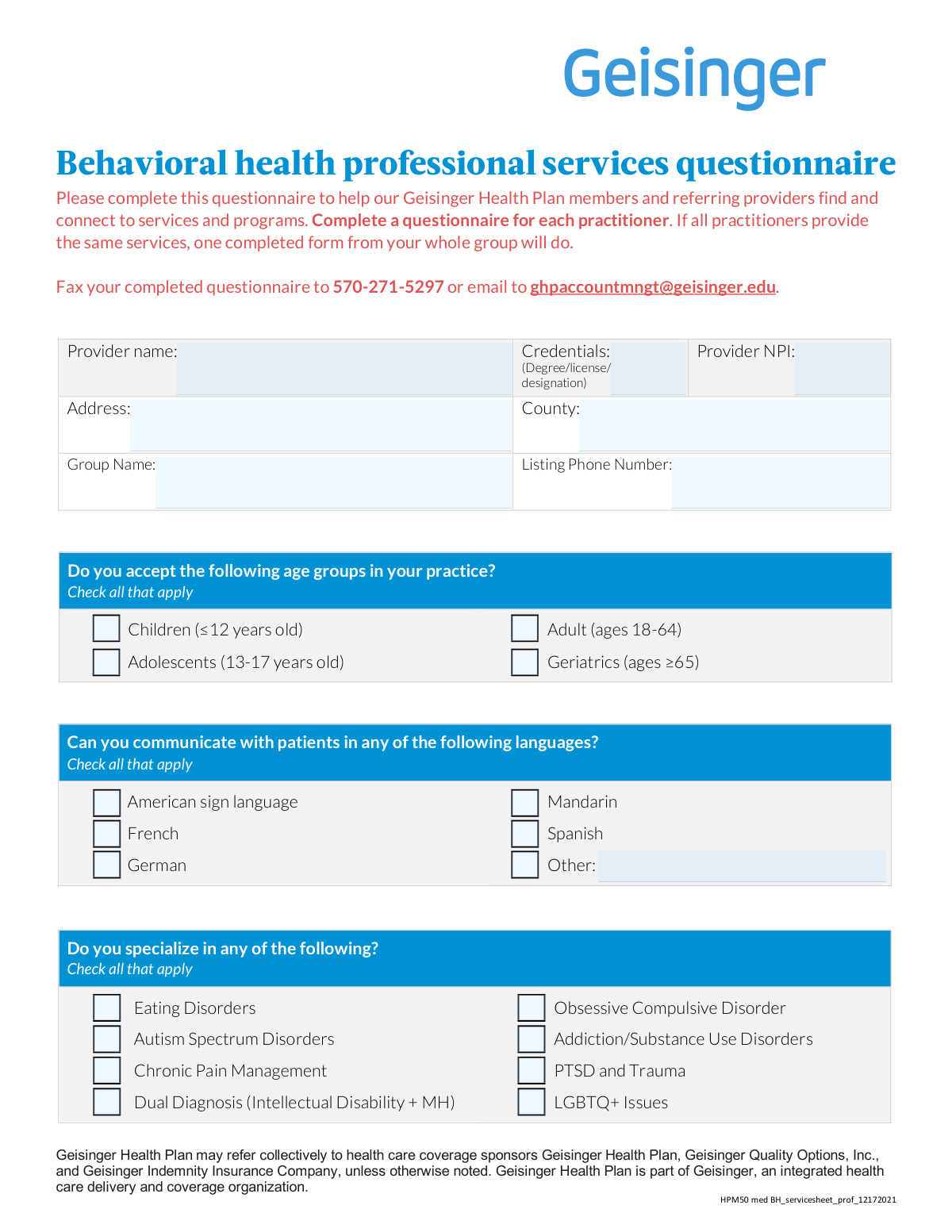
- Enter provider and practice identifiers: provider name, credentials, NPI, address, county, group name, and listing phone number.
- Select the age groups the provider accepts (children, adolescents, adults, geriatrics).
- Select all languages the provider can use to communicate with patients (including ASL and any “Other” language).
- Check any areas of specialization (e.g., eating disorders, autism spectrum disorders, chronic pain, PTSD/trauma, LGBTQ+ issues).
- Check all services/therapies/treatments offered (e.g., CBT/DBT/EMDR, medication management, testing, telehealth, MAT, TMS/ECT/esketamine, IBHS/PIBHS).
- Indicate which conditions the provider would treat if referred and complete the PHP/IOP section (if applicable) by population and program type.
- Review for accuracy, sign and date the affirmation, and provide contact details (email, relationship to practice, fax number), then submit via fax (570-271-5297) or email ([email protected]).
Common Mistakes in Completing GHP BH Services Questionnaire (HPM50)
The ones the AI is built to catch.
Submitting one form for multiple practitioners when services differ
Leaving provider identifiers incomplete (NPI, credentials, group name)
Using the wrong phone number for the 'Listing Phone Number'
Providing an incomplete address or mismatching location details
Misunderstanding age group checkboxes (checking all by default)
Overstating language capabilities (especially ASL) without true proficiency
Checking specialized services that are not actually offered at the listed site
Confusing 'services offered' with 'conditions you will treat'
Not completing 'Other' fields or using vague entries
Incorrectly filling out PHP/IOP grid (mixing levels of care and age bands)
Missing affirmation signature/date or incomplete submitter details
Frequently Asked Questions About GHP BH Services Questionnaire (HPM50)
Is it really free for 7 days?
Can I fill other forms too?
How do I cancel?
How does the AI fill out GHP BH Services Questionnaire (HPM50)?
What happens to my information?
How complex is GHP BH Services Questionnaire (HPM50) to fill out?
What is the purpose of the Geisinger Health Plan Behavioral Health Professional Services Questionnaire?
Who should complete this questionnaire?
Do I need to submit a separate form for each practitioner or location?
How do I submit the completed questionnaire?
What basic provider information is required at the top of the form?
What does 'Listing Phone Number' mean, and which number should I use?
How do I complete the age groups section?
How should I fill out the languages section if we offer interpretation or bilingual staff?
What is the difference between 'specialize in' and 'would you treat if referred'?
Do I need to check every therapy or service we offer, like CBT, DBT, EMDR, or telehealth?
How should we answer items like ECT, TMS, esketamine treatment, or methadone maintenance if we refer those out?
What are PHP and IOP, and how do we complete that section?
What if we treat a condition or offer a service that is not listed on the form?
Who is allowed to sign the affirmation at the end of the form?
How long does processing take after I submit the questionnaire?
Get your GHP BH Services Questionnaire (HPM50) filled out by AI
$0 today. Cancel before Nov 1 and you pay nothing.
Other forms like this one
behavioral health forms: Form BHVH, Outpatient Behavioral Health – ABA Treatment Request, Form CH-006: PA-BH-Res-PCS, Oregon Behavioral Health Support Program Plan of Care Authorization (Plan of Care Request for Behavioral Health Residential or Personal Care Services), Applied Behavioral Analysis (ABA) Prior Authorization Request Form (Health Net Behavioral Health Autism Center), L.A. Care Behavioral Health Treatment Applied Behavioral Analysis Authorization Request Form, Health Net Applied Behavioral Analysis (ABA) Recommendation and Referral Form (24-989), Evernorth Behavioral Health Applied Behavior Analysis Prior Authorization Form (PCOMM-2025-224), Applied Behavioral Analysis (ABA) Authorization Form, Louisiana Health Connect (BRO-DP-ABA FORM-0822), Form 5385BSP, Behavioral Health Utilization Management Applied Behavioral Analysis (ABA) Initial Request Form, Outpatient Behavioral Health (BH) – ABA Treatment Request: Required Information for Precertification (GR-69017-4), Highmark Health Options Applied Behavioral Analysis (ABA) Prior Authorization Request Form, Biopsychosocial Assessment and ABA Treatment Plan, Colorado OBH Critical Incident Report, Behavioral Health Treatment/Applied Behavioral Analysis/Autism Services Recommendation Form, Form CARE-102, Petition to Begin CARE Act Proceedings By Licensed Behavioral Health Professional Only, Outpatient Behavioral Health (BH) – ABA Treatment Request: Required Information for Precertification
health services forms: Form CH-006: PA-BH-Res-PCS, Oregon Behavioral Health Support Program Plan of Care Authorization (Plan of Care Request for Behavioral Health Residential or Personal Care Services), California Department of Social Services Form RFA 07 (2/18), Resource Family Approval (RFA) Health Questionnaire (Mandatory), Texas Standard Prior Authorization Request Form for Health Care Services, Form T-3, Children with Special Health Care Needs (CSHCN) Services Program Application, Behavioral Health Treatment/Applied Behavioral Analysis/Autism Services Recommendation Form, Blue Shield Promise Community Health Worker (CHW) Services Recommendation Form, Community Health Worker (CHW) Services Request for Extension of Services, San Francisco Health Plan (SFHP) Doula Services Attestation Form, Health & Human Services Agency California Department of Social Services APPLICATION FOR A FAMILY CHILD HOME LICENSE LIC 279
health forms: Form 1095-A, Health Insurance Marketplace Statement, Form 8889, Health Savings Accounts, Form WH-380-E, Certification of Health Care Provider, Form 7206, Self-Employed Health Ins. Ded., Form 8885, Health Coverage Tax Credit, Form WH-380-F, Certification of Health Care Provider, Form 1095-C, Employer-Provided Health Insurance Offer and Coverage, Form 1095-B, Health Coverage, Form I-905, Application for Authorization to Issue Certification for Health Care Workers, Form BHVH, Outpatient Behavioral Health – ABA Treatment Request, Form SHA, Separation Health Assessment, DHS-6696-ENG, Minnesota Health Care Programs Application (MNsure/DHS), Priority Health Small Group Renewal Decision Form, Form CH-006: PA-BH-Res-PCS, Oregon Behavioral Health Support Program Plan of Care Authorization (Plan of Care Request for Behavioral Health Residential or Personal Care Services), Form 7206 (2025), Self-Employed Health Insurance Deduction, HIPAA Authorization Form, Authorization for the Release of Protected Health Information, Prior Authorization (PA) Request Form – Adult Palliative Care (Alameda Alliance for Health), Medicare Enrolment Application (Australia) – Enrol in Medicare, Re-enrol/Extend Eligibility, Enrol a Newborn, and Register for My Health Record, Alameda Alliance for Health Prior Authorization (PA) Request Form – Adult Palliative Care, Health Assessment – Ontario Health atHome (Fixing Long-Term Care Act, 2021) (Form 4768-69E)
Let AI fill out your GHP BH Services Questionnaire (HPM50)
Your trial starts once a card is added. You pay nothing before Nov 1.
Our AI already knows this form, all 140 fields of it. Skip the typing: tell it about yourself, or upload what you have, and it fills the whole form in seconds.
- AI fills every field on all 5 pages, checkboxes included
- No typing into boxes: answer a few questions, or upload your insurance card, an old copy of this form, a photo of a document
- The AI checks the answers; you review and change anything before you download
- Download the finished PDF, print it, or sign it online
- Encrypted, and never used to train AI
Cancel before Nov 1 and you pay nothing.
A card is needed to start the trial. Cancel in two clicks from your account.
Terms · Privacy