
Yes! You can use AI to fill out Form SHA, Separation Health Assessment
Don't type 569 fields by hand. Tell our AI about yourself, or upload your insurance card, and it fills every field in seconds. You check it, then download, print or sign.
The AI does the filling. You just check it.
No typing into boxes, nothing to install.
What this form asks for
The AI fills all of it, from your answers or your documents.
The AI checks your answers before you download
15 checks built for this form, so a wrong date or a missing answer is caught before anyone else sees it.
This validation check ensures that the service member acknowledges the Privacy Act Statement, confirming their understanding of the information being collected and how it will be used. It verifies that the service member has actively engaged with this critical information, which is essential for compliance with privacy regulations. By checking this, the system confirms that the service member is aware of their rights regarding personal data. This step is crucial for maintaining transparency and trust in the assessment process.
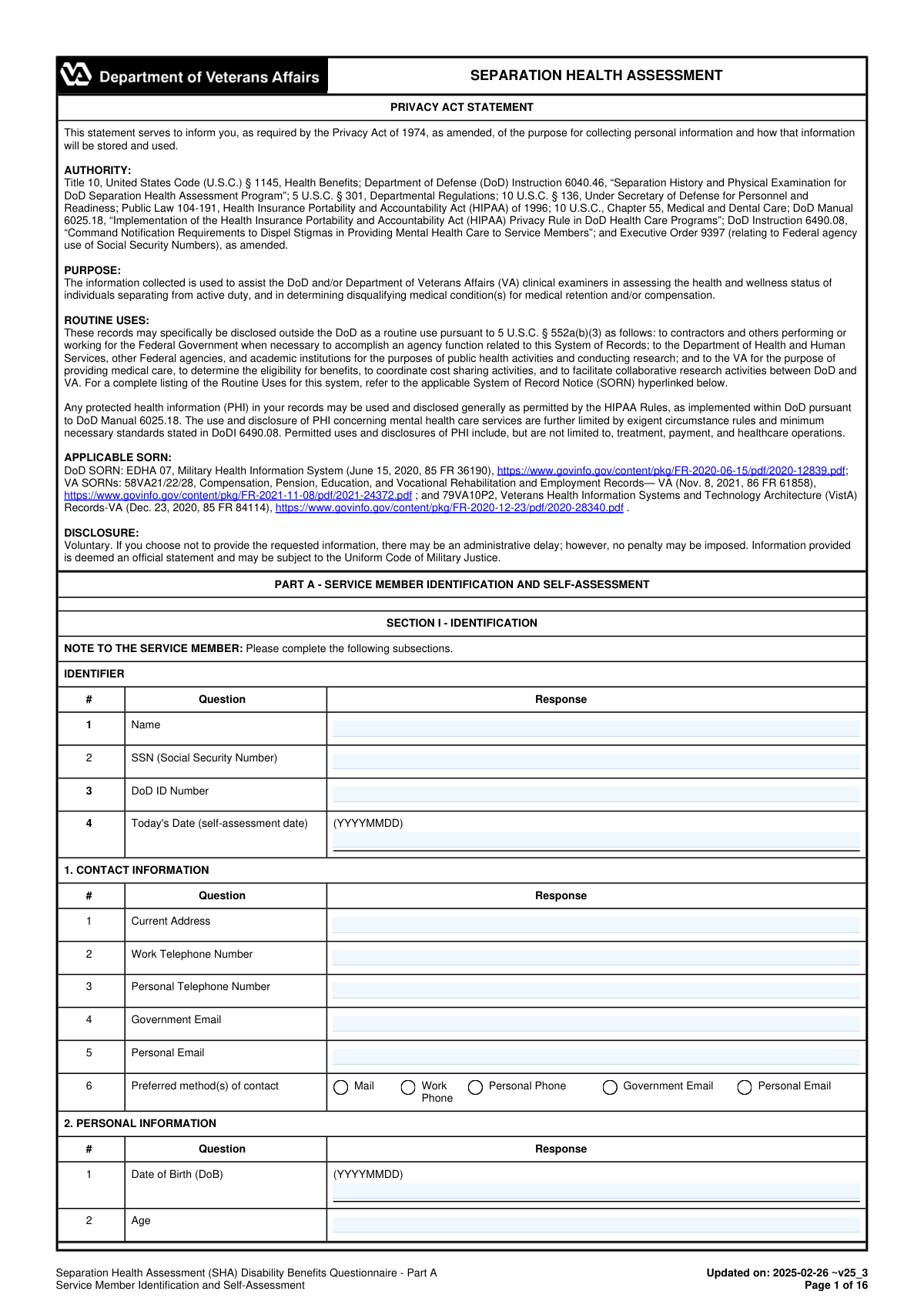
This validation check verifies that the service member's name, Social Security Number (SSN), DoD ID Number, and the current date are entered in the correct format, specifically YYYYMMDD. It ensures that all required fields are completed accurately, which is vital for proper identification and record-keeping. By enforcing this format, the system minimizes the risk of errors that could lead to processing delays or misidentification. This check is essential for maintaining the integrity of the data collected in Section I.
This validation check ensures that the service member provides comprehensive contact information, including their current address, work and personal telephone numbers, and both government and personal email addresses. It confirms that all necessary details are included to facilitate effective communication regarding the assessment. By validating this information, the system helps to ensure that the service member can be reached promptly for any follow-up or additional information required. This step is crucial for maintaining an open line of communication throughout the assessment process.
This validation check verifies that the service member has indicated their preferred method(s) of contact by selecting the appropriate options provided on the form. It ensures that the service member's preferences are respected, which is important for effective communication. By confirming this selection, the system helps to streamline the process of reaching out to the service member, making it more efficient and tailored to their needs. This check is essential for enhancing the overall experience of the service member during the assessment.
This validation check ensures that the service member's date of birth (DoB) and age are entered correctly, confirming that these critical pieces of information align with each other. It verifies that the age is calculated accurately based on the provided date of birth, which is essential for determining eligibility and compliance with age-related requirements. By performing this check, the system minimizes the risk of discrepancies that could affect the assessment process. This validation is vital for maintaining accurate records and ensuring the service member's information is up to date.
This validation check ensures that the race and ethnicity fields are appropriately marked based on the individual's responses. It verifies that at least one option is selected to comply with demographic data collection requirements. The check confirms that the selections made are consistent with the individual's self-identification. This is crucial for accurate representation and analysis of health assessment data.
And 9 more checks
- Confirms that the military service branch, component, duty status, usual occupation, and military occupational code are specified.
- Verifies that the exam date, purpose of the exam, anticipated release date from active duty, and intention to file a disability claim are indicated.
- Checks that the type of claim program/process is selected if applicable.
- Ensures that the medical history questionnaire is completed thoroughly with detailed responses, including dates and explanations.
- Validates that all medical conditions, treatments, or surgeries have been documented accurately.
- Confirms that any injuries or illnesses experienced during service are documented accurately.
- Ensures that all responses have been reviewed for accuracy and completeness before submission.
- Verifies that the service member has signed and dated the form using the specified format (YYYYMMDD).
- Checks that the submission instructions are followed to ensure timely delivery to the appropriate department or personnel.
Let AI fill out your SHA
No typing. Every field filled in seconds, checked, ready to sign.
Common Mistakes in Completing SHA
The ones the AI is built to catch.
Not reading the Privacy Act Statement thoroughly
Incorrect format for date entries (YYYYMMDD)
Omitting Social Security Number (SSN)
Failing to provide complete contact information
Not marking race and ethnicity accurately
Leaving out military service branch and component
Inaccurate or incomplete medical history responses
Not documenting injuries or illnesses during service
Failing to review responses before submission
Not signing the form or using incorrect date format
Submitting the form to the wrong department
Missing preferred method(s) of contact checkboxes
Frequently Asked Questions About SHA
Is it really free for 7 days?
Can I fill other forms too?
How do I cancel?
How does the AI fill out SHA?
What happens to my information?
How complex is SHA to fill out?
What is the purpose of the Separation Health Assessment (SHA)?
Who is required to complete the SHA?
What information is collected during the SHA?
How is the information from the SHA used?
What are the privacy protections for the information provided in the SHA?
Is participation in the SHA mandatory?
What happens if I choose not to provide the requested information?
How can I contact the SHA office if I have questions?
What should I do if I have a medical condition that affects my ability to complete the SHA?
Can I review my SHA results before they are submitted?
What types of medical history questions are included in the SHA?
Are there any specific health concerns that the SHA addresses?
What is the Airborne Hazards and Open Burn Pit Registry mentioned in the SHA?
How does the SHA affect my eligibility for disability benefits?
What should I do if I have previously filed a disability claim with the VA?
How do I enroll in the Airborne Hazards and Open Burn Pit Registry?
What should I do if I have concerns about my exposure to environmental hazards during service?
What types of mental health screenings are included in the SHA?
How can I ensure my responses to the SHA are accurate and complete?
What is the process for submitting the SHA?
Get your SHA filled out by AI
$0 today. Cancel before Nov 1 and you pay nothing.
Other forms like this one
health forms: Form 1095-A, Health Insurance Marketplace Statement, Form 8889, Health Savings Accounts, Form WH-380-E, Certification of Health Care Provider, Form 7206, Self-Employed Health Ins. Ded., Form 8885, Health Coverage Tax Credit, Form WH-380-F, Certification of Health Care Provider, Form 1095-C, Employer-Provided Health Insurance Offer and Coverage, Form 1095-B, Health Coverage, Form I-905, Application for Authorization to Issue Certification for Health Care Workers, Form BHVH, Outpatient Behavioral Health – ABA Treatment Request, DHS-6696-ENG, Minnesota Health Care Programs Application (MNsure/DHS), Geisinger Health Plan Behavioral Health Professional Services Questionnaire, Priority Health Small Group Renewal Decision Form, Form CH-006: PA-BH-Res-PCS, Oregon Behavioral Health Support Program Plan of Care Authorization (Plan of Care Request for Behavioral Health Residential or Personal Care Services), Form 7206 (2025), Self-Employed Health Insurance Deduction, HIPAA Authorization Form, Authorization for the Release of Protected Health Information, Prior Authorization (PA) Request Form – Adult Palliative Care (Alameda Alliance for Health), Medicare Enrolment Application (Australia) – Enrol in Medicare, Re-enrol/Extend Eligibility, Enrol a Newborn, and Register for My Health Record, Alameda Alliance for Health Prior Authorization (PA) Request Form – Adult Palliative Care, Health Assessment – Ontario Health atHome (Fixing Long-Term Care Act, 2021) (Form 4768-69E)
Let AI fill out your SHA
Your trial starts once a card is added. You pay nothing before Nov 1.
Our AI already knows this form, all 569 fields of it. Skip the typing: tell it about yourself, or upload what you have, and it fills the whole form in seconds.
- AI fills every field on all 16 pages, tables and checkboxes included
- No typing into boxes: answer a few questions, or upload your insurance card, an old copy of this form, a photo of a document
- The AI checks the answers; you review and change anything before you download
- Download the finished PDF, print it, or sign it online
- Encrypted, and never used to train AI
Cancel before Nov 1 and you pay nothing.
A card is needed to start the trial. Cancel in two clicks from your account.
Terms · Privacy