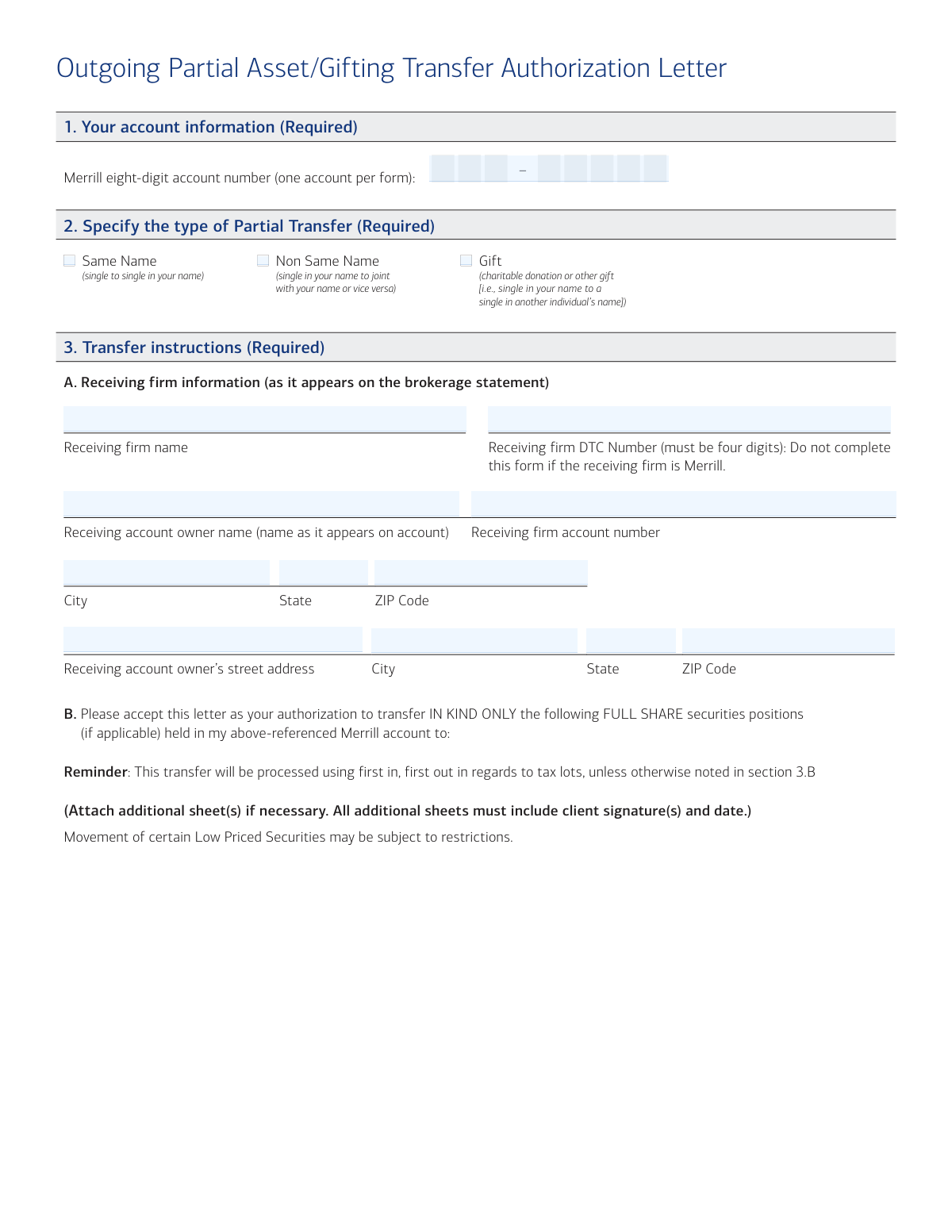
Yes! You can use AI to fill out Outgoing Partial Asset/Gifting Transfer Authorization Letter

This form is used by Merrill clients to authorize a partial transfer or gifting of assets from a non-retirement brokerage account, such as a Cash Management Account (CMA), to an account at a different financial institution. It is crucial for moving specific securities 'in-kind' without liquidating them first, ensuring a seamless transition of investments. Today, this form can be filled out quickly and accurately using AI-powered services like Instafill.ai, which can also convert non-fillable PDF versions into interactive fillable forms.
Our AI automatically handles information lookup, data retrieval, formatting, and form filling.
It takes less than a minute to fill out 00-66-0231NSB using our AI form filling.
Securely upload your data. Information is encrypted in transit and deleted immediately after the form is filled out.

Form specifications

Form name: Outgoing Partial Asset/Gifting Transfer Authorization Letter
Number of pages: 1
Language: English
Categories: authorization forms, asset transfer forms, transfer forms
main-image

Instafill Demo: How to fill out PDF forms in seconds with AI

How to Fill Out 00-66-0231NSB Online for Free in 2026

Are you looking to fill out a 00-66-0231NSB form online quickly and accurately? Instafill.ai offers the #1 AI-powered PDF filling software of 2026, allowing you to complete your 00-66-0231NSB form in just 37 seconds or less.
Follow these steps to fill out your 00-66-0231NSB form online using Instafill.ai:
  1. 1 Navigate to Instafill.ai and upload or select the Merrill Outgoing Partial Asset/Gifting Transfer Authorization Letter.
  2. 2 Use the AI assistant to accurately fill in your Merrill account information in Section 1.
  3. 3 In Section 2, specify the type of partial transfer you are requesting: Same Name, Non Same Name, or Gift.
  4. 4 Complete Section 3 with the detailed transfer instructions, including the receiving firm's information and a precise list of the securities or options contracts to be moved.
  5. 5 Review all the information populated by the AI for accuracy, paying close attention to account numbers and security descriptions.
  6. 6 Electronically or manually sign the form in Section 4. Be aware that a Medallion Signature Guarantee may be required for transfers valued over $50,000.
  7. 7 Download the completed form and submit it to Merrill via one of the approved methods, such as mail, fax, or DocuSign through your MyMerrill portal.

Our AI-powered system ensures each field is filled out correctly, reducing errors and saving you time.

Why Choose Instafill.ai for Your Fillable 00-66-0231NSB Form?

Speed

Complete your 00-66-0231NSB in as little as 37 seconds.

Up-to-Date

Always use the latest 2026 00-66-0231NSB form version.

Cost-effective

No need to hire expensive lawyers.

Accuracy

Our AI performs 10 compliance checks to ensure your form is error-free.

Security

Your personal information is protected with bank-level encryption.

Frequently Asked Questions About Form 00-66-0231NSB

This form is used to authorize a partial transfer of securities, such as stocks and bonds, from your non-retirement Merrill account to an account at a different financial institution. It can be used for transfers to your own account, a joint account, or as a gift to another person.

No, this form is specifically for transferring securities in-kind to an external firm. For cash transfers or internal movements between Merrill accounts, you must use the 'One time Non-Retirement Distribution form (code: 0597NSB)'.

This form should be used for non-retirement brokerage accounts, such as a Cash Management Account (CMA) or an Individual Investor Account (IIA). It is not intended for retirement accounts.

The transfer time varies by asset type. A standard ACAT transfer may take 5-6 business days, while other assets like mutual funds or foreign securities can take anywhere from 15 business days to 6 weeks to complete.

Yes, a Medallion Signature Guarantee is required for all securities transfers valued over $50,000. If you cannot obtain one, each account holder must submit a copy of their driver's license and be available for verbal verification.

You can mail the form via regular or overnight mail to the addresses provided, fax it to 1.877.229.7160, or sign it electronically using DocuSign through MyMerrill or Mobile EZ Sign on the Merrill app.

You must provide the receiving firm's name, account number, and four-digit DTC Number, as well as the receiving account owner's name and address as it appears on their brokerage statement.

For trust accounts, signature requirements can vary, and all trustees may need to sign. You must refer to your Trust Agreement to determine the specific signature requirements for your account.

By default, transfers are processed on a 'first in, first out' (FIFO) basis for tax lots. If you need to transfer specific lots, you must specify this in Section 3.B of the form.

No, this form is for transferring full shares only. You must specify the exact quantity of full shares you wish to transfer in Section 3.

Yes, services like Instafill.ai use AI to accurately auto-fill form fields, which can save you time and help prevent errors. This ensures all required information is entered correctly before submission.

You can use a service like Instafill.ai to easily fill out this form online. Simply upload the document, and the platform will make it interactive, allowing you to type your information directly into the fields.

If you have a non-fillable PDF, you can use a tool like Instafill.ai to convert it into an interactive, fillable form. This allows you to complete and sign the document digitally without needing to print it.

Compliance 00-66-0231NSB
Validation Checks by Instafill.ai

1
Merrill Account Number Format and Existence
This check verifies that the 'Merrill eight-digit account number' in Section 1 is exactly eight digits long and corresponds to a valid, active, non-retirement brokerage account (e.g., CMA or IIA). It is crucial for identifying the correct source account for the transfer. If the number is malformed, non-existent, or for a retirement account, the form will be rejected as the transfer cannot be initiated.
2
Required Sections Completion Check
Ensures that all required sections (1, 2, 3, and 4) contain information. The form cannot be processed without the source account, transfer type, transfer instructions, and authorization. A failure means the submission is incomplete and must be returned to the client for completion.
3
Exclusive Transfer Type Selection
Validates that exactly one transfer type (Same Name, Non Same Name, or Gift) is selected in Section 2. This selection is critical for determining the tax and legal implications of the transfer. If zero or more than one option is selected, the form is ambiguous and will be rejected.
4
Receiving Firm DTC Number Format
This check confirms that the 'Receiving firm DTC Number' in Section 3A is exactly four digits. The Depository Trust Company (DTC) number is essential for the electronic transfer of securities between institutions. An incorrectly formatted number will cause the automated transfer to fail, requiring manual intervention and causing significant delays.
5
Prohibition of Internal Merrill Transfers
Verifies that the receiving firm is not Merrill Lynch, Pierce, Fenner & Smith. The form explicitly states it is not for internal movements between Merrill accounts. This check prevents misuse of the form for an incorrect process, which could be done by checking the 'Receiving firm name' and 'Receiving firm DTC Number' against Merrill's own identifiers. A failed validation would require the user to use the correct form for internal transfers.
6
Minimum Asset Specification
This validation ensures that at least one security in Section 3B or one options contract in Section 3C has been specified for transfer. A form submitted without any assets listed provides no actionable instruction. If this check fails, the form is considered empty and will be rejected.
7
Full Share Quantity Validation
Checks that the 'Share quantity' field for each asset listed in Section 3B is a positive whole number. The form instructions specify 'full shares only', meaning fractional shares cannot be transferred using this process. Any entry with a zero, negative, or fractional value will be flagged as an error, and the form will be returned for correction.
8
Signature and Date Requirement
Confirms that at least one 'Signature' and corresponding 'Date' field in Section 4 are completed. A signature provides the legal authorization to execute the transfer, and the date establishes when the authorization was given. Without a valid signature and date, the request is not legally binding and cannot be processed.
9
Medallion Signature Guarantee (MSG) Logic
This check is triggered if the calculated total value of the securities being transferred exceeds $50,000. It verifies the presence of a Medallion Signature Guarantee stamp. The MSG provides an indemnity against fraudulent signatures. If the value is over $50K and the stamp is missing, the form must be flagged for mandatory manual follow-up to obtain copies of driver's licenses and perform verbal verification, as stated in the instructions.
10
Options Contract Data Completeness
For each options contract row in Section 3C, if any field is filled out, this check ensures all other fields in that same row (Symbol, Quantity, Expiration Date, Long/Short, Call/Put, Strike Price) are also complete. Partial information is insufficient to identify and transfer a specific options contract. An incomplete row will cause the form to be rejected for clarification.
11
Options Expiration Date Validity
Validates that the 'Expiration Date' for any options contract in Section 3C is a valid, correctly formatted date that occurs in the future. It is impossible to transfer an expired contract. An invalid or past date would render the instruction impossible to fulfill and requires correction.
12
Receiving Firm Information Completeness
Ensures all fields related to the receiving firm in Section 3A are filled, including firm name, account owner name, street address, city, state, ZIP code, and account number. This complete dataset is required to correctly identify the destination account. Missing information would result in a failed or misdirected transfer, so the form would be rejected.
13
Asset Description and Quantity Pairing
This validation ensures that for every 'Share quantity' entered in Section 3B, a corresponding 'Description of assets/CUSIP/symbol' is also provided. The system cannot execute a transfer of a specified quantity without knowing which asset to move. A mismatch or missing pair of data points makes the instruction ambiguous and will halt processing.
14
Printed Name and Phone Number Presence
Verifies that for each signature provided in Section 4, the corresponding 'Print name and telephone number' field is also filled. This information is vital for contacting the account holder to resolve any issues or ambiguities with the request. A missing name or number can delay processing if clarification is needed and will cause the form to be flagged for follow-up.

Common Mistakes in Completing 00-66-0231NSB

Using the Form for an Unauthorized Transfer Type

Users often mistakenly use this form for cash transfers, internal movements between Merrill accounts, or retirement account transfers. The form explicitly states it is only for in-kind partial asset transfers from non-retirement brokerage accounts to an external firm. This error leads to immediate rejection and significant delays, requiring the user to start over with the correct paperwork.

Entering an Incorrect Merrill Account Number

A simple typo, transposing digits, or entering a non-brokerage account number in Section 1 is a frequent error. Since the eight-digit account number is the primary identifier for the source of funds, any mistake will cause the entire request to fail processing. To avoid this, carefully copy the number from a recent brokerage statement.

Providing Incomplete or Mismatched Receiving Account Information

In Section 3A, information for the receiving firm and account owner must exactly match the records at the destination institution. People often use abbreviations, informal names, or incorrect addresses, leading to rejection by the receiving firm. Always reference a recent statement from the receiving firm to ensure all names and addresses are copied precisely.

Failing to Provide Proper Signatures or Medallion Guarantee

This form has strict authorization requirements that are often missed, including missing signatures, using unapproved electronic signatures, or forgetting the Medallion Signature Guarantee (MSG) for transfers over $50,000. Forgetting the MSG or the alternative (a copy of each owner's driver's license) will halt the transfer. To prevent this, carefully review Section 4 and obtain the MSG from your bank well in advance if needed.

Omitting or Guessing the Receiving Firm's DTC Number

The four-digit Depository Trust Company (DTC) number is mandatory for processing and is often unknown to the person filling out the form. Leaving this field blank or entering an incorrect number will prevent the electronic transfer of securities. You must contact the receiving financial institution directly to obtain their correct DTC number before submitting the form.

Requesting the Transfer of Fractional Shares

The form specifies that only 'full shares' can be transferred, but users may list quantities with decimals or try to transfer a specific dollar value that equates to fractional shares. This results in the request being rejected or only the whole shares being transferred, leaving a small, unwanted residual position in the account. Always specify whole numbers for share quantities.

Using Vague or Ambiguous Asset Descriptions

When listing securities in Section 3B, providing a generic name like 'Google stock' instead of the official ticker symbol (e.g., GOOGL) or CUSIP number can cause confusion. This ambiguity may delay the transfer as Merrill seeks clarification or, in a worst-case scenario, could lead to the wrong asset being moved. Always use the precise CUSIP or symbol found on your brokerage statement to ensure accuracy.

Listing Assets from Multiple Merrill Accounts on a Single Form

To save time, individuals with multiple Merrill brokerage accounts sometimes try to consolidate their transfer requests onto one form. However, the instructions clearly state 'one account per form'. This error will cause the request to be rejected, forcing the user to resubmit separate forms for each account and delaying all transfers.

Overlooking the Required Transfer Type Specification

Section 2 requires the user to check a box specifying the transfer type: 'Same Name,' 'Non Same Name,' or 'Gift.' It is easy to overlook this simple but mandatory step while focusing on the more complex sections. Failure to specify the transfer type renders the form incomplete and will cause it to be sent back for correction, as the legal and tax implications of the transfer are unclear.

Attaching Unsigned Additional Asset Pages

If more space is needed to list assets, the form allows for additional sheets, but requires that 'All additional sheets must include client signature(s) and date.' Users frequently attach a simple printout of their holdings without signing each page. This results in only the assets listed on the main signed form being transferred, leaving the rest behind and creating an incomplete transfer.
Saved over 80 hours a year

“I was never sure if my IRS forms like W-9 were filled correctly. Now, I can complete the forms accurately without any external help.”

Kevin Martin Green

Your data stays secure with advanced protection from Instafill and our subprocessors

Robust compliance program

Transparent business model

You’re not the product. You always know where your data is and what it is processed for.

ISO 27001, HIPAA, and GDPR

Our subprocesses adhere to multiple compliance standards, including but not limited to ISO 27001, HIPAA, and GDPR.

Security & privacy by design

We consider security and privacy from the initial design phase of any new service or functionality. It’s not an afterthought, it’s built-in, including support for two-factor authentication (2FA) to further protect your account.

Fill out 00-66-0231NSB with Instafill.ai

Worried about filling PDFs wrong? Instafill securely fills outgoing-partial-assetgifting-transfer-authorization-letter forms, ensuring each field is accurate.