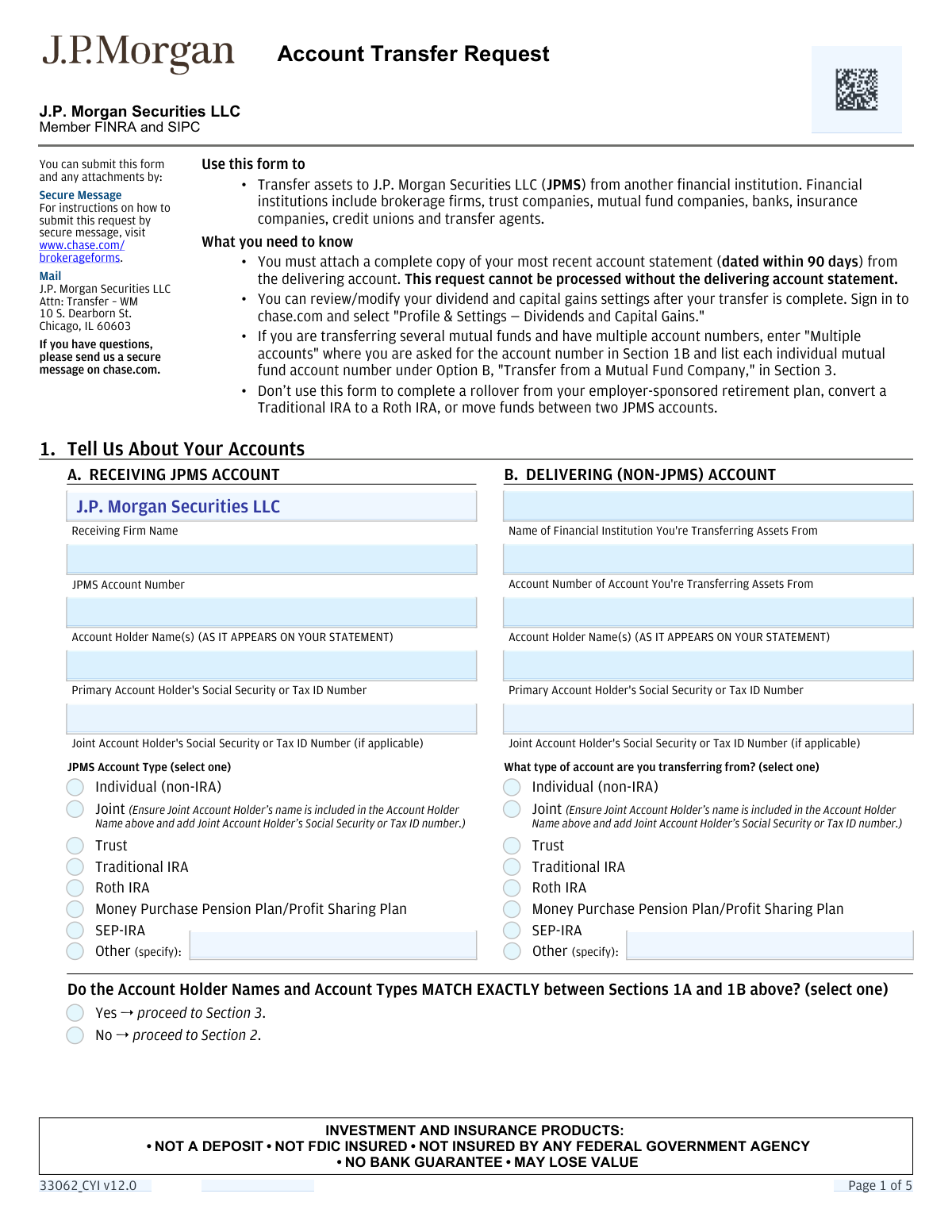
Yes! You can use AI to fill out J.P. Morgan Securities LLC Account Transfer Request
This form authorizes J.P. Morgan Securities LLC (JPMS) to initiate the transfer of assets, such as cash, securities, or mutual funds, from another financial institution into your JPMS account. It is a crucial document for consolidating investments and managing your portfolio under one provider. Today, this form can be filled out quickly and accurately using AI-powered services like Instafill.ai, which can also convert non-fillable PDF versions into interactive fillable forms.
Our AI automatically handles information lookup, data retrieval, formatting, and form filling.
It takes less than a minute to fill out Account Transfer Request using our AI form filling.
Securely upload your data. Information is encrypted in transit and deleted immediately after the form is filled out.
Form specifications
| Form name: | J.P. Morgan Securities LLC Account Transfer Request |
| Number of pages: | 1 |
| Language: | English |
| Categories: | LLC forms, SEC forms, account transfer forms, transfer forms, securities forms |
Instafill Demo: How to fill out PDF forms in seconds with AI
How to Fill Out Account Transfer Request Online for Free in 2026
Are you looking to fill out a ACCOUNT TRANSFER REQUEST form online quickly and accurately? Instafill.ai offers the #1 AI-powered PDF filling software of 2026, allowing you to complete your ACCOUNT TRANSFER REQUEST form in just 37 seconds or less.
Follow these steps to fill out your ACCOUNT TRANSFER REQUEST form online using Instafill.ai:
- 1 Navigate to Instafill.ai and upload or select the Account Transfer Request form.
- 2 Use the AI assistant to fill in Section 1A with your receiving J.P. Morgan Securities LLC (JPMS) account details.
- 3 Provide the information for the delivering (non-JPMS) account in Section 1B, using your most recent statement for accuracy.
- 4 Complete Section 3 to specify the type of transfer and list the exact assets (cash, securities, etc.) you wish to move.
- 5 If account registrations differ, complete and notarize Section 2 as instructed.
- 6 Review all the information pre-filled by the AI for accuracy, including account numbers and asset details.
- 7 Electronically sign and date the form in Section 5, then download it for submission along with a copy of your delivering account statement.
Our AI-powered system ensures each field is filled out correctly, reducing errors and saving you time.
Why Choose Instafill.ai for Your Fillable Account Transfer Request Form?
Speed
Complete your Account Transfer Request in as little as 37 seconds.
Up-to-Date
Always use the latest 2026 Account Transfer Request form version.
Cost-effective
No need to hire expensive lawyers.
Accuracy
Our AI performs 10 compliance checks to ensure your form is error-free.
Security
Your personal information is protected with bank-level encryption.
Frequently Asked Questions About Form Account Transfer Request
This form is used to authorize the transfer of assets, such as stocks, cash, or mutual funds, from another financial institution into your J.P. Morgan Securities LLC (JPMS) investment account.
You must attach a complete copy of your most recent account statement from the financial institution you are transferring from. The statement must be dated within the last 90 days for your request to be processed.
No, this form should not be used to complete a rollover from an employer-sponsored retirement plan. It is also not for converting a Traditional IRA to a Roth IRA or moving funds between two JPMS accounts.
You can submit the form and your account statement either by sending a secure message on chase.com or by mailing it to the J.P. Morgan Securities LLC address listed in Chicago, IL.
If the account holder names or account types do not match exactly, you must complete Section 2. This section requires the signatures of all account holders to be individually notarized by a notary public.
A notary is only required if you fill out Section 2, which is for transfers where the account holder names or account types do not exactly match. If they match, you can skip Section 2 and no notary is needed.
Your delivering account statement is the best source of information. Look for terms like 'Broker/Dealer,' 'Mutual Fund Company,' 'Bank,' or 'Transfer Agent' on the statement to determine whether to complete Option A, B, C, or D.
Yes, in Section 3 you have the option to transfer your entire account or to list specific securities or cash amounts that you wish to move.
JPMS will not accept ineligible assets. In the event that ineligible assets are part of your transfer request, they may be returned to you or left in your original account.
This section is only required if you are transferring assets from one employer-sponsored qualified retirement plan to another at JPMS. The plan trustee from your delivering institution must sign this section.
In Section 1B, write 'Multiple accounts' in the account number field. Then, in Section 3, Option B, list each individual mutual fund account number next to the corresponding fund you are transferring.
Yes, services like Instafill.ai use AI to accurately auto-fill form fields with your information, which can save you time and help reduce errors.
You can use a service like Instafill.ai to upload the PDF document. The platform allows you to fill it out interactively online, and then you can download the completed form for submission.
If you have a non-fillable PDF, you can use a service like Instafill.ai. It can convert flat PDFs into interactive, fillable forms that you can easily complete on your computer.
Compliance Account Transfer Request
Validation Checks by Instafill.ai
1
SSN/Tax ID Format Validation
This check verifies that the Social Security or Tax ID numbers entered in Section 1A and 1B are in a valid format (e.g., XXX-XX-XXXX for SSN or XX-XXXXXXX for TIN). Correct identification is essential for regulatory compliance, tax reporting, and preventing fraud. If the number is malformed, the system will reject the submission and prompt the user to correct the entry.
2
Section 1 Account Information Completeness
Ensures all mandatory fields in Section 1A (Receiving Account) and 1B (Delivering Account) are filled, including account numbers, account holder names, and account type selections. This information is the foundation of the transfer request, and any missing data would make it impossible to identify the source and destination accounts. Incomplete forms will be rejected and returned to the user for completion.
3
Conditional Joint Holder Information Requirement
This validation checks if an account type in Section 1A or 1B is marked as 'Joint'. If it is, the system verifies that the 'Joint Account Holder’s Social Security or Tax ID Number' field is populated. This is critical for ensuring all owners of the account are properly identified for legal and tax purposes, and failure to provide it will halt the transfer process.
4
Account Match and Section 2 Logic
Verifies that if the user selects 'No' to the question 'Do the Account Holder Names and Account Types MATCH EXACTLY...', then Section 2 ('Name and Registration Differences') is fully completed, including signatures and notarization. This logic is crucial because transfers between differently registered accounts require additional legal authorization and indemnification. If Section 2 is required but incomplete, the transfer cannot proceed due to compliance risks.
5
Exclusive Transfer Type Selection in Section 3
This check ensures that the user has completed only one of the four possible transfer options (A, B, C, or D) in Section 3. The form is designed to process a single type of transfer request at a time, and multiple selections create ambiguity. A submission with more than one option selected will be flagged as an error, requiring the user to clarify their intent.
6
Partial Transfer Asset Specification
If a user selects a partial transfer option (e.g., 'Transfer only the cash and/or securities listed below' in Option A), this check confirms that at least one asset is listed in the corresponding table. A partial transfer instruction without specified assets is incomplete and cannot be acted upon. The form would be rejected for lacking specific instructions.
7
CD Maturity Date Rules
When a user requests to 'Transfer my CD proceeds at maturity date' in Section 3C, this validation confirms the 'CD Maturity Date' is a valid date and falls within the allowed window (not more than 60 days in the future). This prevents attempts to schedule transfers too far in advance, which can cause processing issues. An invalid or out-of-range date will result in an error, requiring correction.
8
Primary Account Holder Signature Presence
This is a critical check to ensure the 'Primary Account Holder Signature' in Section 5 is present. The signature provides the legal authorization for JPMS and the delivering firm to execute the transfer. A missing signature renders the entire request invalid and will cause immediate rejection.
9
Conditional Joint Account Holder Signature
If the receiving JPMS account in Section 1A is designated as 'Joint', this validation confirms that the 'Joint Account Holder Signature' is present in Section 5. For joint accounts, all holders must provide authorization to add assets. Failure to secure all required signatures will result in the request being rejected as incompletely authorized.
10
Required Account Statement Attachment
This validation confirms that a copy of the most recent account statement (dated within 90 days) from the delivering institution is attached to the submission. The form explicitly states this is a mandatory requirement for processing. Without the statement to verify assets and account details, the transfer request will be put on hold or rejected.
11
Conditional Trustee Signature for Qualified Plans
This check is triggered if the account type in Section 1 is a 'Money Purchase Pension Plan' or 'Profit Sharing Plan'. It verifies that the Trustee Signature and Date in Section 4 are completed. This authorization is a specific legal requirement for employer-sponsored plans, and its absence will prevent the transfer of such assets.
12
'Other' Account Type Specification
If 'Other' is selected as an account type in Section 1A or 1B, this check ensures the adjacent 'specify' text field is not empty. This detail is crucial for the processing team to understand the nature of the account and determine the correct transfer procedure. An empty specification field makes the account type ambiguous and will require follow-up, delaying the request.
13
Signature and Date Consistency
Verifies that for every signature field that is filled on the form (Sections 2, 4, 5, and Additional Assets), the corresponding date field is also filled with a valid date. This establishes a clear timeline of authorization, which is important for compliance and record-keeping. A missing date next to a signature will cause the form to be flagged as incomplete.
14
Section 2 Notarization Completeness
If Section 2 is triggered by an account mismatch, this check validates that all fields within the notary block (State, County, Name, Date, Signature, Commission Expiration) are completed for each required signature. Notarization is a legal verification of identity, and any missing element invalidates the notarization. An incomplete notary block will cause the transfer to be rejected due to failed legal requirements.
Common Mistakes in Completing Account Transfer Request
The form explicitly requires a complete copy of your most recent account statement, dated within 90 days. This is often missed because it's a separate document that needs to be located and attached before submission. Without this statement, the firm cannot verify the assets or account details, and the form clearly states the request 'cannot be processed,' leading to an automatic rejection. To avoid this, ensure you have a recent statement ready before you begin and attach it to the completed form.
This occurs when the name entered for the delivering account does not exactly match the name on the statement, for example, using a nickname or omitting a middle initial. Financial institutions require an exact match for verification, and any discrepancy will cause the transfer to be rejected for security and compliance reasons. Always copy the name precisely as it appears on your statement for both the delivering (Section 1B) and receiving (Section 1A) accounts to ensure a smooth process.
At the end of Section 1, users must state if the account names and types match exactly. People often incorrectly select 'Yes' for minor differences, causing them to skip the mandatory Section 2. This leads to an automatic rejection because the required authorization and notarization for non-matching registrations are missing. Carefully compare both accounts and if there is any doubt, select 'No' and proceed to Section 2.
When account registrations do not match, Section 2 requires signatures to be notarized, and the form specifies 'Each signature requires its own notarization.' Common errors include forgetting the notarization entirely or, for joint accounts, getting only one signature notarized. A missing or improperly executed notarization makes the authorization legally invalid, causing the request to be rejected and returned for correction.
The instructions clearly state this form is not for certain transactions, such as Roth IRA conversions or transfers between two JPMS accounts. Users may grab the most common transfer form without reading the fine print, leading to an immediate rejection of their request. This wastes time and requires the user to find and start over with the correct, specific form for their intended transaction.
When selecting a partial transfer in Section 3, users must list the specific assets to move. Mistakes include providing incorrect ticker symbols, writing vague quantities like 'half' instead of a specific number of shares, or leaving the asset table blank. This ambiguity makes it impossible for the firm to execute the request, causing significant delays while they contact you for clarification. For accuracy, reference your account statement for the correct asset identifiers and quantities.
Section 4 is specifically for the trustee of an employer-sponsored qualified retirement plan and requires the trustee's signature, not the account holder's. Account holders often mistakenly sign this section themselves, which invalidates the authorization for that specific plan type. This results in rejection and requires the form to be re-submitted with the correct trustee's signature; account holders should only sign in Section 5.
For any joint account, Section 5 requires signatures from all account holders to authorize the transfer. It is a very common oversight for only one person to sign the form, especially in households where one person manages the finances. A missing signature from any account holder will render the request incomplete and cause it to be rejected, delaying the entire transfer process.
Simple typographical errors, such as transposing digits in an account number or Social Security Number, are frequent and lead to hard failures. An incorrect account number means the request cannot be processed, causing delays or outright rejection. Since this form is a non-fillable PDF, these manual entry errors are more likely; tools like Instafill.ai can convert it to a fillable version and use data validation to help prevent such mistakes.
If a user needs more space and lists assets on the 'Additional Assets' page, they must also sign and date that specific page. People often fill out the list of assets but forget the separate signature line at the bottom, assuming the main signature in Section 5 is sufficient. This oversight means the assets listed on the supplemental page will not be considered part of the authorized transfer, leading to an incomplete transfer.
Saved over 80 hours a year
“I was never sure if my IRS forms like W-9 were filled correctly. Now, I can complete the forms accurately without any external help.”
Kevin Martin Green
Your data stays secure with advanced protection from Instafill and our subprocessors

Robust compliance program
Transparent business model
You’re not the product. You always know where your data is and what it is processed for.
ISO 27001, HIPAA, and GDPR
Our subprocesses adhere to multiple compliance standards, including but not limited to ISO 27001, HIPAA, and GDPR.
Security & privacy by design
We consider security and privacy from the initial design phase of any new service or functionality. It’s not an afterthought, it’s built-in, including support for two-factor authentication (2FA) to further protect your account.
Fill out Account Transfer Request with Instafill.ai
Worried about filling PDFs wrong? Instafill securely fills jp-morgan-securities-llc-account-transfer-request forms, ensuring each field is accurate.