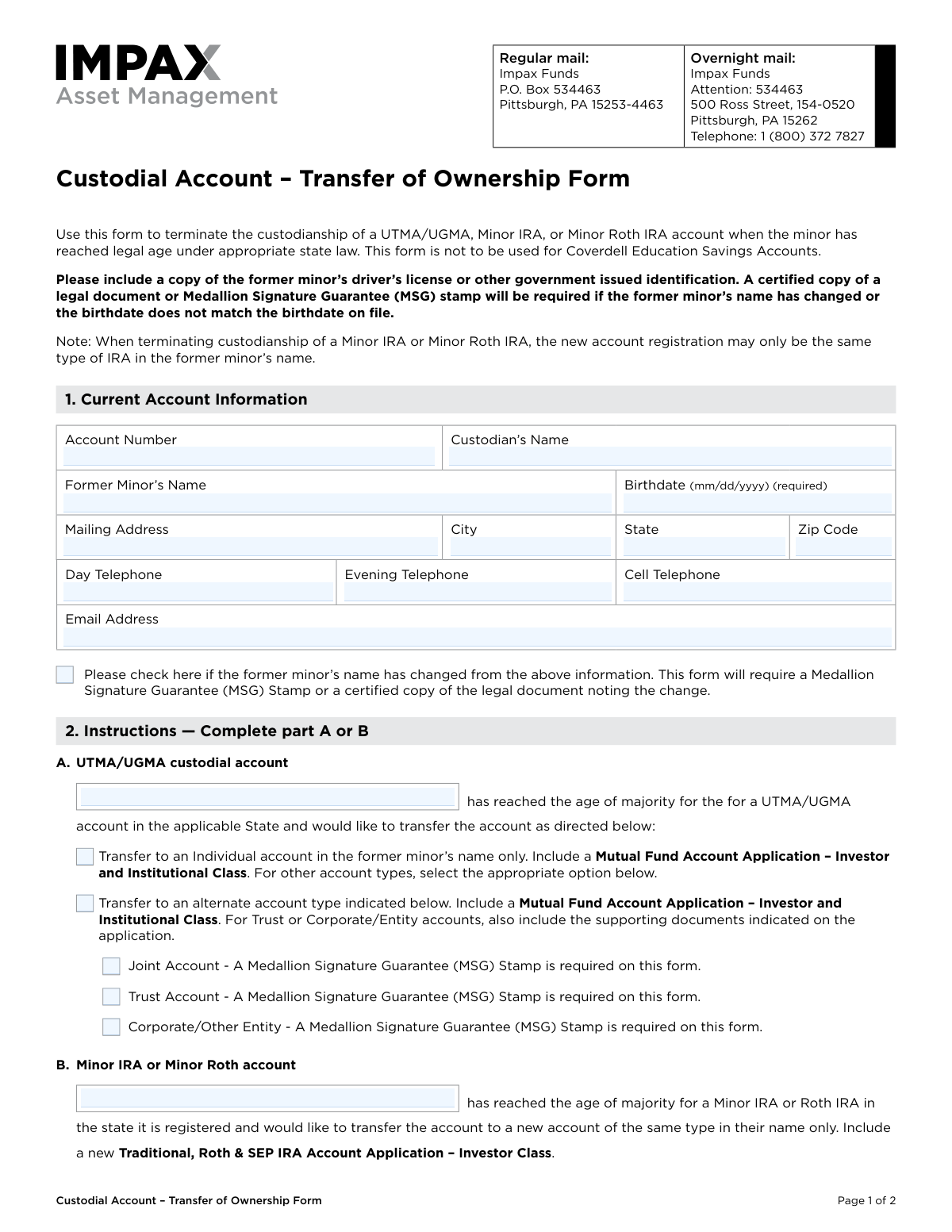
Yes! You can use AI to fill out Custodial Account – Transfer of Ownership Form
This form facilitates the transfer of assets from a custodial account (UTMA/UGMA, Minor IRA, or Minor Roth IRA) to the former minor who has reached the age of majority. It officially terminates the custodianship and directs the funds to a new account in the former minor's name. Today, this form can be filled out quickly and accurately using AI-powered services like Instafill.ai, which can also convert non-fillable PDF versions into interactive fillable forms.
Our AI automatically handles information lookup, data retrieval, formatting, and form filling.
It takes less than a minute to fill out COBF using our AI form filling.
Securely upload your data. Information is encrypted in transit and deleted immediately after the form is filled out.
Form specifications
| Form name: | Custodial Account – Transfer of Ownership Form |
| Number of pages: | 1 |
| Language: | English |
| Categories: | account ownership forms, account transfer forms, transfer forms, ownership transfer forms, custodial account forms |
Instafill Demo: How to fill out PDF forms in seconds with AI
How to Fill Out COBF Online for Free in 2026
Are you looking to fill out a COBF form online quickly and accurately? Instafill.ai offers the #1 AI-powered PDF filling software of 2026, allowing you to complete your COBF form in just 37 seconds or less.
Follow these steps to fill out your COBF form online using Instafill.ai:
- 1 Navigate to Instafill.ai and upload the Custodial Account – Transfer of Ownership Form or select it from their template library.
- 2 Use the AI assistant to accurately fill in the 'Current Account Information' section, including the account number, custodian's name, and the former minor's details.
- 3 In Section 2, indicate whether you are transferring a UTMA/UGMA account or a Minor IRA/Roth IRA account.
- 4 Specify the instructions for the transfer, such as moving assets to a new individual account or another account type, and note if a new application is required.
- 5 The former minor must provide their signature and the date in the 'Authorization' section.
- 6 Secure a Medallion Signature Guarantee (MSG) stamp if required, for instance, if the former minor's name has changed or for certain transfer types like to a trust.
- 7 Review the entire form for accuracy, attach any required documents like a driver's license, and submit it to Impax Funds via the provided mail addresses.
Our AI-powered system ensures each field is filled out correctly, reducing errors and saving you time.
Why Choose Instafill.ai for Your Fillable COBF Form?
Speed
Complete your COBF in as little as 37 seconds.
Up-to-Date
Always use the latest 2026 COBF form version.
Cost-effective
No need to hire expensive lawyers.
Accuracy
Our AI performs 10 compliance checks to ensure your form is error-free.
Security
Your personal information is protected with bank-level encryption.
Frequently Asked Questions About Form COBF
This form is used to terminate the custodianship of a UTMA/UGMA, Minor IRA, or Minor Roth IRA account once the minor has reached the legal age of majority, transferring ownership to them.
The former minor who has reached the legal age of majority for their state must complete and sign this form to take control of their custodial account.
You should use this form when you have reached the legal age of majority as defined by your state for UTMA/UGMA or IRA accounts and wish to take ownership of the assets.
You must include a copy of your driver's license or other government-issued ID. You will also need to submit a new account application corresponding to the type of account you are establishing.
An MSG is a special signature guarantee from a financial institution that is more secure than a notary stamp. It is required if your name has changed or if you are transferring a UTMA/UGMA account into a Joint, Trust, or Corporate account.
You must check the box in Section 1 and provide either a Medallion Signature Guarantee stamp on the form or a certified copy of the legal document, like a marriage certificate, that shows the name change.
Yes, you must include a new account application. For UTMA/UGMA transfers, a Mutual Fund Account Application is needed, and for Minor IRA transfers, a new IRA Account Application is required.
No, the form explicitly states that it is not to be used for Coverdell Education Savings Accounts. You will need to request the appropriate form for that account type.
A UTMA/UGMA account can be transferred to various account types like an individual or joint account. A Minor IRA or Minor Roth IRA can only be transferred to a new IRA of the same type in the former minor's name.
No, they are not the same. The form specifically states that a notarization from a notary public is not an acceptable substitute for a Medallion Signature Guarantee.
You can send the form and required documents via regular mail or overnight mail to the specific Impax Funds addresses listed at the top of the form.
Yes, services like Instafill.ai use AI to auto-fill form fields accurately and save time, helping you complete the form with greater speed and fewer errors.
You can use a service like Instafill.ai to upload the PDF and fill it out electronically. This allows you to type your information directly into the fields before printing for signature and submission.
If you have a non-fillable or 'flat' PDF, you can use a tool like Instafill.ai. It can convert the document into an interactive, fillable form for you to complete on your computer.
Compliance COBF
Validation Checks by Instafill.ai
1
Validates Account Number Existence and Type
This check ensures the Account Number field is completed and corresponds to a valid, active UTMA/UGMA, Minor IRA, or Minor Roth IRA account within the system. This is the primary identifier for the transaction and is crucial for locating the correct assets to transfer. If the account number is missing, invalid, or does not match a custodial account type, the form will be rejected as the request cannot be processed.
2
Verifies Former Minor's Birthdate and Age of Majority
This validation confirms the birthdate is provided in the required 'mm/dd/yyyy' format and that the date confirms the former minor has reached the legal age of majority for the specific account type under applicable state law. This is the legal prerequisite for terminating the custodianship. If the date is missing, improperly formatted, or indicates the individual is still a minor, the transfer is legally impermissible and the form will be rejected.
3
Ensures Exclusive Selection of Transfer Instruction
This check verifies that the applicant has selected instructions in either Part A (for UTMA/UGMA accounts) or Part B (for Minor IRA/Roth IRA accounts), but not both. These sections are mutually exclusive and define the type of transfer being requested. Selecting both or neither creates ambiguity, making it impossible to determine the applicant's intent, which will result in the form being returned for correction.
4
Confirms Sub-Instruction Selection for UTMA/UGMA Transfer
If the applicant selects Part A for a UTMA/UGMA account, this check ensures they have also selected a specific destination account type (e.g., Individual, Joint, Trust). This selection is mandatory as it directs how the assets will be re-registered after the custodianship is terminated. Failure to specify a destination account type will render the form incomplete and lead to its rejection.
5
Requires Medallion Guarantee for Name Change
This check is triggered if the box indicating the former minor's name has changed is checked. It verifies the presence of a valid Medallion Signature Guarantee (MSG) stamp or an attached certified legal document proving the name change. This is a critical anti-fraud measure to confirm the identity of the true account owner. The form will be rejected without this required guarantee if the name change box is checked.
6
Enforces Medallion Guarantee for Complex Transfers
This validation confirms that a Medallion Signature Guarantee (MSG) stamp is present if the applicant requests a transfer to a Joint, Trust, or Corporate/Entity account in Part A. These account types involve higher risk and complexity, and the MSG provides an essential layer of authentication and liability protection. The absence of the required MSG for these specific selections will cause the transfer request to be denied.
7
Verifies Presence of Former Minor's Signature
This check confirms that the 'Former Minor Signature' field in Section 3 has been signed. The signature represents the individual's legal authorization for the fund to act on the instructions and transfer ownership of the account. A missing signature completely invalidates the request, and the form will be returned unprocessed.
8
Validates Signature Date Format and Presence
This check ensures that the date field next to the former minor's signature is completed and adheres to the 'mm/dd/yyyy' format. The signature date is crucial for establishing when the authorization was granted, which is important for compliance and audit trails. A missing or improperly formatted date can lead to processing delays or rejection of the form pending correction.
9
Cross-Validates Birthdate with Account Record
This check compares the birthdate entered on the form with the birthdate on file for the specified account number. A mismatch is a significant red flag for potential error or identity fraud. As per the form's instructions, a discrepancy requires a Medallion Signature Guarantee or legal documentation, and processing will be halted until this verification is provided.
10
Ensures Instruction Logically Matches Account Type
This validation cross-references the account number with the system to determine its type (UTMA/UGMA vs. Minor IRA/Roth) and then verifies that the correct instruction section (Part A or Part B) was completed. For example, completing Part B for a UTMA/UGMA account is a logical error. Such a mismatch indicates a misunderstanding by the applicant and will cause the form to be rejected.
11
Flags Requirement for Accompanying New Account Application
This is a procedural check to ensure the processing agent verifies that the required new account application is included with the submission. The form explicitly states that either a 'Mutual Fund Account Application' (for Part A) or a 'Traditional, Roth & SEP IRA Account Application' (for Part B) must be included. The transfer cannot be completed without the new account being established, so the submission will be held in a pending state if the application is missing.
12
Flags Requirement for Government-Issued ID
This check serves as a reminder for the processor to verify that a copy of the former minor's driver's license or other government-issued identification has been included with the form. This is a fundamental Know Your Customer (KYC) and identity verification requirement. The submission is considered incomplete and will not be fully processed until the required identification is received.
Common Mistakes in Completing COBF
This is a frequent and critical error because the form explicitly states a notarization is not an acceptable substitute for a Medallion Signature Guarantee (MSG). This mistake occurs because people are more familiar with notaries and may not understand the higher level of verification an MSG provides for financial transactions. Submitting a form with a notary stamp instead of a required MSG will result in immediate rejection and significant processing delays.
This form only authorizes the transfer; it does not open the new account for the former minor. The instructions require submitting a separate 'Mutual Fund Account Application' (for UTMA/UGMA) or a 'Traditional, Roth & SEP IRA Account Application' (for Minor IRAs). Overlooking this step will halt the process, as the funds have nowhere to be transferred to, requiring the firm to contact you and delaying the ownership change.
The instructions clearly require a copy of the former minor’s driver’s license or other government-issued ID to verify their identity and age. This is a common oversight as people focus on filling out the form fields and miss the documentation requirements listed in the preamble. Without this ID, the transfer cannot be processed, leading to rejection of the submission and the need to resend the entire package.
The signature line in Section 3 is specifically for the 'Former Minor Signature,' as they are the one authorizing the transfer into their name. The custodian, who has managed the account for years, may sign out of habit, which invalidates the form. To avoid this, the former minor must be the one to sign and date the form, confirming they are of legal age and ready to take control of the account.
The 'Birthdate' field is explicitly marked as '(required)' because it is essential for verifying that the minor has reached the age of majority. Applicants sometimes skip this field, assuming the information is already on file. Leaving the birthdate blank will cause an automatic rejection, as the firm cannot legally process the transfer without confirming eligibility.
An MSG is mandatory if the former minor's name has changed or if transferring a UTMA/UGMA to a Joint, Trust, or Corporate account. People often miss these specific triggers, which are detailed in Sections 1 and 2. Failing to obtain the guarantee stamp in Section 3 under these conditions will cause the form to be returned, forcing the applicant to visit a financial institution and resubmit.
This form handles two different types of custodial accounts: UTMA/UGMA (Part A) and Minor IRAs (Part B). Applicants must only complete the section that corresponds to their specific account type. Filling out both sections indicates confusion and will require the processing agent to halt the request and contact the applicant for clarification, causing unnecessary delays.
The form is explicitly not for Coverdell Education Savings Accounts (ESAs), but users may see 'Custodial Account' and assume it applies. This mistake wastes significant time, as the submission will be rejected, and the user will have to find the correct form and start the process over. Always read the instructions at the top of the form to confirm it is the correct one for your account type.
An error in the account number in Section 1 is one of the most common data entry mistakes and will prevent the firm from locating the account. This can happen due to a simple typo or misreading a statement. To prevent this, carefully double-check the account number against a recent account statement. AI-powered tools like Instafill.ai can help by auto-filling this information from saved records to ensure accuracy.
If the former minor's legal name is different from what is on file (e.g., due to marriage), the checkbox in Section 1 must be selected. Failing to do so means the name on the submitted ID won't match the account record, leading to a processing failure. This simple check alerts the firm and confirms that the applicant understands the corresponding MSG requirement, preventing a rejection and resubmission cycle. If the form is a non-fillable PDF, a tool like Instafill.ai can convert it to a fillable version to ensure all checkboxes and fields are completed clearly.
Saved over 80 hours a year
“I was never sure if my IRS forms like W-9 were filled correctly. Now, I can complete the forms accurately without any external help.”
Kevin Martin Green
Your data stays secure with advanced protection from Instafill and our subprocessors

Robust compliance program
Transparent business model
You’re not the product. You always know where your data is and what it is processed for.
ISO 27001, HIPAA, and GDPR
Our subprocesses adhere to multiple compliance standards, including but not limited to ISO 27001, HIPAA, and GDPR.
Security & privacy by design
We consider security and privacy from the initial design phase of any new service or functionality. It’s not an afterthought, it’s built-in, including support for two-factor authentication (2FA) to further protect your account.
Fill out COBF with Instafill.ai
Worried about filling PDFs wrong? Instafill securely fills custodial-account-transfer-of-ownership-form forms, ensuring each field is accurate.