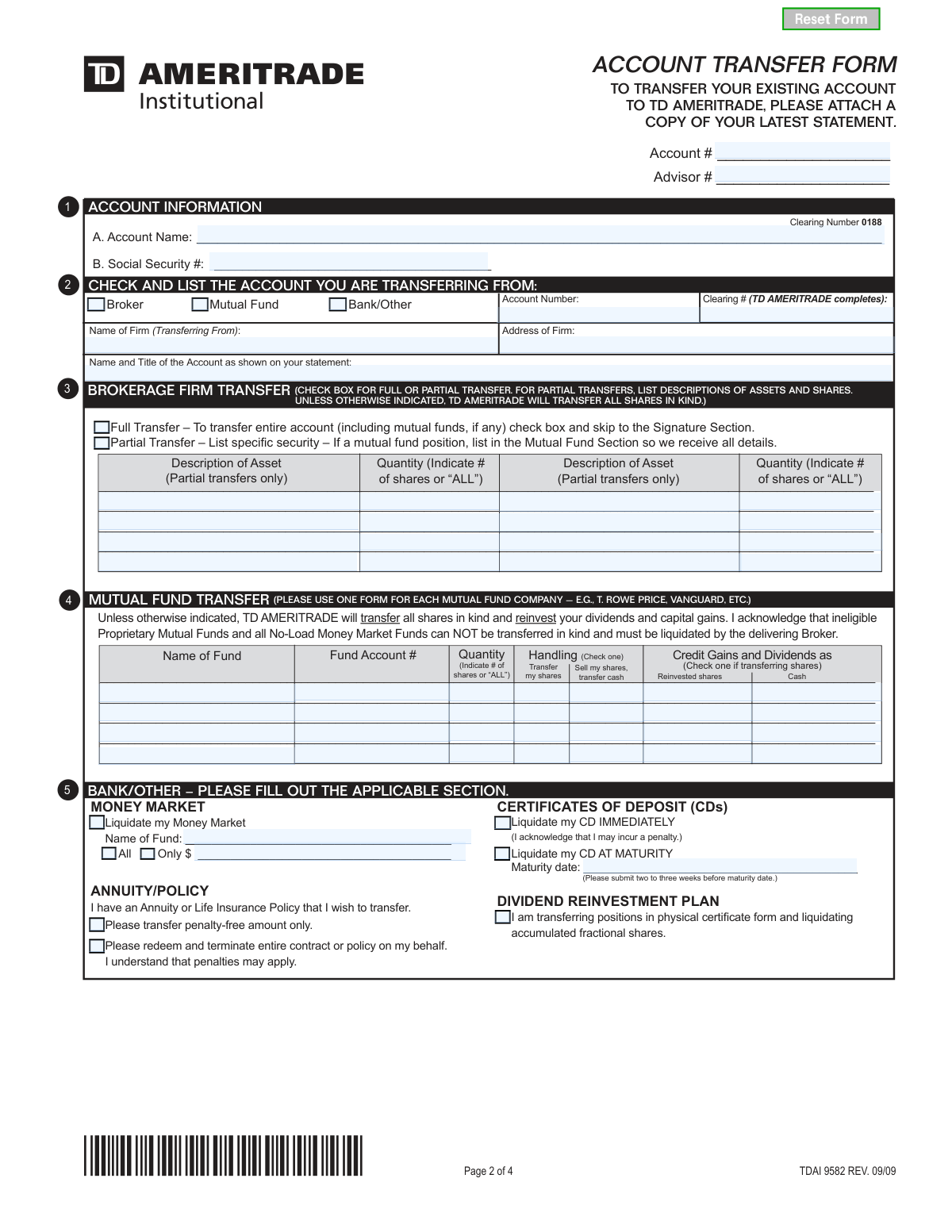
Yes! You can use AI to fill out TD Ameritrade Institutional Account Transfer Form
This form is an official request to transfer financial assets, such as stocks, bonds, or mutual funds, from an existing brokerage, bank, or mutual fund company to a new or existing account at TD Ameritrade Institutional. It serves as a formal instruction to the delivering firm to move the specified assets, simplifying the process of consolidating investments. Today, this form can be filled out quickly and accurately using AI-powered services like Instafill.ai, which can also convert non-fillable PDF versions into interactive fillable forms.
Our AI automatically handles information lookup, data retrieval, formatting, and form filling.
It takes less than a minute to fill out TDAI 9582 using our AI form filling.
Securely upload your data. Information is encrypted in transit and deleted immediately after the form is filled out.
Form specifications
| Form name: | TD Ameritrade Institutional Account Transfer Form |
| Number of pages: | 1 |
| Language: | English |
| Categories: | account transfer forms, transfer forms, institutional forms |
Instafill Demo: How to fill out PDF forms in seconds with AI
How to Fill Out TDAI 9582 Online for Free in 2026
Are you looking to fill out a TDAI 9582 form online quickly and accurately? Instafill.ai offers the #1 AI-powered PDF filling software of 2026, allowing you to complete your TDAI 9582 form in just 37 seconds or less.
Follow these steps to fill out your TDAI 9582 form online using Instafill.ai:
- 1 Navigate to Instafill.ai and upload or select the TD Ameritrade Account Transfer Form.
- 2 Use the AI assistant to input your TD Ameritrade account information in Section 1 and the details of the firm you are transferring from in Section 2.
- 3 Specify the type of transfer (Full or Partial) and provide details for brokerage, mutual fund, or other assets in Sections 3, 4, and 5.
- 4 Securely upload a copy of your most recent statement from the institution you are transferring from, as required by the form.
- 5 Complete Section 7 if you are transferring an individual account into a joint account.
- 6 Review all the information auto-filled by the AI for accuracy, then electronically sign and date the form in the signature section.
- 7 Download the completed form and submit it to TD Ameritrade Institutional along with the required statement.
Our AI-powered system ensures each field is filled out correctly, reducing errors and saving you time.
Why Choose Instafill.ai for Your Fillable TDAI 9582 Form?
Speed
Complete your TDAI 9582 in as little as 37 seconds.
Up-to-Date
Always use the latest 2026 TDAI 9582 form version.
Cost-effective
No need to hire expensive lawyers.
Accuracy
Our AI performs 10 compliance checks to ensure your form is error-free.
Security
Your personal information is protected with bank-level encryption.
Frequently Asked Questions About Form TDAI 9582
This form is used to transfer securities, mutual funds, or other financial assets from another institution, like a brokerage or bank, into your TD Ameritrade Institutional account.
You must attach a copy of your most recent account statement from the financial institution you are transferring assets from. This is a mandatory requirement for processing the transfer.
No, if you are transferring your entire account, simply check the 'Full Transfer' box in Section 3. You do not need to list individual assets and can proceed to the signature section.
You must complete and submit a separate Account Transfer Form for each mutual fund company you are transferring from. You can photocopy the blank form if you need additional copies.
All account owners must sign the form in Section 6. If you have a joint account, both parties are required to sign for the transfer to be authorized.
No, this form is specifically for transferring assets into TD Ameritrade from an external institution. It cannot be used for transfers between existing TD Ameritrade accounts.
To transfer a CD at maturity, complete the applicable part of Section 5 and submit the form at least two to three weeks before the maturity date. You can also choose to liquidate it immediately, but penalties may apply.
You must first convert your Traditional IRA to a Roth IRA with your existing custodian. Once that is complete, you can use this form to transfer the newly converted Roth IRA to your TD Ameritrade account.
Both joint account owners must sign in Section 7. Additionally, you must include a letter of authorization, signed by both owners, stating you are aware of the change from an individual to a joint account.
When transferring a physical certificate from a Dividend Reinvestment Plan, any fractional shares will be liquidated. The resulting cash will then be transferred to your account.
If you have a non-fillable PDF, you can use a service like Instafill.ai. It can convert flat PDFs into interactive, fillable forms that you can complete on your computer.
Yes, services like Instafill.ai use AI to auto-fill form fields accurately with your saved information. This can save you significant time and help reduce errors.
To fill this form online, upload the PDF to the Instafill.ai platform. The AI will make the document interactive and help you fill out the required sections before you download the completed form for submission.
Compliance TDAI 9582
Validation Checks by Instafill.ai
1
SSN Format and Requirement
Checks that the Social Security Number field in Section 1 is not empty and conforms to the 9-digit format, either as XXXXXXXXX or XXX-XX-XXXX. This number is critical for tax reporting and uniquely identifying the account holder. A missing or improperly formatted SSN will result in an immediate rejection of the form for correction.
2
Required Statement Attachment
Validates that a file has been attached to the form submission, as the instructions explicitly require a copy of the most recent statement from the transferring institution. This statement is used to verify account ownership, title, and asset details. Failure to attach the statement will mark the submission as incomplete and halt the transfer process until it is provided.
3
Signature Completeness for Account Type
Ensures that the signature section (Section 6) is properly signed. It verifies at least one signature is present and, if the destination TD Ameritrade account is a joint account, confirms that both signature lines are completed. Missing signatures invalidate the legal authorization to transfer assets, making the form non-binding and causing immediate rejection.
4
Full vs. Partial Transfer Logical Consistency
This check enforces the form's instructions regarding the scope of the transfer. If 'Full Transfer' is checked in Section 2, it verifies that the asset detail sections (3, 4, and 5) are left blank. Conversely, if 'Partial Transfer' is checked, it ensures that at least one of those sections contains specific asset information, preventing ambiguous or incomplete instructions.
5
Prohibition of Internal Transfers
This validation checks the 'Name of Firm (Transferring From)' field in Section 1 to ensure it is not 'TD AMERITRADE' or a known variant. The form is explicitly for external transfers only, and attempting to use it for internal transfers would route it incorrectly. This check prevents processing delays and ensures the user is directed to the correct internal transfer procedure.
6
Mutual Fund Dividend Handling Logic
For each mutual fund listed in Section 4, this check ensures that if 'Transfer my shares' is selected as the handling method, a corresponding instruction for 'Credit Gains and Dividends' ('Reinvested shares' or 'Cash') is also selected. This prevents ambiguity in how future distributions should be handled in the new account. An incomplete instruction would require follow-up with the client, delaying the transfer.
7
CD Maturity Date Requirement and Validity
In Section 5, if the option 'Liquidate my CD AT MATURITY' is chosen, this validation confirms that the 'Maturity date' field contains a valid date that is in the future. It can also flag dates that are less than the recommended two-to-three-week processing window. This ensures the transfer is initiated at the correct time to avoid early withdrawal penalties or missed maturity windows.
8
Joint Account Discrepancy Authorization
This check is triggered if the transfer is from an individual account to a joint TD Ameritrade account, as indicated by account records or the attached statement. It verifies that Section 7 is fully completed, including the names of all parties and signatures from both joint account owners. This provides the necessary legal authorization for changing the ownership structure of the assets.
9
Completeness of Core Account Information
Validates that all fields in Section 1, such as Account Name, TD Ameritrade Account Number, and the transferring firm's name and address, are fully completed. This information is the foundation of the transfer request and is required to identify both the source and destination accounts correctly. Incomplete information in this section will cause the entire transfer to fail.
10
Signature and Date Correspondence
This check ensures that for every signature line that is filled in Section 6 or Section 7, the corresponding date field is also filled with a valid date. A signature without a date can be legally challenged and may not be considered valid authorization by the transferring institution. This validation prevents processing holds due to incomplete legal attestations.
11
Partial Transfer Asset Specification
If 'Partial Transfer' is selected in Section 2, this validation ensures that for every asset description entered in Section 3 (Brokerage) or fund name in Section 4 (Mutual Fund), a corresponding quantity is specified. The quantity must be a specific number of shares or the word 'ALL'. This prevents ambiguity and ensures the transfer agent knows exactly which assets and how much of them to move.
12
Exclusive Selection for Money Market Liquidation
When liquidating a Money Market account in Section 5, this check verifies that the user has selected either the 'All' checkbox or entered a specific dollar amount in the 'Only $' field, but not both. This prevents conflicting instructions for the liquidation amount. If both or neither are specified, the form is considered ambiguous and will be rejected pending clarification.
Common Mistakes in Completing TDAI 9582
This is the most common reason for immediate rejection. People often assume the information entered on the form is sufficient and forget to include a copy of their most recent statement from the transferring institution. Without the statement, the receiving firm cannot verify the account details, ownership, and assets, leading to significant processing delays. Always double-check that a complete, recent statement is attached before sending the form.
The form explicitly requires that the account title and Social Security Number at the new institution are exactly the same as at the old one. Mistakes occur when using a nickname, omitting a middle initial, or having a different registration (e.g., 'John Smith' vs. 'John F. Smith Trust'). Any discrepancy will cause the transfer to fail due to security and compliance validation. To avoid this, carefully copy the account name and SSN directly from your statement.
Forgetting to have all account owners sign is a frequent error on joint accounts. The form is considered incomplete and legally invalid if only one of two or more owners provides a signature in Section 6. This halts the entire transfer process until a properly signed form is resubmitted. Always verify that every individual listed as an owner on the account has signed and dated the form.
Users often get confused in Section 3, either checking 'Full Transfer' and then unnecessarily listing assets, or checking 'Partial Transfer' and forgetting to list which specific assets to move. This ambiguity forces the firm to halt the process and contact you for clarification. A 'Full Transfer' moves everything automatically, while a 'Partial Transfer' requires a precise list of assets and quantities, which should be copied from your statement to avoid errors.
The instructions in Section 4 clearly state to use a separate form for each mutual fund company (e.g., one for Vanguard, another for Fidelity). Applicants try to save time by listing funds from different companies on a single form. This will cause the request to be rejected or only partially processed, as each fund company requires its own unique transfer request. To prevent this, photocopy the form and complete one for each institution.
The form advises initiating a CD transfer two to three weeks before the maturity date, but many people wait until the last minute. Financial institutions require significant lead time to process the liquidation and transfer. Submitting the form too late can result in the CD automatically renewing at the old institution, locking up your funds for another term and potentially incurring penalties for early withdrawal.
When transferring assets from an account owned by one person into a joint account, a separate signed letter of authorization is required, as noted in the instructions and Section 7. This is a special requirement that is easily overlooked. Failure to include this letter or get all required signatures will put the transfer on hold until the proper documentation is received.
Applicants may list proprietary mutual funds or no-load money market funds for an in-kind transfer, not realizing they are non-transferable. The fine print in Section 3 notes these assets must be liquidated by the delivering firm. This mistake leads to unexpected liquidations, which can trigger taxable events, or results in those assets being left behind in the old account. It's crucial to confirm asset transferability with TD Ameritrade beforehand.
This form is a flat, non-fillable PDF, leading to manual data entry errors, poor legibility, and missed fields. Handwriting can be misinterpreted, and there are no built-in checks to ensure data is formatted correctly or that all required sections are complete. This often results in back-and-forth communication to correct simple mistakes. AI-powered tools like Instafill.ai can convert non-fillable PDFs into interactive forms, reducing errors by auto-filling information and ensuring all required fields are completed legibly.
Saved over 80 hours a year
“I was never sure if my IRS forms like W-9 were filled correctly. Now, I can complete the forms accurately without any external help.”
Kevin Martin Green
Your data stays secure with advanced protection from Instafill and our subprocessors

Robust compliance program
Transparent business model
You’re not the product. You always know where your data is and what it is processed for.
ISO 27001, HIPAA, and GDPR
Our subprocesses adhere to multiple compliance standards, including but not limited to ISO 27001, HIPAA, and GDPR.
Security & privacy by design
We consider security and privacy from the initial design phase of any new service or functionality. It’s not an afterthought, it’s built-in, including support for two-factor authentication (2FA) to further protect your account.
Fill out TDAI 9582 with Instafill.ai
Worried about filling PDFs wrong? Instafill securely fills td-ameritrade-institutional-account-transfer-form forms, ensuring each field is accurate.