Yes! You can use AI to fill out TIAA Brokerage Incoming Account Transfer Form
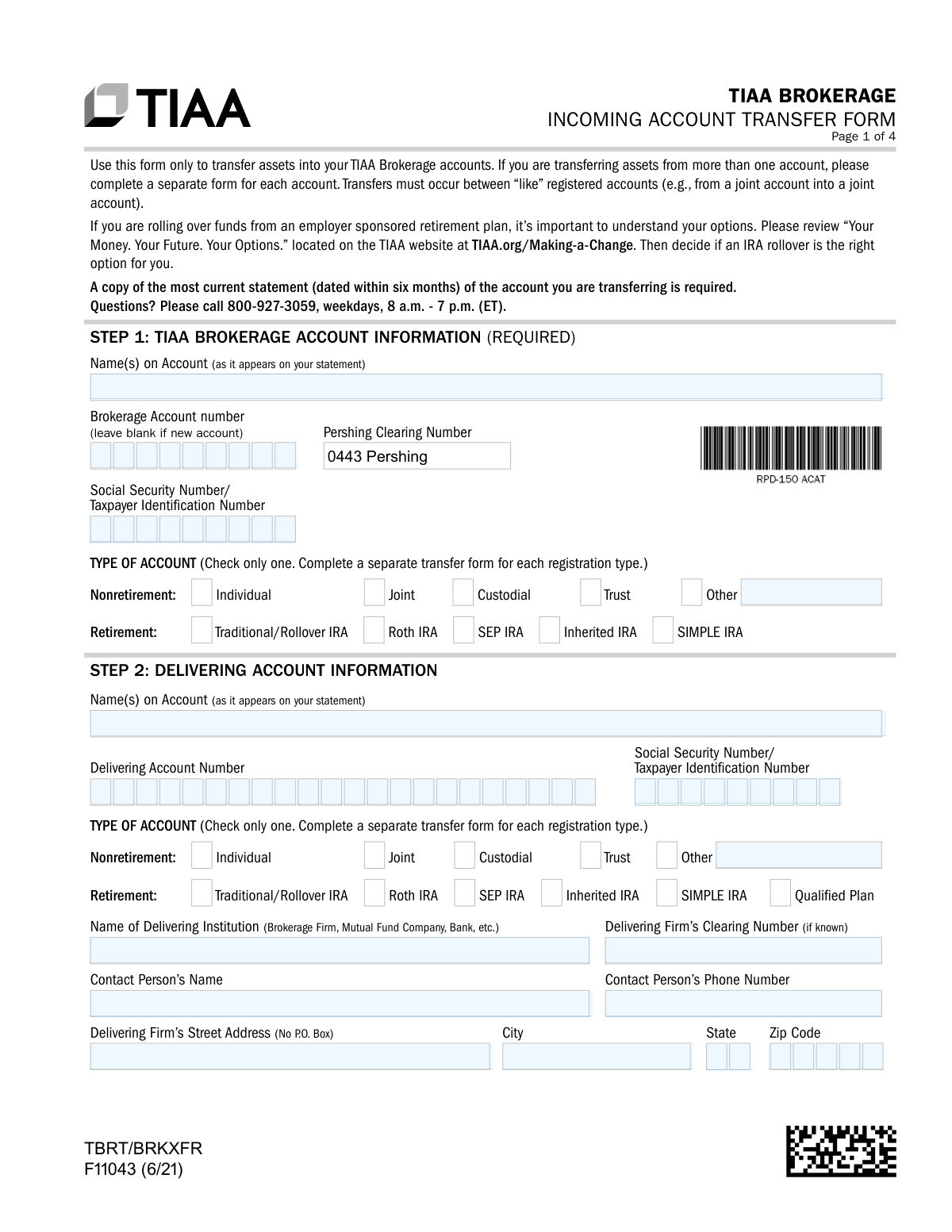
Form F11043, the TIAA Brokerage Incoming Account Transfer Form, is a document used by individuals to authorize the transfer of assets from an external financial institution into their TIAA Brokerage account. This is essential for consolidating investments, such as stocks, mutual funds, or retirement funds, under TIAA's management. Today, this form can be filled out quickly and accurately using AI-powered services like Instafill.ai, which can also convert non-fillable PDF versions into interactive fillable forms.
F11043 is part of the
brokerage forms, TIAA forms, account transfer forms, broker forms, brokerage account forms and brokerage transfer forms categories on Instafill.
Rather not fill this in by hand? Instafill is an online form filler that completes PDF forms automatically — upload the blank form, answer a few questions, and the AI fills every field.
Form specifications
| Form name: | TIAA Brokerage Incoming Account Transfer Form |
| Number of pages: | 1 |
| Language: | English |
Our AI automatically handles information lookup, data retrieval, formatting, and form filling.
It takes less than a minute to fill out F11043 using our AI form filling.
Securely upload your data. Information is encrypted in transit and deleted immediately after the form is filled out.
Instafill Demo: How to fill out PDF forms in seconds with AI
How to Fill Out F11043 Online for Free in 2026
Are you looking to fill out a F11043 form online quickly and accurately? Instafill.ai offers the #1 AI-powered PDF filling software of 2026, allowing you to complete your F11043 form in just 37 seconds or less.
Follow these steps to fill out your F11043 form online using Instafill.ai:
- 1 Navigate to Instafill.ai and upload or select the TIAA Brokerage Incoming Account Transfer Form (F11043).
- 2 Provide your TIAA Brokerage account information for Step 1, including your name and account number.
- 3 Enter the details of the delivering account you are transferring from in Step 2, such as the institution's name and your account number there.
- 4 Clearly specify your transfer instructions in Step 3, choosing whether to transfer the entire account or only specific assets.
- 5 Complete any additional required sections, such as the Retirement Plan Certification (Step 4) or the One and the Same Certification (Step 5) if account names differ slightly.
- 6 Review all the information populated by the AI for accuracy, then electronically sign and date the form in the Participant Signature section (Step 6).
- 7 Securely submit the completed form along with a copy of your most recent account statement from the delivering firm as instructed.
Our AI-powered system ensures each field is filled out correctly, reducing errors and saving you time.
Why Choose Instafill.ai for Your Fillable F11043 Form?
Speed
Complete your F11043 in as little as 37 seconds.
Up-to-Date
Always use the latest 2026 F11043 form version.
Cost-effective
No need to hire expensive lawyers.
Accuracy
Our AI performs 10 compliance checks to ensure your form is error-free.
Security
Your personal information is protected with bank-level encryption.
Frequently Asked Questions About F11043
This form is used to transfer assets like stocks, bonds, mutual funds, or cash from another financial institution into your TIAA Brokerage account.
You must include a complete copy of your most recent account statement, dated within the last six months, from the account you are transferring. In some cases, like a name mismatch, additional documentation may be required.
No, you must complete a separate Incoming Account Transfer Form for each individual account you wish to transfer assets from.
An 'In Kind' transfer moves your investments as they are, without selling them. 'Liquidate' means your assets will be sold by the delivering firm, and the resulting cash will be transferred to your TIAA account.
If you are submitting this form along with a new account application, you can leave the 'Brokerage Account Number' field blank in Step 1.
You must complete Step 5, the 'One and the Same Certification,' to confirm you are the same person. For significant name variations, like a marriage, you may need to provide supporting legal documents.
The fastest way is to upload the completed form and your statement using the TIAA mobile app or by logging into your account on TIAA.org. You can also fax or mail the form using the contact information provided.
Not necessarily. You should first contact your 401(k) plan administrator, as they may have their own required paperwork or procedures for processing a rollover request.
You can only transfer retirement CDs, and they must be liquidated into cash as part of the transfer. Be aware that liquidating a CD before its maturity date may result in penalties from your bank.
All account holders of the receiving TIAA Brokerage account must sign and date the form in Step 6. The signatures must match the account registration.
Yes, services like Instafill.ai use AI to help you accurately auto-fill form fields from your saved profiles, which saves time and helps reduce errors.
You can use a service like Instafill.ai to upload the PDF and fill it out on your computer. The platform allows you to type directly into the fields, add your signature, and then download the completed form for submission.
If you have a non-fillable or 'flat' PDF, you can upload it to a service like Instafill.ai. It will automatically convert the document into an interactive, fillable form that you can complete online.
Compliance F11043
Validation Checks by Instafill.ai
1
Exclusive Transfer Instruction Selection
Ensures that only one transfer instruction option (A, B, C, D, E, F, or G) is selected in Step 3. The form requires the user to choose a single method for the asset transfer. If multiple options are selected, the request is ambiguous and cannot be processed, leading to rejection and delays.
2
Account Type Registration Consistency
Validates that the 'TYPE OF ACCOUNT' selected in Step 1 (TIAA Brokerage Account) matches the 'TYPE OF ACCOUNT' in Step 2 (Delivering Account). Transfers must occur between 'like' registered accounts (e.g., Traditional IRA to Traditional IRA). A mismatch can have significant legal and tax implications, and the transfer will be rejected until the account types align or proper legal documentation for an ownership change is provided.
3
Required Signatures for All Account Holders
Verifies that all account holders listed in Step 1 have provided a signature and date in Step 6. The number of signatures must correspond to the number of owners on the receiving account (e.g., two signatures for a joint account). Missing signatures invalidate the authorization, preventing the transfer from being executed until all parties have signed.
4
Current Account Statement Attachment
Checks for the mandatory attachment of a complete, current statement for the delivering account, dated within the last six months. This statement is crucial for verifying account details, ownership, and the assets to be transferred. Failure to provide a valid statement will halt the process, as TIAA cannot initiate the transfer without this proof.
5
Prohibited Rollover from QRP/403(b) to SIMPLE IRA
Prevents a transfer from a 'Qualified Plan' or 403(b) (selected in Step 2) to a 'SIMPLE IRA' (selected in Step 1). The form explicitly forbids this type of rollover due to IRS regulations. Allowing this transaction would result in an invalid contribution, potentially leading to tax penalties for the account holder.
6
Conditional Completion of 'One and the Same Certification'
This check ensures that Step 5 ('One and the Same Certification') is completed if, and only if, the account owner names in Step 1 and Step 2 are not an exact match. If the names differ without this certification, the transfer will be rejected due to an ownership discrepancy. Conversely, if the names match, this section should be blank to avoid confusion.
7
SSN/TIN Format and Consistency
Validates that the Social Security Number or Taxpayer Identification Number in both Step 1 and Step 2 is present and follows the correct format (e.g., XXX-XX-XXXX for SSN). It also cross-references to ensure the SSN/TIN for the primary owner is identical in both sections. An incorrect or mismatched number will cause an immediate failure in the automated transfer system (ACATS) and requires correction.
8
Conditional Requirement for Partial Transfer Details
If option B ('Transfer only the assets listed below') is selected, this validates that at least one security is detailed with a description and number of shares. Similarly, if a partial rollover/transfer is chosen in option F or G, it ensures a dollar amount is specified. Without these details, the instruction is incomplete and TIAA would not know which specific assets or what amount to transfer.
9
CD Maturity Date Validation
If the user selects 'Liquidate my CD/savings at maturity' (Step 3, Option E), this check verifies that a 'Maturity Date' is provided in a valid mm/dd/yyyy format. It also confirms the date is within 30 days of the form's submission date, as per the form's instructions. An invalid or out-of-range date will cause the request to be rejected as it cannot be timed correctly.
10
Delivering Firm Physical Address Requirement
Verifies that the 'Delivering Firm’s Street Address' provided in Step 2 is a physical address and not a P.O. Box. The form explicitly states 'No P.O. Box' because a physical address is often required for overnight mail and courier services used to expedite transfers. Using a P.O. Box can lead to significant processing delays or returned paperwork.
11
Signature Date Validity
Ensures that the 'Today’s Date' field next to each signature in Step 6 is filled out, is a valid date, and is not a future date. The signature date legally establishes when the authorization was given. A missing, invalid, or future date can render the legal authorization void and will require the form to be re-signed.
12
Bank Transfer Retirement Account Constraint
This check confirms that if Transfer Instruction E ('Bank or Credit Union Transfers') is selected, the receiving account type in Step 1 is a retirement account (e.g., IRA). The form specifies this option is for 'retirement accounts only' and that requests for non-retirement savings accounts will not be accepted. A mismatch would result in the rejection of the transfer request.
Common Mistakes in Completing F11043
The form explicitly requires a full copy of the most current statement (dated within six months) from the account being transferred. People often forget this attachment in their haste to complete the form, leading to immediate processing delays or rejection. To avoid this, use the checklist on the final page before submission and ensure a clear, complete copy of the statement is included with your paperwork.
Transfers are often rejected because the name on the delivering account (Step 2) does not exactly match the name on the new TIAA account (Step 1). This happens with minor differences like a missing middle initial, a suffix like 'Jr.', or a legal name change. If the names are not identical, you must complete the 'One and the Same Certification' in Step 5 or provide legal documentation, otherwise the transfer will be halted until the discrepancy is resolved.
For joint, trust, or custodial accounts, all required parties must sign the form in Step 6. It's a frequent error for only the primary account holder to sign, which invalidates the request for accounts with multiple owners or trustees. Before submitting, verify the account registration type and ensure every individual listed as an owner or trustee has provided a signature that matches their printed name.
Step 3 requires you to choose only one transfer method (A-G), but the options are complex and can be confusing. A common mistake is checking multiple boxes or choosing an option that doesn't apply to the asset type, such as requesting an 'In Kind' transfer for a bank CD that must be liquidated. This leads to incorrect processing or rejection. Carefully read the description for each option to ensure it matches your account type and desired outcome.
Users often misunderstand the term 'In Kind,' assuming they can instruct TIAA to sell assets. The form clarifies that 'In Kind' transfers the assets as they are, and any liquidation must be done by contacting the delivering firm *before* submitting the form. This mistake can result in unwanted securities being transferred instead of cash, potentially disrupting your investment strategy. Always decide if you want to transfer assets or cash first, and take the appropriate action with your current firm if liquidation is needed.
When choosing a partial transfer (Option B or C in Step 3), people frequently fail to provide all the necessary details for each asset, such as the full security description, CUSIP number, and the exact number of shares. Leaving this information incomplete or inaccurate makes it impossible for the firm to identify and transfer the correct assets. To prevent this, have your account statement in front of you and meticulously copy all required details for each security you wish to move.
The form explicitly requests a physical street address for the delivering firm in Step 2 and states 'No P.O. Box,' as overnight mail may be used to expedite the transfer. Providing a P.O. Box can cause significant delays or a failed delivery of the transfer request. Always look up the firm's physical or overnight mailing address on their website or your statement to ensure the paperwork is sent to the correct location.
When rolling over an employer-sponsored plan like a 403(b) or QRP (Option F), many people fill out this form without first contacting their plan administrator. These plans often have their own specific procedures and may require proprietary paperwork in addition to, or instead of, the TIAA form. This oversight will cause the delivering firm to reject the transfer request, forcing you to start the process over. Always consult your plan administrator first to understand their exact requirements.
The section for Bank or Credit Union Transfers (Step 3E) is restricted to retirement accounts containing CDs or savings products. A common error is attempting to use this form to transfer a standard checking or non-retirement savings account, which the form explicitly states will not be accepted. This results in an automatic rejection of that part of the request. Ensure you are only initiating transfers for eligible retirement plan assets held at a bank.
For retirement account transfers, individuals subject to RMDs for the current year must satisfy that distribution *before* transferring the account. The form's certification in Step 4 attests that the RMD is not part of the transfer amount. Overlooking this can lead to tax complications and processing issues. If you are of RMD age, confirm with your tax advisor that your annual distribution has been taken before initiating the transfer.
Saved over 80 hours a year
“I was never sure if my IRS forms like W-9 were filled correctly. Now, I can complete the forms accurately without any external help.”
Kevin Martin Green
Your data stays secure with advanced protection from Instafill and our subprocessors




Robust compliance program
Transparent business model
You’re not the product. You always know where your data is and what it is processed for.
ISO 27001, HIPAA, and GDPR
Our subprocesses adhere to multiple compliance standards, including but not limited to ISO 27001, HIPAA, and GDPR.
Security & privacy by design
We consider security and privacy from the initial design phase of any new service or functionality. It’s not an afterthought, it’s built-in, including support for two-factor authentication (2FA) to further protect your account.
Fill out F11043 with Instafill.ai
Worried about filling PDFs wrong? Instafill securely fills tiaa-brokerage-incoming-account-transfer-form forms, ensuring each field is accurate.
