Yes! You can use AI to fill out Transfer of Assets Out - Partial Account or Charitable Gift Transfers
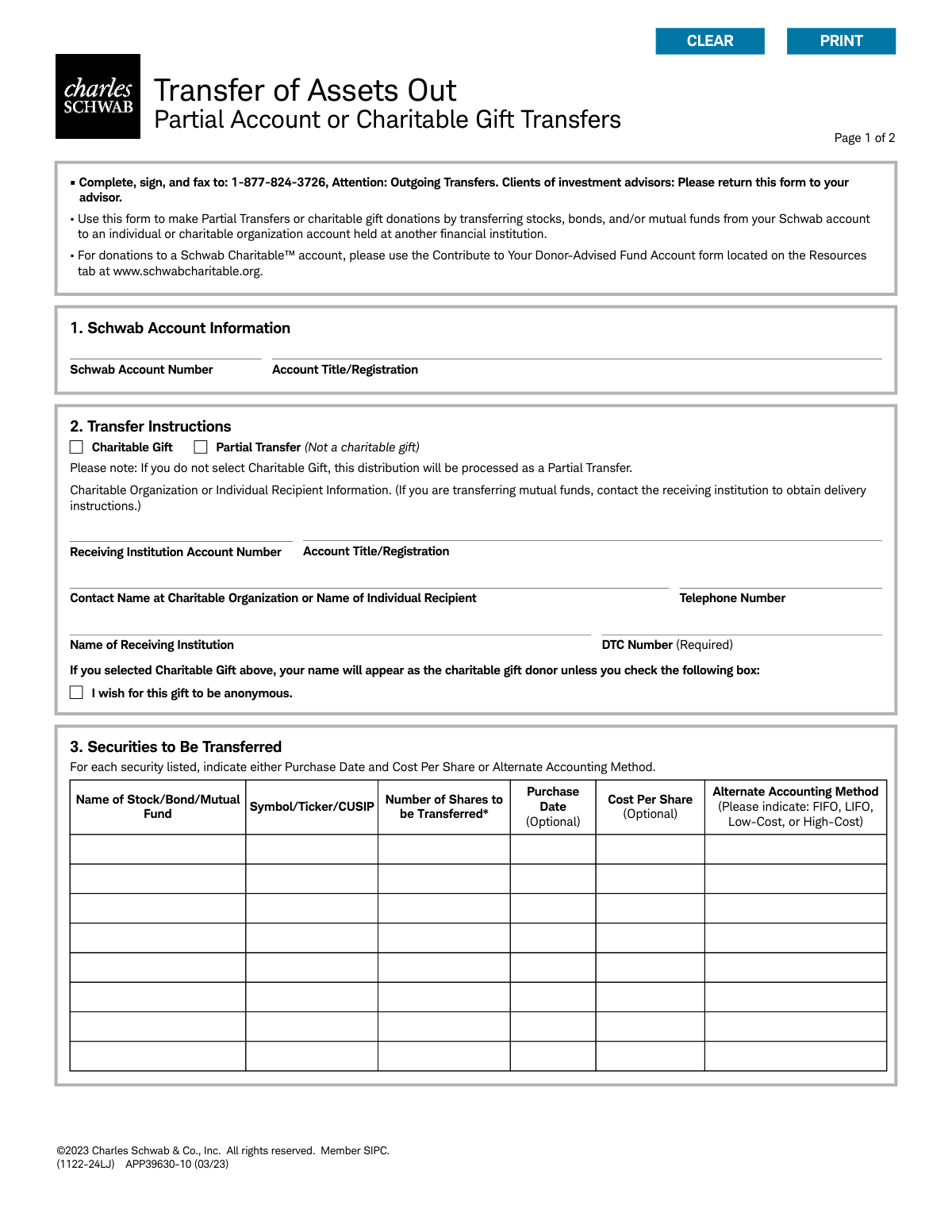
This form, officially titled 'Transfer of Assets Out - Partial Account or Charitable Gift Transfers,' is a document provided by Charles Schwab & Co., Inc. It allows account holders to instruct Schwab to transfer specific assets like stocks, bonds, or mutual funds to an individual or charitable organization's account at a different financial institution. This is crucial for making in-kind transfers without liquidating the assets first. Today, this form can be filled out quickly and accurately using AI-powered services like Instafill.ai, which can also convert non-fillable PDF versions into interactive fillable forms.
APP39630-10 is part of the
asset transfer forms, charitable forms, ABLE account forms, account transfer forms, transfer forms, charitable gift forms and charitable account forms categories on Instafill.
Rather not fill this in by hand? Instafill is an online form filler that completes PDF forms automatically — upload the blank form, answer a few questions, and the AI fills every field.
Form specifications
| Form name: | Transfer of Assets Out - Partial Account or Charitable Gift Transfers |
| Number of pages: | 1 |
| Language: | English |
Our AI automatically handles information lookup, data retrieval, formatting, and form filling.
It takes less than a minute to fill out APP39630-10 using our AI form filling.
Securely upload your data. Information is encrypted in transit and deleted immediately after the form is filled out.
Instafill Demo: How to fill out PDF forms in seconds with AI
How to Fill Out APP39630-10 Online for Free in 2026
Are you looking to fill out a APP39630-10 form online quickly and accurately? Instafill.ai offers the #1 AI-powered PDF filling software of 2026, allowing you to complete your APP39630-10 form in just 37 seconds or less.
Follow these steps to fill out your APP39630-10 form online using Instafill.ai:
- 1 Navigate to Instafill.ai and upload the 'Transfer of Assets Out' PDF or select it from their template library.
- 2 Provide your Schwab account number and the exact account title/registration in Section 1.
- 3 In Section 2, indicate whether the transfer is a 'Partial Transfer' or a 'Charitable Gift' and enter the recipient's account and institution details.
- 4 List the specific securities to be transferred in Section 3, including the symbol/CUSIP and the number of shares for each.
- 5 Optionally, provide cost basis information such as purchase date, cost per share, or an alternate accounting method (e.g., FIFO, LIFO).
- 6 Review all the information populated by the AI to ensure accuracy and completeness.
- 7 Electronically sign and date the form in Section 4 to authorize Schwab to execute the transfer instructions.
Our AI-powered system ensures each field is filled out correctly, reducing errors and saving you time.
Why Choose Instafill.ai for Your Fillable APP39630-10 Form?
Speed
Complete your APP39630-10 in as little as 37 seconds.
Up-to-Date
Always use the latest 2026 APP39630-10 form version.
Cost-effective
No need to hire expensive lawyers.
Accuracy
Our AI performs 10 compliance checks to ensure your form is error-free.
Security
Your personal information is protected with bank-level encryption.
Frequently Asked Questions About APP39630-10
This form is used to transfer specific stocks, bonds, or mutual funds from your Charles Schwab account to an account at another financial institution. It is intended for partial account transfers or for making charitable gift donations.
Use this form only for partial transfers out of your account. Do not use it for transferring your entire account or for making contributions to a Schwab Charitable™ account, as those require different forms.
You can fax the completed and signed form to 1-877-824-3726, Attention: Outgoing Transfers. If you work with an investment advisor, please return the form to your advisor instead.
The DTC (Depository Trust Company) number is a unique code for the receiving financial institution that is required for the transfer. You must contact the receiving institution directly to obtain their correct DTC number.
Yes, you can make your gift anonymous by checking the designated box in Section 2. If you do not check this box, your name will be provided to the recipient organization as the donor.
In Section 3, you can specify lots by entering the 'Purchase Date' and 'Cost Per Share' or by choosing an 'Alternate Accounting Method' like FIFO or High-Cost. If you don't specify, your account's default method will be used.
No, this form does not allow you to specify a dollar amount. You must enter the exact number of whole shares you wish to transfer in Section 3.
Only whole shares of stocks can be transferred using this form. Any fractional shares included in your request will be automatically left behind in your Schwab account.
All account holders listed on the Schwab account must sign the form to authorize the transfer. For accounts registered as 'Tenants in Common,' signatures from both tenants are required.
Yes, before completing the form for a mutual fund transfer, you must contact the receiving institution to obtain their specific delivery instructions.
This means that once you authorize the transfer of assets as a charitable gift, the transaction cannot be canceled or reversed. Please be certain of your donation before submitting the form.
Yes, services like Instafill.ai use AI to help you accurately auto-fill form fields with your saved information. This can save time and reduce the chance of making errors.
Simply upload the PDF to the Instafill.ai platform. The AI will make the form interactive, allowing you to type your information or use the auto-fill feature to complete it quickly before printing for your signature.
You can use a tool like Instafill.ai, which converts flat, non-fillable PDFs into interactive forms. This allows you to easily type your information into the fields on your computer.
Compliance APP39630-10
Validation Checks by Instafill.ai
1
Schwab Account Number Validation
This check ensures the 'Schwab Account Number' provided in Section 1 is a valid, active account number in the system. It is crucial for identifying the source account from which assets will be transferred. If the number is invalid or does not match the account holder's profile, the submission will be rejected to prevent unauthorized access or transfers from the wrong account.
2
Transfer Type Selection Mandate
Validates that one of the two transfer types, 'Charitable Gift' or 'Partial Transfer', is explicitly selected in Section 2. Although the form notes a default, requiring a selection prevents ambiguity and ensures the transfer is processed with the correct tax implications and reporting. A failed validation would prompt the user to make a clear choice before proceeding.
3
DTC Number Requirement
This check verifies that the 'DTC Number' field in Section 2 is filled out, as it is explicitly marked 'Required'. The Depository Trust Company (DTC) number is essential for the electronic transfer of securities between financial institutions. Without a valid DTC number, the transfer cannot be routed correctly and will fail, so the form submission is blocked until it is provided.
4
Securities List Minimum Requirement
Ensures that at least one security (stock, bond, or mutual fund) is listed in the table in Section 3. A transfer request form must specify which assets are to be moved. Submitting a form with no securities listed is an invalid request, and the validation will fail, requiring the user to add at least one asset to transfer.
5
Whole Share Transfer Quantity
This validation confirms that the 'Number of Shares to be Transferred' for each listed security is a positive whole number (integer). The form explicitly states that only whole shares can be transferred and fractional shares will be left behind. This check prevents users from entering decimals, fractions, or dollar amounts, which would cause processing errors.
6
Asset Availability in Account
For each security listed, this check verifies two things: that the 'Symbol/Ticker/CUSIP' exists in the specified Schwab account and that the 'Number of Shares to be Transferred' is less than or equal to the available balance. This is a critical control to prevent attempts to transfer assets that the account holder does not own or over-transferring a position. A failure would result in an error message indicating insufficient shares.
7
Conditional Anonymity Logic
This check ensures the 'I wish for this gift to be anonymous' checkbox is only selected if the 'Charitable Gift' option is also chosen in Section 2. Anonymity is not applicable to a standard 'Partial Transfer' to an individual. If this logical rule is violated, the system should alert the user to either deselect the anonymous option or change the transfer type to 'Charitable Gift'.
8
Accounting Method Exclusivity
For each security, this validation ensures the user provides either specific lot details ('Purchase Date' and 'Cost Per Share') or an 'Alternate Accounting Method' (e.g., FIFO), but not both. Providing both sets of instructions is contradictory and would create ambiguity for cost basis reporting. The validation prevents this conflict by requiring the user to choose only one method for specifying the shares to be transferred.
9
Accounting Method Value Validation
If a user enters a value in the 'Alternate Accounting Method' column, this check verifies that the input is one of the four allowed options: 'FIFO', 'LIFO', 'Low-Cost', or 'High-Cost'. This prevents typos or invalid methods from being submitted, which would cause processing to fail. An invalid entry would trigger an error message listing the acceptable values.
10
Primary Signature and Date Mandate
Validates that the signature and 'Today's Date' fields for the primary account holder in Section 4 are both completed. The signature provides legal authorization for the transfer, and the date establishes when the authorization was given. An unsigned or undated form is legally incomplete and cannot be processed.
11
Conditional Joint Account Signature
This check determines if the Schwab account is a joint account type, such as 'Tenants in Common', which requires signatures from all account holders. If so, it validates that the 'Additional Account Holder' signature and date fields are also completed. This ensures that all required parties have provided authorization, preventing legal and compliance issues with the transfer.
12
Receiving Institution Data Completeness
Verifies that the 'Receiving Institution Account Number', 'Account Title/Registration', and 'Name of Receiving Institution' fields are all filled out. This information is absolutely essential for the receiving firm to identify the correct destination account for the incoming assets. Missing any of this data would almost certainly cause the transfer to be rejected or delayed.
13
Telephone Number Format Validation
This check ensures the 'Telephone Number' provided in Section 2 adheres to a standard, valid format (e.g., 10 digits with or without formatting characters). A valid phone number is important so the receiving institution can be contacted if there are any questions or issues with the transfer. This validation improves data quality and reduces the risk of communication failures during the transfer process.
14
Date Format and Validity
Ensures that all date fields on the form, such as 'Purchase Date' and 'Today's Date', are entered in the specified 'mm/dd/yyyy' format and represent a valid calendar date. This prevents data entry errors like '02/30/2023' or improperly formatted text. Consistent and valid date formatting is essential for accurate record-keeping and processing.
Common Mistakes in Completing APP39630-10
Users often mistype their account number or enter a number for a different account they own. This simple data entry error will cause the transfer to be rejected immediately, as the source of the funds cannot be identified. To avoid this, double-check the account number against your statement. AI-powered tools like Instafill.ai can help by storing and accurately populating this information, and can even convert non-fillable PDFs into interactive forms.
The account title entered in Section 1 or 2 does not exactly match the official registration, such as using a nickname instead of a full legal name. Financial institutions require an exact match for security and legal compliance, so any discrepancy will lead to rejection and delays. Always copy the title precisely from an official account statement to ensure it is correct.
Users sometimes overlook the checkbox in Section 2 to designate the transfer as a 'Charitable Gift.' The form defaults to a 'Partial Transfer' if left blank, which has different tax implications and reporting requirements. This oversight can lead to incorrect tax documentation and complicate year-end filings, so it's crucial to carefully select the correct transfer type.
The form explicitly requires the Depository Trust Company (DTC) number for the receiving institution, but many people don't know what it is or where to find it. Without this number, the electronic transfer cannot be processed, leading to an automatic rejection and significant delays. You must contact the receiving firm to obtain their specific DTC number before filling out the form.
The instructions clearly state this form is not for donations to a 'Schwab Charitable™' account, yet users may miss this detail and attempt it anyway. This results in the request being rejected and redirected, wasting time and delaying the intended donation. Always read the form's purpose and instructions carefully to ensure it's the correct one for your specific transaction.
It's common to think of a transfer in terms of its monetary value, but this form requires the exact 'Number of Shares.' The form explicitly forbids dollar amounts, so any such request will be rejected, forcing you to resubmit. You must calculate the number of whole shares you wish to transfer based on the current market price before completing the form.
The form notes that only whole shares can be transferred, but users with dividend reinvestment plans often own fractional shares and may try to transfer their entire holding. This results in the fractional portion of the shares being left behind in the Schwab account, which may not be the user's intent. Always specify a whole number of shares for the transfer to avoid this issue.
When specifying which shares to transfer, users may fail to select a specific lot or accounting method (FIFO, LIFO, etc.). The form will then default to the account's standard method, which may not be the most tax-efficient choice, potentially leading to higher capital gains taxes. To optimize tax outcomes, consult a tax advisor and clearly specify the desired lots or accounting method in Section 3.
A simple typo in the Ticker Symbol or CUSIP number is a frequent data entry error that can cause the wrong security to be transferred or lead to a processing failure. To prevent this, verify the identifier on your account statement or a financial website. AI form-filling tools like Instafill.ai can reduce these errors by automatically validating security details.
For accounts owned by more than one person, such as a 'Tenants in Common' account, all account holders are required to sign the authorization. It's a common oversight for one owner to fill out and sign the form without getting the signature of the other owner(s). This incomplete authorization will cause the form to be rejected, halting the transfer process until all signatures are collected.
Saved over 80 hours a year
“I was never sure if my IRS forms like W-9 were filled correctly. Now, I can complete the forms accurately without any external help.”
Kevin Martin Green
Your data stays secure with advanced protection from Instafill and our subprocessors




Robust compliance program
Transparent business model
You’re not the product. You always know where your data is and what it is processed for.
ISO 27001, HIPAA, and GDPR
Our subprocesses adhere to multiple compliance standards, including but not limited to ISO 27001, HIPAA, and GDPR.
Security & privacy by design
We consider security and privacy from the initial design phase of any new service or functionality. It’s not an afterthought, it’s built-in, including support for two-factor authentication (2FA) to further protect your account.
Fill out APP39630-10 with Instafill.ai
Worried about filling PDFs wrong? Instafill securely fills transfer-of-assets-out-partial-account-or-charitable-gift-transfers forms, ensuring each field is accurate.
