Yes! You can use AI to fill out Prior Authorization (PA) Request Form – Adult Palliative Care (Alameda Alliance for Health)
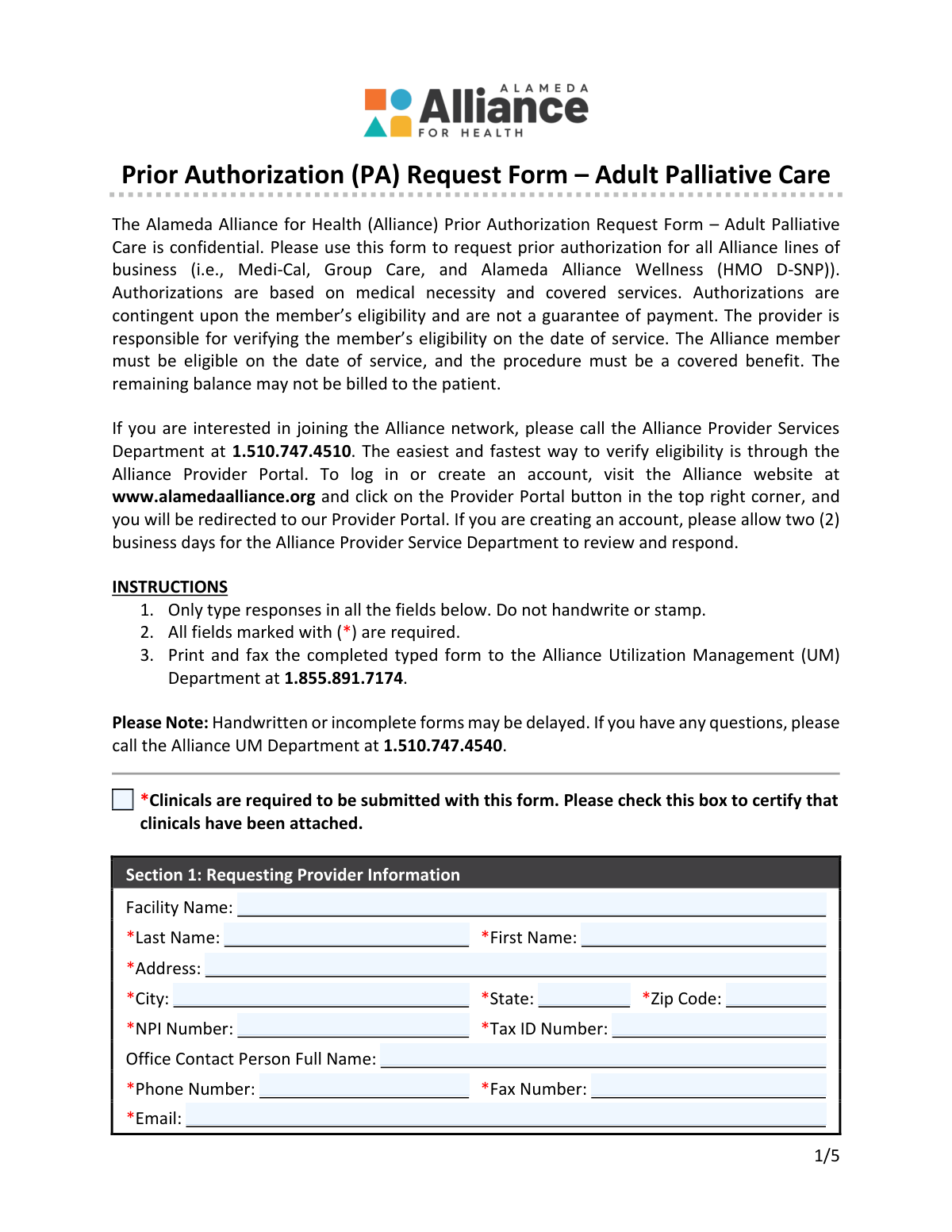
The Prior Authorization (PA) Request Form – Adult Palliative Care is an Alameda Alliance for Health utilization management form used by providers to request approval for adult palliative care services before they are rendered (or retroactively in limited situations). It documents the requesting and rendering provider details, the member’s eligibility and insurance information, the type/urgency of the request, and the clinical eligibility criteria for palliative care. The form also captures required ICD diagnosis codes and CPT/HCPCS service codes so the Alliance can determine medical necessity and covered benefits. Submitting complete typed information and attaching clinical documentation helps avoid processing delays and supports timely authorization decisions.
Our AI automatically handles information lookup, data retrieval, formatting, and form filling.
It takes less than a minute to fill out Alliance Adult Palliative Care PA Request Form using our AI form filling.
Securely upload your data. Information is encrypted in transit and deleted immediately after the form is filled out.
Form specifications
| Form name: | Prior Authorization (PA) Request Form – Adult Palliative Care (Alameda Alliance for Health) |
| Number of pages: | 5 |
| Filled form examples: | Form Alliance Adult Palliative Care PA Request Form Examples |
| Language: | English |
| Categories: | insurance forms, Alameda Alliance forms, CAR forms |
Instafill Demo: filling out a legal form in seconds
How to Fill Out Alliance Adult Palliative Care PA Request Form Online for Free in 2026
Are you looking to fill out a ALLIANCE ADULT PALLIATIVE CARE PA REQUEST FORM form online quickly and accurately? Instafill.ai offers the #1 AI-powered PDF filling software of 2026, allowing you to complete your ALLIANCE ADULT PALLIATIVE CARE PA REQUEST FORM form in just 37 seconds or less.
Follow these steps to fill out your ALLIANCE ADULT PALLIATIVE CARE PA REQUEST FORM form online using Instafill.ai:
- 1 Confirm the member is eligible on the date of service and gather required clinical documentation; check the box certifying clinicals are attached.
- 2 Complete Section 1 (Requesting Provider Information), including facility/provider name, address, NPI, Tax ID, and contact details (phone, fax, email).
- 3 Select exactly one request type in Section 2 (Retro, Routine, Standing Referral, Urgent, or Authorization Change Request) and enter the existing Alliance authorization number if requesting a change.
- 4 Enter Section 3 (Member Information), including name, DOB, Alliance Member ID, CIN/MBI if applicable, address, phone, and any other insurance coverage.
- 5 Complete Section 4 (Requested Service) by selecting the general eligibility statement and the member’s qualifying condition(s) that meet the palliative care criteria.
- 6 Fill out Sections 5–7 with rendering/servicing provider details, service dates, place of service, out-of-network status and reason (if applicable), and discharge planning needs/date (if applicable).
- 7 Complete Section 8 with at least one ICD diagnosis code (mark primary as appropriate) and list requested CPT/HCPCS codes with descriptions, modifiers, quantity, unit type, and total billable units; then print and fax the typed form with attachments to Alliance UM at 1.855.891.7174.
Our AI-powered system ensures each field is filled out correctly, reducing errors and saving you time.
Why Choose Instafill.ai for Your Fillable Alliance Adult Palliative Care PA Request Form Form?
Speed
Complete your Alliance Adult Palliative Care PA Request Form in as little as 37 seconds.
Up-to-Date
Always use the latest 2026 Alliance Adult Palliative Care PA Request Form form version.
Cost-effective
No need to hire expensive lawyers.
Accuracy
Our AI performs 10 compliance checks to ensure your form is error-free.
Security
Your personal information is protected with bank-level encryption.
Frequently Asked Questions About Form Alliance Adult Palliative Care PA Request Form
This form is used to request prior authorization for adult palliative care services through Alameda Alliance for Health. Authorization decisions are based on medical necessity, covered benefits, and the member’s eligibility on the date of service.
The requesting provider (or their office staff on the provider’s behalf) should complete the form. It must be typed and submitted to the Alliance Utilization Management (UM) Department.
This form is used for all Alliance lines of business, including Medi-Cal, Group Care, and Alameda Alliance Wellness (HMO D-SNP).
Yes. Clinicals are required, and you must check the box on the form to certify that clinical documentation has been attached.
No. The form instructions state you must only type responses in all fields and not handwrite or stamp. Handwritten or incomplete forms may be delayed.
All fields marked with an asterisk (*) are required. Missing required fields can delay processing.
Print and fax the completed typed form to the Alliance UM Department at 1.855.891.7174. For questions, you can call UM at 1.510.747.4540.
Routine requests are processed within up to 7 calendar days, standing referrals within up to 3 business days, and urgent requests within up to 72 hours. Retro requests (for eligibility issues or urgent care) can take up to 30 calendar days from receipt.
Choose Retro when requesting authorization due to eligibility issues or urgent care after the date of service. Retro requests must be submitted within 90 days of the date of service.
Urgent requests are for services needing a prompt decision because the member’s condition poses an imminent and serious threat (e.g., potential loss of life, limb, or major bodily function). The form notes that inappropriate use will be monitored.
Select “Authorization Change Request” and provide the Alliance authorization number and the member information. Use a separate sheet to describe the requested changes and/or attach supporting documentation.
You must provide required member details such as name, date of birth, Alliance Member ID, CIN, and address. For newborn services, the form instructs you to provide the mother’s information.
You must select one general eligibility option (decline in health status and not hospice-eligible, or hospice-eligible but declines) and select at least one qualifying condition. Some conditions have specific criteria (e.g., CHF requires both (a) and (b); COPD requires (a) or (b); advanced cancer requires (a) and (b)).
You must enter the rendering provider’s required identifiers (including NPI and Tax ID), contact information, and the starting service date (and ending date if known). You must also select exactly one place of service code (e.g., Office 11, Home 12, Inpatient Hospital 21).
Mark “Yes” in the out-of-network section and select one reason (e.g., in-network provider not available, specialized procedure/area of expertise, timely access). You must provide the reason when requesting out-of-network services.
At least one diagnosis (ICD) code is required in Section 8, and you should indicate the primary diagnosis if applicable. For requested services, include CPT/HCPCS code(s), description, modifiers (if any), quantity, unit type, and total billable units.
Compliance Alliance Adult Palliative Care PA Request Form
Validation Checks by Instafill.ai
1
Clinicals Attachment Certification Required
Validates that the 'Clinicals are required…' certification checkbox is checked before submission. This is required because the form explicitly states clinicals must be attached to support medical necessity review. If unchecked, the submission should be rejected or routed to a pend/deficiency workflow requesting the missing clinical documentation.
2
Requesting Provider Required Fields Completeness
Ensures all required fields in Section 1 are present: requesting provider last name, first name, address, city, state, zip, NPI, tax ID, phone, fax, and email. These fields are necessary to identify the requesting entity and enable UM communication. If any required field is missing, the form should fail validation and prompt the submitter to complete the missing items.
3
Requesting Provider Contact Format Validation (Phone/Fax/Email)
Validates that phone and fax numbers contain valid digits and formatting (e.g., 10-digit NANP numbers, allowing separators) and that email follows a standard email pattern (local@domain). Correct contact formats are critical to avoid delays in UM outreach and fax routing. If invalid, the system should block submission and highlight the specific field(s) needing correction.
4
Provider Identifier Validation (NPI and Tax ID)
Checks that NPI values are exactly 10 digits and pass the NPI Luhn check, and that Tax ID is a valid 9-digit EIN/SSN-style numeric value (with or without hyphen). Accurate identifiers are required for provider matching, network status checks, and claims/payment workflows. If validation fails, the submission should be rejected and the user instructed to correct the identifier(s).
5
Type of Request Single-Selection Enforcement
Ensures exactly one option is selected in Section 2 (Retro, Routine, Standing Referral, Urgent, or Authorization Change Request). The processing timeline and routing depend on this selection, and multiple selections create ambiguity. If none or more than one is selected, the form should fail validation and require a single choice.
6
Authorization Change Request Requires Authorization Number
If 'Authorization Change Request' is selected, validates that an Alliance Authorization Number is provided and is in an acceptable format (e.g., non-empty, alphanumeric length constraints if defined by the payer). This number is required to locate the existing authorization and apply changes correctly. If missing/invalid, the request should be blocked or pended until a valid authorization number is supplied.
7
Retro Request Timeliness (Within 90 Days of Date of Service)
If 'Retro' is selected, validates that the requested starting service date (or date of service) is within 90 days of the submission/receipt date. The form states retro requests must be within 90 days, and late submissions may be non-compliant with policy. If outside the window, the system should flag as invalid and require correction or an exception workflow.
8
Member Required Fields Completeness
Ensures required member fields in Section 3 are completed: last name, first name, date of birth, Alliance member ID, CIN, address, city, state, and zip. These are necessary to confirm eligibility and correctly associate the request to the member. If any required member field is missing, the submission should be rejected or pended for completion.
9
Member Identifiers Format Validation (Alliance Member ID, CIN, MBI)
Validates that Alliance Member ID and CIN follow expected payer formats (e.g., numeric/alphanumeric length constraints) and that MBI, if provided, matches Medicare’s 11-character MBI pattern (excluding invalid characters). Correct identifier formats reduce mismatches and eligibility lookup failures. If invalid, the system should prompt correction and prevent submission when required identifiers are malformed.
10
Date Format and Validity Checks (DOB, Service Dates, Discharge Date)
Validates that all dates entered (DOB, starting service date, ending service date, and discharge date when applicable) are in MM/DD/YYYY format and represent real calendar dates. Date validity is essential for eligibility determination, timeliness rules, and correct authorization spans. If a date is malformed or impossible (e.g., 02/30/2026), the submission should fail with a clear error message.
11
Service Date Logical Consistency (Start/End and Not Before DOB)
Ensures the starting service date is present (required) and that the ending service date, if provided, is on or after the starting service date. Also checks that service dates are not earlier than the member’s date of birth. If inconsistent, the system should block submission and require corrected dates to avoid invalid authorization periods.
12
General Eligibility Single-Selection Requirement
Validates that exactly one General Eligibility option is selected in Section 4 (decline in health status and not hospice-eligible, or hospice-eligible but declines). This selection is required to establish the palliative care eligibility pathway and guide clinical review. If none or both are selected, the request should be rejected for clarification.
13
Qualifying Condition Minimum Selection Requirement
Ensures at least one qualifying condition checkbox is selected in Section 4, as the form states the member must meet at least one condition to be eligible. This is necessary to justify the requested adult palliative care service under the program criteria. If no condition is selected, the submission should be pended/rejected and the submitter prompted to select the applicable condition(s).
14
Rendering/Servicing Provider Required Fields and Identifier Validation
Validates required fields in Section 5: rendering provider last name, first name, address, city, state, zip, NPI, tax ID, phone, fax, and starting service date. It also applies the same NPI (10-digit + Luhn) and Tax ID (9-digit) checks as the requesting provider. If missing or invalid, the system should block submission because the servicing provider is required for authorization and downstream claims.
15
Place of Service Single-Selection and 'Other' Specification
Ensures exactly one Place of Service code is selected in Section 5. If 'Other (99)' is selected, validates that a free-text description is provided to clarify the setting. If multiple/none are selected or 'Other' lacks detail, the submission should fail because place of service affects coverage rules and authorization configuration.
16
Out-of-Network Logic and Reason Requirement
Validates that Section 6 has a Yes/No selection for out-of-network, and if 'Yes' is selected, exactly one reason is chosen (and 'Other' includes a description). This is important for network compliance, exception tracking, and potential member liability protections. If out-of-network is 'Yes' without a reason (or multiple reasons), the request should be pended for correction.
17
Discharge Planning Conditional Discharge Date Requirement
Ensures Section 7 has a Yes/No selection, and if 'Yes' is selected, a discharge date is provided in MM/DD/YYYY format. Discharge planning requests are time-sensitive and require a target discharge date for appropriate prioritization and coordination. If 'Yes' is selected without a valid discharge date, the submission should be blocked or pended until provided.
18
Diagnoses and Service Codes Minimum Requirements (ICD + CPT/HCPCS)
Validates that at least one ICD diagnosis code is provided (as stated) and that each entered ICD code matches an acceptable ICD-10-CM format (e.g., letter + 2 digits, optional decimal and additional characters). Also validates that each service line includes required fields: CPT/HCPCS code, description, quantity, unit type, and total billable units, with codes matching standard CPT (5 digits) or HCPCS (1 letter + 4 digits) patterns. If missing/invalid, the request should be rejected because UM cannot determine what is being authorized or the clinical rationale.
Common Mistakes in Completing Alliance Adult Palliative Care PA Request Form
This form explicitly requires that all fields be typed, but people often print and handwrite corrections or use office stamps out of habit. Handwritten/stamped content can be illegible or fail document-scanning standards, which commonly leads to processing delays or requests for resubmission. To avoid this, complete the form electronically, type every field (including corrections), and reprint a clean final version before faxing.
The form requires clinical documentation and includes a checkbox to certify that clinicals are attached, but submitters often overlook the checkbox or assume prior notes are already on file. Missing clinicals typically results in an incomplete request and delays while UM requests additional information. Always attach supporting clinical records (e.g., recent progress notes, hospital records, test results supporting criteria) and check the certification box before faxing.
Because required fields are spread across multiple sections, it’s common to miss one (e.g., NPI, Tax ID, address, phone/fax, member DOB, member ID/CIN). Missing required fields can prevent the Alliance from matching the member/provider correctly and can stop the request from being processed. Use a final checklist pass: confirm every asterisked field in Sections 1, 3, 5, 6, and 7 is completed before submission.
Section 2 requires selecting only one request type, but people sometimes check more than one (e.g., Routine and Urgent) or mark Urgent for convenience. Incorrect selection can cause mis-triage, compliance concerns (urgent misuse is monitored), and delays if the request must be reclassified. Choose the single option that matches the clinical situation and timing rules, and document urgency in the attached clinicals when applicable.
Retro requests are limited to eligibility issues or urgent care and must be submitted within 90 days of the date of service, but submitters often miss the deadline or use retro for routine late paperwork. This can lead to denial or non-processing because the request does not meet retro criteria. Verify the date of service, confirm it is within 90 days, and clearly document the eligibility/urgent circumstance in the clinicals.
When requesting a change to an existing authorization, the form requires the Alliance authorization number and instructs using a separate sheet to specify changes, but people often omit the auth number or provide vague change requests. Without the authorization number and clear change scope, UM may be unable to locate the case or determine what is being modified, causing delays. Always include the exact Alliance authorization number and attach a clear, itemized description of requested changes with supporting documentation.
The form collects multiple identifiers (Alliance Member ID, CIN, and optional MBI), and people frequently enter the wrong number in the wrong field or submit demographics that don’t match eligibility records. This can prevent accurate member matching and may delay review while UM requests clarification. Copy identifiers directly from the member’s current eligibility/insurance record, and ensure name, DOB, and address match what the Alliance has on file.
The form states that for newborn services, the mother’s information should be provided, but submitters often enter the newborn’s details instead. This can cause eligibility verification failures if the newborn is not yet enrolled or the ID is not active. If the request is for a newborn, enter the mother’s name/ID/DOB as instructed and clarify in the clinicals that services are for the newborn.
Section 4 requires selecting only one General Eligibility option and meeting at least one qualifying condition, but people sometimes check both general options or check a condition without meeting its sub-criteria (e.g., CHF requires both (a) and (b)). This can lead to medical-necessity denials or requests for additional documentation. Select exactly one General Eligibility statement and ensure the attached clinicals explicitly support the specific sub-criteria for each checked condition.
Submitters often assume the requesting provider and rendering provider are the same and leave Section 5 incomplete, or they enter mismatched NPI/Tax ID/address details. Incomplete or inconsistent servicing provider data can cause authorization to be issued to the wrong entity or delay claims payment. Complete Section 5 fully, and verify the rendering provider’s NPI and Tax ID match the entity that will actually deliver and bill for the service.
The form requires selecting exactly one Place of Service code (e.g., Home (12), Inpatient Hospital (21)), but people leave it blank or select multiple locations when care may transition. Missing or incorrect POS can affect authorization accuracy, benefit application, and downstream billing. Choose the single POS where services will primarily be rendered for the authorized period, and if multiple settings are anticipated, clarify the plan in an attachment and request separate authorizations if needed.
Section 8 requires at least one diagnosis code and includes fields for CPT/HCPCS, description, modifiers, quantity, unit type, and total billable units, but submitters often provide only a narrative description or omit units/modifiers. Incomplete coding can prevent UM from determining what is being requested and can lead to delays, partial approvals, or billing mismatches. Include at least one valid ICD-10 code, list each requested CPT/HCPCS code with an accurate description, and specify modifiers, quantity, unit type, and total billable units consistent with the clinical plan.
Saved over 80 hours a year
“I was never sure if my IRS forms like W-9 were filled correctly. Now, I can complete the forms accurately without any external help.”
Kevin Martin Green
Your data stays secure with advanced protection from Instafill and our subprocessors

Robust compliance program
Transparent business model
You’re not the product. You always know where your data is and what it is processed for.
ISO 27001, HIPAA, and GDPR
Our subprocesses adhere to multiple compliance standards, including but not limited to ISO 27001, HIPAA, and GDPR.
Security & privacy by design
We consider security and privacy from the initial design phase of any new service or functionality. It’s not an afterthought, it’s built-in, including support for two-factor authentication (2FA) to further protect your account.
Fill out Alliance Adult Palliative Care PA Request Form with Instafill.ai
Worried about filling PDFs wrong? Instafill securely fills prior-authorization-pa-request-form-adult-palliati forms, ensuring each field is accurate.



