Yes! You can use AI to fill out Form F11004, TIAA Brokerage Individual Transfer on Death Account Agreement
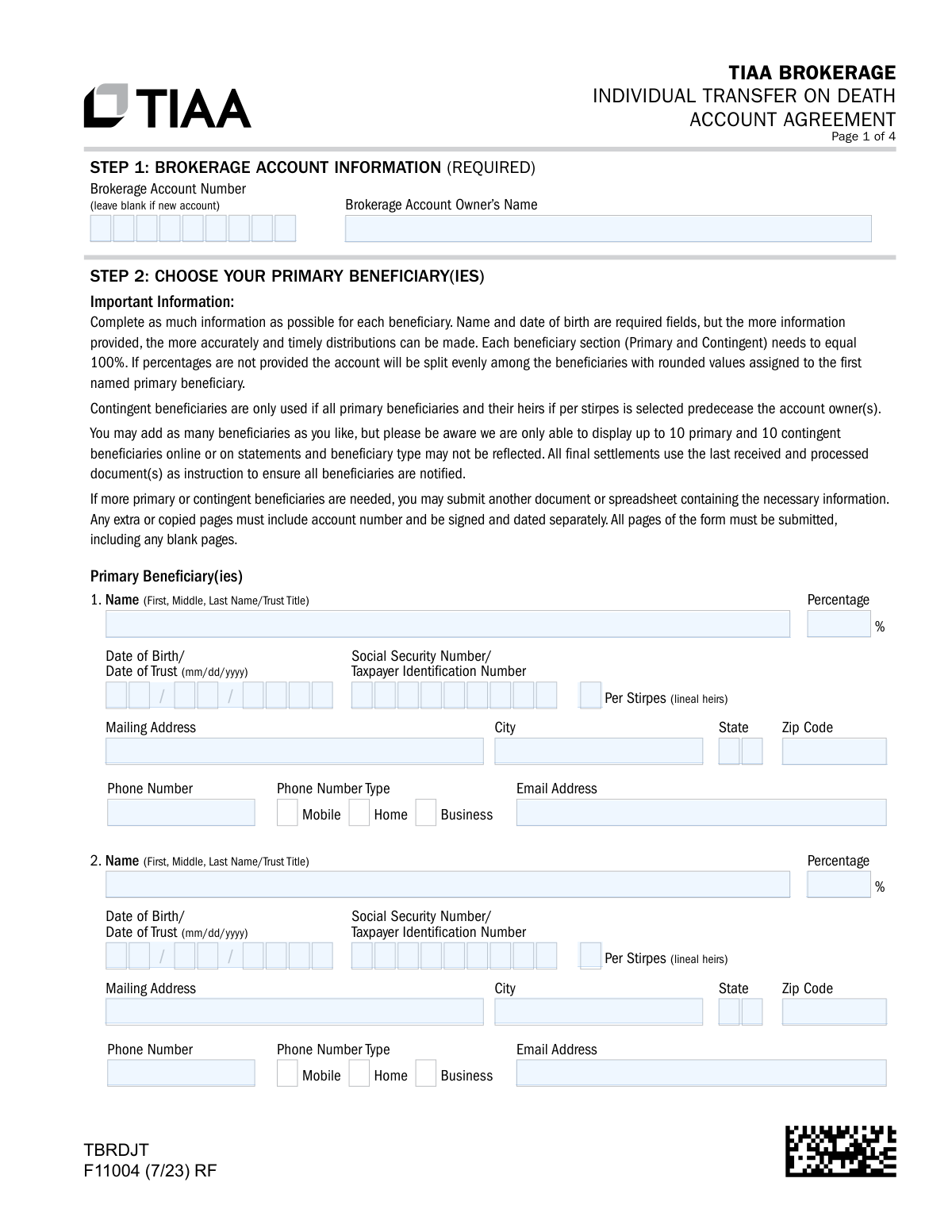
Form F11004, the TIAA Brokerage Individual Transfer on Death Account Agreement, is a legal document that allows an individual account owner to designate beneficiaries to receive the assets in their taxable brokerage account upon their death. This arrangement helps assets bypass the often lengthy and costly probate process, ensuring a smoother transfer to the intended heirs. Today, this form can be filled out quickly and accurately using AI-powered services like Instafill.ai, which can also convert non-fillable PDF versions into interactive fillable forms for your convenience.
F11004 is part of the
brokerage forms, investment account forms, beneficiary designation forms, TIAA forms, account transfer forms, transfer forms, broker forms, brokerage account forms, brokerage transfer forms and transfer on death forms categories on Instafill.
Rather not fill this in by hand? Instafill is an online form filler that completes PDF forms automatically — upload the blank form, answer a few questions, and the AI fills every field.
Form specifications
| Form name: | Form F11004, TIAA Brokerage Individual Transfer on Death Account Agreement |
| Number of pages: | 1 |
| Language: | English |
Our AI automatically handles information lookup, data retrieval, formatting, and form filling.
It takes less than a minute to fill out F11004 using our AI form filling.
Securely upload your data. Information is encrypted in transit and deleted immediately after the form is filled out.
Instafill Demo: How to fill out PDF forms in seconds with AI
How to Fill Out F11004 Online for Free in 2026
Are you looking to fill out a F11004 form online quickly and accurately? Instafill.ai offers the #1 AI-powered PDF filling software of 2026, allowing you to complete your F11004 form in just 37 seconds or less.
Follow these steps to fill out your F11004 form online using Instafill.ai:
- 1 Navigate to Instafill.ai and upload Form F11004 or select it from the template library.
- 2 Provide your brokerage account information in Step 1, including the account number and owner's name.
- 3 In Step 2, enter the full details for each primary beneficiary, including their name, date of birth, SSN, and the percentage of assets they will receive. Ensure the total percentage equals 100%.
- 4 Complete Step 3 to designate contingent beneficiaries who will inherit the assets if all primary beneficiaries predecease you.
- 5 If you are married and live in a community property state listed in Step 4, complete the spousal consent section.
- 6 Carefully review all entered information for accuracy, then proceed to Step 5 to have the account owner electronically sign and date the agreement.
- 7 Securely download, print, or submit the completed and signed form according to the instructions provided by TIAA.
Our AI-powered system ensures each field is filled out correctly, reducing errors and saving you time.
Why Choose Instafill.ai for Your Fillable F11004 Form?
Speed
Complete your F11004 in as little as 37 seconds.
Up-to-Date
Always use the latest 2026 F11004 form version.
Cost-effective
No need to hire expensive lawyers.
Accuracy
Our AI performs 10 compliance checks to ensure your form is error-free.
Security
Your personal information is protected with bank-level encryption.
Frequently Asked Questions About F11004
This form allows you to designate beneficiaries to inherit your taxable brokerage account assets directly upon your death, which can help avoid the probate process. It should not be used for retirement accounts.
Any individual who owns a TIAA Brokerage account and wishes to specify who will receive the account's assets after they pass away should complete this agreement.
Primary beneficiaries are first in line to receive your account assets. Contingent beneficiaries will only inherit the assets if all of your primary beneficiaries have passed away before you.
Choosing 'per stirpes' means that if a beneficiary predeceases you, their designated share will be passed down to their children or other direct descendants. If not selected, the default 'per capita' method applies, and the share is divided among the other surviving primary beneficiaries.
If you list multiple beneficiaries but do not assign percentages, the account assets will be divided equally among the surviving beneficiaries in that category (primary or contingent).
The form requires the full name and date of birth for each beneficiary. Providing additional details like a Social Security Number and address is highly recommended to ensure a timely and accurate distribution.
If you are married, live in a community property state (like AZ, CA, TX), and name someone other than your spouse as a primary beneficiary, your spouse must sign to consent to this arrangement.
You can submit all pages of the form digitally, by uploading it via the TIAA mobile app or website, or by sending it via fax or mail to the addresses listed in the instructions.
To update your beneficiaries, you must complete and submit an entirely new Transfer on Death Account Agreement. Changes mentioned in your will or other documents will not be accepted for this account.
A divorce does not automatically remove your ex-spouse as a beneficiary. You must submit a new, updated form to make any changes to your beneficiary designations.
No, the form explicitly states that it must be signed by the account owner. A signature from a Power of Attorney is not permitted for this agreement.
Yes, services like Instafill.ai use AI to accurately auto-fill form fields, which can save you time and help prevent common errors.
You can upload the PDF to the Instafill.ai platform. The service's AI will identify all the form fields, allowing you to enter your information once and have it populated correctly throughout the document.
If you have a non-fillable or 'flat' PDF, you can use a service like Instafill.ai. It is designed to convert such documents into interactive, fillable forms that you can complete and sign digitally.
Compliance F11004
Validation Checks by Instafill.ai
1
Account Owner Signature Presence
Verifies that the 'Account Owner’s Signature' and 'Today’s Date' fields in Step 5 are completed. This signature is a legal attestation to the beneficiary designations and agreement terms. If missing, the form is invalid and cannot be processed, as it lacks legal authorization from the account holder.
2
Primary Beneficiary Percentage Sum
Calculates the sum of all percentages assigned to primary beneficiaries in Step 2 to ensure it equals exactly 100%. This is critical for ensuring the account owner's assets are distributed precisely as intended. If the total is not 100%, the form will be rejected for correction to prevent ambiguity and legal disputes during asset distribution.
3
Spousal Consent Requirement
Checks if the spousal consent in Step 4 is required and completed correctly. If the account owner resides in a community property state (AZ, CA, ID, LA, NV, NM, TX, WA, WI), is married, and designates a non-spouse as a primary beneficiary, the spouse's signature is mandatory. This validation prevents legal challenges related to community property rights and ensures the waiver is properly executed.
4
Minimum Primary Beneficiary Designation
Ensures that at least one primary beneficiary is fully designated in Step 2. The entire purpose of a Transfer on Death (TOD) agreement is to name a beneficiary to avoid probate. A form without a primary beneficiary fails its primary function and must be rejected for completion.
5
Beneficiary Name and DOB Completeness
Validates that for every beneficiary listed (both primary and contingent), the 'Name' and 'Date of Birth/Date of Trust' fields are filled, as these are explicitly marked as required. This information is essential for correctly identifying the beneficiary and processing the transfer upon the account owner's death. Incomplete entries will cause the form to be returned.
6
Contingent Beneficiary Percentage Sum
Verifies that if any contingent beneficiaries are listed in Step 3, the sum of their assigned percentages equals exactly 100%. Similar to primary beneficiaries, this ensures clear instructions for a secondary scenario. An incorrect total would create ambiguity if all primary beneficiaries predecease the account owner, leading to processing delays and potential legal issues.
7
Date of Birth/Trust Format and Plausibility
Checks that all 'Date of Birth/Date of Trust' fields are in a valid 'mm/dd/yyyy' format and represent a date in the past. This prevents data entry errors like typos or future dates, which are impossible. An invalid date would hinder the ability to correctly identify the beneficiary or trust, so the form would be rejected.
8
SSN/TIN Format Validation
Validates that all 'Social Security Number/Taxpayer Identification Number' fields are entered in a valid 9-digit format (e.g., XXX-XX-XXXX or XXXXXXXXX). While not strictly required on the form, if a value is entered, it must be structurally valid for tax reporting and identification purposes. An improperly formatted number would be flagged for correction.
9
Signature Date Validity
Ensures that the 'Today's Date' fields in Step 4 (Spousal Consent) and Step 5 (Account Owner Signature) are not blank and are not set to a future date. The signature date establishes when the agreement was executed. A future or missing date invalidates the signature's legal timing and will cause the form to be rejected.
10
Account Owner Name Presence
Verifies that the 'Brokerage Account Owner’s Name' field in Step 1 is filled out. This field is fundamental for linking the beneficiary designation form to the correct individual and their account. A submission without the owner's name is unidentifiable and cannot be processed.
11
Email Address Format
Checks that any value entered into an 'Email Address' field follows the standard '[email protected]' format. This ensures that if the email is used for communication, it is deliverable. An invalid format would trigger a warning or error, prompting the user to correct the entry.
12
No Self-Beneficiary Check
Verifies that the Account Owner's name and identifying information do not match any of the listed primary or contingent beneficiaries. An individual cannot be a beneficiary to their own Transfer on Death account. Designating oneself would create a logical impossibility for asset transfer and would require correction.
13
Phone Number Type Selection
Ensures that if a phone number is provided for a beneficiary, the corresponding 'Phone Number Type' checkbox (Mobile, Home, or Business) is also selected. This provides context for the number and aids in communication. A missing selection would result in an incomplete data record and should be flagged for completion.
Common Mistakes in Completing F11004
This occurs when the percentages assigned to either the primary or contingent beneficiaries do not add up to exactly 100%. People often make simple math errors or forget to adjust percentages after adding or removing a beneficiary. This error will cause processing delays and may lead to the firm applying a default 'equal shares' distribution, which might not reflect your true intentions.
Account owners who are married and live in a community property state (like AZ, CA, TX, WA) often overlook Step 4. If they name a primary beneficiary other than their spouse, their spouse's signature is mandatory to waive community property rights. Forgetting this signature can invalidate the entire beneficiary designation, causing the assets to potentially pass through probate instead of directly to the intended heirs.
The form explicitly requires the full name and date of birth for each beneficiary, but people sometimes leave these fields blank, especially the date of birth. This happens due to not having the information on hand and intending to fill it in later. An incomplete form can be rejected or, worse, cause significant delays and difficulties in locating the beneficiary upon the account owner's death.
The instructions in Step 5 clearly state that a Power of Attorney (POA) cannot sign this form. This mistake happens when an agent under a POA attempts to manage all of the principal's affairs, not realizing this specific legal document requires the account owner's personal signature. A form signed by a POA is invalid and will be rejected, leaving the previous beneficiary designation (or lack thereof) in place.
The submission instructions require returning all numbered pages of the form, even those left blank. Filers often assume they only need to send back the pages they filled out, leading to an incomplete submission. The firm may reject the form, assuming pages are missing, which delays the update of your beneficiary information.
People may list beneficiaries using nicknames (e.g., 'Aunt Jenny') or incomplete names instead of their full, legal name (e.g., 'Jennifer Lynn Smith'). This creates ambiguity and can lead to serious legal challenges and delays when it's time to distribute the assets. Always use the beneficiary's full legal name as it appears on their government-issued identification to ensure a smooth transfer.
The form defaults to a 'per capita' distribution but offers a 'per stirpes' checkbox, and many people don't understand the difference. If a beneficiary dies before you, 'per stirpes' passes their share to their children, while the default 'per capita' distributes it among the other surviving primary beneficiaries. Making the wrong choice can unintentionally disinherit a branch of your family, so it's crucial to understand this legal term before making a selection.
A common misunderstanding is that contingent beneficiaries receive a portion of the assets alongside primary beneficiaries. The form clearly states contingent beneficiaries only inherit if ALL primary beneficiaries (and their heirs, if 'per stirpes' is selected) are deceased. This confusion can lead to incorrect planning, where the account owner's true intentions for asset distribution are not legally documented.
The form header explicitly states, 'Use this form to add beneficiaries to your taxable Brokerage account. Do not use this form to add beneficiaries to your retirement account.' People in a hurry may grab the wrong form, especially if managing multiple account types. Submitting this form for an IRA or 401(k) is ineffective and will not update the beneficiary on that retirement account, potentially leading to assets going to an outdated beneficiary or the estate.
When filling out a form by hand, it's easy to transpose numbers in a Social Security Number or write a date in a format other than the required 'mm/dd/yyyy'. These data entry errors can cause the form to be rejected by automated systems or require manual correction, delaying the process. Using a tool like Instafill.ai, which can convert flat PDFs into fillable forms and validate data formats, helps prevent these simple but consequential mistakes.
Saved over 80 hours a year
“I was never sure if my IRS forms like W-9 were filled correctly. Now, I can complete the forms accurately without any external help.”
Kevin Martin Green
Your data stays secure with advanced protection from Instafill and our subprocessors




Robust compliance program
Transparent business model
You’re not the product. You always know where your data is and what it is processed for.
ISO 27001, HIPAA, and GDPR
Our subprocesses adhere to multiple compliance standards, including but not limited to ISO 27001, HIPAA, and GDPR.
Security & privacy by design
We consider security and privacy from the initial design phase of any new service or functionality. It’s not an afterthought, it’s built-in, including support for two-factor authentication (2FA) to further protect your account.
Fill out F11004 with Instafill.ai
Worried about filling PDFs wrong? Instafill securely fills form-f11004-tiaa-brokerage-individual-transfer-on-death-account-agreement forms, ensuring each field is accurate.
