Yes! You can use AI to fill out Fidelity Investments Account Application/Enrollment Form and Beneficiary Designation

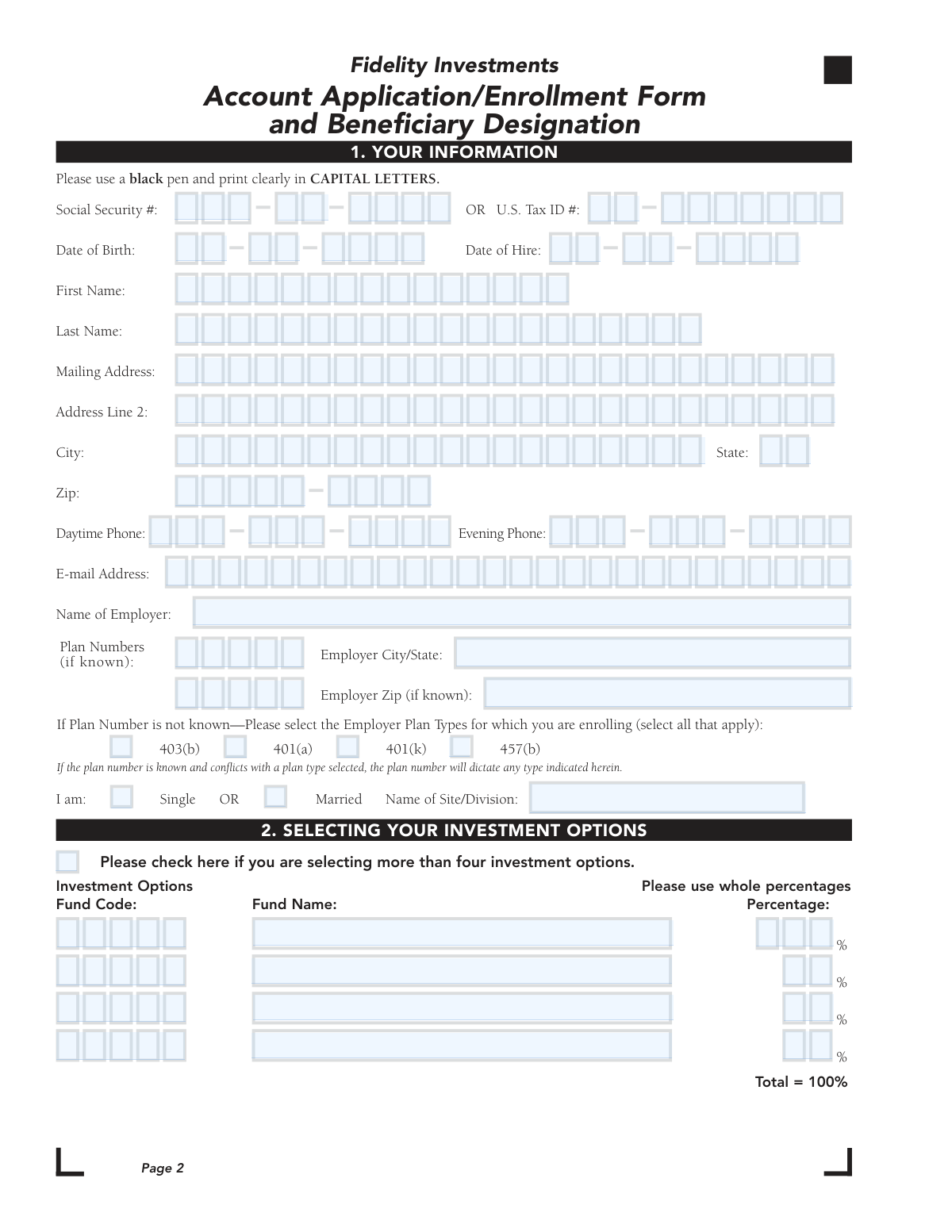
This form is an application to open a new account with Fidelity Investments, often for a workplace savings plan like a 401(k) or 403(b), and to designate beneficiaries. It is crucial for establishing your retirement or investment account, selecting how your contributions are invested, and ensuring your assets are distributed according to your wishes. Today, this form can be filled out quickly and accurately using AI-powered services like Instafill.ai, which can also convert non-fillable PDF versions into interactive fillable forms.
Our AI automatically handles information lookup, data retrieval, formatting, and form filling.
It takes less than a minute to fill out Fidelity Account Application/Enrollment Form using our AI form filling.
Securely upload your data. Information is encrypted in transit and deleted immediately after the form is filled out.

Form specifications

Form name: Fidelity Investments Account Application/Enrollment Form and Beneficiary Designation
Number of pages: 1
Language: English
Categories: beneficiary forms, investment forms, enrollment forms, enrollment application forms, investment account forms, beneficiary designation forms, Fidelity forms
main-image

Instafill Demo: How to fill out PDF forms in seconds with AI

How to Fill Out Fidelity Account Application/Enrollment Form Online for Free in 2026

Are you looking to fill out a FIDELITY ACCOUNT APPLICATION/ENROLLMENT FORM form online quickly and accurately? Instafill.ai offers the #1 AI-powered PDF filling software of 2026, allowing you to complete your FIDELITY ACCOUNT APPLICATION/ENROLLMENT FORM form in just 37 seconds or less.
Follow these steps to fill out your FIDELITY ACCOUNT APPLICATION/ENROLLMENT FORM form online using Instafill.ai:
  1. 1 Navigate to Instafill.ai and upload or select the Fidelity Account Application/Enrollment Form.
  2. 2 Use the AI assistant to fill in your personal information in Section 1, such as your name, Social Security Number, date of birth, and employer details.
  3. 3 In Section 2, specify your investment choices and the percentage you wish to allocate to each fund, ensuring the total allocation is 100%.
  4. 4 Complete Section 3 by designating your primary and contingent beneficiaries, providing their details and the percentage share for each.
  5. 5 If applicable, complete the Spousal Consent section, which may require your spouse's signature in the presence of a notary public.
  6. 6 Review all the information for accuracy, then electronically sign and date the Authorization section to finalize the application.
  7. 7 Download the completed form and submit it to Fidelity according to the instructions provided on the form.

Our AI-powered system ensures each field is filled out correctly, reducing errors and saving you time.

Why Choose Instafill.ai for Your Fillable Fidelity Account Application/Enrollment Form Form?

Speed

Complete your Fidelity Account Application/Enrollment Form in as little as 37 seconds.

Up-to-Date

Always use the latest 2026 Fidelity Account Application/Enrollment Form form version.

Cost-effective

No need to hire expensive lawyers.

Accuracy

Our AI performs 10 compliance checks to ensure your form is error-free.

Security

Your personal information is protected with bank-level encryption.

Frequently Asked Questions About Form Fidelity Account Application/Enrollment Form

This form is used to open a new employer-sponsored retirement savings account, select your investment options, and designate beneficiaries for your plan.

Employees who are enrolling in their workplace savings plan (such as a 401(k), 403(b), or 457(b)) managed by Fidelity need to complete this form to open their account.

After your account is established with this form, you must submit a separate Workplace Savings Plan Contribution Form (Salary Reduction Agreement) to your employer to authorize payroll deductions.

If your selected investment percentages do not total 100%, your contributions will be invested in a default investment option as determined by your specific plan's rules.

Yes, you are not limited to two beneficiaries. To add more, you should attach a separate, signed, and dated piece of paper with the additional names and allocation percentages.

Your plan requires you to designate your spouse for at least 50% of your account balance. If you wish to name someone else for that portion, your spouse must sign the 'Spousal Consent' section in the presence of a notary or plan representative.

If you are under 35 and your spouse waives their right, that waiver becomes void on the first day of the plan year you turn 35. To maintain a non-spouse beneficiary after that date, you must complete a new form with your spouse's consent.

No, the form specifies that your primary beneficiary cannot also be designated as your contingent beneficiary. Contingent beneficiaries only inherit if all primary beneficiaries are deceased.

You can submit the form digitally via the NetBenefits® Mobile App, or mail it to the Fidelity Investments P.O. Box or overnight address listed in the General Instructions section.

You will need your Social Security Number, date of birth, contact information, and employer details. You will also need the full name, date of birth, and Social Security Number for any beneficiaries you designate.

Yes, services like Instafill.ai use AI to accurately auto-fill form fields with your saved information, which can save time and help reduce errors.

You can use a service like Instafill.ai to upload the PDF, fill it out on your computer or mobile device, and then download or print the completed form for submission.

If you have a non-fillable or 'flat' PDF, tools like Instafill.ai can convert it into an interactive, fillable form that you can easily complete on your device.

Compliance Fidelity Account Application/Enrollment Form
Validation Checks by Instafill.ai

1
Validates Applicant's Social Security or Tax ID Number
This check ensures that either a Social Security Number (SSN) or a U.S. Tax ID Number is provided in Section 1 and that it conforms to the standard 9-digit format. This is a legal requirement for opening a financial account to prevent fraud and for tax reporting purposes. If the number is missing, incomplete, or invalid, the account cannot be opened.
2
Ensures Investment Allocation Percentages Total 100%
This validation verifies that the sum of all percentages entered in the 'SELECTING YOUR INVESTMENT OPTIONS' section equals exactly 100%. This is critical to ensure the applicant's entire contribution is allocated according to their wishes. If the total is not 100%, the form states the contribution will be invested according to plan rules, which may not align with the applicant's intent, so the form should be flagged for correction.
3
Verifies Primary Beneficiary Percentages Sum to 100%
This check confirms that the percentages assigned to all Primary Beneficiaries in Section 3 add up to exactly 100%. This ensures the full account value is distributed as intended upon the applicant's death. A failure in this validation would create ambiguity in asset distribution and could lead to legal complications or distributions not aligned with the deceased's wishes.
4
Verifies Contingent Beneficiary Percentages Sum to 100%
This validation confirms that the percentages assigned to all Contingent Beneficiaries in Section 3 add up to exactly 100%. This is important for clear instructions on asset distribution if no primary beneficiaries are living at the time of the applicant's death. If the total is incorrect, the distribution among contingent beneficiaries would be ambiguous and default to plan rules.
5
Checks for Beneficiary Role Uniqueness
This check ensures that an individual or trust designated as a Primary Beneficiary is not also listed as a Contingent Beneficiary, as explicitly prohibited on the form. This prevents logical impossibilities in the succession of assets. If a beneficiary is listed in both categories, the form is invalid and must be corrected to clarify the intended order of inheritance.
6
Mandatory Spousal Consent for Married Applicants
This is a conditional validation that triggers if the applicant indicates they are 'Married' in Section 1 but does not designate their spouse as the primary beneficiary for at least 50% of the account value. In this case, the 'SPOUSAL CONSENT' section must be signed by the spouse and witnessed by a notary or plan representative. Failure to provide this consent when required makes the beneficiary designation legally invalid under many retirement plans.
7
Validates Applicant's Date of Birth Format and Plausibility
This check ensures the Date of Birth in Section 1 is a valid date in MM/DD/YYYY format and represents a plausible age for an employee opening a retirement account (e.g., over 18 and not in the future). This information is essential for identity verification and for determining eligibility for certain plan features. An invalid or illogical date will prevent the account from being opened.
8
Ensures Applicant Signature and Date are Present
This validation confirms that the applicant has signed and dated the form in the 'AUTHORIZATION AND SIGNATURE' section. The signature is a legal authorization that certifies the correctness of the information provided and agreement to the terms. A missing signature or date renders the entire application null and void.
9
Completeness Check for Core Personal Information
This check verifies that all mandatory fields in Section 1, such as First Name, Last Name, Mailing Address, City, State, and Zip Code, are filled out. This information is fundamental for creating the account, mailing statements, and communicating with the account holder. Incomplete information will halt the application process until all required fields are provided.
10
Validates Investment Allocation Percentages are Whole Numbers
This check ensures that all allocation percentages in Section 2 are entered as whole numbers, as specified by the form instructions ('In whole percentages'). Using decimals or fractions can cause calculation errors and misallocation of funds. If non-whole numbers are detected, the form should be rejected for correction to ensure precise fund allocation.
11
Validates Email Address Format
This check verifies that the E-mail Address provided in Section 1 follows the standard '[email protected]' format. A valid email is crucial for digital communication, account notifications, and online access. An incorrectly formatted email address will lead to communication failures and prevent the user from receiving important account information.
12
Ensures Beneficiary Type is Mutually Exclusive
For each beneficiary entry in Section 3, this check validates that information is provided for either an 'Individual' (Name, SSN, DOB) or a 'Trust' (Trust Name, Tax ID, Trust Date), but not both simultaneously. This prevents data entry conflicts and ensures the beneficiary entity is clearly and unambiguously defined. If data is present for both an individual and a trust in the same beneficiary slot, the entry is invalid.
13
Verifies Plan Identification is Provided
This check ensures that the applicant has either provided their 'Plan Numbers' or selected at least one 'Employer Plan Type' (e.g., 403(b), 401(k)) in Section 1. This information is critical for enrolling the applicant in the correct employer-sponsored plan. Without this information, Fidelity cannot determine which account to open, and the application cannot be processed.
14
Consistency Check for Marital Status and Spouse Beneficiary
This validation checks for logical consistency between the applicant's marital status and beneficiary designations. If a beneficiary is designated with the relationship 'Spouse', the applicant's marital status in Section 1 must be marked as 'Married'. Conversely, if the applicant is 'Single', no beneficiary should be designated as 'Spouse'. This helps catch potential data entry errors and ensures the legal status of the beneficiary is correctly recorded.

Common Mistakes in Completing Fidelity Account Application/Enrollment Form

Investment Allocation Miscalculation

Applicants often make mathematical errors in the 'Selecting Your Investment Options' section, with percentages that do not total exactly 100%. This happens due to simple miscalculation or misunderstanding the instructions. If the percentages are incorrect, the contribution will be invested in a default option according to plan rules, which may not align with the applicant's investment strategy. Always double-check that your chosen fund allocations sum to exactly 100% before submitting.

Missing or Invalid Spousal Consent

A married applicant who designates someone other than their spouse as the primary beneficiary for 50% or more of the account balance often forgets to have their spouse complete Section 4. This section requires the spouse's signature to be witnessed by a notary public or plan representative. Submitting the form without this consent and notarization when required will render the beneficiary designation invalid and can lead to significant legal complications and processing delays.

Incorrect Beneficiary Percentage Totals

A frequent error is failing to ensure that the percentages for Primary Beneficiaries total 100% and that the percentages for Contingent Beneficiaries also total 100% as two separate groups. Applicants sometimes mistakenly try to make all beneficiaries (primary and contingent) add up to 100%. This can invalidate the designation, causing assets to be distributed according to default plan rules rather than your wishes. Ensure each beneficiary group's allocations independently sum to 100%.

Incomplete Beneficiary Personal Information

Applicants often leave critical information like a beneficiary's Social Security Number (SSN) or full Date of Birth blank in Section 3. This information is vital for accurately identifying the beneficiary and processing the payout upon the account holder's death. Missing data can cause significant delays, require legal intervention, and create distress for your heirs. Always gather and enter all required details for each listed beneficiary.

Forgetting the Final Authorization Signature

It is surprisingly common for applicants to meticulously fill out the entire multi-page form but forget to sign and date it in Section 5. An unsigned application is invalid and cannot be processed, halting the account opening or enrollment process entirely. You must carefully review the final page and provide your signature and the date to authorize the application. AI-powered form fillers like Instafill.ai can highlight required signature fields to prevent this oversight.

Vague or Incomplete Employer Information

In Section 1, applicants may provide a generic employer name (e.g., 'State Government') or omit the specific Plan Number. This ambiguity makes it difficult for Fidelity to link the new account to the correct employer-sponsored plan. This can result in processing delays or incorrect account setup. Be as specific as possible with your employer's full legal name, site/division, and plan number if known.

Naming the Same Person as Primary and Contingent Beneficiary

The form explicitly states that a primary beneficiary cannot also be a contingent beneficiary, but this rule is often overlooked. The purpose of a contingent beneficiary is to receive the assets only if all primary beneficiaries are deceased. Naming the same person in both roles creates a logical conflict and can invalidate the contingent designation. Always designate a different individual or group for the contingent role.

Using Fractional or Decimal Percentages

The instructions for both investment options and beneficiary designations clearly request 'whole percentages'. However, applicants sometimes enter fractional (e.g., 33 1/3%) or decimal (e.g., 33.3%) values. This can lead to rejection of the allocation or rounding by the system that doesn't match the applicant's intent. Always use whole numbers for all percentage fields.

Incomplete Trust Information for a Beneficiary

When designating a trust as a beneficiary, applicants frequently list the trust's name but forget to include the required trust creation date and the trustee's name. Both pieces of information are legally necessary to validate the designation and ensure assets are transferred correctly to the trust. Failure to provide these details will result in an incomplete designation and require follow-up, delaying the finalization of your beneficiary instructions.

Forgetting to Check Marital Status

In Section 1, applicants sometimes overlook the simple checkbox to indicate if they are 'Single' or 'Married'. This information is critical as it directly impacts the requirement for spousal consent in Section 4. Forgetting to check this box can cause processing delays as the firm will need to follow up to confirm marital status before the application can be fully approved. Tools like Instafill.ai can convert flat PDFs into fillable forms and flag mandatory fields like this to ensure they are not missed.
Saved over 80 hours a year

“I was never sure if my IRS forms like W-9 were filled correctly. Now, I can complete the forms accurately without any external help.”

Kevin Martin Green

Your data stays secure with advanced protection from Instafill and our subprocessors

Robust compliance program

Transparent business model

You’re not the product. You always know where your data is and what it is processed for.

ISO 27001, HIPAA, and GDPR

Our subprocesses adhere to multiple compliance standards, including but not limited to ISO 27001, HIPAA, and GDPR.

Security & privacy by design

We consider security and privacy from the initial design phase of any new service or functionality. It’s not an afterthought, it’s built-in, including support for two-factor authentication (2FA) to further protect your account.

Fill out Fidelity Account Application/Enrollment Form with Instafill.ai

Worried about filling PDFs wrong? Instafill securely fills fidelity-investments-account-applicationenrollment-form-and-beneficiary-designation forms, ensuring each field is accurate.