Yes! You can use AI to fill out City of Harvey Real Estate Transfer Declaration & Application (with Certificate for Exemption)

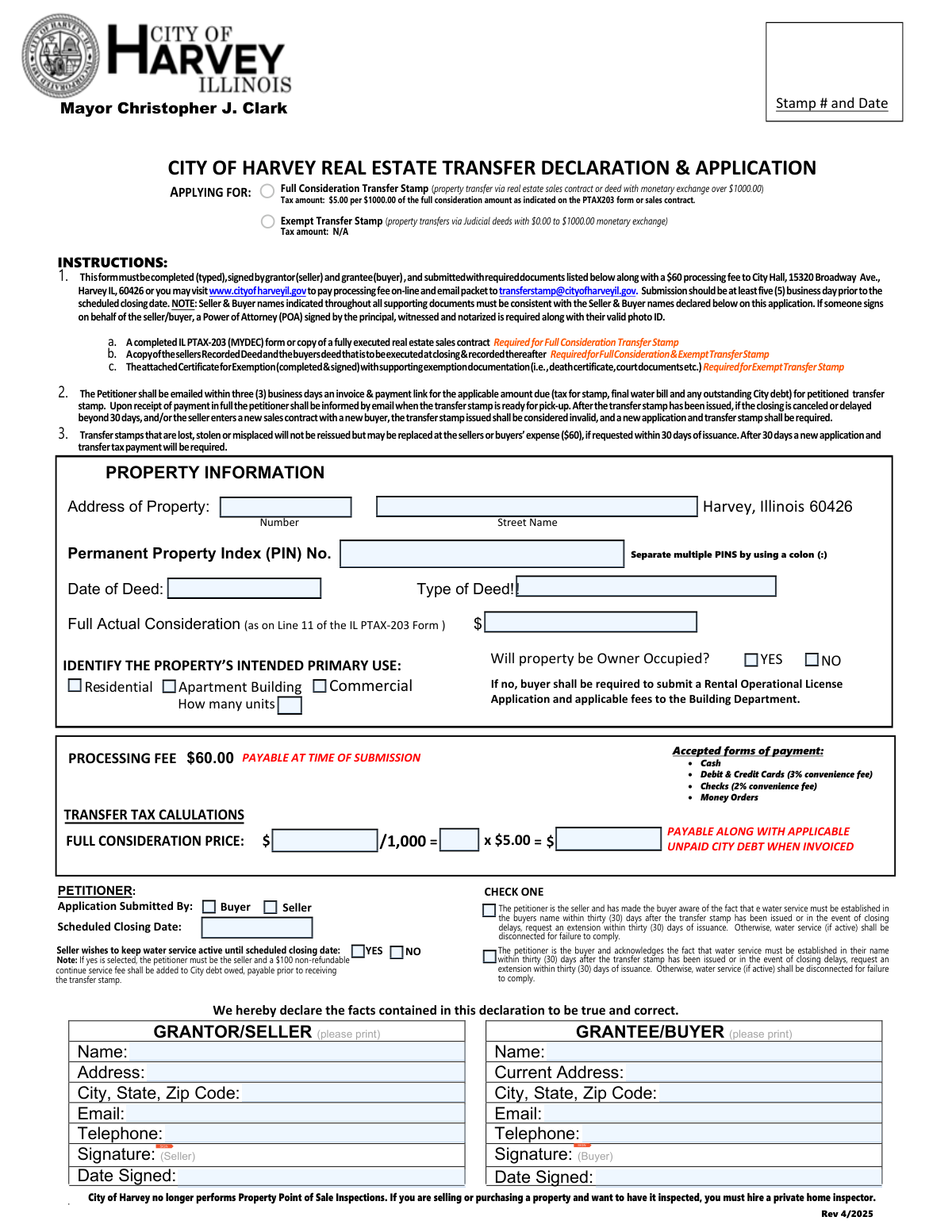
The City of Harvey Real Estate Transfer Declaration & Application is a municipal form used to request a City of Harvey transfer stamp for a property conveyance and to determine whether the transfer is subject to the City’s real estate transfer tax. It collects property details (address, PIN, deed date/type), buyer and seller information, owner-occupancy and intended use, and transfer tax calculations (e.g., full consideration transfers taxed at $5 per $1,000). For exempt or low-consideration transfers, the attached Certificate for Exemption is used to claim a statutory exemption and provide supporting documentation. The form is important because the City issues the transfer stamp only after the application is complete and all invoiced amounts (tax, processing fee, water bill, and any outstanding City debt) are paid, which can affect closing timelines.
Our AI automatically handles information lookup, data retrieval, formatting, and form filling.
It takes less than a minute to fill out City of Harvey Transfer Stamp Application using our AI form filling.
Securely upload your data. Information is encrypted in transit and deleted immediately after the form is filled out.

Form specifications

Form name: City of Harvey Real Estate Transfer Declaration & Application (with Certificate for Exemption)
Number of pages: 2
Filled form examples: Form City of Harvey Transfer Stamp Application Examples
Language: English
Categories: real estate forms, Harvey forms, transfer tax forms, property transfer forms, estate forms, PA state forms
main-image

Instafill Demo: filling out a legal form in seconds

How to Fill Out City of Harvey Transfer Stamp Application Online for Free in 2026

Are you looking to fill out a CITY OF HARVEY TRANSFER STAMP APPLICATION form online quickly and accurately? Instafill.ai offers the #1 AI-powered PDF filling software of 2026, allowing you to complete your CITY OF HARVEY TRANSFER STAMP APPLICATION form in just 37 seconds or less.
Follow these steps to fill out your CITY OF HARVEY TRANSFER STAMP APPLICATION form online using Instafill.ai:
  1. 1 Enter the property information: property address, Permanent Property Index (PIN) number(s) (use a colon to separate multiple PINs), date of deed, type of deed, and the full actual consideration amount (as shown on IL PTAX-203/MYDEC line 11 or the sales contract).
  2. 2 Complete the GRANTEE/BUYER section: buyer name, current address, city/state/ZIP, email, telephone, and buyer signature.
  3. 3 Complete the GRANTOR/SELLER section: seller name, address, city/state/ZIP, email, telephone, and seller signature.
  4. 4 Answer transaction and use questions: indicate whether the property will be owner-occupied, identify the intended primary use (e.g., residential/apartment/commercial and number of units), provide the scheduled closing date, and indicate whether the seller wants to keep water service active until closing (if applicable).
  5. 5 Select the stamp type and calculate amounts: choose Full Consideration Transfer Stamp or Exempt Transfer Stamp, compute the transfer tax for full consideration transfers ($5 per $1,000), and include the required processing fee (noted as $60) as directed by the City.
  6. 6 If claiming an exemption, complete the Certificate for Exemption: fill in the grantor/grantee, deed date, check the applicable exemption category (a–k), provide an explanation, list the property address, and sign; gather supporting documents (e.g., court documents, death certificate) as required.
  7. 7 Upload/attach required documents and submit online: include IL PTAX-203 (MYDEC) or executed sales contract (for full consideration), the seller’s recorded deed and the buyer’s deed to be executed at closing, any POA and photo ID if signing for a party, then submit the packet and pay fees via the City’s online payment option and email the completed packet to [email protected]; watch for the emailed invoice/payment link and pay all amounts due to receive the transfer stamp.

Our AI-powered system ensures each field is filled out correctly, reducing errors and saving you time.

Why Choose Instafill.ai for Your Fillable City of Harvey Transfer Stamp Application Form?

Speed

Complete your City of Harvey Transfer Stamp Application in as little as 37 seconds.

Up-to-Date

Always use the latest 2026 City of Harvey Transfer Stamp Application form version.

Cost-effective

No need to hire expensive lawyers.

Accuracy

Our AI performs 10 compliance checks to ensure your form is error-free.

Security

Your personal information is protected with bank-level encryption.

Frequently Asked Questions About Form City of Harvey Transfer Stamp Application

This form is used to request a City of Harvey real estate transfer stamp for a property transfer. The City uses it to calculate any transfer tax due, confirm required documents, and address water billing and any outstanding City debt before closing.

The form must be completed (typed) and signed by both the grantor/seller and the grantee/buyer. If someone signs on behalf of either party, a properly executed Power of Attorney and valid photo ID are required.

Submit the completed packet at least five (5) business days before the scheduled closing date. This helps ensure time for invoicing, payment, and stamp pickup before closing.

You can submit in person to City Hall at 15320 Broadway Ave., Harvey, IL 60426, or pay the processing fee online and email the full packet to [email protected]. The City will email the petitioner an invoice and payment link after review.

You must include a completed IL PTAX-203 (MyDec) form or a fully executed real estate sales contract, plus a copy of the seller’s recorded deed and the buyer’s deed to be executed at closing and recorded afterward. Names on all documents must match the buyer/seller names on the application.

You must include the seller’s recorded deed and the buyer’s deed to be executed at closing, plus the Certificate for Exemption completed and signed with supporting documentation (such as court documents or a death certificate, depending on the exemption).

Apply for a Full Consideration Transfer Stamp when the transfer involves a monetary exchange over $1,000 (based on the PTAX-203 or sales contract). Apply for an Exempt Transfer Stamp for certain judicial or exempt transfers with $0.00 to $1,000 exchange and a qualifying exemption category.

The tax is $5.00 per $1,000 of the full actual consideration amount (as shown on Line 11 of the IL PTAX-203 form or the sales contract). The form’s calculation section divides the consideration by 1,000 and multiplies by $5.00.

A $60 processing fee is required with the submission of the application packet. This fee is separate from any transfer tax, final water bill, and any outstanding City debt that may be invoiced later.

Accepted payment methods include cash, money orders, debit/credit cards (3% convenience fee), and checks (2% convenience fee). Additional amounts may be due for transfer tax, water bills, and unpaid City debt when invoiced.

The petitioner is the person submitting the application (buyer or seller), and you must check one on the form. It matters for certain options—such as keeping water service active until closing—where the petitioner must be the seller.

Yes, but if “yes” is selected, the petitioner must be the seller and a $100 non-refundable continue service fee will be added to City debt owed and must be paid before the transfer stamp is issued. The form also notes water service must be transferred to the buyer’s name within 30 days after the stamp is issued (or an extension requested).

The buyer must establish water service in their name within thirty (30) days after the transfer stamp is issued, or request an extension within that same 30-day period if closing is delayed. If they do not comply, water service (if active) may be disconnected.

No, the form states the City of Harvey no longer performs Property Point of Sale Inspections. If an inspection is desired, the buyer or seller must hire a private home inspector.

If the property will not be owner-occupied, the buyer is required to submit a Rental Operational License application and applicable fees to the Building Department. This is in addition to the transfer stamp requirements.

If closing is canceled or delayed beyond 30 days, or if the seller enters a new sales contract with a new buyer, the issued transfer stamp becomes invalid. A new application and a new transfer stamp will be required.

Lost, stolen, or misplaced transfer stamps will not be reissued, but they may be replaced at the buyer’s or seller’s expense ($60) if requested within 30 days of issuance. After 30 days, a new application and transfer tax payment will be required.

Compliance City of Harvey Transfer Stamp Application
Validation Checks by Instafill.ai

1
Validates Property Address Completeness (Number, Street, City, State, ZIP)
Checks that the property address is fully populated with a street number, street name, city, state, and 5-digit ZIP (or ZIP+4). This is critical to uniquely identify the parcel and ensure the transfer stamp is applied to the correct location. If any component is missing or malformed, the submission should be rejected or routed to manual review for correction.
2
Validates City/State Consistency for Property Location (Harvey, IL)
Verifies that the property city and state align with the City of Harvey jurisdiction (e.g., City = Harvey and State = IL) and that the ZIP code is plausible for Harvey, IL (e.g., 60426 or other valid Harvey ZIPs if allowed). This prevents issuing a City of Harvey transfer stamp for property outside the taxing authority. If inconsistent, the system should block submission and prompt the user to confirm jurisdiction or redirect to the correct municipality.
3
Validates PIN Format and Multi-PIN Delimiter Rule
Ensures the Permanent Property Index Number (PIN) is present and matches the expected county format (numeric with hyphens as applicable) and, if multiple PINs are provided, they are separated using a colon (:) as instructed. Correct PIN formatting is essential for matching the property to tax and water accounts and for internal indexing. If the PIN is missing, contains invalid characters, or uses the wrong delimiter, the form should fail validation and request correction.
4
Validates Deed Dates (Date of Deed and Dated fields) Are Real Dates
Checks that all date fields (e.g., Date of Deed, Scheduled Closing Date, Date Signed, and exemption certificate 'Dated') are valid calendar dates in an accepted format (e.g., MM/DD/YYYY) and not placeholders. Accurate dates are required for determining timeliness, stamp validity windows, and recordkeeping. If a date is invalid or missing where required, the submission should be rejected and the user prompted to enter a valid date.
5
Validates Scheduled Closing Date Timing vs Submission Requirement
Validates that the scheduled closing date is provided and is at least five (5) business days after the submission date, per the form instructions. This ensures the City has sufficient processing time to invoice, collect payment, and issue the transfer stamp. If the closing date is too soon or in the past, the system should flag the submission and require an updated closing date or an expedited/manual handling workflow if supported.
6
Validates Transfer Type Selection (Full Consideration vs Exempt) and Required Attachments
Ensures the applicant selects exactly one transfer stamp type (Full Consideration Transfer Stamp or Exempt Transfer Stamp) and enforces the corresponding document requirements (PTAX-203 or executed sales contract for full consideration; exemption certificate plus supporting documentation for exempt). This prevents incomplete packets and incorrect tax treatment. If the selection is missing/ambiguous or required attachments are not indicated/provided, the submission should be marked incomplete and not accepted for processing.
7
Validates Full Actual Consideration Amount as Currency and Threshold Logic
Checks that the Full Actual Consideration is a numeric currency value (non-negative, two decimal places allowed) and aligns with the chosen stamp type (e.g., > $1,000 for full consideration; $0.00–$1,000.00 for exempt as stated). This is necessary to calculate transfer tax correctly and to prevent misclassification of taxable transfers as exempt. If the amount is missing, non-numeric, negative, or conflicts with the selected stamp type, validation should fail and require correction.
8
Validates Transfer Tax Calculation ($5 per $1,000) and Rounding Rules
Recomputes the transfer tax as (Full Consideration / 1,000) * $5.00 and verifies the displayed/entered tax amount matches the computed value using a defined rounding policy (e.g., round up to the next $1,000 if required by local policy, or standard rounding if specified). This prevents underpayment/overpayment and reduces billing disputes. If the calculated tax does not match the provided value, the system should override with the computed amount or block submission until corrected.
9
Validates Processing Fee Presence and Amount ($60) and Replacement Fee Rule
Ensures the processing fee is present and equals $60.00 for a standard application, and if the submission is explicitly marked as a replacement request within 30 days, ensures the replacement fee is also $60.00 and the request date is within the allowed window. Correct fee validation is required for consistent invoicing and compliance with stated policy. If the fee is missing, altered, or inconsistent with the request type/timing, the submission should be rejected or routed for manual review.
10
Validates Buyer (Grantee) and Seller (Grantor) Identity Fields Are Complete
Checks that both buyer and seller sections include a full printed name and complete mailing address (street, city, state, ZIP). These fields are required for legal recordkeeping, invoicing, and ensuring names match supporting documents. If either party’s required identity fields are missing, the system should not accept the application and should prompt for completion.
11
Validates Email Address Format for Buyer/Seller and Petitioner Contact
Ensures any provided email addresses conform to standard email syntax and, if the process requires email invoicing, that at least one valid email is present for the petitioner (application submitted by). Email is used to send invoices, payment links, and pickup notifications, so invalid emails can halt processing. If the required email is missing or malformed, validation should fail and request a corrected email.
12
Validates Telephone Number Format and Minimum Digits
Checks that telephone numbers contain a valid 10-digit US format (optionally allowing country code +1, parentheses, spaces, and hyphens) and are not obviously invalid (e.g., all zeros). Phone numbers are important for resolving payment, water service, and document issues quickly. If a required phone number is missing or invalid, the submission should be flagged and the applicant prompted to correct it.
13
Validates Signatures and Signature Dates for Buyer and Seller
Ensures both buyer and seller signatures are present (or a valid indication of electronic signature) and that each has an associated Date Signed. Signatures attest that the declaration is true and correct and are necessary for enforceability and audit. If a signature or date is missing for either party, the application should be rejected as incomplete.
14
Validates Petitioner Selection and Water Service Continuation Dependency
Checks that exactly one petitioner is selected (Buyer or Seller) and enforces the rule that if 'Seller wishes to keep water service active until scheduled closing date' is YES, then the petitioner must be the seller and a $100 non-refundable continue service fee is added to city debt owed. This ensures the correct party is billed and policy is applied consistently. If the dependency is violated (e.g., buyer selected as petitioner while water continuation is YES), the system should block submission and require correction.
15
Validates Owner-Occupied Response and Rental License Requirement Trigger
Ensures the 'Will property be Owner Occupied?' question is answered YES or NO, and if NO, flags that a Rental Operational License application and applicable fees are required. This supports compliance with local rental regulations and prevents missed licensing steps. If the owner-occupied field is unanswered or contradictory to other provided information, the submission should be flagged for follow-up or prevented from final submission until resolved.
16
Validates Intended Primary Use Selection and Unit Count When Applicable
Checks that the intended primary use is selected from the provided categories (e.g., Residential, Apartment Building, Commercial) and, if 'Apartment Building' (or any multi-unit category) is selected, requires a valid 'How many units' integer greater than zero. This information affects licensing, inspections, and potential fee/tax handling. If use is missing or unit count is missing/invalid when required, the submission should fail validation and request correction.
17
Validates Exemption Certificate Selection and Explanation/Property Address Completeness
If an Exempt Transfer Stamp is requested, verifies that exactly one exemption reason (a–k) is checked, the exemption explanation text is provided (non-empty), and the exemption certificate includes the property address plus 'From', 'To', and 'Dated' fields. This is necessary to substantiate the exemption and support audit/appeal processes. If any required exemption certificate elements are missing or multiple reasons are selected, the exemption request should be rejected or routed to manual review with a deficiency notice.

Common Mistakes in Completing City of Harvey Transfer Stamp Application

Leaving the property address incomplete (missing number/street)

People often type only the city/ZIP (e.g., “Harvey, Illinois 60426”) and forget the street number and street name because the form layout separates these fields. An incomplete address can prevent the City from matching the transfer to the correct parcel and can delay invoicing and stamp issuance. Always enter the full situs address (number + street name + city/state/ZIP) exactly as it appears on the deed or tax records.

Entering the wrong PIN format or not separating multiple PINs correctly

Applicants frequently omit the Permanent Property Index (PIN) entirely, transpose digits, or use commas/spaces when listing multiple PINs. The form specifically instructs to separate multiple PINS using a colon (:), and incorrect formatting can cause staff to reject the packet or apply it to the wrong parcel. Copy the PIN(s) directly from the recorded deed or county tax bill and use a colon (:) between multiple PINs.

Not specifying the deed type or using an unclear deed description

The form calls out “Type of Deed!!” and many people leave it blank or write vague terms like “transfer” instead of “Warranty Deed,” “Quit Claim Deed,” “Judicial Deed,” “Tax Deed,” etc. Deed type affects whether the transfer is full consideration or potentially exempt and what supporting documents are required. Use the exact deed type shown on the deed being recorded and ensure it aligns with the stamp type you are applying for.

Mismatch between buyer/seller names across documents

A very common issue is that the buyer/seller names on this application don’t match the PTAX-203, sales contract, recorded deed, or the deed to be executed (e.g., missing middle initials, LLC suffixes, trust names, or different spelling). The instructions state names must be consistent throughout all supporting documents, and mismatches can trigger rejection or requests for correction. Enter legal names exactly as they appear on the deed/contract (including “LLC,” “Inc.,” “Trust,” and trustee names) and keep formatting consistent across the entire packet.

Incorrect full consideration amount (not matching PTAX-203 Line 11/contract)

People often enter the purchase price from memory, exclude credits/assumed debt, or use a net amount instead of the “Full Actual Consideration” required (as on Line 11 of the IL PTAX-203). This leads to incorrect transfer tax calculations and an invoice that must be revised, delaying the stamp. Pull the exact figure from PTAX-203 Line 11 (or the fully executed sales contract if applicable) and enter it without rounding.

Transfer tax calculation errors (math, rounding, or wrong stamp type)

Applicants frequently miscalculate the tax by dividing incorrectly, rounding inconsistently, or applying the $5 per $1,000 rate to an exempt transfer. Errors can cause underpayment/overpayment and delay issuance until the City recalculates and re-invoices. Confirm whether you are applying for Full Consideration or Exempt, then compute: (Full Consideration Ă· 1,000) × $5.00, and be prepared to pay the invoiced amount rather than a self-calculated estimate.

Selecting Exempt Transfer Stamp without completing the Certificate for Exemption

Many filers check “Exempt” but do not attach the completed Certificate for Exemption, fail to check a specific exemption category (a–k), or omit supporting documentation (court documents, death certificate, etc.). Without a properly completed certificate and proof, the City cannot approve the exemption and will treat the submission as incomplete. If claiming exemption, complete every field on the certificate, check one exemption reason, provide a clear written explanation, and attach the required evidence.

Missing signatures, dates, or signing in the wrong places (buyer vs seller)

It’s common for one party to sign while the other forgets, or for signatures to be present but dates left blank (including the “Date Signed” fields). Missing signatures/dates can invalidate the declaration and stop processing until corrected. Ensure both grantor/seller and grantee/buyer sign where indicated and date their signatures on the same submission.

Power of Attorney (POA) not provided when someone signs on another’s behalf

When an agent, family member, or representative signs for the buyer/seller, applicants often forget that the form requires a POA signed by the principal, witnessed, and notarized, plus valid photo ID. Without the POA and ID, the City may reject the application because the signer’s authority is not documented. If anyone other than the named buyer/seller signs, include the properly executed POA and a copy of the signer’s photo ID in the packet.

Omitting required supporting documents for the chosen stamp type

Submissions are frequently missing one of the required attachments: PTAX-203 (MYDEC) or fully executed sales contract (for full consideration), the seller’s recorded deed, and the buyer’s deed to be executed/recorded (for both full and exempt). Missing documents prevent verification of consideration, parties, and chain of title, which delays the invoice and stamp issuance. Use a checklist before submitting and include every document listed under the applicable stamp type.

Confusion about petitioner selection and water service continuation requirements

Applicants often check “Buyer” or “Seller” as petitioner without understanding that if the seller wants to keep water service active until closing, the petitioner must be the seller and a $100 non-refundable continue service fee is added. Choosing the wrong petitioner or selecting “YES” without meeting the condition can lead to billing issues and processing delays. Decide who will be the petitioner, answer the water service question accurately, and ensure the petitioner selection matches the water-service choice and fee requirements.

Submitting too close to closing or misunderstanding payment timing/fees

People commonly submit the packet fewer than five business days before the scheduled closing date or assume the $60 processing fee is the only amount due. The form states submission should be at least five business days prior, and the City will invoice for transfer tax, final water bill, and any outstanding City debt, all payable when invoiced. Submit early, budget for additional invoiced amounts beyond the processing fee, and monitor email for the invoice/payment link to avoid closing delays.
Saved over 80 hours a year

“I was never sure if my IRS forms like W-9 were filled correctly. Now, I can complete the forms accurately without any external help.”

Kevin Martin Green

Your data stays secure with advanced protection from Instafill and our subprocessors

Robust compliance program

Transparent business model

You’re not the product. You always know where your data is and what it is processed for.

ISO 27001, HIPAA, and GDPR

Our subprocesses adhere to multiple compliance standards, including but not limited to ISO 27001, HIPAA, and GDPR.

Security & privacy by design

We consider security and privacy from the initial design phase of any new service or functionality. It’s not an afterthought, it’s built-in, including support for two-factor authentication (2FA) to further protect your account.

Fill out City of Harvey Transfer Stamp Application with Instafill.ai

Worried about filling PDFs wrong? Instafill securely fills city-of-harvey-real-estate-transfer-declaration-ap forms, ensuring each field is accurate.